Node.js Web APIs: fetch, Web Streams, Blob & FormData
Node includes many web-compatible globals now, so backend code can work with familiar objects such as fetch, Request, Response, Headers, Blob, FormData, ReadableStream, URL, and structuredClone.
That does not make Node a browser. It means Node gives you the same JavaScript object contracts for common data and network work, while the actual runtime still belongs to Node - V8, libuv, Undici, native bindings, OS resources, process state, module loading, and stream adapters.
The useful way to read this chapter is simple. When you see a web API in Node, trust the JavaScript contract, but remember where it is running.
Web Platform APIs
Node's web-compatible APIs give backend code a shared vocabulary with browsers, edge runtimes, workers, and modern libraries. A package can accept a Request, return a Response, build FormData, stream a Blob, or parse a URL without needing a different object structure for every runtime.
The familiar names can be a little misleading at first. Node implements several web APIs, but it does not include browser page APIs. You get transport and data primitives. You do not get a DOM, a rendered page, layout, navigation, or browser tab state.
You can see that boundary with three quick checks -
console.log(typeof fetch);
console.log(typeof Request);
console.log(typeof document);
In Node v24, the first two lines print function. The third prints undefined.
fetch and Request are available at process scope. document belongs to browser page runtimes. That is the line to keep in your head - Node can speak many web-standard JavaScript object structures, but the process is still a backend process.
The standard way to reach globals is globalThis. In Node modules, these runtime globals live there. Node still has global, its older global namespace object, but new code should generally think in terms of globalThis.
console.log(globalThis.fetch === fetch);
console.log(globalThis.URL === URL);
console.log(globalThis.process === process);
All three checks print true.
That last line is the part people forget. globalThis contains both web-compatible globals and Node-specific globals. Code that uses fetch and URL may be portable across Node and browsers. Code that reaches for process.env has moved back into Node-specific territory.
Browser runtimes have their own global shapes. A browser page exposes window. Web workers expose a worker-style global object. Node exposes a process-oriented global object. The overlap is real, but Node still runs with server-side process state - one process, OS resources, module caches, network sockets, file descriptors, environment variables, and server request handlers.
So the working model is this - Node exposes web-compatible JavaScript objects on top of Node-owned runtime machinery.
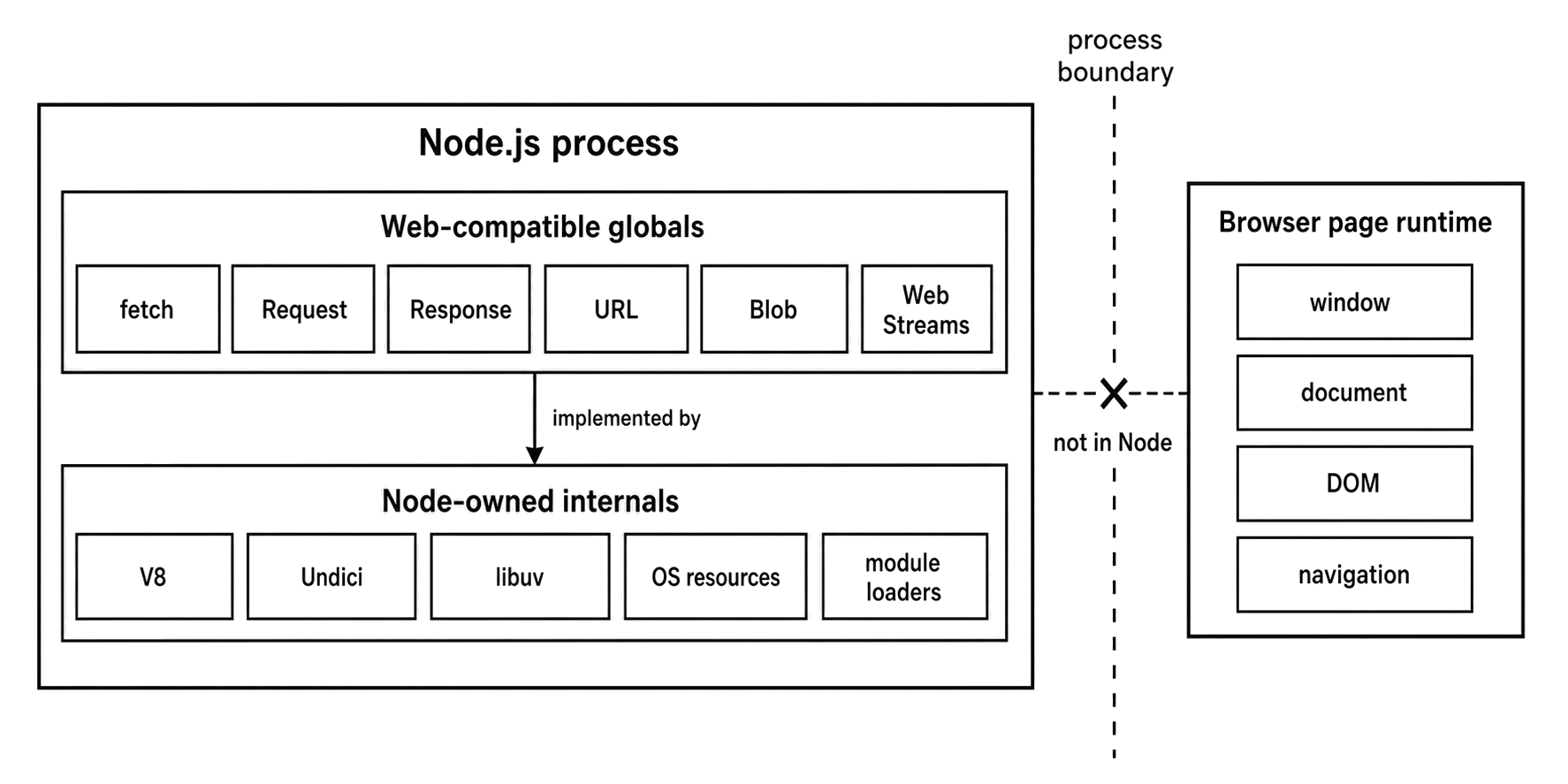
Figure 8.1 - Node exposes web-compatible JavaScript objects at process scope. Transport, streams, operating-system resources, and browser-page APIs still belong to separate runtime layers.
Here is a practical grouping of the Node v24 web-compatible surface -
| Runtime group | Examples | Node v24 contract |
|---|---|---|
| Fetch objects | fetch, Request, Response, Headers | Stable globals backed by Undici |
| Payload objects | Blob, File, FormData | Stable globals useful for fetch and form payloads |
| Web streams | ReadableStream, WritableStream, TransformStream | Stable globals with adapters to Node streams |
| Text, URL, and clone utilities | TextEncoder, TextDecoder, URL, URLSearchParams, structuredClone, DOMException | Stable global utilities and web-compatible value or error contracts |
| Protocol-specific globals | CompressionStream, DecompressionStream, BroadcastChannel, WebSocket | Stable globals, each tied to its own protocol or runtime area |
| Stability-sensitive globals | URLPattern, navigator, localStorage, sessionStorage, EventSource | Experimental, active-development, release-candidate, or flag-controlled APIs |
This helps explain why these globals are useful in backend code. Modern packages often target several runtimes at once. A validation package may accept a Request. A storage client may return a Response. A multipart helper may build FormData. A compression helper may expect a web stream. Older Node applications often needed polyfills or adapters for those shapes. In current Node, many of them are already built in.
That removes dependency weight, but it moves some responsibility into your runtime contract. A package that assumes fetch exists needs a Node line where fetch is available. A package that assumes URLPattern exists needs Node v24 or a fallback. A service that assumes localStorage exists needs startup flags and storage policy.
Stable globals are fine to use directly. Feature-detect globals whose docs still mark them experimental, active development, release candidate, or flag-controlled. Convert deliberately when older Node stream APIs or Buffer are the better local type.
A good pattern is to read risky globals near the edge instead of deep inside helper code -
export function makeClient({ fetchImpl = fetch } = {}) {
  return url => fetchImpl(url);
}
The function defaults to Node's global fetch, but tests can pass a fake implementation. Older runtime adapters can pass a polyfill. Production code can use the built-in path. The dependency stays visible at the call boundary.
Stable data objects need less ceremony. URL, URLSearchParams, TextEncoder, TextDecoder, Blob, and the fetch classes are fine to use directly in application code when your runtime floor supports them. The extra caution belongs around globals whose availability depends on flags or a newer Node line.
Global availability also changes how small modules are shaped. Older Node code often imported node-fetch, form-data, whatwg-url, or stream ponyfills at the top of a file. Current Node code can often use built-in objects instead. That changes ownership. The runtime now owns more API behavior, bug fixes, and compatibility. Your dependency tree owns fewer polyfills.
That trade is useful, but your module should still say which runtime it expects. A library that calls global fetch is expecting a Node line with global fetch. A library that calls URLPattern is expecting Node v24 or a caller-provided fallback. A service that calls localStorage is expecting startup flags and a storage-file policy.
Do not hide those assumptions deep in a random helper. Make them visible near startup, near dependency injection, or near the API boundary.
Fetch as an HTTP Client API
fetch() is Node's global HTTP client entry point for the web-compatible fetch API. You give it a URL or Request, and it returns a Promise for a Response.
A minimal fetch call looks like this -
const response = await fetch(url);

console.log(response.status);
console.log(await response.text());
Assume url is an upstream endpoint supplied by the caller. The call creates a request, sends it through Node's built-in fetch implementation, waits for response headers, and gives JavaScript a Response object.
The body may still be streaming when the promise resolves. That detail is easy to miss. Status and headers are available first. Body bytes are consumed later.
Node's fetch implementation is backed by Undici. Undici handles the HTTP client work underneath the global API - request dispatch, connection reuse, response parsing, body streaming, and lower-level failure handling. For this chapter, keep the layer split clear. fetch() is the public global. Undici is the client engine underneath it.
You can print the bundled Undici version -
console.log(process.versions.undici);That version helps during bug reports. A Node release includes a specific Undici version, and fetch behavior can shift when Node upgrades that bundled dependency. If a production issue involves redirects, body streaming, proxy behavior, or socket reuse, record both the Node version and the Undici version before blaming application code.
The object form of a fetch request is Request. It stores the URL, method, headers, body, and web request metadata.
const request = new Request('https://api.example.test/users', {
  method: 'POST',
  headers: { 'content-type': 'application/json' },
  body: JSON.stringify({ name: 'Ada' })
});

console.log(request.method);
Constructing a Request creates a JavaScript object. It does not send anything by itself. Passing it to fetch() starts the request.
That split is useful when code needs to normalize headers, attach a body once, then pass the request through a small client wrapper.
Headers travel with both requests and responses. The Headers class gives you the web header container. Header names are case-insensitive, and lookups use that rule.
const headers = new Headers();
headers.set('content-type', 'application/json');
headers.append('x-trace-id', 'req-123');

console.log(headers.get('Content-Type'));
The last line returns the content type value even though the casing is different. Use Headers as the standard container when an API expects fetch-style objects.
On the response side, Response is the object returned by fetch(). You can also construct one yourself in tests, mocks, and internal adapters.
const response = new Response('created', {
  status: 201,
  headers: { location: '/users/123' }
});

console.log(await response.text());
A response has status, headers, and an optional body. The body methods are where many bugs start.
Request and Response share the Body behavior. That gives them methods such as .text(), .json(), .arrayBuffer(), .blob(), and .formData(), plus .body and .bodyUsed.
The body is one-use. Once one reader consumes it, later reads reject.
const res = new Response(JSON.stringify({ ok: true }));

console.log(await res.json());
console.log(res.bodyUsed);

try {
  await res.text();
} catch (err) {
  console.log(err.name);
}
The first read consumes the body and sets bodyUsed to true. The second read fails because those bytes already moved through the JSON reader.
This shows up a lot in logging middleware. The logger reads response.text() for diagnostics, then the caller tries to parse JSON from the same response. The caller is too late. The body already has an owner.
When two parts of the code really need to read the same body, clone before either side reads -
export async function logAndReturn(response) {
  const copy = response.clone();
  console.log(await copy.text());
  return response;
}
clone() splits the body into two branches. That is useful for small responses, especially diagnostics. It can also create memory pressure with large bodies or slow consumers. If one branch reads quickly and the other branch falls behind, chunks may need to be buffered for the slower branch.
For large responses, keep one owner for the body. Stream it through the code path that needs it. Log metadata, status, headers, or a bounded prefix instead of cloning the full body casually.
Fetch errors follow the web contract. A network-level failure rejects the promise. An HTTP status like 404 or 500 still resolves with a Response, because the server did send a response.
That gives you two layers of handling. try and catch handle transport and request setup failures. Status checks happen after the Response exists.
const res = await fetch(url);

if (!res.ok) {
  throw new Error(`bad status: ${res.status}`);
}
That branch is application policy. Fetch delivered the response. Your code decides whether that status is acceptable.
A fetch call moves through a small lifecycle -
Request object
  -> Undici dispatch
  -> response headers
  -> Response object
  -> web stream body when present
  -> body reader
The Request starts as JavaScript state. It has a URL, method, headers, and maybe a body. The body may be a string, Buffer, typed array, Blob, FormData, URLSearchParams, or a stream-like object accepted by Node's fetch.
When fetch() receives it, Node validates enough state to dispatch the operation. Bad URLs, invalid methods, invalid header names, or illegal body shapes can fail during construction or cause fetch() to reject before the request is sent.
After dispatch, Undici owns the in-flight HTTP work. JavaScript keeps a promise. Node's fetch stack keeps state tied to sockets, timers, parsers, and body queues. When response headers arrive, the promise resolves with a Response.
That timing is important. You can check response.status, response.ok, and response.headers before the whole body has arrived. If the response has a body, that body remains a stream until someone consumes it.
Calling .text() or .json() drains the entire body into memory, then converts it. Manual streaming keeps the payload chunked. The right choice depends on the response size and the caller's job. Small JSON metadata is fine to buffer. A multi-gigabyte export should not be read through .text().
The one-use body rule comes from ownership. A body has one consumption path. .json() consumes it. .arrayBuffer() consumes it. A reader from .body.getReader() consumes it. Piping through a transform consumes it. After consumption starts, the object records that state through bodyUsed or stream disturbance. A second consumer gets a rejection.
Headers have their own rules. Some Headers objects are mutable. Others are restricted by where they came from. A response returned by fetch reflects headers received from the server. A request you are building can usually accept application headers through the constructor or a mutable Headers object. Let fetch and Undici handle transport-owned headers. Wrapper code should focus on application headers.
A backend wrapper usually needs both transport handling and status handling -
const res = await fetch(url);

if (res.status >= 500) {
  throw new Error(`upstream failed: ${res.status}`);
}
A DNS failure, refused connection, invalid request body stream, or aborted operation rejects before this branch. A 500 response reaches this branch because a response arrived. Keeping those two paths separate makes retries and logging cleaner.
Redirects, cookies, cache modes, proxying, keep-alive behavior, and connection pooling need HTTP-specific discussion. At this level, keep the object graph in your head - create a request, dispatch it, receive headers, then consume one body stream if a body exists.
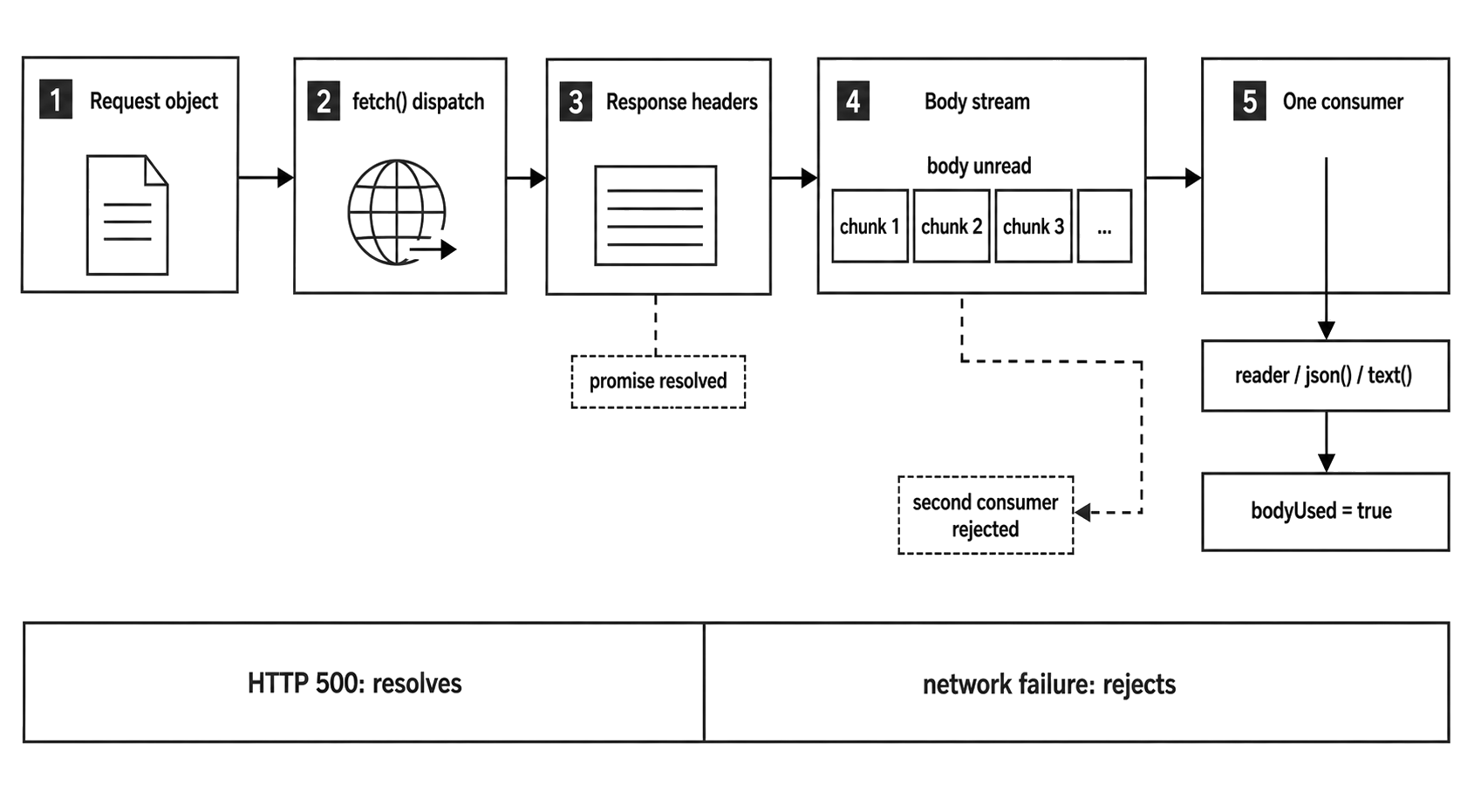
Figure 8.2 - Fetch resolves when response headers are available. The body remains a stream with one consumption path unless code deliberately clones or tees it.
Abort signals belong to the same handoff. Fetch accepts a web-compatible AbortSignal.
const signal = AbortSignal.timeout(2_000);
const response = await fetch(url, { signal });
The request receives a cancellation signal with a two-second timer. If the signal aborts before the operation finishes, fetch rejects. Aborting affects the wait for headers and the in-flight body.
Timeout policy usually belongs above low-level helpers. A generic helper can accept a signal. A service method can choose the deadline.
export async function getJson(url, { signal } = {}) {
  const res = await fetch(url, { signal });
  if (!res.ok) throw new Error(`bad status: ${res.status}`);
  return res.json();
}
This helper forwards cancellation and owns two decisions - status policy and body consumption. It calls .json(), so it drains the full body into memory. For large responses, return the Response or the body stream and let the caller decide how to consume it.
Payload Objects Carry Bytes and Metadata
Blob, File, and FormData show up as soon as fetch code handles uploads, generated payloads, or multipart request bodies. They give bytes and metadata the shapes that fetch already understands.
Blob is the simplest one. It is an immutable byte container with a size and a MIME type string. You can build it from strings, ArrayBuffer, typed arrays, other blobs, and buffers.
const payload = new Blob(['hello\n'], {
  type: 'text/plain'
});

console.log(payload.size);
The blob stores bytes. The type string is metadata. Reading a blob is asynchronous because the web API exposes promise-returning methods.
const bytes = await payload.arrayBuffer();
const text = await payload.text();
Those reads produce the requested output structures. If your code is doing Node-native file or socket work, Buffer may still be the better local type. Convert to Blob when the receiving API expects a web payload object.
File builds on the same byte-container behavior and adds file-like metadata such as a name and last-modified time. It is not an open file descriptor. It does not point at an OS file handle. It is a payload object with a filename attached.
const file = new File(['id,name\n1,Ada\n'], 'users.csv', {
  type: 'text/csv',
  lastModified: Date.now()
});

console.log(file.name, file.type, file.size);
The constructor supplies the bytes. The name travels as metadata for APIs that care about uploaded filenames.
When payloads need named fields, use FormData. Values can be strings or blob-like file parts. In Node fetch code, this is the object you pass when the request body needs form fields and files.
const form = new FormData();
form.set('name', 'Ada');
form.set('avatar', file);

await fetch(url, { method: 'POST', body: form });
Assume url is the upload endpoint.
When the body is FormData, let fetch serialize it. Do not manually set a multipart content-type header with a guessed boundary. Fetch knows the boundary because it creates the multipart bytes. The header and the bytes need to match.
These objects are useful at API boundaries. They are easy to overuse inside backend business logic. A service that reads files from disk, transforms buffers, and writes to a database may gain nothing from wrapping every byte array in a Blob. Keep Buffer or typed arrays while the code needs low-level byte work. Build a Blob, File, or FormData at the web API edge.
That edge is also an ownership handoff. A Buffer may point at external memory managed by Node's Buffer machinery. A typed array may view an ArrayBuffer. A Blob accepts parts and exposes an immutable byte sequence through the blob contract. Code that still needs mutation should stay with mutable byte containers until the final handoff. Code that needs an immutable request payload can build a Blob and pass it on.
FormData delays final serialization. After code appends a File or Blob, the form stores the field name, value, and optional filename. The actual request bytes are produced later when fetch consumes the body.
You can inspect the field list before those wire bytes exist -
for (const [name, value] of form) {
  console.log(name, typeof value);
}
A string value appears as a string. A file part appears as an object. Treat FormData as a structured body source whose final bytes are created during fetch.
This helps avoid a common request-building bug. JSON bodies and form bodies need different header behavior. Choose the body and headers together -
const body = asForm ? buildForm(data) : JSON.stringify(data);
const headers = asForm ? undefined : { 'content-type': 'application/json' };

await fetch(url, { method: 'POST', headers, body });
When the body is FormData, leave content-type alone. When the body is JSON text, set it.
Another common body shape is URLSearchParams. Use it for URL-encoded key/value posts.
const tokenUrl = 'https://auth.example.test/token';

const body = new URLSearchParams();
body.set('grant_type', 'client_credentials');

await fetch(tokenUrl, { method: 'POST', body });URLSearchParams, FormData, and JSON are separate choices.
URLSearchParams produces URL-encoded text. FormData produces field parts and can include files. JSON produces a string or bytes that you label as application/json.
For backend code, keep protocol serialization close to the HTTP client adapter. Domain code should usually pass structured values. The adapter decides whether those values become JSON, FormData, URLSearchParams, blobs, strings, or bytes.
Web Streams Cross Into Node
Fetch response bodies use Web Streams when a body exists.
const response = await fetch(url);
const body = response.body;

if (body) {
  console.log(body instanceof ReadableStream);
}
In Node v24, response.body is either a ReadableStream or null. A present body uses the Web Streams API, not Node's older Readable stream class.
The concepts overlap - chunks, backpressure, cancellation, and errors. The object model is different. That difference shows up when code tries to read the same body twice, adapt a stream too late, or mix Node stream helpers with web stream helpers.
A ReadableStream has an internal queue and a source that supplies chunks. A WritableStream has a sink that receives chunks. A TransformStream has a writable side, a readable side, and transform logic between them.
Three stream states explain many fetch-body bugs -
| State | What it means | Common failure |
|---|---|---|
| Locked | A reader owns the stream until it releases, cancels, or finishes | Another reader or body helper rejects |
| Disturbed | Bytes have already been read, or the stream was canceled | Body helpers reject even after a lock is released |
| Adapted | A Node stream wrapper and a web stream wrapper are translating between APIs | Errors, destroy, cancel, and backpressure show up through the wrapper |
The most visible rule is locking. Calling .getReader() locks the stream to that reader. While the lock is held, another reader cannot take over, and body helpers cannot consume the same stream.
const body = response.body;
if (!body) throw new Error('missing body');

const reader = body.getReader();
const first = await reader.read();

console.log(first.done);
reader.releaseLock();
The reader owns consumption until it releases the lock, cancels, or the stream finishes. Releasing the lock removes exclusivity. It does not make already-read bytes available again. If the reader pulled bytes, the stream is disturbed, and methods such as response.text() still reject.
This rule keeps chunk ownership clean. Reads affect the internal queue, pull timing, cancellation, and error delivery. Two independent readers would compete for the same chunks, so the API allows one active reader.
A fetch body travels through this path -
socket bytes
  -> Undici parser
  -> Response headers
  -> web ReadableStream body when present
  -> reader or Body method
  -> JavaScript value
Headers arrive before the full body. When a body exists, chunks move through the web stream. A helper such as .json() drains the stream, decodes text, parses JSON, and resolves with the value. A manual reader gives you chunks as they arrive. Both paths consume the body.
Backpressure also travels through this path. A web stream has queue state and a desired size. When the consumer slows down, the stream stops asking for more chunks until demand returns. Under fetch, that pressure connects back through Undici and the socket layer.
For application code, the visible rule is practical. Do not leave response bodies unread by accident. Drain them, cancel them, or pass ownership clearly to code that will consume them.
A small custom ReadableStream shows the source side -
const stream = new ReadableStream({
  pull(controller) {
    controller.enqueue(new Uint8Array([1, 2, 3]));
    controller.close();
  }
});
The controller receives chunks and closes the stream. In fetch, you usually receive the stream from Node instead of creating it yourself, but the same control points exist under the implementation.
Most backend code uses the default reader -
const body = response.body;
if (!body) throw new Error('missing body');

const reader = body.getReader();

for (;;) {
  const { value, done } = await reader.read();
  if (done) break;
  console.log(value.byteLength);
}
That loop owns the body until it exits. In production code, if the loop throws or exits early, cancel or release deliberately based on what the caller should do next.
If the next API expects a Node stream, convert once at the boundary -
import { Readable } from 'node:stream';

const response = await fetch(url);
const body = response.body;
if (!body) throw new Error('missing body');

const nodeStream = Readable.fromWeb(body);
Readable.fromWeb() wraps a web readable as a Node Readable. Readable.toWeb() wraps a Node Readable as a web ReadableStream. Writable and duplex adapters exist too.
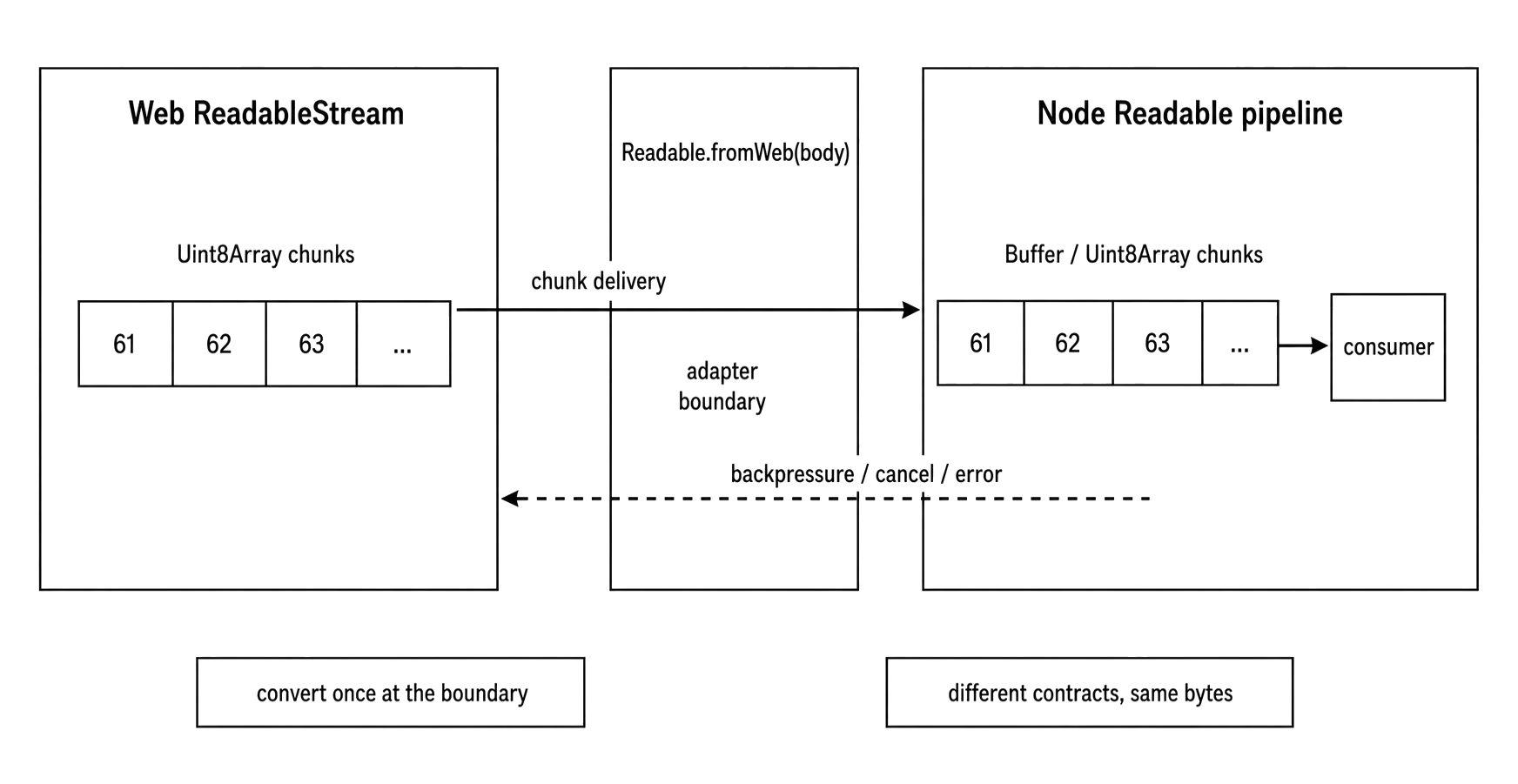
Figure 8.3 - Convert once at the boundary. The adapter translates chunk delivery, backpressure, cancellation, and errors between Web Streams and Node streams.
The adapter is still a wrapper. Chunks move through queues. Backpressure still depends on the receiving side continuing to read. Errors and cancellation still need an owner.
Fetch bodies usually produce Uint8Array chunks. Node streams often produce Buffer chunks for binary data, although Buffer is a subclass of Uint8Array. Most byte-processing code works with either. Strict type checks can break.
for await (const chunk of nodeStream) {
  console.log(chunk.byteLength);
}
The async iterator consumes the Node stream chunk by chunk.
The opposite direction shows up when a Node stream needs to feed a web-compatible API -
import { Readable } from 'node:stream';

const source = Readable.from(['{"id":1}\n', '{"id":2}\n']);
const body = Readable.toWeb(source);
body is now a web ReadableStream.
When you pass a streaming body to Node's fetch, include duplex: 'half' -
await fetch(url, {
  method: 'POST',
  body,
  duplex: 'half'
});
The body object already looks complete, so this option is easy to forget. The local rule is simple - streaming request body in Node fetch means duplex: 'half'.
Adapter bugs usually come from unclear ownership. A web stream gets locked by one helper and then passed to another. A body gets read for logging and then parsed again. A Node stream emits an error and the web reader sees a rejected read. A web stream cancellation destroys the Node stream underneath.
When a bug crosses a web stream and Node stream adapter, inspect who owns the body first. Do that before changing highWaterMark values or adding buffering.
Readable.isDisturbed() can help during debugging. It reports whether a Node readable or web readable has been read from or canceled.
import { Readable } from 'node:stream';

if (response.body) {
  console.log(Readable.isDisturbed(response.body));
}
A true result means some consumer touched the body. Then the review becomes simpler - find the first consumer.
Adapters preserve the original error well enough for normal debugging, but the observation point changes. A Node readable can emit an 'error' event. A web readable can make reader.read() reject and move the stream into an errored state. Readable.fromWeb() maps web stream errors into Node stream errors. Readable.toWeb() maps Node stream errors into rejected reads.
Destruction and cancellation need the same care. In Node v24, destroy and cancel propagate through the built-in adapters in the normal ownership direction. Destroying a Node stream created from a web stream cancels the web source. Canceling a web stream created from a Node stream destroys the Node stream.
The cleanup below the adapter still depends on the source. A fetch body has HTTP client state underneath it. A custom in-memory stream does not.
import { Readable } from 'node:stream';

const body = response.body;
if (!body) throw new Error('missing body');

const nodeStream = Readable.fromWeb(body);

nodeStream.on('error', err => console.error(err.message));
nodeStream.destroy(new Error('stop early'));
The error listener is required. A Node readable destroyed with an error emits 'error'. Without a listener, this example can terminate the process.
For a fetch response, early cancellation can affect connection reuse and body cleanup under the HTTP client. Once the adapter wraps the body, the adapter becomes the body consumer.
Use one stream shape per boundary. If your pipeline is mostly Node streams, convert once and stay in Node streams. If your pipeline is mostly fetch and web transforms, keep it in web streams and use pipeThrough() or pipeTo().
Repeated conversion makes debugging harder because each adapter adds another place where errors, cancellation, and backpressure are translated.
There is one more body trap. Helper methods hide full-body buffering. .json() looks like a parser call, but it drains the entire body first. .arrayBuffer() looks like a conversion call, but it also drains the entire body first. .blob() builds a blob from the entire body.
Those methods are fine for bounded API responses. They are poor defaults for exports, media files, backups, and unknown-size upstream bodies.
A streaming helper should show stream ownership in its return type -
import { Readable } from 'node:stream';

export async function download(url) {
  const res = await fetch(url);
  if (!res.ok) throw new Error(`bad status: ${res.status}`);

  const body = res.body;
  if (!body) throw new Error('missing body');

  return Readable.fromWeb(body);
}
This function returns a Node stream. Callers can pipe it, observe backpressure, and handle errors in the Node stream style.
A web-streaming helper would return res.body. A parsing helper would return parsed data. Each helper should pick one ownership model and make that choice visible.
Text and URL Utilities
Some web-compatible globals are small, but they remove a lot of custom helper code around text and URL handling.
TextEncoder turns JavaScript strings into UTF-8 bytes -
const encoder = new TextEncoder();
const bytes = encoder.encode('ready\n');

console.log(bytes.byteLength);
The result is a Uint8Array. That works well with web APIs that expect typed arrays or byte streams.
TextDecoder does the reverse. It turns bytes back into text -
const decoder = new TextDecoder('utf-8');
const text = decoder.decode(bytes);

console.log(text);
For whole buffers, .decode(bytes) is enough. Chunked input needs a little more care because a multibyte UTF-8 character may be split across chunks. Pass { stream: true } until the final chunk so the decoder can keep partial character state.
const decoder = new TextDecoder();

const chunkA = new Uint8Array([0xe2, 0x82]);
const chunkB = new Uint8Array([0xac]);

let out = decoder.decode(chunkA, { stream: true });
out += decoder.decode(chunkB);
That carried state is why TextDecoderStream exists, although most backend code can stay with TextDecoder or Node stream transforms until it reaches a web-stream boundary.
URLs are another place where hand-written string logic causes bugs. URL is the standard parser and formatter.
const url = new URL('/users?id=123', 'https://api.example.test');

console.log(url.pathname);
console.log(url.searchParams.get('id'));
The base URL supplies the origin for a relative path. URLSearchParams owns the query string state.
const params = new URLSearchParams();
params.set('limit', '50');
params.set('cursor', 'abc');

console.log(params.toString());
Query values are strings when they enter your code. Parse numbers and booleans after reading them. Serialize values deliberately before writing them.
URL also normalizes. It percent-encodes where needed, resolves . and .. path segments using URL rules, and exposes components through properties. Use it for callback URLs, proxy targets, redirect locations, and internal service endpoints.
Avoid building URLs with string concatenation when the pieces have meaning.
const base = new URL('https://api.example.test/v1/');
const users = new URL('users?active=true', base);

console.log(users.href);
The trailing slash on the base path changes resolution. With https://api.example.test/v1/, users goes under /v1/. With https://api.example.test/v1, users replaces v1.
Repeated query keys need care too. URLSearchParams preserves repeated entries during iteration.
const params = new URLSearchParams('tag=node&tag=runtime');

console.log(params.getAll('tag'));
getAll() returns both values. get() returns the first. Backend filters often allow repeated keys, so choose the method that matches the API contract.
Because parsing happens in one place, you also get a clean place to reject unsupported schemes -
const input = 'https://api.example.test/users';
const target = new URL(input);

if (target.protocol !== 'https:') {
  throw new Error('https required');
}
Do this before fetch and before any code opens a socket. It is basic input handling. It does not replace redirect policy. Fetch follows redirects by default, so a security-sensitive outbound request path should also control redirect behavior with redirect: 'manual' or validate redirect targets before following them.
URLPattern matches URL components against patterns. In Node v24 it is experimental, so production code should treat it as a feature that may need detection or a wrapper.
const pattern = new URLPattern({
  pathname: '/users/:id'
});

console.log(pattern.exec('https://x.test/users/42')?.pathname.groups.id);
The pattern matches the pathname and returns named groups. It can also match protocol, hostname, port, search, hash, and username/password fields when those parts are supplied.
Use URLPattern for small routing or validation edges when a web-standard matcher is enough. Full application routing needs more - methods, middleware order, path decoding policy, parameter validation, error shaping, and observability hooks. Frameworks usually own that layer better.
A successful match returns component-specific groups -
const match = pattern.exec('https://x.test/users/42');

console.log(match.pathname.input);
console.log(match.pathname.groups.id);
That shape works for small internal dispatch tables -
const routes = [
  ['GET', new URLPattern({ pathname: '/users/:id' })],
  ['GET', new URLPattern({ pathname: '/health' })]
];
The array still needs application policy around method matching, route order, validation, and error responses. The pattern only answers whether the URL shape matched.
Because URLPattern is experimental in Node v24, feature detection or a compatibility wrapper belongs around library code that may run on multiple Node lines.
Text encoding and URL parsing often meet in request-signing code. Exact bytes count there. URLSearchParams serializes with its own encoding rules. TextEncoder serializes strings as UTF-8. Buffer.from(string) also defaults to UTF-8, but TextEncoder makes the web API handoff explicit.
This is only a handoff example, not a signing recipe -
const url = new URL('https://api.example.test/search?q=node');
const canonical = `${url.pathname}?${url.searchParams}`;
const bytes = new TextEncoder().encode(canonical);
Real signing schemes define sorting, percent-encoding, header inclusion, path normalization, and query rules. Build the URL with URL objects, build the exact canonical string required by the target protocol, encode it once, then pass bytes to the next layer.
The same habit works on input. Parse once near the edge and pass typed values inward -
const requestUrl = '/users?limit=50';

const url = new URL(requestUrl, 'https://service.local');
const limit = Number(url.searchParams.get('limit') ?? 50);
Validation still needs to check Number.isInteger(limit) and range. The URL layer only extracts text using URL parsing rules. Keeping that line explicit prevents lower layers from each applying their own parsing behavior.
Structured Clone and Runtime Values
structuredClone() copies runtime values using the structured clone algorithm.
const copy = structuredClone({
  createdAt: new Date(),
  ids: new Set([1, 2, 3])
});

console.log(copy.ids.has(2));
This preserves many built-in shapes that JSON would flatten or lose - Date, Map, Set, typed arrays, ArrayBuffer, nested arrays, and plain objects. It also handles cycles.
const value = { name: 'root' };
value.self = value;

const copy = structuredClone(value);
console.log(copy.self === copy);
The clone keeps the cycle by tracking object identity while copying. JSON serialization would throw on the same value.
structuredClone() is for data. It does not copy every kind of thing in memory. Functions, promises, module namespace objects, and many host objects are outside the structured-clone set.
When cloning fails, the error is a DOMException, often with the name DataCloneError.
try {
  structuredClone({ run() {} });
} catch (err) {
  console.log(err.name);
}
DOMException is the web-compatible error class used by several APIs in this chapter. The name property often carries the useful category - DataCloneError, AbortError, QuotaExceededError, or another web-defined name depending on the API.
Structured clone also supports transfer for some values. An ArrayBuffer can move to the clone when passed in the transfer list.
const buffer = new ArrayBuffer(16);
const copy = structuredClone(buffer, { transfer: [buffer] });

console.log(buffer.byteLength);
console.log(copy.byteLength);
After transfer, the original buffer is detached and its byte length becomes zero. That is useful when ownership should move. It is a bug when the caller expects to keep using the original.
For this chapter, keep the rule narrow - clone copies supported values, while transfer moves supported backing storage.
The clone result has fresh object identity. A cloned Map is a different Map. A cloned typed array has a different wrapper. A copied ArrayBuffer has separate backing storage unless transferred. Shared memory stays shared only for types whose contract allows that, such as SharedArrayBuffer.
This makes structuredClone() useful for snapshots of data. A configuration object or test fixture may contain maps, sets, dates, typed arrays, or cycles. Structured clone keeps more of that runtime shape than JSON.
Keep live resources out of it. File handles, sockets, streams, and module objects have lifecycle state tied to the process. Copy data. Keep capabilities and open resources outside the cloned object graph.
When the object has a stream body or request body, use the API-specific clone method if body splitting is part of the design. Request.clone() and Response.clone() know about body ownership. structuredClone() is the wrong tool for that job.
Stability-Sensitive Globals Need Feature Detection
The globals in this chapter do not all have the same deployment promise.
Some are stable and broadly available in Node v24 - fetch, Request, Response, Headers, Blob, File, FormData, Web Streams, TextEncoder, TextDecoder, URL, URLSearchParams, structuredClone, CompressionStream, DecompressionStream, BroadcastChannel, and WebSocket.
Others need a runtime check. URLPattern is experimental. navigator is active development and can be disabled. Web Storage is release candidate and flag-gated in v24. EventSource is experimental and flag-gated in v24.
Use this as the deployment guide -
| API or group | Node v24 status | Runtime contract |
|---|---|---|
fetch, fetch classes, payload classes, Web Streams, text and URL utilities, structuredClone() | Stable globals | Use directly when your runtime floor is current Node |
CompressionStream, DecompressionStream, BroadcastChannel, WebSocket | Stable globals | Use at the matching API boundary |
URLPattern | Experimental global | Feature-detect or wrap when code may run across Node lines |
navigator | Active development, disabled by --no-experimental-global-navigator | Treat values as process hints |
localStorage, sessionStorage | Release-candidate Web Storage behind --experimental-webstorage; local storage also needs file policy through --localstorage-file | Use only when startup explicitly enables process-level storage |
EventSource | Experimental behind --experimental-eventsource | Feature-detect and keep SSE behavior out of generic fetch code |
Feature detection is usually better than checking a Node major version -
if (typeof URLPattern === 'function') {
  console.log('URLPattern available');
}
An API can be behind a flag, disabled by a flag, or affected by the exact runtime build. A direct check tells you what this process actually has.
Applications that own the runtime can fail fast at startup -
const required = ['fetch', 'Request', 'Response', 'ReadableStream'];

for (const name of required) {
  if (typeof globalThis[name] === 'undefined') throw new Error(name);
}
That belongs in applications that own their deployment image and Node version. Libraries should usually accept injected capabilities or provide graceful fallback, because they run inside someone else's process.
navigator is a good example of a browser-like name that can mislead. In Node, it is a partial process-level object inspired by browser navigator. In v24 it is active development. It can expose fields such as hardwareConcurrency, language, languages, platform, and userAgent.
const nav = globalThis.navigator;

if (nav) {
  console.log(nav.userAgent);
  console.log(nav.hardwareConcurrency);
}
navigator.hardwareConcurrency reports the number of logical processors available to the current Node instance. Treat it as a scheduling hint. Thread pool sizing, worker counts, and job concurrency still need application policy.
Web Storage needs even more care in backend code because it has browser names but process-level behavior. Node v24 documents localStorage and sessionStorage as release-candidate Web Storage APIs behind --experimental-webstorage.
Without that flag, they are absent. localStorage stores unencrypted data in the file named by --localstorage-file, with a 10 MB quota. sessionStorage stores up to 10 MB in memory for the current process and is not shared between workers.
Server code shares process globals across requests, so request-specific or user-specific data belongs somewhere else.
if (typeof localStorage === 'object') {
  localStorage.setItem('last-start', String(Date.now()));
}
That write stores process-level state. Every request handler in the same process sees the same global storage object. Use it only for tooling experiments or process-local metadata when startup explicitly enables it. User sessions belong in an application-owned store.
Some stable globals still need design care because they belong to specific protocol or stream boundaries.
CompressionStream and DecompressionStream expose web-compatible compression transforms. They are stable globals in Node v24 and fit naturally with fetch bodies and web stream paths.
const body = new Blob(['hello\n']).stream();
const compressed = body.pipeThrough(new CompressionStream('gzip'));
That pipeline stays in web streams. Node's node:zlib APIs still fit better for Node stream pipelines and lower-level compression control. Choose based on the stream shape around the code.
BroadcastChannel is a named message channel API. In Node, it is useful around workers and runtime contexts that participate in the same channel model.
const channel = new BroadcastChannel('events');

channel.postMessage({ type: 'ready' });
channel.close();
WebSocket is also global and stable in Node v24, with a browser-compatible client shape. Keep it separate from generic fetch wrappers. A WebSocket is a long-lived bidirectional protocol endpoint with its own lifecycle.
EventSource is the global shape for Server-Sent Events. In Node v24, it is experimental and appears only when --experimental-eventsource enables it. Feature-detect before relying on it.
Web Crypto is available through crypto and SubtleCrypto globals when the Node binary has the crypto module built in. Crypto code has its own policy, key-management, and algorithm-selection concerns, so it belongs in a separate discussion.
AbortController and AbortSignal appear throughout fetch and stream APIs. For this chapter, the rule is straightforward - pass a signal when an API accepts one, and keep timeout or cancellation policy owned by the calling layer.
The same pattern keeps showing up. Use stable web-compatible globals directly. Feature-detect globals with stability or flag concerns. Convert at boundaries where Node streams or buffers are the better local type.
Many adapter bugs come from assuming fetch means "browser-like runtime". A package sees fetch, then reaches for localStorage, EventSource, URLPattern, or newer navigator fields. Those APIs have different stability and startup rules. A test runner may use a different Node line. A service may disable a global through a CLI flag. A bundled polyfill may behave differently from Node's built-in object.
Own the runtime contract near startup -
export const platform = {
  fetch,
  URLPattern: globalThis.URLPattern ?? null,
  storage: globalThis.localStorage ?? null
};
The rest of the app can inspect one module. Tests can set URLPattern to null and verify the fallback path. Production startup can reject a missing stable dependency before the service handles traffic.
For libraries, keep the contract smaller. Accept objects from callers. A function that accepts a fetch implementation, a Request, or a ReadableStream is easier to run in Node, browsers, workers, and tests. Runtime globals are convenient at the application edge. Passing the object through the code keeps the dependency visible.
Node's web-compatible globals are native runtime APIs, not browser simulation. They reduce adapter code and make backend code easier to share with other runtimes. They also keep the exact body, stream, clone, and stability rules of the APIs they implement. Use those rules directly, and the whole surface stays much easier to reason about.
Related Reading
- Previous - .env Files and Configuration Loading
- Next - TypeScript Support and Compile Cache