Node.js Async Iterators: for await...of, Streams, and Backpressure
Async iteration is Node's way of letting a consumer pull data that arrives over time.
The consumer asks for one item by calling next(). The source returns a promise. That promise eventually resolves to a result shaped like { value, done }. After the consumer finishes handling that value, it asks for the next one.
That pacing is the important part. The source does not have to dump everything into memory, and the consumer does not have to be ready for all of it at once. The same loop shape can now handle stream chunks, file lines, database cursor rows, EventEmitter adapters, paginated API responses, and async generator transforms.
Baseline and Conventions
This chapter assumes Node v24 LTS.
The APIs used here are available in that baseline. Readable[Symbol.asyncIterator]() has been non-experimental since Node 11.14. readable.iterator() exists since Node 16.3 and is stable in current LTS lines. events.on() exists since Node 12.16 and 13.6, with watermark support added across Node 20.0 and Node 20.13/22.0. FileHandle.readLines() exists since Node 18.11. The fetch() examples use the Node v24 global. The pipeline() examples use node:stream/promises.
Code blocks are complete CommonJS examples unless the text calls them fragments. When a block is marked as a fragment, assume the named source, stream, emitter, or cursor already exists in the surrounding function.
The Sync Protocol You Already Know
The easiest way to understand async iteration is to start with normal for...of.
A normal iterable exposes Symbol.iterator. When JavaScript calls that method, it gets back an iterator object. That iterator has a next() method. Every time next() is called, it returns an object shaped like { value, done }.
Arrays, Maps, Sets, strings, and typed arrays all follow this same pattern.
Here is the protocol without the for...of syntax hiding it -
const arr = [10, 20, 30];
const iter = arr[Symbol.iterator]();

console.log(iter.next()); // { value: 10, done: false }
console.log(iter.next()); // { value: 20, done: false }
console.log(iter.next()); // { value: 30, done: false }
console.log(iter.next()); // { value: undefined, done: true }
A for...of loop does that work for you. It gets the iterator, calls next(), checks done, gives the loop body the value, and repeats until done becomes true.
That works well when the data is already available. An array is already in memory. A Map already has its entries. A string already has its characters. When the loop asks for the next value, the iterator can answer immediately.
Async sources have the same basic shape, but the timing is different.
A database cursor might need to fetch the next row across a network. An HTTP response might still be receiving bytes. A file reader might be waiting on the filesystem. When the consumer asks for the next value, the source may need time before it can answer.
The sync iterator protocol has no place to wait. Its next() method must return { value, done } right away. Async iteration keeps the same result structure, but lets the result arrive later.
The Async Iteration Protocol
Async iteration changes one part of the sync protocol.
Instead of Symbol.iterator, the object exposes Symbol.asyncIterator. Instead of next() returning { value, done } directly, next() returns a promise that resolves to { value, done }.
Here is a complete async iterable -
const asyncIterable = {
  [Symbol.asyncIterator]() {
    let i = 0;

    return {
      next() {
        if (i < 3) {
          return Promise.resolve({ value: i++, done: false });
        }

        return Promise.resolve({ value: undefined, done: true });
      }
    };
  }
};
The shape should look familiar. There is still an iterator. There is still a next() method. There is still a { value, done } result. The only change is that the result comes through a promise.
That promise gives the source time to wait for I/O, buffering, timers, remote responses, or any other async work before it answers the consumer.
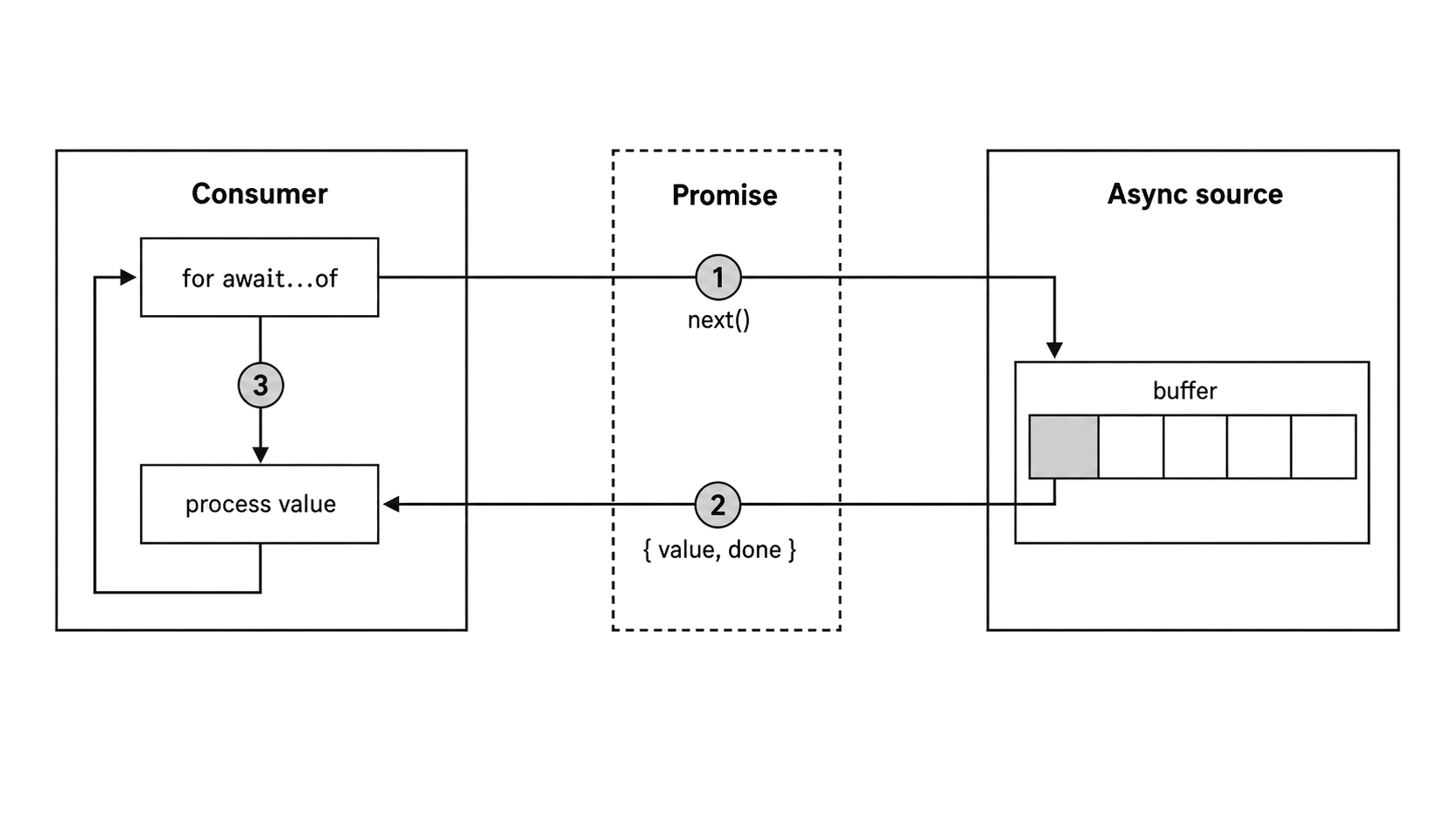
Figure 7.1 - Async iteration lets the consumer request one promised result, process it, and then request the next one.
The streams chapter already used this protocol through Readable streams. A for await...of loop over a stream calls the stream's async iterator internally. That chapter focused on the stream behavior. This chapter focuses on the protocol itself, then uses it to explain cleanup, custom async iterables, streams, and EventEmitter adapters.
How for await...of Works
for await...of is the loop syntax built for async iterables.
It calls next(), waits for the promised result, gives the loop body the value, and then asks for the next one.
A simplified version looks like this -
const iterator = source[Symbol.asyncIterator]();

let result = await iterator.next();

while (!result.done) {
  const item = result.value;

  // ... loop body ...

  result = await iterator.next();
}
The real loop does more than this. It knows how to clean up early by calling return() when the iterator provides it. It can also consume sync iterables through a fallback path. If a next() promise rejects, the loop turns that rejection into a throw.
The key behavior is still simple. The loop asks for one item, waits for it, runs the body, and then asks for the next item.
That means the loop is sequential by default. If the body does 500ms of async work per item and there are 100 items, the loop takes at least 50 seconds. Nothing in for await...of adds parallelism on its own.
When the Loop Body Throws
Once the loop body receives a value, any error from your code goes through the loop's cleanup path.
If the body throws and the iterator has a return() method, the loop calls return() before the original error continues outward.
Here is a stream fragment where the body rejects a chunk -
// Fragment - `readable` is an existing Readable stream.
for await (const chunk of readable) {
  if (chunk.length > 1024) {
    throw new Error('chunk too large');
  }
}
That cleanup call gives the source a chance to release whatever it owns.
For a readable stream, return() destroys the stream. For an async generator, return() enters any finally block inside the generator. After cleanup finishes, the original error moves to the surrounding try/catch, if there is one.
Early break and return
A break statement uses the same cleanup path. So does a return from the function that contains the loop.
Here is a function that stops once it finds the first matching chunk -
async function findFirst(stream) {
  for await (const chunk of stream) {
    if (chunk.includes('target')) return chunk;
  }

  return null;
}
When return chunk runs, the loop calls return() on the iterator it created at the start. For the default Readable stream iterator, that destroys the stream. If the stream is backed by a file descriptor or socket, the stream's destroy path releases it.
The loop body does not need its own cleanup code just to stop the stream on early exit. The async iterator protocol already gives the source a cleanup hook.
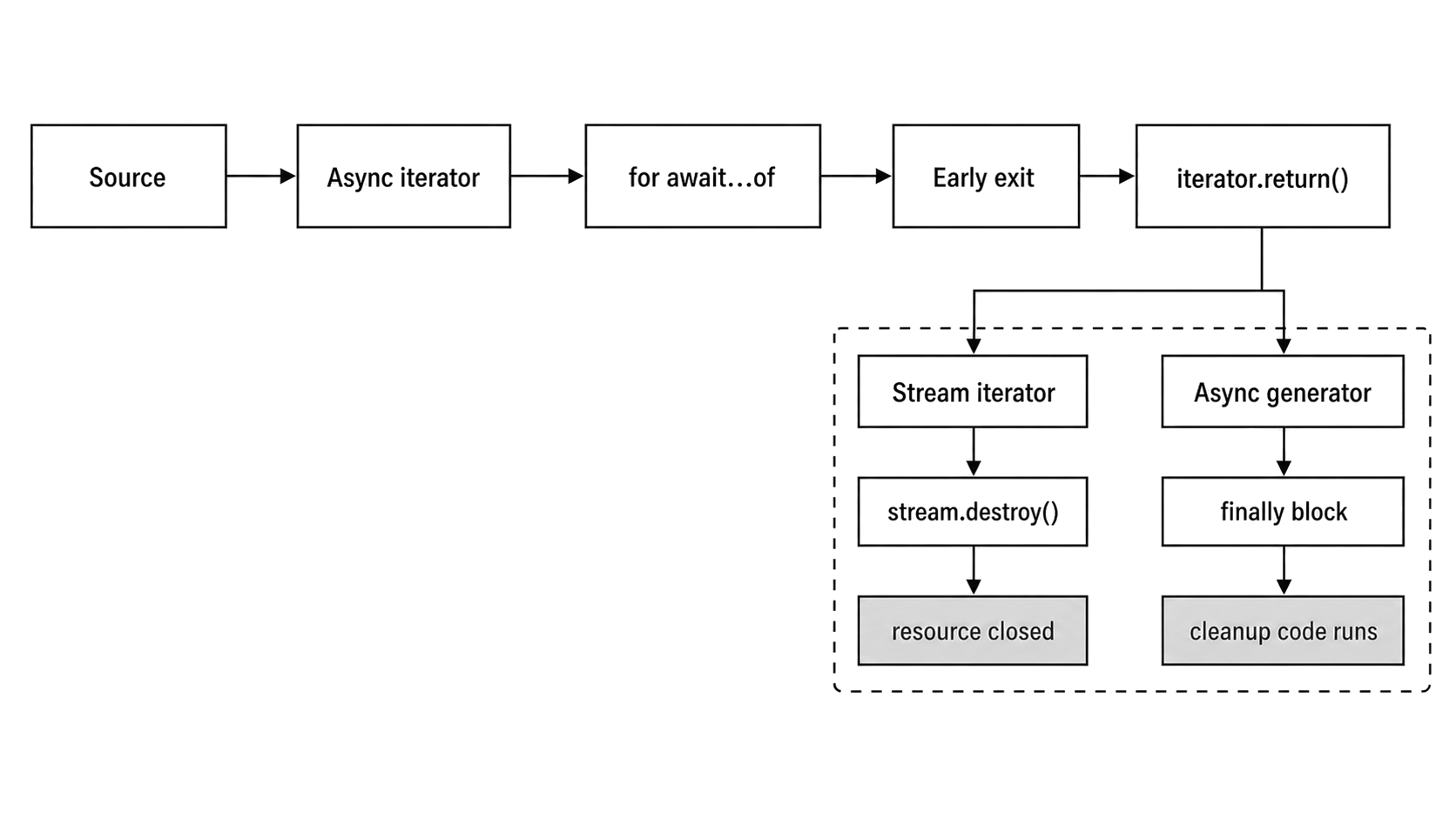
Figure 7.2 - Early exit follows the iterator cleanup path. A stream iterator destroys the stream, while an async generator enters its finally block.
Errors from next()
The other failure path starts before the body receives a value.
If the promise returned by next() rejects, the for await...of loop throws. You handle it with the same try/catch you would use around any awaited operation.
// Fragment - `asyncSource` is an existing async iterable.
try {
  for await (const event of asyncSource) {
    console.log(event);
  }
} catch (err) {
  console.error('Source failed:', err.message);
}
For a readable stream, a stream error becomes a rejected next() promise. The loop throws, and the surrounding try/catch receives the error.
That means source failures and loop-body failures can share one local error path, even though they come from different sides of the protocol.
There is one cleanup detail worth knowing. In Node v24.15, if a custom async iterator's own next() promise rejects, for await...of does not call return() afterward. If the source itself fails, cleanup should happen inside the source or iterator implementation. Do not rely only on return() for source-side failures.
Timing Implications
Every iteration crosses an async boundary. Even if the iterator returns an already resolved promise, the loop resumes later through the async function continuation path.
For I/O-bound work, that cost usually disappears under the time spent waiting for the filesystem, network, database, or stream. For CPU-heavy loops over data that is already in memory, the extra async hop can show up.
You can observe the sequential behavior with this generator -
async function* syncData() {
  yield 1;
  yield 2;
  yield 3;
}

console.log('before');

for await (const n of syncData()) {
  console.log(n);
}

console.log('after');
The output is still ordered -
before
1
2
3
after
The order is simple, but each iterator result still resumes through async machinery.
Add a queued microtask before the loop and the await points become easier to see -
let ticks = 0;

queueMicrotask(function tick() {
  console.log('microtask');

  if (++ticks < 4) {
    queueMicrotask(tick);
  }
});
On Node v24.15, this setup can print an interleaving such as -
microtask
microtask
1
microtask
microtask
2
3
after
The exact interleaving depends on which microtasks are already queued and how the iterator creates its promises.
Use for...of when the source is already synchronous. Use for await...of when values arrive through async delivery, promise-based errors, cancellation, or a source that needs an async cleanup path.
Async Generators
Writing Symbol.asyncIterator and next() manually works, but most code does not need that much setup.
Async generators give you the same protocol with less ceremony. You write async function*, then use yield inside the function body. Calling the generator function returns an AsyncGenerator object. That object already has [Symbol.asyncIterator](), next(), return(), and throw().
Here is a generator that fetches pages from an API one page at a time -
async function* fetchPages(url) {
  for (let page = 1; ; page++) {
    const res = await fetch(`${url}?page=${page}`);

    if (!res.ok) {
      throw new Error(`HTTP ${res.status}`);
    }

    const data = await res.json();

    if (data.items.length === 0) {
      return;
    }

    yield data.items;
  }
}
The generator waits for the HTTP response, checks the status, parses JSON, and yields one page of items. When the API returns an empty page, the generator ends.
The consumer controls the pace. No later page is requested until the consumer asks for the next value.
Here is the consumer side -
// Fragment - consumes the generator above.
for await (const items of fetchPages('https://api.example.com/things')) {
  for (const item of items) {
    console.log(item.name);
  }
}
Each outer loop iteration calls next() on the generator. The generator runs until it reaches a yield, hands that value to the consumer, and pauses. After the consumer finishes that page, the next next() call resumes the generator from the same point.
This is a small example. Production code usually adds request cancellation, retry behavior, and response validation around the same basic generator shape.
Combining yield and await
Inside an async generator, both await and yield pause execution, but they wait for different things.
await pauses the generator until a promise settles. yield pauses the generator until the consumer asks for the next value.
When you write yield await somePromise, the promise resolves first. Then the resolved value is yielded to the consumer.
This distinction helps when you debug where a generator is paused. At an await, it is waiting on async work. At a yield, it is waiting on the consumer.
Here is a generator that opens a file, reads lines, transforms each line, and yields the transformed result -
const { open } = require('node:fs/promises');

async function* transformLines(filePath, transform) {
  const handle = await open(filePath, 'r');

  try {
    for await (const line of handle.readLines()) {
      yield await transform(line);
    }
  } finally {
    await handle.close();
  }
}
There are several places where this function can pause.
await open() waits for the file to open. The inner for await...of waits for each line. await transform(line) waits for the transform function. yield waits until the outer consumer asks for the next result.
The finally block closes the file handle if the transform throws or if the consumer stops early.
yield* Delegation
Async generators are async iterables, so one generator can hand work to another.
yield* consumes another iterable and yields each value to the outer consumer.
async function* allPages(urls) {
  for (const url of urls) {
    yield* fetchPages(url);
  }
}
The consumer sees one flat sequence of yielded pages, even though the outer generator is pulling from multiple URLs. yield* also works with other async iterables, including readable streams.
Controlling Generators from Outside
An AsyncGenerator object has a small control surface.
next(value) resumes the generator from the last yield point. If you pass a value, that value becomes the result of the yield expression inside the generator. Most application code never uses this input channel because for await...of calls next() with no argument.
return(value) asks the generator to finish. The generator enters any finally block it is currently inside. If the finally block only performs cleanup, the returned promise resolves to { value, done: true }. If the finally block yields values, those values come out before the generator reaches its final done state. This is the method for await...of calls when you break, return early, or throw from the loop body.
throw(error) resumes the generator by throwing the error at the current yield point. If the generator catches it, execution can continue. If it does not catch it, the generator ends and the returned promise rejects.
Most code should use for await...of and let the loop call these methods. Knowing they exist still helps when you debug generator behavior. If a generator stops earlier than expected, something may have triggered return() through a break, an early function return, or a loop-body error.
Cleanup with try/finally
Resource-owning generators should put acquisition and release in the same function.
Open the resource before the try. Yield values inside the try. Close the resource in finally.
const { open } = require('node:fs/promises');

async function* readLines(filePath) {
  const handle = await open(filePath, 'r');

  try {
    for await (const line of handle.readLines()) {
      yield line;
    }
  } finally {
    await handle.close();
  }
}
If a consumer breaks out of a for await...of loop over this generator, the loop calls return() on the generator. That sends execution into the finally block, and the file handle closes at the interruption point.
Without try/finally, early exit could leave the file handle open until garbage collection, assuming it is collected at all. That is not a cleanup plan you want in real code.
How Readable Streams Implement Symbol.asyncIterator
Readable streams are one of the most common async iterables in Node.
Readable streams gained Symbol.asyncIterator in Node 10, and support became non-experimental in Node 11.14. In Node 24.x, the implementation lives in lib/internal/streams/readable.js. Readable.prototype[Symbol.asyncIterator]() delegates to an internal stream-to-async-iterator path. readable.iterator(options) uses the same core path with options.
Those internal names are useful when you read Node's source. Application code should use the public APIs.
In Node 24.x, the actual iterator is built by an async generator named createAsyncIterator(). It registers a 'readable' listener. It also sets up eos(stream, { writable: false }, callback) to observe end, error, and premature close. Then it runs a loop around stream.read().
That loop keeps checking three possible states.
If stream.read() returns a chunk, the iterator yields that chunk. If eos() recorded an error, the iterator throws. If eos() recorded normal completion, the iterator returns. If none of those happened yet, the iterator waits for a promise that will be resolved by the next 'readable' event or by the eos() callback.
So the stream's async iterator consumes through the readable API. It does not consume through 'data' events.
The stream may buffer ahead up to its configured highWaterMark. The iterator then drains that buffer through read() as the consumer advances. A for await...of loop keeps that flow naturally sequential - get one chunk, run the body, then ask for the next chunk.
That same generator shape also explains cleanup. When the stream is fully consumed, the iterator reaches the stream's end and returns. When the consumer exits early, the iterator's finally block destroys the stream unless readable.iterator({ destroyOnReturn: false }) was used. That option belongs to readable.iterator(), not to Symbol.asyncIterator().
Backpressure and highWaterMark
The iterator pulls from the readable buffer one chunk at a time.
After the consumer processes a chunk and asks for the next one, the iterator calls stream.read() again. This works with stream backpressure. The stream buffers data according to its highWaterMark threshold, and the async iterator drains that buffer as the loop advances.
highWaterMark is a threshold, not a strict memory limit. Once the readable buffer reaches that threshold, Node stops calling the stream's internal _read() method until buffered data is consumed.
Compare that with flowing mode through 'data' events.
With readable.on('data', handler), the stream pushes chunks as fast as it can. The handler runs for each chunk. If the handler starts async work and returns, the stream does not wait for that work to finish. It keeps pushing. If you want to slow it down, you have to call stream.pause() and stream.resume() yourself.
With for await...of, the next chunk is requested when the loop reaches the next next() call. That gives your per-chunk async work a clear place in the flow.
This is why Node's stream docs recommend choosing one consumption style for a stream. Mixing on('data'), on('readable'), pipe(), and async iteration on the same stream can produce behavior that is hard to reason about.
Resource Cleanup
The default stream iterator's return() method calls stream.destroy().
When you break out of a for await...of loop over a stream, the loop calls return(), and the stream is destroyed. File descriptors close. Network sockets terminate. Early exit has a defined cleanup path.
If you call stream[Symbol.asyncIterator]() manually and do not consume the full stream, call return() on the iterator yourself. The for await...of syntax does that automatically. Manual protocol usage needs manual cleanup.
Forgetting return() on a partially consumed stream iterator can leave the stream open.
The separate readable.iterator(options) method lets you change the early-exit behavior. By default, return() destroys the stream. readable.iterator({ destroyOnReturn: false }) creates an async iterator that leaves the stream open when the loop exits early.
Use that option only when you plan to resume reading later. Once you choose not to destroy on return, cleanup is back in your hands.
events.on() and events.once()
The previous subchapter introduced events.on() and events.once() as adapters for EventEmitter-based code.
They are not streams. They take pushed EventEmitter events and expose them through promise-based consumption.
events.on()
events.on(emitter, eventName, options) returns an async iterator. Each time the emitter fires the named event, the iterator yields an array containing that event's arguments.
const { EventEmitter, on } = require('node:events');

const ee = new EventEmitter();

async function consumeOne() {
  for await (const [msg] of on(ee, 'message')) {
    console.log('Got:', msg);
    break;
  }
}

consumeOne().catch(console.error);

ee.emit('message', 'hello');
When ee.emit('message', 'hello') runs, the loop receives ['hello']. The destructuring [msg] pulls out the first argument, so the body works with the plain message.
Internally, events.on() registers a listener for eventName. When the event fires, that listener stores the event arguments in an internal FixedQueue.
If a next() call is already waiting, the adapter resolves that pending promise. If the consumer is still busy with a previous event, the new event stays queued until the consumer calls next() again.
That queue is where EventEmitter adapters differ from streams. If the emitter produces events faster than the consumer handles them, queued events grow in memory.
Node 20.0 added close, highWatermark, and lowWatermark options to events.on(). Node 20.13 and Node 22.0 added the camel-cased highWaterMark and lowWaterMark names for consistency. The older lowercase-mark names still work.
The defaults are effectively unbounded. highWaterMark defaults to Number.MAX_SAFE_INTEGER, and lowWaterMark defaults to 1. In Node v24.15, lowWaterMark must be at least 1.
Watermarks only slow the source down when the emitter has real pause() and resume() methods. A plain EventEmitter does not. Passing finite watermarks to a plain emitter does not fail immediately. It fails later if buffered events cross the high watermark and Node tries to call emitter.pause().
For high-throughput sources, prefer a stream, an emitter that actually supports pause and resume, or a queue that has its own buffer limit.
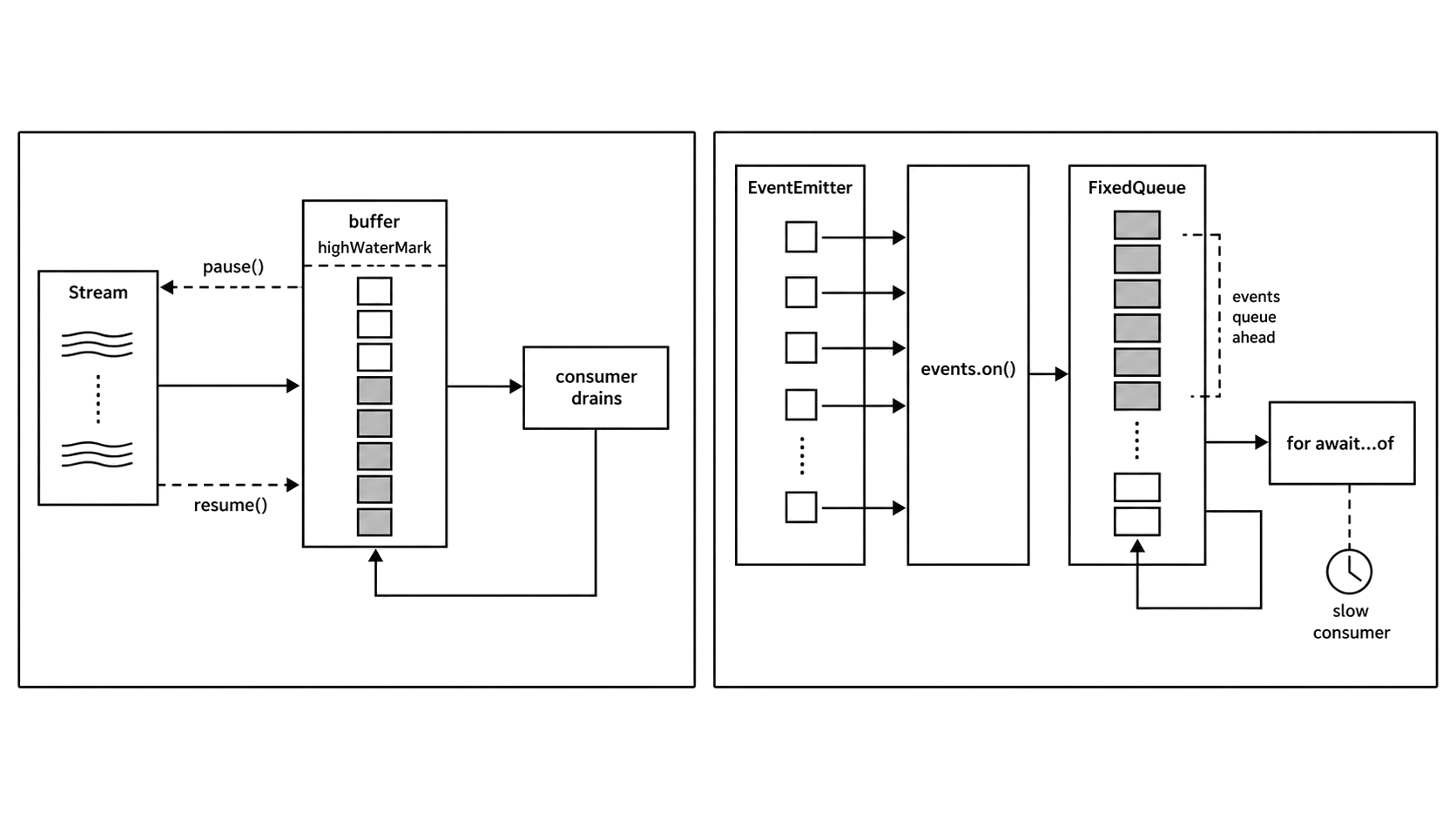
Figure 7.3 - events.on() adapts pushed events into async iteration, but events can queue when the emitter is faster than the consumer. Streams have a real pause path.
Error Handling in events.on()
events.on() also gives EventEmitter errors a promise-shaped path.
By default, if the emitter fires an 'error' event while you are iterating some other event, the async iterator throws. The loop receives that as a rejected next() promise.
If you are iterating the 'error' event itself, then 'error' is treated as the target event.
Use try/catch around the loop -
// Fragment - `stream` is an existing EventEmitter-backed stream.
const { on } = require('node:events');

try {
  for await (const [data] of on(stream, 'data', { close: ['end'] })) {
    console.log(data);
  }
} catch (err) {
  console.error('Stream error:', err);
}
You can also tell the iterator which events should end the sequence. Without a close option, the iterator keeps running until the emitter errors, the signal aborts, or you break out.
Pass completion event names through close -
// Fragment - `emitter` is an existing EventEmitter.
const { on } = require('node:events');

const iter = on(emitter, 'data', { close: ['end', 'finish'] });
Now the iterator finishes with { done: true } when 'end' or 'finish' fires.
AbortSignal Support
For cancellation that does not depend on the emitter, pass an AbortSignal.
const { EventEmitter, on } = require('node:events');

const ee = new EventEmitter();
const ac = new AbortController();

setTimeout(() => ac.abort(), 5000);

try {
  for await (const [msg] of on(ee, 'message', { signal: ac.signal })) {
    console.log(msg);
  }
} catch (err) {
  if (err.name !== 'AbortError') {
    throw err;
  }
}
When the signal aborts, the iterator throws an AbortError. The loop exits, and the adapter removes its listener from the emitter. That prevents the emitter from keeping a dead listener around.
This is the standard way to add timeouts or cancellation to event-driven iteration.
events.once()
For a single event, async iteration is usually too much structure. Use events.once() instead.
events.once(emitter, eventName, options) returns a promise. The promise resolves with an array of event arguments the first time the event fires.
const { once } = require('node:events');
const { createServer } = require('node:http');

const server = createServer();

(async () => {
  server.listen(0);

  await once(server, 'listening');
  console.log('Server is up');

  server.close();
})();
When the target event fires, the promise resolves with the argument array. If the emitter fires an 'error' event before the target event, the promise rejects with that error. If you pass an AbortSignal and it aborts first, the promise rejects with an AbortError.
events.once() is the promise version of emitter.once(eventName, listener). You get a promise you can await, and Node removes the listener after the event fires or after an error.
Use once() for one-time lifecycle events such as server readiness, socket connection, or process exit. Use on() for ongoing event sources such as incoming messages or data chunks. With on(), remember that events can queue when the consumer is slower than the emitter.
Building Custom Async Iterables
Streams, generators, and EventEmitter adapters cover many cases. Sometimes you still need your own async iterable.
That usually happens when you are wrapping a callback-based API, building a producer-consumer queue, or exposing an internal source through a cleaner loop interface.
Manual Implementation
The manual protocol shape is the same one from earlier.
You return an object with a Symbol.asyncIterator method. That method returns an iterator with next(). You can also provide return() and throw() when the source needs cleanup or custom control behavior.
Here is a small delayed counter -
function createCounter(limit, delay) {
  let count = 0;

  return {
    [Symbol.asyncIterator]() {
      return {
        async next() {
          await new Promise(r => setTimeout(r, delay));

          if (count < limit) {
            return { value: count++, done: false };
          }

          return { value: undefined, done: true };
        }
      };
    }
  };
}
Because next() is an async function, it returns a promise automatically. Each call waits for the timeout, then returns the next count. When the count reaches the limit, it returns done: true.
A consumer can use it like any other async iterable -
for await (const n of createCounter(5, 100)) {
  console.log(n);
}
Wrapping Callback-Based APIs
For many custom sources, an async generator is still the cleanest wrapper.
Suppose a database cursor exposes one callback-based next() method. You can turn it into an async iterable like this -
async function* iterateCursor(cursor) {
  try {
    while (true) {
      const rec = await new Promise((resolve, reject) => {
        cursor.next((err, row) => err ? reject(err) : resolve(row));
      });

      if (!rec) {
        return;
      }

      yield rec;
    }
  } finally {
    await cursor.close?.();
  }
}
Each loop pass wraps one callback call in a promise. The generator awaits that promise, checks whether a row exists, and yields the row.
The finally block closes the cursor whether the consumer reads every record or stops early. await cursor.close?.() works with cursor APIs whose close method returns a promise, and it does nothing when the cursor has no close method.
Queue-Based Async Iterable
A queue-based async iterable is useful when the producer and consumer do not live in the same function.
The producer pushes values into the queue. The consumer pulls values out with for await...of.
There are two timing cases to handle. The producer might push a value before the consumer asks for it. The consumer might ask for a value before the producer has one ready.
Here is a minimal queue that handles both cases -
function createQueue() {
  const values = [];
  const waiters = [];
  const DONE = Symbol('done');
  let ended = false;

  const result = value => value === DONE
    ? { value: undefined, done: true }
    : { value, done: false };

  function finish() {
    ended = true;

    while (waiters.length) {
      waiters.shift()(DONE);
    }
  }

  function close() {
    finish();
    values.length = 0;

    return Promise.resolve(result(DONE));
  }

  return {
    push(value) {
      if (ended) {
        throw new Error('queue ended');
      }

      if (waiters.length) {
        waiters.shift()(value);
      } else {
        values.push(value);
      }
    },

    end() {
      finish();
    },

    [Symbol.asyncIterator]() {
      return {
        next() {
          if (values.length) {
            return Promise.resolve(result(values.shift()));
          }

          if (ended) {
            return Promise.resolve(result(DONE));
          }

          return new Promise(resolve => {
            waiters.push(value => resolve(result(value)));
          });
        },

        return: close
      };
    }
  };
}
The queue keeps two arrays.
values holds items the producer has pushed but the consumer has not received yet. waiters holds pending consumers that called next() before any value was available.
DONE is a private sentinel. That lets null and undefined remain valid queue values.
When the producer calls push(value), the queue first checks whether a consumer is waiting. If a waiter exists, the queue resolves that consumer immediately. If no consumer is waiting, the value is stored in values.
When the consumer calls next(), the queue first checks for a stored value. If no value is stored and the queue has ended, it returns done: true. If no value is ready and the queue is still open, it stores a resolver in waiters.
end() marks the producer side closed while allowing queued values to drain. return() clears queued values and resolves pending waiters when the consumer exits early.
This simple version has no backpressure. If the producer calls push() 10,000 times before the consumer starts, the values array holds 10,000 entries in memory.
That may be fine for bounded sources, such as a known set of database rows or a finite API response. For unbounded sources, such as live events or continuous sensor data, you need a buffer limit and a way to tell the producer to slow down.
One common design is to track the buffer size and return a boolean from push(). The producer treats false as a signal to pause or back off. writable.write() uses the same kind of signal. It returns false when the internal buffer crosses highWaterMark.
When to Use Generators vs Manual Implementation
Use async generators first when one function owns the resource and produces the values. They give you automatic protocol behavior. You write yield, and the generator object handles next(), return(), and throw().
Manual Symbol.asyncIterator implementations are useful when you need lower-level control. That usually means pending promises, cancellation, producer-consumer queues, or custom cleanup behavior that does not fit cleanly inside one generator body.
The queue above is the common case. The producer and consumer are separated. They may live in different modules. They may run on different timing. The producer calls push(). The consumer uses for await...of. The queue handles the timing gap between them.
A manual iterator does not make for await...of faster. The loop still awaits each next() result.
Patterns and Practical Considerations
Pipeline with Async Generators
Once a source supports async iteration, async generators can turn it into a small transformation pipeline.
Each generator receives an async iterable, processes one value at a time, and yields the transformed output.
async function* map(source, fn) {
  for await (const item of source) {
    yield await fn(item);
  }
}

async function* filter(source, predicate) {
  for await (const item of source) {
    if (await predicate(item)) {
      yield item;
    }
  }
}
You can chain them like this -
filter(map(source, transform), predicate);The final consumer pulls from filter(). filter() pulls from map(). map() pulls from the original source. Work starts when the final consumer asks for a value.
This chain processes one item at a time unless one of the sources or stages buffers internally. There is no automatic intermediate array and no hidden batch of transformed values.
stream.pipeline() with Async Generators
Async generator stages can also participate in stream pipelines.
Since Node 13, stream.pipeline() accepts async generators as transform stages. That means a pipeline can mix streams and generators.
const fs = require('node:fs');
const { pipeline } = require('node:stream/promises');

async function run() {
  await pipeline(
    fs.createReadStream('input.txt'),

    async function* (source, { signal }) {
      for await (const chunk of source) {
        signal.throwIfAborted();
        yield chunk.toString().toUpperCase();
      }
    },

    fs.createWriteStream('output.txt')
  );
}

run().catch(console.error);
input.txt and output.txt are placeholders. The pipeline connects the read stream to the async generator, then connects the generator to the write stream.
Backpressure moves through all three stages. If the write stream's buffer fills, the pipeline waits before pulling another value from the generator. The generator then waits before pulling another chunk from the source.
For simple transforms, this is often easier than subclassing Transform or implementing _transform().
The pipeline also handles errors and cleanup. If any active stage fails, the pipeline tears down the whole chain. The read stream is destroyed. The write stream is destroyed. An async generator stage that has started receives return(), which triggers its finally block. A generator stage that never starts has no body or finally block to run.
The Serial Nature of for await...of
A for await...of loop processes items one at a time.
The protocol is sequential - call next(), await one result, process that value, then call next() again.
If you need parallel work, add concurrency above the loop. A common pattern is to collect a batch of promises, wait for that batch, and then continue.
async function processBatched(source, batchSize, fn) {
  let batch = [];

  for await (const item of source) {
    batch.push(Promise.resolve().then(() => fn(item)));

    if (batch.length >= batchSize) {
      await Promise.all(batch);
      batch = [];
    }
  }

  if (batch.length > 0) {
    await Promise.all(batch);
  }
}
This runs up to batchSize items at the same time. Items inside one batch are concurrent. Batches still run one after another.
Promise.resolve().then(() => fn(item)) gives synchronous throws and async rejections the same promise-shaped path. That keeps error handling consistent.
This gives you bounded concurrency. It avoids fully serial processing, and it also avoids starting unlimited work all at once.
Memory with events.on()
The events.on() adapter deserves a second warning because it is easy to mistake it for stream-style flow control.
If the consumer does async work per event and the emitter fires faster than the loop can process, memory grows. The default highWaterMark is Number.MAX_SAFE_INTEGER, so the queue is effectively unbounded unless you pass watermarks and the emitter supports pause() and resume().
For moderate event rates, this may be fine. A server emitting request events or a socket emitting data events often has natural pacing from the surrounding I/O.
For synthetic sources, such as high-frequency timers or code that calls emit() in a tight loop, the queue can grow quickly.
If that risk applies, prefer a readable stream with for await...of. Streams have backpressure built in. Another option is a custom async queue with a buffer limit and explicit flow control.
One Consumer Shape
Async iteration gives many source types one shared consumption shape.
Streams, EventEmitters, database cursors, paginated APIs, file line readers, and WebSocket messages can all be consumed with for await...of once they expose Symbol.asyncIterator.
Source rejections become throws. Early exit calls return() when the iterator provides it. Processing stays sequential unless you add concurrency yourself.
for await...of with Non-Async Iterables
for await...of also works with regular sync iterables.
If an object has Symbol.iterator but no Symbol.asyncIterator, the loop falls back to the sync protocol. It wraps each sync { value, done } result in Promise.resolve().
That means this works -
for await (const item of [1, 2, 3]) {
  console.log(item);
}
There is rarely a good reason to use this for ordinary sync data. It adds an async hop per item without helping anything. Use for...of when the source is already sync.
One useful case is ordered consumption of promises that have already started.
const urls = ['https://example.com/a', 'https://example.com/b'];
const promises = urls.map(url => fetch(url));

for await (const response of promises) {
  console.log(response.status);
}
The fetch() calls start when urls.map() runs, before the loop begins. The loop then awaits the promises in array order.
If the second request finishes first, the loop still waits for the first promise before the body sees the second response. This behaves like ordered await calls over an already-created promise array.
If you want all results after parallel completion, use Promise.all() instead.
The main payoff is composition. A generator can consume a stream, transform each chunk, and expose the result through the same protocol. Another generator can filter that output. stream.pipeline() can connect those stages with backpressure and cleanup.
EventEmitter still has its place when listeners need synchronous dispatch during emit(). events.on() is a useful adapter, but it buffers. When the consumer needs flow control, prefer a stream, a source that can pause and resume, or a bounded async iterable.