Error-First Callbacks
Error-first callbacks are one of Node's original ways to report the result of async work. The shape is simple -
(err, value)The first slot is for failure. The values after it are for success data.
That same shape shows up across older Node APIs. A filesystem request, DNS lookup, child-process completion, or older userland function can all finish by calling a JavaScript function with an error first and the result after it.
The idea sounds small, but it controls a lot of Node's older async behavior. Once you understand this pattern, older callback-based APIs become much easier to read.
Error-First Callbacks
An error-first callback is a function that receives the final result of an operation. In most Node APIs, that operation is expected to complete once. The callback should be called once, with either an error or a successful result.
A typical callback looks like this -
function callback(err, value) {
  if (err) {
    // handle failure
    return;
  }

  // use value
}
A falsy first argument means the operation finished normally. A truthy first argument usually means Node is giving you an Error object. When the operation succeeds, the data comes after the error slot.
The callback runs on the JavaScript thread for that Node environment. In the main process, that means the main JavaScript thread. Inside a worker thread, it means that worker's JavaScript thread.
The timing depends on the API. Some callbacks run immediately because the API is synchronous. Core async operations, such as filesystem I/O, finish later. The setup call returns first. The callback runs after Node receives the result.
That timing difference is where most callback bugs come from. The same JavaScript shape can mean "call this function right now" or "save this function and call it later when the operation finishes."
Callback APIs Under Core Async Work
Callbacks sit under a lot of Node's older async APIs. Filesystem calls, some DNS operations, child-process APIs, timers, streams, and older userland libraries all use callback-shaped completion points.
At the JavaScript level, a callback is just a function you pass to another function. There is no special callback keyword. There is no callback class. The function itself is ordinary JavaScript.
The difficult parts are timing, argument order, and making sure the callback is called exactly once.
Here is the usual filesystem shape -
const fs = require("node:fs");

fs.readFile("config.json", "utf8", (err, data) => {
  if (err) throw err;
  console.log(data.trim());
});
This example assumes config.json exists.
The arrow function is the callback. It is the third argument to fs.readFile(). Node validates that the third argument is a function, stores it as part of the read operation, starts the filesystem work, and returns before the file contents are available.
Your code keeps running after fs.readFile() returns. Later, when the I/O operation finishes, Node calls your callback with either an error or the file contents.
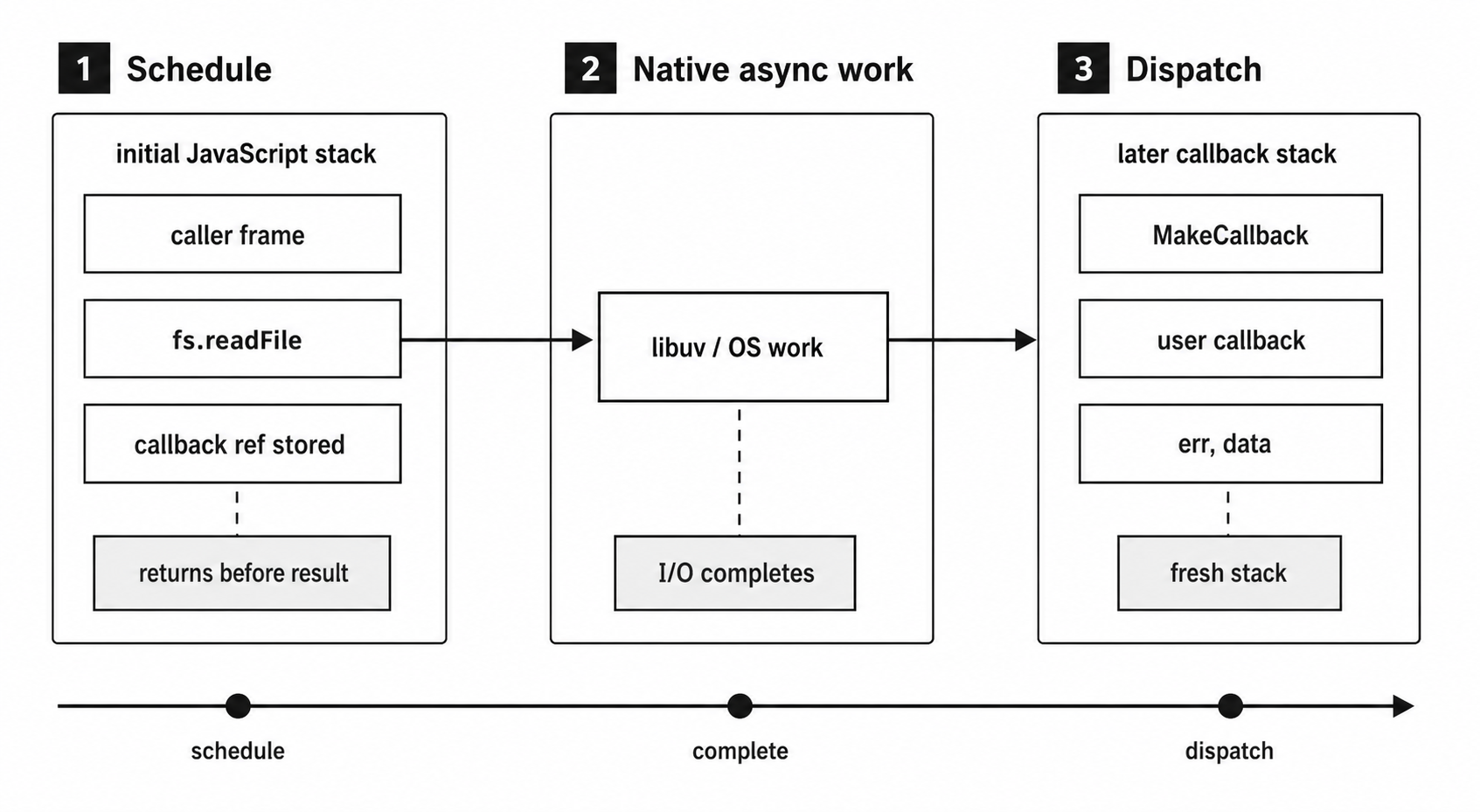
Figure 7.1 - A callback-based I/O request separates setup from completion. The setup stack returns while native work continues, and the user callback later runs on a new JavaScript stack.
The key word is "later". The callback does not run inside the original readFile() call. It runs on a future turn of the event loop, after the call stack that started the operation has already returned.
Node also validates callback arguments synchronously. If you pass undefined where a function is expected, readFile() throws a TypeError immediately, before any I/O is queued.
That validation only checks the type. Node confirms that the argument is a function and stores a reference to it. Node does not inspect the function body, check whether you handle errors, or verify that your callback uses the result correctly. What happens inside the callback is your responsibility.
Promise-based APIs use a different public shape. A promise-native API may use promise request wrappers internally instead of storing a user callback. Native completions still happen underneath for many OS handoffs, but the JavaScript API you write against can be callback-based or promise-based.
Synchronous vs Asynchronous Callbacks
The word "callback" does not tell you when the function runs.
Some callbacks run immediately. Array methods are the easiest example -
const numbers = [3, 1, 4, 1, 5];

numbers.forEach((n) => {
  console.log(n);
});

console.log("done");
The function passed to forEach() is a callback, but it runs synchronously. It runs inline, on the same call stack. Every callback call finishes before forEach() returns. By the time "done" is printed, all five numbers have already been logged.
Errors behave like normal synchronous JavaScript here. If the forEach() callback throws, that exception travels through forEach() and can be caught by a surrounding try/catch.
fs.readFile() uses a similar callback shape, but the timing is completely different -
fs.readFile("config.json", "utf8", (err, data) => {
  if (err) return handleError(err);
  console.log(data.trim());
});

console.log("read started");
The readFile() call returns before the file contents exist. The callback has not run yet. It runs later, on a new JavaScript stack, after libuv reports that the filesystem work has completed.
That difference changes how you write the code. A synchronous callback is a regular function call with one extra layer. An asynchronous callback is code scheduled for later. The original stack is gone by the time it runs.
Most APIs make the timing clear.
A callback passed to a one-shot Node I/O API is usually asynchronous -
fs.readFile(path, callback);
http.get(url, callback);
dns.lookup(hostname, callback);
child_process.exec(command, callback);
A callback passed to an array method is synchronous -
array.map(callback);
array.filter(callback);
array.forEach(callback);
array.reduce(callback);
EventEmitter listeners are synchronous too. When code calls -
emitter.emit("data", chunk);all registered "data" listeners run before emit() returns.
Timer callbacks are asynchronous. setTimeout() stores your function and calls it on a later event-loop turn. Array.sort() comparators are synchronous. They run during the sort.
Userland libraries are where things can get messy. A library might call your callback synchronously when it has a cached result, but asynchronously when it needs to do real work. That mixed timing creates bugs that are hard to see.
Node developers call that mistake "releasing Zalgo". The safer rule is simple - if an API ever calls its callback asynchronously, it should always call it asynchronously, even when the result is already available.
Older Node code often used process.nextTick() for that deferral. It is Node-specific and runs before promise jobs. For many userland APIs, queueMicrotask() is the smaller portable tool.
Continuation-Passing Style
There is a formal name for this style - continuation-passing style, or CPS.
The name sounds academic, but the idea is straightforward. Instead of returning a value directly, a function sends the result to another function. That other function is the continuation. It is the code that should run next.
The examples below assume fs is already in scope.
Direct style looks like this -
const data = fs.readFileSync("config.json", "utf8");
console.log(data.trim());
You call a function. It returns a value. You use the value on the next line.
The result and control both come back to the caller. The code reads in the same order it runs.
CPS changes where the result goes -
fs.readFile("config.json", "utf8", (err, data) => {
  if (err) return handleError(err);
  console.log(data.trim());
});
fs.readFile() still returns to its caller, but it does not return the file contents. In practice, the useful result comes through the callback.
That callback is the continuation. It is the rest of your program from that point, wrapped inside a function. Anything that needs the file contents has to happen inside that callback, because that is where data exists.
This takes a moment to get used to. The return value of fs.readFile() is not useful. The callback carries the program forward.
The style gets harder to read when each step starts more async work -
fs.readFile("config.json", "utf8", (err, raw) => {
  if (err) return done(err);

  let config;

  try {
    config = JSON.parse(raw);
  } catch (err) {
    return done(err);
  }

  fs.readFile(config.dataPath, "utf8", (err, data) => {
    if (err) return done(err);

    fs.writeFile("output.txt", data, done);
  });
});
There are three async operations here. Each result starts the next operation. Each callback is the continuation of the step before it.
The code still works, but reading it takes more effort. You read top-to-bottom, then outside-to-inside. The useful logic keeps moving deeper into nested functions.
The JSON.parse() block is local because that exception happens inside the callback's own stack. A try/catch around the original fs.readFile() call would not catch it.
CPS comes from programming language theory. Scheme compilers use CPS internally. Haskell has a continuation monad. Early Node used the same broad idea because JavaScript had first-class functions before it had standardized promises or async functions.
JavaScript functions made this style practical. The error-first convention made it predictable enough for a large ecosystem.
There are two versions of CPS in everyday JavaScript. A synchronous function like Array.forEach() can call the continuation immediately. An async function like fs.readFile() calls the continuation later. Node uses the async version for I/O and the sync version for ordinary iteration helpers.
The async version is the tricky one because the callback runs on a later stack, with a different error-handling path.
The try/catch Gap
try/catch only protects the stack that is running right now.
This example looks like it should catch the filesystem error -
const fs = require("node:fs");

try {
  fs.readFile("/nonexistent", "utf8", (err, data) => {
    console.log(data.trim());
  });
} catch (e) {
  console.log("caught -", e.message);
}
It does not.
The try/catch wraps the call to fs.readFile(). That call succeeds. Node accepts the callback, starts the I/O request, and returns. No exception is thrown during that setup step, so the try block finishes normally.
The actual filesystem failure happens later. libuv tries to open the file. The kernel reports ENOENT. Node receives that completion, builds an Error object, and calls your callback with -
(err, undefined)By then, the original try/catch is gone. The stack that contained it has already returned.
Inside the callback, err is truthy and data is undefined. The code ignores err, then tries to call data.trim(). That throws a TypeError inside the callback's later stack.
That TypeError does not go back to the old try/catch. It travels up the callback's current stack. If nothing catches it there, it reaches Node's uncaught exception path. Without a process.on("uncaughtException") handler, Node prints the stack and exits.
This is why error-first callbacks exist. Async failures cannot be thrown back into a stack that has already returned. The failure has to travel as data through the callback arguments.
When your callback runs, the stack contains Node's completion machinery and your callback. The original call to fs.readFile() is no longer on the stack. The handler you wrote around that original call cannot help anymore.
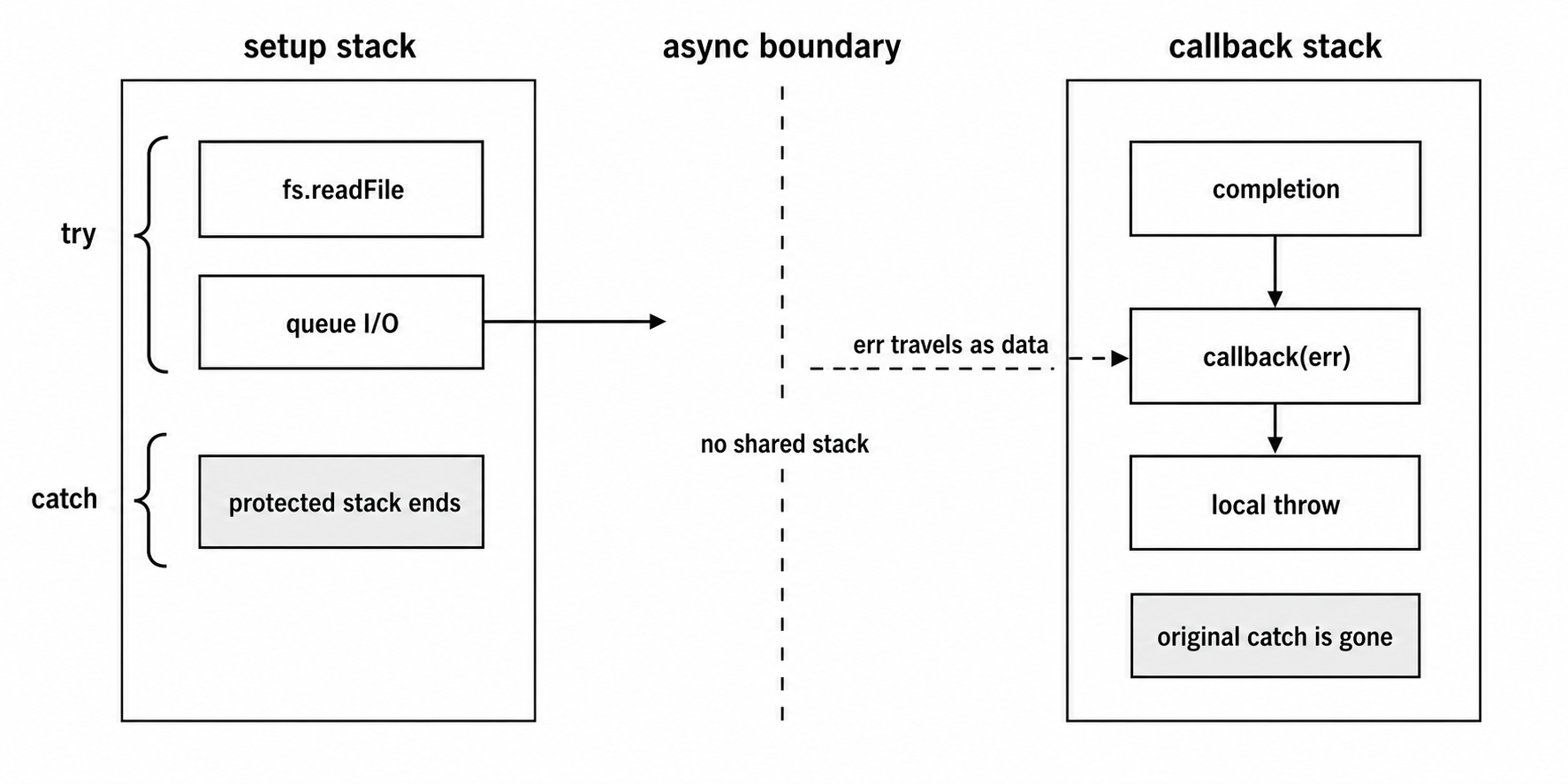
Figure 7.2 - A try/catch block protects only the stack that schedules work. An asynchronous failure crosses the gap as an err argument on the later callback stack.
Many callback bugs look like errors disappeared. Usually they did not disappear. They arrived as err arguments that nobody checked.
The other common bug is throwing inside the callback and expecting an old try/catch to catch it. That does not work either, because the callback runs on a later stack.
The fix is local error handling inside the callback -
fs.readFile("/nonexistent", "utf8", (err, data) => {
  if (err) return handleError(err);
  console.log(data.trim());
});
Check err first. Only use the result after that check passes.
Why Error-First
Node's error-first convention gives async code a consistent failure channel.
Single-completion callback APIs in Node core usually put the error first -
fs.readFile(path, encoding, (err, data) => { ... });
fs.writeFile(path, content, (err) => { ... });
fs.stat(path, (err, stats) => { ... });
On success, err is null, and the remaining arguments contain the result.
On failure, err is usually an Error object, and the result arguments are undefined or missing. fs.writeFile() only receives err because a successful write does not need to return data.
Putting the error first makes the required branch hard to miss -
fs.readFile("data.json", "utf8", (err, raw) => {
  if (err) return handleError(err);

  let parsed;

  try {
    parsed = JSON.parse(raw);
  } catch (err) {
    return handleError(err);
  }

  processData(parsed);
});
The callback checks the I/O error first. If the read failed, the function returns early. The rest of the code only runs when raw is valid.
The return is doing real work. It sends the error to the handler and stops the callback from continuing into code that expects success data.
This pattern appears everywhere in callback-era Node code -
if (err) return callback(err);or -
if (err) return done(err);or -
if (err) return handleError(err);That first guard is the callback-era replacement for a local try/catch around the async operation.
If you skip it, the callback continues as if the operation succeeded. Then raw may be undefined, JSON.parse(undefined) may throw, and the stack trace will point at the parsing line instead of the filesystem failure that caused the bad input.
Early Node userland did not begin with one clean convention. Some modules put errors second. Some used separate success and error callbacks. Some emitted events. Some threw synchronously for setup failures. Some returned error codes instead of Error objects.
The ecosystem eventually settled around "Node style callbacks" - a callback whose first argument is null on success or an error object on failure.
That convention gives the API and caller a shared agreement. When you see (err, result) in a Node callback, you can expect this -
if (err) {
  // result is not safe to use
} else {
  // result is valid
}
Community libraries were not always consistent. Some passed strings. Some passed objects that were not Error instances. Some used numbers or custom error codes. If you build callback APIs, pass real Error objects.
A useful error object gives the caller a .message, a .stack, and often a .code such as "ENOENT". A plain string can tell the caller what happened, but it does not tell them where the problem came from.
Filesystem Callback Dispatch
When you call fs.readFile(path, options, callback), the JavaScript function returns before the file contents exist. Behind that simple call, Node has already set up a small chain of internal completions.
The names in this section describe Node v24 internals, not public API. They are useful because they show why one public callback can involve several internal steps.
At the JavaScript layer, fs.readFile() starts by validating the callback. Then it normalizes options like encoding and signal. It creates a ReadFileContext that stores the user callback and the state needed to finish the read.
That context can hold things like -
- the user callback
- the requested encoding
- file descriptor state
- buffers collected during reads
- the current offset
- abort signal state
- any stored error
Then Node creates a native-backed FSReqCallback, attaches the context to it, sets the request's oncomplete handler to an internal continuation, and starts the filesystem open operation.
The success path goes through several completion steps -
fs.readFile()validates arguments and startsopen.readFileAfterOpenreceives the file descriptor and startsfstat.- The stat completion decides whether to allocate a sized buffer or collect chunks.
- Read completions keep filling buffers until EOF or the requested length.
- The close completion calls the original user callback from the
ReadFileContext.
An open failure takes a shorter path. If opening the file fails, there is no descriptor to close, so Node can call the user callback with the error. If a later step fails after a descriptor exists, Node still has to close the descriptor before it finishes.
So fs.readFile() looks like one callback from your side, but internally it is a sequence of smaller callbacks.
At the native layer, FSReqCallback is an AsyncWrap-backed request object for filesystem work. It wraps a libuv uv_fs_t. For async filesystem calls, libuv receives the event loop, the request struct, operation arguments, and a C callback.
Most async filesystem work runs through libuv's thread pool. The default pool size is four threads, controlled by UV_THREADPOOL_SIZE.
The result is stored in uv_fs_t.result, and the meaning depends on the operation.
For uv_fs_open, the result is a file descriptor on success. For uv_fs_read, the result is the number of bytes read. On failure, the result is a negative libuv error code. The file bytes themselves live in the buffer passed to uv_fs_read; they are not stored in result.
When the libuv operation completes, Node's C++ filesystem completion path reads uv_fs_t.result. A negative result becomes a JavaScript error. A successful result becomes the JavaScript value expected by the next internal continuation.
FSReqCallback::Resolve() calls into JavaScript with a success result. FSReqCallback::Reject() calls into JavaScript with an error.
MakeCallback is the native-to-JavaScript entry point used here. It sets up the async context, calls the JavaScript function, then cleans up after that call returns.
That cleanup step also reaches Node's task-queue checkpoints. Node can run process.nextTick() callbacks, promise microtasks, and rejection handling work after returning from a native callback into JavaScript.
The practical rule is still the one you see in code - after a native callback enters JavaScript and returns, Node checks the task queues before delivering the next libuv callback.
In a CommonJS script, process.nextTick() scheduled inside an fs.readFile() callback runs before a promise handler scheduled in the same callback.
ESM top-level evaluation has extra ordering details because module evaluation uses the microtask system, but inside this filesystem callback the usual next-tick-before-promise behavior still applies.
One small trap is the this binding. Internal read-file continuations use this.context because Node calls them with the request wrapper as the receiver. Your user callback is called differently.
The final JavaScript continuation retrieves context.callback and calls it as a plain function. In CommonJS, a non-strict regular function sees globalThis as this. In ESM or strict mode, it sees undefined. Arrow functions keep lexical this.
Use callback arguments. Do not rely on this inside filesystem callbacks.
If your callback throws, the exception escapes from that later callback invocation. The stack comes from the completion path, not from the original fs.readFile() call that scheduled the work. That is the same async error-handling separation from earlier, seen from inside the runtime.
Callback Patterns in Practice
The simplest callback pattern is sequential work - do one thing, then start the next thing inside its callback.
fs.readFile("input.txt", "utf8", (err, data) => {
  if (err) return console.error(err);

  const upper = data.toUpperCase();

  fs.writeFile("output.txt", upper, (err) => {
    if (err) return console.error(err);
    console.log("done");
  });
});
This reads a file, transforms the content, then writes the result. The write starts only after the read finishes.
Two or three steps can still be readable. After that, the nesting gets harder to follow. Each new async step pushes the next part of the program one level deeper.
Parallel work needs a different shape. Suppose you need to read three files and process them together. Reading them one after another would serialize the I/O. If each read takes about 5ms, three sequential reads take about 15ms. If the reads are independent, you usually want to start all three first and join their results later.
A basic counter-based version looks like this -
const files = ["a.txt", "b.txt", "c.txt"];
const results = new Array(files.length);
let pending = files.length;

files.forEach((file, i) => {
  fs.readFile(file, "utf8", (err, data) => {
    if (err) return console.error(err);

    results[i] = data;

    if (--pending === 0) {
      processAll(results);
    }
  });
});
All three readFile() calls start immediately. They do not wait for each other.
Each callback stores its result at the original input index. That keeps the output order stable even if the files finish in a different order. The pending counter tells the code when all reads are done.
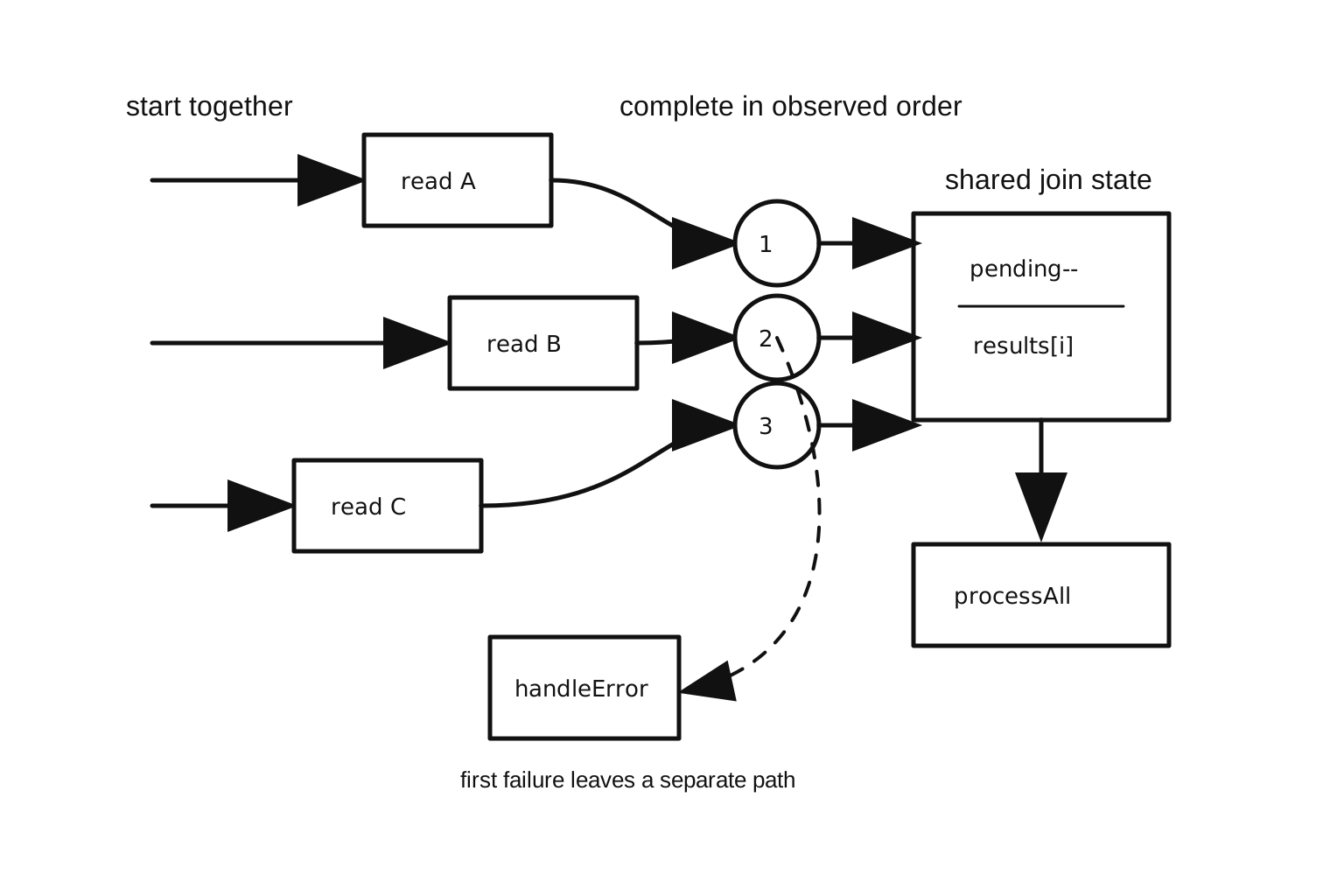
Figure 7.3 - Parallel callback code starts independent work first, then joins completions through shared state. Success decrements the counter; the first failure takes a separate error path.
That example handles the success path for a non-empty file list. It is incomplete for production.
If b.txt does not exist, that callback logs the error and returns. The counter never reaches zero, so processAll() never runs.
If you decrement the counter before checking the error, processAll() could run with a missing result. Then results[1] might be undefined.
Parallel callbacks need more coordination around errors. One common approach is first-error-wins -
let errored = false;

fs.readFile(file, "utf8", (err, data) => {
  if (errored) return;

  if (err) {
    errored = true;
    return handleError(err);
  }

  results[i] = data;

  if (--pending === 0) {
    processAll(results);
  }
});
The first error is reported. Later completions are ignored by the guard.
The filesystem work already in flight still finishes at the OS and libuv level. This guard does not cancel those reads. It only stops your JavaScript completion logic from running after the first failure.
That behavior is similar to one part of Promise.all() - report the first failure. If you want to collect every success and every failure, you need more state. You need an errors array, a results array, and a counter that tracks all completions. That is basically the callback version of Promise.allSettled().
Waterfall code adds another layer. A waterfall is a sequence where each async result feeds into the next step. If step 3 needs the result from step 1, you either keep that result in an outer variable or pass it through intermediate callbacks that do not use it.
Retry logic adds yet another layer. If an operation fails and you want to retry with backoff, you usually wrap the operation in a recursive function. The retry count, delay, and maximum retry count live in closure variables. The code works, but reading it means following state across multiple later callbacks.
This is why the async package became so popular in early Node. The async.js project by Caolan McMahon gave developers utilities such as async.parallel, async.series, async.waterfall, async.retry, and async.queue.
Those utilities existed because raw callbacks made flow control manual. Developers kept writing the same counters, guards, queues, and retry loops by hand, and the same mistakes kept showing up.
Callback Hell and Inversion of Control
The nesting problem has a familiar name - callback hell.
If you remove error handling for a moment, the shape is easy to see -
getUser(userId, (err, user) => {
  getOrders(user.id, (err, orders) => {
    getOrderDetails(orders[0].id, (err, details) => {
      getShippingStatus(details.trackingId, (err, status) => {
        updateUI(user, orders, details, status);
      });
    });
  });
});
Each callback pushes the next step one level deeper. Reading the code means tracking which scope you are inside and which values came from outer scopes.
If you add proper error guards, the code gets longer at every level. Each callback declares its own err, shadowing the previous one. The indentation is the visible pain.
Named functions can improve the layout -
function onUser(err, user) {
  if (err) return handleError(err);
  getOrders(user.id, onOrders);
}

function onOrders(err, orders) {
  if (err) return handleError(err);
  getOrderDetails(orders[0].id, onDetails);
}

function onDetails(err, details) {
  if (err) return handleError(err);
  getShippingStatus(details.trackingId, onStatus);
}

getUser(userId, onUser);
This version is easier to scan. Each step has a name. The indentation is under control.
The bigger issue is still there.
When you pass a callback to another function, you give that function control over what happens next. You are trusting it to call your callback at the right time, exactly once, with the right arguments.
That creates a few common failure modes.
The callback is never called. A library can miss a branch and leave your callback waiting forever. A database driver might forget to call back on timeout. Middleware might forget to call next() on an error path. Nothing throws. Nothing rejects. The request just sits there while state accumulates.
The callback is called twice. A buggy API can call your callback more than once. If your callback sends an HTTP response, writes to a database, charges a card, or calls another service, the second call can cause real damage. In Express apps, this often shows up as "headers already sent".
The callback timing changes. A function might call the callback synchronously for cached data and asynchronously for a cache miss. Then your code behaves differently depending on timing. State may not be ready. Listeners added after the call may miss the callback. This is the Zalgo problem from earlier.
The arguments do not follow the expected shape. JavaScript does not enforce the error-first convention. A library can pass a string instead of an Error, put the result in the wrong slot, or use two separate callbacks. The contract is based on convention.
A small wrapper can protect you from double calls -
function once(fn) {
  let called = false;

  return function (...args) {
    if (called) return;
    called = true;
    fn.apply(this, args);
  };
}
Passing once(callback) means an accidental second call is ignored. In development, you may prefer to log or throw on the second call so the bug becomes visible. In production code with side effects, ignoring the duplicate can be safer than running the side effect twice.
Middleware stacks, including Express applications, often exposed these problems through next(). Calling next() twice could continue the chain twice. Forgetting to call it could leave the request hanging. Teams used conventions, wrappers, and lint rules to reduce those mistakes.
Promises gave JavaScript a cleaner structure for one-shot async results. A promise represents the future result as an object returned to the caller. The caller attaches handlers. The promise can fulfill or reject once. Extra calls to resolve() or reject() after settlement do not change the state.
That is why promises became the next step after callbacks.
Callbacks Today
Callbacks are still part of Node. Promises and async/await are common in modern application code, but callbacks remain in public APIs, old libraries, native bindings, events, timers, and internal completion paths.
libuv is callback-based at the C API level. Async filesystem operations receive a uv_fs_cb. Thread-pool work receives an after_work_cb on the loop thread after the worker finishes. Node's C++ binding layer uses those native callbacks to resume JavaScript work.
Sometimes that JavaScript work calls a user callback. Sometimes it resolves or rejects a promise.
The public API shape decides what Node keeps.
With callback style -
fs.readFile(path, callback);Node stores your callback in the read-file context and eventually calls it.
With promise style -
await fs.promises.readFile(path);Node uses promise-oriented request machinery. The filesystem work still crosses native completion points, but Node does not store a user callback because you did not pass one.
util.callbackify() exists for compatibility in the other direction. It turns a promise-returning function into a callback-accepting function. That sounds old-fashioned, but it is useful when a callback-based API needs to call newer async code, or when a library wants to support callback users while using promises internally.
Performance is another reason callbacks still show up. A callback path can allocate fewer promise-related objects in some workloads. That is not a general rule. Node and V8 have optimized promises heavily. Treat callback performance as something to measure, not something to assume.
For most application code, promises and async/await are easier to read and easier to compose. Use callbacks when the API requires them, when you are integrating with older code, or when profiling shows a real reason to keep them.
EventEmitter listeners are callbacks too -
server.on("request", handler);The handler is a callback registered for the "request" event. EventEmitter is a multi-callback pattern. Multiple listeners can be registered for one event, and they run synchronously in registration order when the event is emitted.
Streams use callbacks through events as well. A "data" handler is a callback. An "error" handler is a callback.
Timers are callback APIs -
setTimeout(() => {
  console.log("later");
}, 100);
You pass a function, and Node calls it later when the timer expires.
Even the Promise constructor starts with a function -
new Promise((resolve, reject) => {
  // executor
});
That executor runs synchronously during promise construction, so it is different from a Node-style async callback. Still, it shows the same basic JavaScript feature - functions can be handed to other code.
Callbacks are one of Node's lowest-level completion shapes. Modern APIs often wrap them, sit beside them, or meet them at integration boundaries. Underneath callback-based filesystem APIs, Node still has request objects, native completions, callback dispatch, and task-queue checkpoints. Promise-native code uses a related path that resolves promises instead of calling user callbacks.
The shape has changed over time, but the runtime difference remains the same. Work starts now. Completion arrives later. Something has to carry the result back into JavaScript.
For older Node APIs, that "something" is the error-first callback.