Node.js import.meta: URLs, Caching & Module State
import.meta is the metadata object you get inside an ES module. It gives the module a way to ask, "Where am I? Am I the entry file? How would this import resolve from here?"
CommonJS had __filename, __dirname, and require.resolve() because Node wrapped every file in a function and injected those values. ES modules do not use that CommonJS wrapper. Instead, each ES module gets its own import.meta object.
In Node v24, the fields you will usually care about are import.meta.url, import.meta.filename, import.meta.dirname, import.meta.main, and import.meta.resolve().
These fields look small, but they lead into one of the bigger differences between CommonJS and ESM. In ESM, module identity is based on URLs. That URL decides where the module lives, how the loader caches it, whether two imports point to the same module instance, and what happens when modules depend on each other during startup.
import.meta and ESM Caching
ESM has its own loader cache. It is separate from require.cache, and you cannot inspect it or delete entries from it the same way you can with CommonJS.
The ESM loader tracks modules by resolved URL. Once a module is resolved, parsed, linked, and evaluated, later imports of the same URL reuse the same module record. That is why module-level state behaves like a singleton when every importer reaches the same URL.
Circular dependencies show why this loader model behaves differently from CommonJS. ESM imports are live bindings. The import is connected to the export during linking, before the module's top-level code finishes running. If another module reads that binding too early, the value may not be initialized yet.
The easiest way to understand this chapter is to start with import.meta, then follow the same URL identity into caching, singleton state, V8 module status, and circular dependencies.
import.meta
CommonJS gave every module __filename and __dirname by injecting them through the module wrapper function. ES modules do not get that wrapper. Module-specific information comes through import.meta.
The ECMAScript spec defines the syntax for import.meta, but the host environment decides what properties appear on the object. Browsers usually expose import.meta.url. Node exposes more fields because server-side code often needs filesystem paths, entry-point checks, and module resolution.
Each module gets its own import.meta object. It is not shared across the whole dependency graph.
Node also creates it lazily. V8 asks Node to initialize import.meta only when code actually accesses it inside a module. If a module never touches import.meta, Node does not create those properties for that module.
import.meta.url
Every file-backed ES module gets import.meta.url. The value is a file:// URL pointing to the module's source file.
console.log(import.meta.url);
// file:///home/app/src/index.mjs
This is a URL string, not a normal filesystem path.
On Unix-like systems, the value has three slashes at the start, such as file:///home/app/src/index.mjs. On Windows, it looks more like file:///C:/Users/app/src/index.mjs. The path part uses forward slashes because URLs use forward slashes. Special characters are URL-encoded, so a space becomes %20 and a hash becomes %23.
Because import.meta.url is a real URL, it works well as a base for files near the current module -
const dataUrl = new URL('./data.json', import.meta.url);
console.log(dataUrl.pathname);
// /home/app/src/data.json
The URL constructor applies URL resolution rules. It knows how to combine ./data.json with the current module's URL.
Be careful with .pathname. It gives you the path part of the URL, but that path is still URL-encoded. A file inside /home/my app/data.json gives you /home/my%20app/data.json from .pathname.
When you need an actual operating-system path string, use fileURLToPath() from node:url. That gives you a decoded path, and it also gives you Windows backslashes when the platform expects them.
Before Node added import.meta.filename and import.meta.dirname, this was the usual ESM replacement for __filename and __dirname -
import { fileURLToPath } from 'node:url';
import { dirname } from 'node:path';

const __filename = fileURLToPath(import.meta.url);
const __dirname = dirname(__filename);
That pattern existed because ESM exposes location as a URL first. The path is something you derive from the URL when you need it.
The common mistake is treating the URL as if it were already a path. For example, file:///home/app/data.json is a URL string. If you pass that string to fs.readFileSync(), Node treats it as a literal path string. The fs APIs accept real path strings and they also accept URL objects. A URL string is different from both.
import.meta.filename and import.meta.dirname
Node v21.2 introduced import.meta.filename and import.meta.dirname. In Node v24, both are stable. They give ESM code the path strings people used to build manually.
console.log(import.meta.filename);
// /home/app/src/index.mjs

console.log(import.meta.dirname);
// /home/app/src
These values are regular filesystem paths. They are decoded, absolute, and formatted for the current platform.
import.meta.filename gives the same value as this -
fileURLToPath(import.meta.url);import.meta.dirname gives the same value as this -
dirname(import.meta.filename);For modules loaded from disk, the old helper pattern is no longer needed.
The "loaded from disk" part is important. A data: module still has import.meta.url, but it does not have a filesystem path. In that case, import.meta.filename and import.meta.dirname are undefined. For https: modules, Node v24 still needs a custom HTTPS loader. Native network imports are not the normal path.
So in everyday Node code, files on disk get the path helpers. Non-file module sources may only get the URL.
There is also a symlink detail. By default, import.meta.filename resolves symlinks. If /home/app/lib/index.mjs is a symlink to /home/shared/lib/index.mjs, the default filename is /home/shared/lib/index.mjs.
Node can preserve the symlink spelling when you use the symlink flags. --preserve-symlinks-main affects the entry module. --preserve-symlinks affects imported modules. When you need the exact URL that the loader used, use import.meta.url.
import.meta.main
import.meta.main tells a module whether it is the process entry point.
function main() {
  // parse CLI args, run the command, or start the process
}

if (import.meta.main) {
  main();
}
That is the ESM version of the old CommonJS entry-point check -
if (require.main === module) {
  main();
}
This pattern is useful when one file can be used in two ways. It can run as a CLI, and it can also export functions for other modules. When the file is the program entry point, import.meta.main is true. When another module imports it, import.meta.main is false.
Node added import.meta.main in v24.2. In the Node v24 docs, it is still marked as Stability 1.0, early development. If your code needs to support older Node versions, use a wrapper entry point or add a version check.
import.meta.resolve()
import.meta.resolve() takes a module specifier and resolves it from the current module.
const resolved = import.meta.resolve('node:fs');
console.log(resolved);
// node:fs
The result is always a URL string.
Built-in modules resolve to the node: scheme. That means import.meta.resolve('fs') returns node:fs.
Local files resolve to file:// URLs. A relative specifier like ./utils.js resolves against the URL of the module that called import.meta.resolve().
Package names go through Node's package resolution algorithm. That includes node_modules, package.json, exports, conditions, and subpath patterns.
In Node v24, import.meta.resolve() is synchronous. Older Node versions had some async behavior behind flags, but current releases return a string directly. Node v24 still marks this API as Stability 1.2, release candidate.
Resolution only answers the question, "Where would this specifier point from here?" It does not import the module. It does not run the target file. It does not evaluate any code.
That makes it useful for tasks similar to require.resolve() in CommonJS. You can find where a package entry resolves, locate a file shipped by a dependency, check whether a package subpath is exposed, or pass the resolved location into another API.
A failed package resolution commonly throws ERR_MODULE_NOT_FOUND or an exports-related error such as ERR_PACKAGE_PATH_NOT_EXPORTED.
A missing relative file is a little different. In Node v24, this can still return a file: URL -
import.meta.resolve('./definitely-missing.js');The missing file shows up later when you try to load it or read it.
Here is a common package-file lookup -
import { readFileSync } from 'node:fs';
import { fileURLToPath } from 'node:url';

const schemaUrl = import.meta.resolve('my-lib/schema.json');
const schema = readFileSync(fileURLToPath(schemaUrl), 'utf8');
The package specifier resolves to a URL. The URL becomes a filesystem path. Then fs reads the file.
This does not import my-lib. It only uses Node's package resolution rules to find a file that the package exposes.
Package encapsulation still applies. If my-lib has an exports field and does not expose ./schema.json, then import.meta.resolve('my-lib/schema.json') fails even if the file exists on disk. CommonJS package specifiers follow the same rule, so require.resolve('my-lib/schema.json') also fails when exports hides that subpath.
An absolute filesystem path skips package resolution because you already chose the file directly.
How import.meta Is Populated
V8 knows how to parse and run ES modules, but it does not know what a Node file path is. It also does not know about Node's package resolver.
When module code accesses import.meta, V8 calls a hook provided by the host environment. Node registers that hook during startup.
Node receives the import.meta object and the internal module wrapper for the current source-text module. In Node's C++ layer, that wrapper is called ModuleWrap. It connects Node's JavaScript loader code to V8's native v8::Module.
From that wrapper, Node gets the module URL and the entry-point flag. Then Node fills the object with the fields for that module.
The initializer sets url from the module URL. It sets main from the entry-point flag. For file: URLs, it installs lazy helpers for filename and dirname. It also creates a resolve function bound to the current module's URL.
That binding is why this works the way you expect -
import.meta.resolve('./data.json');The resolver uses the current module as the parent, so ./data.json resolves next to the file that called it.
All of this happens lazily. If a module never accesses import.meta, the initialization callback never runs for that module. The savings per module are small, but large dependency graphs often contain many files that never need their own location.
In the Node v24 source, the JavaScript initializer lives in lib/internal/modules/esm/initialize_import_meta.js. Related wiring lives in lib/internal/modules/esm/utils.js, with C++ support behind ModuleWrap.
Module Caching
Both CommonJS and ESM cache modules.
Once a module has loaded and evaluated, later requests for the same module identity reuse the cached result. A project might import the same utility from 200 files. Node should not read, parse, and execute that utility 200 times. It loads it once, caches it, and reuses the same module identity.
CommonJS and ESM disagree on what "same module" means.
CommonJS uses resolved filenames and exposes its cache as a normal JavaScript object. ESM uses resolved URLs and keeps its cache inside the loader. That one difference affects hot reload, symlinks, duplicate packages, singleton state, and circular dependencies.
Module._cache
When code calls require('./foo'), Node resolves that request to an absolute filename such as /home/app/foo.js.
Then it checks this cache entry -
Module._cache['/home/app/foo.js']If the entry exists, Node returns the cached module.exports object immediately. There is no file read, no compilation, and no evaluation.
Module._cache is a plain JavaScript object. Its keys are fully resolved absolute filesystem paths. Its values are Module instances. Those instances have properties like .exports, .id, .filename, .loaded, .children, and .paths.
require.cache points to that same object -
const Module = require('node:module');

console.log(require.cache === Module._cache);
// true
Because it is a normal object, userland code can inspect it, loop over it, and delete entries from it.
delete require.cache[require.resolve('./myModule')];After that deletion, the next require('./myModule') misses the cache. Node reads the file again, compiles it again, evaluates it again, and stores a fresh module entry.
Some in-process hot reload tools use this shape. They watch files, delete cache entries, and re-require changed modules. Tools like nodemon use a cleaner approach. They restart the whole process.
Cache deletion only affects future lookups. It does not update old references.
If this already ran -
const foo = require('./foo');then the local foo variable still points at the old exports object. Deleting the cache entry does not reach into existing variables and replace them. Old closures stay alive. Old state stays alive. Any code already holding the old object keeps using it.
That is why CommonJS hot reload is partial. A new require() can get fresh exports, but existing references remain attached to the previous module instance. More complete hot reload has to walk back through the dependency graph and reload the modules that already captured the stale value. Some tools do that, but it is easy to get wrong.
There is one more detail in CommonJS. When module A requires module B, Node pushes B into A's module.children array. Deleting B from require.cache does not remove it from A's children. Test frameworks and isolation tools have to account for that too.
CJS Cache Keys and Symlinks
CommonJS usually keys the cache by the resolved real filename. That means Node follows symlinks before choosing the cache key.
If /home/app/node_modules/foo is a symlink to /home/shared/foo, the cache key becomes something like this -
/home/shared/foo/index.jsTwo different require() calls through two different symlink paths can hit the same cache entry if they resolve to the same physical file.
Node also keeps internal resolution caches so repeated lookups do not repeat every filesystem check. In Node v24, node:module exposes _pathCache. Realpath caching is an internal implementation detail rather than a public property on node:module.
The --preserve-symlinks flag changes the cache behavior. With that flag, Node uses the symlink path itself as the cache key instead of the real target path. The entry module has a separate flag, --preserve-symlinks-main.
This can be useful in monorepos with workspace symlinks. It can also create duplicate module instances. If the same physical file is reached through two different symlink paths, Node can treat them as two different modules.
ESM Loader Caches
ESM caching lives inside the ESM loader. There is no public import.cache object. There is also no public API that deletes ESM cache entries.
In Node v24, lib/internal/modules/esm/module_map.js defines internal caches named ResolveCache and LoadCache. They are backed by Node's internal primordials.SafeMap.
When code imports a module, Node resolves the specifier to a URL. For example -
import './foo.mjs';may resolve to this -
file:///home/app/foo.mjsThe loader then checks its cache for that URL. If the entry already exists, the import gets the same module job and the same module instance.
Because the cache key is a URL, query strings and fragments are part of the identity -
import './foo.mjs';        // file:///home/app/foo.mjs
import './foo.mjs?v=1';    // file:///home/app/foo.mjs?v=1
import './foo.mjs?v=2';    // file:///home/app/foo.mjs?v=2
All three can point to the same file on disk, but the loader sees three different URLs. That gives you three ES module instances and three evaluations.
This behavior applies when the target is an ES module, such as .mjs or a .js file inside a package with "type": "module". If an ESM file imports a default CommonJS .js target, Node goes through the CommonJS loader, and the path can collapse back to one CommonJS cache entry.
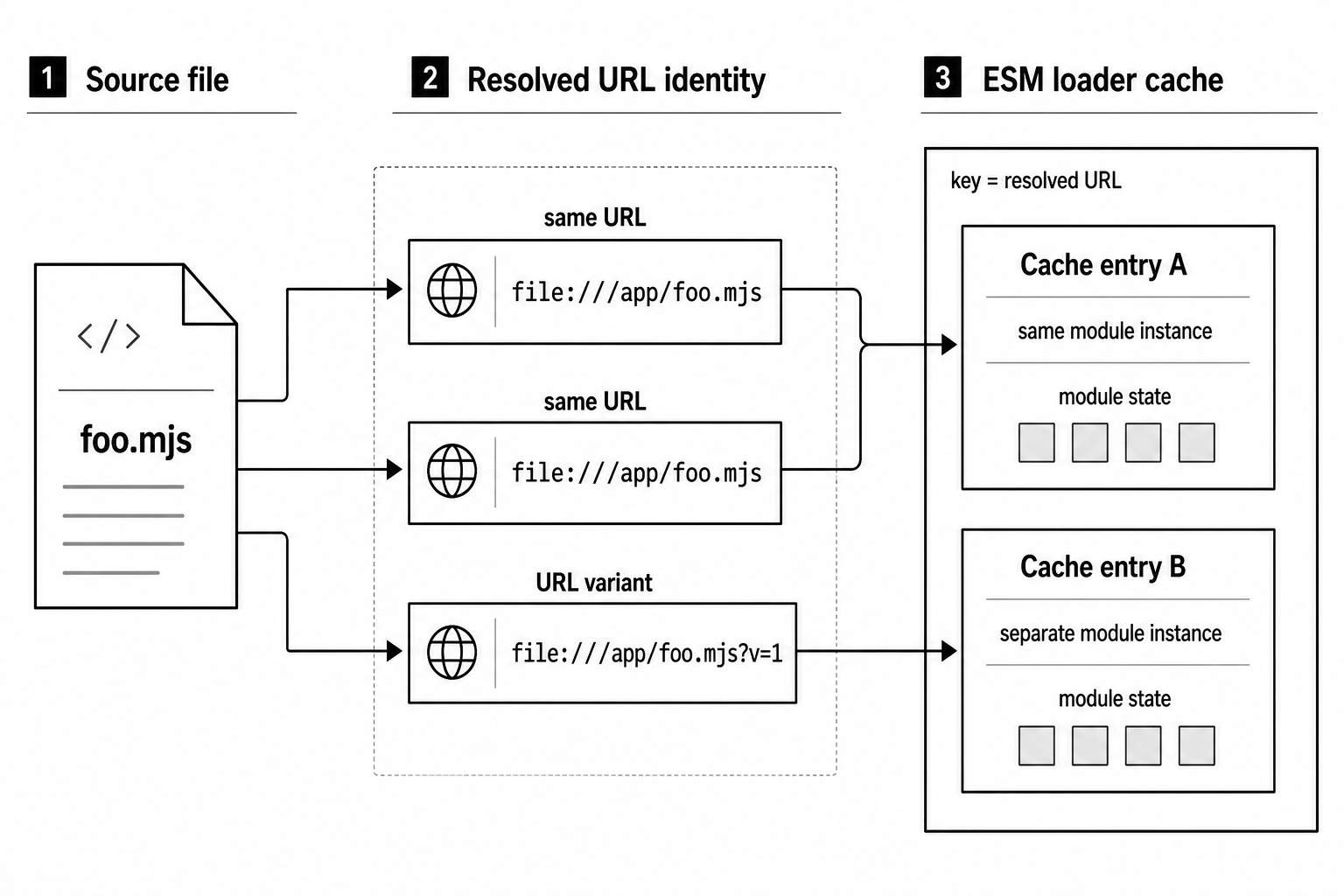
Figure 5.1 - ESM cache identity follows the resolved URL. The same URL reaches the same module instance. A query string or fragment creates another cache entry for the same file.
Query strings can help during development. If dynamic import() sees a new query string, it sees a new URL, so it loads another module instance. That can work as cache busting.
Use that carefully. Every variant stays in memory for the lifetime of the process. If you keep generating unique query strings, you keep accumulating module instances.
ESM has no public cache-clearing API because the loaded graph is tied to V8 module records. Those records move through a one-way lifecycle. Once a module has evaluated, V8 does not provide a way to turn it back into a fresh, unlinked module. Other module records and namespace objects may already reference its live bindings.
Deleting only the loader lookup entry would not cleanly replace the graph. Existing modules would still point at the old record.
Singletons Through Caching
Module caching creates shared module-level state.
If every importer resolves to the same module identity, there is one evaluation, one module scope, and one set of module-level variables.
Here is the ESM version -
// counter.mjs
let count = 0;

export function increment() {
  count++;
}

export function getCount() {
  return count;
}
Every file that imports counter.mjs gets functions connected to the same count variable. Calling increment() from one part of the app changes what getCount() returns somewhere else.
CommonJS reaches the same shape through the cached module.exports object -
// counter.js
let count = 0;

module.exports = {
  increment() {
    count++;
  },
  getCount() {
    return count;
  },
};
The first require('./counter') evaluates the file and caches the exports object. Every later require('./counter') returns that same object. The functions close over the same count.
You do not need a singleton class for this. The module cache already gives you one shared instance, as long as every consumer resolves to the same cache entry.
The catch is cache identity. If two consumers resolve to different cache entries, they get separate module instances and separate state.
That can happen when a package is installed twice, once at the project root and once inside a nested dependency's node_modules directory. Now you have two evaluations and two singletons. A logger can have two instances. A database pool can be created twice. A config object can exist in two copies with different values.
When that kind of bug appears, tools like this can help find duplicate installs -
npm ls <package>Workers also split the cache. A worker_threads worker has its own module graph with its own CommonJS and ESM caches. If the main thread imports counter.mjs and a worker imports the same file, each one gets its own count.
They share an operating-system process, but they do not share a module cache.
V8 Module States and Cache Internals
The ESM loader cache in Node sits above V8's module machinery.
In Node v24, the load cache stores ModuleJob instances. A ModuleJob tracks one module from source loading through final evaluation. Each ModuleJob wraps a ModuleWrap, the C++ binding class that connects Node's JavaScript loader code to V8's native v8::Module.
V8 tracks every ES module through a fixed set of states. These states explain two things that beginners often find surprising. First, ESM cache entries cannot be reset cleanly. Second, circular dependencies fail differently from CommonJS cycles.
The walkthrough below describes a synchronous ESM graph. Top-level await still uses the same broad parse, link, and evaluate phases, but evaluation moves through promises and parts of the graph can stay pending. The cycle examples later are for synchronous modules.
Uninstantiated. V8 has parsed the source and created a module record. It knows the module's static imports and exports from the import and export statements. It has not allocated the runtime binding storage yet.
At this point, V8 knows the shape of the module. The code has not run.
Instantiating. V8 allocates binding slots and connects imports to exports across the graph. It walks the graph, asks Node to resolve each specifier, finds the target module, finds the requested export, and connects the import to that export's binding.
The importer does not receive a copy of the value. It receives a live connection to the exporter's binding slot.
Cycles are detected during this phase. If V8 reaches a module that is already being instantiated, it has found a circular dependency. The cycle does not automatically fail. V8 still creates the binding connections. Reads before lexical initialization still go through temporal dead zone checks.
Instantiated. All bindings are connected. Every import points to a specific export binding in another module. Function declarations and var exports have their normal instantiation-time behavior. let and const exports still wait for evaluation to reach their declarations.
No top-level module code has run yet.
Evaluating. V8 starts executing the module's top-level code. As declarations and assignments run, export bindings receive their values.
Because imports are live bindings, other modules can observe those values through the connected binding slots. If a circular dependency causes a module to read a lexical export before the exporting module reaches its declaration, the read throws ReferenceError. The binding exists, but it has not been initialized.
Evaluated. Top-level execution finished successfully. Exported bindings now have their completed top-level values. Mutable exports can still change later, and importers will see those changes because imports stay connected to the binding.
This state is permanent. V8 has no API that resets an evaluated module back to a fresh uninstantiated state.
Errored. Evaluation threw. V8 stores the error on the module record. Any future attempt to use that same module record rethrows the same error.
There is no retry for that exact URL after an evaluation error. If you fix the source file and want to try again, restart the process. In development, dynamic import() with a different query string can load the fixed file as a different URL.
Resolution, load, and parse errors happen earlier. Those are different from an evaluation error stored on a created module record.
CommonJS handles cycles with a simpler cache timing.
When CommonJS loads a fresh module, the sequence goes like this -
- Node creates a new
Moduleobject withmodule.exportsset to{}. - Node puts that
ModuleintoModule._cache[filename]. - Node wraps and compiles the source.
- Node evaluates the wrapper function, and the module fills
module.exportsas the code runs.
Step 2 happens before step 4. That means a CommonJS module appears in the cache before its code finishes running.
If module A starts loading, then requires module B, and module B requires module A back, B receives whatever A's module.exports object contains at that moment. It may be half-filled.
ESM also creates internal cache entries early. But ESM does not expose a half-filled exports object. It exposes live bindings. A binding can exist and still be uninitialized. Reading it too early throws instead of quietly returning a half-built object.
That is also why ESM cache invalidation has no public Node API. Once V8 evaluates a module, other modules may already hold live binding connections to it. Removing a loader-cache entry would only change future lookup. It would not disconnect the already-evaluated graph.
CommonJS is easier to poke at because require.cache is just an object. delete require.cache[key] removes a property. The old module instance stays alive if anything still references it, but the next require() can create a fresh instance. That is rough, but usable for some development hot reload workflows.
Circular Dependencies
A circular dependency happens when two modules depend on each other, directly or through a longer chain.
Both CommonJS and ESM can represent cycles. A cycle is allowed, but it can still be unsafe. The risky part is top-level timing. If one module reads something from the other before the other module has finished initializing it, startup can produce partial values or throw.
Partial Exports in CJS
Here is the classic CommonJS cycle. a.js requires b.js, and b.js requires a.js.
// a.js
module.exports.x = 1;
const b = require('./b');
module.exports.y = 2;
console.log('a sees b:', { ...b });// b.js
const a = require('./a');
module.exports.value = 42;
console.log('b sees a:', { ...a });Run this -
node a.jsNode starts loading a.js. It creates a module object, sets module.exports to {}, puts the module in the cache, and starts evaluating the file.
The first line adds x, so A's cached exports object now looks like this -
{ x: 1 }Then a.js calls require('./b').
Node starts loading b.js. It creates and caches B's module object, then starts evaluating B. The first line of b.js calls require('./a').
Node checks the cache and finds A already there. A has not finished evaluating yet, but it is already cached. So B receives A's current exports object -
{ x: 1 }The y assignment has not run yet because A is paused at require('./b').
Then b.js continues. It sets module.exports.value = 42, logs what it sees from A, and finishes. Control returns to a.js. Then A sets module.exports.y = 2 and logs what it sees from B.
The output is -
b sees a: { x: 1 }
a sees b: { value: 42 }
B saw only the part of A that existed before the circular require() call.
The object reference still matters. B has a reference to A's actual module.exports object. If B waits until later to read it, it can see the later properties too -
// b.js
const a = require('./a');

module.exports.value = 42;
module.exports.getA = () => a;
Calling b.getA() after A finishes gives this -
{ x: 1, y: 2 }That works because A kept mutating the same module.exports object.
The dangerous version is replacing module.exports entirely. If A does this near the end -
module.exports = { x: 1, y: 2 };then A creates a new object and points the cache entry at it. But B already captured the old object from the middle of A's evaluation. B keeps pointing at the old object.
That is why CommonJS modules involved in cycles are usually safer when they add properties to module.exports instead of replacing the whole object.
Live Bindings and TDZ in ESM
ESM cycles use live bindings.
An import does not receive a snapshot object. It receives a connection to a binding in the exporting module.
That binding can change over time. It can also be uninitialized when another module tries to read it.
// a.mjs
import { value } from './b.mjs';

export const x = 1;

console.log('a sees value:', value);// b.mjs
import { x } from './a.mjs';
export const value = 42;
console.log('b sees x:', x);The ESM loader first parses both files. It sees that they depend on each other. Then it links their imports and exports. The x import in b.mjs points to the x export binding in a.mjs. The value import in a.mjs points to the value export binding in b.mjs.
Then evaluation begins.
For node a.mjs, Node evaluates the dependency side first. That means b.mjs can start running before a.mjs reaches this line -
export const x = 1;When b.mjs reaches this -
console.log('b sees x:', x);the x binding exists, but it has not been initialized. Reading it throws -
ReferenceError: Cannot access 'x' before initializationThat is the big difference from CommonJS.
CommonJS gives you an object that may be partially filled. ESM gives you a live binding. If the binding has not been initialized yet, reading it fails immediately.
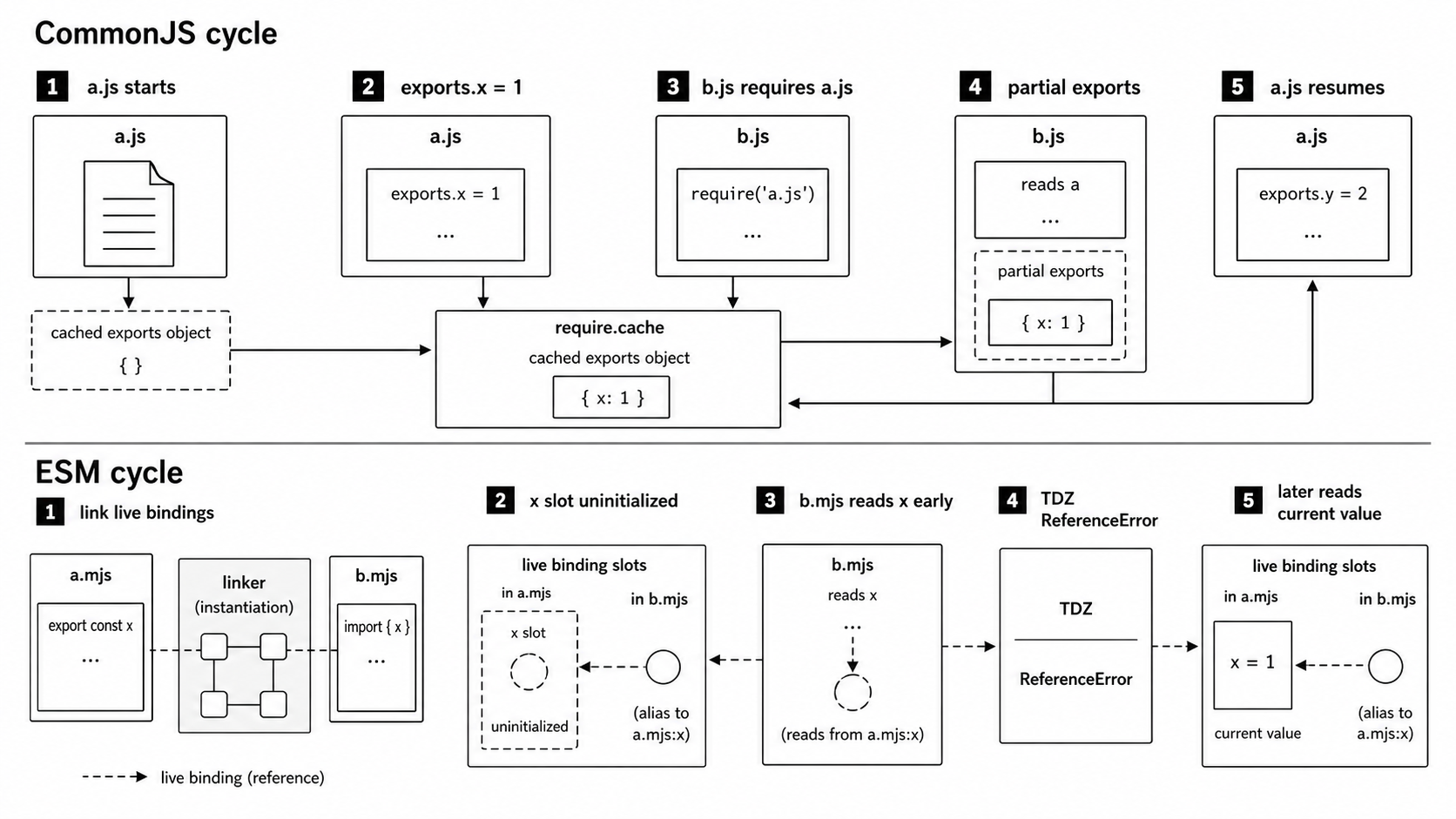
Figure 5.2 - CommonJS cycles expose the current contents of the cached exports object. ESM cycles connect live bindings during linking, so a read can happen before a lexical export has been initialized.
Once a binding has a value, importers see the current value through that same live connection. There are no stale copies.
This version works because the read happens later -
// c.mjs
export let count = 0;

import { logCount } from './d.mjs';

count = 10;
logCount();// d.mjs
import { count } from './c.mjs';
export function logCount() {
console.log('count is:', count);
}d.mjs imports count, but it does not read it at the top level. It reads count inside logCount(). By the time c.mjs calls logCount(), it has already assigned count = 10.
So the output is -
count is: 10Function exports often make ESM cycles less fragile. The function binding is available during instantiation, and the function body runs only when called. If the call happens after the needed values are initialized, the cycle can work.
A top-level const initializer is riskier. If a module does this -
export const snapshot = count;then it reads count during startup. In a cycle, that read may happen before count is initialized. Depending on evaluation order, it may throw or capture a value earlier than you expected.
Moving the read into a function delays the access until call time, which is usually much easier to reason about.
Detecting and Breaking Cycles
Circular dependencies usually mean two modules know too much about each other. If A needs B and B needs A, there is often a third idea hiding between them that deserves its own module.
ESM cycles often fail loudly with a ReferenceError during startup. CommonJS cycles are quieter. They may give you partial exports, then fail later when a property is undefined or a function is missing.
Node may also warn when code inspects missing properties on exports inside a circular dependency.
Tools can help find cycles before runtime. madge can scan import and require statements and report cycles -
madge -circular src/dpdm does similar work for TypeScript projects.
The cleanest fix is usually to extract shared logic. If a.js and b.js both need the same helper, move that helper into shared.js. Then both modules import shared.js, and shared.js imports neither of them.
Another option is dependency inversion. Instead of module A importing module B directly, A can accept a callback or small interface that B provides at runtime. The runtime relationship still exists, but the static module graph no longer has the cycle.
In CommonJS, lazy require() can delay the dependency until call time -
// a.js
module.exports.x = 1;
module.exports.getB = () => require('./b');
Now require('./b') does not run while a.js is initially loading. It runs when someone calls getB(), by which time B may already be fully loaded.
In ESM, dynamic import() gives you the lazy version -
// a.mjs
export const x = 1;

export async function getB() {
  const b = await import('./b.mjs');
  return b.value;
}
The static graph no longer has an immediate edge from a.mjs to b.mjs. The dependency happens later, when getB() runs. That usually avoids the startup window where TDZ reads happen.
Cycles are valid in both module systems, but code that depends on evaluation order is fragile. A small refactor can change the order - a new entry point, a renamed file, or an extra import can move when a module runs.
The safest long-term fix is usually to simplify the dependency graph.
Cache identity is module identity. CommonJS exposes that identity through require.cache, keyed mostly by filenames. ESM keeps it inside the loader, keyed by URLs. That difference shapes path handling, singleton state, hot reload strategies, and the way circular dependencies fail.