Node.js File I/O: Whole-File Helpers, Streams, Random Access, and Durability
File I/O is how your program moves bytes between storage and process memory. At first, the APIs can look like different ways to do the same thing - read a file, write a file, append some text, stream some data. But each API makes a different tradeoff.
Some APIs load the whole file into memory. Some move data in chunks. Some let you jump to exact byte positions. Some return after data is handed to the operating system, while others ask the OS to flush that data more durably.
So the real question is not "which method is shortest to type?" The real question is - how much data are you moving, how long can it stay in memory, how should operations be ordered, and does the write need to survive a crash?
Small files are usually fine with whole-file helpers. Large files usually need streams. Binary formats and random access need descriptor-level reads and writes. State files, databases, and ledgers need a more careful write pattern with flushing.
Reading and Writing Files
The snippets in this chapter use CommonJS with node: built-in specifiers. Examples that use await are async-function fragments. If you run them with top-level await in an ES module, rewrite the require() calls as import declarations.
The previous subchapter covered file descriptors. This chapter builds on that. When you read or write file contents, Node eventually works through an operating-system file descriptor or platform handle. You may not always see that descriptor in your code, but it exists somewhere in the path.
Some filesystem calls work only with paths. Operations like stat, rename, unlink, mkdir, and watch can do their job without giving your JavaScript code a persistent descriptor. File content is different. Once bytes need to move in or out, Node gives you a few levels of control.
You can read or write the whole file with readFile, writeFile, and appendFile. You can process data in chunks with createReadStream and createWriteStream. You can work at exact byte positions with fs.read and fs.write. You can parse text line by line with readline. And when a write must be more than "successfully accepted by the OS", you can ask for flushes with fsync() or related options.
Under most asynchronous filesystem APIs, libuv uses a worker pool to run blocking filesystem work away from the main JavaScript thread. That detail shows up later when we talk about performance and contention.
Reading Entire Files with readFile
The simplest reading API is fs.readFile(). You give it a path, and Node gives you the file contents when the read finishes -
const fs = require('node:fs');

fs.readFile('./config.json', 'utf8', (err, data) => {
  if (err) throw err;

  const config = JSON.parse(data);
});
When you pass a path, Node handles the file lifecycle for you. It opens the file, reads the contents, closes the descriptor it opened internally, and gives you the result.
That does not mean Node performs one huge operating-system read. For regular files, Node v24 reads in 512 KiB chunks. When Node cannot determine the file size up front, such as with some non-regular files, it uses smaller chunks.
The value you get back depends on the encoding option. If you pass 'utf8', Node converts the file bytes into a string before calling your callback. If you do not pass an encoding, you get a raw Buffer.
The promise version reads the same way underneath. It just fits better into async and await code -
const data = await fs.promises.readFile('./config.json', 'utf8');
const config = JSON.parse(data);
The filesystem path is still the same style of work. Node opens, reads, and closes. The only change is how JavaScript receives the result - callback APIs call your callback, promise APIs resolve or reject a promise.
readFileSync and Blocking
readFileSync() performs the same kind of read, but it does it on the main JavaScript thread -
const data = fs.readFileSync('./config.json', 'utf8');While this call is running, the rest of the process waits. Timers do not run. Incoming requests do not get handled. Promise microtasks do not continue. The event loop gets control back only after the synchronous filesystem call finishes.
That can be perfectly fine during startup. If the server has not started accepting traffic yet, reading a config file synchronously only delays startup. It does not block live users.
This is a normal startup pattern -
// Fine during startup.
const config = JSON.parse(fs.readFileSync('./config.json', 'utf8'));

const app = createServer(config);
app.listen(3000);
Inside a request handler, the same call behaves very differently. A 10 ms blocking read means the process spends 10 ms doing nothing else. No other request, timer, or microtask can run during that window. If every request performs that synchronous read, your throughput is tied directly to storage latency. Put that same code on a slow disk, a busy volume, or a network-mounted filesystem, and the whole server pays for it.
Use sync file calls when blocking the process is acceptable. Startup scripts, CLIs, migrations, and one-off tools are common places. In request paths and long-running servers, reach for async APIs.
Memory Implications
readFile() buffers the entire file before giving it to you. That is the part to keep in your head.
A 10 KB config file needs about 10 KB of file content memory. A 500 MB log file needs about 500 MB. Ten concurrent reads of 100 MB files can put about 1 GB of file content in memory at the same time.
The bytes live outside V8's normal JavaScript heap, but V8 still accounts for them as external memory. Large external allocations can increase garbage collection pressure and pause time. During those pauses, every connection can stall, even though the file bytes are not stored as ordinary JavaScript objects.
This is why readFile() is great for small, predictable files and risky for large or user-controlled files. A config file, small JSON document, or tiny template is usually fine. A video, archive, huge CSV, or multi-gigabyte log belongs on streams or explicit chunked reads.
A good practical rule is simple - use readFile() when you actually need the whole file at once and the file size is comfortably bounded. When the file can be large or unpredictable, do not let one call allocate the whole thing.
Error Handling
Filesystem errors are normal. The path may not exist. The process may lack permission. The file may actually be a directory. The disk may be full. The process may have too many descriptors open.
The stable field to check is err.code -
try {
  const data = await fs.promises.readFile(path, 'utf8');
  return JSON.parse(data);
} catch (err) {
  if (err.code === 'ENOENT') return {};
  if (err.code === 'EACCES') throw new Error('permission denied');

  throw err;
}
ENOENT means the path does not exist. That can be expected for an optional config file, a cache file that has not been created yet, or a file the user has not supplied. Returning a default value can be fine there.
EACCES means the process does not have permission to read the file. EISDIR usually means the path points at a directory instead of a file. On FreeBSD, reading a directory can return a representation of the directory contents instead. EMFILE means the process has hit its file descriptor limit, which the previous subchapter covered.
The API style changes how the error reaches you. Callback APIs pass it as the first callback argument. Promise APIs reject. Sync APIs throw. The error codes stay the same.
The AbortSignal Option
You can cancel an in-progress readFile() with an AbortSignal -
const controller = new AbortController();

setTimeout(() => controller.abort(), 500);

try {
  const data = await fs.promises.readFile('./huge.bin', {
    signal: controller.signal
  });
} catch (err) {
  if (err.name === 'AbortError') console.log('read cancelled');
}
Cancellation means Node stops the readFile() operation it is coordinating. If the abort happens before the read finishes, Node rejects with an AbortError.
For a path-based readFile(), Node also closes the descriptor it opened internally. The abort does not cancel an operating-system read that is already running on a worker thread. Instead, it stops Node from continuing the internal buffering work between those lower-level read requests.
If you pass an existing file descriptor or FileHandle, you still own that resource's lifetime. Aborting the operation does not mean you can forget to close the handle.
Writing Entire Files with writeFile
fs.writeFile() is the write-side partner to readFile(). You give Node a path and some data -
await fs.promises.writeFile('./output.json', JSON.stringify(data));With the default options, Node opens the file for writing, creates it if it does not exist, truncates it if it already exists, writes the data, and closes the descriptor it opened internally.
The default flag is 'w'. That means open for writing, create if needed, and truncate existing content during open.
The data can be a string, a Buffer, a TypedArray, a DataView, an Iterable, an AsyncIterable, or a Stream. Strings use 'utf8' by default. If you need a different encoding, pass it explicitly -
await fs.promises.writeFile('./output.txt', content, 'latin1');Exclusive Creation with 'wx'
Use the 'wx' flag when the file should be created only if it does not already exist -
await fs.promises.writeFile('./lock.pid', process.pid.toString(), {
  flag: 'wx'
});
At the syscall level, this uses O_CREAT | O_WRONLY | O_EXCL. The kernel either creates and opens the file, or it returns EEXIST.
That is safer than checking first with something like existsSync(). A separate "check then create" sequence leaves a race window. Another process can create the file between your check and your write. With 'wx', the existence check and creation happen as one open operation.
If two processes race to create the same lock file on a local filesystem, one wins and the other gets EEXIST.
File Permissions on Creation
When writeFile() creates a new file, the mode option supplies the requested permissions -
await fs.promises.writeFile('./secret.key', keyData, {
  mode: 0o600
});
0o600 gives the owner read and write permission. Group and others get no permission bits.
Node's default creation mode is 0o666, which means read and write for owner, group, and others before the process umask is applied. With a common umask of 0o022, the final result becomes 0o644 - owner read and write, everyone else read-only.
There is one easy detail to miss. mode only applies when the file is created. If the file already exists, its permissions stay as they are. If you need to enforce permissions either way, call chmod after writing.
The Truncation Problem
The default 'w' flag is convenient, but it has a failure case you should understand. It truncates the file before the new data has been fully written.
So if the process crashes after truncation but before the write completes, the file can be empty or partially written. For disposable output, that may be acceptable. For config files, state files, or anything needed during restart, it can leave the application broken.
For local POSIX filesystems, a safer replacement pattern is - write a temporary file in the same directory, flush it, rename it over the target, then flush the directory entry.
Here is that pattern -
const crypto = require('node:crypto');
const fs = require('node:fs/promises');
const path = require('node:path');

async function replaceFileAtomic(targetPath, data) {
  const dir = path.dirname(targetPath);
  const base = path.basename(targetPath);
  const suffix = crypto.randomBytes(6).toString('hex');
  const tmpPath = path.join(dir, `.${base}.${process.pid}.${suffix}.tmp`);

  let file;

  try {
    file = await fs.open(tmpPath, 'wx');
    await file.writeFile(data);
    await file.sync();
    await file.close();
    file = undefined;

    await fs.rename(tmpPath, targetPath);

    const directory = await fs.open(dir, 'r');
    try {
      await directory.sync();
    } finally {
      await directory.close();
    }
  } catch (err) {
    if (file) await file.close().catch(() => {});
    await fs.unlink(tmpPath).catch(() => {});
    throw err;
  }
}
The temporary file is created in the same directory as the target because the later rename() needs to replace the target inside that directory. If the write fails, the original file remains untouched. If the write succeeds, POSIX readers see the old file or the new file. They do not see a half-written replacement.
The file sync() asks the OS to flush the new file contents before the rename. The directory sync() asks the OS to flush the name update after the rename, on platforms that support opening and syncing directories.
Without the directory sync, the replacement can become visible before the directory entry is crash-durable.
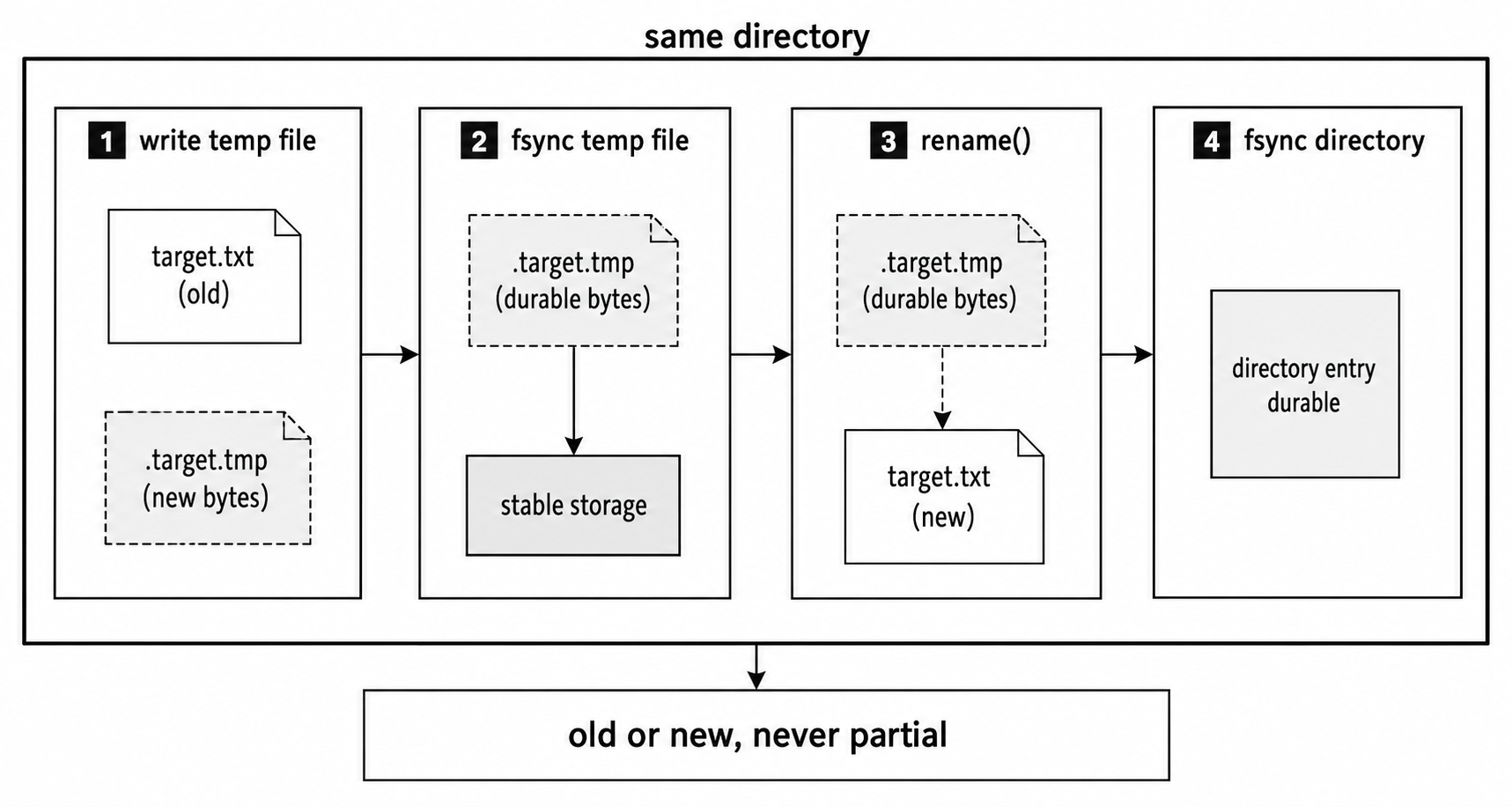
Figure 4.4 - A durable replacement writes new bytes to a temporary file in the target directory, flushes that file, renames it into place, and then flushes the directory entry.
writeFileSync
writeFileSync() has the same blocking profile as readFileSync(). It performs the write on the main JavaScript thread and freezes the event loop until the operation finishes -
try {
  fs.writeFileSync('./output.json', JSON.stringify(result));
} catch (err) {
  console.error('write failed', err.code);
}
That is fine in scripts, CLIs, and startup code. In a hot server path, it forces other work to wait behind the write.
Sync APIs throw exceptions. If an ENOSPC disk-full error or an EACCES permission error escapes uncaught, the process terminates.
Appending to Files
Appending uses a different open mode. fs.appendFile() opens the file with the O_APPEND flag and writes at the end -
const entry = `${new Date().toISOString()} Server started\n`;

await fs.promises.appendFile('./server.log', entry);
If the file does not exist, Node creates it. If it already exists, the new bytes go after the existing bytes.
O_APPEND changes how the kernel chooses the write position. On local POSIX filesystems, before each write(2) call, the kernel moves the file offset to the end and performs the write as one step. That protects the file position from races between processes.
That protection has limits. It does not guarantee that one high-level append call becomes one syscall. It does not make network filesystems such as NFS safe for concurrent appenders. It also does not give you a total ordering between multiple processes that all append around the same time.
For logs, keep each record small and write each record as one payload when possible.
You can get the same append behavior with writeFile() by passing { flag: 'a' }. appendFile() is usually nicer because the call site says what you meant.
When Append Falls Short
Append mode works well for log files, CSV files that grow over time, and audit trails.
It does not work well for structured formats where the whole file must remain valid. A JSON array is a simple example. If the closing bracket is already in the file, appending another object to the end does not produce valid JSON. You need to read the file, parse it, update the data structure, and write the whole file back. For state files, that write should usually use the temp-file-and-rename pattern from earlier.
Repeated appendFile() calls can also be inefficient for high-throughput logging because each call opens and closes the file. A write stream in append mode keeps the descriptor open -
const fs = require('node:fs');
const { once } = require('node:events');

const log = fs.createWriteStream('./app.log', { flags: 'a' });

if (!log.write('entry one\n')) await once(log, 'drain');
if (!log.write('entry two\n')) await once(log, 'drain');

log.end();
await once(log, 'finish');
The stream keeps the file descriptor open and uses writable-stream backpressure when the application produces log records faster than the file can accept them.
Stream-Based File I/O
As files get larger, reading the whole file into memory becomes the wrong default. Streams process data in chunks instead.
For file read streams, chunks are usually up to 64 KB by default. That means memory use depends on stream buffers, transform state, queued writes, and concurrency. It does not depend directly on the total file size.
createReadStream
A read stream gives you chunks as the file is read -
const stream = fs.createReadStream('./access.log', 'utf8');

stream.on('data', (chunk) => {
  // chunk is a string, often around 64 KB
});

stream.on('end', () => console.log('done'));

stream.on('error', (err) => {
  console.error('read failed', err.code);
});
Node opens the file, reads up to highWaterMark bytes at a time, emits each chunk, and repeats until EOF. For file read streams, the default highWaterMark is 64 KB. After the final chunk, the stream emits 'end' and closes the descriptor.
If you pass 'utf8', chunks arrive as strings. If you leave the encoding off, chunks arrive as Buffers. For images, videos, archives, and other binary files, leave the encoding off and work with bytes.
You can change the requested chunk size with highWaterMark -
const stream = fs.createReadStream('./file.bin', {
  highWaterMark: 256 * 1024
});
Larger chunks usually mean fewer read requests and fewer JavaScript callbacks. They also mean more memory per active stream. On fast local storage, larger chunks can improve throughput when JavaScript overhead is a big part of the cost. In memory-limited environments with many concurrent reads, smaller chunks such as 4 KB to 16 KB can reduce per-stream memory.
The default 64 KB is a reasonable starting point for most workloads.
Byte Range Reads
createReadStream() can read only part of a file with start and end -
const stream = fs.createReadStream('./video.mp4', {
  start: 1048576,
  end: 2097151
});
The end value is inclusive. This example requests bytes from 1 MB through 2 MB minus 1.
Node does not request the rest of the file, although the operating system may still do its own cache or readahead work. HTTP range requests for video seeking and download resumption use this pattern. The server reads only the byte range the client asked for, then sends that range.
createWriteStream
A write stream lets you send output in chunks -
const fs = require('node:fs');
const { once } = require('node:events');

const out = fs.createWriteStream('./output.txt');

out.write('first chunk\n');
out.write('second chunk\n');
out.end('final chunk\n');

await once(out, 'finish');
Each write() call may buffer data inside the stream. highWaterMark is a backpressure threshold, not a hard memory cap. When the buffered amount reaches or crosses that threshold, write() returns false. That return value tells you to pause and wait for 'drain' before writing more.
If you need the exact threshold, inspect out.writableHighWaterMark or set highWaterMark yourself. Defaults have changed across Node releases.
In practice, you rarely wire this manually for a full stream chain because pipeline() handles backpressure between connected streams.
end() writes the final data, finishes the stream, closes the descriptor, and eventually emits 'finish'.
To append instead of overwrite, open the write stream with the 'a' flag -
const log = fs.createWriteStream('./server.log', { flags: 'a' });

log.end('started\n');
Piping with pipeline
Streams are most useful when you connect them. The promise-based pipeline() helper is the safest default for that -
const { pipeline } = require('node:stream/promises');

await pipeline(
  fs.createReadStream('./input.bin'),
  fs.createWriteStream('./output.bin')
);
Data moves chunk by chunk from the read stream to the write stream. If the write side cannot keep up, backpressure pauses the read side until the buffered data drains.
If any stream errors, pipeline() destroys the connected streams and rejects the promise. That cleanup behavior is the main reason to prefer pipeline() over bare pipe() for file-to-file and transform chains. A bare pipe() does not automatically propagate every error in the way people expect, and a write failure can leave the read side open if you do not handle it.
HTTP responses are the main case where you need extra care. Destroying a response socket after sending a partial response is visible to the user, so handle that path deliberately.
Transform chains work the same way -
const zlib = require('node:zlib');

await pipeline(
  fs.createReadStream('./data.json'),
  zlib.createGzip(),
  fs.createWriteStream('./data.json.gz')
);
The file moves from disk through compression into a new file. Memory stays bounded by stream buffers and transform state, not by the full input size.
Serving Files over HTTP
A common HTTP handler streams a file directly to the response -
const fs = require('node:fs');
const http = require('node:http');

http.createServer((req, res) => {
  const stream = fs.createReadStream('./static/bundle.js');

  stream.on('open', () => {
    res.writeHead(200, { 'content-type': 'application/javascript' });
    stream.pipe(res);
  });

  stream.on('error', () => {
    if (res.headersSent) return res.destroy();

    res.writeHead(404);
    res.end();
  });
}).listen(3000);
The file reaches the client without being loaded into memory as one large Buffer. Ten concurrent downloads of a 50 MB file do not require 500 MB of file-content buffers up front. Memory stays tied to active stream buffers and response buffering.
Buffer-All vs. Stream - The Decision
The decision comes down to whether the program needs the whole file at the same time.
| Choice | Use it when |
|---|---|
Buffer-all with readFile or writeFile | The file is small, usually under a few MB, and the code needs the whole content at once. |
Buffer-all with readFile or writeFile | The format requires complete content, such as JSON or XML. |
Buffer-all with readFile or writeFile | Simplicity is more useful than saving memory. |
| Stream | The file is large or unpredictable in size. |
| Stream | The program can process data incrementally, such as log analysis, data conversion, or file copying. |
| Stream | The program is forwarding data without inspecting all of it, such as proxying or serving static files. |
| Stream | Memory is constrained, especially in containers or processes with many concurrent file operations. |
Whole-file helpers give you simple code. Streams ask you to handle chunks, async flow, and errors more carefully. For large files, that extra structure is worth it because memory stays bounded.
Calling readFile() on a 10 GB file either fails allocation or creates memory pressure a request path should never create. For that kind of input, use a stream or an explicit chunked fs.read() loop.
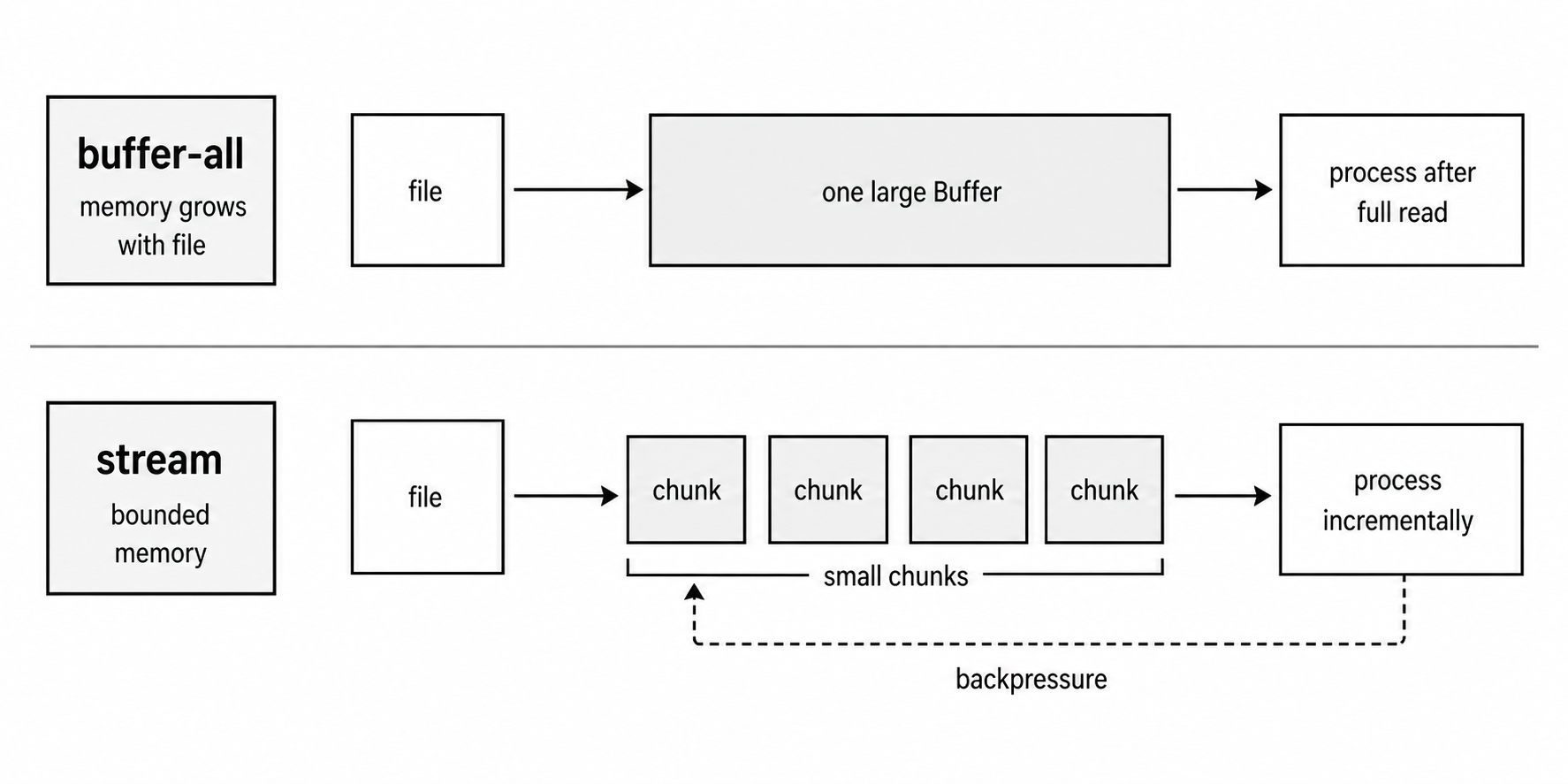
Figure 4.5 - Whole-file helpers collect the complete file before processing, while streams move bounded chunks forward and let backpressure slow later reads.
Low-Level Byte Operations with fs.read and fs.write
fs.read() and fs.write() give you lower-level control than whole-file helpers and streams. You provide the buffer. You choose the file offset. You choose how many bytes move.
Higher-level APIs use the same lower-level filesystem machinery somewhere underneath, but they own the buffer allocation, descriptor lifetime, and control flow for you.
Use these APIs when you need exact byte control.
Reading at Specific Positions
The traditional callback form looks like this -
fs.read(fd, buffer, offset, length, position, callback);You pass the file descriptor, the buffer to write into, the offset inside that buffer, the number of bytes to read, and the byte position inside the file. The callback receives (err, bytesRead, buffer).
The FileHandle version is usually easier to read -
const fd = await fs.promises.open('./data.bin', 'r');

try {
  const buf = Buffer.allocUnsafe(64);
  const { bytesRead } = await fd.read(buf, 0, 64, 0);
} finally {
  await fd.close();
}
This reads up to 64 bytes from file position 0 into buf, starting at buffer offset 0.
bytesRead tells you how many bytes actually arrived. It can be less than 64 near the end of a file. It can be zero if the requested position is already at EOF.
The position argument is where random access comes in. Pass a number, and Node reads from that exact byte offset. Pass null, and Node reads from the descriptor's current file position and advances it.
Explicit positions let you jump around inside a file without reading everything before the byte range you need.
Parsing a Binary Header
Many binary formats start with a fixed-size header. That header tells you how to read the rest of the file.
PNG files start with an 8-byte signature. ZIP files keep central directory information near the end. Database files often store version numbers, record counts, and offsets inside a header.
Here is a hypothetical database file with a 64-byte header -
let dataOffset;

const fd = await fs.promises.open('./database.db', 'r');

try {
  const header = Buffer.allocUnsafe(64);
  const { bytesRead } = await fd.read(header, 0, 64, 0);

  if (bytesRead < 64) throw new Error('Incomplete header');

  const magic = header.readUInt32BE(0);
  const version = header.readUInt32LE(4);
  const recordCount = header.readUInt32LE(8);
  dataOffset = header.readUInt32LE(12);
} finally {
  await fd.close();
}
The file read happens once. The readUInt32* calls read numbers from the header Buffer already in memory. They do not go back to disk.
Once the header gives you the start of the record section, you can jump straight to a single fixed-width record -
const fd = await fs.promises.open('./database.db', 'r');

try {
  const recordBuf = Buffer.allocUnsafe(128);
  const pos = dataOffset + (5 * 128);
  const { bytesRead } = await fd.read(recordBuf, 0, 128, pos);

  if (bytesRead < 128) throw new Error('Incomplete record');
} finally {
  await fd.close();
}
This is the reason random access is useful. If the file is 10 GB, the program does not need to allocate or scan 10 GB. It can read 64 bytes for the header and 128 bytes for one record.
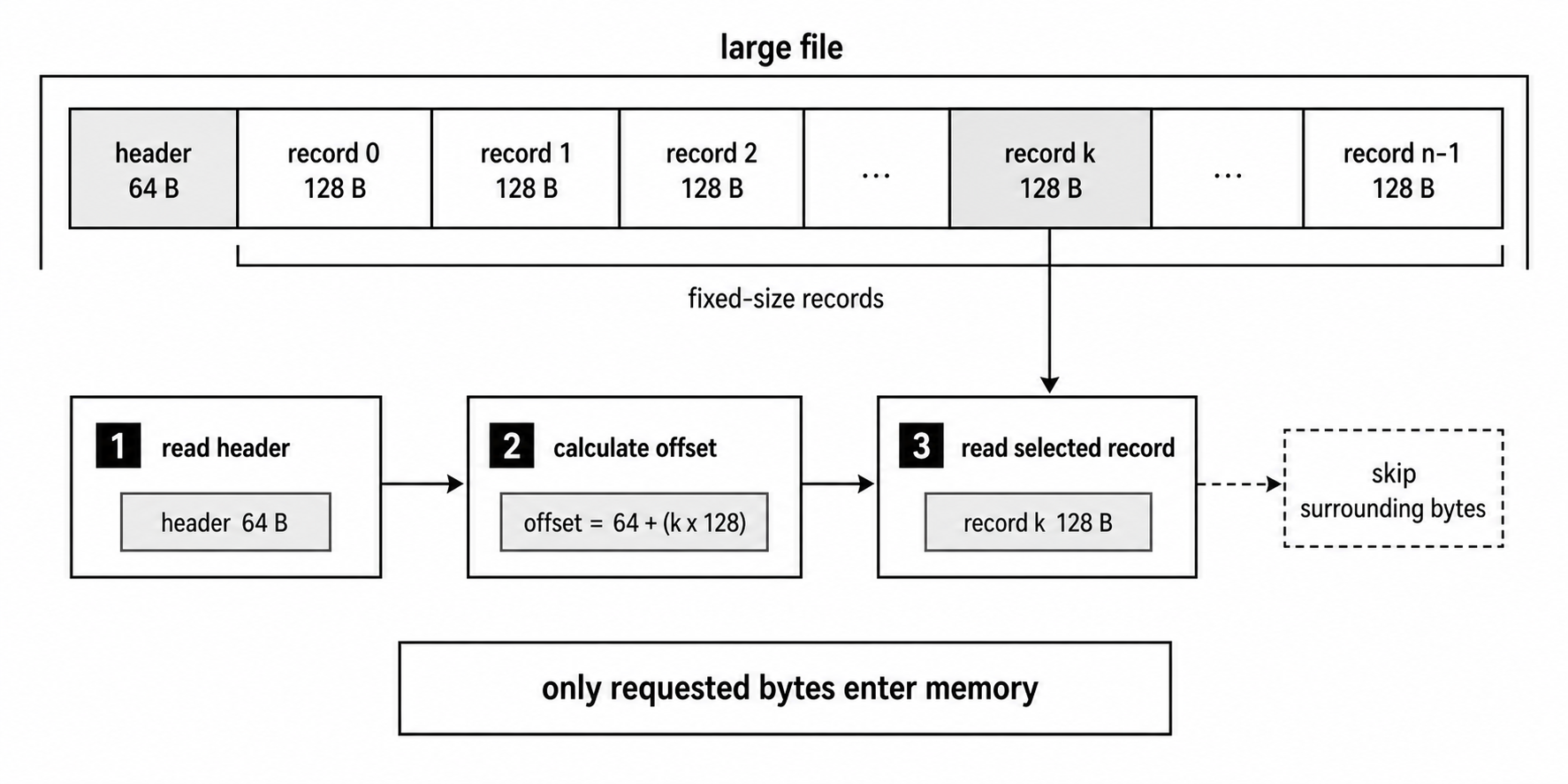
Figure 4.6 - Explicit positions let one descriptor read a small header, calculate a record offset, and fetch only the requested record instead of loading surrounding bytes.
Writing at Specific Positions
fs.write() works the same way in reverse. You choose which bytes to write and where they should land -
const fd = await fs.promises.open('./database.db', 'r+');

try {
  const buf = Buffer.allocUnsafe(4);
  buf.writeUInt32LE(42, 0);

  await fd.write(buf, 0, 4, 16);
} finally {
  await fd.close();
}
The file is opened with 'r+', which means read and write without truncating existing content. Only 4 bytes at offset 16 are replaced. The rest of the file stays untouched.
That flag choice is critical. Opening with 'w' would truncate the file to zero length before the write, destroying the existing data. Use 'r+' when you want to update bytes inside an existing file.
This is the kind of pattern databases and binary file editors use. They update specific byte ranges instead of rewriting the whole file.
Buffer Reuse in Read Loops
Low-level reads also let you reuse the same buffer many times -
const buf = Buffer.allocUnsafe(4096);
let position = 0;
let bytesRead;

do {
  ({ bytesRead } = await fd.read(buf, 0, 4096, position));

  if (bytesRead > 0) {
    processChunk(buf.subarray(0, bytesRead));
  }

  position += bytesRead;
} while (bytesRead > 0);
This loop allocates one 4 KB Buffer and reuses it for every read. That can reduce garbage collection pressure in tight loops over large files.
The subarray() call creates a view over only the bytes that were actually read. That detail is important because the final read may return fewer than 4096 bytes.
Buffer.allocUnsafe() is safe here only because the read overwrites the bytes before the code processes them. Process only buf.subarray(0, bytesRead). Bytes after bytesRead may contain old or uninitialized memory.
When to Go Low-Level
Most application code should start with readFile(), writeFile(), streams, or readline. Drop to fs.read() and fs.write() when the higher-level APIs hide control you need.
Use low-level byte operations for -
| Need | Why low-level calls help |
|---|---|
| Exact byte ranges | You can read headers, fixed-size records, length-prefixed data, or binary sections directly. |
| Random access | You can jump to calculated offsets instead of reading sequentially from the start. |
| Buffer reuse | You can allocate once and reuse the same Buffer across many reads. |
| Custom storage formats | You can build parsers, paged file layouts, or database-like structures. |
These APIs are powerful, but they put more responsibility in your code. You own the buffer. You own the descriptor lifetime. You own the loop and EOF handling.
Flushing to Disk with fsync
A successful write does not always mean the bytes are on physical storage. Often, the kernel has accepted the data into the OS buffer cache and will write it to storage later.
That is usually good for performance. The OS can batch writes, reorder work, and avoid making every write wait for the device. But if the machine loses power or the kernel crashes before the data is flushed, a recently "successful" write may still be lost.
fsync() asks the kernel to flush buffered writes and file metadata for a descriptor to the storage device -
const fd = await fs.promises.open('./ledger.dat', 'w');

try {
  await fd.write(buf, 0, buf.length, 0);
  await fd.sync();
} finally {
  await fd.close();
}
sync() is slower than a buffered write because it waits for the OS to report that the flush completed. It also uses a libuv worker while it waits. The final durability guarantee still depends on the filesystem, mount options, storage device, and whether the device honors flush requests properly.
Node v20.10 and later, including Node v24, expose flush: true on whole-file helpers and write streams -
await fs.promises.writeFile('./ledger.dat', data, { flush: true });
await fs.promises.appendFile('./audit.log', entry, { flush: true });

const out = fs.createWriteStream('./ledger.dat', { flush: true });
out.end(data);
These options flush the file descriptor before closing it. They do not sync the containing directory after a rename.
For a durable temp-file-and-rename replacement, flush the file first, then rename, then flush the directory -
const fd = await fs.promises.open(tmpPath, 'w');

try {
  await fd.writeFile(data);
  await fd.sync();
} finally {
  await fd.close();
}

await fs.promises.rename(tmpPath, targetPath);

const dir = await fs.promises.open(path.dirname(targetPath), 'r');

try {
  await dir.sync();
} finally {
  await dir.close();
}
The file sync() flushes the new file contents before the rename. On POSIX-style systems where directories can be opened and synced, the directory sync() flushes the directory entry update that points the target name at the new file.
Without both steps, you can get atomic visibility without crash durability.
Most writes do not need fsync(). Logs, caches, and temporary files are often acceptable to lose or rebuild. Use flushing for database transaction logs, financial records, state files, and any data where losing the last successful write would corrupt the application's view of the world.
Line-by-Line Reading with readline
Many text files are naturally line-based - logs, CSVs, configuration files, and JSONL files where each line is one JSON object.
readline lets you process those files one line at a time without loading the entire file into memory. It reads chunks from a stream, keeps incomplete line data internally, and yields complete lines as they become available.
Here is a typical async-iterator version -
const fs = require('node:fs');
const readline = require('node:readline/promises');

const input = fs.createReadStream('./access.log', { encoding: 'utf8' });

const rl = readline.createInterface({
  input,
  crlfDelay: Infinity
});

let inputError;

input.on('error', (err) => {
  inputError = err;
  rl.close();
});

try {
  for await (const line of rl) {
    if (line.includes('ERROR')) console.log(line);
  }
} finally {
  rl.close();
  input.destroy();
}

if (inputError) throw inputError;
crlfDelay: Infinity handles Windows-style \r\n line endings cleanly, even when the \r and \n arrive in different chunks. Without it, readline can treat a delayed \r\n pair as two line breaks under the default timing behavior.
The for await loop gives you a clean way to process lines sequentially. Just remember that readline.createInterface() starts consuming the input stream as soon as the interface is created. It may read ahead internally while your loop is still awaiting work for the current line.
If strict backpressure is required, use a stream transform or a manual chunked read loop where your code decides exactly when the next read happens.
How readline Buffers Lines
The awkward part of line parsing is that stream chunks do not care about your line boundaries.
A file read chunk might end halfway through a line. For example, one chunk might end with "2024-01-15 request to /api/us" and the next chunk might start with "ers 200 OK\n".
readline keeps the partial line internally until the next chunk completes it. When it sees a newline, it emits the completed line. When the stream ends, it emits whatever remains as the final line, even if that final line has no trailing newline.
That is the work you avoid by using readline instead of writing your own split logic each time.
Early Exit and Searching
You can stop once you find what you need -
const input = fs.createReadStream('./access.log', { encoding: 'utf8' });
const rl = readline.createInterface({ input, crlfDelay: Infinity });

try {
  for await (const line of rl) {
    if (line.startsWith('FATAL')) {
      console.log('Found', line);
      input.destroy();
      break;
    }
  }
} finally {
  rl.close();
}
Breaking out of the for await loop closes the readline interface, but rl.close() does not necessarily destroy the input stream. If early exit should stop file reading, destroy the file stream yourself.
Also remember that readline may have already read ahead. Early exit stops future reads. It does not promise that Node read exactly up to the matching line and no further.
Batched Concurrent Processing
Sequential line processing is easy to understand, but it can be too slow when each line starts an independent async operation, such as a database insert or API call.
Batching gives you controlled concurrency -
const batch = [];

for await (const line of rl) {
  batch.push(processLine(line));

  if (batch.length >= 20) {
    await Promise.all(batch);
    batch.length = 0;
  }
}

if (batch.length > 0) await Promise.all(batch);
This reads up to 20 lines into a batch, starts their async work, waits for the whole batch to finish, then continues. That keeps application-level concurrency bounded so the process does not collect an unbounded number of in-flight promises.
It does not stop readline from buffering ahead internally. It limits the work your application starts from those lines.
readline vs. Manual Chunk Splitting
You can parse lines yourself with createReadStream() and split('\n') -
const stream = fs.createReadStream('./file.txt', 'utf8');
let leftover = '';

stream.on('data', (chunk) => {
  const lines = (leftover + chunk).split('\n');
  leftover = lines.pop();

  for (const line of lines) processLine(line);
});

stream.on('end', () => {
  if (leftover) processLine(leftover);
});

stream.on('error', (err) => {
  console.error('read failed', err.code);
});
That works for simple scripts. But the moment you need better \r\n handling, async iteration, cleaner lifecycle management, or fewer edge cases, readline is usually the better starting point.
You still need to handle stream errors and cleanup. readline helps with line parsing. It does not remove the need to manage the input stream.
How libuv Dispatches File I/O
The performance behavior of async file APIs makes more sense once you understand the libuv path.
Regular file I/O is not like socket I/O in most portable runtimes. The common Node path for asynchronous filesystem work is to run blocking filesystem calls on libuv worker threads. That keeps the main JavaScript thread available while the worker waits for the operating system.
Some libuv versions experimented with io_uring for selected Linux filesystem operations, but libuv reverted to thread-pool-by-default behavior in v1.49. For Node v24, the useful model is still - async fs calls usually avoid blocking JavaScript by using libuv's worker pool.
When you call fs.readFile('./data.json', callback), Node starts in JavaScript. It validates arguments and creates an internal filesystem request. That request wraps libuv's uv_fs_t type, which carries the operation, path or descriptor, buffers, flags, result storage, and callback state across the native boundary.
For a path-based readFile(), Node usually performs a sequence like this -
- Open the file.
- Inspect metadata when useful.
- Read one or more chunks.
- Close the descriptor.
- Return the result to JavaScript.
The async version does not run those blocking filesystem calls on the main JavaScript thread. libuv schedules work onto its thread pool. One worker thread picks up the request, calls the platform filesystem operation, stores the result, and posts completion back to the event loop. Then Node turns that result into either a callback call or a promise resolution.
The shape to remember is -
JavaScript call
  -> Node native binding
  -> libuv filesystem request
  -> worker thread
  -> operating-system syscall
  -> stored result
  -> event-loop completion
  -> callback or promise resolution
That is why async file APIs let JavaScript keep running while the filesystem operation waits on the OS.
Thread Pool Contention
The default libuv worker pool has 4 threads. Unless you change the size, only 4 thread-pool tasks can execute at the same time.
If you start 100 filesystem calls that all need the pool, 4 run and the rest wait. The storage device may be fast, but the work can still queue behind the pool.
You can increase the pool size before starting Node -
UV_THREADPOOL_SIZE=16 node server.jsSet it before the process starts. Assigning process.env.UV_THREADPOOL_SIZE = '16' inside application code is not reliable because the pool may already exist by then.
More threads are not free. Libuv gives worker threads an 8 MB stack by default, with stacks growing lazily on most platforms. More threads also add scheduling overhead and more competition for CPU and storage. There is no universal best value. Measure the workload you actually run.
The pool is shared by more than filesystem work. dns.lookup(), some crypto operations, zlib compression, and native work queued with uv_queue_work can all compete for the same workers. A burst of DNS or compression work can make file reads wait even when the disk is healthy.
Sync Variants Skip the Thread Pool
readFileSync(), writeFileSync(), and other sync filesystem calls do not use the worker pool. They call the blocking filesystem operation on the main JavaScript thread.
That is why they freeze the event loop. There is no background worker, no queued completion, and no chance for other JavaScript to run while the syscall waits.
Promise-based APIs use the same thread-pool mechanism as callback APIs. The difference is only at the JavaScript completion layer. Callback APIs invoke callbacks. Promise APIs resolve or reject promises and then schedule microtasks.
Choosing the Right API
Start from what the program needs, then choose the simplest API that matches it.
| Situation | Good default |
|---|---|
| Small config or JSON during startup | readFileSync() |
| Small file inside async server code | fs.promises.readFile() |
| Large file processing | createReadStream() |
| Large data output | createWriteStream() |
| Appending logs | appendFile() or a write stream with flags: 'a' |
| Binary parsing or random access | fs.read() with explicit positions |
| Updating bytes inside an existing file | fs.write() with 'r+' |
| Log analysis or CSV parsing | readline with a read stream |
| State files that must survive crashes | temp file, sync, rename, then directory sync |
| Write completion that should request a flush | flush: true or fsync() before close |
Use sync variants during startup, in CLI tools, and in scripts where blocking the process is acceptable. In code that runs while the event loop handles concurrent work, use async APIs.
For modern application code, fs.promises.* is usually the cleanest surface. It works naturally with async and await, uses normal try and catch, and composes well with the rest of your async code.
There is a ladder of control.
Whole-file helpers handle opening, reading or writing, and closing for you. Streams add chunked processing and flow control. Descriptor calls give you exact byte positions and buffer ownership. readline adds line parsing on top of streams, with some read-ahead behavior.
Pick the highest-level API that still fits the job. Drop lower only when you need the extra control.
The final decision usually comes down to three things - memory, ordering, and durability. Whole-file helpers keep code simple but buffer complete files. Streams keep memory bounded but require chunk-aware code. Descriptor calls give exact byte control. Flush operations are for writes where "the OS accepted it" is not enough.
Related Reading
- Previous subchapter - Node.js File Descriptors: fs.open, FileHandle, Flags, and EMFILE
- Next subchapter - Node.js fs.promises and FileHandle: Async File Operations and Resource Cleanup