Node.js Standard I/O: File Descriptors, TTYs, Pipes, and Backpressure
Every Node process starts with three standard I/O streams already connected. You know them as process.stdin, process.stdout, and process.stderr, but underneath those properties are the same file descriptors from the previous chapter.
Descriptor 0 is standard input. Descriptor 1 is standard output. Descriptor 2 is standard error.
Your JavaScript code does not decide what those descriptors point to. The shell, service manager, container runtime, or parent process sets them up before Node starts. They might point to a terminal, a pipe, a file, a socket, or another inherited handle. Node looks at each descriptor, figures out what kind of handle it is, and wraps it in a stream.
That is why standard streams feel simple at first, then start acting differently in real programs. The JavaScript property stays the same. The target behind the descriptor changes.
stdin, stdout, and stderr
The old Unix rule still works well today - stdout is for program output, stderr is for diagnostics.
That split is what makes command-line tools useful inside pipelines. A program can write clean data to stdout while warnings, progress messages, stack traces, and debug logs go to stderr. The next command in the pipeline receives the data stream without having to filter out human-readable noise.
For example, this command sends stdout into grep -
node app.js | grep foostderr still goes to the terminal unless the shell redirects descriptor 2 as well. That means your program can print useful diagnostics without corrupting the data flowing through the pipe.
The tricky part is that process.stdin, process.stdout, and process.stderr are streams sitting on top of descriptors that already existed before Node started. The property names are stable, but the handle underneath depends on how the command was launched. The same process.stdout.write() call might write to your terminal, to another process, or to a file.
Node creates the standard stream wrappers lazily. The first time your code accesses process.stdout, Node checks fd 1, decides whether it is a TTY, pipe, socket, file, or unknown handle, then creates the matching stream wrapper. After that, normal stream methods such as .write(), .on("data"), and .pipe() work as expected, but the backing handle still affects buffering, blocking behavior, terminal helpers, and shutdown.
The Three Streams
At the JavaScript layer, process.stdin is a Readable stream. process.stdout and process.stderr are Writable streams.
Those roles line up with how programs usually communicate. stdin brings data into the process. stdout sends program output out. stderr sends diagnostics out through a separate route.
Here is the smallest version -
process.stdout.write("hello");
process.stderr.write("debug info");
Both calls write strings to Writable streams, but they are meant for different readers. stdout is for the data your program produces. stderr is for information about what your program is doing or why something went wrong.
That difference becomes visible as soon as someone pipes your program -
node app.js | grep fooThe pipe receives stdout only. stderr still goes to the terminal unless the shell redirects it. So if your CLI prints JSON, CSV, NDJSON, or any other machine-readable format, keep that output on stdout. Put progress bars, skipped-file messages, parse warnings, timing lines, and stack traces on stderr.
That lets a caller do this safely -
node tool.js > data.jsonThe file receives clean data. Diagnostics still appear in the terminal because fd 2 stayed connected there.
Later, you can create custom Console instances that write somewhere else, such as log files. The default process streams follow the descriptors inherited from the parent process.
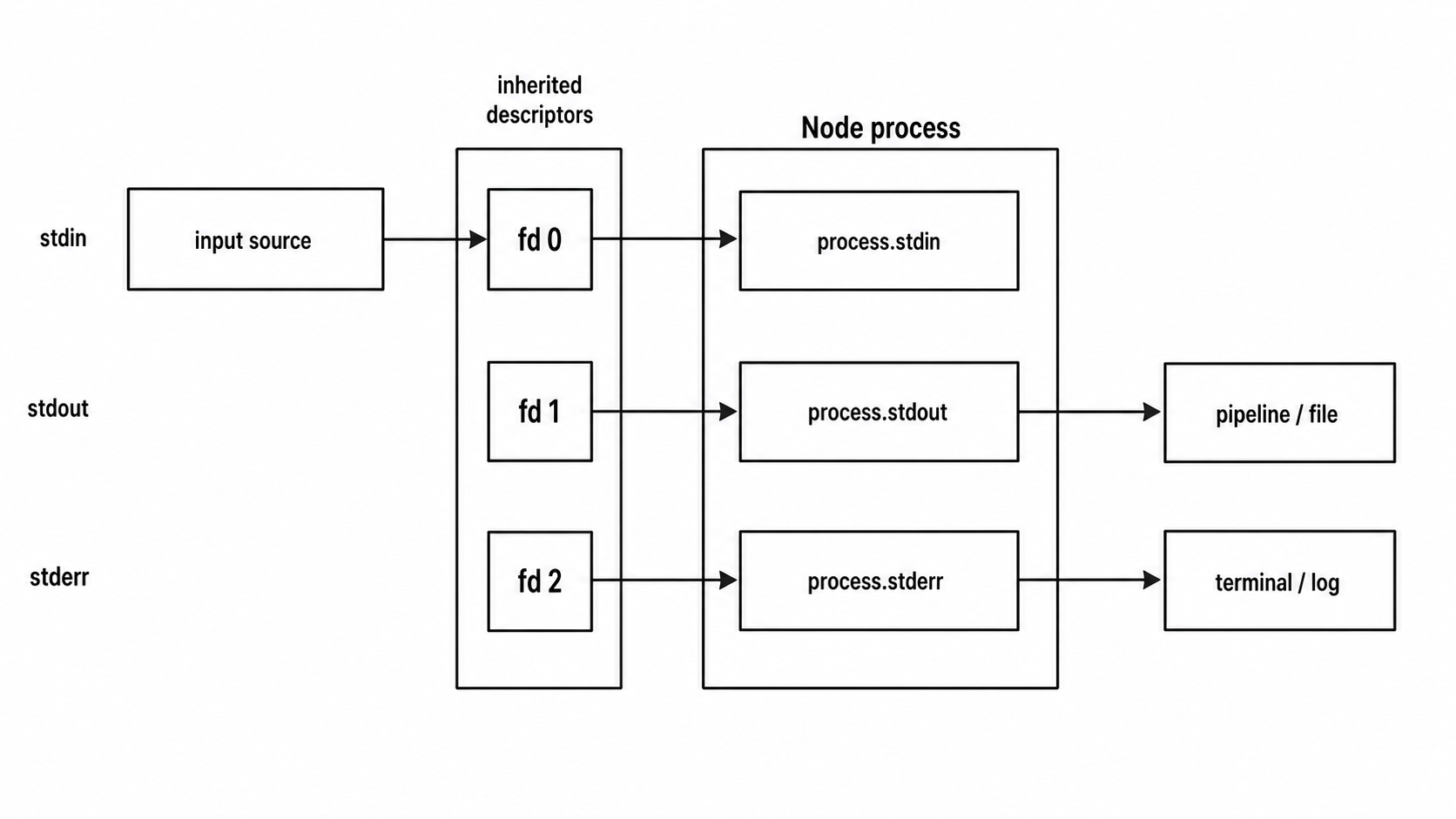
Figure 1 - A Node process inherits separate routes for standard input, standard output, and standard error. Keeping those routes separate lets data flow through pipelines while diagnostics stay on their own channel.
process.stdin
process.stdin is where input enters your program. It might come from a person typing in a terminal, from another command in a pipeline, or from a file redirected into the process.
By default, stdin starts paused. No data flows until your code asks for it. Attaching a data listener, calling .resume(), or piping stdin somewhere starts the stream.
The smallest version looks like this -
process.stdin.on("data", (chunk) => {
  console.log(`Got: ${chunk}`);
});
The data event gives you Buffer chunks by default. If stdin is connected to a terminal, input usually arrives one line at a time because the terminal waits until the user presses Enter. If stdin is piped, chunk boundaries are less predictable. A small echo command might produce one chunk. A large file or fast producer might produce many chunks.
That is the first rule to keep in mind - a chunk is not automatically a line, and a chunk is not automatically a full message.
If you are parsing JSONL, collect bytes until you have a complete line. If you are parsing a binary protocol, collect bytes until you have a complete frame. The stream decides how bytes arrive. Your parser decides when enough bytes are available.
The async iterator form reads from the same stream -
for await (const chunk of process.stdin) {
  console.log(`Got: ${chunk}`);
}
This removes the event listener wiring, but the source is the same fd 0. The loop finishes when stdin ends. On Unix, a terminal user sends EOF with Ctrl+D. On Windows, the usual terminal EOF is Ctrl+Z followed by Enter. Piped input ends when the upstream process closes its output.
By default, chunks are Buffers. Text tools can either call chunk.toString() or set the encoding once -
process.stdin.setEncoding("utf8");

process.stdin.on("data", (text) => {
  console.log(text);
});
Binary tools should keep the Buffer. Text tools can use an encoding and work with strings.
Line-by-line with readline
Most interactive CLI tools do not want arbitrary chunks. They want complete lines.
The readline module sits on top of stdin and handles that buffering for you -
import { createInterface } from "node:readline";

const rl = createInterface({
  input: process.stdin,
  output: process.stdout
});

rl.on("line", (line) => {
  console.log(`You said: ${line}`);
});
readline reads bytes, decodes text, and splits input on line breaks such as \n and \r\n. When stdin and stdout are attached to a terminal, it also works with terminal editing behavior such as backspace, arrow keys, and history navigation.
When stdin comes from a pipe, there is no interactive terminal editing. readline simply turns incoming bytes into lines.
The promise version is usually nicer for prompt-style code -
import { createInterface } from "node:readline/promises";

const rl = createInterface({
  input: process.stdin,
  output: process.stdout
});

try {
  const answer = await rl.question("Your name? ");
  console.log(`Hello, ${answer}`);
} finally {
  rl.close();
}
rl.question() writes the prompt, waits for one line, and resolves with the answer. Closing the interface in finally is the safe habit. It releases readline's hold on stdin even if the prompt code throws.
Raw mode
When stdin is connected to a terminal, Node can put it into raw mode.
In normal terminal mode, the terminal driver helps you. It buffers input until Enter, handles backspace, and turns Ctrl+C into SIGINT. In raw mode, your program receives keystrokes directly.
Here is the basic pattern -
if (!process.stdin.isTTY) process.exit(1);

const stop = () => {
  process.stdin.setRawMode(false);
  process.exit();
};

process.stdin.setRawMode(true);
process.stdin.resume();

process.stdin.on("data", (key) => {
  if (key[0] === 3) stop(); // Ctrl+C
  process.stdout.write(key);
});
Raw mode makes each keypress arrive immediately. Your program decides whether to echo the key, ignore it, interpret it as a command, or exit. Ctrl+C arrives as byte 0x03, so your code owns that behavior while raw mode is active.
This is useful for password prompts, menu interfaces, REPL controls, keyboard shortcuts, and editor-style input.
setRawMode() exists on TTY stdin. Pipe-backed and file-backed stdin do not have terminal mode. Guard with process.stdin.isTTY before calling it.
Raw mode also does not mean every key is one byte. Arrow keys send ANSI escape sequences. The up arrow sends \x1b[A, down sends \x1b[B, right sends \x1b[C, and left sends \x1b[D. Your data handler receives those bytes as a Buffer. Libraries such as keypress or readline's internal key parser decode those sequences for you.
Cleanup is extra important with raw mode. If a program enables raw mode and crashes before restoring normal mode, the user's terminal can behave badly after your program exits. Line buffering, visible echo, and normal Ctrl+C behavior may be missing. Terminal programs should restore normal mode in finally blocks and signal handlers.
Node restores the original TTY mode during normal shutdown, but code that calls process.exit() from many places makes cleanup harder to control.
stdin can also keep the process alive. Once active input is being watched, stdin holds a ref on the event loop. That is correct for an interactive program. Some tools only want optional keyboard input while the main job runs. In that case, unref stdin -
process.stdin.resume();

if (typeof process.stdin.unref === "function") {
  process.stdin.unref();
}
After unref(), stdin can still receive input, but it no longer keeps the process alive by itself. The process exits when all other ref'd work finishes. You can call process.stdin.ref() later if an interactive prompt becomes active.
Developer tools often use that pattern. Start with stdin unref'd, then ref it only when the user enters an interactive mode.
process.stdout
process.stdout is the stream for program output. console.log() writes to it, and so does process.stdout.write().
console.log("hello");          // writes "hello\n"
process.stdout.write("hello"); // writes "hello"
console.log() formats its arguments, adds a newline, and writes the result to stdout. process.stdout.write() writes exactly what you pass, without adding a newline.
Use console.log() when you want convenient human-readable output. Use process.stdout.write() when you need exact control over bytes, newlines, prompts, progress bars, or terminal UI.
The formatting work inside console.log() is real work. These all do extra processing before anything is written -
console.log("count: %d", 42);
console.log({ a: 1 });
console.log("a", "b", "c");
console.log() handles placeholders, inspects objects, joins arguments, and appends a newline. For a CLI that prints a few lines, that cost is usually fine. In a tight loop, formatting and terminal I/O can dominate the runtime.
Once a chunk reaches stdout, the normal Writable stream contract applies. write() returns true when the stream buffer is still under its limit. It returns false when the buffer has too much queued data, and the producer should wait for drain.
const bigChunk = Buffer.alloc(1024 * 1024);

const ok = process.stdout.write(bigChunk);

if (!ok) {
  process.stdout.once("drain", () => {
    // safe to write more
  });
}
Most CLIs ignore this because they print a small amount of output. A tool that dumps megabytes or gigabytes to stdout has to care. If the next process in the pipeline reads slowly and your code keeps writing, Node buffers more and more data in memory.
Backpressure is easiest to see when stdout is not your terminal -
node dump.js | gzip > out.gz
node dump.js | head -10
node dump.js > /mnt/slow/out.txt
The JavaScript call is the same in each case. The target behind fd 1 decides how fast the bytes can leave the process. A slow compressor, an early-exiting head, or a slow filesystem all affect stdout.
The return value from write() is the early warning. If a loop ignores false, it can enqueue thousands of chunks while the downstream process is still reading the first few. Waiting for drain turns the loop into a paced producer.
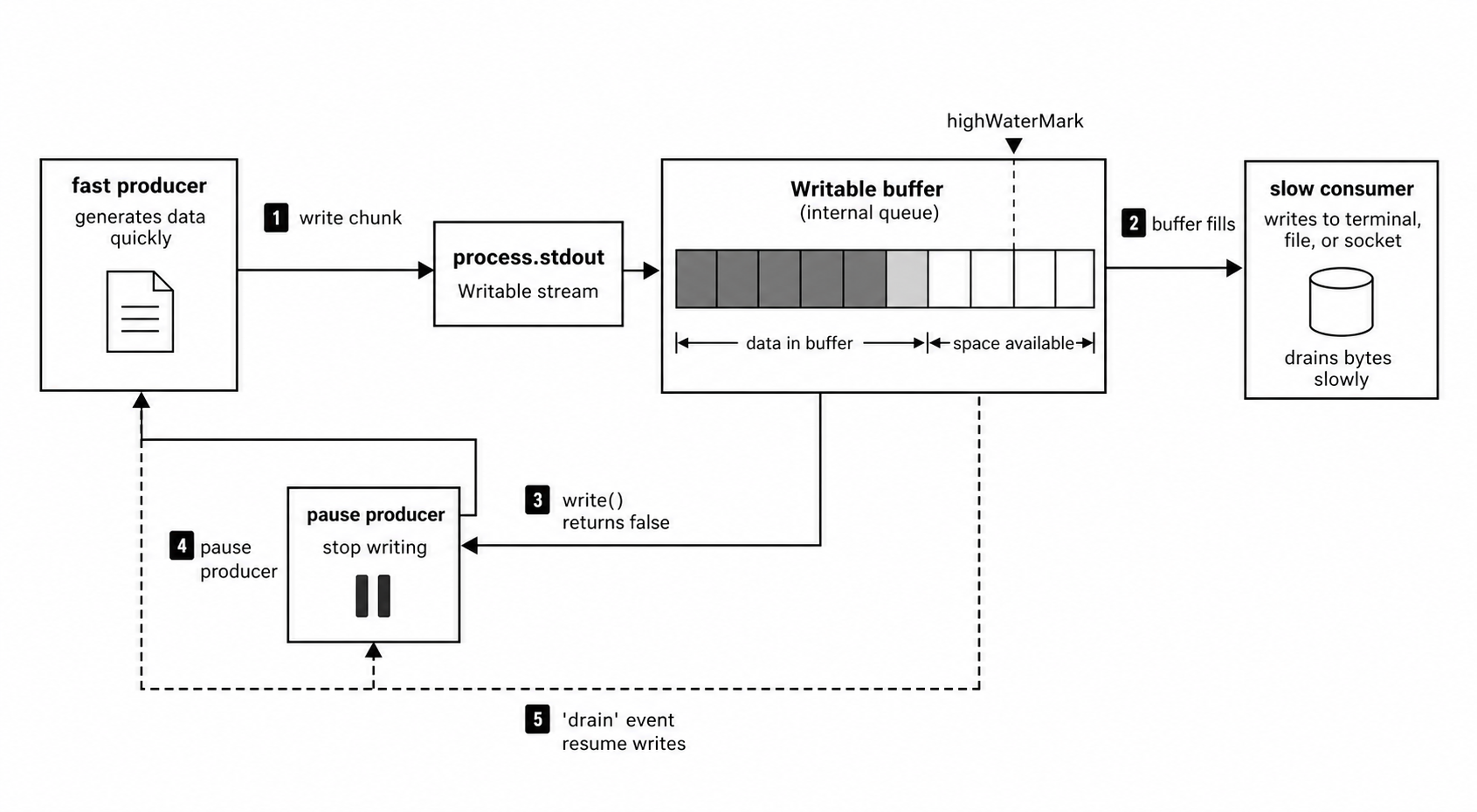
Figure 2 - Backpressure starts when a stdout destination cannot accept bytes as quickly as the program writes them. After write() returns false, the producer should pause and resume when the stream drains.
Terminal dimensions
When stdout is attached to a terminal, Node exposes the terminal size -
if (process.stdout.isTTY) {
  console.log(process.stdout.columns); // e.g., 120
  console.log(process.stdout.rows);    // e.g., 40
}
Those values are measured in character cells. Terminal UIs, progress bars, and table formatters use them to decide how much space they have.
When the terminal size changes, stdout emits resize -
if (process.stdout.isTTY) {
  process.stdout.on("resize", () => {
    console.log(`${process.stdout.columns}x${process.stdout.rows}`);
  });
}
If stdout is piped or redirected to a file, columns and rows are usually undefined. In that case, terminal UI code should fall back to a default width or switch to plain output.
The resize event comes from the TTY handle. On Unix, the terminal sends SIGWINCH when its dimensions change. libuv asks the terminal for the new size and Node reflects that through the stream.
ANSI cursor control
A terminal understands ANSI escape sequences written to stdout.
process.stdout.write("\x1b[2J");    // clear screen
process.stdout.write("\x1b[H");     // move cursor to top-left
process.stdout.write("\x1b[5;10H"); // move to row 5, column 10
These are just bytes. Packages such as ansi-escapes, chalk, and kleur make those bytes easier to produce, but the final operation is still a write to fd 1.
A progress display often redraws the same line -
if (process.stdout.isTTY) {
  process.stdout.write("\r");
  process.stdout.clearLine(0);
  process.stdout.cursorTo(0);
  process.stdout.write("Progress: 42%");
}
clearLine() and cursorTo() exist on TTY streams. Piped stdout does not have terminal cursor methods, so terminal UI code should branch on process.stdout.isTTY.
That branch should usually change the output format too. A terminal can redraw one line. A log file or CI output usually wants plain newline-separated records. If a progress bar writes carriage returns into a file, the result is hard to read. If the same program switches to plain status lines, it behaves well in terminals, logs, tests, and shell pipelines.
process.stderr
process.stderr is the stream for diagnostics. Use it for warnings, errors, stack traces, progress messages, debug output, and anything a human may need while the main output stays clean.
The console methods are split across stdout and stderr. console.log(), console.info(), console.debug(), console.dir(), console.table(), console.count(), console.timeLog(), and console.timeEnd() write to stdout. console.error(), console.warn(), console.trace(), failed console.assert() calls, and console warnings such as a missing timer label write to stderr.
This split becomes useful in pipelines -
console.log("data output");  // goes to the pipe
console.error("debug info"); // goes to the terminal
Run that through a pipe -
node app.js | grep patterngrep receives fd 1, which is stdout. The debug line on fd 2 still appears in the terminal unless redirected.
This is why diagnostics belong on stderr and program data belongs on stdout. Many scripts begin with console.log() for everything. Later, someone pipes the output into another tool and the debug text breaks parsing. The fix is simple - program data goes to stdout, diagnostics go to stderr.
stderr is also the right stream for progress. A downloader can stream file bytes to stdout while progress goes to stderr. A formatter can write transformed JSON to stdout while parse warnings go to stderr. The caller can redirect them independently.
Shells redirect fd 1 and fd 2 separately -
node app.js > output.txt 2> errors.txt
node app.js > output.txt 2>&1  # merge stderr into stdout
node app.js 2>/dev/null        # discard stderr
The shell sets this up before Node starts. It opens files, duplicates descriptors, replaces fd 1 or fd 2, and then starts the Node process. By the time JavaScript runs, process.stdout and process.stderr already point wherever the shell arranged.
Order is important with 2>&1 because shells process redirections from left to right.
This sends both stdout and stderr to out.txt -
node app.js > out.txt 2>&1This sends stderr to the original stdout target, then sends stdout to out.txt -
node app.js 2>&1 > out.txtSame pieces, different order, different result.
TTY detection
process.stdout.isTTY tells you whether stdout is connected to a terminal.
if (process.stdout.isTTY) {
  process.stdout.write("\x1b[31mred text\x1b[0m\n");
} else {
  process.stdout.write("red text\n");
}
In a terminal, ANSI color bytes render as colors. In a file or downstream process, those bytes appear literally. isTTY lets your program decide whether terminal-specific output is appropriate.
For pipes and redirected files, isTTY is usually undefined, so branch on truthiness instead of checking === false.
Each standard stream has its own TTY status -
| Stream | TTY case | Non-TTY case |
|---|---|---|
process.stdin.isTTY | Input comes from an interactive terminal | Input is piped or redirected |
process.stdout.isTTY | Output goes to a terminal | Output is piped or redirected |
process.stderr.isTTY | Diagnostics go to a terminal | Diagnostics are redirected |
Do not treat the whole process as simply interactive or non-interactive. Each stream can be different.
For example -
node app.js | catstdout is no longer a TTY because it goes into cat. stderr may still be a TTY because it still goes to the terminal.
This affects color decisions. Many tools disable color on stdout when stdout is piped, but keep colored diagnostics on stderr when stderr still points at a terminal.
Color detection
TTY streams expose helper methods for color support -
if (process.stdout.isTTY) {
  process.stdout.getColorDepth(); // 1, 4, 8, or 24
  process.stdout.hasColors(256);  // true or false
}
getColorDepth() returns the supported color depth. 1 means monochrome. 4 means 16 colors. 8 means 256 colors. 24 means true color.
These methods exist on TTY write streams. Piped stdout and file-backed stdout usually do not have them, so check isTTY first.
hasColors(count) checks whether the terminal supports at least that many colors. You can pass an environment object as the second argument, which is useful in tests -
process.stdout.hasColors(256, {
  TERM: "xterm-256color",
  FORCE_COLOR: "1"
});
The helper looks at common environment conventions such as COLORTERM, TERM, NO_COLOR, NODE_DISABLE_COLORS, and FORCE_COLOR. NO_COLOR and NODE_DISABLE_COLORS reduce Node's color decision to monochrome. FORCE_COLOR raises the requested color level for TTY color detection.
A careful color branch looks like this -
if (process.env.NO_COLOR || process.env.NODE_DISABLE_COLORS) {
  // user explicitly wants no color
} else if (process.stdout.isTTY && process.stdout.hasColors(256)) {
  // use 256-color output
} else if (process.stdout.isTTY) {
  // use basic 16-color output
}
Libraries such as chalk, kleur, and colorette handle this detection internally. Most application code should let the library decide whether to emit ANSI sequences.
Blocking and Nonblocking Writes
stdout and stderr do not always write the same way. Their behavior depends on what fd 1 and fd 2 point to.
Start with terminals. On Linux and macOS, writes to terminal-backed stdout and stderr are synchronous. The write blocks the event loop until the kernel accepts the bytes for the terminal driver. On Windows, TTY writes are asynchronous because libuv routes them through the Windows console path.
Pipes behave differently. On POSIX platforms, pipe-backed writes are asynchronous. Data enters Node and libuv's write path, then waits for the kernel pipe buffer to accept it. If the reader is slow, the pipe buffer fills and backpressure moves back into the Writable stream. On Windows, pipe-backed standard stream writes are synchronous.
Files are simpler. Redirect stdout to a file -
node script.js > output.txtWrites are synchronous on supported platforms. The syscall returns after the kernel accepts the bytes into the file path, though those bytes may still be flushed to physical storage later.
So the practical matrix is -
| Target | POSIX behavior | Windows behavior |
|---|---|---|
| TTY | Synchronous | Asynchronous |
| Pipe | Asynchronous | Synchronous |
| File | Synchronous | Synchronous |
The .write() callback exists in all of these cases, but its timing follows the backing handle. For a pipe, the callback runs when libuv completes the async write request. For a Unix TTY, it may run after the blocking syscall returns.
This comes from libuv's handle choice. A TTY uses uv_tty_t. On Unix, that path writes directly with blocking write(2) calls. A pipe uses uv_pipe_t, which participates in the event loop and owns an async write queue. Regular files use synchronous writes for stdout and stderr because thread-pool file writes could complete out of order.
That order guarantee is useful. If you write A, then B, then C, redirected file output should preserve that order. Sending file writes through a worker pool could let a later write complete before an earlier one.
The cost is blocking. If stdout is redirected to a slow network mount, a nearly full disk, or a busy filesystem, a write can stall the JavaScript thread. Most CLI tools accept that. Server processes that log heavily to stdout should measure it.
process.exit() and buffered output
This code looks harmless -
process.stdout.write("results\n");
process.exit(0);
It works often enough to trick people. On Unix with terminal stdout, the write is usually synchronous, so the line reaches the terminal before exit. With pipe-backed stdout on POSIX, the write may still be queued. process.exit() terminates the process before that queued write finishes.
That creates a common CLI bug. The program works in a terminal, then loses the final line when used with | tee, | cat, or a log collector.
If you must call process.exit(), wait for the write callback -
process.stdout.write("results\n", () => {
  process.exit(0);
});
For most programs, the better pattern is process.exitCode -
process.exitCode = 0;
console.log("results");
Set the exit code, stop scheduling new work, and let the event loop finish pending writes. That gives pipe-backed stdout and stderr time to flush.
drain is not the same thing as a write callback. drain helps after write() returns false. A small queued pipe write may never produce drain. The write callback is the precise completion hook for one chunk.
console.log() has no per-call completion callback. It formats, writes, and returns. That is fine for natural exit. If you need to print a final message and exit immediately afterward, use process.stdout.write(message, callback).
stderr follows the same connection-type rules. Crash diagnostics usually go to stderr because stderr often still points at a terminal, and Unix terminal writes block. Piped stderr can still lose buffered data if process.exit() runs before the write completes.
For fatal paths, keep the logic simple. Write the diagnostic. Use process.exitCode when normal shutdown is still possible. Use process.exit() only when immediate termination is the actual requirement.
The console object
The global console object is a Console instance wired to process.stdout and process.stderr.
You can create one yourself like this -
import { Console } from "node:console";

const logger = new Console({
  stdout: process.stdout,
  stderr: process.stderr
});

logger.log("ready");
Each console method formats its arguments, chooses stdout or stderr, and writes to that stream.
By default, Console ignores write errors from the destination streams. Pass ignoreErrors: false if logging failures should surface.
A custom console can write to files instead -
import { Console } from "node:console";
import { createWriteStream } from "node:fs";
import { join } from "node:path";
import { tmpdir } from "node:os";

const log = new Console({
  stdout: createWriteStream(join(tmpdir(), "app.log")),
  stderr: createWriteStream(join(tmpdir(), "app.err")),
  ignoreErrors: false
});

log.log("this goes to app.log");
The method split follows the kind of output being emitted. Regular informational output goes to stdout. That includes console.log(), console.info(), console.debug(), console.dir(), console.dirxml(), console.table(), console.count(), console.timeLog(), and console.timeEnd().
Diagnostics go to stderr. That includes console.error(), console.warn(), console.trace(), failed console.assert() calls, and console warnings such as a missing timer label.
Some methods change console state without writing a line. console.time() starts a timer. console.countReset() resets a counter. console.groupEnd() closes a group.
Several methods share implementation paths. console.log() and console.info() behave similarly. console.error() and console.warn() behave similarly. They call util.format() and write the result to the selected stream.
console.table() prints a formatted table to stdout -
console.table([
  { name: "alice", score: 95 },
  { name: "bob", score: 87 }
]);
Current Node versions use box-drawing characters, inspect object values, extract column names from keys, and pad cells for alignment. A second argument selects columns -
console.table(data, ["name"]);The output is meant for people. If another program needs to parse the output, use JSON, NDJSON, or CSV instead.
Timing methods write to stdout too -
console.time("work");

await new Promise((resolve) => setTimeout(resolve, 10));

console.timeEnd("work"); // work: 10.123ms
console.time() starts a high-resolution timer under a label. console.timeEnd() stops it and writes elapsed time. console.timeLog() writes elapsed time without stopping the timer. Multiple labels can run at once. A missing label warning goes to stderr.
Because timing output goes to stdout, it can pollute machine-readable output in a pipeline. If timing is diagnostic output, send it through a custom Console that writes to stderr.
console.trace() writes a stack trace to stderr and keeps the program running -
console.trace("checkpoint");That makes it useful during debugging. The main data keeps flowing through stdout, while the stack trace appears on stderr.
Piping patterns
stdin and stdout are what let Node programs fit into Unix-style pipelines.
The simplest pipeline program copies input to output -
process.stdin.pipe(process.stdout);stdin is a Readable. stdout is a Writable. .pipe() connects them and handles backpressure between the two.
A line-based filter adds only a little structure -
import { createInterface } from "node:readline";

const rl = createInterface({ input: process.stdin });

for await (const line of rl) {
  process.stdout.write(line.toUpperCase() + "\n");
}
Run it like this -
cat file.txt | node upper.js | head -5stdin comes from cat. stdout goes to head. stderr remains available for diagnostics.
The same idea works well for JSONL -
import { createInterface } from "node:readline";

const rl = createInterface({ input: process.stdin });

for await (const line of rl) {
  try {
    const obj = JSON.parse(line);

    if (obj.level === "error") {
      process.stdout.write(`${line}\n`);
    }
  } catch {
    process.stderr.write(`invalid JSON: ${line}\n`);
  }
}
Valid matching records go to stdout. Parse failures go to stderr. A caller can keep them separate -
node filter.js < logs.jsonl > errors.jsonl 2> parse-failures.txtThe try/catch keeps the pipeline alive after malformed input. Report the bad line, skip it, and continue reading.
There is still a stream detail inside the loop. process.stdout.write() can return false. For small filters, ignoring it is usually fine. For high-volume filters, use a Transform stream and pipeline() so backpressure travels through the whole chain.
When stdin is piped, it ends when the upstream writer closes -
let total = 0;

process.stdin.on("data", (chunk) => {
  total += chunk.length;
});

process.stdin.on("end", () => {
  console.log(`Read ${total} bytes`);
});
TTY stdin ends when the user sends EOF. The same end event handles both cases.
Pipeline shutdown has direction. In this pipeline -
node producer.js | node consumer.jsif the producer exits, the consumer sees EOF on stdin. If the consumer exits early, the producer writes into a closed pipe. Generic Unix programs may receive SIGPIPE. Node usually turns the failed write into an EPIPE error because Node ignores SIGPIPE during startup.
That difference is normal. Upstream completion is EOF. Downstream early exit is a broken output target. Good CLI programs treat EOF as completion and treat EPIPE as a clean early stop when the downstream command intentionally quits.
For stream-shaped transformations, use pipeline() -
import { pipeline } from "node:stream/promises";
import { Transform } from "node:stream";

const upper = new Transform({
  decodeStrings: false,
  transform(chunk, enc, cb) {
    cb(null, chunk.toUpperCase());
  }
});

await pipeline(process.stdin.setEncoding("utf8"), upper, process.stdout);
The line-by-line version is smaller for record-based text filters. pipeline() is better when the transformation naturally works as a stream and you want backpressure and cleanup handled from end to end.
setEncoding("utf8") keeps multibyte characters intact across chunk boundaries before the Transform receives strings.
Bootstrapping stdin, stdout, and stderr
Before your code runs, Node prepares lazy accessors for the standard streams on process. Lazy means Node does not create the stream wrapper until your code first asks for it.
That saves work and avoids unnecessary handles. A script that writes to stdout and never reads stdin does not need to create a stdin handle at all.
In Node v24, the main-thread implementation currently lives in lib/internal/bootstrap/switches/is_main_thread.js. Worker threads use a separate path for redirected stdio. These file names are implementation details, so do not build program logic around them.
When code first reads process.stdout, Node creates the wrapper for fd 1. In current Node, that path calls an internal getStdout() function, then createWritableStdioStream(1). Node asks libuv what kind of handle fd 1 is. libuv checks the descriptor and classifies it as something like TTY, pipe, TCP, file, or unknown.
That classification decides which stream object Node creates.
For stdout and stderr -
| fd target | JavaScript wrapper |
|---|---|
| TTY | tty.WriteStream |
| Pipe or socket | writable net.Socket-style stream |
| Regular file | internal sync write stream |
| Unknown | fallback writable stream |
For stdin -
| fd target | JavaScript wrapper |
|---|---|
| TTY | tty.ReadStream |
| Pipe or socket | readable socket-style stream |
| Regular file | fs.ReadStream |
| Unknown | fallback readable handling |
When the target is a TTY, stdout and stderr get terminal write helpers such as columns, rows, clearLine(), cursorTo(), getColorDepth(), and hasColors().
TTY stdin gets read-side terminal behavior such as setRawMode(), ref(), and unref(). Raw mode belongs to stdin because it changes how terminal input is delivered.
The TTY streams reuse Node's stream and socket machinery, but the fd still points at a terminal device. Some socket-style methods have little useful information to return because there is no remote peer in the TCP sense.
When stdout or stderr points at a pipe or socket, writes go through libuv's async write queue. If the kernel pipe buffer is full, the write waits, and Node's Writable buffer eventually reports backpressure with write() === false.
That is why pipe-backed stdout can keep the process alive after synchronous JavaScript has finished. Pending writes are active work. Natural process exit lets them finish. process.exit() skips that waiting.
When stdout or stderr points at a regular file, Node uses synchronous writes internally. That preserves write order. It also means a slow file target can block the JavaScript thread.
stdin follows the same detection idea. If you run -
node parse.js < input.ndjsonfd 0 points at a regular file, and process.stdin becomes an fs.ReadStream. Your code can still consume it with for await, data, or pipe(). The source changed, but the Readable interface stayed familiar.
TTY stdin has one extra behavior around Ctrl+C. In normal terminal mode, the terminal driver turns Ctrl+C into SIGINT. In raw mode, JavaScript receives byte 0x03. Switching modes requires libuv and Node to save and restore terminal attributes.
Worker threads have their own stdio behavior. By default, a worker's process.stdout and process.stderr send data to the parent thread through an internal channel, and the parent writes to its own stdout or stderr. If the Worker is created with stdout: true or stderr: true, the parent can read from worker.stdout or worker.stderr directly.
Worker stdin works similarly. By default, it receives no input. If the Worker is created with stdin: true, the parent gets a writable worker.stdin, and chunks written there appear on the worker's process.stdin.
This can affect test output. A worker's console.log() travels through the parent before reaching the real stdout. Ordering against parent-thread logs depends on message delivery and stream state. If exact ordering is required, send structured messages to the parent and let one place own final output.
Operational Checklist
- Put machine-readable data on stdout.
- Put diagnostics, warnings, progress, and stack traces on stderr.
- Check each stream's own
isTTYvalue before using color or cursor control. - Respect
write()backpressure for large output. - Use
pipeline()when data flows through multiple streams. - Prefer
process.exitCodewhen normal shutdown can flush pending writes. - Use a write callback when a final chunk must finish before explicit exit.
- Handle
EPIPEin producer-style CLIs that may be piped intohead,grep, or another early-exiting consumer.
Edge Cases and Gotchas
TTY-backed and pipe-backed stdout are net.Socket instances -
import net from "node:net";

console.log(process.stdout instanceof net.Socket);
// true for TTYs and pipes, false for regular files
Some inherited socket methods are not useful on a terminal fd or pipe fd. For terminal-specific behavior, use process.stdout.isTTY.
The more useful thing to handle is write failure. stdout can emit error if the underlying write fails.
The common case is a broken pipe. Run this -
node app.js | head -1head exits after one line. If your program keeps writing, stdout points at a pipe with no reader. Node turns that into an EPIPE error on process.stdout.
Pipeline-friendly programs should handle it -
process.stdout.on("error", (err) => {
  if (err.code === "EPIPE") {
    process.exit(0);
  }

  throw err;
});
This treats early consumer exit as normal completion. The producer did not fail. The downstream command simply got enough data and closed the pipe.
Mixed synchronous and asynchronous writes can also surprise you -
process.stdout.write("A");
setTimeout(() => process.stdout.write("B"), 0);
process.stdout.write("C");
The output is usually ACB. The first and third writes happen before the timer runs. With enough data and backpressure, timing effects can become more visible, but JavaScript call order still determines the write queue until you yield to the event loop.
console.log() can block because stdout can be synchronous. Heavy terminal logging can dominate benchmarks. Redirect to /dev/null or use a controlled output target when you want to measure the actual program work.
Redirecting to a regular file can also be synchronous. /dev/null is usually cheap because the kernel discards the bytes quickly. A real file on a slow device measures filesystem speed too.
isTTY gives you the terminal branch. It does not tell you whether a non-TTY stream is a pipe or a file. If you truly need that distinction, inspect fd 1 with fs.fstatSync(1).
Most CLIs do not need that deeper branch. Treat stdout as a destination. Use TTY-specific behavior only when isTTY is true. Otherwise, produce plain output.
The final trap is process exit. process.exit() runs exit handlers synchronously and terminates the process. Pending async writes do not get time to finish.
Prefer this -
process.exitCode = 1;
console.error("something went wrong");
Then stop creating new work and let the event loop drain. That gives pipe-backed stdout and stderr a chance to flush.
Standard streams look small in JavaScript, but they carry process setup with them. The parent process decides the descriptors. Node wraps them lazily. libuv picks the handle type. Your code sees streams, and the behavior of those streams comes from the descriptor target behind them.