File Watching and Atomic Replacement
File watchers are easy to misunderstand because the callback feels like it is telling you "the file changed." That is close, but it is not precise enough for production code.
A watcher tells you that the filesystem reported some activity near a path. It does not tell you that the writer is finished. It does not tell you that the file is valid. It does not even always tell you whether the file was edited, deleted, renamed, or replaced.
Node gives you two main tools here. fs.watch() connects your JavaScript callback to the operating system's watcher system. fs.watchFile() takes the slower path and checks file metadata again and again on a timer.
Atomic replacement adds one more detail. Many editors and deploy scripts do not edit the target file in place. They write a temporary file first, then rename that temporary file over the target. To your watcher, that often looks like a rename, even though the human action was "save this file."
File Watching and Atomic Replacement
The safest way to use file watchers is to treat every event as a prompt to check the file again.
That shape shows up in almost every production watcher. A config reloader usually waits briefly, checks whether the file exists, reads the whole file, validates it, and only then swaps application state. The watcher starts the process. It should not be the final source of truth.
When you write code like this -
fs.watch('./config.json', callback);Node hides the platform watcher underneath it. On Linux, that usually means inotify. On macOS, it means kqueue for file watches and FSEvents for directory watches. On Windows, it means ReadDirectoryChangesW.
Node gives you one JavaScript API over all of them. That is convenient, but those systems do not behave the same way. They report different event shapes, coalesce events differently, overflow differently, and recover from replacement differently.
Atomic writes run straight into those differences. An editor might save config.json by writing config.json.tmp, then renaming that temp file into place. Your watcher may receive a rename event, not a change event. That is normal. File watching and atomic replacement need to be understood together because one ordinary save operation can use both systems.
Atomic replacement
In computing, an "atomic" operation is visible as one complete state change. For file replacement, readers see either the old file or the renamed replacement. They should not see a half-written file.
Atomic replacement gives consistency to readers. It does not automatically guarantee that the data survives power loss. For that, the writer needs explicit fsync() calls, covered later in this chapter.
Operating systems do not usually expose one operation called "replace these file contents atomically." Applications build that behavior by writing the new data to a temporary file first, then using one rename() operation to publish it.
fs.watch() and the OS Event Layer
At the JavaScript layer, fs.watch() looks small -
import fs from 'node:fs';

const watcher = fs.watch('./config.json', (event, filename) => {
  console.log(`${event} - ${filename}`);
});

watcher.on('error', err => console.error(err.code));
The callback receives an event, usually either 'change' or 'rename'. It may also receive a filename, but that value is optional. Some platforms can provide it. Some situations cannot. Good watcher code has a fallback for filename === null.
The returned FSWatcher is an EventEmitter. Setup errors can happen immediately, and later watcher failures arrive through the watcher's 'error' event.
Those two event names, 'change' and 'rename', carry a lot of different filesystem activity. A content edit often arrives as 'change'. A deletion, creation, move, or replacement often arrives as 'rename'. Some platforms can report both for one save.
So the event string should start your logic, not finish it. Use it as a reason to inspect the path again.
How Events Map to OS Mechanisms
On Linux, fs.watch() is built on inotify through libuv. inotify has richer event masks such as IN_MODIFY, IN_ATTRIB, IN_DELETE_SELF, IN_MOVE_SELF, IN_CREATE, and more. Node compresses those details into 'change' and 'rename'.
That compression is useful for the API, but it removes detail. Metadata updates and content writes often become 'change'. Deletes, creates, and moves often become 'rename'.
On macOS, Node uses kqueue for file watches and FSEvents for directory watches. FSEvents was designed to watch large directory trees efficiently. It can batch rapid activity together. If a file is modified ten times quickly, your callback may receive fewer than ten events.
On Windows, ReadDirectoryChangesW watches directories and reports actions such as FILE_ACTION_MODIFIED, FILE_ACTION_ADDED, FILE_ACTION_REMOVED, FILE_ACTION_RENAMED_OLD_NAME, and FILE_ACTION_RENAMED_NEW_NAME. The API uses a buffer. If too many events arrive before they are drained, the buffer can overflow. Windows reports that as ERROR_NOTIFY_ENUM_DIR, and the individual change records are already gone. The safe recovery path is to rescan the directory.
Here is a short sequence that shows why exact event counts are not portable -
import fs from 'node:fs';

fs.writeFileSync('./test.txt', 'hello');
fs.appendFileSync('./test.txt', ' world');
fs.renameSync('./test.txt', './test-renamed.txt');
On one Node v24 Linux run, a file watcher for that sequence reported change, change, change, then rename. A parent-directory watcher reported modification events plus rename events for the old and new names.
Another kernel, filesystem, editor, or watcher backend may split or combine the same operations differently. macOS may combine the two writes into one change event. Windows can report rename pairs through its native API.
The portable rule is simple. Do not depend on exact event counts or exact ordering.
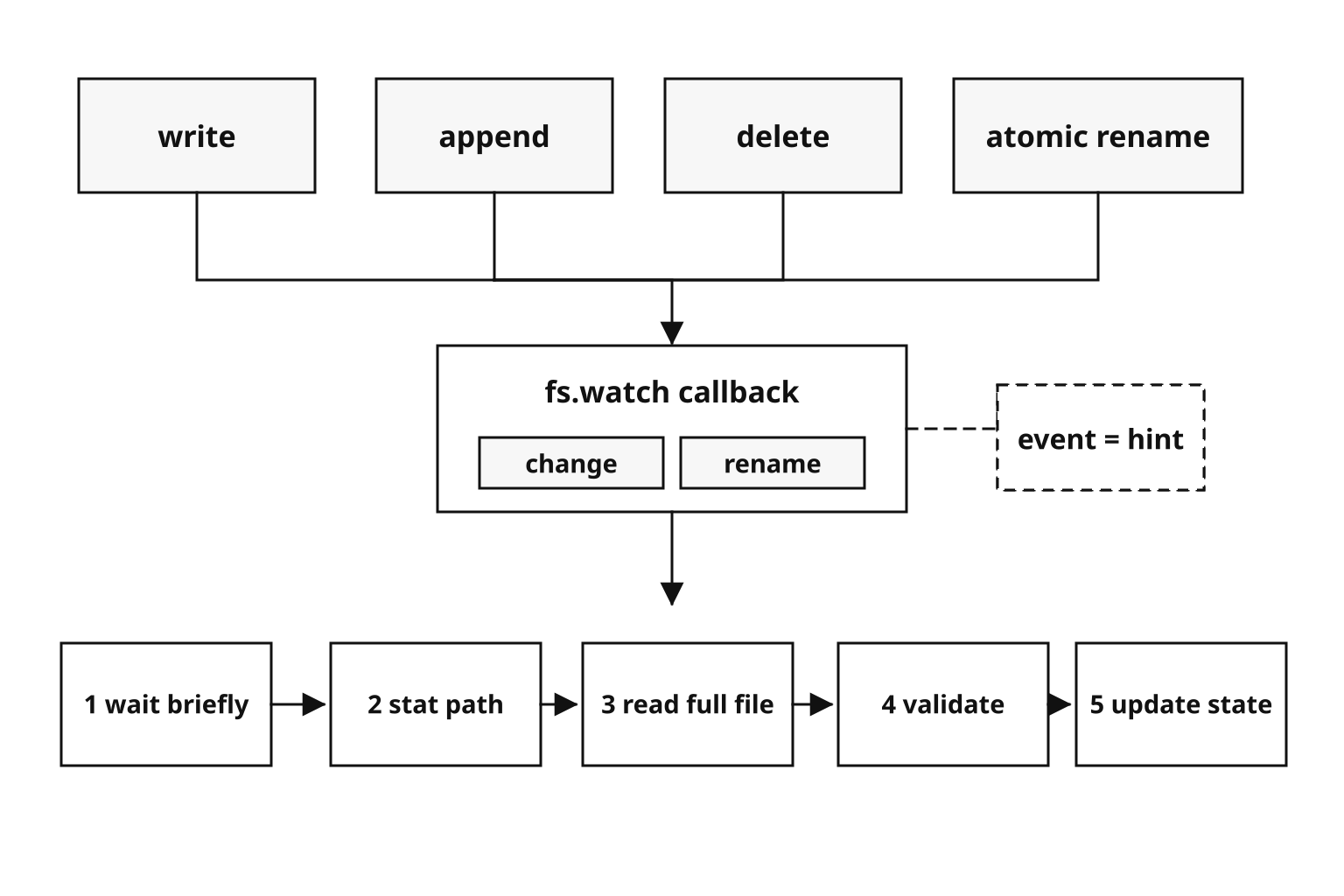
Figure 4.10 - Watcher events are coarse notifications. Portable code treats the callback as a prompt to inspect the path, read the file, and validate the contents before changing application state.
Watching Directories vs. Files
Watching a directory gives you events for activity inside that directory - files created, modified, deleted, or renamed. The filename parameter usually tells you which entry was affected.
Watching a single file is narrower. It sounds more precise, but it can be fragile.
On Linux, a file-level watch attaches to the inode behind the path. The inode is the actual file object. The path is only the name pointing to it.
That detail becomes a problem when the file is replaced. Suppose you watch config.json. Then an editor saves by writing a temp file and renaming it over config.json. The old inode is gone from that path. The new config.json has a different inode. Your watcher may still be attached to the old file object.
This happens in normal workflows. Editors often write changes to a temp file, rename the original to a backup, then rename the temp file into place. A deployment tool may do the same thing. From the watcher's point of view, the original file was renamed away.
That is why production code usually watches the parent directory, then filters by filename. If the file is deleted and recreated, the directory still exists, and the directory watcher can still see activity involving that name.
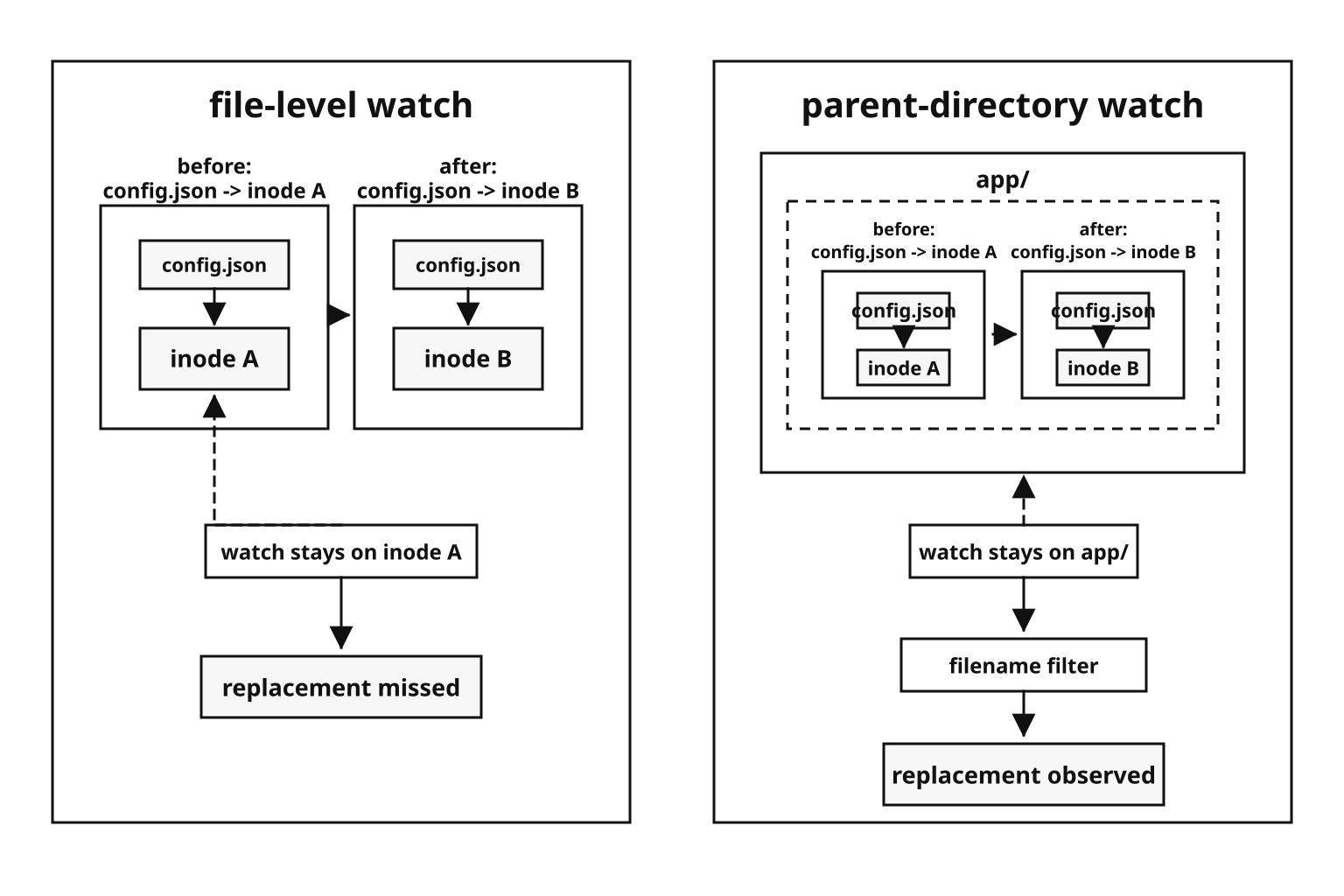
Figure 4.11 - A file-level watch can stay attached to the old file object after replacement. A parent-directory watch stays attached to the directory and filters events by filename.
The recursive Option
Recursive watching means one watch call should cover a directory and its children.
The API looks like this -
fs.watch('./src', { recursive: true }, (event, filename) => {
  console.log(`Changed - ${filename}`);
});
On macOS, recursive directory watching uses FSEvents' native tree support. One watch can cover the directory tree.
On Windows, ReadDirectoryChangesW also supports recursive watching natively.
On Linux, the story is different. recursive: true was historically unsupported. Node added recursive Linux support in v19.1 by walking the directory tree and adding individual inotify watches for subdirectories.
That costs more. Each subdirectory consumes one inotify watch slot. Node also has to notice new subdirectories and add watches for them.
This makes the Linux inotify watch limit part of your application's behavior. You can check the current limit with -
cat /proc/sys/fs/inotify/max_user_watchesOn the Linux host used to fact-check this chapter, the value was 524288. Lower values such as 8192 or 65536 still appear on some systems.
If a project has more watched directories than the configured limit, watcher setup can fail with ENOSPC. In this case, ENOSPC does not mean the disk is full. It means the inotify watch table is full.
You can raise the runtime value with -
echo 524288 | sudo tee /proc/sys/fs/inotify/max_user_watchesThat command changes the value until reboot. Use a sysctl config file if the machine needs the higher value permanently.
This is why a watcher can work perfectly on macOS and fail on a Linux server with an ENOSPC error.
The persistent Option and Keeping the Process Alive
By default, an active watcher keeps the Node process alive. The event loop sees a live handle, so the process will not exit.
Set persistent: false when you want the watcher to be passive. It can fire while the process is alive for other reasons, but it will not keep the process alive by itself.
fs.watch('./file.txt', { persistent: false }, (event) => {
  console.log('Changed');
});
A common script bug comes from the default behavior. The script watches a file, handles one change, and then seems to hang. Nothing is broken. The watcher is still open.
If the script should exit after one change, close the watcher inside the callback or use persistent: false. That option controls process lifetime. It does not replace cleanup in long-running code.
Watcher Errors
Watcher setup can fail before Node returns an FSWatcher. Later failures arrive through the watcher's 'error' event. Handle both paths -
let watcher;

try {
  watcher = fs.watch(targetPath, onChange);
  watcher.on('error', reportWatchError);
} catch (err) {
  reportWatchError(err);
}
Common failures are ordinary filesystem problems seen through the watcher API. A missing path can give ENOENT. On Linux, too many watches can give ENOSPC. Permissions can change after setup. A watched directory can be deleted.
On Node v24, watching a missing path throws ENOENT synchronously on Linux. Behavior after deletion differs across platforms, so keep both the setup try/catch and the 'error' listener.
Closing Watchers
Close a watcher when you are done with it -
watcher.close();Closing releases the operating-system watch resource. On Linux, that is tied to inotify. On macOS, it may be a kqueue-backed file watch or an FSEvents-backed directory watch. On Windows, it releases the watcher handle used by ReadDirectoryChangesW.
The same habit applies here as with file descriptors. Watchers are finite OS resources. If a long-running process keeps creating watchers and never closes them, it eventually hits limits.
Current Node.js releases also support AbortSignal for watcher cleanup -
const controller = new AbortController();

fs.watch(dir, { signal: controller.signal }, onChange);

controller.abort();
If watchers are created at runtime, track them. For example, if you create one watcher per user session or one watcher per uploaded file, store them in a Map and close them when that session or file is done. Leaking 10 watchers a minute becomes 14,400 leaked watchers per day.
fs.watchFile() and Stat Polling
fs.watchFile() does not use the operating system's event watcher. It polls the file's metadata with fs.stat() on a timer.
fs.watchFile('./config.json', { interval: 2000 }, (curr, prev) => {
  console.log(`mtime - ${prev.mtime} -> ${curr.mtime}`);
  console.log(`size - ${prev.size} -> ${curr.size}`);
});
The callback receives two Stats objects. curr is the current snapshot. prev is the previous snapshot. Your code can compare mtime, ctime, size, permission bits, link count, or any other stat field.
For content changes, mtimeMs is usually the field to compare -
fs.watchFile('./config.json', { interval: 1000 }, (curr, prev) => {
  if (curr.mtimeMs !== prev.mtimeMs) {
    console.log('Content changed');
  }
});
How Polling Works Internally
Node keeps internal state for files watched with fs.watchFile(). A timer runs at the configured interval. On each tick, Node checks the watched path with stat-style filesystem operations.
If the new stat result differs from the previous one, Node calls your listener.
The cost grows with the number of watched paths. Watching 100 files at a 1-second interval means roughly 100 metadata checks per second. Watching thousands of files at short intervals creates real filesystem load.
Those stat calls can also compete with other work. Filesystem reads and writes, DNS lookups, crypto work, and other libuv thread-pool tasks may all be active in the same process.
Why the Default Interval Is 5007ms
The default interval is 5007ms, not 5000ms. Treat it as a historical default.
If detection time or filesystem load is important, set the interval yourself and measure it on the filesystem you deploy to.
Shorter intervals find changes faster but cost more. For config files that change during deploys, 10 or 30 seconds can be enough. For a dev server, 1 second may feel fine. If you need sub-second detection, polling is usually the wrong tool. Use fs.watch() instead.
When Polling Beats Events
Polling is slower, but it can work in places where event watchers do not.
Network filesystems are the main example. NFS, CIFS, and SMB often have unreliable or missing event delivery because writes happen through a remote server. fs.watch() depends on local kernel notifications. If the local kernel never receives a useful event, your callback never fires.
fs.watchFile() asks the filesystem for metadata again. That can still work on remote mounts.
Polling can also help in containers, virtualized filesystems, or Docker volume setups where inotify support is incomplete. If event delivery is unreliable, stat polling is often the fallback.
Stopping a Stat Watcher
Current Node.js releases return an fs.StatWatcher object from fs.watchFile(). It has ref() and unref(), but cleanup still goes through fs.unwatchFile().
const watcher = fs.watchFile('./config.json', onStatChange);

watcher.unref();

fs.unwatchFile('./config.json', onStatChange);
Calling fs.unwatchFile(filename) removes all listeners for that file. Calling fs.unwatchFile(filename, listener) removes that specific listener.
mtime Precision Limits
fs.watchFile() depends on stat changes. That means timestamp precision affects what it can see.
Modern filesystems such as ext4, APFS, NTFS, and ZFS can expose subsecond timestamps. Node can also expose nanosecond stat fields when bigint: true is used.
Older filesystems such as FAT32, some network mounts, and some virtualized filesystems can have coarser timestamps. On those filesystems, two writes inside the same timestamp tick can collapse into one visible stat state.
Polling also sees snapshots. A file can be opened, changed, changed again, and closed between two polls. In that case, fs.watchFile() only sees the final stat state.
Choosing Between fs.watch() and fs.watchFile()
Use fs.watch() when you want fast event delivery and your filesystem supports it well. It is usually efficient because the OS tells you when something happened. On Linux, events often arrive within milliseconds. On macOS and Windows, latency can vary more.
The cost is inconsistency. Events can be duplicated, combined, delayed, or missed. File replacement can break file-level watches on Linux. The event vocabulary is also small - only 'change' and 'rename'.
Use fs.watchFile() when reliability of event delivery is the problem. It is slower because detection depends on the polling interval. It also costs more because every watched path is checked again and again. But it can work on filesystems where native events are absent or unreliable.
For cross-platform development tools, recursive watching, or large projects, production code often uses a wrapper library instead of raw fs.watch() or fs.watchFile().
Why chokidar Exists
chokidar is a third-party file-watching library that wraps these platform differences. Install it as an application dependency before using it, and check the option names for the major version you ship.
Its value comes from the behavior around raw watchers. It handles things you would otherwise have to build yourself.
Recursive watching on Linux. chokidar walks the directory tree, adds inotify watches for subdirectories, and updates those watches as directories appear or disappear.
Event normalization. Instead of only 'change' and 'rename', chokidar emits events such as 'add', 'change', 'unlink', 'addDir', and 'unlinkDir'.
Editor safe-write handling. When an editor writes to a temp file and renames it over the target, chokidar can combine the delete-create sequence into a single useful change event.
Polling support. On filesystems where event delivery is unreliable, chokidar can use stat polling through usePolling and interval options.
Initial scan. When watching starts, chokidar can emit 'add' events for existing files, so your code can initialize state from what is already present.
A small watcher looks like this -
import chokidar from 'chokidar';

const watcher = chokidar.watch('./src', {
  ignored: /node_modules/,
  persistent: true,
});

watcher.on('change', p => console.log(`Changed - ${p}`));
watcher.on('add', p => console.log(`Added - ${p}`));
Many build tools, test runners, and framework dev servers use chokidar or similar watcher layers internally. For one known file on one known platform, raw fs.watch() can be enough. For cross-platform or recursive watching, a library usually saves you from rebuilding the same fixes.
File Watching in Practice
Production watcher code usually follows one pattern. The event schedules verification. The verification reads the current state and decides what to do.
That keeps your application from reacting too early.
Config File Hot Reload
A config reloader usually loads config once at startup, then reloads when the file changes.
import fs from 'node:fs';
import path from 'node:path';

const configPath = path.resolve('./config.json');
let config = JSON.parse(fs.readFileSync(configPath, 'utf8'));
The reload step should read the full file and validate it before replacing the old config -
const reloadConfig = debounce(() => {
  try {
    const raw = fs.readFileSync(configPath, 'utf8');
    config = JSON.parse(raw);
    console.log('Config reloaded');
  } catch (err) {
    console.error('Bad config, keeping old -', err.message);
  }
}, 500);
Watch the parent directory and filter for the file name -
const dir = path.dirname(configPath);
const base = path.basename(configPath);

fs.watch(dir, (event, filename) => {
  if (filename == null) return reloadConfig();
  if (filename === base) reloadConfig();
});
The try/catch protects the running application. If the new config is invalid JSON, the old config stays active.
The debounce handles editor saves that produce several filesystem events. The parent-directory watch survives delete-and-recreate save patterns better than a file-level watch.
The synchronous read blocks briefly in the watcher callback. For a small config file, that is usually acceptable. The useful part is validation. Reading bytes from disk does not prove the config is valid.
Watching a Directory for New Files
The same approach works for upload folders, incoming data drops, or queued work items.
import fs from 'node:fs';
import path from 'node:path';

const uploadDir = './uploads';
const processed = new Set();

fs.watch(uploadDir, (event, filename) => {
  if (filename == null) return scanUploads();

  const fullPath = path.join(uploadDir, filename);
  if (processed.has(fullPath)) return;

  queueIfStable(fullPath);
});
Before processing the file, check that it exists and appears stable -
async function queueIfStable(fullPath) {
  const first = await fs.promises.stat(fullPath).catch(() => null);
  if (!first?.isFile()) return;

  await new Promise(r => setTimeout(r, 250));

  const second = await fs.promises.stat(fullPath).catch(() => null);
  if (!second || first.size !== second.size) return;

  processed.add(fullPath);
  processFile(fullPath);
}
A 'rename' event can mean creation or deletion. The first stat tells you whether the path currently exists. The second stat gives basic protection against reading a file while another process is still writing it.
For high-volume uploads, use a stronger protocol. Have writers upload under a temporary name, then rename into uploads only after the file is complete.
Log Rotation Detection
Suppose your app writes to app.log. An external log rotation tool renames it to app.log.1, then expects your app to start writing to a fresh app.log.
import fs from 'node:fs';

let logStream = fs.createWriteStream('./app.log', { flags: 'a' });
let watcher;
When rotation happens, reopen the log -
function reopenLog() {
  watcher?.close();

  logStream.end(() => {
    logStream = fs.createWriteStream('./app.log', { flags: 'a' });
    logStream.once('open', watchLog);
  });
}
Then watch for rename activity -
function watchLog() {
  watcher = fs.watch('./app.log', event => {
    if (event === 'rename') reopenLog();
  });

  watcher.on('error', err => console.error(err.message));
}

watchLog();
When log rotation renames the file, a 'rename' event usually fires. The old stream may still point at the renamed file through its open descriptor. Closing it lets the app open a new stream for app.log.
The watcher restarts after the new stream opens because, on Linux, a file-level watch follows the inode that was renamed. This handles rename-based rotation. Copy-truncate rotation keeps the same inode and needs different logic.
Watching Network Filesystems
fs.watch() depends on local OS event delivery. With NFS, SMB, or CIFS mounts, writes may happen through a remote server. The local kernel may not see those writes as local filesystem events.
For network-mounted files, use stat polling with fs.watchFile(), or move notification outside the filesystem. Common alternatives are HTTP webhooks, message queues, database triggers, or another explicit signal from the writer.
Watcher Resource Leaks
Every watcher holds OS resources. On Linux, each fs.watch() call consumes inotify resources. On macOS and Windows, watchers use different OS handles, but the resource cost is still real.
If your application creates watchers at runtime and forgets to close them, resources build up. One watcher per user session, one per uploaded file, or one per API request can become a serious leak.
A leak of 10 watchers per minute becomes 14,400 leaked watchers per day. On Linux, that can hit the inotify limit or the file descriptor limit. The symptoms can look unrelated - new watchers fail with ENOSPC or EMFILE, memory grows from accumulated JavaScript watcher objects, or tests hang because open watchers keep the event loop alive.
Track watchers by the resource they belong to -
const watchers = new Map();

function startWatching(key, filePath) {
  if (watchers.has(key)) return;

  const watcher = fs.watch(filePath, () => handleChange(key));
  watcher.on('error', err => reportWatchError(key, err));

  watchers.set(key, watcher);
}
Close them when the resource is done -
function stopWatching(key) {
  const watcher = watchers.get(key);

  watcher?.close();
  watchers.delete(key);
}
In tests, close all watchers in afterEach hooks. Otherwise, the test process may stay alive until the runner times out.
Assuming Events Are Immediate
Even fs.watch() has latency. Linux inotify events often arrive within a few milliseconds. macOS directory watches backed by FSEvents can batch events and deliver them later. Under load, that delay can be 100ms or more, sometimes around a second. Windows has similar variability.
If you need to detect a change within a strict window such as 10ms, file watching is usually the wrong channel. Use a direct signal instead - IPC, a Unix domain socket, a message queue, or a shared memory flag.
Debouncing File Watch Events
One human action can produce several watcher events. Saving a file in an editor may write a temp file, rename the old file, rename the temp file into place, and update metadata. The OS may report these as multiple events.
If your handler rebuilds a project, reloads config, or uploads a file, running it three times in 50ms is wasted work. It can also create bugs if the first run reads a half-finished file.
Debouncing waits until the event burst settles before running the real action.
Here is a small debounce helper -
function debounce(fn, delay) {
  let timer;

  return (...args) => {
    clearTimeout(timer);
    timer = setTimeout(() => fn(...args), delay);
  };
}
Each event resets the timer. The function runs only after delay milliseconds with no new events.
Wrap the watcher callback with it -
const onChange = debounce((event, filename) => {
  console.log('File settled, reloading...');
}, 300);

fs.watch('./', (event, filename) => {
  if (filename === 'config.json') onChange(event, filename);
});
The delay depends on the job. For development tools, 100-300ms often feels responsive and catches editor save bursts. For production config reloads, 500ms or 1 second gives deploy scripts more time to finish. For log directory scanning, you may skip debouncing and process files as soon as they appear.
Stat-Based Deduplication
You can also ignore events where the file's observed metadata has not changed. When an event fires, stat the file and compare a small signature to what you saw last time.
let lastSeen = null;

fs.watch(path.dirname(configPath), async (event, filename) => {
  if (filename == null) return reloadConfig();
  if (filename !== path.basename(configPath)) return;

  const stats = await fs.promises.stat(configPath).catch(() => null);
  if (!stats) return;

  const signature = `${stats.mtimeMs}:${stats.size}`;
  if (signature === lastSeen) return;

  lastSeen = signature;
  console.log('Config changed');
});
This filters duplicate OS events and some metadata-only noise. It is still a filter, not proof that the writer is finished. Size can stop changing before the writer closes the file. Content can also change while keeping the same size.
For safer reloads, combine both techniques. Stat-check to suppress duplicate events, then debounce before reading and validating the file.
Editor Safe-Write Patterns
Editors often avoid direct in-place writes. They do this to reduce the chance of leaving a corrupted file if the editor crashes during save.
Different tools use different save sequences. A command line tool or atomic-write library might write config.json.tmp, rename config.json to config.json~, then rename config.json.tmp to config.json. Vim, VS Code, Sublime Text, JetBrains IDEs, and others use variations of this idea.
Those steps can produce several filesystem events. They can also change the inode behind the watched filename.
On Linux, this breaks naive file-level watchers. If you watch config.json directly, the watcher may follow the original inode when it is renamed to a backup. The new config.json gets a different inode. Your watcher can miss the new file because it is still attached to the old object.
Directory watching avoids that failure mode. Watch the parent directory, filter for config.json, debounce the event burst, then read and validate the file.
This is one of the reasons chokidar exists. Recognizing safe-write patterns and turning them into a clean "file changed" event takes more tracking than the raw fs.watch() API provides.
Kernel Watcher Internals
The platform differences in fs.watch() come from different kernel designs. Once you understand what each backend is built to do, the behavior feels less random.
inotify on Linux
inotify is based on three main operations - inotify_init1(), inotify_add_watch(), and read().
inotify_init1() creates an inotify instance and returns a file descriptor. That fd represents a queue of filesystem events. libuv can add that fd to the event loop and wake up when events are ready to read.
inotify_add_watch(fd, pathname, mask) registers interest in a path. The mask says which events you want. Common masks include IN_MODIFY for content changes, IN_ATTRIB for metadata changes, IN_CREATE for new files in a watched directory, IN_DELETE for deletion, and IN_MOVED_FROM / IN_MOVED_TO for rename pairs.
When an event happens, the kernel writes an inotify_event record into the inotify fd's buffer. That record includes the watch descriptor, event mask, optional rename cookie, length, and filename.
libuv wraps that behind a uv_fs_event handle. Node then exposes the smaller JavaScript shape - an FSWatcher, an 'error' event, optional filename, and event strings collapsed to 'change' or 'rename'.
inotify watches individual inodes. A directory watch reports activity inside that directory, but not inside nested subdirectories. Recursive watching needs one watch per subdirectory. Each one consumes a slot from the per-user inotify watch table.
That is why large projects can hit /proc/sys/fs/inotify/max_user_watches and fail with ENOSPC.
inotify gives more detail than FSEvents, but it still is not an audit log. The kernel can coalesce identical unread events. It can also drop events when the queue overflows. You can check the queue limit with -
cat /proc/sys/fs/inotify/max_queued_eventsFSEvents on macOS
FSEvents was designed for watching large directory trees with low overhead. Spotlight and Time Machine need that kind of behavior. They care that something changed under a tree, then they can rescan what they need.
That design is different from inotify. FSEvents watches directory paths and can cover everything below them. One stream can watch a subtree without creating one watch per subdirectory.
Node uses kqueue for file watches on macOS and FSEvents for directory watches. So the backend depends on what you watch.
FSEvents batches rapid changes. If a file changes ten times quickly, you may receive one or two notifications. The event tells you that the path was affected. It does not promise one callback per filesystem operation.
For directory watches, libuv can request file-level FSEvents notifications with kFSEventStreamCreateFlagFileEvents. Even then, coalescing still applies. You can get per-file paths while rapid changes merge into fewer delivered events.
In practice, macOS may fire fewer callbacks than Linux for the same operations. Timing differs too. Node also documents filename as optional, so your code still needs fallback behavior.
ReadDirectoryChangesW on Windows
Windows uses ReadDirectoryChangesW. It watches a directory handle and fills a buffer with change records.
Each record contains an action such as FILE_ACTION_MODIFIED, FILE_ACTION_ADDED, FILE_ACTION_REMOVED, FILE_ACTION_RENAMED_OLD_NAME, or FILE_ACTION_RENAMED_NEW_NAME, plus the relative filename.
Recursive watching is supported natively through a flag, so Windows can monitor subdirectories without the same manual watch-per-directory approach used by Linux inotify.
The main failure mode is buffer overflow. Windows writes events into a fixed-size buffer. If too many changes happen before your process drains that buffer, later events are discarded. The API reports ERROR_NOTIFY_ENUM_DIR. At that point, the specific events are gone, so the recovery path is a directory rescan.
The Practical Result
No library can make inotify, FSEvents, and ReadDirectoryChangesW behave identically.
inotify is inode-based and mask-based. FSEvents is tree-oriented and coalesced. ReadDirectoryChangesW gives per-file records through a buffer that can overflow.
A library such as chokidar can debounce events, deduplicate them, run stat checks, and use a nicer event vocabulary. That normalization layer is doing real work. The small fs.watch() API hides a lot of platform behavior.
The Problem With Naive File Writes
A naive file write often starts with fs.writeFile(). By default, it opens the target with the 'w' flag.
That flag truncates the file to zero bytes immediately, then writes the new content. During that window, the file may be empty or partially written.
If the process crashes between truncate and write completion, the old content is already gone. The file may be empty or may contain only part of the new content.
Even without a crash, writes can fail partway through. Node writes data through the operating system. If the disk fills after 60 percent of the data has been written, you may get ENOSPC, and the file contains a partial new version. Your application can catch and log the error, but the file has already changed.
Readers see whatever bytes are present when they open the file. If another process reads a JSON config while you are halfway through writing it, it can receive broken JSON. That can cause a parse failure, a crash, or a fallback to defaults.
This failure is ugly because it depends on timing. A deploy script updates the config. A request arrives during the write. The service reads partial JSON and returns a 500. The next request may work because the write has finished.
Using 'r+' avoids immediate truncation, but it creates a different problem. If the new content is shorter, you need to truncate the file yourself after writing. A crash between the write and the truncate can leave stale bytes from the old content at the end.
In-place overwrites are hard to make safe because open, write, truncate, and close are separate operations. A failure between them can leave the file in a bad state.
The Temp-File-and-Rename Pattern
The safer pattern is to write the new content to a temporary file first. Once that file is complete, rename it over the target.
On POSIX systems, rename() is atomic when the source and destination are on the same filesystem. Readers opening the path before the rename see the old file. Readers opening it after the rename see the new file. They should not see a half-written target.
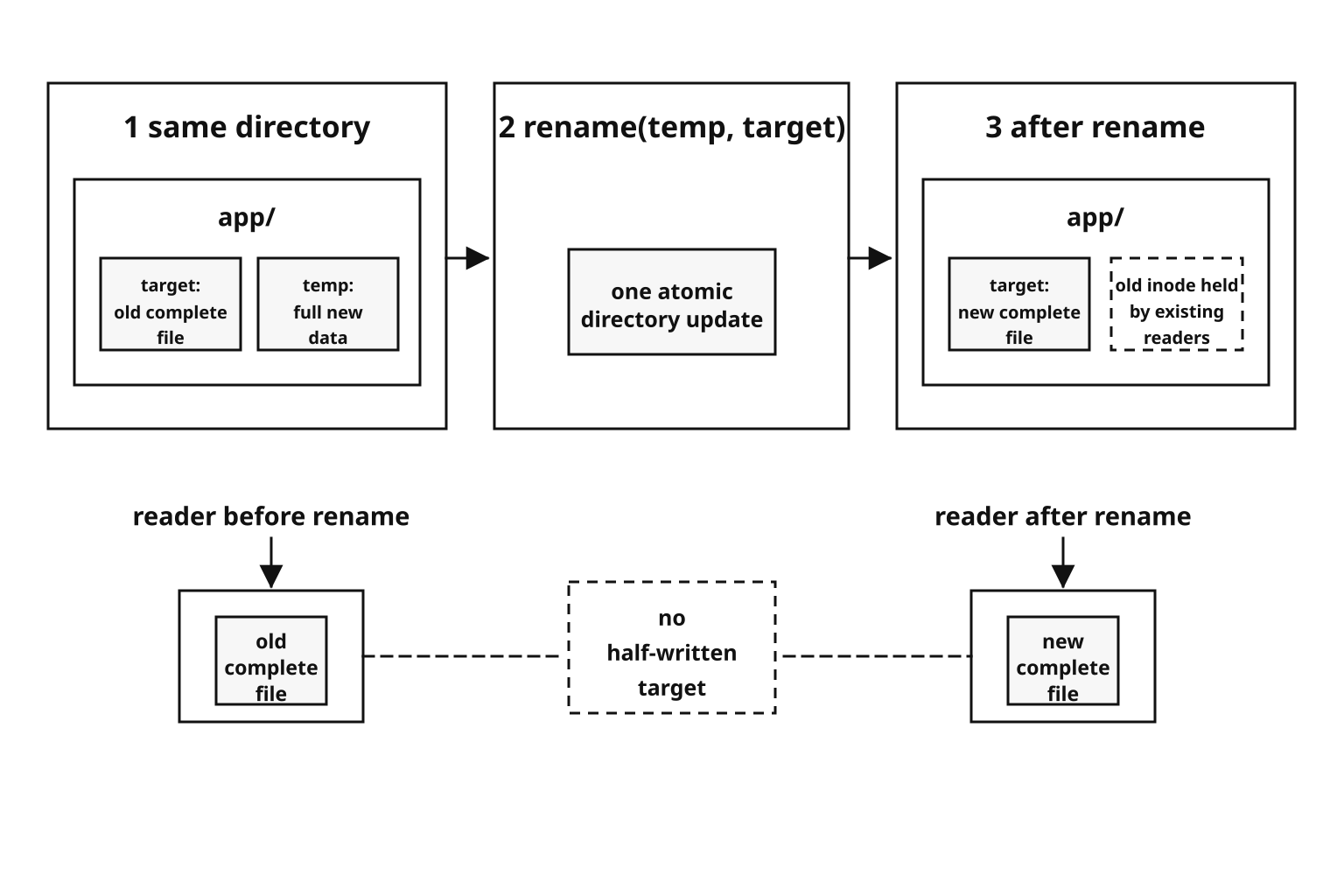
Figure 4.12 - Atomic replacement publishes a complete temporary file with one same-filesystem rename. Readers opening the pathname before or after the rename see complete content, not the write in progress.
A basic version looks like this -
import crypto from 'node:crypto';
import fs from 'node:fs';
import path from 'node:path';

const dir = path.dirname(targetPath);
const base = path.basename(targetPath);
const suffix = crypto.randomBytes(6).toString('hex');
const tempPath = path.join(dir, `.${base}.tmp-${suffix}`);

await fs.promises.writeFile(tempPath, data, { flag: 'wx' });
await fs.promises.rename(tempPath, targetPath);
The temp file is created in the target directory. That keeps the final rename on the same mounted filesystem.
The 'wx' flag means write exclusively. If the temp path already exists, the open fails with EEXIST. Underneath, this uses O_WRONLY | O_CREAT | O_EXCL. The check and create happen together inside the kernel.
If two processes somehow generate the same temp suffix, only one creates the file. The other gets EEXIST and can retry.
Node's docs warn that exclusive mode may not work reliably on network filesystems, so shared mounts need extra care.
Why rename() Is Atomic on POSIX
On POSIX filesystems, a directory maps names to inode numbers. rename() updates those directory entries.
When you rename temp file A over target file B in the same directory and on the same filesystem, the kernel updates B's directory entry to point to A's inode and removes A's old name.
POSIX requires that rename either fully completes or fully fails. Other processes do not see an in-between state.
If B already exists, its old inode loses a link. Processes that already opened the old B can keep reading it through their file descriptors. The data is removed only after the last descriptor closes and the link count reaches zero. New opens of B after the rename get the new inode.
Why the Same Filesystem Is Required
rename() is atomic only when both paths are on the same mounted filesystem.
If the temp file is on /tmp and the target is on /var/app, the kernel cannot update both filesystems as one operation. On Linux, the rename fails with EXDEV, which means cross-device link.
Create temp files in the same directory as the target. Avoid os.tmpdir() for atomic replacement unless you know it is on the same filesystem as the target.
Docker environments often expose this split. /tmp may be a different mount from the application data directory. The same issue appears when os.tmpdir() is on tmpfs while your data lives on a persistent volume.
Permissions After Rename
After rename, the target path points to the temp file's inode. That means it gets the temp file's permissions and ownership.
If the original config was 0644 and owned by www-data, but the temp file is 0600 and owned by deploy, the replaced file keeps the temp file's metadata. Your application may suddenly lose access to its own config.
To preserve the original POSIX permission bits, stat the original first -
const original = await fs.promises.stat(targetPath).catch(() => null);
const mode = original ? original.mode & 0o777 : 0o666;

await fs.promises.writeFile(tempPath, data, {
  flag: 'wx',
  mode,
});

if (original) await fs.promises.chmod(tempPath, mode);

await fs.promises.rename(tempPath, targetPath);
The mode option is only the requested creation mode. The process umask can still clear bits from it. If exact permission bits count, call chmod() on the temp file before the rename.
This preserves mode bits. It does not preserve ownership, ACLs, extended attributes, or platform-specific metadata. Preserving ownership may require chown(), which often needs privileges that app processes do not have.
Windows Differences
Windows file sharing rules affect replacement. On POSIX, replacing an open file is allowed, and the old inode stays alive until its last descriptor closes. On Windows, replacement can fail if another process opened the target without delete-sharing permission.
Node may surface that as EPERM or EACCES. The replacement did not partially happen. It was blocked.
The usual workaround is retry with backoff -
async function renameWithRetry(tempPath, targetPath) {
  for (let i = 0; i < 5; i++) {
    try {
      await fs.promises.rename(tempPath, targetPath);
      return;
    } catch (err) {
      if (!['EPERM', 'EACCES'].includes(err.code) || i === 4) throw err;
      await new Promise(r => setTimeout(r, 50 * (i + 1)));
    }
  }
}
The other process may close its handle, and a later retry can succeed. Production code should cap the total wait and log the final failure.
Windows also has a Win32 ReplaceFile() API for replacement workflows that preserve more metadata, but Node does not expose it through fs.rename().
Creating Temporary Files and Directories
fs.mkdtemp() for Temp Directories
fs.mkdtemp() creates a new temporary directory with a random suffix -
import { mkdtemp } from 'node:fs/promises';
import os from 'node:os';
import path from 'node:path';

const dir = await mkdtemp(path.join(os.tmpdir(), 'myapp-'));
That might create something like /tmp/myapp-a7F3kL.
os.tmpdir() returns the system's temp location. On Linux, that is usually /tmp. On macOS, it is often a per-user /var/folders/... path. On Windows, it is usually under %LOCALAPPDATA%\Temp.
For atomic file replacement, do not put the temp file in os.tmpdir() by default. Put it beside the target file so the final rename stays on the same filesystem.
fs.mkdtemp() is useful for scratch directories - staging several files, running isolated build steps, or creating a workspace for batch operations. For one atomic file write, create a temp file directly in the target directory with a random name and 'wx'.
TOCTOU and the Role of O_EXCL
TOCTOU means time-of-check-time-of-use. It is a race where code checks something, then acts on that result later.
Filesystem code hits this when it checks whether a path exists, then creates the file based on that check.
This pattern is vulnerable -
// Vulnerable to TOCTOU -
const exists = await fs.promises.access(tempPath)
  .then(() => true, () => false);

if (!exists) {
  await fs.promises.writeFile(tempPath, data);
}
Between access() and writeFile(), another process can create a file at tempPath. On a shared system, an attacker could create a symlink there and redirect your write to another location. writeFile() with the default 'w' flag follows symlinks.
The 'wx' flag avoids that race. It uses O_EXCL, so the check and create happen in one kernel operation. Either the file does not exist and you create it, or it already exists and you get EEXIST.
There is no gap between checking and creating.
TOCTOU problems are well-known in filesystem security. They are especially risky on multi-user machines, CI environments, and shared development systems. They can also show up in single-user production when multiple app instances, cron jobs, or deploy scripts touch the same directory.
Cleaning Up Temp Files
Temp files can be left behind if the process crashes after creating the temp file but before renaming it.
A few habits keep that under control.
Include timestamps in temp file names, such as .tmp-1708538400000-a1b2c3. On startup, scan for old temp files and delete anything older than your threshold. The timestamp also makes it obvious when an orphan was created.
Track active temp files during the process lifetime. Delete them in finally blocks. You can also register a best-effort exit cleanup -
import fs from 'node:fs';

const tracked = new Set();

process.on('exit', () => {
  for (const p of tracked) {
    try {
      fs.unlinkSync(p);
    } catch {}
  }
});
Exit handlers do not run on SIGKILL or segfaults. Treat them as best-effort cleanup. Startup cleanup is the backstop.
For long-running servers, a periodic cleanup routine can remove stale temp files -
async function cleanStaleTemps(dir, maxAgeMs = 3600000) {
  const now = Date.now();

  for (const name of await fs.promises.readdir(dir)) {
    const match = /^\.tmp-(\d+)-/.exec(name);
    if (!match || now - Number(match[1]) <= maxAgeMs) continue;

    await fs.promises.unlink(path.join(dir, name)).catch(() => {});
  }
}
Run it on startup and optionally on a timer. The .catch(() => {}) handles races where another process deleted or renamed the file between readdir() and unlink().
Atomic Writes and File Watching Together
An atomic write usually reaches watchers as a rename. If your code only handles 'change', it can miss updates published by rename.
The safer pattern is to watch the parent directory, ignore the exact event type, debounce, then read and validate the file.
const reload = debounce(async () => {
  try {
    const raw = await fs.promises.readFile(configPath, 'utf8');
    config = JSON.parse(raw);
  } catch (err) {
    console.error('Keeping old config -', err.message);
  }
}, 500);fs.watch(path.dirname(configPath), (event, filename) => {
if (filename == null) return reload();
if (filename === path.basename(configPath)) reload();
});Any matching event schedules a reload attempt. The debounce handles event bursts from rename sequences. The try/catch handles moments where the target name is briefly absent or the new file is invalid.
Directory-level watching also survives delete-and-recreate patterns better than watching the file directly.
A Complete Atomic Write Implementation
Here is the full shape pulled together. This version uses the renameWithRetry() helper from the Windows section.
Start with the imports -
import crypto from 'node:crypto';
import fs from 'node:fs';
import path from 'node:path';
Generate a temp name beside the target -
function tempNameFor(targetPath) {
  const dir = path.dirname(targetPath);
  const base = path.basename(targetPath);
  const suffix = crypto.randomBytes(6).toString('hex');

  return path.join(dir, `.${base}.${Date.now()}-${suffix}.tmp`);
}
Then write, chmod, rename, and clean up on failure -
async function atomicWrite(targetPath, data, options = {}) {
  const tempPath = tempNameFor(targetPath);
  const original = await fs.promises.stat(targetPath).catch(() => null);
  const mode = original ? original.mode & 0o777 : options.mode ?? 0o666;
  const writeOptions = { ...options, mode, flag: 'wx' };

  try {
    await fs.promises.writeFile(tempPath, data, writeOptions);
    await fs.promises.chmod(tempPath, mode);
    await renameWithRetry(tempPath, targetPath);
  } catch (err) {
    await fs.promises.unlink(tempPath).catch(() => {});
    throw err;
  }
}
This creates a temp file beside the target with a timestamped random name. It uses exclusive creation so an existing temp path cannot be overwritten. It preserves the original file's POSIX permission bits when the target already exists. It keeps flag: 'wx' after caller options so callers cannot accidentally disable exclusive creation.
If the write or rename fails, the temp file is removed. If the rename succeeds, callers opening the target path see either the old file or the complete new file.
For cross-platform use, wrap the rename in retry logic for Windows EPERM and EACCES errors.
For crash durability, add fsync() calls. Sync the temp file before rename, then sync the directory after rename. Most config and JSON-state files do not need that extra cost. Databases and transaction logs usually do.
The overhead is one extra temp file and one rename syscall. For small config files, that cost is tiny. For large data files, the data is written once to the temp file. The rename is fast because it updates a directory entry instead of copying the file data.
When the data can be regenerated, or when the file is an append-only log, direct writes may be fine.
When to Use Atomic Writes
Configuration files are the usual case. A corrupt config can prevent an app from starting, or make a running app reload bad state. Atomic replacement lets readers see a complete old config or a complete new config.
Application state files have the same shape - caches, session stores, feature flags, and small JSON state files. If the app reads them on startup, partial writes can turn into broken behavior.
PID files are small, but the failure mode can still hurt. A truncated PID file can confuse a process manager and lead to a second instance. Writing it atomically avoids that.
Atomic writes do not prove the new content is semantically valid. Validate first when validity counts, then rename.
You usually do not need atomic replacement for append-only logs, throwaway temp files, or build outputs that can be regenerated from source.
Multi-File Atomic Updates with Symlink Swaps
Single-file atomic rename works when one file is the unit of publication. Sometimes the real unit is a group of files.
A deploy may publish static assets. A build tool may produce several outputs. A data file may need to match an index file.
If you rename file A successfully and crash before renaming file B, readers may see new A with old B. Each file is intact, but the set is mixed.
A symlink swap can publish the whole set together. Write every file into a new versioned directory first -
const dataDir = './data';
const newDir = path.join(dataDir, `v-${Date.now()}`);

await fs.promises.mkdir(newDir, { recursive: true });
await fs.promises.writeFile(path.join(newDir, 'config.json'), configData);
await fs.promises.writeFile(path.join(newDir, 'index.dat'), indexData);
Then create a temporary symlink and rename it over current -
const tmpLink = path.join(dataDir, `.current-tmp-${Date.now()}`);

await fs.promises.symlink(path.basename(newDir), tmpLink);
await fs.promises.rename(tmpLink, path.join(dataDir, 'current'));
The symlink target uses path.basename(newDir) because relative symlinks are resolved from the directory containing the link. If the link is inside ./data, the target should be relative to ./data.
On POSIX filesystems, renaming the symlink is atomic. Before the rename, ./data/current points to the old version directory. After the rename, it points to the new one. Readers see a complete old set or a complete new set.
The old version directory remains until you clean it up. You can keep a few old versions for rollback, then delete older ones after a grace period.
On Windows, symlink creation can require privileges or developer mode. Many Windows deployments use another indirection layer instead of symlink swaps.
Durability vs. Consistency
Atomic replacement gives visible consistency. Readers see old content or complete new content.
Durability is a separate guarantee. Durability means the data survives power loss or kernel crash.
fs.writeFile() writes into the kernel's page cache. The kernel flushes dirty pages to storage later. On many Linux systems, dirty-page expiration defaults around 30 seconds, but that is kernel tuning, not a Node guarantee.
If power fails before the flush, recently written data can be lost.
For durability, sync the temp file before rename -
const handle = await fs.promises.open(tempPath, 'wx');

try {
  await handle.writeFile(data);
  await handle.sync();
} finally {
  await handle.close();
}

await fs.promises.rename(tempPath, targetPath);
handle.sync() asks the kernel to flush the file's data and metadata to storage. Some drives have write caches that complicate this, but that is a hardware and filesystem concern.
For crash-durable replacement, sync the directory after rename too -
const dir = await fs.promises.open(path.dirname(targetPath), 'r');

try {
  await dir.sync();
} finally {
  await dir.close();
}
The rename updates the directory's name-to-inode mapping. That update can also sit in the page cache. If power fails before the directory metadata is flushed, the rename may not survive.
Directory sync works on common POSIX filesystems, including the Linux host used for this chapter's fact checks, but support is platform- and filesystem-dependent. Databases pay this cost. Most apps do not need it for every small config write.
File watching and atomic replacement meet at the pathname. The writer should publish complete data. The watcher should wait for events to settle, read the current file, validate it, and only then update application state.