Node.js Signals, Exit Codes, and Graceful Shutdown
Signals are how the operating system gets a process's attention.
A JavaScript function does not run the moment someone sends a signal. The operating system delivers a notification to the process first. Node receives the notification through its native layer, turns selected signals into process events, and then your handler decides what should happen next.
That next step is where most real shutdown logic lives. Should the server stop accepting new requests? Should existing requests finish? Should database connections close? Should the process exit with success or failure? Signals are small, but the decisions behind them affect the whole lifetime of the process.
This is why graceful shutdown needs more than "catch SIGTERM and exit". Once you install your own handler, you take over behavior that Node may have handled for you before. On non-Windows platforms, Node has default handlers for SIGINT and SIGTERM. After you add your own listener, Node does not automatically follow that default exit path anymore. Your code now owns the shutdown path.
Some signals cannot be handled at all. SIGKILL is the big one. The kernel stops the process directly, and no JavaScript cleanup runs. The process events are also different from signal handlers. beforeExit only runs when Node has no more scheduled work. exit runs during final shutdown and only allows synchronous work.
Every Unix process can receive signals. They can arrive because a terminal sent one, because another process asked the kernel to send one, or because the kernel generated one itself. The rest of this chapter follows that path from operating-system notification to JavaScript handler, then uses it to explain shutdown, exit codes, deadlines, and process behavior.
What Signals Actually Are
A signal is a small asynchronous notification sent to a process by the kernel.
"Asynchronous" here means your program did not ask for it at that exact moment. The signal can arrive while the process is waiting on I/O, while another process sends it, or while the kernel is about to return control back to user code. Your process can choose how to handle many signals, but it does not choose the exact moment they arrive.
Signals are old Unix machinery. They existed long before most of the IPC tools application developers use today, like sockets, pipes, and shared memory. They are intentionally tiny. A normal signal gives you a signal name or number. There is no structured payload and no built-in acknowledgment.
That makes signals good for process control. They are a poor fit for application messages. Use them to say "stop", "reload", "interrupt", or "dump diagnostics". Do not treat them like a message queue.
Each signal has a name and a number. POSIX standardizes common names, but the numbers can vary by operating system and CPU architecture. On common Linux x86 and ARM systems, these are the ones you will see most often -
SIGHUP    1    Terminal hangup
SIGINT    2    Interrupt (Ctrl+C)
SIGKILL   9    Forced termination
SIGUSR1  10    User-defined signal 1 (on Linux)
SIGUSR2  12    User-defined signal 2 (on Linux)
SIGTERM  15    Graceful termination request
These signals show up in server shutdown, terminal control, debugging, and process-manager workflows. There are many others, including SIGPIPE, SIGWINCH, SIGSTOP, and SIGQUIT, but the same basic delivery model applies.
Signals can come from a few places. The kernel generates some directly. For example, invalid memory access can produce SIGSEGV, and writing to a pipe whose reader has closed can produce SIGPIPE. Other processes can send signals through the kill syscall. The terminal driver sends signals for interactive key presses like Ctrl+C, which sends SIGINT, or Ctrl+, which sends SIGQUIT. A process can also send a signal to itself.
At the kernel level, a signal becomes pending for a process or thread. A process-directed signal, like one sent by kill(2), can be delivered to any thread that is not blocking that signal. When execution moves from kernel mode back to user mode, the kernel checks for pending unblocked signals. If the process has a handler, the handler path is used. If it does not, the signal's default action is used.
There is one limit that stops normal signals from being useful as a message system. Standard signals do not queue. If two SIGTERMs arrive while SIGTERM is already pending, the process receives one pending SIGTERM, not two separate events. That is fine for shutdown. It is not fine if you try to use signals as counters or structured messages. POSIX real-time signals can queue, but Node does not expose them as a structured application messaging API.
Default Signal Actions
Every signal starts with a default behavior. If your program does not install a handler, the operating system or runtime follows that behavior.
| Category | Meaning | Examples |
|---|---|---|
| Terminate | The process exits. | SIGTERM, SIGINT, SIGHUP, SIGUSR1, SIGUSR2, SIGPIPE |
| Core dump | The process exits and writes a core dump file. | SIGQUIT, SIGABRT, SIGSEGV, SIGBUS |
| Ignore | The signal is discarded. | SIGCHLD, SIGURG |
Two signals are handled directly by the kernel - SIGKILL and SIGSTOP.
User-space code cannot catch, block, or ignore either one. When SIGKILL arrives, the kernel tears down the process, reclaims memory, closes file descriptors, and informs the parent process. When SIGSTOP arrives, the process pauses until SIGCONT resumes it. No JavaScript cleanup runs for either signal.
Node adjusts a few defaults during startup. On non-Windows platforms, it installs default handlers for SIGINT and SIGTERM. Those handlers reset terminal mode and then terminate with exit status 128 + signal number.
Once you add your own listener for one of those signals, Node removes that default exit behavior for that signal. From that point on, the process will keep running unless your handler closes the remaining work, lets the event loop drain, or exits explicitly.
Node also reserves SIGUSR1 for the inspector and debugger. Sending SIGUSR1 to a Node process can activate the inspector. If you register your own SIGUSR1 listener, you can interfere with that debugger behavior.
SIGPIPE is worth calling out because server developers hit the situation often. In many Unix programs, writing to a closed pipe sends SIGPIPE, and the default action terminates the process. Node changes that behavior during startup by ignoring SIGPIPE globally. A broken pipe then shows up as an EPIPE error from the write operation instead of killing the whole process. That is the behavior most network servers need.
Catching Signals
You register a signal handler with the same event API used for other process events -
process.on('SIGTERM', (signal) => {
  console.log(`Received ${signal}`);
  shutdown(signal);
});
This callback runs on the main JavaScript thread during a normal event-loop turn. It does not interrupt JavaScript that is already running. If your code is stuck in a long for loop, parsing a huge JSON string synchronously, or doing heavy string manipulation, the signal handler waits until that work finishes and control returns to the event loop.
That behavior is very different from a low-level C signal handler. A C signal handler can interrupt execution at difficult points, so it is allowed to do only a tiny set of safe operations. Node takes a safer path for JavaScript. The kernel may have delivered the signal already, but your JavaScript sees it only after Node converts that delivery into event-loop work.
Multiple handlers for the same signal work like normal EventEmitter listeners. They run in registration order -
process.on('SIGTERM', () => console.log('handler 1'));
process.on('SIGTERM', () => console.log('handler 2'));

// Both fire on SIGTERM, in order.
Removing a handler also uses the standard EventEmitter API -
const handler = () => {
  // ...
};

process.on('SIGTERM', handler);

// Later:
process.removeListener('SIGTERM', handler);
After all listeners for a signal are removed, Node returns to the default behavior for that signal. On a non-Windows platform, if you remove every SIGTERM listener, the next SIGTERM follows Node's default signal-exit path again.
The libuv Signal Bridge
The operating system can deliver a signal at almost any time. JavaScript, on the other hand, needs to run in a controlled event-loop turn on the main thread. Node uses libuv to bridge those two worlds.
When you add the first JavaScript listener for a signal type, Node creates an internal SignalWrap. It then calls uv_signal_init() and uv_signal_start() for that signal number. If you add more JavaScript listeners for the same signal, those extra listeners are normal EventEmitter callbacks. Node does not create a separate low-level signal watcher for every process.on('SIGTERM', ...) callback.
The native signal handler inside libuv stays extremely small. POSIX allows only a small set of async-signal-safe functions inside a real signal handler. It is not safe to allocate memory, call printf, or grab locks from there. So libuv does something simple and safe - it writes a small signal message to an internal pipe connected to the event loop.
That pattern is called the self-pipe pattern. The read end of the pipe is registered with the event loop's I/O polling system, such as epoll on Linux or kqueue on macOS. When the signal handler writes to the pipe, the poller wakes up. The signal is then processed later as ordinary event-loop work.
The path looks like this -
- The kernel delivers
SIGTERMto the process. - libuv's native signal handler writes a small message to the internal signal pipe.
- The event loop wakes because the pipe is readable.
- libuv reads from the pipe and identifies the signal.
- libuv calls the callback registered by
uv_signal_start(). - Node schedules the matching JavaScript signal listeners to run on a later event-loop turn.
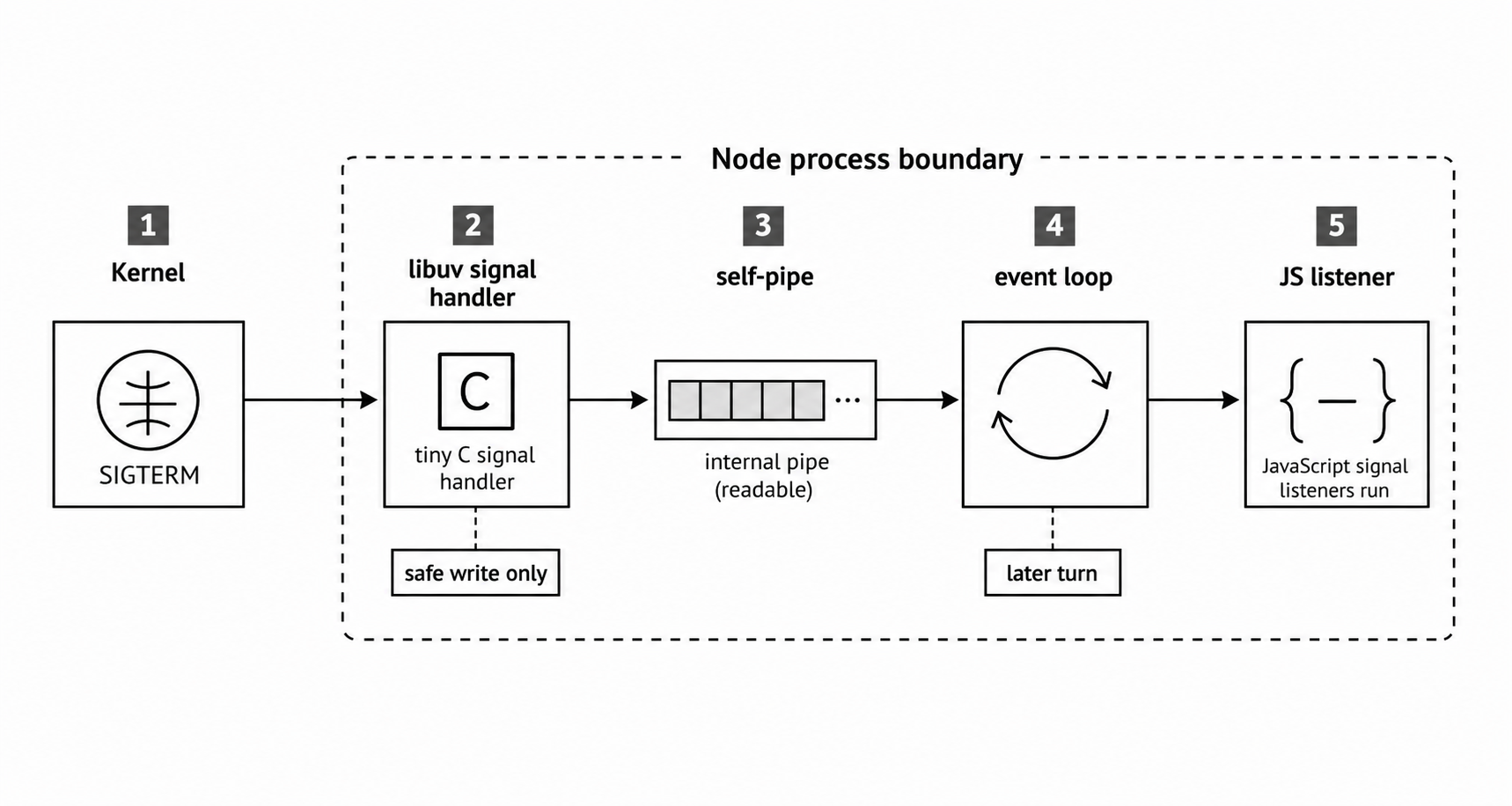
Figure 5.1 - The libuv signal bridge turns a kernel notification into event-loop work. The native handler only performs the safe write. JavaScript runs later from the event loop.
This is why JavaScript signal handlers feel like normal callbacks. Raw signal delivery cannot safely run arbitrary JavaScript. A pipe notification gives libuv a normal readable handle to process later. The small write() inside the native handler is allowed because write() is async-signal-safe.
The timing follows from that path. If your program runs a 500ms synchronous computation, the JavaScript signal handler is delayed by 500ms. The kernel may have delivered the signal, and libuv may have written to the pipe, but JavaScript still has to return control to the event loop before the callback can run.
A tight synchronous loop can make the process look unresponsive to normal signals. The event loop is pinned, the pipe read waits, and the JavaScript callback waits behind it. SIGKILL is the exception because the kernel handles it directly and does not wait for JavaScript.
Inside libuv, active signal watchers are stored in a red-black tree keyed by signal number. Multiple libuv watchers can exist for the same signal, although Node normally uses one internal watcher per signal type and fans out to JavaScript listeners through process.emit().
Current libuv installs the Unix handler with SA_RESTART. libuv's own I/O routines still handle EINTR where needed, and native addons should do the same. Signal delivery is a common way to expose native code that assumes blocking syscalls never return early.
A raw uv_signal_t handle is ref'd by default in libuv, but Node immediately unrefs its internal SignalWrap. Because of that, a lone JavaScript signal listener does not keep an otherwise idle process alive. If no other handles are active, the process can still exit naturally.
There is also a small setup cost. Registering a signal type requires a libuv signal watcher and a sigaction() call on Unix. For normal applications that register SIGTERM and SIGINT once at startup, that cost is tiny. Code that repeatedly adds and removes signal listeners on a hot path is doing unnecessary work.
SIGINT and Ctrl+C
SIGINT is the signal you usually meet first because it is tied to Ctrl+C.
Pressing Ctrl+C does not call Node directly. The terminal driver sends SIGINT to the foreground process group. On non-Windows platforms, Node's default handler resets terminal mode and exits with status 130, which is 128 + 2.
That default path is signal termination. It is not a JavaScript process.exit() call that waits for async cleanup.
Once you add your own SIGINT handler, Node removes that default behavior -
process.on('SIGINT', () => {
  console.log('Caught SIGINT');

  // If another handle is active, the process keeps running.
});
After this listener is registered, pressing Ctrl+C prints the message. Node no longer exits for you. If another handle is active, such as an HTTP server, timer, stdin stream, or open socket, the process keeps running.
A signal listener by itself does not keep Node alive. The surprise is that it also stops Node from taking its default exit path for that signal. If you want the process to stop cleanly, your handler must start cleanup, close remaining handles, or set process.exitCode and let the event loop drain.
This is a common beginner bug. Someone adds a Ctrl+C handler to flush logs, forgets to close the HTTP server, and the process looks like it is ignoring Ctrl+C. It is not ignoring it. The handler ran. The server is still open, so Node still has work keeping the process alive.
A good pattern is to route Ctrl+C into the same shutdown function used for deployment signals -
process.on('SIGINT', () => {
  console.log('Cleaning up...');
  shutdown('SIGINT');
});
Readline has its own signal path. When a terminal readline interface is active, readline installs SIGINT handling and emits a 'SIGINT' event on the interface. For an interactive CLI, handle Ctrl+C on the readline interface. For a server, handle it on process.
One more process-group detail helps explain parent and child programs. Ctrl+C goes to the whole foreground process group, not only to the parent process. A Node process and its child processes may all receive SIGINT at the same time and start cleanup together. Detached children, or children in another process group, stay outside that foreground signal.
SIGTERM and Graceful Termination
SIGTERM is the usual "please shut down" signal.
Docker, Kubernetes, and systemd commonly use it as the first stop request. PM2 defaults to SIGINT unless configured differently. The outside controller usually follows this shape - send a graceful signal, wait for a grace period, then send SIGKILL if the process is still running.
On non-Windows platforms, Node's default SIGTERM behavior is to terminate with status 143, which is 128 + 15. If your application needs to finish requests, close databases, flush logs, or report its own status, install a handler -
process.on('SIGTERM', () => {
  shutdown('SIGTERM');
});
The real shutdown work belongs inside shutdown(). That function should stop accepting new work, wait for in-flight work, close shared resources, set a deadline, and choose the final exit status.
SIGHUP, SIGUSR1, SIGUSR2
SIGHUP originally meant "the terminal hung up". Modern daemons often reuse it to mean "reload configuration". Node's default behavior is still termination, so a process that wants reload behavior must register it -
process.on('SIGHUP', () => {
  reloadConfig();
});
The original terminal meaning still exists. On macOS and Linux, closing the controlling terminal sends SIGHUP to processes attached to that terminal. SSH disconnections can do the same for processes in that session. That is why long-running commands often run under nohup, tmux, screen, or a process manager.
nohup makes the child ignore SIGHUP. tmux and screen create a virtual terminal that continues after the SSH session ends. Process managers such as systemd do not run the service under a controlling terminal, so there is no terminal hangup to receive.
SIGUSR1 is signal 10 on common Linux systems, and Node uses it for the built-in debugger and inspector. Sending kill -USR1 <pid> to a running Node process can make it start listening for Chrome DevTools Protocol connections on port 9229. Because of that, SIGUSR1 is a bad choice for general application control in Node.
SIGUSR2 is signal 12 on common Linux systems. Node does not give it special meaning. The kernel also does not attach any application meaning to it. It simply delivers the signal. Some teams use SIGUSR2 to trigger log rotation. Others use it to dump diagnostics. Those meanings are team conventions, not OS rules.
Do not assume your process manager uses SIGUSR2 for shutdown unless you configured it that way. PM2's documented graceful-stop path sends SIGINT by default and can be configured to use another kill signal.
SIGPIPE, SIGQUIT, and SIGWINCH
SIGPIPE fires when a process writes to a pipe or socket whose reading end has already closed. On common Linux systems, it is signal 13.
In many C programs, the default action kills the process. That can be rough for network servers. A client disconnects, the server writes to the dead socket, SIGPIPE arrives, and the process dies.
Node ignores SIGPIPE globally. The failed write becomes an EPIPE error instead. You almost never need to handle SIGPIPE in Node. That is intentional.
SIGQUIT is usually Ctrl+\ in the terminal. On common Linux systems, it is signal 3. Its default action terminates the process and generates a core dump. A core dump contains the process's memory state at the moment it died, which can help with post-mortem debugging.
Node does not intercept SIGQUIT by default. Pressing Ctrl+\ kills the process and produces a core dump if the operating system allows one. On Linux, that may require enabling core dumps with -
ulimit -c unlimitedSome teams replace the crash behavior with diagnostics. A handler can capture a process report and write it to a file -
const fs = require('node:fs');
const os = require('node:os');
const path = require('node:path');

process.on('SIGQUIT', () => {
  const file = path.join(os.tmpdir(), `node-report-${process.pid}-${Date.now()}.json`);
  const report = process.report.getReport();

  fs.writeFileSync(file, JSON.stringify(report));
});
That gives operators a way to collect information from a misbehaving process without killing it. The handler still runs on the main thread. process.report.getReport() captures heap statistics, active handles, libuv metrics, and the JavaScript stack. Writing it to a file lets the team inspect it later.
SIGWINCH fires when the terminal window is resized. On common Linux systems, it is signal 28. Headless servers usually do not care about it. Terminal UIs do, because they may need to redraw progress bars, cursor positions, and layouts.
Inside the handler, read the current dimensions from process.stdout.columns and process.stdout.rows.
Exit Codes
When a process ends, it reports a numeric exit code to its parent process. Zero means success. Any other value means some kind of failure or non-success outcome. The exact meaning comes from the program, runtime, shell, or process manager.
Node defines several exit codes for its own failures -
| Code | Meaning |
|---|---|
| 0 | Success |
| 1 | Uncaught fatal exception |
| 2 | Unused, reserved by Bash for builtin misuse |
| 3 | Internal JavaScript parse error |
| 4 | Internal JavaScript evaluation failure |
| 5 | Fatal error, such as V8 out of memory |
| 6 | Non-function internal exception handler |
| 7 | Internal exception handler runtime failure |
| 8 | Unused |
| 9 | Invalid argument, such as an unknown CLI flag or missing flag value |
| 10 | Internal JavaScript runtime failure |
| 12 | Invalid debug argument |
| 13 | Unfinished top-level await |
| 14 | Snapshot failure |
Exit code 1 is the failure code you will see most often. Uncaught exceptions, unhandled promise rejections when --unhandled-rejections=throw is active, and explicit process.exit(1) calls all produce it. Since Node 15, that unhandled-rejection behavior is the default, so many unhandled promise rejections become normal fatal application failures.
Exit code 5 means something lower-level than an application exception. It points to a fatal V8 error, such as running out of heap during garbage collection or hitting an internal V8 assertion. The process is finished at that point. Application code cannot recover.
Exit code 9 appears before your program loads when Node rejects a CLI argument or a required flag value is missing. For example -
node --invalid-flag app.jsExit code 12 is reserved for invalid or unavailable debugger arguments. Be careful when building examples around it. In current Node v24 builds, some malformed inspector values print a warning and continue, while other invalid flag values exit with code 9 before user code loads. Treat 12 as an official runtime code, not as something every malformed --inspect string will reproduce.
Exit code 13 belongs to unsettled top-level await. If an ES module waits on a promise that never settles and no other work keeps the process alive, Node exits with 13 because module evaluation never completes.
Exit code 14 is used when Node starts in V8 startup snapshot-building mode and snapshot creation fails because the application state does not meet snapshot requirements. Most applications never see it, but it is part of Node's official exit-code table.
From a shell, inspect the last process's exit code with $? -
node -e "process.exit(5)"
echo $?  # prints 5
That value is how shell scripts, CI systems, and process managers decide what happened. A test command exiting with code 1 means the test step failed. A deployment script can check $? before deciding whether to continue.
Exit codes are reported from 0 through 255. If you call process.exit(256), it wraps around to 0. process.exit(-1) becomes 255. For your own application codes, stay in the 0-127 range because shells commonly use 128 and above for signal-related status.
The 128+N Convention
When a process is killed by a signal, POSIX-style shells usually report the status as 128 + signal number.
The kernel does not store that as a single ordinary exit code. It reports whether the child exited normally, or whether it was killed by a signal. Shells such as bash, zsh, and dash combine that lower-level status into one number because scripts need a single value.
The common values are -
128 + 2  = 130  (killed by SIGINT)
128 + 9  = 137  (killed by SIGKILL)
128 + 15 = 143  (killed by SIGTERM)
128 + 11 = 139  (killed by SIGSEGV)
That is why exit status 137 usually points toward SIGKILL. The cause may be the Linux OOM killer, Docker, Kubernetes, or a human running kill -9. It does not look like a normal JavaScript exception. It means the process was killed, or the process deliberately reported the same status.
Nearby values tell different stories. Exit code 139 usually points to a segmentation fault in a native addon or V8 itself. Exit code 143 usually means the process was terminated by SIGTERM, or that it handled SIGTERM and deliberately reported 128 + 15.
If an orchestrator sends SIGTERM, waits, and then sends SIGKILL, the final shell status is normally 137, not 143.
Node keeps the difference between a normal exit and signal death when you observe a child process -
const { spawn } = require('node:child_process');

const child = spawn(process.execPath, ['-e', 'setInterval(() => {}, 1000)']);

child.on('exit', (code, signal) => {
  console.log(code);   // null
  console.log(signal); // 'SIGTERM'
});

child.kill('SIGTERM');
Here code is null because the child did not exit normally. The signal argument contains the signal name. The 128+N number is the shell convention layered on top.
Handled signals can look different. If your process catches SIGTERM, finishes cleanup, and sets process.exitCode = 0, the reported status is 0 because the process exited voluntarily.
So an exit status of 143 does not prove cleanup failed. It only tells you the final status maps to SIGTERM. Good monitoring should separate clean application shutdown from signal death.
Graceful Shutdown Mechanics
Graceful shutdown has a simple job - stop new work, finish the work already in progress, and close resources in a safe order.
Most shutdown bugs come from getting that order wrong.
Start by closing admission. For an HTTP server, that usually means server.close(). It stops the server from accepting new TCP connections while existing requests continue. In Node 19 and later, server.close() also closes idle HTTP keep-alive connections before its callback returns. There are still edge cases. A request that is active when shutdown begins can become idle later, and modern client keep-alive defaults can hold server.close() open until a timeout or force-close path runs. On Node 18.x, use server.closeIdleConnections() after server.close() if you need explicit idle connection cleanup.
After admission is closed, set a deadline. A setTimeout() with unref() gives cleanup a hard upper bound without keeping the process alive by itself. If shutdown hangs, the timeout path can force-close connections and exit before an outside process manager sends SIGKILL.
Then wait for in-flight requests. The callback passed to server.close() runs after the server is closed and active HTTP requests have finished. Slow clients, lingering keep-alive sockets, and requests that become idle only after shutdown starts can stretch this phase. Bigger implementations often track active connections and close idle ones separately.
External resources close after the listener. Database pools, Redis clients, message queue consumers, file handles, and write streams all need explicit cleanup. Most libraries expose a .close(), .end(), or .disconnect() method. Call them in the order your app depends on. If requests still need the database while they finish, do not close the database before the listener has drained.
Finally, report the outcome. Set process.exitCode, close the handles that should close, and let the event loop drain. Save process.exit() for the hard timeout path, where cleanup has failed or exceeded the deadline.
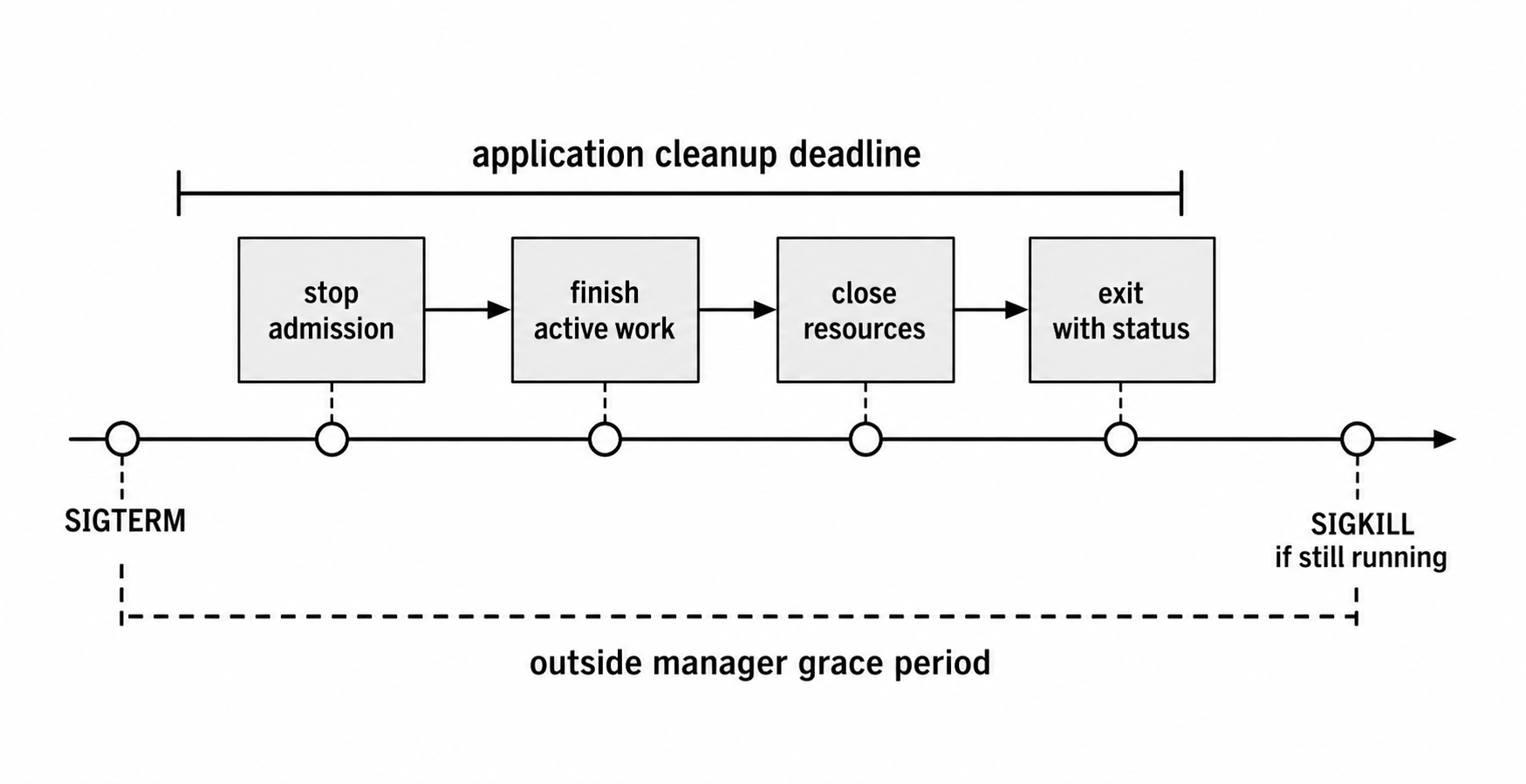
Figure 5.2 - A shutdown path has two clocks - the application's cleanup deadline and the outside manager's grace period. Keep the internal deadline shorter so the process can report its own outcome before a force kill.
A minimal helper for server.close() looks like this -
let shuttingDown = false;

function closeServer(server) {
  return new Promise((resolve, reject) => {
    server.close((err) => {
      if (err && err.code !== 'ERR_SERVER_NOT_RUNNING') reject(err);
      else resolve();
    });
  });
}
The helper turns server.close() into something an async shutdown function can await. The shutdown path usually starts with an idempotence check and a hard deadline -
if (shuttingDown) return;
shuttingDown = true;

const hardStop = setTimeout(() => {
  console.error(`${signal} - forced shutdown timeout`);
  server.closeAllConnections?.();
  process.exit(1);
}, 10000);

hardStop.unref();
With the deadline active, wait for the HTTP listener before closing shared resources -
const serverClosed = closeServer(server);

server.closeIdleConnections?.();

await serverClosed;
await db.end();

clearTimeout(hardStop);
process.exitCode = 0;
The real function should wrap cleanup in try and catch, log failures, set process.exitCode = 1, and call server.closeAllConnections?.() on the failure path. The shuttingDown flag prevents overlapping cleanup when another signal arrives. The timeout is unref'd so it does not keep the event loop alive after everything else finishes. If server.close() or db.end() hangs, the timeout force-closes HTTP connections and exits with code 1.
Deployment stops and terminal interrupts should usually share the same shutdown function -
process.on('SIGTERM', shutdown);
process.on('SIGINT', shutdown);
Depending on the deployment environment, SIGHUP may belong there too.
Tracking Active Connections
The baseline waits for server.close() to complete, but keep-alive connections, upgraded sockets, and custom protocols can still hold the process open. A more aggressive shutdown starts by tracking sockets -
const connections = new Set();

server.on('connection', (socket) => {
  connections.add(socket);
  socket.on('close', () => connections.delete(socket));
});
Destroying every socket during shutdown is tempting -
function shutdown() {
  if (shuttingDown) return;

  shuttingDown = true;
  server.close(() => cleanup());

  for (const socket of connections) {
    socket.destroy();
  }
}
That loop is harsh. socket.destroy() closes TCP sockets immediately. Active requests can be dropped, and clients may see ECONNRESET. To let active requests finish, you need to know which sockets are currently serving HTTP requests and which ones are idle. Tracking connection objects alone does not tell you that.
A more polite approach is to tell clients that the connection should not be reused. When the server sends Connection: close, the client closes its side after the response completes, and the server's socket.on('close') handler runs without a forced reset. This takes longer, but it avoids cutting off active responses.
For common HTTP shutdown cases, Node 18.2+ added server.closeAllConnections() and server.closeIdleConnections() -
server.close((err) => {
  if (err) console.error('server close failed', err);
});

server.closeIdleConnections?.();

const forceClose = setTimeout(() => {
  server.closeAllConnections?.();
}, 5000);

forceClose.unref();
closeIdleConnections() closes keep-alive sockets that have no in-flight request at the moment you call it. It does not later close a request that is active now and becomes idle after shutdown starts.
closeAllConnections() forcefully closes established HTTP(S) connections, including active requests. It does not cover upgraded sockets such as WebSocket or HTTP/2. Using both methods with a delay gives active requests a chance to finish before the force-close path runs.
Draining Queues and Background Work
HTTP traffic is only one source of work. A server may also have background intervals, message queue consumers, scheduled tasks, or buffered telemetry. Shutdown should stop new background work before it flushes the last logs or metrics.
Inside async shutdown, that may look like this -
clearInterval(metricsInterval);

await consumer.stop(); // Stop consuming from Kafka, RabbitMQ, etc.
await flushLogs();     // Push buffered log entries.
The order is practical. Each step can create work for the next one. If you flush logs before stopping consumers, the last processed batch may create more log entries after the flush has already happened.
Health Check Integration
Health checks should join the shutdown path.
If your app sits behind a load balancer, start failing the health check as soon as shutdown begins. The 503 response tells the load balancer to stop routing new traffic to this instance before the listener closes.
Start with a simple state flag -
let isHealthy = true;For a native HTTP server, check that state before normal routing -
if (req.url === '/health') {
  res.writeHead(isHealthy ? 200 : 503).end();
  return;
}
In Express, the same state becomes a small route -
app.get('/health', (_req, res) => {
  res.status(isHealthy ? 200 : 503).end();
});
During shutdown, set isHealthy = false before calling server.close(). The load balancer sees the 503 on its next health check and should stop sending new traffic to this instance.
There is still a race window until that health-check cycle completes. Traffic may briefly arrive at a server that is already starting shutdown.
The size of that window depends on the load balancer interval. If it checks every 5 seconds, you may choose to wait 5-10 seconds after failing the health check before closing the server -
function shutdown() {
  isHealthy = false;

  const drainDelay = setTimeout(() => {
    server.close(() => cleanup());
  }, 5000);

  drainDelay.unref();
}
That delay gives the load balancer time to drain traffic while the server is still open. It also adds 5 seconds to shutdown, so the total shutdown time must still fit inside the orchestrator's grace period.
The PID 1 Problem in Containers
When a process runs directly as a container entrypoint, it is usually PID 1 inside the container's PID namespace.
PID 1 has special behavior on Linux. Signals whose default action would terminate a normal process are treated differently when PID 1 has no handler. PID 1 is also responsible for reaping orphaned child processes.
This does not mean a Node process running as PID 1 can ignore shutdown. Node's own default SIGTERM handling can still end the process on Unix-like systems, but default termination does not perform application cleanup. PID 1 also has signal-forwarding and child-reaping duties.
docker stop sends the configured stop signal, usually SIGTERM, waits for the stop timeout, and then sends SIGKILL. Without an application shutdown handler, the process has no chance to finish HTTP requests, close database pools, or stop queue consumers cleanly.
There are two practical fixes. Register a SIGTERM handler in the application and do real cleanup there. Also use Docker's --init option, Compose's init: true, or a small init process such as tini or dumb-init as the container entrypoint. These init systems run as PID 1, forward signals, and reap child processes.
ENTRYPOINT ["tini", "--"]
CMD ["node", "server.js"]
With this setup, tini owns PID 1 responsibilities. The Node process receives SIGTERM as a child process, while tini handles signal forwarding and child reaping.
Sending Signals
process.kill() sends a signal to a process by PID -
process.kill(childPid, 'SIGTERM');The method name is historical. It does not always kill the process. It sends the signal you ask for. process.kill(pid, 'SIGUSR2') sends SIGUSR2. The target may terminate by default, or it may have a handler that does something else.
Signal 0 is useful for checking whether a process exists and whether you have permission to signal it -
try {
  process.kill(pid, 0);
  console.log('Process exists');
} catch (e) {
  console.log(`Cannot signal process - ${e.code}`);
}
Signal 0 does not deliver a real signal. The kernel checks whether the process exists and whether the caller has permission. If the process does not exist, Node throws ESRCH. If the process exists but you do not have permission, Node throws EPERM.
That permission check follows normal Unix rules. You can usually signal processes owned by the same UID. Root, or a process with the right capability, can signal more. A normal application trying to run process.kill(1, 'SIGTERM') on the host usually gets EPERM.
The same API can signal the current process -
process.kill(process.pid, 'SIGUSR2');Even then, delivery goes through the kernel and back to the process. The handler fires on a later event-loop turn, not inline at the exact point where process.kill() was called.
Windows Differences
Windows does not have POSIX signals. Its kernel uses different process-control mechanisms, and Node emulates only a limited subset of signal behavior.
SIGINT works because it maps to the console Ctrl+C handler. Pressing Ctrl+C in a Windows terminal sends an interrupt event to the foreground process, and Node exposes that as SIGINT.
SIGTERM can be listened for in Node, but Windows has no POSIX SIGTERM. When Node emulates process.kill(pid, 'SIGTERM') on Windows, the target process is terminated forcefully instead of receiving a Unix-style graceful signal.
SIGHUP is generated when a Windows console window closes. Node may run a SIGHUP listener, but Windows will still terminate the process shortly afterward. Do not treat SIGHUP as a portable graceful-shutdown mechanism.
SIGKILL always terminates unconditionally, matching the Unix-facing behavior. Windows has no OS-level SIGUSR1 or SIGUSR2, so user-defined POSIX signals should not be part of a cross-platform control path.
SIGBREAK, produced by Ctrl+Break, is Windows-specific and Node supports it. Cross-platform code commonly handles SIGINT and SIGTERM, then adds SIGBREAK when attached to a Windows console -
const isWindows = process.platform === 'win32';

process.on('SIGTERM', shutdown);
process.on('SIGINT', shutdown);

if (isWindows) process.on('SIGBREAK', shutdown);
On Windows, SIGBREAK is the closest terminal equivalent to "please stop gracefully". Some Windows process managers generate SIGBREAK instead of SIGTERM. Console close events are mapped to SIGHUP, but Windows terminates the process shortly afterward, so that path is useful only for last-moment synchronous cleanup or diagnostics.
For Linux containers, SIGTERM remains the normal graceful shutdown path. For Windows services, use the Windows Service Control Manager through a package or service wrapper instead of relying on POSIX-style signals.
Double-Signal and Force-Kill Patterns
Production shutdown has to handle the case where the process does not exit after the first signal. A database connection might hang, a DNS lookup might be stuck, or cleanup code might have a bug.
From outside the process, the usual pattern is -
- Send
SIGTERM. - Wait 10-30 seconds.
- Send
SIGKILL.
The defaults vary by tool, but the shape is similar. Docker sends the configured stop signal, usually SIGTERM, then waits for the container stop timeout. If no Linux-container timeout is configured, Docker's documented default is 10 seconds. Kubernetes sends TERM to process 1 in the container and defaults terminationGracePeriodSeconds to 30 seconds. systemd service shutdown uses TimeoutStopSec, which defaults to the manager's DefaultTimeoutStopSec and is commonly 90 seconds. PM2 sends SIGINT by default, waits 1.6 seconds unless kill_timeout is changed, then sends SIGKILL.
Those numbers affect your application design. Your internal shutdown timeout should be shorter than the outside grace period. If PM2's default is 1.6 seconds, cleanup must be very fast, or PM2's kill_timeout needs to be increased.
Inside the process, setTimeout(...).unref() gives the app the same shape. The app gives cleanup a grace period. If cleanup does not finish, the timeout path force-exits.
Some programs also treat a second SIGTERM or second Ctrl+C as "stop now" -
let termCount = 0;

process.on('SIGTERM', () => {
  termCount++;

  if (termCount > 1) process.exit(1);

  shutdown('SIGTERM');
});
The first signal starts graceful cleanup. The second signal exits immediately. This pattern is familiar in CLI tools. The first Ctrl+C asks the command to stop cleanly. The second one says to quit right away.
A boolean isShuttingDown flag and a counter solve different problems. Use the boolean when only one cleanup run should happen. Use a counter when the second signal should change behavior.
Putting It All Together
A production-style signal handler combines the pieces from the previous sections - double-signal behavior, a timeout fallback, connection handling, health-check state, and resource cleanup ordering.
Start with the state and timing values -
let isShuttingDown = false;
let isHealthy = true;

const DRAIN_DELAY_MS = 5000;
const FORCE_CONNECTIONS_MS = 7000;
const SHUTDOWN_TIMEOUT_MS = 15000;
These values make the shutdown timeline visible. The drain delay gives the load balancer time to stop routing new work. The connection deadline limits slow requests. The final timeout keeps the application ahead of the orchestrator's SIGKILL.
A small delay helper keeps later code readable -
function delay(ms) {
  return new Promise((resolve) => setTimeout(resolve, ms));
}
server.close() still needs a Promise wrapper so the shutdown function can await it -
function closeServer(server) {
  return new Promise((resolve, reject) => {
    server.close((err) => {
      if (err && err.code !== 'ERR_SERVER_NOT_RUNNING') reject(err);
      else resolve();
    });
  });
}
Those helpers keep the main shutdown function focused on order. The function begins by handling re-entry and failing the health check -
async function gracefulShutdown(signal) {
  if (isShuttingDown) {
    console.error(`${signal} - forcing shutdown`);
    process.exit(1);
  }

  isShuttingDown = true;
  isHealthy = false;
  process.exitCode = 0;
}
Install the hard timeout before any cleanup step has a chance to hang -
const hardStop = setTimeout(() => {
  console.error(`${signal} - shutdown timeout`);
  server.closeAllConnections?.();
  process.exit(1);
}, SHUTDOWN_TIMEOUT_MS);

hardStop.unref();
After the drain delay, the server stops accepting work. Idle keep-alive sockets close immediately, while active connections get a shorter force-close deadline. Keep let forceConnections outside the try block so finally can clear it later.
await delay(DRAIN_DELAY_MS);

const serverClosed = closeServer(server);

server.closeIdleConnections?.();

forceConnections = setTimeout(() => {
  server.closeAllConnections?.();
}, FORCE_CONNECTIONS_MS);

forceConnections.unref();

await serverClosed;
clearTimeout(forceConnections);
External resources can then close in parallel while still preserving failure information -
const results = await Promise.allSettled([db.end(), redis.quit()]);

for (const result of results) {
  if (result.status === 'rejected') {
    process.exitCode = 1;
    console.error('cleanup failed', result.reason);
  }
}
In the complete function, those steps should live inside try, catch, and finally. The catch path sets process.exitCode = 1 and logs the shutdown error. The finally path clears forceConnections if it exists and clears hardStop only when shutdown has succeeded.
The order is the part to protect. Fail the health check first. Then stop accepting new work. Then wait for active requests. Then close shared resources. Keep the internal timeout shorter than the outside grace period so the process can report its own result before the orchestrator force-kills it.
Waiting for server.close() is necessary. If you call it and immediately close the database, in-flight HTTP requests may fail while still using the database connection. Wrapping server.close() in a Promise keeps database cleanup behind request completion.
The re-entry check gives operators a force-exit path. A second signal during shutdown exits immediately, but only after graceful cleanup has already started.
server.closeIdleConnections() closes keep-alive sockets that are idle when shutdown begins. The delayed closeAllConnections() is still useful for strict deadlines because active requests can later become idle keep-alive sockets, and slow active requests need an upper bound. It does not close upgraded sockets such as WebSocket or HTTP/2. Track those separately if your server accepts them.
Promise.allSettled() lets database and Redis cleanup run in parallel while still recording failures from either one.
A clean shutdown reports exit code 0. A forced, timed-out, or partially failed shutdown reports exit code 1. Monitoring can use that difference to separate ordinary restarts from cleanup failures.
Register both deployment and terminal signals -
process.on('SIGTERM', () => gracefulShutdown('SIGTERM'));
process.on('SIGINT', () => gracefulShutdown('SIGINT'));
Common Mistakes
The same shutdown bugs show up again and again because each line looks reasonable by itself.
Ignoring the callback error from server.close(). If the server was never listening, server.close() reports ERR_SERVER_NOT_RUNNING through the callback. Wrap the call and decide which errors are safe to ignore -
server.close((err) => {
  if (err && err.code !== 'ERR_SERVER_NOT_RUNNING') {
    console.error('Server close error', err);
    process.exitCode = 1;
  }

  cleanup();
});
Calling process.exit() before async cleanup finishes. process.exit() is synchronous and immediate. If you call process.exit(0) before promises, callbacks, or stream flushes finish, that work is abandoned. Await cleanup first. Use process.exit() only on the hard-failure path.
Expecting beforeExit to run after process.exit(). Cleanup placed in beforeExit does not run when a SIGTERM handler calls process.exit(). The exit event fires, but beforeExit does not. If signal shutdown needs cleanup, call that cleanup directly from the signal handler.
Setting a force-exit timeout longer than the orchestrator's grace period. If Kubernetes gives the container 30 seconds and the internal timeout is 45 seconds, Kubernetes sends SIGKILL while the process is still cleaning up. The internal timeout never fires. Keep the app's deadline shorter than the outside deadline.
Registering signal handlers inside request handlers or conditional paths. Signal handlers should be registered once at startup, before the server starts listening. Registering them during request flow can leave the process without a handler when the signal arrives, or it can accumulate duplicate handlers over time.
Signal Handling Across Process Scope
Child processes make shutdown less local.
By default, spawned children are usually in the same process group as the parent. Ctrl+C from the terminal sends SIGINT to the whole foreground process group. The parent and child may both start cleanup at the same time.
If the parent should control shutdown order, spawn children in a separate process group with detached: true and signal them explicitly. That lets the parent decide whether to stop itself first, stop children first, or coordinate both phases -
const { spawn } = require('node:child_process');

const child = spawn(process.execPath, ['worker.js'], {
  detached: true,
  stdio: 'ignore',
});

child.unref();
A detached child does not receive Ctrl+C from the parent's foreground process group. During parent shutdown, call child.kill('SIGTERM') or send another signal intentionally. You get full control over order, but you now own the propagation logic.
Clustered processes add another layer. The primary process usually handles signals and coordinates worker shutdown. Each worker has its own PID and can have its own signal handlers, but a signal sent to the primary PID is not automatically delivered to every worker. That differs from a terminal-generated process-group signal such as Ctrl+C, which can hit the whole foreground group.
The rule is simple - the process that receives the signal must decide whether to pass shutdown along to its children. The kernel does not cascade the signal for you unless you target a process group or the signal comes from terminal job control.
Debugging Signal Issues
When shutdown misbehaves, find where the chain broke. Usually it is one of four places. The signal never arrived. The handler did not run. Cleanup started but hung. The process exited before cleanup finished.
The signal never arrives. This often happens in containers that start the application through a shell. With shell-form CMD node server.js, Docker actually runs /bin/sh -c "node server.js". The shell receives SIGTERM, but may not forward it to the Node process. Fix the process tree first. Use exec form, CMD ["node", "server.js"], and register a SIGTERM handler. If the application spawns children, add --init, Compose init: true, or an init entrypoint.
The handler never fires. If the signal is delivered but the JavaScript handler does not run, the main thread is usually blocked by synchronous work. Signal handlers run on later event-loop turns, so a 30-second synchronous operation can delay the handler by 30 seconds.
Cleanup is hanging. If shutdown starts but server.close() or db.end() never completes, inspect open connections and pending operations. For server.close(), keep-alive sockets are a common cause. Node's http.globalAgent uses keep-alive with a 5-second timeout by default in modern releases, so local shutdown tests can reproduce this even without a browser or load balancer. For database clients, pending queries may never resolve. A force-exit timeout catches the hang, but every extra second still slows deployments.
The process exits too early. This usually means process.exit(0) ran before async cleanup finished, or cleanup triggered an unhandled rejection that led to a fatal path. Wrap cleanup in try and catch, and make sure every async operation is awaited.
Timing logs make the slow step obvious -
async function shutdown(signal) {
  const start = Date.now();

  console.log(`${signal} - starting shutdown`);

  await closeServer(server);
  console.log(`${signal} - server closed (${Date.now() - start}ms)`);

  await db.end();
  console.log(`${signal} - db closed (${Date.now() - start}ms)`);

  process.exitCode = 0;
}
In production, send those timings to the logging system so you can compare shutdown duration across instances. If one instance consistently takes 8 seconds to stop while others take 200ms, that slow instance has a specific resource or workload to investigate.
process.on('exit', ...) can help as a final synchronous diagnostic. The event fires right before the process terminates -
const fs = require('node:fs');

process.on('exit', (code) => {
  fs.writeSync(2, `Process exiting with code ${code}\n`);

  if (code !== 0 && !isShuttingDown) {
    fs.writeSync(2, 'Unexpected exit - not from shutdown handler\n');
  }
});
The exit handler is synchronous only. No timers, promises, network writes, or async file operations will complete from there. Use it for final diagnostics, not cleanup.
A handled SIGTERM followed by exit code 0 is a voluntary clean exit. It is not signal death. A reliable shutdown path follows the same order every time - stop admission, give active work a deadline, close shared resources after the listener is closed, and let Node exit naturally when cleanup succeeds.