File Descriptors: Handles, Kernel Resources, and Close Semantics
A file descriptor is the small handle your Node.js process uses to talk to an open file-like resource.
Your JavaScript code does not carry the real operating-system file object around. The OS keeps that state internally. Node gives your code a small reference to it. In callback and sync APIs, that reference is usually a number called an fd. In promise-based APIs, it is usually wrapped inside a FileHandle.
The number itself is not the interesting part. You care about what sits behind it - how the file was opened, which flags were used, who is responsible for closing it, whether reads and writes share an offset, and what happens when the process opens too many resources at once.
On POSIX systems, the descriptor is an integer in the process descriptor table. On Windows, Node and libuv translate Windows file handles into the fd-shaped API used by Node's fs module. That translation lets most JavaScript code look the same on both platform families, though OS-specific behavior still shows up in permissions, sharing rules, path handling, and file locking.
File Descriptors
When you call fs.open(), you pass a path, flags, and sometimes a mode. The result is not a file object with the path baked into it. The operating system opens the resource, creates state for that open resource, and gives the process a small handle it can use later.
Node exposes that handle as either a numeric descriptor or a FileHandle.
That handle keeps OS state alive. So the moment your code opens one, it also needs a plan for closing it. This is the part that separates safe fd code from code that slowly leaks resources under traffic.
All fd-based APIs follow the same basic idea. On POSIX systems, the fd is a non-negative integer that points into the process's descriptor table. On Windows, libuv receives a Windows HANDLE and presents it to Node through the same descriptor-style API. JavaScript mostly sees something simple - a value it can pass to read, write, stat, sync, and close operations.
The handle is small, but it can represent a lot of OS state. Files, sockets, pipes, standard input, standard output, standard error, streams, and FileHandle methods all reach the operating system through open resources tracked outside JavaScript. Path-based operations such as stat, access, rename, and unlink can finish without leaving a long-lived descriptor in your JavaScript code.
Here is a small example that opens a temporary file, prints the fd, then closes it -
const fs = require('node:fs');
const os = require('node:os');
const path = require('node:path');

const dir = fs.mkdtempSync(path.join(os.tmpdir(), 'fd-example-'));
const file = path.join(dir, 'example.txt');

const fd = fs.openSync(file, 'w');
console.log(fd);

fs.closeSync(fd);
fs.rmSync(dir, { recursive: true, force: true });
The printed value might be 17, 22, or something nearby. A fresh Node process already has several descriptors open before your code runs, so your first user-created descriptor usually will not be 3.
That number only has meaning inside the current process. Another process can also have fd 17, and its fd 17 may point to a different file, socket, pipe, or terminal. An fd is a process-local reference.
The Descriptor Table
A process usually starts with three descriptors already in use.
Descriptor 0 is standard input. Descriptor 1 is standard output. Descriptor 2 is standard error. The parent process sets these up before Node starts running your program.
In a terminal, fd 0 usually reads from your keyboard, fd 1 writes normal output to the terminal, and fd 2 writes error output to the terminal. In a container, service manager, test runner, or shell pipeline, those same numbers may point to pipes, sockets, log files, or log collectors. The numbers are conventional. The target depends on how the process was launched.
Node exposes stdio as streams. Underneath those streams, descriptor writes are still happening. console.log() eventually writes bytes to fd 1. process.stderr.write() writes bytes to fd 2.
After descriptors 0, 1, and 2, POSIX systems usually assign the lowest free descriptor number when a new resource is opened. If you close a descriptor, that slot can be reused later.
You can see the reuse with three files -
const a = fs.openSync(aPath, 'w');
const b = fs.openSync(bPath, 'w');

fs.closeSync(a);

const c = fs.openSync(cPath, 'w');
console.log({ a, b, c });

fs.closeSync(b);
fs.closeSync(c);
c often equals a, because closing a freed that descriptor-table slot. The exact numbers depend on what Node and the OS already opened, but the reuse behavior comes from the operating system.
This is safe when the fd lifetime is clear. It becomes dangerous when old fd numbers keep floating around after close. If some stale callback still holds the old number, it may accidentally operate on a completely different resource that reused the same slot.
On POSIX systems, the descriptor table entry is only the first layer. That entry points at an open file description in kernel memory. The open file description tracks things like the current file offset, access mode, append behavior, status flags, and the underlying file object.
If the descriptor represents a regular file, the file object eventually points at an inode on POSIX filesystems. If the descriptor represents a socket or pipe, the object behind it contains socket or pipe state instead.
The descriptor table uses the same general shape for many resource types. The object behind the descriptor decides which operations are allowed. That is why the same table can hold regular files, TCP sockets, Unix domain sockets, pipes, terminals, and special files such as /dev/null.
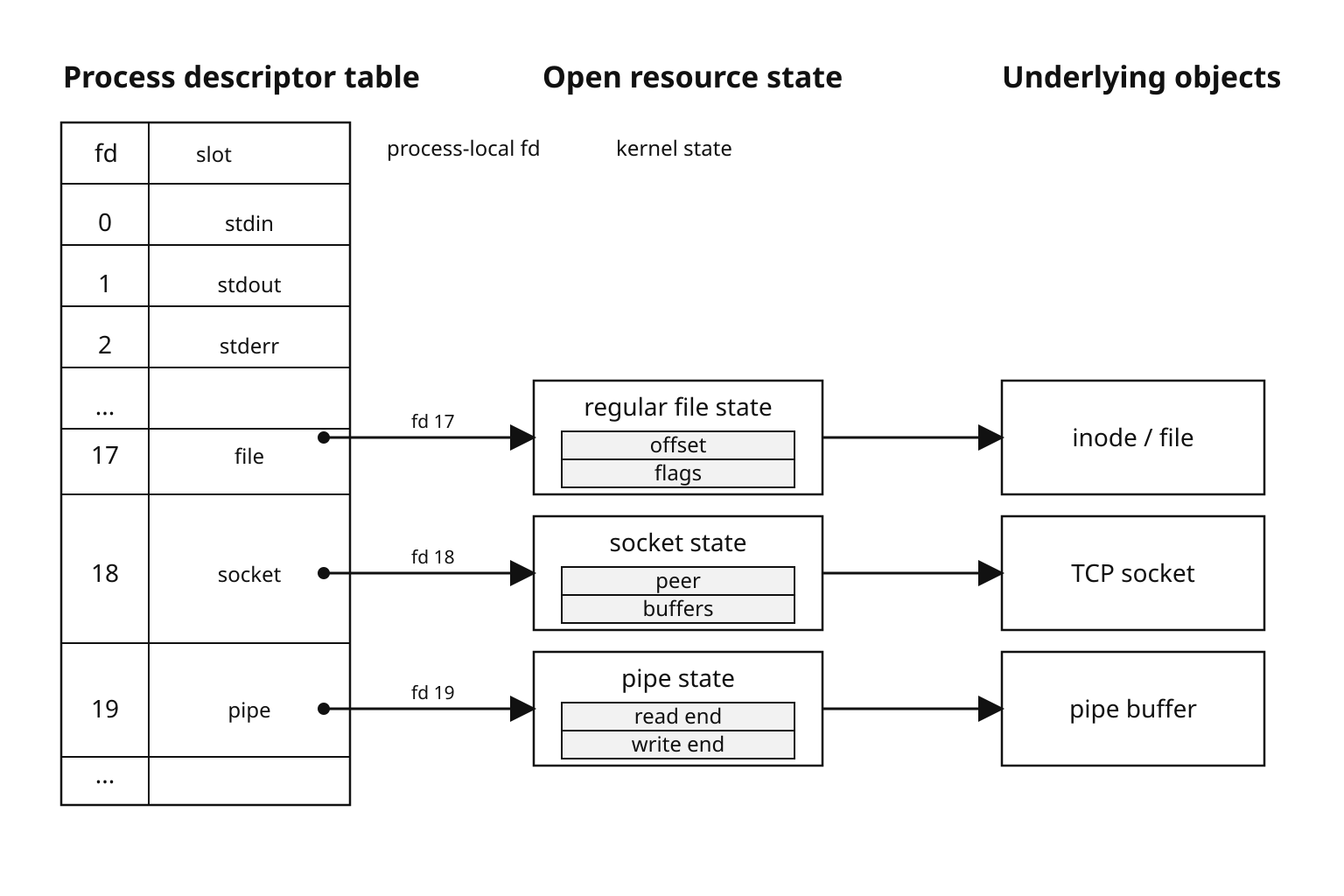
Figure 1 - A descriptor-table entry gives the process a local way to reach an open resource. The resource state behind it carries offsets, flags, and references to the real file, socket, or pipe.
Opening a File
fs.open() is the point where a JavaScript path becomes an open operating-system resource.
If the path exists and the flags allow the operation, the callback receives an fd after the native open operation finishes -
fs.open(file, 'r', (err, fd) => {
  if (err) return handleError(err);

  console.log(fd);

  fs.close(fd, (closeErr) => {
    if (closeErr) handleError(closeErr);
  });
});
The fd arrives only after Node and libuv finish the native work. Node takes your JavaScript path and flags, sends them through the C++ binding layer, creates a libuv filesystem request, and gives that request to libuv.
The OS then does the actual open. It resolves the path component by component, checks permissions, applies the flags, creates or finds the file object, creates open-file state, stores a pointer to that state inside the process descriptor table, and returns the descriptor number.
On Linux and macOS, the native call is open() or a close relative. On Windows, libuv calls CreateFileW() and maps the returned HANDLE into libuv's file abstraction. Node hides most of that platform separation, but Windows-specific behavior can still show up around sharing modes, long paths, and permissions.
After open returns, the descriptor belongs to that process. If two different processes open /tmp/data.txt, each process gets its own descriptor table entry. On POSIX systems, each independent open also gets its own open file description. That means each one has its own file offset.
If one descriptor reads 100 bytes, its offset advances by 100. A separate open call keeps its own offset.
Duplicated descriptors behave differently on POSIX systems. dup(), fork(), and descriptor inheritance can create multiple descriptor-table entries that point at the same open file description. Those descriptors share offset state. If one descriptor reads 100 bytes, the next read through the other descriptor starts from the new position.
Node keeps most application code away from raw fork() descriptor inheritance, but this OS behavior explains odd results when descriptors are duplicated or passed between processes.
Flags Decide the Open State
The second argument to fs.open() controls how the file is opened. The string flags are the friendly Node API. Underneath, Node maps them to OS-level bits.
| Flag | Open behavior |
|---|---|
'r' | Opens for reading. The file must already exist. A missing path gives ENOENT. |
'r+' | Opens for reading and writing. The file must already exist, and the offset starts at byte 0. |
'w' | Opens for writing, creates the file when needed, and truncates existing content during open. |
'w+' | Opens for reading and writing with the same create-and-truncate behavior. |
'a' | Opens for appending, creates the file when needed, and makes each write land at the current end of the file. |
'a+' | Opens for reading and appending. Reads can use positions. Writes still append. |
Append mode surprises people because it changes how writes behave. On Linux, when a file is opened with append flags, the kernel sends each write to the end of the file. The write position you pass does not let you overwrite earlier bytes.
So if you need to update bytes at a known offset, do not open the file in append mode.
Exclusive creation is another flag worth knowing. 'wx' means open for writing, but only if the path does not already exist. If the path already exists, the open fails with EEXIST.
This is better than checking first with fs.existsSync(). A separate exists check creates a race. Another process can create the file between your check and your open. With 'wx', the existence check and creation attempt happen inside one OS operation on local filesystems.
Here is the usual shape for one-time file creation -
let fd;

try {
  fd = fs.openSync(lockPath, 'wx', 0o600);
  fs.writeSync(fd, `${process.pid}\n`);
} catch (err) {
  if (err.code === 'EEXIST') console.error('lock already exists');
  else throw err;
} finally {
  if (fd !== undefined) fs.closeSync(fd);
}
This pattern handles the descriptor correctly. If fs.writeSync() throws after the file opens, the finally block still closes the fd.
A real lock-file system needs more than this small example. Production lock files need stale-lock handling, tests on the target filesystem, and clear behavior when a process dies after creating the file. Node also documents the usual O_EXCL caveat - exclusive creation may not be reliable on network filesystems.
Numeric flags exist too -
const flags =
  fs.constants.O_WRONLY |
  fs.constants.O_CREAT |
  fs.constants.O_TRUNC;

const fd = fs.openSync(file, flags);
fs.closeSync(fd);
String flags are easier to read in most application code. Numeric flags are useful when you need a specific platform flag, when porting C logic, or when a native addon already works with flag bits.
Creation Mode and umask
The third argument to fs.open() is used only when the open call creates a new file. It controls the requested permission bits. The OS then applies the process umask before the file is actually created.
This example asks for owner-only read and write permission -
const fs = require('node:fs');
const os = require('node:os');
const path = require('node:path');

const dir = fs.mkdtempSync(path.join(os.tmpdir(), 'fd-mode-'));
const file = path.join(dir, 'secret.txt');

const fd = fs.openSync(file, 'w', 0o600);
fs.closeSync(fd);

fs.rmSync(dir, { recursive: true, force: true });
0o600 means the owner gets read and write permission. Group and others get no permission bits.
The three octal digits represent owner, group, and others. Inside each digit, read is 4, write is 2, and execute is 1. Add the bits together to describe the permission set.
Node's default creation mode is 0o666. That asks for read and write permission for owner, group, and others before the process mask is applied. On POSIX and Unix-family systems, the umask removes permission bits from that request.
A common 0o022 mask turns 0o666 into 0o644 - owner can read and write, everyone else can only read.
This is a common source of deployment bugs. Your development shell may use one umask. Your production service manager, container image, init system, or shell wrapper may use another. The same Node code can create files with different final permissions depending on how the process was started.
Windows uses ACLs for actual permission decisions. Node can expose and adjust a small POSIX-style mode surface on Windows, but those mode bits are not the full Windows access-control model.
Close Is Part of the Operation
A descriptor lifecycle has three parts - open, use, close.
The descriptor is still a live OS resource after the last read or write finishes. open creates descriptor-table state and open-file state. read, write, fstat, fsync, and related calls use that state. close releases the descriptor slot and drops the kernel reference count for the open file description.
Here is a raw callback example where the descriptor must stay open until the read callback runs -
fs.open(file, 'r', (err, fd) => {
  if (err) return handleError(err);

  fs.read(fd, Buffer.alloc(64), 0, 64, 0, (readErr, bytesRead) => {
    fs.close(fd, (closeErr) => {
      if (readErr) return handleError(readErr);
      if (closeErr) return handleError(closeErr);

      console.log(`read ${bytesRead} bytes`);
    });
  });
});
The read call uses an explicit position of 0, so it reads from the beginning of the file without changing the descriptor's current offset. The close happens inside the read callback because the descriptor must remain open until the async read has completed.
That nesting is not pretty, but it shows the ownership rule clearly. Once raw fd code opens a descriptor, every success path and every failure path needs to reach fs.close().
Production code may preserve both the read error and the close error with an AggregateError. The error-shaping policy can vary. The cleanup path cannot.
If you move fs.close() above fs.read(), the read may fail with EBADF, or worse, it may race against descriptor reuse. The OS can reuse a closed descriptor number for a different file or socket.
Keep close and durability separate. close() releases the descriptor. It does not automatically mean your data is crash-safe on disk. Written bytes may still be sitting in the page cache. Use fs.fsync() or FileHandle.sync() when you need crash durability, then close.
You should also check close errors. On POSIX systems, delayed write failures such as quota exhaustion, ENOSPC, or some NFS writeback errors may be reported when the descriptor closes.
Descriptor reuse is the part that makes stale fd bugs nasty. Imagine code closes fd 18. A different part of the process opens a socket and receives fd 18. A stale async callback that still holds the old 18 can now operate on the new socket. Higher-level Node APIs reduce this risk by owning descriptors internally. Raw fd code leaves that responsibility with you.
Leaks Become EMFILE
A leaked descriptor stays allocated until the process exits or some cleanup path eventually closes it.
One leaked descriptor may go unnoticed. One leaked descriptor per request eventually takes the service down. The operating system enforces a per-process descriptor limit, and Node shares that limit across files, sockets, pipes, stdio, internal libuv descriptors, and active TCP connections.
Unix-family systems can also fail opens with ENFILE when the system-wide open-file table is exhausted.
Check the shell limit with -
ulimit -nDefaults vary a lot. Check the limit in the same shell, container, service manager, or runtime environment that starts the Node process.
When the process runs out of descriptor slots, open operations fail with EMFILE. When the system-wide table runs out, the failure is ENFILE.
You can force EMFILE in a disposable shell by lowering the soft limit, then running a script that repeatedly opens the same existing file -
ulimit -n 64
node emfile-demo.cjsconst fds = [];
try {
for (let i = 0; i < 2000; i++) {
fds.push(fs.openSync(file, 'r'));
}
} catch (err) {
console.error(err.code);
} finally {
for (const fd of fds) fs.closeSync(fd);
}Every successful open consumes a descriptor slot until the finally block closes it. With a low test limit such as 64, this reaches EMFILE quickly once file points at an existing file.
On a host with a high soft limit, the loop may finish without failure. If file does not exist, the first failure will be ENOENT, which tells you nothing about descriptor pressure.
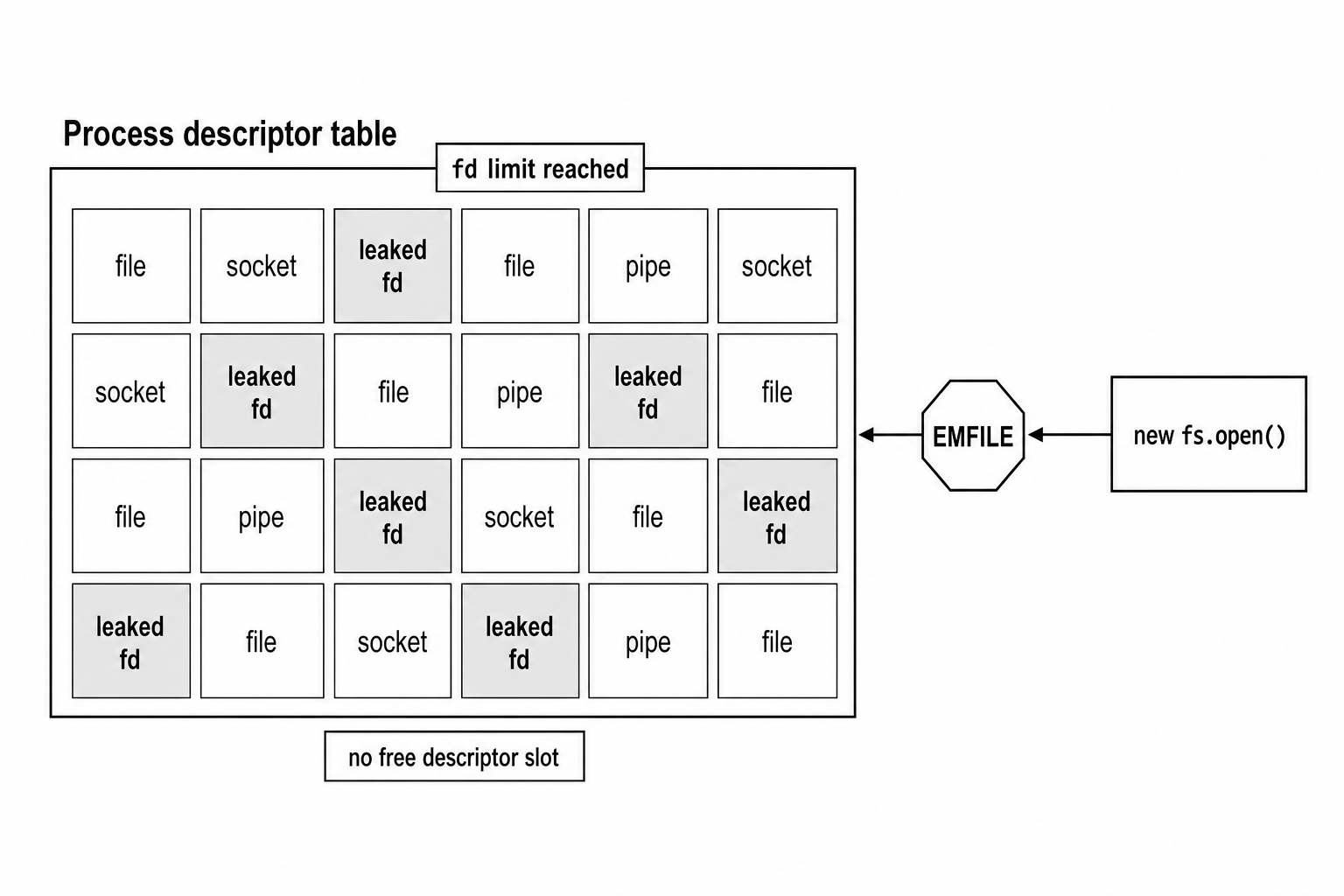
Figure 2 - Descriptor leaks build up over time. Once the table is full, the next valid open can fail even when that request did nothing wrong.
Most real descriptor leaks hide in error paths. The success path looks fine, so the bug can sit unnoticed until traffic or failures increase.
Here is the broken shape -
fs.open(file, 'r', (err, fd) => {
  if (err) return handleError(err);

  doWork(fd, (workErr) => {
    if (workErr) return handleError(workErr);

    fs.close(fd, (closeErr) => {
      if (closeErr) handleError(closeErr);
    });
  });
});
If doWork() reports an error, the callback returns before fs.close() runs. The descriptor stays open.
The fixed version closes the descriptor before reporting the work error -
fs.open(file, 'r', (err, fd) => {
  if (err) return handleError(err);

  doWork(fd, (workErr) => {
    fs.close(fd, (closeErr) => {
      if (workErr) return handleError(workErr);
      if (closeErr) return handleError(closeErr);

      finish();
    });
  });
});
This version has one exit path after doWork() starts. Work failure and close failure are both handled after cleanup is attempted.
On Linux, /proc/self/fd lets you inspect the current process's open descriptor list -
const fs = require('node:fs');

if (process.platform === 'linux') {
  const count = fs.readdirSync('/proc/self/fd').length;
  console.log('open descriptors', count);
}
Treat this number as a gauge. Reading the directory may involve temporary descriptors, and the process can open or close other resources while you sample it.
For an external view, use lsof -
PID=12345
lsof -p "$PID"
When lsof is installed, it can show descriptors, target paths, sockets, pipes, and deleted files still held open. It may also print host or container warnings while it collects metadata.
A descriptor count that keeps growing under steady traffic usually points to a leak. A flat count under load usually means the process is opening and closing resources at a stable rate.
Raising the limit gives the process more room -
ulimit -n 65536That helps servers with many legitimate concurrent sockets. It does not fix leaking code. A leak still fails later after more requests.
Shell ulimit changes apply to that shell session and its children. systemd, Docker, Kubernetes, launchd, and other service managers have their own limit settings. Fix the close path first. Then set the descriptor limit for real concurrency in the environment that actually starts the process.
FileHandle Is the Better Default
Raw fd integers are easy to lose track of because the number is separate from the methods that operate on it. open() from node:fs/promises wraps the descriptor in a FileHandle, so the resource and its operations stay together.
The next examples open the current ES module file, so they do not need a separate setup file -
import { open } from 'node:fs/promises';

const fh = await open(new URL(import.meta.url), 'r');
console.log(fh.fd);
await fh.close();
The .fd property exposes the underlying descriptor, but most application code should use the FileHandle methods instead of passing the raw number around.
A handle gives the descriptor a clear owner. That makes cleanup easier to review.
Use try and finally when a handle spans more than one operation -
import { open } from 'node:fs/promises';

const fh = await open(new URL(import.meta.url), 'r');

try {
  const buf = Buffer.alloc(256);
  const result = await fh.read(buf, 0, 256, 0);
  console.log(result.bytesRead);
} finally {
  await fh.close();
}
finally runs whether the work succeeds or fails. The descriptor closes if parsing throws, if a read fails, or if later code returns early. That structure is why FileHandle is usually the better default for new async and await code.
Current Node releases also support explicit resource management. In Node.js v24.2 and newer, FileHandle[Symbol.asyncDispose] is no longer experimental. That means await using can close a handle at scope exit when your runtime and tooling support the syntax.
Older Node versions may expose the API as experimental or may not support the using syntax in your parser or tooling.
import { open } from 'node:fs/promises';

{
  await using fh = await open(new URL(import.meta.url), 'r');
  const text = await fh.readFile('utf8');
  console.log(text.length);
}
await open() waits for the file to open. await using registers async cleanup for the binding. When execution leaves the block, Node calls the handle's async disposer, which closes the descriptor.
You still need explicit cleanup. Node may try to close an unclosed FileHandle during garbage collection and warn, but the docs say not to rely on that behavior because it can change. Garbage collection timing also has no useful relationship with descriptor pressure, traffic bursts, or your fd limit.
Raw descriptors still have a place. Legacy callback code uses them. Native addons may expect them. Some low-level APIs still speak in integers. For most new application code written with async and await, FileHandle gives you a cleaner ownership model.
The libuv Path
Node gives you async callbacks and promises for file I/O. For regular files, the usual Node path still uses blocking operating-system calls. The trick is that Node moves that blocking work off the main JavaScript thread and into libuv's worker pool.
libuv exposes filesystem work through functions such as uv_fs_open(), uv_fs_read(), uv_fs_write(), and uv_fs_close(). Each async filesystem call uses a uv_fs_t request. Node's C++ binding fills that request with the path, fd, flags, mode, buffers, offsets, and callback state needed by the operation.
Regular file I/O is handled this way because portable async file I/O is messy. Linux has io_uring. Older Linux AIO exists but has constraints. macOS readiness APIs fit sockets better than regular files. Windows has overlapped I/O with different semantics.
In Node v24, callback and promise-based filesystem APIs use libuv's thread pool, except for file watchers. Sync APIs are different because they block the JavaScript thread directly. The default libuv worker pool has four threads and is controlled by UV_THREADPOOL_SIZE.
For a call such as fs.open('/tmp/x', 'r', cb), the flow goes like this -
Node validates the arguments in JavaScript. The C++ binding receives the call and creates an FS request object. libuv queues the work to its thread pool. A worker thread calls the platform open primitive. The kernel resolves the path, checks permissions, allocates open-file state, and returns either an fd-shaped value or an error. The worker stores that result on the uv_fs_t request and posts completion back to the event loop. On the main thread, Node reads the request result, builds the JavaScript callback arguments, and calls your callback.
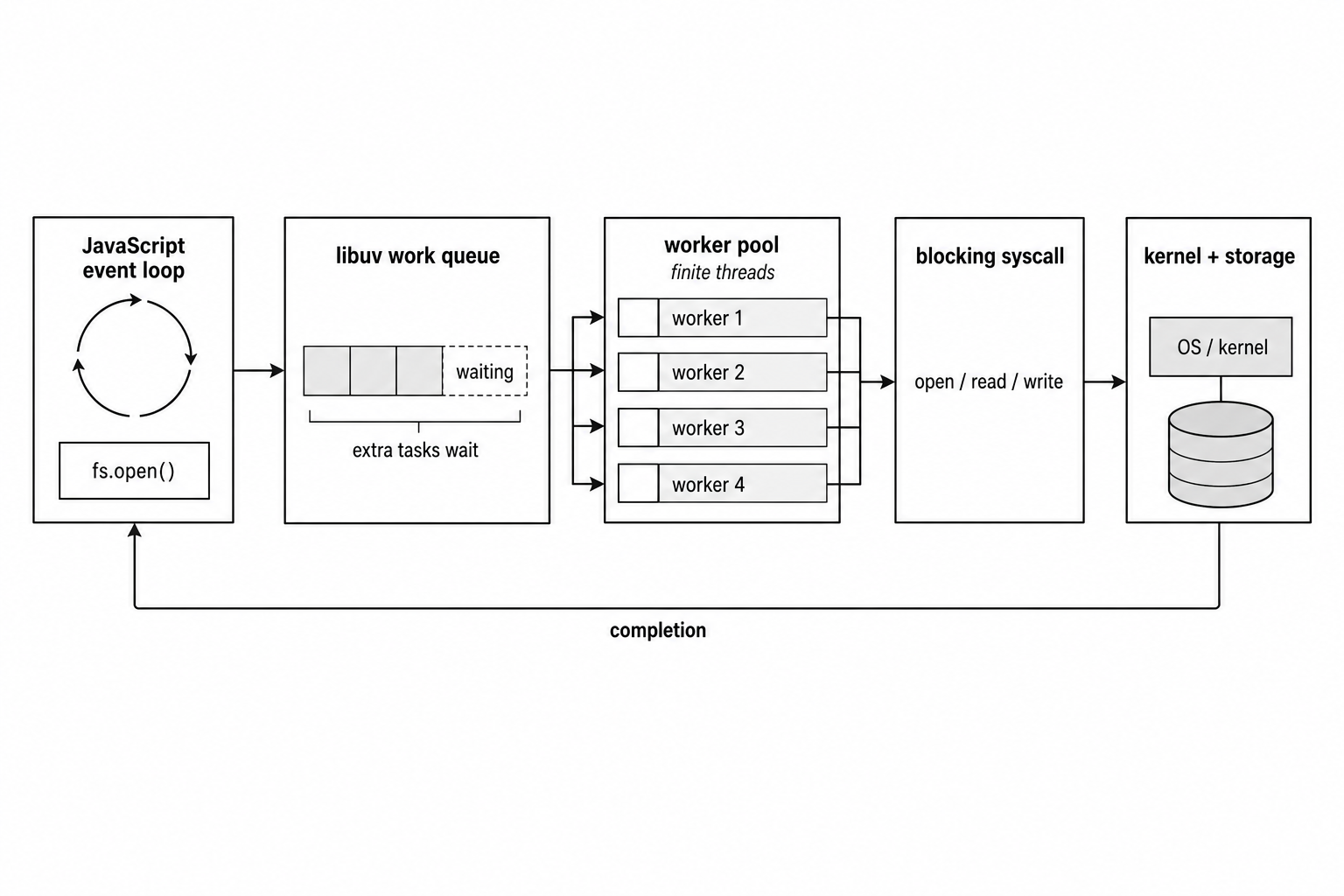
Figure 3 - Async filesystem APIs keep JavaScript moving by queueing blocking filesystem work onto libuv workers, then returning completion to the event loop.
This design keeps the event loop available while a worker thread blocks in the filesystem call. The trade-off is that the worker pool can become the bottleneck.
If you fire 500 concurrent fs.open() calls with the default pool, only a small number of filesystem tasks can execute at once. The rest wait in libuv's queue, so latency rises even though your JavaScript code used async APIs.
The pool is shared. Filesystem calls wait beside dns.lookup(), many crypto operations, compression work, and native addon or runtime work queued with uv_queue_work.
Increasing UV_THREADPOOL_SIZE can help file-heavy workloads, but it also increases native thread count and can add scheduling overhead. Measure the workload before changing it. A very large pool can move the wait from libuv's queue to the kernel scheduler or storage device.
Once a worker reaches open(), the kernel behavior from earlier takes over. On Linux, the process has a descriptor table. Descriptor-table entries point at open file descriptions. Open file descriptions point at inodes or other kernel objects. Multiple descriptors can point at the same open file description after duplication or inheritance. Separate opens can create separate open file descriptions that point at the same inode.
That distinction explains offset behavior. Two independent calls to fs.open('/tmp/log', 'r') get separate offsets. A duplicated descriptor shares the same offset as the original. With O_APPEND, the kernel positions each write at end-of-file as part of the write operation.
close() releases the references in the other direction. The descriptor-table slot becomes free. The open file description reference count drops. When the last descriptor pointing at that open file description closes, the kernel releases it.
If a POSIX directory entry has already been removed, the file data can still remain alive until the last open descriptor closes. That is why disk space may stay used after rm when a process still has the file open.
For startup stdio and inherited descriptors, Node spawned children get a controlled set of handles. Node's child_process APIs build the child's standard streams from the stdio option and pass extra descriptors only when you explicitly configure them. IPC can pass certain network handles later through sendHandle, but that is a separate channel. In normal application code, do not assume arbitrary fds are inherited by child programs.
Sync APIs take a shorter path. fs.openSync() runs the filesystem operation on the main JavaScript thread and blocks until the OS returns. That can be fine during startup, CLIs, migrations, and scripts. It can stall a server badly when storage is slow, remote, busy, or waiting on permission infrastructure.
Use sync file calls where blocking the event loop has no request traffic cost.
Cross-Platform Cases
Most descriptor code stays portable when you use Node APIs and node:path. Problems usually appear when code assumes the production filesystem behaves exactly like the development machine.
| Area | What changes |
|---|---|
| Path separators | Use path.join() and path.resolve() instead of hard-coding separators. |
| Case behavior | Linux filesystems are usually case-sensitive. Windows and default macOS filesystems usually treat File.txt and file.txt as the same path, so tests can pass on one platform and collide on another. |
| Permissions | POSIX modes and umask map cleanly on Unix-family systems. Windows ACLs carry the real permission model. |
| File locking | POSIX locks are commonly advisory. Windows sharing modes can prevent other opens. Node core does not expose a portable flock or fcntl-style locking API, so lock-file code should use a package built for that job and be tested on the target OS. |
| Path length | Modern Windows APIs can handle long paths with the right prefixes and process settings, while older MAX_PATH assumptions still show up in tools. POSIX path limits are byte-based and vary by filesystem. |
Production Habits
Prefer APIs that own descriptors for you. readFile, writeFile, appendFile, createReadStream, and createWriteStream open and close internally when you pass a path and keep the default ownership options.
Streams can also accept an fd or FileHandle. If you pass one yourself, ownership may shift back to your code depending on options such as autoClose: false.
Use fs.open() or FileHandle when you need repeated operations against one descriptor, random access, explicit durability calls, or integration with code that already expects an fd.
Keep the number of active descriptors under control. Processing 50,000 files does not require 50,000 files to be open at the same time.
Here is a small concurrency limiter -
async function runLimited(items, concurrency, worker) {
  let next = 0;

  const runners = Array.from({ length: concurrency }, async () => {
    while (next < items.length) await worker(items[next++]);
  });

  await Promise.all(runners);
}

await runLimited(paths, 50, processFile);
That keeps at most 50 operations active through this code path. If one worker rejects, Promise.all() rejects. Runners that are already inside their current await are not canceled by this helper.
The right concurrency number depends on the workload. Descriptor limits, storage latency, thread-pool pressure, active sockets, and the rest of the process all count.
Track open descriptors in production. On Linux, export /proc/self/fd count as a gauge. Watch it beside request rate and active socket count. If descriptor count keeps rising while traffic is flat, look for a leak.
Close in finally. Use await using where your runtime and tooling support it. Keep raw fd integers inside the smallest scope that needs them.
Descriptors are finite process resources. Node gives you high-level APIs that own most of the lifecycle, but the kernel still counts every open file, socket, and pipe. When the count reaches the limit, the next open fails.
The usual fixes are straightforward - reduce unnecessary concurrent opens, make cleanup paths tighter, and add metrics before EMFILE becomes your first warning.