Node.js ES Modules: import/export & Linking
ES Modules in Node.js are planned before they run.
That is the biggest shift from CommonJS. With CommonJS, a file can call require() while the program is already running. With ESM, Node can read the module first, find its static imports and exports, connect the dependency graph, and prepare the bindings before any top-level code executes.
So when you see import and export, do not treat them as a syntax upgrade alone. They change the way Node loads the file. Node first decides whether the file is CommonJS or ESM. Then it resolves imports, links modules together, prepares live bindings, and only then starts evaluating module bodies.
That order explains most of the behavior people find strange at first - why file extensions are stricter, why missing exports fail before your code runs, why imports stay live, why circular imports sometimes work, and why top-level await can hold back other modules.
ES Modules
The first signal usually comes from the file name.
A .mjs file is always treated as an ES module. A .cjs file is always treated as CommonJS. A .js file depends on the nearest package.json that controls it. If that package says "type": "module", then .js files in that package scope are ESM. If it says "type": "commonjs" or does not define type, then .js files load as CommonJS.
Once a file is treated as ESM, Node handles it differently from CommonJS. Its imports are resolved before the body runs. Its exports are live bindings. Top-level await can delay modules that depend on it. Dynamic import() enters the same ESM loader at runtime and returns a promise for the module namespace object.
The key idea is simple. ESM gives Node a module graph before the program starts executing that graph.
Format Detection
Every file load starts with one question - should Node treat this as CommonJS or ESM?
That answer controls the parser rules, which top-level variables exist, and how exports are created. A CommonJS file gets names such as require, module, exports, __filename, and __dirname. An ES module does not. An ES module gets import, export, import.meta, live bindings, and top-level await.
The easiest cases are file extensions.
A .mjs file is always ESM. A .cjs file is always CommonJS. Package settings do not override those extensions. If a file ends in .mjs, Node sends it through the ES module loader.
For .js files, Node walks upward from the file's directory until it finds the nearest package.json. That file defines the package scope.
If the package contains "type": "module", .js files in that scope load as ESM -
{
  "name": "my-app",
  "type": "module"
}
That one field flips .js files in the package scope to ESM. A nested folder can change the rule by adding its own package.json with a different type, because Node uses the nearest package scope.
If the nearest package.json contains "type": "commonjs" or has no type field, .js files load as CommonJS. The default is still CommonJS.
String input has its own explicit switch. For --eval, -e, or STDIN, you can pass --input-type=module.
Node also has syntax detection for ambiguous input. It was added in v21.1 and v20.10, enabled by default in v22.7 and v20.19, and can still be controlled with --experimental-detect-module and --no-experimental-detect-module.
Syntax detection looks for syntax that only works in ESM, such as static import, static export, import.meta, top-level await, or lexical redeclarations of CommonJS wrapper names. If Node sees that syntax in otherwise ambiguous input, it treats the file as ESM.
That fallback helps compatibility, but it is not a good way to define a package. Put "type": "module" or "type": "commonjs" in package.json so humans, tools, and Node all agree without guessing.
Static Analysis
CommonJS finds dependencies while code runs.
require() is a normal function call. You can put it inside an if block. You can build the path with string concatenation. You can call it inside a loop. Until execution reaches that call, the runtime may not know which module will be loaded.
This is valid CommonJS -
const mod = require(condition ? './a.js' : './b.js');Static ESM imports work differently. They must be readable from the source text before the module body runs. The string after from must be a literal string.
This ESM code fails before condition could ever run -
import something from (condition ? './a.js' : './b.js');At parse time, there is no runtime value to inspect. The parser needs a specifier it can read directly from the source.
That restriction gives Node and the JavaScript engine a lot of information up front. They can build the dependency graph before evaluation. They can detect cycles. They can allocate bindings. They can check whether imported names actually exist. They can prepare the module before user code starts running.
Tools benefit from the same shape. Bundlers, tree-shakers, type checkers, and linters can inspect the import graph without executing the program. If a module exports foo and no module imports foo, a bundler can often remove it. That is harder with CommonJS because a require() call can happen during execution, behind a branch, or with a computed path.
ESM also moves some mistakes earlier. If a module imports a name that the target module does not export, the loader reports that during linking. With CommonJS, a similar mistake often becomes an undefined value that breaks later after it has moved through the program.
The Three-Phase Loading Pipeline
ESM loading in Node happens in three phases - parsing, instantiation, and evaluation.
This explains why missing exports fail early, why imports stay live, why many circular imports can be represented, and why top-level await can pause modules that depend on the waiting module.
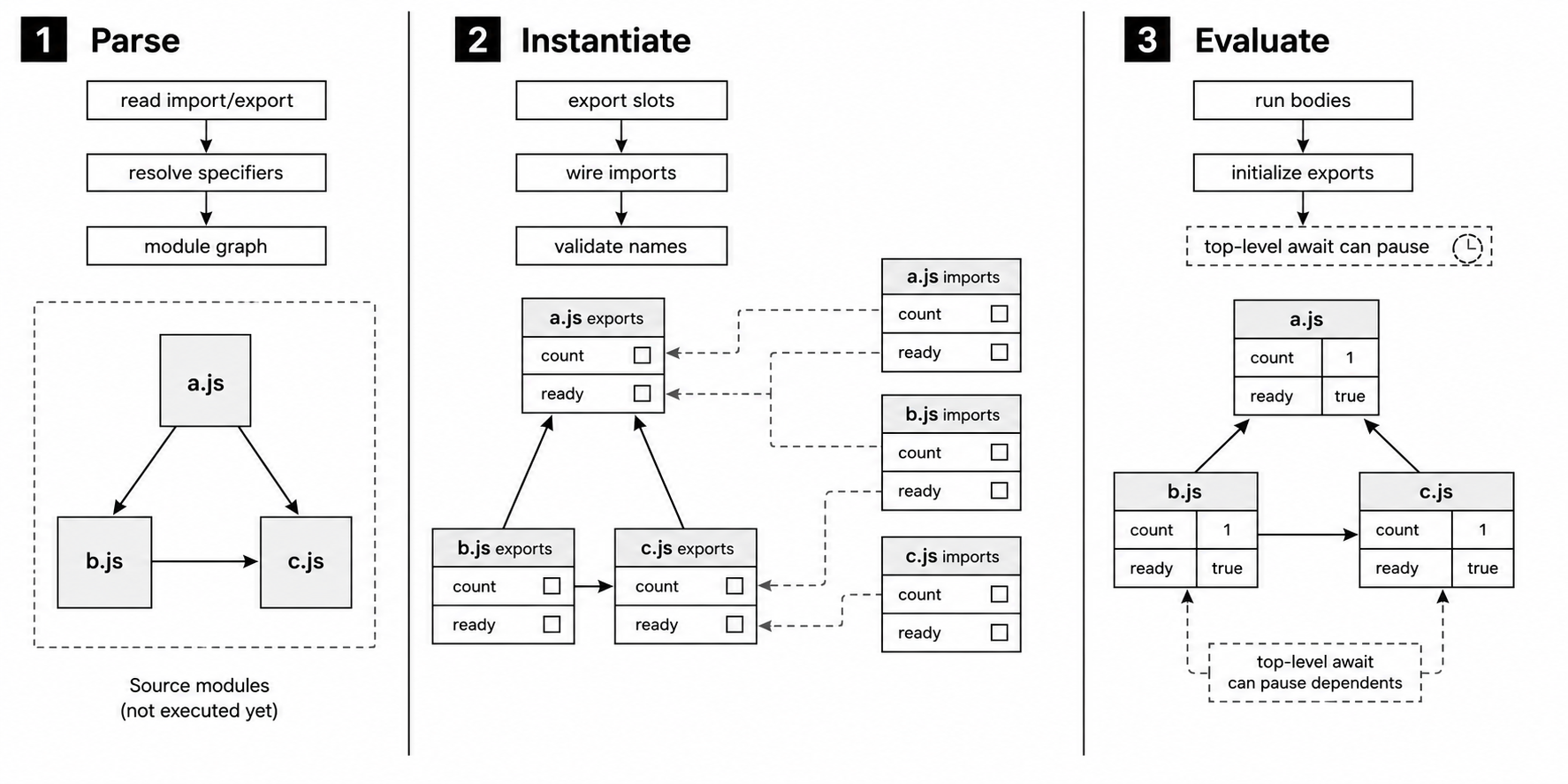
Figure 3.1 - ESM loading separates graph discovery, binding setup, and module execution. Imported names can be checked during linking before any module body runs.
Parsing
Node first reads the file using ES module grammar.
During this step, it records the module's import declarations and export declarations. It does not run the module. It does not initialize variables. It does not call functions. It only records which modules this file depends on and which names this file exports.
Every static import points Node to another module. Node resolves that specifier to a URL, loads the dependency's source, and parses that dependency too.
So if a.js imports b.js, and b.js imports c.js, Node discovers and parses all three before running any top-level code from them.
The result is a module graph. Each file is a node. Each import is an edge from one node to another. At this point, Node knows the shape of the graph, but none of the module bodies has executed.
Instantiation
Instantiation prepares the bindings.
For each module, the engine allocates slots for the exports declared by that module. Those slots exist before they have values. At first, many of them are uninitialized.
Then the engine connects imports to exports. If a.js imports count from b.js, the local count binding in a.js is wired to the exported count slot in b.js.
Those are not two separate variables with copied values. The importer reads from the exporter's binding.
Here is the relationship -
// b.js
export let count = 0;

// a.js
import { count } from './b.js';
After instantiation, a.js has a count binding that points to the exported count slot in b.js. The value will be filled in during evaluation, but the connection already exists.
This is also where Node can catch missing names. If an importer asks for a name the target module does not export, or if a re-export points at a missing name, the loader throws a SyntaxError before any module body runs.
Evaluation
Evaluation is the first phase that runs top-level code.
The engine works through the graph so dependencies run before the modules that depend on them. Modules with no further imports run first. Their top-level code initializes their exported bindings with real values. Then their dependents can run, and then the modules above those.
By the time a module body starts, its direct dependencies have usually already evaluated. Top-level await can pause that order. If b.js contains a top-level await, and a.js imports from b.js, then a.js waits until the awaited work in b.js finishes.
Each module evaluates once for a given cache identity. Later imports receive the cached module namespace object. The namespace still points at the same live bindings.
This upfront work has a startup cost. CommonJS loads as require() calls execute, compiling and running each file as it is reached. ESM discovers and links the graph before module bodies run. For a deep dependency tree, that can mean more file reads and parses before the first module body executes.
The tradeoff is cleaner loading behavior. Names are checked earlier. Cycles can be represented. Dependencies are resolved before application logic starts.
Import Syntax
Named Imports
Named imports bind specific exported names from another module -
import { readFile, writeFile } from 'node:fs/promises';
import { EventEmitter } from 'node:events';
The names inside the braces must exist as named exports in the target module. If node:fs/promises does not export readFile, the module fails during linking.
You can also rename an imported binding locally -
import { readFile as read } from 'node:fs/promises';read is only the local name. It still points at the same exported binding as readFile. No value is copied, and the exporting module does not create a new binding.
Default Imports
A default import binds the export named default -
import EventEmitter from 'node:events';The importer chooses the local name. In this example, the local name is EventEmitter.
At the binding level, default exports are not stored in a special separate system. default is an export name with special syntax around it.
Namespace Imports
A namespace import gives you one object view of the module's exports -
import * as fs from 'node:fs/promises';Here, fs is the module namespace object. Its properties expose the module's named exports, so you read them as fs.readFile, fs.writeFile, and so on.
The namespace object is sealed and non-extensible. You cannot add new properties, delete exports, or reconfigure them. Assigning to export properties is rejected.
There is one detail that looks odd at first. Namespace property descriptors report writable: true, so Object.isFrozen(fs) returns false. But the object is a special module namespace object. Its internal write behavior rejects assignment, while reads stay connected to live export bindings.
Side-Effect Imports
A side-effect import loads and runs a module without binding any of its exports -
import './setup.js';This form is useful when the target module does setup work. It might register event handlers, initialize instrumentation, install a polyfill, load configuration, or change global state.
The target still goes through the normal module pipeline. Node parses it, resolves its own imports, links it, and evaluates it. The importing module simply does not add any exported names to its own scope.
Combining Forms
A default import can appear beside named imports in the same declaration -
import fs, { readFile, writeFile } from 'node:fs';Here, fs is the local name for the default export. readFile and writeFile bind named exports.
This works because the default export is still an export named "default" under the syntax.
Export Syntax
Named Exports
A module can export a binding by putting export on the declaration -
export const PORT = 3000;
export function startServer() { /* ... */ }
export class Router { /* ... */ }
Those declarations create named exports called PORT, startServer, and Router.
You can also declare bindings first, then export them later -
const PORT = 3000;
function startServer() { /* ... */ }

export { PORT, startServer };
Both forms expose the same bindings.
Export lists can rename the public name -
export { startServer as start };The local binding is still called startServer. Other modules import it as start.
Default Export
A module can have one default export -
export default function createApp() { /* ... */ }This exports the function as the default binding.
Default export syntax has two common shapes. One shape exports a declaration, such as a function or class declaration -
export default function createApp() { /* ... */ }The other shape exports an expression -
export default 42;
export default { foo: 1, bar: 2 };
Expression defaults are evaluated during module evaluation, and the result becomes the value of the default export.
There is a useful sharp edge here. A named export keeps a live connection to the original binding. A default export written as an expression stores the result of that expression at evaluation time.
So if the module writes this -
let count = 0;
export default count;
count++;
the default export receives the value of count when the default expression runs. Later changes to count do not update that default export.
If you want the changing binding itself to be exported, use a named export -
export { count };Re-Exports
A module can forward exports from another module without creating local variables for them -
export { readFile, writeFile } from 'node:fs/promises';
export { default as EventEmitter } from 'node:events';
The first line makes readFile and writeFile available from the current module. They are still owned by node:fs/promises.
The second line takes the default export from node:events and re-exports it as a named export called EventEmitter.
Wildcard re-exports forward named exports in bulk -
export * from './utils.js';That forwards all named exports from ./utils.js. Default exports are not included in export *, so you must re-export them explicitly.
If two wildcard sources export the same name and a consumer tries to import that name, the ambiguity is reported at link time.
This is the idea behind barrel files, often named index.js. A barrel file gathers exports from several internal files into one public entry point. That lets a package expose a clean API without exposing its internal file layout.
The binding does not need to pass through a temporary local variable. The engine can wire the original export to the final consumer.
Live Bindings
Live bindings are one of the biggest behavior differences between ESM and CommonJS.
In ESM, an imported binding stays connected to the exported binding in the original module. The importer does not receive a snapshot of the value. It reads from the exporter's binding slot.
Here is a small counter module -
// counter.js
export let count = 0;

export function increment() {
  count++;
}
And here is a module that imports it -
// main.js
import { count, increment } from './counter.js';

console.log(count);  // 0
increment();
console.log(count);  // 1
In main.js, count is not an ordinary local variable initialized to 0. It is connected to the count binding owned by counter.js. When increment() updates count inside counter.js, the next read in main.js sees the new value.
The importing module can read the binding, but it cannot reassign it. If main.js tries this -
count = 5;it throws a TypeError. The exporter owns the binding. Importers only observe it.
CommonJS behaves differently when you destructure a property into a local variable -
// CJS equivalent
const { count, increment } = require('./counter.js');

console.log(count);  // 0
increment();
console.log(count);  // still 0 - this local variable was copied from a property value
Here, count is a local variable created from the property value at destructuring time. If the module later updates its internal count, this local primitive does not update.
If the CommonJS caller keeps the whole exports object, property reads can still observe changes -
const counter = require('./counter.js');

console.log(counter.count);  // 0
counter.increment();
console.log(counter.count);  // 1
So the difference is specific. CommonJS gives you an exports object. Destructuring reads property values into local variables. ESM imports bind directly to exported bindings.
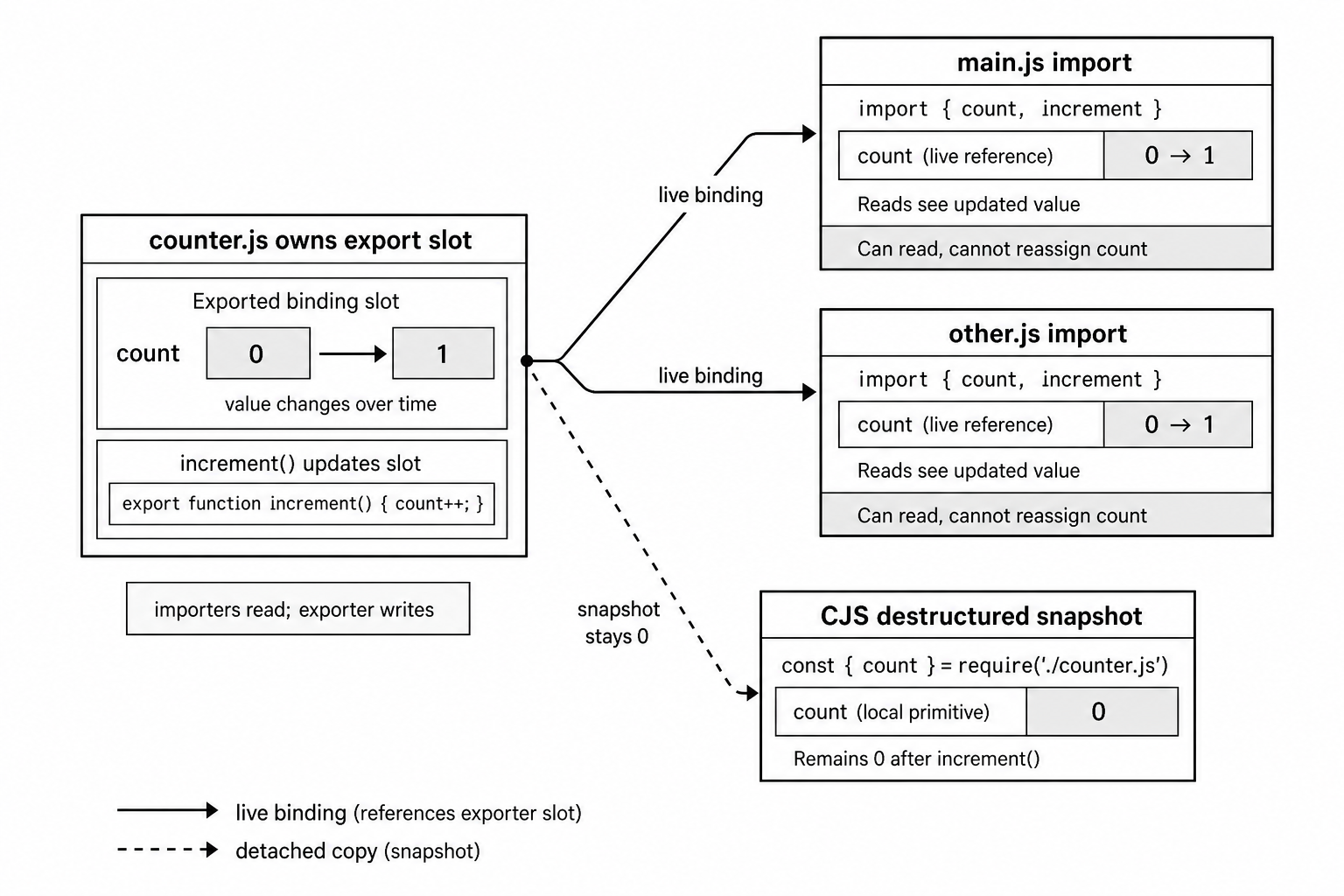
Figure 3.2 - An imported ESM binding points back to the exporter's slot. When the exporter updates that slot, importers read the new value. A detached snapshot does not update.
This same binding model helps with circular imports.
If module A imports from module B, and module B imports from module A, the loader can still create export slots for both modules during instantiation. The cycle does not automatically break loading.
The risky part is reading a value before it has been initialized. Lexical exports declared with let, const, or class stay in the temporal dead zone until their declaration runs. Reading one too early throws a ReferenceError. A var export can be seen as undefined before its assignment runs.
// b.js
import { a } from './a.js';

console.log(a); // ReferenceError if a is a lexical export that has not initialized yet
The binding exists, but the value may not be ready.
Circular imports work best when modules avoid reading each other's uninitialized exports during top-level evaluation. Move the read into a function that runs later, or split shared state into a third module if the cycle becomes hard to reason about.
const exports follow the same live binding model. The binding is live, but the binding cannot be reassigned after initialization. If the exported const holds an object, the object reference stays fixed while the object's properties can still change. Importers see those property changes because they all read the same object reference.
The import() Expression
Static imports cover the usual case. They are great when the dependency is known ahead of time and should load with the module.
Some imports depend on runtime state. Some modules are expensive and should only load when needed. Some code needs to load a module from CommonJS. That is where import() fits.
const mod = await import('./heavy-module.js');
mod.doSomething();
import() looks like a function call, but it is special syntax. You cannot alias it with const myImport = import, bind it with .bind(), or pass it around as a normal callback.
It accepts a specifier expression and returns a promise that resolves to the module namespace object. Since the specifier is an expression, it can be a variable or a computed string -
const lang = getUserLanguage();
const i18n = await import(`./locales/${lang}.js`);
That computed specifier works because import() runs during evaluation. Static import declarations cannot do this because their specifiers must be literal strings.
import() works in both ESM and CommonJS. A CommonJS file can use it to load an ES module, which makes it one of the main bridges between the two systems.
The promise resolves to a namespace object. Named exports appear as properties, and the default export appears as the default property.
If the target module has not been loaded yet, import() starts the same resolution, linking, and evaluation path used by static imports. If the target is already cached under the same resolved URL, the promise resolves to the cached namespace object. The module body does not run again.
The promise return value is the part to plan around. CommonJS require() is synchronous. The module is loaded, compiled, and executed before require() returns. import() is asynchronous, so code that depends on the loaded exports must continue after the promise resolves.
That async step is one reason some startup paths still use require() even in projects that otherwise use ESM.
URL-Based Module Resolution
ESM in Node uses URLs internally.
Relative and absolute file specifiers resolve to file: URLs. Bare package specifiers usually become file: URLs after package resolution. Built-in modules use node: URLs. Node also supports data: modules.
This is different from CommonJS, which mainly works with resolved filesystem paths.
A normal relative import like this -
import { something } from './utils.js';
// Resolves to - file:///Users/dev/project/utils.js
usually feels like a file path in day-to-day code. But for ESM caching, Node uses the full resolved URL.
That includes query strings and fragments -
import a from './module.js?v=1';
import b from './module.js?v=2';
// a and b are different module instances
Those two imports point at the same source file, but they are different URLs. Node treats them as different module instances. That can be useful in development or tests, but it can also create accidental duplicate state.
Bare specifiers are names without ./, ../, or /. They still go through Node's package resolution rules. Node checks package metadata and node_modules. For file-backed packages, the final result is a file: URL, and that URL becomes the module identity.
The URL model also includes inline modules -
import { name } from 'data:text/javascript,export const name="inline"';A data: URL creates a module from the URL contents. This is mostly useful in tests and specialized tooling.
Built-in modules use the node: scheme -
import fs from 'node:fs';Those specifiers bypass filesystem resolution and load from Node's built-in module set.
Mandatory File Extensions
Relative ESM imports must name the file explicitly, including its extension.
CommonJS will try alternate targets for you. ESM will not.
// Works in CJS
const utils = require('./utils');

// Fails in ESM
import utils from './utils';
// ERR_MODULE_NOT_FOUND

// Must be explicit
import utils from './utils.js';
CommonJS probes for .js, .json, and .node. ESM does not do that probing. This matches browser ESM, where module specifiers are URLs and URLs do not search for other file extensions.
For node: built-ins and bare specifiers resolved through packages, the package's exports field controls the final file target. For relative and absolute specifiers, the importing source writes the extension itself.
Directory imports follow the same rule. In ESM, this -
import './utils/';does not mean this -
import './utils/index.js';CommonJS performs that directory-to-index lookup. ESM requires the exact file path and commonly fails with ERR_UNSUPPORTED_DIR_IMPORT for directory imports.
Older Node releases had experimental options around specifier resolution. Current Node v24 does not restore extension and directory probing for this path. Write explicit paths.
Implementation in Node
The ESM loader lives under lib/internal/modules/esm/ in the Node source tree. Those files are internal, so names can move between releases. Still, the broad shape in Node v24 is useful when you want to understand what is happening.
A JavaScript-side loader resolves and loads sources. A ModuleJob tracks each module through its lifecycle. ModuleWrap connects Node's loader to V8's module implementation.
ModuleLoader
In Node v24, loader.js defines ModuleLoader. Older class names may still appear in stale articles and comments.
ModuleLoader coordinates resolution and loading. When a module writes this -
import { foo } from './bar.js';the loader resolves './bar.js' to an absolute URL, loads the source for that URL, determines its format, and creates or retrieves a ModuleJob.
The format may be module, commonjs, json, wasm, or builtin.
Node does not expose this machinery as one public "module map." In the v24 source, ModuleLoader keeps a resolve cache and a load cache. The user-facing behavior is that once a module has a resolved URL and a job, later imports can reuse that job instead of starting the work again.
Custom loader hooks also enter at this layer. The CLI spelling is --loader or --experimental-loader, and programmatic hooks come from node:module.
Async hooks registered with module.register() run on a separate loader thread. Synchronous hooks registered with module.registerHooks() run in the same thread. That difference affects hook code that expects shared state, thread-local behavior, or synchronous access to application objects.
ModuleJob
Each module in the graph gets a ModuleJob, implemented in module_job.js.
A job tracks one module through parsing, linking, and evaluation. It holds the ModuleWrap, tracks dependencies, and coordinates the work that must finish before dependents can continue.
When Node creates a ModuleJob, it starts resolving that module's dependencies. For each static import in the source, the job asks the loader for the dependency's job. That may trigger resolution and loading for the dependency. The resulting job graph mirrors the import graph from the source files.
After the graph is ready, the job drives linking and evaluation. It instantiates the underlying ModuleWrap, which triggers V8's linking phase, then evaluates the module.
If the module or one of its dependencies uses top-level await, evaluation becomes asynchronous from the job's point of view. Dependents wait for the resulting promise to settle.
ModuleWrap
ModuleWrap is the bridge between Node's JavaScript-side loader and V8's C++ module API. It wraps V8's internal representation of an ES module.
When Node creates a ModuleWrap from JavaScript source, V8 compiles the text as a module. During that compile step, V8 extracts the import and export declarations and creates a module record that has not been instantiated yet.
Node can then ask V8 what the module imports. Node resolves those imports using its own loader rules, then gives V8 the matching modules during instantiation.
Instantiation asks V8 to link the graph. V8 walks the module records and calls a host-provided resolve callback for each import. Node's callback supplies the matching ModuleWrap for the dependency.
V8 then creates the internal binding setup for exports and cross-module imports. Those bindings live in V8-managed module state. They are not ordinary properties on the namespace object.
After linking, evaluation runs the module's code.
Module code runs differently from script code. It always runs in strict mode. It has its own module scope. Exports are module bindings, not object properties created by assignment.
Inside the engine, evaluation is promise-shaped. For modules without top-level await, the promise is already resolved when control returns to Node. For modules with top-level await, it stays pending until the awaited work completes. ModuleJob uses that result to decide when dependent modules may continue.
The Module Graph and Cycle Detection
V8 handles cycle detection during instantiation.
If module A imports B, B imports C, and C imports A, V8 does not keep recursing forever. It marks each module's instantiation status and skips modules that are already being instantiated. The cyclic module's export slots are allocated, even if some values are still uninitialized.
During evaluation, modules in a cycle run according to the spec's cyclic module record algorithm. The first module that reads another module's export may hit an uninitialized binding.
For lexical exports, that early read throws a temporal-dead-zone ReferenceError. For var exports, the binding can be seen as undefined before assignment.
That is why circular imports can avoid an infinite loading loop but still fail at runtime. Instantiation can create the binding. Evaluation still has to initialize the value before other modules can safely read it.
Host-Created Modules
Most application modules begin as JavaScript source text. JSON modules use a different public rule.
Node parses the JSON and exposes one default export containing the parsed value. It does not create named exports for each JSON property.
The loader decides this from the loaded format. If the format is JavaScript module source, V8 parses it as a module. If the format is JSON, Node creates a module with a default binding for the parsed JSON value.
For users, the rule is simple. JSON imports are default-only and require an import attribute in current Node.js releases.
Custom Loader Hooks
Async customization hooks registered through module.register() run away from the application thread. That isolation means hook code cannot directly share application globals. It also avoids reentrancy problems during module loading.
Data sent to those hooks must cross a structured-clone handoff. Plain configuration is safer than functions or class instances.
Synchronous hooks registered with module.registerHooks() run in-thread. They are meant for cases where synchronous resolution or loading is required.
Do not treat the two hook APIs as the same tool with different names. Their execution models are different, and that changes what hook code can safely do.
Without custom hooks, Node follows its built-in resolve and load path. With custom hooks, user code sits in the middle of module resolution. Keep hook code small, predictable, and explicit about configuration.
Cache Identity
ESM cache identity is URL-based.
When the loader sees an import specifier, it resolves it to a URL and checks its caches. A cache hit means the module is already somewhere in its lifecycle. It may be loading, linked, or fully evaluated. Node can reuse the existing job or namespace instead of evaluating the module again.
This affects import() too. If two parts of the app call this -
await import('./foo.js');they receive the same module instance, as long as the specifier resolves to the same URL. The module evaluates once. Both callers receive the same namespace object with the same live bindings.
CommonJS caches by resolved file path. ESM caches by resolved URL. Since URLs include query strings and fragments, these are different cache entries -
import './foo.js';
import './foo.js?bust';
They produce different module instances from the same source file.
Module Namespace Object
When a module writes this -
import * as ns from './module.js';ns is the module namespace object.
The engine creates this object during instantiation, after it knows which exports the module provides. The object gives you property-style access to those exports.
Its properties correspond to named exports. The object is sealed, so Object.isSealed(ns) returns true. It is also non-extensible. You cannot add properties, delete export properties, or reconfigure them.
Object.isFrozen(ns) returns false in Node because namespace property descriptors report writable: true. Assignment still fails because this is a special module namespace object. Reading ns.count reads the current export binding. Writing ns.count = 5 is rejected.
import * as counter from './counter.js';

console.log(counter.count);          // 0
counter.increment();
console.log(counter.count);          // 1
console.log(Object.keys(counter));   // ['count', 'increment']
A default export appears as a property named "default" on the namespace object. You can read counter.default, although most code uses default import syntax instead.
The namespace object also has a null prototype, so Object.getPrototypeOf(ns) returns null. Its Symbol.toStringTag property is "Module", which makes this return "[object Module]" -
Object.prototype.toString.call(ns);import.meta
Every ES module receives an import.meta object. It contains metadata about the current module.
For local file modules in Node, it includes URL and filesystem-derived properties -
console.log(import.meta.url);
// file:///Users/dev/project/src/app.js

console.log(import.meta.filename);
// /Users/dev/project/src/app.js

console.log(import.meta.dirname);
// /Users/dev/project/src
For local file modules, import.meta.url is the fully resolved file: URL.
import.meta.filename and import.meta.dirname are the ESM equivalents of CommonJS's __filename and __dirname. They were added in Node v21.2 and backported to v20.11.
Before those properties existed, code had to convert the URL manually with fileURLToPath(import.meta.url).
Those filesystem properties only exist for local file: modules. A data: module still has import.meta.url, but it has no filesystem filename or dirname.
import.meta.resolve() resolves a specifier from the current module without loading the target -
const resolvedPath = import.meta.resolve('./config.json');
// file:///Users/dev/project/src/config.json
In Node, this method is synchronous and returns a string. It follows the same resolution algorithm as import. Package exports maps, node: built-ins, and bare specifiers through node_modules all apply.
Resolution is where it stops. It returns the URL without fetching, parsing, linking, or evaluating the target.
Each module gets its own import.meta object. Another module cannot read it from the outside. Node creates and fills it during instantiation through the host-defined HostInitializeImportMeta callback before the module's code runs.
Strict Mode, Scoping, and Other Differences
ES module code always runs in strict mode. You do not need a "use strict" directive.
That changes several things. Top-level this is undefined instead of globalThis. Assigning to an undeclared variable throws. Duplicate parameter names are forbidden. with statements are illegal.
Each ES module also has its own scope. Top-level variables stay local to the module unless they are exported.
CommonJS also has module-level scope, but it gets that scope through a wrapper function. ESM scope is part of the engine's module environment.
That difference shows up in the names available at the top level. In an ES module, these CommonJS wrapper names do not exist -
arguments;
require;
module;
exports;
__filename;
__dirname;
In ESM, dependencies come from import declarations, and module metadata comes from import.meta.
Other strict-mode behavior applies normally. typeof works normally. eval() uses strict-mode semantics. new Function() creates functions in the global scope, not in the surrounding module scope.
Top-level this is a common migration trap. In CommonJS, top-level this equals module.exports because of the wrapper function. In ESM, top-level this is undefined. Code ported from CommonJS that writes to this at the top level can fail when moved to ESM.
JSON loading is another difference. CommonJS can do this synchronously -
const config = require('./config.json');ESM can import JSON too, but current Node.js releases require an import attribute -
import config from './config.json' with { type: 'json' };The attribute tells the loader to treat the target as JSON and expose the parsed value as the default export.
For configuration files that do not need module loading behavior, reading the file and calling JSON.parse is still explicit and portable. Code that specifically wants CommonJS loading behavior can use createRequire() from node:module to create a CommonJS require function.
Putting the Pieces Together
The parse, instantiate, evaluate sequence explains the parts of ESM that feel unusual when coming from CommonJS.
Start with this module -
// config.js
export const debug = process.env.DEBUG === '1';
export let requestCount = 0;

export function trackRequest() {
  requestCount++;
}
And this importer -
// server.js
import { debug, requestCount, trackRequest } from './config.js';
During parsing, Node sees that server.js depends on config.js, so both modules are parsed before either body runs.
During instantiation, config.js gets export slots for debug, requestCount, and trackRequest. The imported bindings in server.js are connected to those slots.
During evaluation, config.js runs first because server.js depends on it. config.js reads process.env.DEBUG, initializes debug, sets requestCount to 0, and creates trackRequest.
Then server.js runs. Its imported debug binding already has a value. Its imported requestCount binding starts at 0. If server.js calls trackRequest(), the update is visible through requestCount because both modules are connected to the same binding.
For production code, the practical rules come straight from that loading model.
Declare the package type in package.json. Write explicit relative specifiers with file extensions. Remember that ESM cache identity is URL-based. Static imports let Node build the dependency graph before execution. Live bindings keep imported values connected to the exporter, but circular imports can still fail if a module reads another module's binding before it has initialized.
Related Reading
- Previous - Node.js Module Resolution Algorithm - node_modules, package.json, and exports
- Next - Node.js CommonJS and ES Modules Interop - require(), import, and Dual Packages