Zero-Copy, Scatter/Gather I/O & Advanced Techniques
This chapter covers advanced performance optimization techniques. If you feel uncomfortable while reading, feel free to skip this and come back later. The techniques here matter most when you're processing large volumes of data and have already identified I/O as your bottleneck through profiling.
Every time you copy a file in Node.js, you're likely copying the same data four times. First from disk into kernel memory. Then from kernel memory into your Node.js process memory. Then from your process memory back into kernel memory for the destination. Finally from kernel memory to the destination disk. Four copies for what should conceptually be one operation.
This matters because copying is expensive. Every copy involves CPU time, memory bandwidth, and cache pollution. When you're moving gigabytes of data through a stream pipeline, unnecessary copies become the bottleneck. Your disk might be capable of 2GB/sec, but you're getting 500MB/sec because you're spending CPU cycles shuffling bytes around in memory instead of actually doing useful work.
The performance techniques we're covering in this chapter - zero-copy, scatter/gather I/O, buffer pooling - aren't academic curiosities. They're the difference between a stream pipeline that maxes out your hardware and one that wastes resources on bookkeeping. We're going to look at how data actually moves through a system, where the copies happen, and how to eliminate them. Then we'll explore techniques for batching I/O operations to reduce syscall overhead, and strategies for managing buffers to minimize garbage collection pressure.
By the end, you'll understand how to make streams faster, why they're slow in the first place, and which optimizations actually matter for your workload.
What is Zero-Copy?
The term "zero-copy" gets thrown around loosely, and it's not as magical as it sounds. We need to be precise about what it actually means.
Traditional I/O involves copying data between different regions of memory. Your operating system maintains a strict separation between kernel space (where the OS kernel runs) and user space (where your application runs). This separation matters for system stability - it prevents applications from corrupting kernel memory or interfering with each other.
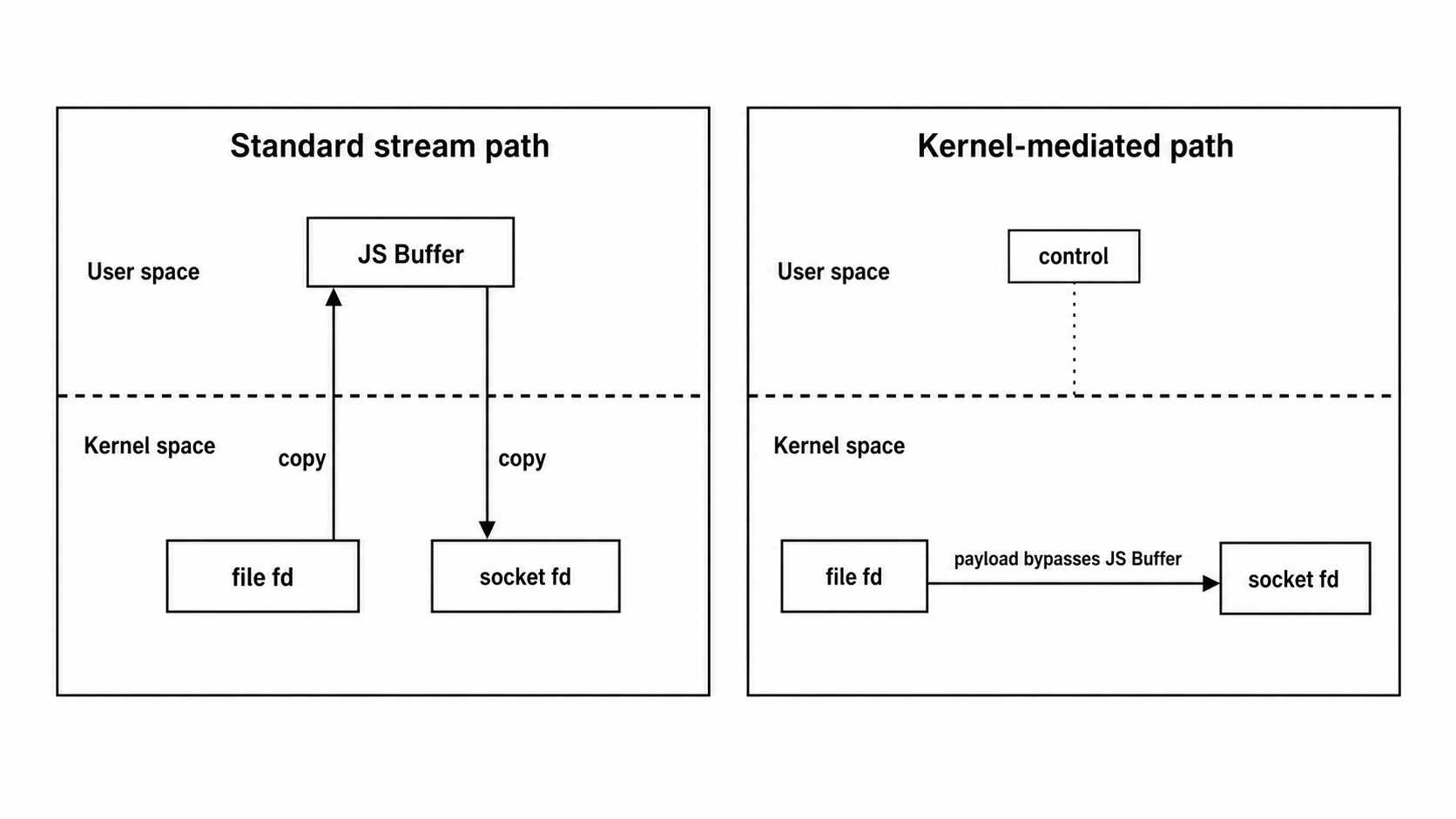
When you read a file in Node.js, here's what typically happens. The operating system reads data from disk into a kernel buffer. This is the first copy - from disk to kernel memory. Then, because your Node.js process can't directly access kernel memory, the OS copies that data from the kernel buffer into your process's memory space. That's the second copy. When you write that data to another file, the process reverses: your process writes to a buffer in user space, the OS copies it into a kernel buffer (third copy), and then writes it to disk (fourth copy).
Four copies. For a simple file copy operation.
Each copy operation involves several expensive steps. The CPU must execute instructions to read from one memory location and write to another. This consumes CPU cycles that could be spent on actual computation. It also pollutes the CPU cache - when you copy megabytes of data through the cache, you evict useful data that other parts of your program need, causing cache misses later.
Memory bandwidth is also finite. Modern systems have very fast memory, but there's still a limit to how many bytes per second can move between CPU and RAM. When you're copying the same data multiple times, you're consuming that bandwidth repeatedly for the same bytes. This becomes the bottleneck when moving large amounts of data.
Consider a web server serving a 1GB video file. With traditional I/O, that 1GB gets copied four times, but each CPU-mediated copy involves both a read and a write on the memory bus. The actual bandwidth breakdown:
- Disk to kernel buffer: DMA write (1GB)
- Kernel to user space: CPU read + write (2GB)
- User space to kernel: CPU read + write (2GB)
- Kernel to network: DMA read (1GB)
That's 6GB of memory bandwidth consumed to serve 1GB of actual data. On a system capable of 50GB/sec memory bandwidth, that single file transfer consumes 120ms just in memory operations, before even accounting for disk or network I/O latency.
Zero-copy is the technique of eliminating some or all of these intermediate copies. The "zero" is aspirational - you can't truly have zero copies because data has to move from one place to another - but you can avoid copies between kernel and user space, which is where most of the CPU overhead occurs.
If you're just moving data from one file to another without examining or modifying it, why copy it into your process's memory at all? The kernel already has the data. It could just move it directly from the source file's kernel buffer to the destination file's kernel buffer, bypassing your process entirely.
The sendfile() syscall on Linux does exactly this. You tell the kernel "copy data from file descriptor A to file descriptor B," and it does so entirely within kernel space. No copying to user space. No CPU cycles spent in your process moving bytes around. The data flows from source to destination with the fewest possible copies.
The implementation varies by operating system. Linux has sendfile() and splice(). FreeBSD and macOS have sendfile() with slightly different semantics. Windows has TransmitFile(). These are OS-level primitives that applications can use to achieve zero-copy transfers in specific scenarios.
On modern systems with DMA (Direct Memory Access), it's even better. DMA controllers can transfer data between devices and memory without involving the CPU at all. The disk controller reads data from disk and writes it directly to memory. The network card reads data from memory and sends it over the wire. The CPU just sets up the transfer and then does other work while the DMA controller handles the actual data movement.
When zero-copy works perfectly, the CPU's job is reduced to setting up transfers. The data moves via DMA and kernel-to-kernel copies, never touching user space, never consuming CPU cycles for memcpy operations. The CPU initiates the transfer with a syscall, the kernel programs the DMA controllers, and the data flows directly from disk to network (or file to file) without ever entering the CPU cache.
This is the ideal case. In practice, there are still some copies. The disk might read into a kernel buffer first, then the kernel copies (or maps) that buffer to the network card's DMA region. But compared to four copies (disk → kernel → user → kernel → destination), two kernel-level copies is a big improvement.
Zero-copy only works when you don't need to examine or modify the data. The moment you need to transform data - parse it, compress it, encrypt it - you need access to it in user space. You can't ask the kernel to "compress this data before writing it" (well, you can in some specialized cases with kernel-level compression, but it's not broadly applicable). You need to copy data into your process, transform it, and copy it back out.
Zero-copy gives you maximum throughput when data flows untouched. The second you need to process the data, you're back to traditional I/O with all its copying overhead. This is why zero-copy is most applicable to proxy scenarios: an HTTP proxy forwarding requests, a file server serving static files, a reverse proxy routing traffic. In these cases, you're just moving data from one socket or file to another without modification.
There's also a practical limitation: zero-copy only works for certain source-destination combinations. Linux's sendfile() requires the source to be a regular file (something that supports mmap()), not a pipe or socket. You can't use sendfile() for socket-to-socket transfers at all on Linux - the input must be a file. For socket-to-socket zero-copy, you'd need splice() with an intermediate pipe, which is more complex to implement.
Understanding these constraints helps you reason about when your streams will be fast (zero-copy applies) and when they'll be slower (fallback to traditional I/O). You can't make every stream zero-copy - that's impossible. But you can structure your pipelines so the high-volume data paths use zero-copy when available.
Let's see how this applies to Node.js streams.
Zero-Copy in Node.js Streams
A common misconception is that Node.js automatically uses zero-copy techniques like sendfile() when you pipe a file to a socket. It doesn't.
When you write code like this:
const readable = createReadStream("largefile.mp4");
const socket = getSocketSomehow();
readable.pipe(socket);Node.js does not automatically use the sendfile() system call. The standard stream pipe() method reads data through user space buffers using regular read() and write() operations. The data flows from disk into a kernel buffer, then into your Node.js process memory, then back to a kernel buffer, and finally to the socket. That's the traditional four-copy path we discussed earlier.
Despite claims you may have read elsewhere, Node.js streams don't use kernel-level zero-copy. Here's what's actually true:
libuv does have uv_fs_sendfile(), but it's used for file-to-file operations like fs.copyFile(), not for stream piping. When you call fs.copyFile(), libuv can use the kernel's efficient file copying mechanisms. On Linux, this might use sendfile() or copy-on-write reflinks (with COPYFILE_FICLONE flag) if the filesystem supports them. But this is file-to-file, not file-to-socket.
Node.js streams use buffered I/O through JavaScript. When you pipe(), Node sets up event listeners. The readable stream emits data events with Buffer chunks. The writable stream's write() method is called for each chunk. This all happens in JavaScript, with data passing through V8's heap. There's no magic kernel bypass.
Why doesn't Node.js use sendfile() for file-to-socket streaming? Several reasons:
-
sendfile()behaves differently on Linux, macOS, and FreeBSD. Windows usesTransmitFile()with different semantics. The abstraction cost adds up. -
HTTPS complicates things. Zero-copy requires data to flow untouched through the kernel. Traditional TLS requires encrypting every byte in user space. Linux 4.13+ introduced kernel TLS (kTLS), which can enable zero-copy for TLS traffic by handling encryption in the kernel. However, Node.js doesn't currently use kTLS, so HTTPS traffic still requires user-space encryption. Since most production traffic is HTTPS, the practical benefit of kernel-level zero-copy in Node.js is limited.
-
Node's stream backpressure mechanism relies on JavaScript callbacks and the
drainevent. Integrating this with kernel-levelsendfile()is complex. -
Node.js had
sendfile()support briefly in its early days, but it was removed after the libeio to libuv transition due to bugs and cross-platform issues.
So when would you actually get zero-copy benefits in Node.js? There are a few scenarios:
fs.copyFile() for file-to-file copies. This uses libuv's uv_fs_copyfile() which can use sendfile() or copy-on-write reflinks:
import { copyFile, constants } from "fs/promises";
// Try copy-on-write first, fall back to sendfile-based copy
await copyFile(src, dest, constants.COPYFILE_FICLONE);On filesystems that support reflinks (like Btrfs, XFS, APFS), this creates an instant copy that shares physical blocks until one copy is modified. That's true zero-copy.
Native addons. If you absolutely need sendfile() for file-to-socket, you can write a native addon that calls it directly. This requires handling partial writes, backpressure, and platform differences yourself. It's rarely worth it for most applications.
HTTP/2 with respondWithFile(). The http2 module has http2stream.respondWithFile() and respondWithFD() methods that are optimized for serving files. These still go through user space but are more efficient than manual streaming.
The practical implications: don't structure your code expecting automatic zero-copy magic. Instead, focus on the optimizations you can control - buffer sizes, avoiding unnecessary copies in your code, and using _writev() for batching. These give you real, measurable wins.
The stream abstraction prioritizes correctness, flexibility, and cross-platform compatibility over maximum raw throughput. For most applications, this is the right trade-off. The scenarios where kernel-level zero-copy matters (serving huge files over HTTP to thousands of concurrent clients) are better handled by specialized software like nginx or a CDN, not Node.js.
The concepts of zero-copy are still useful even without kernel bypass. You can minimize copies in your own code, and that's what we'll focus on next.
Memory Mapping
There's another zero-copy approach worth understanding: memory mapping. Instead of reading a file into a buffer, you can map the file directly into your process's address space. The file's contents appear as a region of memory, and you access it by reading from that memory region.
Memory mapping uses the OS's virtual memory system. The kernel maps the file's pages into your process's address space, but it doesn't actually load the file into physical memory until you access those pages. When you read from a mapped page, the OS loads that page from disk. When you write to it, the OS marks the page as dirty and flushes it back to disk later.
This is zero-copy in the sense that you're not explicitly copying the file's data into a separate buffer. You're accessing the file's data directly via the memory map. Changes you make to the mapped memory are reflected in the file.
Node.js core doesn't expose memory mapping. There's no built-in JavaScript API for mmap(). To use memory mapping in Node.js, you need third-party native addons. The original node-mmap and mmap-io packages are largely unmaintained and may not work with modern Node.js versions. If you need mmap functionality, look for actively maintained forks or consider whether the use case truly requires memory mapping - often fs.read() with appropriate offsets works well enough.
Memory mapping is useful for random access to large files. If you need to read specific offsets within a multi-gigabyte file, mapping it into memory lets you treat it like a huge byte array. No need to seek and read chunks - just index into the mapped region.
But memory mapping has trade-offs. The OS does apply readahead to memory-mapped files, but the optimization works differently than with read(). With read(), the kernel knows exactly how much data you want upfront. With mmap, the kernel must detect your access pattern through page faults - you access a page, the kernel loads it and potentially prefetches nearby pages. This reactive approach adds latency for initial accesses that read() avoids. For pure sequential streaming, a read stream is usually faster.
For streaming, memory mapping rarely makes sense. For random access workloads (like a database), it can work well. Just be aware of the trade-offs and measure performance for your specific use case.
Avoiding Unnecessary Buffer Copies in Your Code
Even when Node.js can't use OS-level zero-copy, you can avoid unnecessary copies in your own code. Let's talk about common patterns that introduce extra copies and how to eliminate them.
One frequent culprit is Buffer.concat():
const chunks = [];
readable.on("data", (chunk) => {
chunks.push(chunk);
});
readable.on("end", () => {
const combined = Buffer.concat(chunks);
processData(combined);
});This pattern collects chunks into an array, then concatenates them. The Buffer.concat() call allocates a new buffer and copies all chunks into it. That's an extra copy.
If you're going to process the data as one contiguous buffer, this copy is unavoidable. But if you can process chunks individually, skip the concatenation:
readable.on("data", (chunk) => {
processChunk(chunk);
});Process each chunk as it arrives. No intermediate buffer, no concatenation copy.
Another anti-pattern is converting buffers to strings and back:
const str = buffer.toString("utf8");
const processedStr = processString(str);
const newBuffer = Buffer.from(processedStr, "utf8");Each conversion allocates new memory and copies data. If your processing can work directly on buffers (using buffer.indexOf(), buffer.subarray(), etc.), avoid string conversion.
Buffer slicing is a zero-copy operation when used correctly:
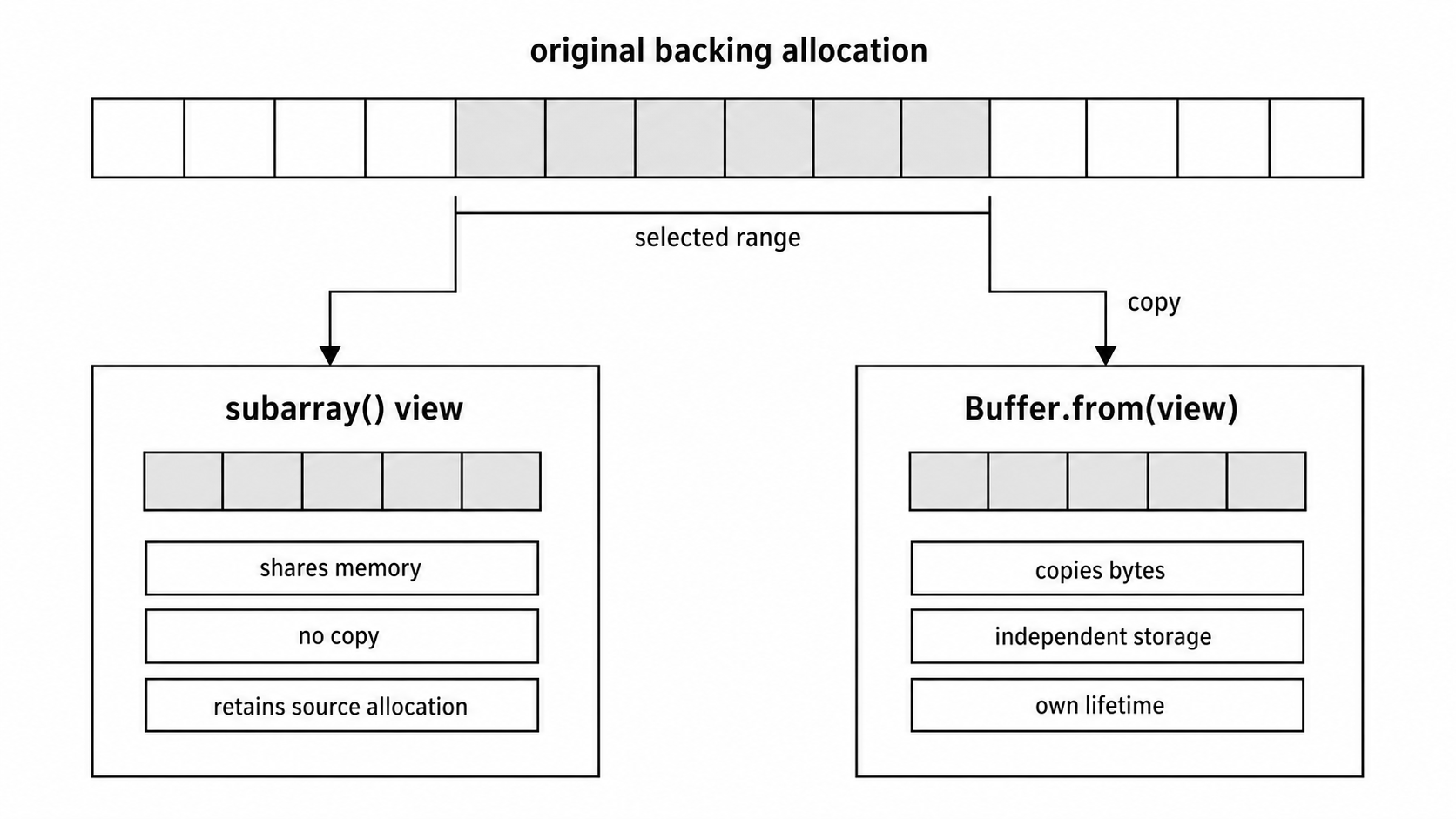
const slice = buffer.subarray(10, 50);This doesn't copy data. It creates a view of the original buffer from byte 10 to byte 50. The slice shares the underlying memory with the original buffer. Modifying the slice modifies the original buffer. This is zero-copy slicing.
Note: Use subarray() instead of slice(). Buffer.slice() has the same behavior, but it's deprecated (DEP0158) because it's inconsistent with TypedArray.prototype.slice() which creates a copy. As of Node.js v25, calling slice() emits runtime deprecation warnings. Use subarray() instead - it's the recommended API and won't trigger warnings.
But if you then modify the original buffer's length or reallocate it, the slice becomes invalid. And if you slice tiny fragments from many large buffers and keep those slices alive, you're preventing the large buffers from being garbage collected. The small slice holds a reference to the large buffer, keeping it in memory.
The safe pattern: slice for temporary processing, then copy if you need to retain the data:
const slice = buffer.subarray(10, 50);
processTemporarily(slice);
// If you need to keep it long-term:
const copy = Buffer.from(slice);
// Now the original buffer can be GC'dOne more pattern: avoid Buffer.from(buffer) unless you explicitly need a copy. If you just need to pass a buffer to another function, pass the original:
// Unnecessary copy:
const copy = Buffer.from(originalBuffer);
writeStream.write(copy);
// Just use the original:
writeStream.write(originalBuffer);The writable stream doesn't modify the buffer (unless it's a very unusual stream), so there's no reason to copy it.
Every Buffer.concat(), Buffer.from(), and buffer.toString() potentially allocates and copies. Only do these operations when the semantics of your code require them, not out of habit. And remember to use subarray() instead of slice() for zero-copy views.
Scatter/Gather I/O
Scatter/gather I/O is a technique for reducing the number of syscalls when working with multiple buffers.
In traditional I/O, if you want to write three buffers to a file, you make three write syscalls:
fs.writeSync(fd, buffer1);
fs.writeSync(fd, buffer2);
fs.writeSync(fd, buffer3);Each syscall has overhead. The CPU switches from user mode to kernel mode, the kernel processes the request, and the CPU switches back to user mode. For small writes, this overhead can exceed the actual I/O cost.
Let's quantify this overhead. A syscall typically takes 50-200 nanoseconds just for the mode switch, depending on CPU and OS. Then there's the kernel's work of processing the request - validating parameters, setting up I/O, etc. For a simple write, this might be another 100-500 nanoseconds. So each syscall has a baseline cost of roughly 150-700 nanoseconds before any actual data movement happens.
If you're writing three 1KB buffers, that's three syscalls, so 450-2100 nanoseconds of pure overhead. The actual writing of 3KB might take only a few hundred nanoseconds on a fast SSD. The syscall overhead can exceed the I/O cost.
Now scale this up. If you're writing 1000 small buffers, you're spending 150-700 microseconds just on syscall overhead. That might not sound like much, but in a high-throughput system processing millions of writes per second, this overhead adds up to real CPU time.
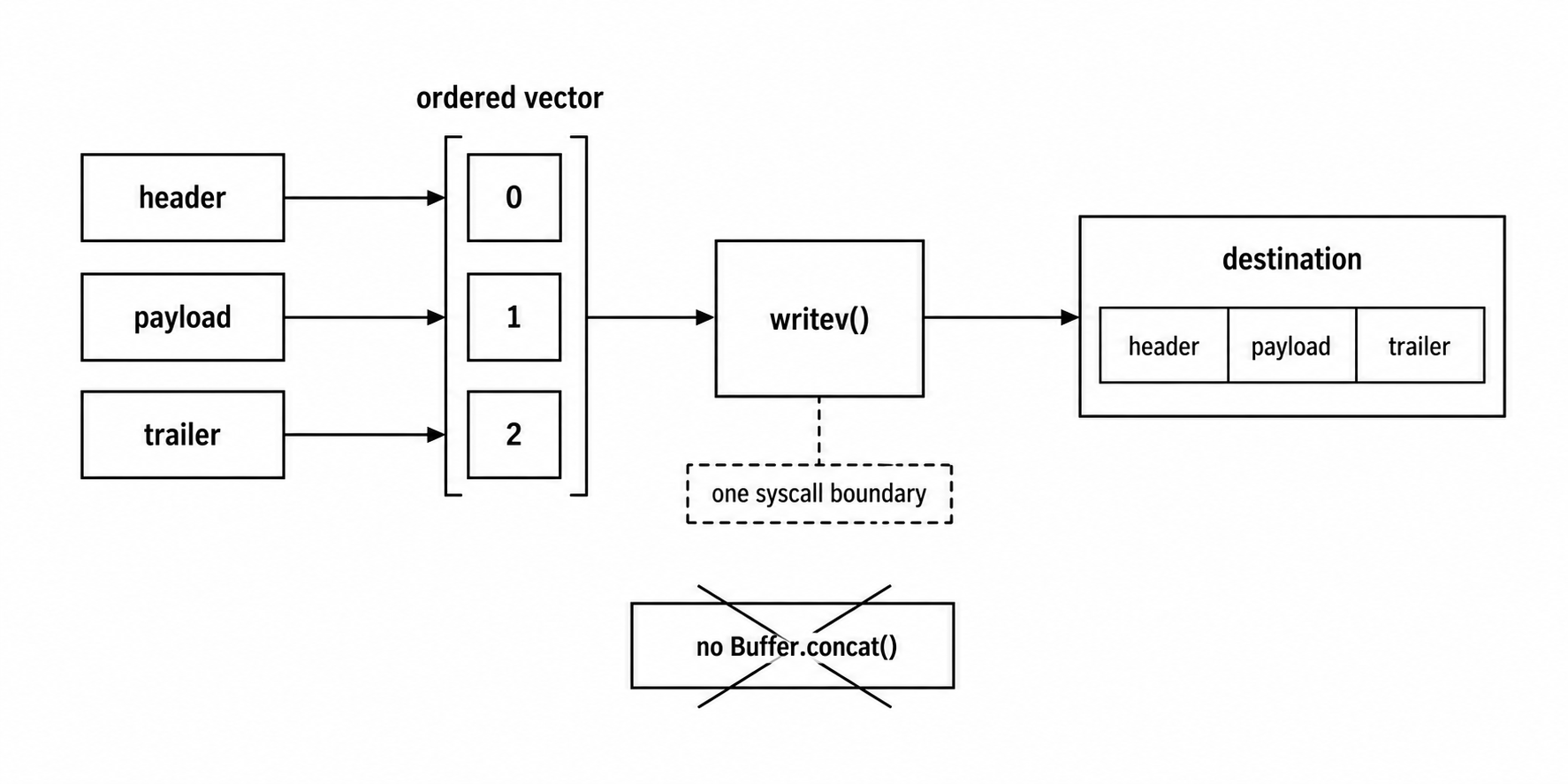
Scatter/gather I/O lets you pass multiple buffers to a single syscall. For writes (gather), you're gathering data from multiple buffers and writing it in one operation. For reads (scatter), you're scattering incoming data into multiple buffers.
On Linux, the writev() syscall handles gather writes. You pass an array of buffers (technically, an array of iovec structures pointing to buffers), and the kernel writes all of them in one operation. This is much more efficient than separate write calls.
The scatter counterpart is readv(), which reads data into multiple buffers. You specify an array of buffers, and the kernel fills them in order. If the read provides more data than the first buffer can hold, it continues into the second buffer, and so on. This is useful when you know the structure of incoming data - for example, a fixed-size header followed by variable-length payload. You can scatter-read into a header buffer and a payload buffer in one syscall.
Node.js exposes gather writes through the _writev() method on writable streams, but scatter reads aren't directly exposed in the stream API because the stream abstraction doesn't know in advance how many buffers to scatter into. However, the lower-level fs.readv() and fs.writev() functions are available if you need them.
Node.js writable streams expose this via the _writev() method. If you're implementing a custom writable stream and you override _writev(), Node will batch writes and call your _writev() with an array of chunks instead of calling _write() multiple times.
Here's how it works. When a writable stream is corked or when multiple chunks are written rapidly, Node buffers them. If the stream implements _writev(), Node calls it with all buffered chunks:
class BatchWriter extends Writable {
_writev(chunks, callback) {
// chunks is an array: [{ chunk, encoding }, ...]
const buffers = chunks.map(({ chunk }) => chunk);
// Write all buffers in one syscall
fs.writev(this.fd, buffers, (err) => {
callback(err);
});
}
}The chunks array contains objects with chunk and encoding properties. You extract the chunks and pass them to a syscall that supports vectored I/O.
The benefit: instead of N syscalls for N chunks, you make one syscall. For a stream writing many small chunks (like a HTTP response with many small writes), this can cut syscall overhead a lot.
But there's a nuance. Node only calls _writev() when multiple chunks are buffered. If chunks arrive slowly (one at a time with gaps between), Node calls _write() for each. To force batching, you can cork the stream:
writable.cork();
writable.write(chunk1);
writable.write(chunk2);
writable.write(chunk3);
writable.uncork(); // Flushes as one _writev() callCorking suppresses _write() calls and buffers everything. Uncorking flushes the buffer, calling _writev() with all buffered chunks.
This is useful when you know you're about to write multiple chunks. Cork before the writes, uncork after, and you get batching even if _write() would normally be called.
For scatter reads (the opposite direction), Node doesn't expose readv() directly because readable streams pull data on demand, and it's not clear how many buffers to scatter into. But if you're using low-level fs APIs, you can use fs.readv() to read into multiple buffers in one syscall.
Batching multiple I/O operations into one syscall reduces overhead. Scatter/gather I/O is the mechanism for doing this with multiple buffers.
Implementing _writev() for Maximum Throughput
Here's an example of implementing _writev() to optimize a writable stream.
Suppose you're writing to a network socket and you want to minimize syscalls. The socket's default behavior calls write() for each chunk. If chunks are small, you're making many syscalls.
By implementing _writev(), you batch writes:
class BatchedSocket extends Writable {
constructor(socket, options) {
super(options);
this.socket = socket;
}
_write(chunk, encoding, callback) {
this.socket.write(chunk, callback);
}
_writev(chunks, callback) {
const buffers = chunks.map((c) => c.chunk);
const combined = Buffer.concat(buffers);
this.socket.write(combined, callback);
}
}This _writev() concatenates buffers, which does introduce a copy. But it's still a net win if the alternative is many small syscalls.
Here's the trade-off. Without _writev(), you make N syscalls for N chunks. Syscalls are expensive. With _writev() that concatenates, you make one copy (concatenation) and one syscall. If syscall overhead exceeds copy overhead, batching wins.
But you can do better. If your underlying I/O mechanism supports true vectored writes (like writev() on a file descriptor), you can avoid the concatenation:
_writev(chunks, callback) {
const buffers = chunks.map((c) => c.chunk);
fs.writev(this.fd, buffers, (err) => {
callback(err);
});
}Now you're passing multiple buffers to a vectored I/O syscall. The kernel writes them all without you copying them into a single buffer. This is true gather I/O.
For sockets, Node's net.Socket doesn't expose vectored writes at the JavaScript level, but libuv (which underlies Node) uses them internally where supported. By implementing _writev() and letting the socket's internal write handle batching, you benefit from libuv's optimizations.
The key is to always implement _writev() when your destination supports batched writes. Even if you have to concatenate buffers, it's often faster than multiple syscalls.
One more pattern: adaptive batching. If chunks are large, batching doesn't help much. If chunks are small, batching matters a lot. You can track chunk sizes and cork/uncork dynamically:
let pendingWrites = 0;
let isCorked = false;
function writeWithBatching(chunk) {
pendingWrites++;
if (pendingWrites === 1 && chunk.length < 4096 && !isCorked) {
writable.cork();
isCorked = true;
}
writable.write(chunk, (err) => {
pendingWrites = Math.max(0, pendingWrites - 1);
if (pendingWrites === 0 && isCorked) {
writable.uncork();
isCorked = false;
}
});
}This corks on the first small write and uncorks once writes settle. Using the write callback ensures we uncork even if some writes fail. The Math.max(0, ...) guards against the counter going negative if something unexpected happens.
This is a simplified heuristic. In production, you'd track timing and chunk sizes more carefully, and add cleanup for stream close/error events. But the idea is solid: batch small writes, skip batching for large writes.
Buffer Pooling
Every time you allocate a buffer, you're asking V8 to allocate memory. Every allocation is tracked by the garbage collector. When buffers are no longer referenced, the GC reclaims them. Frequent allocations create GC pressure - the garbage collector has to run more often, pausing your application to reclaim memory.
For high-throughput streams, buffer allocation overhead can become a bottleneck. If you're processing gigabytes of data in small chunks, you might allocate millions of buffers, each creating GC work.
Understanding the mechanics matters here. When you allocate a buffer with Buffer.alloc(size), V8 doesn't just hand you memory. It has to find a free memory region (possibly triggering GC if memory is fragmented), initialize metadata to track the allocation, potentially zero the memory for security, and link the buffer into its tracking structures.
For a small buffer (say 1KB), this allocation might take 500-2000 nanoseconds, depending on heap state. If you're allocating one buffer per chunk and processing 100,000 chunks per second, that's 50-200 milliseconds per second spent just on allocation overhead - 5-20% of CPU time wasted on bookkeeping.
When those buffers become unreachable, the garbage collector has to reclaim them. V8's GC has multiple generations (young generation, old generation), and objects move between generations based on age. Buffers that live for many GC cycles get promoted to the old generation, which is more expensive to collect. Frequent buffer allocations and deallocations thrash the GC, causing longer and more frequent pause times.
Buffer pooling is the technique of reusing buffers to avoid repeated allocations. Instead of allocating a new buffer for each chunk, you allocate a pool of buffers upfront and reuse them.
The core idea is simple: allocate N buffers at startup, keep them in a pool, and hand them out when needed. When a buffer is no longer needed, return it to the pool instead of letting it be garbage collected. This transforms repeated allocations into simple pool management - popping and pushing from an array, which is orders of magnitude faster than GC operations.
The difficulty is in managing buffer lifetimes. You can only reuse a buffer when you're certain it's no longer referenced anywhere else. If you return a buffer to the pool while some other code still holds a reference, that code will see its data corrupted when the buffer is reused. This is a use-after-free bug, just in JavaScript instead of C.
The safe approach is to only pool buffers with well-defined, scoped lifetimes. For example, buffers used for a single I/O operation: read into buffer, process immediately, return to pool. As long as processing doesn't retain a reference to the buffer, it's safe to reuse.
Here's the simplest form: a single reusable buffer:
const reusableBuffer = Buffer.allocUnsafe(65536);
readable.on("data", (chunk) => {
chunk.copy(reusableBuffer, 0, 0, chunk.length);
processBuffer(reusableBuffer.subarray(0, chunk.length));
});You allocate one 64KB buffer. For each incoming chunk, you copy it into the reusable buffer, process it, and then reuse the buffer for the next chunk.
This eliminates per-chunk allocations. You allocate once, reuse many times, reducing GC pressure.
But there's an important detail: Buffer.allocUnsafe(). This allocates a buffer without zeroing its memory. Normal Buffer.alloc() zeroes the buffer, which ensures no leftover data from previous uses. Zeroing costs CPU cycles. If you're about to overwrite the entire buffer anyway, zeroing is wasted work.
Buffer.allocUnsafe() skips zeroing. The buffer contains whatever data was in that memory region before. This is faster but dangerous. If you don't overwrite the entire buffer, you might leak sensitive data from previous operations.
The safe pattern: use Buffer.allocUnsafe() when you're immediately overwriting the buffer, and slice the buffer to the actual data length to avoid exposing uninitialized memory:
const buf = Buffer.allocUnsafe(1024);
const bytesRead = readDataInto(buf);
const safeSlice = buf.subarray(0, bytesRead);The slice contains only the bytes you wrote. The rest of the buffer (which might have garbage data) isn't exposed.
For more flexible pooling, maintain a pool of buffers and check them out/in:
class BufferPool {
constructor(bufferSize, poolSize) {
this.bufferSize = bufferSize;
this.pool = [];
for (let i = 0; i < poolSize; i++) {
this.pool.push(Buffer.allocUnsafe(bufferSize));
}
}
acquire() {
return this.pool.pop() || Buffer.allocUnsafe(this.bufferSize);
}
release(buffer) {
if (this.pool.length < 100) {
this.pool.push(buffer);
}
}
}You allocate a pool of buffers upfront. When you need a buffer, you pop one from the pool. When you're done, you return it to the pool. If the pool is empty, you allocate a new buffer (falling back to normal allocation). If the pool is too large (to avoid hoarding memory), you discard returned buffers instead of pooling them.
Security warning: This basic pool doesn't zero buffers on release. If your application handles sensitive data (passwords, tokens, PII), previous contents remain in memory and could leak to subsequent users of the same buffer. For security-sensitive applications, either zero the buffer before releasing (buffer.fill(0)) or don't pool buffers that held sensitive data.
This cuts allocations way down. Instead of allocating per chunk, you allocate a small pool upfront and reuse those buffers thousands of times.
Use it in a readable stream:
const pool = new BufferPool(16384, 10);
class PooledReadable extends Readable {
_read(size) {
const buffer = pool.acquire();
readDataInto(buffer, (err, bytesRead) => {
if (err) {
pool.release(buffer);
this.destroy(err);
} else if (bytesRead === 0) {
pool.release(buffer);
this.push(null);
} else {
const data = Buffer.from(buffer.subarray(0, bytesRead));
this.push(data);
pool.release(buffer);
}
});
}
}You acquire a buffer, use it for reading, copy the relevant portion with Buffer.from(), push that copy, and release the original buffer back to the pool. The buffer is reused for the next read.
The explicit copy with Buffer.from() is to be noted here. subarray() creates a view that shares memory with the original buffer - it does NOT copy data. If you pushed the subarray directly and released the buffer, downstream consumers might see corrupted data when the pool reuses that buffer for another read. Always copy before releasing a pooled buffer.
You're still controlling where allocations happen. Instead of allocating a buffer in _read() each time (which V8 has to manage), you're allocating smaller copies of just the bytes you read. The pool buffers are large and reused, reducing pressure on the allocator.
For truly zero-copy pooling, you'd need to pass pool buffers directly downstream and ensure they're released after consumption. This means coordinating with the consumer, which gets messy. In practice, pooling is most useful when you control both ends of the data flow (like a custom protocol implementation).
Buffer pooling reduces allocations, which reduces GC pressure. Use Buffer.allocUnsafe() for buffers you're about to overwrite, and be careful with slicing to avoid leaking uninitialized data.
Batching Writes for Efficiency
We touched on cork/uncork earlier for batching writes. Now we'll examine when and how to use it strategically.
Corking a writable stream tells it to buffer writes instead of flushing them immediately. Uncorking flushes the buffered writes, ideally in a single batched operation (via _writev() if implemented).
The benefit: reducing the number of write operations. The cost: increased latency (data sits in the buffer until uncorked).
The key is knowing when to cork. If you're about to write a burst of small chunks, cork before the burst and uncork after:
writable.cork();
for (const item of items) {
writable.write(processItem(item));
}
writable.uncork();All writes buffer, then flush together. If _writev() is implemented, they're written in one syscall.
But there's a problem with this pattern: if processItem() throws an exception, uncork() never gets called and the stream stays corked. Always pair cork with uncork in a try/finally:
writable.cork();
try {
// ... writes ...
} finally {
writable.uncork();
}The finally block ensures uncork even if an error occurs.
One subtlety: Node allows multiple cork calls. Each cork increments an internal counter. Each uncork decrements it. The stream only flushes when the counter reaches zero:
writable.cork(); // counter = 1
writable.cork(); // counter = 2
writable.uncork(); // counter = 1, no flush
writable.uncork(); // counter = 0, flushThis lets you nest cork regions. The innermost cork/uncork doesn't trigger a flush; only the outermost uncork does.
This is useful for complex control flow where multiple functions might cork/uncork:
function writeHeader(writable) {
writable.cork();
writable.write(header);
writable.uncork();
}
function writeBody(writable) {
writable.cork();
for (const chunk of chunks) {
writable.write(chunk);
}
writable.uncork();
}
writable.cork();
writeHeader(writable); // Nested cork/uncork
writeBody(writable); // Nested cork/uncork
writable.uncork(); // Final flushBoth writeHeader and writeBody cork/uncork, but because they're nested within an outer cork, their uncorks don't flush. The final uncork flushes everything.
When not to cork: if writes are already large (megabytes), corking doesn't help. The overhead of buffering might exceed any batching benefit. Cork is most useful for many small writes.
Also, don't cork indefinitely. If you're processing a long-running stream and you cork at the start, data buffers until the end. This consumes memory and increases latency. Cork only around bursts of writes, not for the entire stream lifetime.
A pattern for adaptive corking: cork when writes are frequent, uncork when they slow down:
let lastWrite = Date.now();
let corked = false;
let uncorkTimer = null;
function adaptiveWrite(chunk) {
const now = Date.now();
if (now - lastWrite < 10 && !corked) {
writable.cork();
corked = true;
}
writable.write(chunk);
lastWrite = now;
if (uncorkTimer) clearTimeout(uncorkTimer);
uncorkTimer = setTimeout(() => {
if (corked) {
writable.uncork();
corked = false;
}
uncorkTimer = null;
}, 10);
}If writes happen within 10ms of each other, cork. If 10ms pass without writes, uncork. This batches rapid writes while flushing promptly when writes slow down. Note that we clear and reset the timer on each write - without this, rapid writes would accumulate many pending timers.
This is a heuristic. The right threshold depends on your workload. Measure and tune.
Avoiding String Concatenation Overhead in Streams
String concatenation in JavaScript can be memory-inefficient when accumulating large amounts of text. Modern engines like V8 optimize concatenation using "cons strings" (also called ropes) - instead of immediately copying, they create a tree structure pointing to the original strings. The actual copying happens later when the string is read or flattened.
But this optimization has limits. Cons strings add memory overhead for the tree structure, and flattening happens unpredictably - when you access a character, search the string, or pass it to native code. In stream scenarios where you're accumulating many chunks, these deferred copies still happen eventually, and the memory overhead of maintaining deep cons string trees can cause issues.
In streams, the problematic pattern looks like this:
let text = "";
readable.on("data", (chunk) => {
text += chunk.toString();
});Each += either creates a cons string (deferred cost) or triggers flattening of previous cons strings (immediate cost). For a large file with many chunks, you end up with either a deep tree that eventually flattens expensively, or repeated flattening operations that approach O(N^2) behavior.
The fix: use an array to collect chunks, then join once:
const chunks = [];
readable.on("data", (chunk) => {
chunks.push(chunk.toString());
});
readable.on("end", () => {
const text = chunks.join("");
processText(text);
});Array.push() is cheap. Array.join() allocates once and copies all strings in one pass. Linear time instead of quadratic.
Even better, if you're working with buffers, collect buffers and concatenate at the end:
const buffers = [];
readable.on("data", (chunk) => {
buffers.push(chunk);
});
readable.on("end", () => {
const combined = Buffer.concat(buffers);
processBuffer(combined);
});Buffer.concat() allocates once and copies all buffers. Avoid toString() until you actually need a string.
If you need to process data incrementally (not accumulate the entire stream), process chunks directly:
readable.on("data", (chunk) => {
processChunk(chunk); // No accumulation
});No concatenation, no accumulation, just per-chunk processing.
Another anti-pattern: converting buffers to strings for simple operations:
const str = buffer.toString();
if (str.includes("keyword")) {
// ...
}Buffers have methods for searching:
if (buffer.indexOf("keyword") !== -1) {
// ...
}No conversion, no string allocation, just a buffer scan.
Strings are immutable, and concatenation creates new strings. For streams, minimize conversions and concatenations. Work with buffers when possible, and collect chunks in arrays when accumulation is necessary.
The stream.read(0) Hack
An obscure but occasionally useful trick: calling read(0) on a readable stream.
Normally, read(size) pulls size bytes from the stream's internal buffer. But read(0) doesn't pull any data. Instead, it triggers the stream's internal buffer check, potentially calling _read() if certain conditions are met.
_read() will only be called when both conditions are true:
- The internal buffer is below
highWaterMark - The stream is not currently in the middle of a
_read()call
This is useful when you're using a stream in paused mode and you want to initiate buffer filling:
readable.pause();
// Later, trigger buffer fill without consuming data:
readable.read(0);Calling read(0) tells the stream "check if you need to read more data," without actually consuming anything. If the buffer is low and no read is in progress, _read() is called to start filling the buffer.
One important caveat: _read() implementations are almost always asynchronous. They call this.push() later, after I/O completes. So read(0) merely initiates a read request; it doesn't synchronously fill the buffer. If you need data to be available, you must wait for the async operation to complete:
readable.pause();
setupResources();
readable.read(0); // Initiates async buffer fill
// Wrong: buffer likely empty here, _read() hasn't completed yet
// readable.resume();
// Right: wait for data to be available
readable.once('readable', () => {
readable.resume(); // Now data is actually available
});This is a niche optimization. Most code doesn't need it. But if you're writing low-level stream plumbing and you need fine-grained control over when _read() is called, read(0) is the tool.
For debugging: if read(0) doesn't trigger _read(), it doesn't necessarily indicate a bug. It might mean the buffer is already at or above highWaterMark, or that a previous _read() is still in progress. Check readable.readableLength against the stream's highWaterMark to understand the current state.
Treat this as an advanced technique. For normal stream usage, you won't touch read(0). But it's part of the stream API, and knowing it exists can help when you're deep in the internals.
Avoiding Intermediate Transforms
Each transform in a pipeline adds overhead. The data passes through the transform's buffering, the _transform() method is called, and the output is buffered again. For complex pipelines with many stages, this overhead compounds.
If you can combine transformations, you reduce stages and improve performance:
// Slower: three transforms
pipeline(
source,
toUpperCase,
removeWhitespace,
trimLines,
dest
);
// Faster: one combined transform
pipeline(
source,
allInOne, // Does all three transformations
dest
);The combined transform does the same work in one pass. Less buffering, fewer method calls, less overhead.
The trade-off is modularity. Separate transforms are easier to test and reuse. A combined transform is a monolith. Choose based on your priorities: performance vs. maintainability.
If performance matters and you have a pipeline with many simple transforms, consider combining them. If maintainability matters and transforms are reused across pipelines, keep them separate.
One pattern: lazy combination. Start with separate transforms for clarity. If profiling shows pipeline overhead is high, combine the hot path:
const combined = new Transform({
transform(chunk, encoding, callback) {
let result = toUpperCase(chunk);
result = removeWhitespace(result);
result = trimLines(result);
this.push(result);
callback();
},
});You've encapsulated the combined logic, and the pipeline has one fewer stage.
Another optimization: eliminate no-op transforms. Sometimes transforms pass data unchanged under certain conditions:
if (shouldTransform) {
pipeline(source, transform, dest);
} else {
pipeline(source, dest);
}If the transform isn't needed, skip it entirely. Don't include a passthrough transform "just in case."
Every pipeline stage has a cost. Minimize stages when performance matters. Combine transforms judiciously to balance speed and code clarity.
Optimizing readable.readableFlowing for Manual Control
The readable.readableFlowing property tells you whether the stream is in flowing mode (true), paused mode (false), or hasn't been set yet (null).
You can use this for manual flow control. Suppose you're consuming a stream and you want to pause based on external conditions:
readable.on("data", (chunk) => {
processChunk(chunk);
if (shouldPause()) {
readable.pause();
}
});
// Later, resume based on readableFlowing:
if (readable.readableFlowing === false) {
readable.resume();
}Checking readableFlowing before calling resume() avoids redundant resume calls. If the stream is already flowing, resume() does nothing, but checking first saves a method call.
This is micro-optimization territory, but in tight loops processing millions of chunks, small savings add up.
Another pattern: conditionally switching modes based on flow state:
if (readable.readableFlowing === null) {
// Stream hasn't been started, use flowing mode
readable.on("data", handler);
} else if (readable.readableFlowing === false) {
// Stream is paused, resume it
readable.resume();
}This lets you adapt to the stream's current state without assumptions.
The readableFlowing property is also useful for debugging. If a stream isn't emitting data, check readableFlowing. If it's false, the stream is paused. If it's null, no listener has triggered flowing mode yet. If it's true, the stream is flowing, and the issue is elsewhere.
For most code, you won't manipulate readableFlowing directly. But it's a handy introspection tool when building or debugging streaming systems.
Performance Profiling
All these optimizations - zero-copy, buffer pooling, cork/uncork - only matter if they improve performance for your workload. The only way to know is to measure.
Start with a baseline. Run your stream pipeline without optimizations and measure throughput:
const start = Date.now();
let bytes = 0;
source.on("data", (chunk) => {
bytes += chunk.length;
});
source.on("end", () => {
const duration = (Date.now() - start) / 1000;
const throughput = bytes / duration / 1024 / 1024;
console.log(`Baseline: ${throughput.toFixed(2)} MB/s`);
});Record the baseline throughput. Then apply one optimization at a time and remeasure.
For example, implement _writev():
class OptimizedWriter extends Writable {
_writev(chunks, callback) {
// ... batching logic ...
}
}Run the pipeline with the optimized writer and measure throughput. If it's higher, the optimization helps. If it's the same or lower, it doesn't (or it's not the bottleneck).
Measure memory usage too:
setInterval(() => {
const mem = process.memoryUsage();
console.log(`Heap: ${(mem.heapUsed / 1024 / 1024).toFixed(2)} MB`);
}, 1000);If buffer pooling reduces heap usage without hurting throughput, it's a win. If it reduces throughput more than it saves memory, it's not worth it.
Use Node's built-in profiler to find hotspots:
node --prof script.js
node --prof-process isolate-*.log > profile.txtLook for time spent in buffer operations, syscalls, or transform methods. If 50% of time is in Buffer.concat(), that's your bottleneck. Optimize that.
The key is to profile your actual workload, not synthetic benchmarks. If you're processing JSON, test with JSON. If you're serving files, test with real file sizes. Optimizations that help with small chunks might hurt with large chunks, or vice versa.
And remember: premature optimization is the root of all evil. Optimize after measuring, not before. Many "obvious" optimizations don't help in practice.
Real-World Performance Patterns
Before complete examples, we need to establish when each optimization technique provides real value in production systems.
Zero-copy concepts matter in high-bandwidth, low-transform scenarios. If you're building a static file server, video streaming service, or HTTP proxy, minimizing copies is crucial. However, remember that Node.js streams don't automatically use kernel-level zero-copy like sendfile(). The optimizations we've discussed - avoiding Buffer.concat(), using subarray() for views, implementing _writev() - help reduce copies in user space. For true kernel-level zero-copy at CDN scale (10,000+ requests/second for large files), specialized servers like nginx are typically more appropriate than Node.js.
But if you're building an API that returns JSON responses (typically under 100KB), zero-copy won't help. The responses are small, they're generated dynamically (requiring transform), and they don't flow through file-to-socket pipes. Traditional I/O is fine here, and optimization effort should focus elsewhere - like JSON serialization or database queries.
Scatter/gather I/O (writev) matters when you have many small writes. HTTP response headers are a classic example. You write status line, multiple header lines, and then body - potentially dozens of small chunks. Without writev(), that's dozens of syscalls. With writev(), it's one or a few. For a high-volume HTTP server, this can improve response latency by 10-30% just by reducing syscall overhead.
But if your writes are already large (like streaming 64KB chunks from a file), writev() won't help. Each chunk is written in one syscall anyway. The overhead you're saving is negligible compared to the actual I/O cost.
Buffer pooling pays off when allocation rate is extreme. If you're processing binary protocols with many small messages (think network packet parsing, IoT sensor data, financial tick data), you might allocate millions of small buffers per second. Pooling can reduce GC pause time by 50-80%, transforming a system that struggles to maintain 10,000 msg/sec into one that easily handles 100,000 msg/sec.
But if your stream processing allocates buffers at a modest rate (say, 1,000 per second for a typical web application), pooling won't provide measurable benefit. The GC can easily handle that rate, and the complexity of pool management isn't justified.
Cork/uncork optimization helps with bursty write patterns. If your application processes batch jobs - reading 1000 records from a database, transforming them, and writing results - corking around the batch gives a clear win. You might reduce write operations from 1000 to 10-50, boosting throughput a lot.
But for steady-state streaming (like tailing a log file and forwarding lines), cork/uncork doesn't help. Data flows continuously, and batching doesn't reduce total I/O operations, it just delays them. In some cases, it might even increase latency for no throughput benefit.
The pattern here is clear: measure your workload characteristics first, then apply optimizations that match those characteristics. Don't optimize for scenarios you don't have.
A decision framework:
-
Profile your application under realistic load. Use
perfon Linux, Instruments on macOS, or Node's built-in profiler. Identify where CPU time is actually going. If you see high CPU usage but low disk/network utilization, CPU overhead (copying, syscalls) is your bottleneck. If disk/network is saturated and CPU is low, I/O throughput is your limit, not CPU overhead. -
Measure allocation rates and GC impact. Use
process.memoryUsage()and track heap growth. Use--trace-gcto see GC pause times. If allocations are extreme (multi-MB/sec) and GC pauses are long (>10ms), buffer pooling might help. If allocations are modest and GC pauses are tiny (<1ms), pooling won't provide benefit. -
Count your syscalls. Use
straceon Linux ordtrusson macOS to see how many syscalls your application makes. If you see thousands of tiny write() calls when you expected a few large ones, writev() or cork/uncork can help. If you see mostly large I/O operations, batching won't matter. -
Benchmark with and without optimizations. The only way to know if an optimization helps is to measure. Implement the optimization, benchmark throughput and latency, and compare to baseline. If throughput improves by 20% and latency doesn't increase, it's a win. If there's no change or performance degrades, remove the optimization.
This methodical approach prevents premature optimization. You might think buffer pooling will help, but profiling shows allocation isn't a bottleneck. You might assume zero-copy is necessary, but you're transforming every byte and can't use it anyway. Measure, then optimize.
Practical Example: Optimized File Copy Pipeline
Here's an optimized file copy pipeline that combines these techniques.
We'll copy a large file using larger buffers for throughput, _writev() for batching, and efficient buffer handling:
import { createReadStream, createWriteStream } from "fs";
import { pipeline } from "stream/promises";
import { Writable } from "stream";
const pool = new BufferPool(65536, 10);
class OptimizedWriter extends Writable {
constructor(dest, options) {
super(options);
this.dest = dest;
}
_write(chunk, encoding, callback) {
this.dest.write(chunk, callback);
}
_writev(chunks, callback) {
const buffers = chunks.map((c) => c.chunk);
const combined = Buffer.concat(buffers);
this.dest.write(combined, callback);
}
}
async function optimizedCopy(src, dest) {
const reader = createReadStream(src, {
highWaterMark: 65536,
});
const writer = new OptimizedWriter(
createWriteStream(dest, { highWaterMark: 65536 })
);
await pipeline(reader, writer);
}
await optimizedCopy("input.dat", "output.dat");This pipeline uses 64KB buffers and implements _writev() for batching multiple chunks into single write operations. Note that 64KB is actually the default for fs.createReadStream() and fs.createWriteStream() as of Node.js 22 - we're being explicit here for clarity, but you could omit highWaterMark entirely for file streams. The base stream.Readable class still defaults to 16KB.
For file-to-file copies where you don't need to process the data, consider using fs.copyFile() directly, which can use OS-level optimizations:
import { copyFile, constants } from "fs/promises";
// Use copy-on-write if filesystem supports it
await copyFile(src, dest, constants.COPYFILE_FICLONE);The key takeaway: combine techniques. Use larger buffers for high throughput, implement _writev() for batching, and use fs.copyFile() when you don't need stream processing.
Measurement and Debugging Techniques
Figuring out whether your optimizations are working takes more than eyeballing throughput numbers. Here are some ways to dig deeper.
Syscall tracing shows exactly how your optimizations affect system calls. On Linux, use strace with timestamping:
strace -c -f node your-script.jsThe -c flag shows a summary of syscall counts. If you implemented _writev() but still see hundreds of individual write() calls, something's wrong - maybe the stream isn't corking, or chunks aren't being buffered. If you see dozens of writev() calls with the same number of operations as your data chunks, the optimization is working.
For more detail, trace specific syscalls:
strace -e write,writev -f node your-script.jsThis shows every write and writev call with parameters and return values. You can verify that writev() is receiving multiple buffers, not one.
CPU profiling with perf shows where CPU time is spent. On Linux:
perf record -F 99 -g node your-script.js
perf reportThis samples the call stack 99 times per second and shows which functions consume the most CPU. If you see high CPU in memcpy or Buffer.concat, you have unnecessary copying. If you see high CPU in syscall entry/exit (__kernel_vsyscall on x86), you're syscall-bound - batching might help.
Look for the sendfile() function in the profile. If it's there and consuming noticeable CPU (which is actually kernel time, but attributed to sendfile), zero-copy is active. If it's absent and you expected it, zero-copy isn't being used.
Memory profiling with Chrome DevTools or V8's heap profiler shows allocation patterns. Connect to Node with --inspect and open Chrome DevTools. Take heap snapshots before and after processing a stream. If you see millions of small Buffer objects in the heap, allocations are excessive - pooling might help. You can also use node --heap-prof your-script.js to generate a heap profile file, then load it in DevTools for analysis.
The "Allocation Timeline" view shows allocation rate over time. Spiky allocation patterns indicate burst allocations - maybe during certain processing phases. This helps identify where to apply pooling.
GC tracing with --trace-gc shows garbage collection activity:
node --trace-gc your-script.jsEach GC event prints timing and heap sizes. Look for frequent minor GCs (young generation) - a sign of high allocation rate. If buffer pooling reduces minor GC frequency, it's working. Look for major GCs (old generation) - these are more expensive. If pooling reduces major GC pause times, that's a big win.
Detailed GC stats with --trace-gc-verbose provides even more info:
node --trace-gc --trace-gc-verbose your-script.jsThis shows GC timing, how much memory was reclaimed, how much survived, and promotion rates. High promotion rates (objects moving from young to old generation) indicate long-lived objects - not ideal for buffers that should be short-lived or pooled.
Event loop delay measurement tells you if I/O operations block the event loop. Use perf_hooks:
import { monitorEventLoopDelay } from 'perf_hooks';
const h = monitorEventLoopDelay({ resolution: 20 });
h.enable();
// Run your stream pipeline
setInterval(() => {
// Note: all values are in nanoseconds, divide by 1e6 for milliseconds
console.log(`p50: ${(h.percentile(50) / 1e6).toFixed(2)}ms`);
console.log(`p99: ${(h.percentile(99) / 1e6).toFixed(2)}ms`);
console.log(`max: ${(h.max / 1e6).toFixed(2)}ms`);
}, 1000);If p99 delay spikes when processing streams, your code is blocking the event loop. This could be synchronous buffer operations (Buffer.concat() on huge buffers) or large chunks overwhelming the processing loop. Break up the work or use smaller chunks.
Node.js internal module debugging can be enabled with the NODE_DEBUG environment variable:
NODE_DEBUG=fs,net,stream node your-script.jsThis enables debug output for the specified built-in modules (fs, net, stream in this example). It shows internal operations like file opens, socket connections, and stream state changes.
Note: The DEBUG=* environment variable is for the popular npm debug package, not Node.js internals. For actual syscall-level visibility, use strace on Linux or dtruss on macOS as shown earlier.
Combining these techniques gives you a complete picture. Syscall tracing shows I/O behavior, CPU profiling shows computational cost, memory profiling shows allocation impact, GC tracing shows memory management overhead, and event loop monitoring shows responsiveness. Together, they tell you whether your optimizations are actually working and where to focus next.
When to Use These Techniques
Not every stream needs these optimizations. Here's when they're worth it:
Minimize buffer copies when:
- Processing large files through stream pipelines
- Building high-throughput data processing systems
- Serving static content (though kernel-level zero-copy isn't automatic in Node.js)
Use fs.copyFile() with COPYFILE_FICLONE for true zero-copy file duplication on filesystems that support reflinks (Btrfs, XFS, APFS).
Don't over-optimize copying when:
- You need to transform data (copies are unavoidable)
- Data is small (optimization overhead exceeds benefit)
- You're not CPU-bound on buffer operations (profile first!)
Use scatter/gather I/O (_writev()) when:
- Writing many small chunks
- Syscall overhead is high (profiling confirms)
- Your destination supports vectored writes
Skip it when:
- Chunks are already large (batching doesn't help)
- You're writing to a stream that doesn't benefit (in-memory buffers)
Use buffer pooling when:
- Allocating millions of buffers (GC pressure is high)
- Buffers are uniform size (easy to pool)
- You control buffer lifecycle (can safely reuse)
Skip it when:
- Buffers are variable size (hard to pool efficiently)
- Allocations aren't a bottleneck (profiling shows low GC impact)
Use cork/uncork when:
- Writing bursts of small chunks
- You control the burst boundaries (start and end)
- Latency during the burst is acceptable
Skip it when:
- Writes are already batched naturally
- Latency matters (corking delays flushing)
Measure first, optimize second. These techniques help, but they add complexity. Apply them where they demonstrably improve performance, not everywhere by default.