What Is a Buffer? Bits/Bytes, Hex, Encoding, and TypedArray Memory
A quick intro to Bits, Bytes, and Hex
Before touching anything, let's talk about how you count. Your brain does this automatically, so you probably stopped noticing it. You use base-10. You have exactly ten digits ie. 0 through 9. When you run out, you add a column to the left and start over. That is the entire system.
Look at the number 435:
| Column | Hundreds (10²) | Tens (10¹) | Ones (10⁰) |
|---|---|---|---|
| Digit | 4 | 3 | 5 |
| Value | 4 × 100 = 400 | 3 × 10 = 30 | 5 × 1 = 5 |
400 + 30 + 5 = 435. Each column is a power of 10, moving left. We call this positional notation - where a digit sits tells you exactly how much it is worth. Keep this idea in your head, because binary and hex work the exact same way. Only the base changes.
Counting Like a Computer (Binary)
Computers are built from physical transistors. A transistor is either on or off. There is no middle ground. That physical reality forces computers into base-2 - which means they only have two digits - 0 and 1. We call a single 0 or 1 a bit. That is the smallest unit of information a computer can possibly hold.
It uses the exact same positional notation, just with a different base. Each column is now a power of 2 instead of 10 -
| Column | 2⁷ | 2⁶ | 2⁵ | 2⁴ | 2³ | 2² | 2¹ | 2⁰ |
|---|---|---|---|---|---|---|---|---|
| Value | 128 | 64 | 32 | 16 | 8 | 4 | 2 | 1 |
So the binary number 1011 means -
| Position | 2³ (8) | 2² (4) | 2¹ (2) | 2⁰ (1) |
|---|---|---|---|---|
| Bit | 1 | 0 | 1 | 1 |
| Value | 8 | 0 | 2 | 1 |
8 + 0 + 2 + 1 = 11 in decimal.
Decimal vs Binary
| Decimal | Binary |
|---|---|
| 0 | 0000 |
| 1 | 0001 |
| 2 | 0010 |
| 3 | 0011 |
| 4 | 0100 |
| 5 | 0101 |
| 6 | 0110 |
| 7 | 0111 |
| 8 | 1000 |
| 9 | 1001 |
| 10 | 1010 |
| 15 | 1111 |
| 16 | 0001 0000 |
| 255 | 1111 1111 |
Notice that 255 takes eight 1s to represent. We will get to why that not an accident, but an important thing you'll see in a minute.
Converting Decimal to Binary (the manual way)
Divide your number by 2. Write down the remainder. Repeat this until you hit 0. Read the remainders from bottom to top. For eg. convert 13 to binary.
13 ÷ 2 = 6  remainder 1
 6 ÷ 2 = 3  remainder 0
 3 ÷ 2 = 1  remainder 1
 1 ÷ 2 = 0  remainder 1
Read the remainders from bottom to top - 1101. Check your math - 8 + 4 + 0 + 1 = 13
Converting Binary to Decimal (the fast way)
Write out your powers of 2 columns. Put each bit under its column. Multiply and add them up. For eg. convert 10110 to decimal.
| 2⁴ (16) | 2³ (8) | 2² (4) | 2¹ (2) | 2⁰ (1) |
|---|---|---|---|---|
| 1 | 0 | 1 | 1 | 0 |
| 16 | 0 | 4 | 2 | 0 |
16 + 4 + 2 = 22
The Byte
Eight bits grouped together form a byte. This grouping gives you exactly 256 possible combinations (0 through 255). It turns out this is the perfect size to efficiently encode things like individual text characters, color channel values, and small numbers.
One bit:   0 or 1                                  -> 2 possible values
Two bits:  00, 01, 10, 11                          -> 4 possible values
Four bits: 0000 through 1111                       -> 16 possible values
Eight bits (one byte): 0000 0000 through 1111 1111 -> 256 possible values
A group of four bits has its own name - a nibble. A nibble is exactly half a byte. You will see why nibble is hwo we quickly identify the value of a hexadecimal number when we look at hexadecimal system in a bit.
Storage units you will actually use
Every step up in scale multiplies the size by 1024 (which is 2¹⁰), not 1000 - regardless of what hard drive marketing materials try to tell you.
| Name | Size | Rough real-world size |
|---|---|---|
| Bit | 1 bit | One on/off switch |
| Byte | 8 bits | One character of text |
| Kilobyte | 1,024 bytes | A short text message |
| Megabyte | 1,024 KB (~1 million B) | A few seconds of MP3 audio |
| Gigabyte | 1,024 MB (~1 billion B) | A full HD movie |
| Terabyte | 1,024 GB (~1 trillion B) | ~200,000 songs |
Why Binary Gets Messy Fast
You can agree with me on this one, reading raw binary is miserable. How the heck do we actually read them? The number 200 in binary is 1100 1000. The number 255 is 1111 1111. If you try reading a memory dump that is nothing but long strings of 1s and 0s, you will go cross-eyed inside a minute.
Programmers needed a shorthand that maps cleanly onto binary without losing any information. Decimal does not work here - there is no clean way to split an 8-bit byte into base-10 digits. So they reached for base-16, also known as hexadecimal.
Hexadecimal
Hex uses 16 unique symbols: 0 1 2 3 4 5 6 7 8 9 A B C D E F
Those letters are not variables. They are literal digits. A means 10. B means 11. This goes up to F, which means 15.
| Decimal | Binary | Hex |
|---|---|---|
| 0 | 0000 | 0 |
| 1 | 0001 | 1 |
| 2 | 0010 | 2 |
| 3 | 0011 | 3 |
| 4 | 0100 | 4 |
| 5 | 0101 | 5 |
| 6 | 0110 | 6 |
| 7 | 0111 | 7 |
| 8 | 1000 | 8 |
| 9 | 1001 | 9 |
| 10 | 1010 | A |
| 11 | 1011 | B |
| 12 | 1100 | C |
| 13 | 1101 | D |
| 14 | 1110 | E |
| 15 | 1111 | F |
Here is the something that you may have already noticed - one hex digit represents exactly four bits (one nibble). This means two hex digits represent exactly eight bits - one full byte. This is exactly why hex and binary translate into each other without requiring any real math. You simply swap a nibble for a digit.
Binary & Hex
Let's try to convert binary 1100 1000 to hex. Split the byte into two nibbles -
1100    1000
  |       |
  C       8
Binary 1100 1000 = Hex C8. No calculation needed - just look up each nibble.
Now, convert hex 3F to binary**
3         F
|         |
0011    1111
Hex 3F = Binary 0011 1111. Again, pure substitution.
You don't need to memorize all six hex digits i.e A -> F. Just keep three numbers in your head. A is 10, C is 12, F is 15. That's it. A is easy - first letter of the alphabet, first double-digit number. F is easy - last hex digit, and 15 is the max a single nibble can hold. C is your midpoint anchor at 12. Once those three are locked, everything else is just counting. B is one after A, so 11. D is one after C, so 13. E is one before F, so 14. You're not memorizing six values - you're memorizing three and counting one step in either direction.
You will see hex written in different ways depending on where you are working.
| Context | Example | What it means |
|---|---|---|
| Programming (C/JS) | 0xFF | The 0x prefix = hex |
| HTML/CSS colors | #FF5733 | The # prefix = hex |
| Assembly / debugging | FFh | The h suffix = hex |
| Python | 0xFF | Same as C |
When you see 0x in front of a number, that is hex. Many people who are not familiar with it, assume this is some complex pointer syntax or a memory address trick. It is not, and is just a standard label telling the compiler to read the following characters as base-16.
CSS colors like #1A2B3C are just three bytes packed together. One for red, one for green, and one for blue.
# 1A   2B   3C
   |    |    |
  Red Green Blue
1A in hex translates to 0001 1010 in binary, which is 26 in decimal. So the red channel has an intensity of 26 out of 255. That gives you a very dark red. FF is 255, meaning full intensity. 00 is 0, meaning no intensity. This is why #FF0000 is pure red, #000000 is black, and #FFFFFF is pure white.
Hex to Decimal
This uses the exact same positional notation. Each column is now a power of 16. For eg. Convert 2F (hex) to decimal -
| Position | 16¹ (16) | 16⁰ (1) |
|---|---|---|
| Digit | 2 | F (=15) |
| Value | 2 × 16 = 32 | 15 × 1 = 15 |
32 + 15 = 47. Anothe example, convert FF to decimal -
| Position | 16¹ (16) | 16⁰ (1) |
|---|---|---|
| Digit | F (=15) | F (=15) |
| Value | 15 × 16 = 240 | 15 × 1 = 15 |
240 + 15 = 255 - and there is your maximum byte value again.
Decimal to Hex
This is the same logic as decimal-to-binary, but you divide by 16. Let's convert 200 to hex.
200 ÷ 16 = 12  remainder  8
 12 ÷ 16 =  0  remainder 12 (= C)
Read the remainders from bottom to top. It is C8 ie. (12 × 16) + 8 = 192 + 8 = 200. That's it.This is the full picture. These are just three different ways of writing the exact same number.
| Decimal | Binary | Hex |
|---|---|---|
| 0 | 0000 0000 | 00 |
| 10 | 0000 1010 | 0A |
| 16 | 0001 0000 | 10 |
| 32 | 0010 0000 | 20 |
| 100 | 0110 0100 | 64 |
| 127 | 0111 1111 | 7F |
| 128 | 1000 0000 | 80 |
| 200 | 1100 1000 | C8 |
| 255 | 1111 1111 | FF |
A few things to notice here. 16 in hex is written 10 - just like how 10 in decimal looks like "one zero." The column filled up and reset. 127 is 7F - this is the highest possible value where the leftmost bit is still 0. 128 is 80 - the leftmost bit finally flips to 1. In signed integers, this exact flip is where negative numbers begin.
That's it. If you want (and you should) go a bit more deeper in hex/bits world, like learning how negative numbers are represented using binary, or bit masking etc. Now that we know about hex, let's come back to our main topic.
Buffers
Raw bytes are the universal language of I/O. When you deal with files, TCP sockets, or TLS records, that data always crosses into your runtime as bytes first. The same rule applies to compressed payloads, database frames, and image headers.
A Buffer is how Node keeps those incoming bytes completely intact. It stores raw numerical values from 0 to 255, lets you access them directly by index, and provides built-in methods for encoding and decoding. Because it inherits directly from Uint8Array, it fits perfectly into the modern JavaScript typed-array ecosystem.
The hard part of working with bytes is tracking your data state - knowing exactly whether the value in front of you is still raw, unopinionated binary, or if an earlier API step has already decoded it into a meaningful string.
// This is decoded text. The JavaScript engine already knows exactly what this means.
const text = "Hello";

// This is raw binary data. Node just sees a sequence of numbers (72, 101, 108, 108, 111).
const rawBytes = Buffer.from(text, "utf8");

// You have to explicitly tell Node how to translate those raw bytes back into meaning.
console.log(rawBytes.toString("utf8"));
Here is exactly how the different data representations compare.
| Type | What it represents | How it behaves |
|---|---|---|
Buffer | Node's dedicated byte view for I/O payloads. | A mutable view over underlying memory. This is your standard result for file, stream, socket, crypto, and compression data. |
string | Text that has been decoded into UTF-16 code units. | Completely immutable. The length property counts code units, while the actual physical byte size changes depending on your encoding. |
Uint8Array | The standard JavaScript typed-array view for byte values. | A mutable view sitting on top of an ArrayBuffer. You see this constantly when working with Web APIs and low-level binary tasks. |
ArrayBuffer | The raw, underlying memory space that these other views expose. | You cannot read or write to it directly. You must use a Buffer, a typed array, or a DataView to actually interact with the data. |
I break down exactly how to safely create and manage these objects in Buffer Allocation. If you need to dive into advanced memory management - handling things like long-lived slices, retained backing stores, and external-memory pressure - you will find that in Buffer Fragmentation, Retained Views, and External Memory.
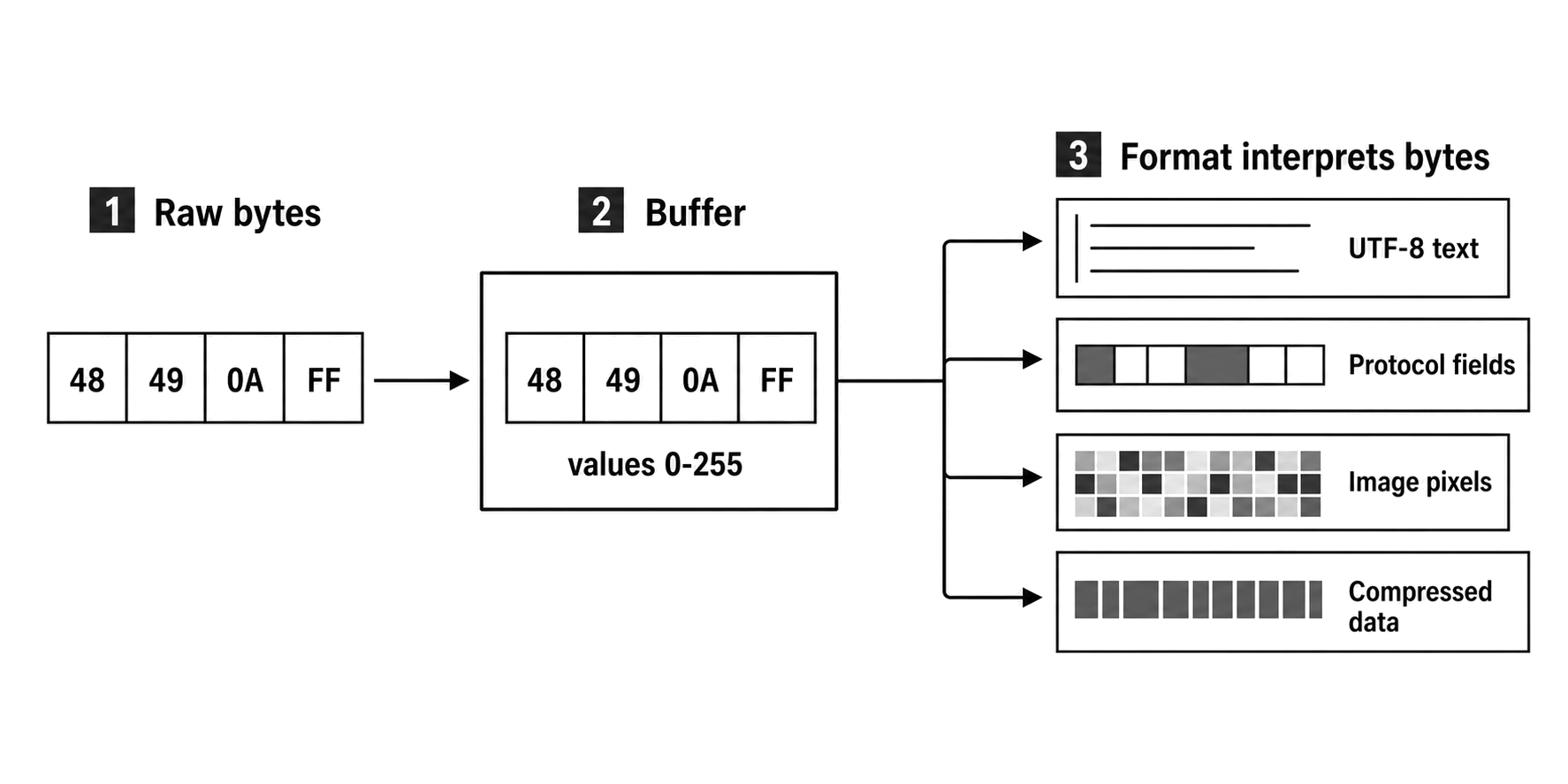
Figure 2.1 - A Buffer preserves the byte sequence before a format gives those bytes meaning. The same values can become text characters, protocol fields, image components, compressed data, or another representation.
Bytes Before Meaning
As we talked about in the intro section, a byte is simply eight bits, giving it exactly 256 possible values from 0 to 255. That is why low-level APIs constantly return numbers sitting directly in that exact range. At this level, the number is nothing more than a stored value.
Take the byte 0x49, which is the decimal value 73. Under ASCII encoding, 73 maps to the letter I. But in an image file, that exact same value might represent a specific shade of red. In a compressed stream, it might dictate a sequence length. In a network packet, it could be part of a checksum. The byte itself carries zero inherent meaning. The format you apply to it dictates what it actually represents.
We usually print bytes in hexadecimal because exactly two hex digits line up perfectly with one single byte -
0x00 -> 0
0x0a -> 10
0x49 -> 73
0xff -> 255
You might see Node print Buffer.from("HI") as <Buffer 48 49> and assume the buffer converted your text into a hex string. No, that's not what actually happens. The Buffer is still holding raw bytes. Node is simply displaying those two bytes using fixed-width hexadecimal notation. Under UTF-8 or ASCII, 0x48 maps to H and 0x49 maps to I.
The moment a format combines multiple bytes into a larger value, you have to deal with byte order. If you have a two-byte integer made from 0x12 and 0x34, you can read it as 0x1234 or 0x3412. It entirely depends on whether the format requires big-endian or little-endian order. Node gives you this choice directly through specific methods.
// Reading the exact same bytes yields different results based on the chosen order.
buf.readUInt16BE(); // Big-endian order reads it as 0x1234
buf.readUInt16LE(); // Little-endian order reads it as 0x3412
The underlying bytes stay exactly the same. Only your interpretation of them changes.
To understand why there are two different ways, you need to look at how these two formats prioritize information. Big-endian stores the most significant byte first. This perfectly matches how humans naturally read numbers, making it very easy to debug by eye. Little-endian takes the exact opposite approach, placing the least significant byte at the very beginning of the sequence.
You might wonder why the tech industry never just standardized on a single format. The reality is that hardware processors and internet protocols care about completely different things.
Most modern computer processors run natively on little-endian order. When a CPU performs mathematical addition or multiplication, it has to start calculating from the smallest digits first and carry the remainder upward. Storing the smallest bytes first makes these operations highly optimized at the silicon level.
Meanwhile, the internet standardized on big-endian - often referred to strictly as Network Byte Order. When network routers inspect incoming data packets, reading the largest and most significant bytes first allows them to make routing decisions much faster. Because your Node application constantly acts as a bridge between web traffic and local hardware, your code has to be able to speak both of these languages fluently.
The underlying bytes stay exactly the same just the interpretation of them changes.
Characters Are Not Bytes
Most of the JavaScript code you write operates long after the underlying bytes have been interpreted. By the time your application code runs, an incoming HTTP request body has already become a string, a JSON payload has parsed into an object, and web form fields are neatly normalized by your framework. Buffer code operates one layer lower, sitting exactly where the runtime still needs to preserve the incoming bytes exactly as they arrived.
It is easy to assume a JavaScript string as a container for raw bytes. That's not correct. A JavaScript string is actually an immutable sequence of UTF-16 code units. That model works perfectly for text, but it completely breaks down for binary data. Some characters take up a single code unit, others require two, and their actual UTF-8 byte length is a completely different measurement.
import { Buffer } from "node:buffer";

// This string contains an 'e' with an acute accent and a smiley face emoji.
const text = "\u00e9\u{1f642}";

// Asks the language: "How many UTF-16 code units does this string use?"
console.log(text.length); // -> 3

// Asks the buffer: "Exactly how much memory will this take up as UTF-8 bytes?"
console.log(Buffer.byteLength(text, "utf8")); // -> 6

// Creates a new buffer and checks the length of the resulting raw byte array.
console.log(Buffer.from(text, "utf8").length); // -> 6
The Buffer.byteLength() method answers the physical memory question, calculating exactly how much physical space the text requires under a specific encoding. The text.length property answers the language question, counting how many internal UTF-16 code units the JavaScript engine sees.
You might see bugs appear the moment you treat those two questions as interchangeable. If you blindly decode arbitrary binary file data into a JavaScript string, you force the runtime to apply strict text rules to bytes that might not be text at all.
Text Decoding Corrupts Binary Data
Let's look at a tiny binary example that starts with a PNG file signature. We don't need a complete image - the first eight bytes are enough to demonstrate the failure. A real PNG file breaks here because its very first byte is 0x89, which is invalid as the start of a UTF-8 sequence.
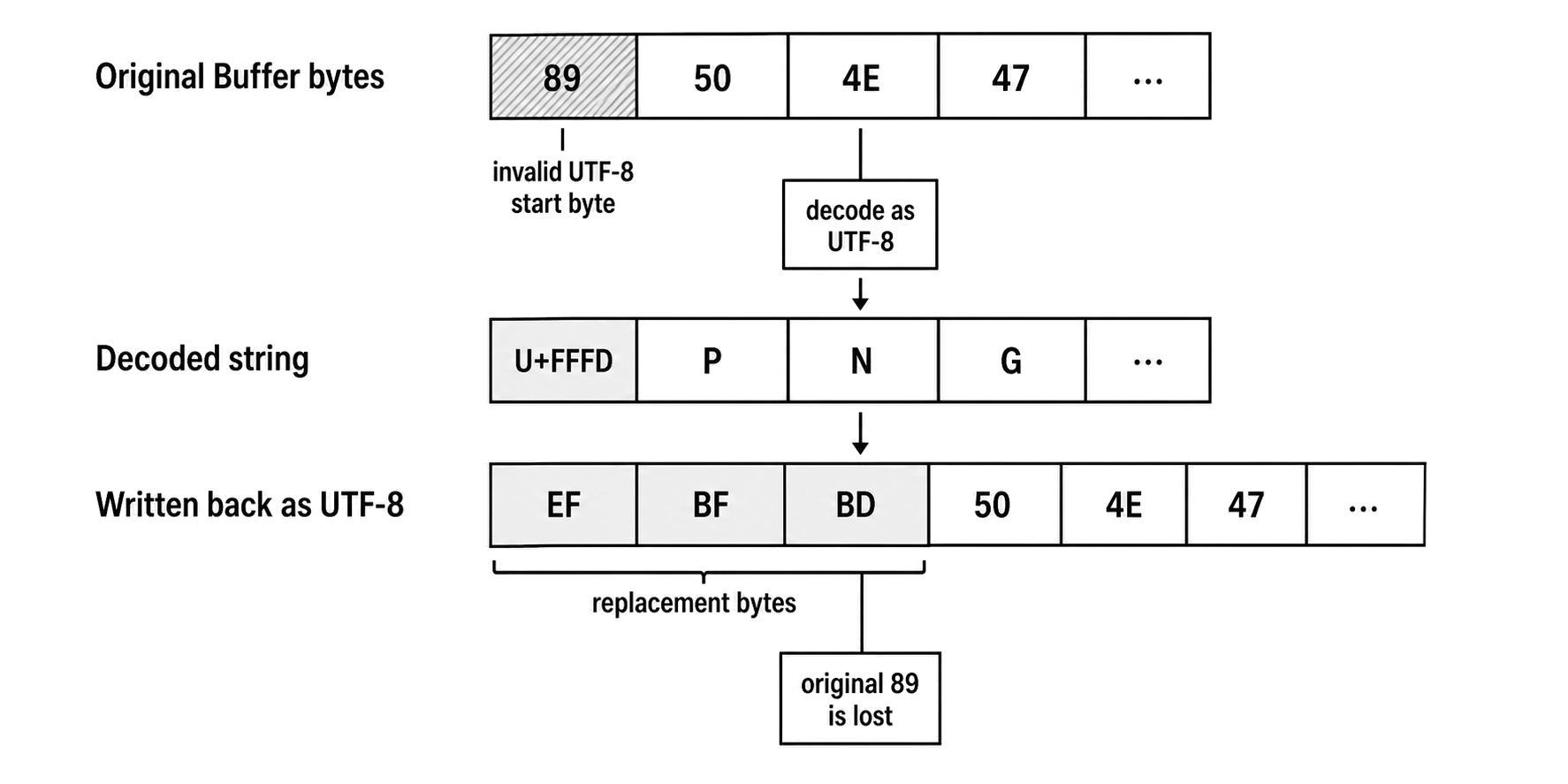
Figure 2.2 - Decoding binary data as UTF-8 can replace invalid byte sequences. Writing that string back stores the replacement character's bytes, so the output is no longer the original payload.
import { Buffer } from "node:buffer";
import { readFileSync, writeFileSync } from "node:fs";

// Create a mock PNG signature and write it to disk as raw bytes.
const bytes = Buffer.from([0x89, 0x50, 0x4e, 0x47, 0x0d, 0x0a, 0x1a, 0x0a]);
writeFileSync("sample.bin", bytes);

// Read the file and force it to decode into a UTF-8 string.
const text = readFileSync("sample.bin", "utf8");

// Write that decoded string back to a new file.
writeFileSync("sample-corrupted.bin", text);

// See the damage: the invalid first byte became the replacement character (\ufffd).
console.log(JSON.stringify(text)); // -> "\ufffdPNG\r\n\u001a\n"

// The physical bytes on disk have permanently changed.
console.log(readFileSync("sample-corrupted.bin").toString("hex"));
The corrupted output file now starts with efbfbd504e47... instead of the original 89504e47.... The damage happened instantly at the first byte, and the change is permanent.
By passing the 'utf8' argument, you told Node to decode the raw bytes as text. Since 0x89 is invalid UTF-8, Node gracefully swapped it out for U+FFFD - the standard Unicode replacement character. When you saved that string back to disk, Node converted that replacement character into its physical three-byte UTF-8 representation: ef bf bd. At that exact moment, your original 0x89 byte is completely destroyed. No API can ever recover it from that string.
If you have ever seen a file unexpectedly change size after being copied, routing binary data through a text decoder is usually the culprit. Invalid bytes expand into multi-byte replacement characters, valid-looking regions survive intact, and your final payload becomes a warped version of the original. Any real image viewer, decompression algorithm, or cryptographic verifier will immediately reject the file because the underlying format is broken.
You cannot fix this design flaw just by swapping encodings. Node does support a latin1 encoding that perfectly maps every byte value from 0 to 255 directly to code points U+0000 to U+00FF. Because of this 1-to-1 mapping, reading and writing with latin1 can technically round-trip the exact byte values:
const bytes = Buffer.from([0x41, 0x89, 0xff]);

// Forcing it to a latin1 string.
const text = bytes.toString("latin1");

// Decoding it back explicitly with latin1 works perfectly.
console.log(Buffer.from(text, "latin1")); // -> <Buffer 41 89 ff>

// But forgetting the encoding argument defaults to UTF-8 and corrupts the data again.
console.log(Buffer.from(text)); // -> <Buffer 41 c2 89 c3 bf>
The default string-to-Buffer path automatically encodes strings as UTF-8, causing that second conversion to instantly alter the bytes. Beyond that, using latin1 just masks the real problem. Your code is now holding raw image or compression data inside a standard string variable. The very next API that touches that variable and treats it like regular text runs the risk of corrupting it all over again.
The correct fix is much simpler - if the data is not text, do not decode it.
import { Buffer } from "node:buffer";
import { readFileSync, writeFileSync } from "node:fs";

// Read the file without an encoding argument to keep it as a raw Buffer.
const data = readFileSync("sample.bin");

console.log(Buffer.isBuffer(data)); // -> true

// Write those exact bytes directly back out to disk.
writeFileSync("sample-copy.bin", data);
By dropping the encoding argument, readFileSync() hands you a raw Buffer. When you pass that Buffer into writeFileSync(), it writes those exact bytes directly to disk. The text decoder never runs, no replacement characters ever enter the picture, and your binary data remains perfectly intact.
Where Buffer Memory Is Accounted
A Buffer object is technically a JavaScript value, but its actual data payload is not stored in memory the same way standard JS objects are. The Buffers you typically create in Node are simply views pointing to the underlying ArrayBuffer storage. Both V8 and Node track this storage as external memory. If you check process.memoryUsage().arrayBuffers, you will see exactly how much memory is currently allocated for ArrayBuffer, SharedArrayBuffer, and Buffer backing stores - and that entire amount is rolled up into the broader external metric.
This accounting difference becomes obvious when you are hunting down memory leaks. A service can easily have a perfectly stable heapUsed metric while its external, arrayBuffers, or overall RSS (Resident Set Size) continues to grow uncontrollably. This happens because massive binary payloads live entirely outside the normal V8 object heap. The tiny JavaScript Buffer object simply keeps the underlying native storage reachable, but the actual payload bytes are completely hidden from the garbage collector's standard object graph scans.
For now, we can keep the memory lifecycle simple. As long as a live JavaScript object holds a reference to a Buffer - or even just a partial view of its backing store - those native bytes must stay alive. The moment all those references disappear, the memory can finally be released back to the allocator. But, releasing memory internally does not mean Node instantly returns it to your operating system. The exact moment your process RSS actually drops depends on the allocator behavior, internal memory pooling etc
This explains why Buffer exists as a dedicated API instead of just using standard arrays of numbers. Node requires a high-performance byte container that can pass through native I/O boundaries without forcing every single network payload into a slow string or a massive array of boxed numbers. History also plays a big role. Node's Buffer API actually predates modern standardized typed-array specifications. Node keeps the API around today because it carries highly optimized, Node-specific methods for memory allocation, character encoding, and low-level binary reading.
Creating Buffers Without Guesswork
Once you know a value needs to stay as raw bytes, the next step is allocating memory for it. You should never use the deprecated new Buffer(...) constructor in your code. Its behavior is highly ambiguous, and historically, it exposed dangerous uninitialized memory hazards. You need to use Node's explicit factory methods instead.
To reserve a specific amount of memory, use Buffer.alloc(size). This method creates a Buffer of the requested length and safely fills every single byte with zero -
import { Buffer } from "node:buffer";

const buf = Buffer.alloc(10);

console.log(buf);
// -> <Buffer 00 00 00 00 00 00 00 00 00 00>
Filling that memory with zeros takes a little extra work though, but it guarantees a completely clean slate. If you need maximum performance and plan to immediately fill the memory yourself, you can use Buffer.allocUnsafe(size). This skips the initialization part entirely, meaning the memory might contain leftover data from previous tasks. You should only use this method if your very next operation completely overwrites every single byte before any read, log, network send, or error can expose the contents.
When you already have data and just need to wrap it in a Buffer, use Buffer.from(value). The ownership changes entirely depending on what type of data you pass in -
const original = Buffer.from("hello");
const copy = Buffer.from(original);

copy[0] = 0x48;

console.log(copy.toString()); // -> "Hello"
console.log(original.toString()); // -> "hello"
Calling Buffer.from() with an existing Buffer creates a full copy of the original bytes. Changing the new copy leaves the original completely untouched.
Passing an ArrayBuffer behaves completely differently:
const store = new ArrayBuffer(3);
const bytes = new Uint8Array(store);
const buf = Buffer.from(store);

buf[0] = 0x41;
bytes[1] = 0x42;

console.log(buf.toString("utf8")); // -> "AB\u0000"
In this snippet, the Buffer and the Uint8Array actually share the exact same underlying memory block. If you write to one view, the changes immediately appear in the other. This shared state is incredibly useful for high-performance memory sharing, but it becomes a massive bug if the caller assumed they were getting a safe, isolated copy.
Reading and Writing Bytes
Once you create a Buffer, interacting with its indexes works exactly like a standard Uint8Array. Reading an index gives you the raw byte value. But, writing to an index does something unexpected. It silently forces out-of-bounds numbers to fit inside the byte range, completely ignoring whether that was your actual intent.
const buf = Buffer.alloc(2);

// 300 is larger than a single byte's maximum of 255, so it wraps around to 44.
buf[0] = 300;
// -1 wraps backwards to 255.
buf[1] = -1;

console.log([...buf]); // -> [44, 255]
If you want the engine to catch invalid inputs and throw an error instead of quietly warping your data, you need to use specific, range-checked methods.
const buf = Buffer.alloc(1);

buf.writeUInt8(255, 0); // This works perfectly.

try {
  // This immediately throws an error because 300 is too large for a single byte.
  buf.writeUInt8(300, 0);
} catch (err) {
  console.log(err.code); // -> ERR_OUT_OF_RANGE
}
Converting a Buffer back into readable text using toString() is perfectly safe - as long as you know exactly what format you are dealing with. Encodings like Hex and Base64 are just standard ways to represent arbitrary binary data as text strings. UTF-8, on the other hand, will only work properly if the underlying bytes actually form valid UTF-8 characters.
const data = Buffer.from("my-super-secret-password");

// Converts the binary data into a fixed-width hexadecimal string.
console.log(data.toString("hex"));
// -> 6d792d73757065722d7365637265742d70617373776f7264

// Converts the exact same bytes into a Base64 encoded string.
console.log(data.toString("base64"));
// -> bXktc3VwZXItc2VjcmV0LXBhc3N3b3Jk
Pushing text into a Buffer flips this process entirely. It encodes your string into raw bytes and places them at a specific position, or offset. The following snippet shows how this looks when manually building a protocol layout - though you should obviously rely on high-level frameworks to send actual HTTP responses in a real application.
const response = Buffer.alloc(128);

// write() returns the number of bytes written, which we use to track our current position.
let offset = response.write("HTTP/1.1 200 OK\r\n");
offset += response.write("Content-Type: text/plain\r\n", offset);
offset += response.write("\r\n", offset);

console.log(offset); // -> 45
console.log(response.toString("utf8", 0, offset));
Pay close attention to that return value. The write() method tells you exactly how many bytes it wrote to memory, not how many JavaScript characters it processed. This difference becomes game-channging the moment you introduce emojis or non-ASCII text into a binary layout.
Buffer and Uint8Array
Since Node v3.0, the Buffer class has deliberately aligned with modern JavaScript standards by inheriting directly from Uint8Array.
import { Buffer } from "node:buffer";

const buf = Buffer.alloc(10);

// A Buffer is an instance of its own class...
console.log(buf instanceof Buffer); // -> true

// ...but it also strictly inherits from standard typed arrays.
console.log(buf instanceof Uint8Array); // -> true
This inheritance means you can usually take a Node Buffer and hand it straight to any third-party API that expects a standard Uint8Array. Keep an eye on the fine print, though. Some strict libraries check for exact constructors, forcefully transfer memory ownership, or only run in browser environments where Buffer simply does not exist. A Buffer absolutely is a Uint8Array, but that alone does not guarantee it will work perfectly across every strict API.
This shared history also leaves behind one legacy trap regarding the slice() method. When you call slice() on a standard JavaScript typed array, the engine creates a safe, independent copy of the bytes. However, calling slice() on a Node Buffer creates a view over the exact same memory space. If you mutate that view, you permanently alter your original data.
const source = Buffer.from("abcd");

// We slice out the middle two bytes
const view = source.slice(1, 3);

// We mutate only the new sliced view, changing 'b' to 'Z'
view[0] = 0x5a;

// The original source buffer is now altered!
console.log(source.toString()); // -> "aZcd"
To avoid this trap entirely, stop using slice() on Buffers. If you want a shared memory view, use buf.subarray() so your naming explicitly matches modern JavaScript conventions. If you actually need an independent copy of those bytes, force a new allocation using Buffer.from(buf.subarray(start, end)).
The Backing Store Is Not Always the View
It is easy to look at a Buffer and assume it represents a standalone chunk of memory. It actually doesn't. A Buffer is really just a view looking into an underlying memory space, guided by three important pieces of information. The backing buffer itself, a specific byte offset, and a byte length. Because Node frequently pools small memory allocations together to improve performance, this backing store is often much larger than the specific Buffer you are currently working with.
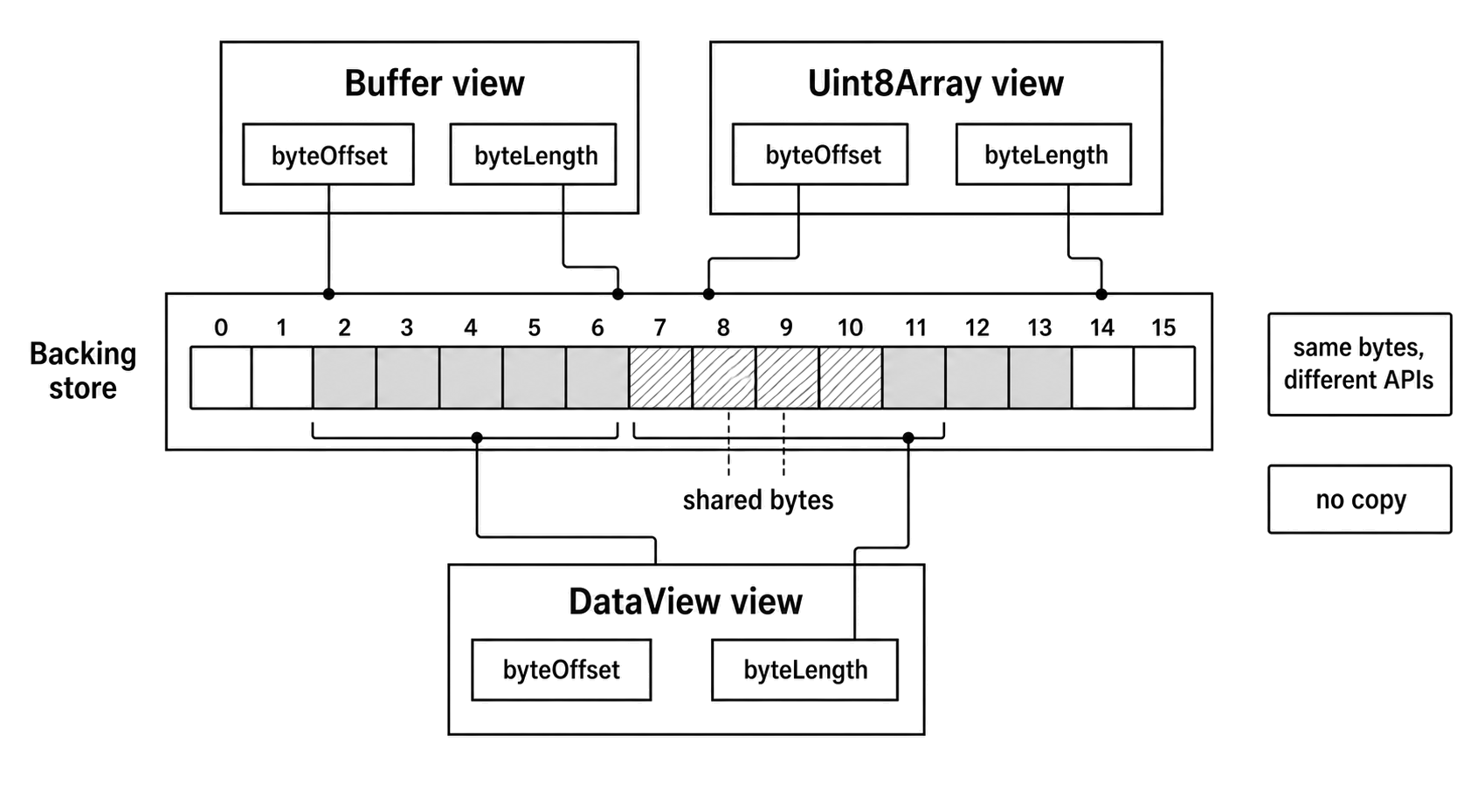
Figure 2.3 - A Buffer, a Uint8Array, and a DataView can be separate views over the same backing store. The view's offset and length define which bytes each API exposes.
const buf = Buffer.from("abc");
const backing = buf.buffer; // The actual memory allocation

console.log(buf.byteOffset); // -> 0, or potentially a larger offset if Node pooled the allocation
console.log(buf.byteLength); // -> 3
console.log(backing.byteLength >= buf.byteLength); // -> true

// If you need the exact underlying bytes, you must slice the backing store using the view's specific offset and length.
const exact = backing.slice(buf.byteOffset, buf.byteOffset + buf.byteLength);
console.log(exact.byteLength); // -> 3
Because of this pooling behavior, you should never pass buf.buffer by itself if the receiving function expects exactly the bytes contained in your Buffer. If you do, you risk leaking data from adjacent memory allocations. Instead, pass the Buffer directly, pass a Uint8Array view, or pass the backing buffer alongside its precise byteOffset and byteLength.
When you create Buffers through standard Node operations, that .buffer property usually exposes an ArrayBuffer. However, the API is actually much broader. You can easily map a Buffer over a SharedArrayBuffer instead -
const shared = new SharedArrayBuffer(4);
const buf = Buffer.from(shared);

// The underlying memory is a SharedArrayBuffer, not a standard ArrayBuffer.
console.log(buf.buffer instanceof SharedArrayBuffer); // -> true
console.log(buf.buffer instanceof ArrayBuffer); // -> false
If you write code that interacts directly with .buffer, treat it strictly as a generic backing store. Do not hardcode assumptions that the value will always be a standard ArrayBuffer.
This same view model lets you map entirely different TypedArrays over the same slice of memory simultaneously.
const backing = new ArrayBuffer(4);
const bytes = new Uint8Array(backing);
const view = new DataView(backing);

// We write four distinct bytes using the Uint8Array view.
bytes.set([0xff, 0xff, 0xff, 0x7f]);

// We read those exact same bytes back as a single 32-bit signed integer using the DataView.
console.log(view.getInt32(0, true)); // -> 2147483647
Notice how the Uint8Array handles individual bytes, but the DataView interprets that exact same memory space as a little-endian 32-bit signed integer. The system never copies any data between these two operations. Both views simply provide different lenses over the exact same physical memory.
The Edge Streams Build On
At its core, a Buffer acts as the separation line between JavaScript's text-oriented string model and the raw, byte-oriented world of system I/O. It provides Node with a fixed-size, mutable sequence of memory. It also hooks directly into the broader Uint8Array ecosystem. Most importantly, it keeps the underlying bytes completely visible to native I/O processes, completely avoiding the trap of treating arbitrary binary data as readable text.
This raw byte model lays the groundwork for the next major concept of Node's architecture - Streams.
When you work with streams, you are never pushing one giant, monolithic payload through your process. Instead, you are moving a continuous sequence of distinct Buffer chunks. Every single bug you will eventually encounter regarding chunk ownership, broken decoding, bad memory copying, or memory retention leads right back to the Buffer rules we talked about in this chapter.