What Node.js Is
In simple terms, Node.js is a JavaScript runtime for building server-side programs, CLI tools, build tools, and automation scripts. It runs JavaScript through V8, exposes system APIs through Node core, and uses libuv for the event loop, timers, operating-system I/O, and the worker pool behind file-system, dns.lookup(), crypto, and zlib work. Don't worry, we'll go through all of these scary-sounding words, if you've not heard them before.
That paragraph is a decent answer to "what is Node.js". In short, V8 handles JavaScript execution. libuv tracks asynchronous work and reports that it's ready. C++ bindings connect JavaScript API calls to native code, like accessing file system, as Javascript doesn't have any way to read/write files. Node's standard library then gives you modules such as node:fs, node:net, node:http, node:crypto, and node:timers as ordinary JavaScript entry points into all that machinery.
If you're not familiar with the convention of using "node:fs" instead of just "fs", it was added so the built-in Node modules have their own unambiguous namespace. It tells the module resolver that don't look inside node_modules, instead use the core module named fs shipped with Node.js itself.
The main thread still runs JavaScript through the call stack, one frame at a time. Only one JavaScript callback runs on that thread at any moment. The waiting itself happens off the stack. A socket can wait in the operating system. File-system work can run through libuv's worker pool. Timers can sit in libuv until their deadline passes. When waiting work becomes ready, the event loop brings its callback back into JavaScript and queues it to run.
This book uses Node 24 and Node 22 as the current LTS baseline. The official Node.js release table lists both as LTS, while the Node.js Release Working Group lists Node 20 as EOL on 2026-04-30. I'll call out version-specific behavior where it affects anything.
The Four Parts of the Runtime
The runtime is easiest to hold in your head as four parts -
- V8 parses, compiles, optimizes, executes JavaScript, and manages the JavaScript heap.
- libuv runs the event loop, tracks handles and requests, provides cross-platform I/O primitives, and owns the worker pool used by several blocking native operations.
- Node core APIs expose JavaScript modules such as
node:fs,node:http,node:net,node:crypto,node:stream, andnode:process. - Userland packages add modules on top of the runtime through npm-compatible package managers.
So, JavaScript runs on one main thread. Slow native work can keep moving elsewhere. When the native side has a result, Node schedules the matching JavaScript callback or promise reaction.
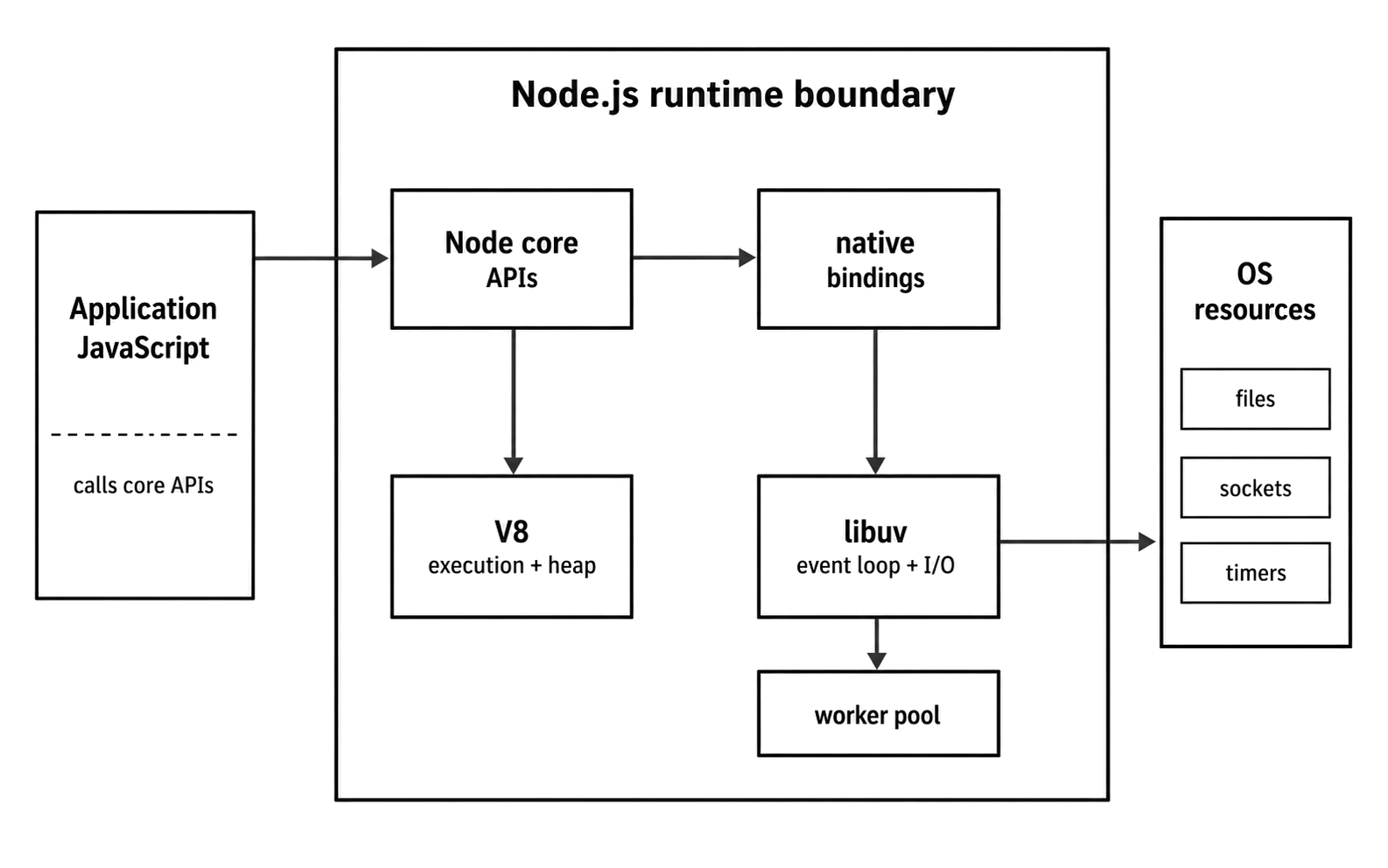
Figure 1.1 - Node core is the JavaScript-facing surface of the runtime. V8 owns execution, while native bindings and libuv connect selected host work to the operating system.
The JavaScript application logic runs on a single main thread by default, which avoids many traditional thread-locking problems, but it does not remove concurrency issues. Ordinary async callbacks do not run simultaneously on that thread, instead they interleave over time, so logical races can still happen when the order of completions changes. We will cover each of these in greater detail.
Runtime Architecture
The Blocking I/O Problem
Around 2009, many mainstream web stacks still handled a request roughly like this:
- A user's request comes in.
- The server (like apache) dedicates a thread (or a whole process) to handle that request.
- Your application code runs on that thread.
- If your code needs to do something slow - like query a database, read a file from disk, or call another API - that thread blocks while it waits.
- Once the slow thing is done, the thread wakes up, finishes generating the response, sends it back, and is finally free to handle another request.
The model is easy to reason about, and for many applications it was perfectly workable. Its cost appears when a large number of requests are not using the CPU but still occupy execution slots.
In a thread-per-request design, each slow request holds a thread or process until its I/O completes. High concurrency therefore means high memory use and scheduler pressure. This was the C10k problem: handling ten thousand concurrent connections on a single server without drowning in per-connection overhead.
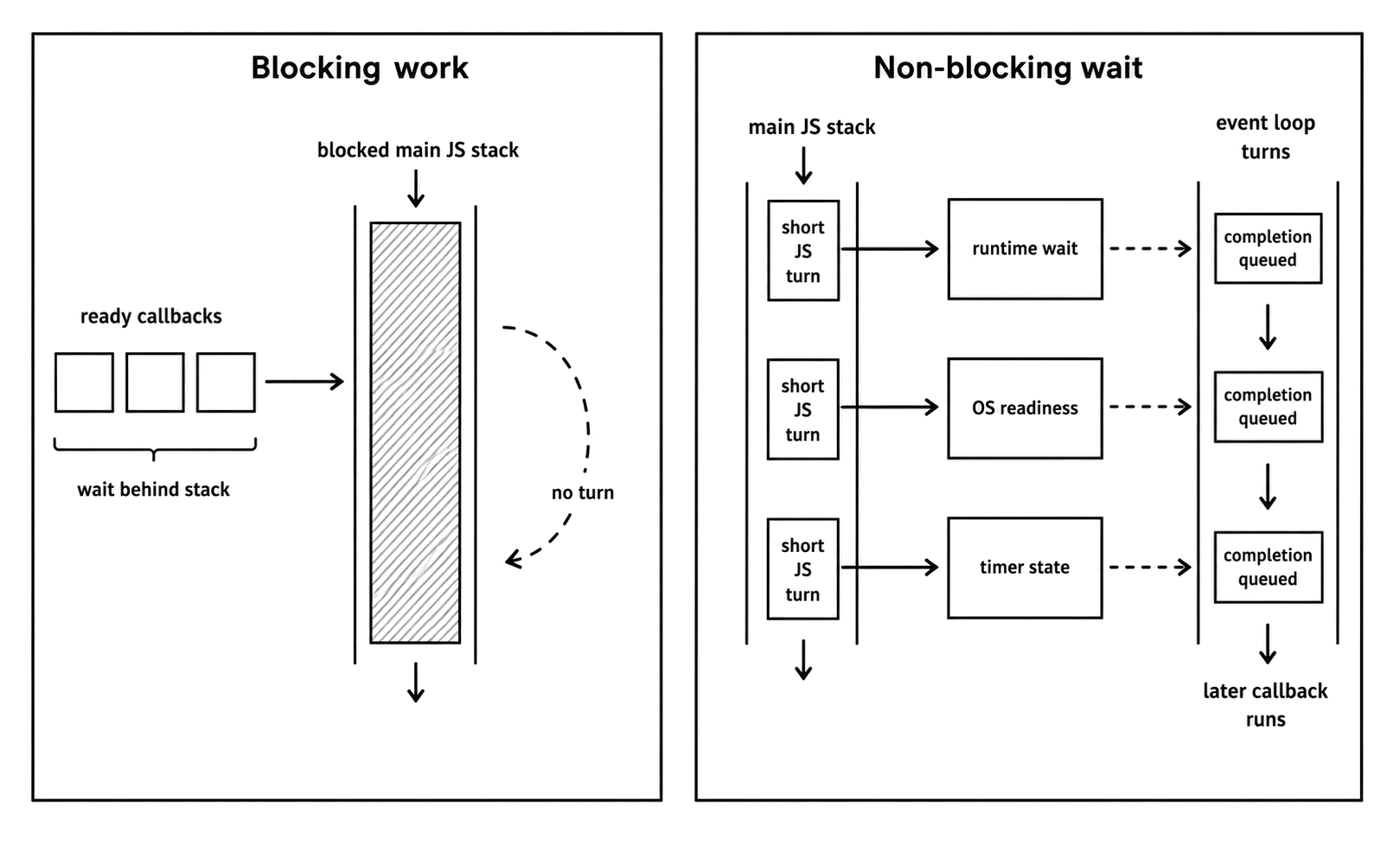
Figure 1.2 - Blocking work holds the JavaScript stack. Non-blocking waits move state into the runtime or operating system and return to JavaScript only when a continuation is ready.
Ryan Dahl and Non-Blocking I/O
Ryan Dahl argued that this model wasted resources. The slowest parts of many web applications were I/O operations - waiting for the network, waiting for the disk, or waiting for another service. The CPU itself was often idle while the request thread was blocked.
High-performance servers such as Nginx approached the same problem with an event-driven, non-blocking architecture. Instead of dedicating one worker to one request while that request waits, the server registers interest in sockets and other operations, returns to the loop, and runs the completion handler only when the OS or worker pool reports progress.
Node applied that idea to server-side JavaScript. Browser JavaScript had already made event callbacks familiar, so server I/O could be exposed through a programming style JavaScript developers already understood. It kept JavaScript on a single thread and made the waiting explicit.
Dahl chose V8, a fast open-source engine from Chrome, and paired it with native event/I/O libraries. His 2009 Node.js presentation slides named V8, libev, and libeio as early building blocks. I'd recommend going through these slides, they're genuinely informative. Node v24 centers that platform layer on libuv, giving it a cross-platform event loop, asynchronous I/O, worker pool, and platform API surface.
Early Node used libev/libeio for event loop and filesystem worker behavior. Now, Node.js use libuv for portable event-loop, filesystem, threadpool, DNS, process, and all the platform abstractions.
The early Node demo was simple (which is also there in the slides above), a JavaScript server could keep many connections open because it did not park one thread per idle socket. It was a direct response to C10k-era server design.
Some parts of that earlier Node version still show up in the API. The dominant pattern is to keep the main thread available while slow work proceeds elsewhere. That is why core APIs have asynchronous alternatives, why current Node.js code usually uses Promises and async/await, and why synchronous APIs such as fs.readFileSync are treated as deliberate blocking choices rather than the default for request paths.
In old Node.js versions, fs.readFile used callbacks. Now you should prefer fs.promises with async/await or streaming APIs when possible.
V8, libuv, and Core Bindings
Running node my_app.js launches an embedded runtime around all those parts we've talked about - V8, libuv, native bindings, and Node core.
At a high level, the Node.js architecture follows as shown in the Figure 1.1 ie. application code enters Node core APIs, V8 owns JavaScript execution, and host access crosses through Node's native layer and libuv where the API needs operating-system coordination.
That simplified diagram is useful only if the ownership handoffs stay clear.
V8 - The Javascript Engine
V8 is something many developers know first. It is Google's open-source JavaScript and WebAssembly engine, written in C++. It also powers Google Chrome. When Node started, using V8 gave the project a fast, actively maintained JavaScript engine instead of requiring Node to build one.
In this context, an engine is the component that parses JavaScript, produces executable work, optimizes hot paths of your code, and manages the JavaScript heap. V8 does not just interpret source line by line, instead it parses JavaScript to bytecode and may compile warm or hot paths to machine code through several Just-In-Time (JIT) tiers.
Modern V8 is multi-tiered. V8 first compiles JavaScript to Ignition bytecode, which is executed by the Ignition interpreter. As code gets hotter, it may tier up through Sparkplug and/or Maglev, and sufficiently hot code can be optimized by TurboFan, which is V8's top-tier optimizing compiler.
The later chapter V8 in Node.js examines V8 internals and optimization-friendly code.
For this chapter, the useful fact is narrower than the optimization pipeline we just talked about. For now, remember - V8 executes and optimizes JavaScript inside Node. It takes a dynamic language and runs it through a modern interpreter and JIT pipeline.
But V8 does not know about Node's files, networks, modules, or timers. It is a JavaScript and WebAssembly engine, not Node's runtime. A plain V8 embedder does not provide Node's module loader or operating-system APIs. If you tried to run require("node:fs") inside a plain V8 context without implementing Node's loader and bindings, it would fail. To do useful server work, V8 needs an embedding runtime around it.
libuv
Another major component of Node is libuv, the C library that gives Node its portable event loop, asynchronous I/O abstractions, timers, child-process support, and worker-pool.
Its main responsibilities are as follows -
-
The Event Loop. This is the main scheduling mechanism. It runs timers, polls for I/O readiness, receives completed native work, and queued callbacks across phases. When you call
setTimeout,fs.readFile, orserver.listen(), Node's native bindings hand off the work to libuv. When that work becomes ready or completes, libuv reports back to Node. Node then schedules the matching callback, or resolves/rejects the Promise path so V8 can run its queued continuation at the next microtask checkpoint. -
Asynchronous I/O.
libuvabstracts the non-blocking I/O capabilities of the underlying operating system. It's not really important to remember this, but so that you know - on Linux, it usesepoll. On macOS/BSD, it useskqueue. On Windows, it usesIOCP(I/O Completion Ports). JavaScript code calls Node APIs, then libuv and Node's native layer choose the platform-specific mechanism behind those APIs. -
The Thread Pool. Your Node/JS code runs on a single thread, but some native operations cannot be performed by the OS in a non-blocking way. If those operations ran on the main thread, they would block the event loop. This includes many file system APIs and CPU-intensive tasks like work in the
cryptoandzlibmodules.
To solve this, libuv maintains a small, fixed-size thread pool (defaulting to 4 threads, with an absolute max of 1024). Node exposes the startup setting as UV_THREADPOOL_SIZE. When you call a function that lacks a non-blocking equivalent at the OS level, such as many filesystem operations, libuv dispatches the work to its thread pool. Also, network I/O is handled directly by the OS's non-blocking mechanisms (like epoll, kqueue, IOCP) and does not use the thread pool, allowing a single thread to handle many concurrent sockets.
Most network socket I/O is handled via the OS's non-blocking I/O facilities (epoll/kqueue/IOCP) and doesn't use the libuv worker pool. There's an exception though, hostname lookups (for example, dns.lookup() uses getaddrinfo on the libuv threadpool) and many filesystem operations are offloaded to the libuv threadpool - those tasks do consume worker threads.
Once a thread in the pool finishes its task, it reports completion back to the event loop thread, where Node eventually (not immediately) runs the JavaScript callback or promise reaction.
So, Node is single-threaded from your perspective, but it uses a few threads internally to handle specific types of work.
(The later chapter Node.js Event Loop examines libuv internals, event-loop phases, and the worker pool.)
Native Bindings and Core APIs
We just said V8 and libuv are completely separate. They meet through Node's native bindings and core modules. Those bindings are how a JavaScript call can eventually become a filesystem request, socket operation, or timer registered with the runtime.
When you write const fs = require("node:fs");, you don't get a pure JS object. Instead, you receive a JavaScript module that has bindings to the underlying native code. When you call fs.readFile("/path/to/file", callback), the simplified path looks like this:
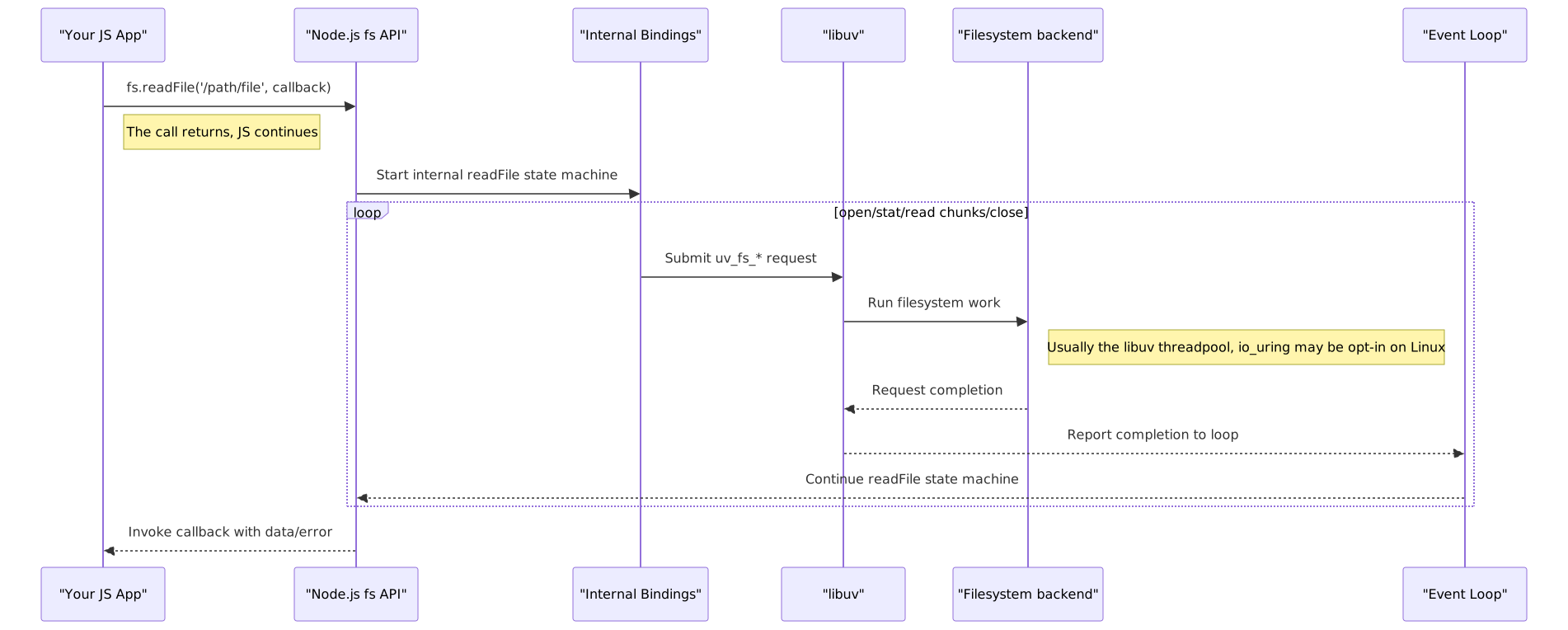
Figure 1.3 - A simplified fs.readFile() path. The JavaScript call returns before the native filesystem state machine finishes, and the exact backend differs by platform and libuv configuration.
- The
readFilefunction (callback based) in Node's corefsmodule is called. - Node starts an internal state machine that opens the file, determines useful metadata when available, reads chunks, and closes the descriptor.
- Each filesystem step goes through Node's internal bindings and becomes one or more
uv_fs_*requests. - On the common libuv path, those requests use the worker pool.
- The JavaScript code continues executing immediately. The callback-style
readFilecall has returnedundefined. - As each native filesystem request completes, libuv reports completion back to the event loop thread.
- Node either submits the next read step or, when the full file has been assembled in memory, invokes the submitted callback with the data or error.
Node's own docs describe fs.readFile() as reading the file into memory one chunk at a time, allowing the event loop to turn between chunks. That makes fs.readFile() convenient for bounded files, but it is still an all-in-memory API at the JavaScript API. For large files, streams or explicit fs.read() loops give you better control over memory, scheduling, and throughput.
The same native bridge is why node:http, node:crypto, node:path, and the rest of core give you plain JavaScript APIs while still reaching OS and C/C++ capabilities. The JavaScript surface stays thin, and the native bindings do the actual OS work.
Blocking Wait vs Timer Wait
Let's examine one big difference - a blocking JavaScript path occupies the only request-handling thread in that process, while a timer wait leaves the JavaScript thread available to accept more work.
Blocking Server
Save this as blocking_server.mjs:
import http from "node:http";

function busyWait(ms) {
  const end = Date.now() + ms;
  while (Date.now() < end) {}
}

http.createServer((_req, res) => {
  console.log("Request received. Blocking...");
  busyWait(500);
  res.end("blocking\n");
}).listen(5000);
This server is deliberately wasteful. The busyWait(500) call keeps the JavaScript stack occupied for half a second, so no other request callback can run in that process until the current one returns.
Timer Server
Save this as non_blocking_server.mjs:
import http from "node:http";

http.createServer((_req, res) => {
  console.log("Request received. Scheduling timer...");
  setTimeout(() => {
    console.log("Timer finished. Sending response.");
    res.end("non-blocking\n");
  }, 500);
}).listen(5001);
setTimeout schedules a callback for a future turn of the event loop. It still allocates a timer handle, and that handle can keep the process alive unless you call unref() on it, but it does not keep the JavaScript call stack occupied while the timer is pending. In short, Node can keep the JavaScript thread available while external waits haven't processed yet.
Running the Check
On Unix-like shells with curl, this command starts 10 requests in the background and waits for all of them:
time bash -c 'for i in {1..10}; do curl -s -o /dev/null http://localhost:5000/ & done; wait'Against blocking_server.mjs, the server log stays sequential:
Request received. Blocking...
Request received. Blocking...
Request received. Blocking...
... (10 times) ...
The elapsed time should be around five seconds - 10 request callbacks times 500 milliseconds of occupied JavaScript stack.
Run the same command against the timer server:
time bash -c 'for i in {1..10}; do curl -s -o /dev/null http://localhost:5001/ & done; wait'The timer server accepts the requests first, then sends responses after the timers become eligible:
Request received. Scheduling timer...
Request received. Scheduling timer...
Request received. Scheduling timer...
... (10 times, quickly) ...

Timer finished. Sending response.
Timer finished. Sending response.
Timer finished. Sending response.
... (10 times, after about half a second) ...
The total time should be just over half a second. The timer callbacks still run one at a time on the JavaScript thread. They merely become ready around the same time.
Runtime and npm
Node is a runtime, but most developers meet it through npm and its packages. That package layer sits above the runtime, and it helps explain why Node became the default execution environment for so much JavaScript tooling.
npm and the Cost of So Many Packages
Isaac Z. Schlueter created npm in 2009 as a package manager for Node projects. Early public releases and registry adoption followed in 2010. npm later became bundled with Node.js, and the registry gave JavaScript developers a common distribution channel for reusable packages.
Today, the npm docs describe npm as the world's largest software registry. That scale is both a strength and a risk.
- Pro - You can build complex applications quickly from reusable packages, including web frameworks, CLIs, build tools, database clients, test runners, and observability libraries.
- Con - A project can accumulate a large dependency tree. Install time, audit noise, package maintenance quality, and runtime attack surface can become a problem.
This is why serious Node projects treat dependency management as production work. Lockfiles define the artifact CI installs. Lifecycle scripts can run during install. Indirectly imported code can become build-time code, startup-time code, or request-path code depending on how the package is imported. Reproducible installs, and review of new dependencies all affect runtime behavior, not only the repository hygiene.
The left-pad Supply-Chain Lesson
On March 22, 2016, Azer Koçulu unpublished kik and 272 other packages from npm. One of them was left-pad, a small string-padding package that was pulled into many dependency chains. npm's postmortem reported that the unpublish affected many thousands of projects and produced hundreds of failures per minute.
The first replacement was published as left-pad@1.0.0, but many builds still failed because dependency chains including Babel and Atom pulled left-pad through line-numbers, which explicitly requested 0.0.3. npm then restored the original 0.0.3 from backup. The disruption lasted about 2.5 hours.
This incident taught everyone a very useful lesson, it made the supply-chain risk visible.
- Dependencies cannot be trusted. An
npm installcan run lifecycle scripts, and installed code runs when your application imports or executes it. - Indirect dependencies count. You might not depend directly on a package, but your production build can still require it through another package.
- Tooling and governance count. Lockfiles, reproducible install commands, package review, registry policy, and audit tooling should be the part of production Node work.
I'm not saying that small packages are bad. Pulling in packages trades speed for dependency risk, and Node developers need to manage both.
Where the Runtime Shows Up
That package layer is why Node's reach now extends beyond backend services into build tools, CLIs, desktop shells, and hosted runtimes.
Tools such as Webpack, Vite, the TypeScript compiler, and esbuild are commonly installed, configured, and run through the Node/npm toolchain. Not all of them are written in JavaScript - esbuild is written in Go and compiled to native code - but the development workflow still depends heavily on Node as the local runtime.
Electron combines Chromium with a Node.js-powered main process, with Node access in renderer processes constrained for security by default. Tauri uses a Rust core process and the operating system's WebView libraries rather than bundling Chromium and Node as the application runtime.
Node is a common choice for cross-platform CLI tools as well. The npm registry contains project scaffolders, code generators, migration tools, and cloud infrastructure CLIs because Node makes packaging JavaScript command-line programs direct across operating systems.
Node is supported on serverless platforms such as AWS Lambda, Google Cloud Run functions, and Vercel Functions. Its async I/O model fits request handlers that spend most of their time waiting on network services, but startup time and memory use still depend on dependency size, initialization work, and the hosting platform's runtime model.
Even engineers who do not deploy Node services often encounter the runtime through various tools, like CLIs apps, or desktop apps.
V8 executes JavaScript. libuv owns the runtime waiting points. Node core turns native capabilities into JavaScript APIs. The rest of the book keeps following that through modules, streams, files, processes, and network sockets.