fs.promises and FileHandle Cleanup
fs.promises changes how filesystem operations report that they are done. FileHandle changes who owns the open file descriptor.
Those two things are related, but they are not the same thing. The promise API gives you await instead of callbacks. A FileHandle gives you an object that represents one open file, and that object stays your responsibility until it is closed.
fs.promises and FileHandle
Some filesystem helpers are one-shot operations. When you call something like readFile(path), Node opens the file, reads the data, and closes the file for you. Your code gets the result, and the descriptor lifecycle stays hidden inside that one helper call.
fs.promises.open() works differently. It opens the file and gives you a FileHandle. That handle wraps an open descriptor. From that point on, your code owns it. You can read through it, write through it, create streams from it, sync it to disk, and inspect metadata from it. You also have to close it.
That ownership is the main idea in this chapter. Most of the tricky parts come from keeping an open descriptor around longer than one operation. You need to know who closes it, whether a stream closes it for you, what happens to the current file position, when durability calls are needed, and why parallel operations may finish in a different order than they appear in your code.
The callback-based fs API reports completion through a function you pass in. Node calls that function when the operation finishes. You then check whether the first argument is an error, and if not, you use the result. That model works, but it gets harder to read once operations depend on each other. Nested callbacks, repeated if (err) checks, and cleanup paths all start competing for attention.
The fs.promises namespace keeps the filesystem work asynchronous while making the JavaScript easier to follow. You import promise-based helpers from node:fs/promises, await the result, and use try/catch for errors. The filesystem work still happens asynchronously. The code shape becomes cleaner.
FileHandle is the bigger shift. fs.promises.open() returns an object that owns the descriptor and gives you methods tied to that descriptor. The raw fd from the previous subchapter is still there, but most application code should use the object instead of passing an integer around.
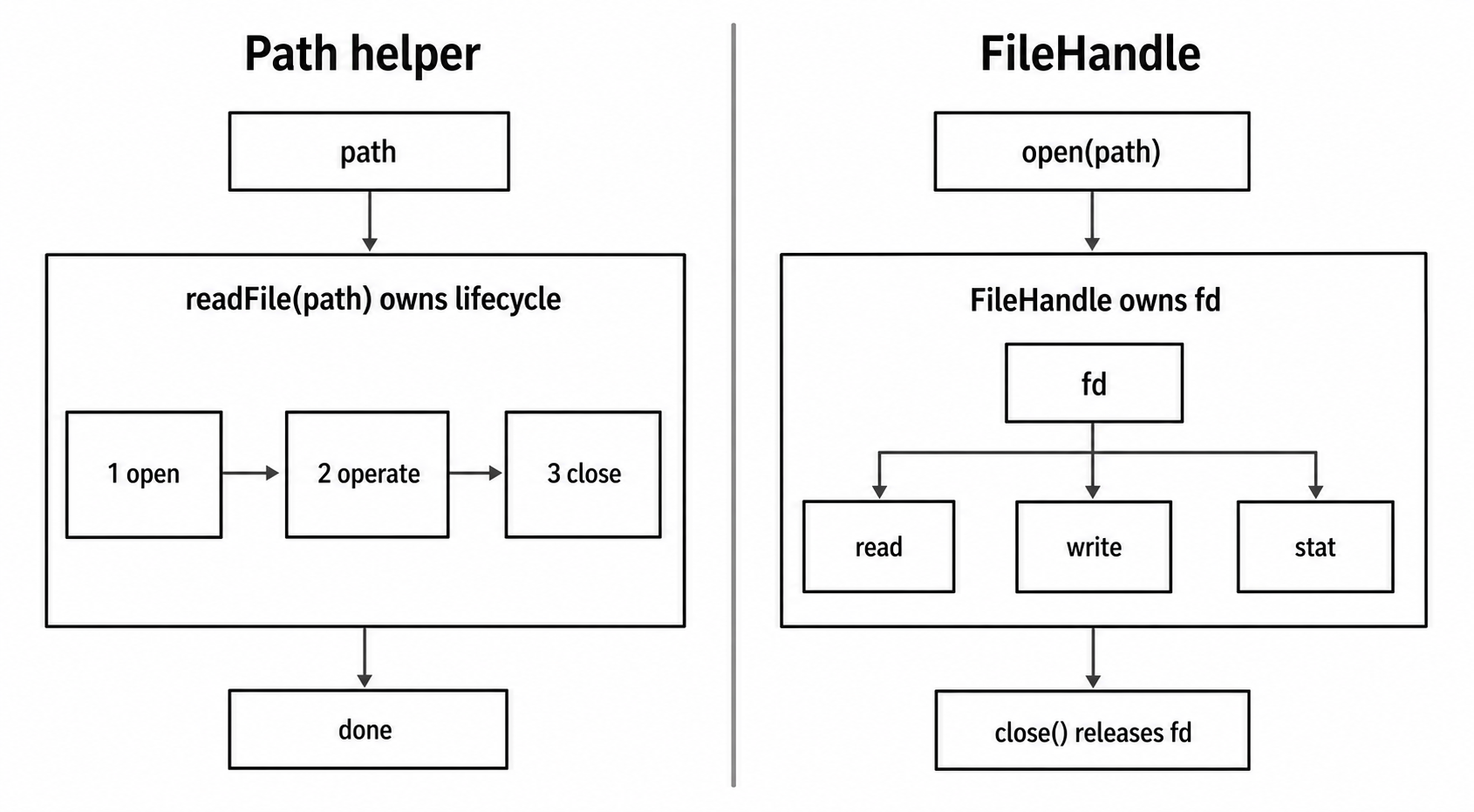
Figure 1 - Path helpers keep open, operate, and close inside one call. A FileHandle moves descriptor ownership into your code, so every later operation runs against the same open file.
The fs.promises Namespace
You can import the promise API directly -
import { readFile, writeFile, open } from 'node:fs/promises';You can also access it from node:fs when a module still uses both styles -
import fs from 'node:fs';

const fsp = fs.promises;
Named imports are usually easier to read in new code. They show exactly which filesystem helpers the file uses, and the call sites stay short. The fs.promises property is useful during migration, especially when one module still has callback-based code beside newer promise-based code.
The examples in this chapter use ES module imports. They assume either top-level await or an enclosing async function. Examples that use /tmp follow POSIX-style paths. On Windows, use os.tmpdir() with path.join(), or adjust the path for the target machine.
What's Available
The namespace covers almost every asynchronous fs operation. The common path-based helpers are -
readFile(path, options)- reads a whole file into memory and returns a Buffer or stringwriteFile(path, data, options)- replaces file contentsappendFile(path, data, options)- appends data to the endopen(path, flags, mode)- opens a file and returns aFileHandlestat(path, options)andlstat(path, options)- read metadatareaddir(path, options)- list a directorymkdir(path, options)- create a directory, with support for{ recursive: true }rm(path, options)- remove files or directories, with support for{ recursive: true, force: true }rename(oldPath, newPath)- rename or movecopyFile(src, dest, mode)- copy a filecp(src, dest, options)- copy files or directories recursively, added in v16.7unlink(path)- delete a filesymlink(target, path, type)- create a symbolic linklink(existingPath, newPath)- create a hard linkchmod(path, mode)- change permissionschown(path, uid, gid)- change ownershiputimes(path, atime, mtime)- set timestampsmkdtemp(prefix, options)- create a unique temporary directoryrealpath(path, options)- resolve symlinksaccess(path, mode)- check accessibilitytruncate(path, len)- change a file's size
Most of these helpers return promises. On success, the promise resolves with the result. On failure, it rejects with the filesystem error.
A few newer APIs behave differently. glob() and watch() return async iterators, so you consume them with for await...of.
Once an operation is represented as a promise, your options become easier to combine. You can await operations one by one, start independent work together with Promise.all(), inspect multiple outcomes with Promise.allSettled(), or let one try/catch handle a group of related failures.
Comparing the Two APIs
The callback version of fs.readFile() and the promise version from node:fs/promises both read the same file. They both use Node's filesystem machinery. For regular file work, both keep blocking filesystem calls away from the main JavaScript thread.
The difference is how completion comes back to your code.
With promises, the operation reads from top to bottom -
import { readFile } from 'node:fs/promises';

const data = await readFile('/tmp/config.json', 'utf8');
const config = JSON.parse(data);
The callback form expresses the same operation by passing a function to Node -
import fs from 'node:fs';

fs.readFile('/tmp/config.json', 'utf8', (err, data) => {
  if (err) return handleError(err);

  const config = JSON.parse(data);
});
Both versions read /tmp/config.json. The promise version makes dependent work easier to follow. The read finishes, then parsing happens. If either step fails, control moves to the nearest catch.
That gets more useful when one operation decides the next one -
const configText = await readFile('config.json', 'utf8');
const config = JSON.parse(configText);

const data = await readFile(config.dataPath, 'utf8');
processData(data);
There is no callback nesting here. Each line depends on the one above it. If the config file is missing, if the JSON is invalid, or if the second file fails to read, the error travels through the same try/catch path.
For ordinary file I/O, do not choose callbacks or promises because you guessed one wrapper is faster. Measure if performance is truly the concern. In most real code, the larger wins come from streaming large files, avoiding duplicate work, and controlling concurrency.
Error Handling Patterns
A promise-based helper usually keeps the happy path clean and leaves the error policy to the caller -
async function readJson(path) {
  const data = await readFile(path, 'utf8');
  return JSON.parse(data);
}
This function does one job. It reads JSON from a path. It does not decide what every error should mean.
The caller can add policy when it knows what a specific failure means -
async function readOptionalJson(path) {
  try {
    return await readJson(path);
  } catch (err) {
    if (err.code === 'ENOENT') return null;
    throw err;
  }
}
Here, ENOENT means the file does not exist. This caller chooses to treat that as null. Permission errors, invalid JSON, and other filesystem failures still move upward.
The error objects are the same kind you get from callback APIs. They include properties such as code, syscall, and sometimes path. The difference is where you handle them. Callback code checks if (err). Promise code uses catch.
One pattern looks tidy but hides too much -
const data = await readFile(path, 'utf8').catch(() => null);That turns every failure into null. Missing file, permission denied, bad path, disk error - all of them get treated the same. That makes debugging harder later.
If you use inline .catch(), keep it specific -
const data = await readFile(path, 'utf8').catch((err) => {
  if (err.code === 'ENOENT') return null;
  throw err;
});
Now only the expected missing-file case becomes a fallback. Everything else still fails loudly. Another easy mistake is starting a promise and never handling its failure -
async function cleanup() {
  readFile('/tmp/data.txt'); // no await
}
That read starts, but this function does not wait for it. If the read fails, the rejection has nowhere useful to go. In current Node releases, the default unhandled-rejection mode is throw, so an unhandled rejection becomes an uncaught exception and usually terminates the process.
A process-level unhandledRejection or uncaughtException handler can change what happens next, but that should not be your normal error path. If you start promise-based filesystem work, either await it or attach a .catch() on purpose.
fs.promises.constants
fs.promises.constants gives you the same constants as fs.constants, but from the promise namespace. That keeps imports tidy when you are already using node:fs/promises.
For example, access() can check whether a path is readable and writable -
import { access, constants } from 'node:fs/promises';

await access('/tmp/data.txt', constants.R_OK | constants.W_OK);
The bitwise OR combines checks. R_OK checks read access. W_OK checks write access. If any requested check fails, the promise rejects.
A missing file usually gives ENOENT. Permission problems often show up as EACCES or EPERM. Other filesystem errors can appear depending on the path, filesystem, and operating system.
You will most often use these constants with access(), copyFile(), and open(). For open(), string flags such as 'r' and 'w' are usually easier to read than numeric constants, even though they map to underlying flag values.
Be careful with access(). It checks the path at one moment in time. The file can change before your next operation. If your real goal is to open or read the file, usually attempt that operation directly inside try/catch.
Use access() when the check itself is the feature. A file browser UI might report permissions. A startup check might validate that a config path is readable before the service begins accepting work. For normal read and write paths, doing the operation and handling the error is safer.
Directory Operations
A few directory helpers have options that change how you should think about them.
mkdir() with { recursive: true } creates the full path, including missing parent directories -
await mkdir('/tmp/a/b/c/d', { recursive: true });If the path already exists, this form does not throw. Without recursive, creating /tmp/a/b/c/d fails when /tmp/a/b/c does not already exist. The return value is the first directory that was actually created, or undefined if no new directory was needed.
readdir() with { withFileTypes: true } returns Dirent objects instead of plain strings -
const entries = await readdir('/tmp', { withFileTypes: true });

for (const entry of entries) {
  console.log(entry.name, entry.isFile(), entry.isDirectory());
}
Each Dirent has methods such as isFile(), isDirectory(), and isSymbolicLink(). On filesystems that expose directory entry types, this avoids a separate stat() call for every entry. When the type information is unavailable or not enough for your decision, follow up with stat() or lstat().
readdir() also supports { recursive: true }, added in v20.1 and backported to v18.17. That walks the whole directory tree -
const allFiles = await readdir('/project/src', { recursive: true });It returns every file and subdirectory with paths relative to the starting directory. This is convenient for small and medium trees. For very large trees, remember that the entire listing is collected into memory.
rm() with { recursive: true, force: true } behaves like the filesystem version of removing a directory tree without failing on missing paths -
await rm('/tmp/build-output', { recursive: true, force: true });force: true suppresses the error when the path does not exist. Without it, removing a nonexistent path rejects with ENOENT.
The FileHandle Object
Calling fs.promises.open() gives you a FileHandle. The callback API gives you a raw integer fd. The promise API gives you an object that wraps that fd and exposes methods on it.
import { open } from 'node:fs/promises';

const fh = await open('/tmp/data.txt', 'r');

try {
  console.log(fh.fd); // the raw integer, e.g. 21
} finally {
  await fh.close();
}
The .fd property is available when you truly need the raw number, such as when calling a native addon or older callback-based code. In normal application code, prefer the methods on the FileHandle. The object makes ownership visible. You opened this handle, you operate through this handle, and you close this handle.
Methods on FileHandle
A FileHandle groups the operations that belong to one open descriptor.
Reading and writing -
fh.read(buffer, offset, length, position)- read bytes into a bufferfh.write(buffer, offset, length, position)- write bytes from a bufferfh.readFile(options)- read the whole file from the current positionfh.writeFile(data, options)- write data from the current positionfh.appendFile(data, options)- append data
Metadata and control -
fh.stat(options)- read metadata such as size, timestamps, and permissionsfh.truncate(len)- shrink or extend the filefh.chmod(mode)- change permissionsfh.chown(uid, gid)- change ownershipfh.utimes(atime, mtime)- update access and modification timestamps
Durability -
fh.sync()- flush data and metadata to disk, wrappingfsyncfh.datasync()- flush data and the metadata needed to retrieve it, wrappingfdatasync
Vectored I/O -
fh.readv(buffers, position)- scatter read into multiple buffersfh.writev(buffers, position)- gather write from multiple buffers
Streams -
fh.createReadStream(options)- readable stream from this filefh.createWriteStream(options)- writable stream to this filefh.readLines(options)- readline interface for line-by-line iteration
Lifecycle -
fh.close()- close the underlying fdfh[Symbol.asyncDispose]()- automatic close support forawait using
Most of these methods return promises. Stream methods return streams. readLines() returns a readline interface that can be used with async iteration.
Reading Bytes
Use fh.read() when you want direct control over where bytes go. You provide the buffer, the offset inside that buffer, how many bytes to read, and the file position to read from -
const fh = await open('/tmp/data.bin', 'r');

try {
  const buf = Buffer.alloc(64);
  const { bytesRead, buffer } = await fh.read(buf, 0, 64, 0);

  console.log(bytesRead, buffer.subarray(0, bytesRead));
} finally {
  await fh.close();
}
The result gives you bytesRead and buffer. The buffer is the same Buffer you passed in. bytesRead can be smaller than the requested length, especially near the end of the file.
The final argument, position, is the byte offset in the file. Passing 0 reads from the beginning. Passing null reads from the handle's current file position and advances that position.
There is also an object form when you want defaults for most fields -
const fh = await open('/tmp/data.bin', 'r');

try {
  const result = await fh.read({ buffer: Buffer.alloc(64) });
  console.log(result.bytesRead, result.buffer);
} finally {
  await fh.close();
}
In that form, offset defaults to 0, length defaults to the buffer's length, and position defaults to null.
Writing Bytes
fh.write() mirrors the low-level read shape. You choose which bytes to write and where they should go -
const fh = await open('/tmp/out.bin', 'w');

try {
  const data = Buffer.from('hello, file');
  await fh.write(data, 0, data.length, 0);
} finally {
  await fh.close();
}
Strings can be written directly too -
const fh = await open('/tmp/out.txt', 'w');

try {
  await fh.write('some text', null, 'utf8');
} finally {
  await fh.close();
}
When the first argument is a string, the second argument is the position, or null for the current position. The third argument is the encoding.
readFile and writeFile on FileHandle
Sometimes you open a file because you need one descriptor for a sequence of related operations. For example, you may want to inspect the file size before reading the whole file -
const fh = await open('package.json', 'r');

try {
  const stats = await fh.stat();
  if (stats.size > 10_000_000) throw new Error('too large');

  const content = await fh.readFile('utf8');
} finally {
  await fh.close();
}
This uses one open descriptor. You open the file, check the size of that same open file, then read from that same handle.
If you used top-level stat(path) and then top-level readFile(path), those would be two separate path-based operations. Another process could replace the path between them. A FileHandle keeps the operations tied to the file you already opened.
fh.writeFile() writes from the handle's current position. If you opened the file with 'w', the open step already truncated the file, so the result usually feels like replacing the contents -
const fh = await open('/tmp/state.json', 'w');

try {
  await fh.writeFile(JSON.stringify({ count: 42 }));
} finally {
  await fh.close();
}
The current position still counts. If earlier fh.read() or fh.write() calls moved the position, a later fh.readFile() or fh.writeFile() continues from there. It does not automatically jump back to byte zero.
Lines and Streams from FileHandle
fh.readLines() returns a readline interface that can be used with async iteration. The FileHandle itself is not the iterator -
const fh = await open('/tmp/log.txt', 'r');

for await (const line of fh.readLines()) {
  process.stdout.write(line + '\n');
}
By default, readLines() closes the FileHandle when the interface closes. If you pass { autoClose: false }, your surrounding code still owns the handle and must close it.
For chunked reads, create a stream from the handle -
const fh = await open('/tmp/data.csv', 'r');

try {
  const stream = fh.createReadStream({ encoding: 'utf8', autoClose: false });

  for await (const chunk of stream) {
    processChunk(chunk);
  }
} finally {
  await fh.close();
}
The default for filehandle.createReadStream() and filehandle.createWriteStream() is autoClose: true. That means the stream closes the FileHandle when the stream closes.
Set autoClose: false only when the surrounding code owns cleanup. In that case, make sure the stream has finished before you close the handle.
stat, truncate, and datasync
Some FileHandle methods are less common, but they are useful because they operate on the file you already opened.
fh.stat() returns the same kind of Stats object as the top-level stat() helper. The difference is that fh.stat() reads metadata from the open descriptor. Use it when the metadata decision must apply to this exact open file.
fh.truncate(len) changes the file size. If len is smaller than the current size, the file shrinks and trailing bytes are removed. If len is larger, the file grows. The new region is filled with zero bytes, or represented as a sparse hole on filesystems that support sparse files.
This can show up when rewriting a file with shorter content. Without truncation, old trailing content can remain -
const fh = await open('/tmp/data.txt', 'r+');

try {
  await fh.writeFile('short');
  await fh.truncate(5);
} finally {
  await fh.close();
}
fh.datasync() and fh.sync() both force buffered data toward disk. The difference is metadata. sync() flushes data and file metadata. datasync() may skip metadata that is not needed to retrieve the data later.
On Linux, for example, fdatasync() can skip timestamp metadata, but a file-size change still needs metadata to reach disk. If you need full metadata persistence, use sync(). If you mainly need file data durability and looser metadata guarantees are acceptable, datasync() may reduce metadata work. Measure before treating it as a performance shortcut.
The close() Obligation
When open() returns a FileHandle, the descriptor is now yours. It stays open until you close it. If you forget, the descriptor leaks. Enough leaks eventually hit the per-process fd limit and cause EMFILE errors for unrelated work, including file opens, socket connections, and pipe creation.
The normal pattern is -
const fh = await open(path, 'r');

try {
  const data = await fh.readFile('utf8');
  return JSON.parse(data);
} finally {
  await fh.close();
}
The finally block runs on success and failure. The file closes if the read succeeds, if parsing fails, if the function returns early, or if another error is thrown.
If open() itself fails, no FileHandle exists yet. The body is never entered, there is nothing to close, and the open error moves upward normally.
Multiple handles follow the same rule. Each one needs its own cleanup path -
const src = await open(srcPath, 'r');

try {
  const dest = await open(destPath, 'w');

  try {
    await dest.writeFile(await src.readFile());
  } finally {
    await dest.close();
  }
} finally {
  await src.close();
}
This is correct, but it gets noisy. As the number of owned resources grows, nested try/finally blocks become harder to read. That is one reason await using is useful when your runtime supports it.
What Happens When You Don't Close
Node tracks unclosed FileHandle objects. If a still-open handle becomes unreachable, garbage collection can attempt to close the underlying fd and may print a warning like this -
(node:12345) Warning: Closing file descriptor 21 on garbage collectionThe fd number in the warning can help you find a leak during debugging. Do not treat this as a cleanup strategy.
Garbage collection runs when V8 decides to run it. That might be seconds or minutes later, depending on memory pressure and workload. Until then, the fd stays open and counts against the process limit.
An open FileHandle by itself does not keep the event loop alive like a server or timer. The production risk is descriptor pressure while the process continues handling real work.
await using
FileHandle implements Symbol.asyncDispose, so runtimes with explicit resource management can use await using. In Node.js, filehandle[Symbol.asyncDispose]() is stable starting in v24.2. Earlier releases exposed it as experimental. Check your Node version and tooling before using this syntax in shared code.
With await using, the handle closes when the scope exits -
async function readConfig(path) {
  await using fh = await open(path, 'r');
  return JSON.parse(await fh.readFile('utf8'));
}
After the handle is opened successfully, the runtime registers it for cleanup. When the function exits, whether by return or throw, the runtime calls the handle's async disposer. For FileHandle, that disposer closes the fd.
With multiple handles, cleanup runs in reverse declaration order -
async function copyWithHandles(src, dest) {
  await using srcFh = await open(src, 'r');
  await using destFh = await open(dest, 'w');

  await destFh.writeFile(await srcFh.readFile());
}
Here, destFh closes first and srcFh closes second. That matches the same cleanup order you would usually write with nested try/finally, but without the boilerplate.
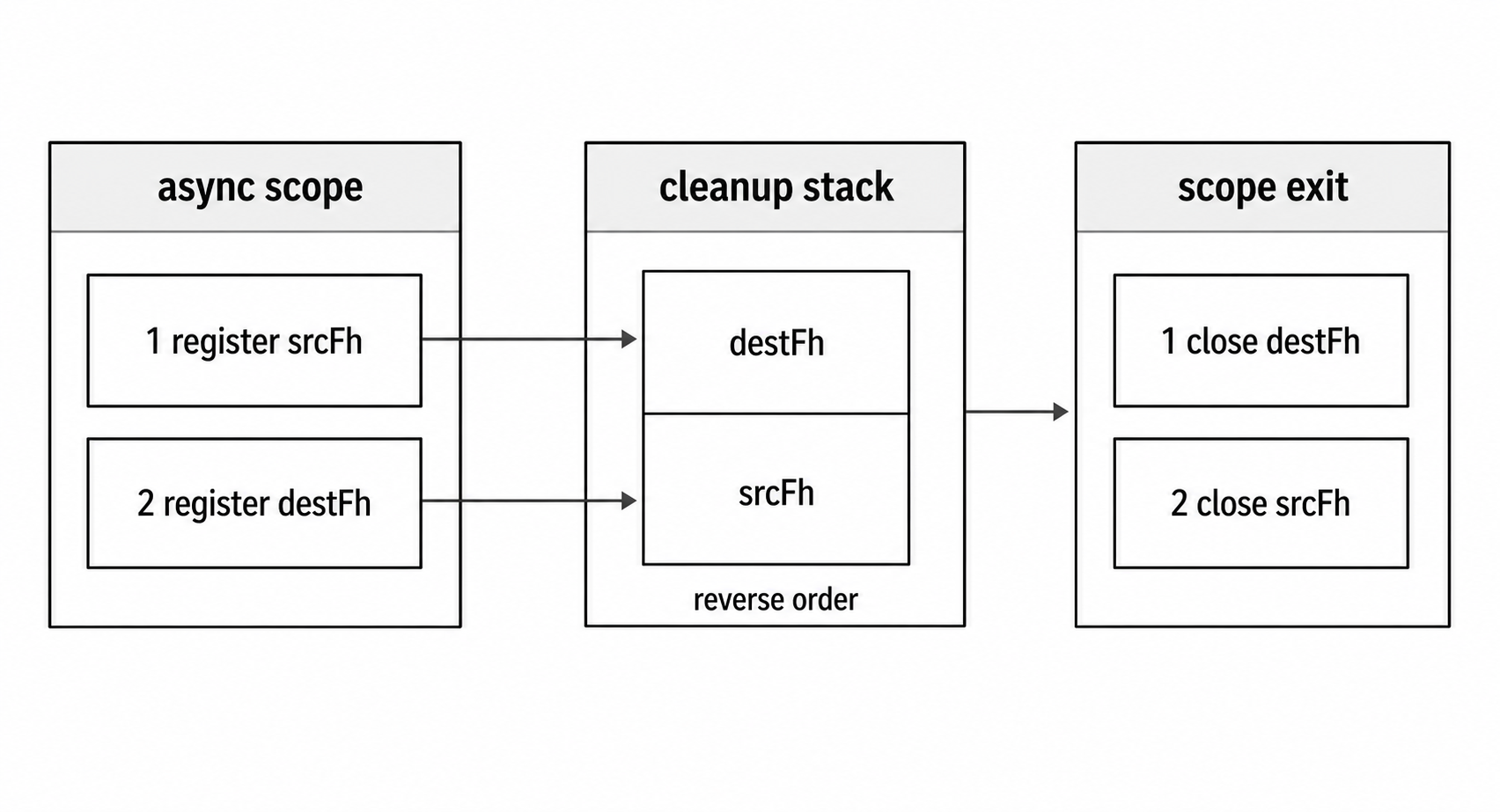
Figure 2 - await using treats owned handles like a cleanup stack. The last handle registered in the scope is disposed before earlier handles.
How Symbol.asyncDispose Works
When you write await using x = expr, the runtime handles the cleanup setup for the current block.
The rough sequence is -
- Evaluate
exprand assign the result tox. - Check that
xhas a[Symbol.asyncDispose]method, or[Symbol.dispose]for synchronoususing. - Register
xfor cleanup at the end of the current block. - When the block exits, run registered cleanup methods in reverse order.
- Await each async disposer before moving to the next one.
For FileHandle, the async disposer behaves like this -
[Symbol.asyncDispose]() {
  return this.close();
}
The method closes the handle. The await using syntax makes sure that method runs at scope exit.
If the block is already throwing and disposal also fails, the runtime wraps the situation in a SuppressedError, preserving both the original error and the disposal error.
When to Use await using vs try/finally
Use await using when the ownership scope is simple. Open a handle, do the work, and close it when the block ends. It is especially nice when several resources need cleanup in reverse order.
Use try/finally when cleanup needs extra behavior, such as logging, metrics, conditional cleanup, or a specific policy for close errors. Also use try/finally when the code must run on older Node versions or through tooling that does not yet support explicit resource management syntax.
For code that targets Node v24.2+ and compatible tooling, await using is a strong default for simple FileHandle ownership. Keep try/finally when compatibility or custom cleanup behavior is needed.
Convenience Functions vs FileHandle
The promise filesystem API has two levels.
The first level is path helpers. Functions such as readFile, writeFile, stat, and mkdir operate on paths. When a helper needs to open a descriptor internally, it owns that descriptor for the duration of the call.
const data = await readFile('/tmp/config.json', 'utf8');The second level is FileHandle. You call open(), get a handle, do several descriptor-scoped operations, and close the handle when the ownership scope ends.
Path helpers are best for one-shot work. Reading a config file, writing a result, checking a path, creating a directory, or removing a build folder all fit that style. The helper owns whatever internal resource it needs.
Use FileHandle when several operations need to refer to the same open file. You might read a header, jump to a byte position, write a patch, sync the file, or check metadata before reading. Keeping one handle makes it clear that those operations belong to the same open file.
This difference becomes useful when paths can change. These are two independent path-based operations -
const stats = await stat(path);
const data = await readFile(path, 'utf8');
Between those two calls, another process could replace the file at that path.
With a FileHandle, both operations run against the same open file -
await using fh = await open(path, 'r');

const stats = await fh.stat();
const data = await fh.readFile('utf8');
That gives you one open file, one descriptor, and one close. For one small file, the benefit is mostly clarity and correctness. For large batch jobs, benchmark the whole workflow before assuming it is faster.
Parallel File Operations
Independent file operations can overlap. Promise.all() starts the promise-returning calls before waiting for the group -
const [configText, schemaText, dataText] = await Promise.all([
  readFile('config.json', 'utf8'),
  readFile('schema.json', 'utf8'),
  readFile('data.json', 'utf8'),
]);
All three reads are initiated before the await. Node schedules the underlying filesystem work through libuv's worker pool. The array order controls how results are returned to you, but it does not force the filesystem work to finish in that order.
If one promise rejects, Promise.all() rejects with that error. The await does not give you the fulfilled values from the other promises.
When you want to inspect every result, even if some operations fail, use Promise.allSettled() -
const results = await Promise.allSettled([
  readFile('a.json', 'utf8'),
  readFile('b.json', 'utf8'),
  readFile('maybe-missing.json', 'utf8'),
]);
Each result has a status of 'fulfilled' or 'rejected'. Fulfilled results have value. Rejected results have reason. That lets you process successes and failures one by one.
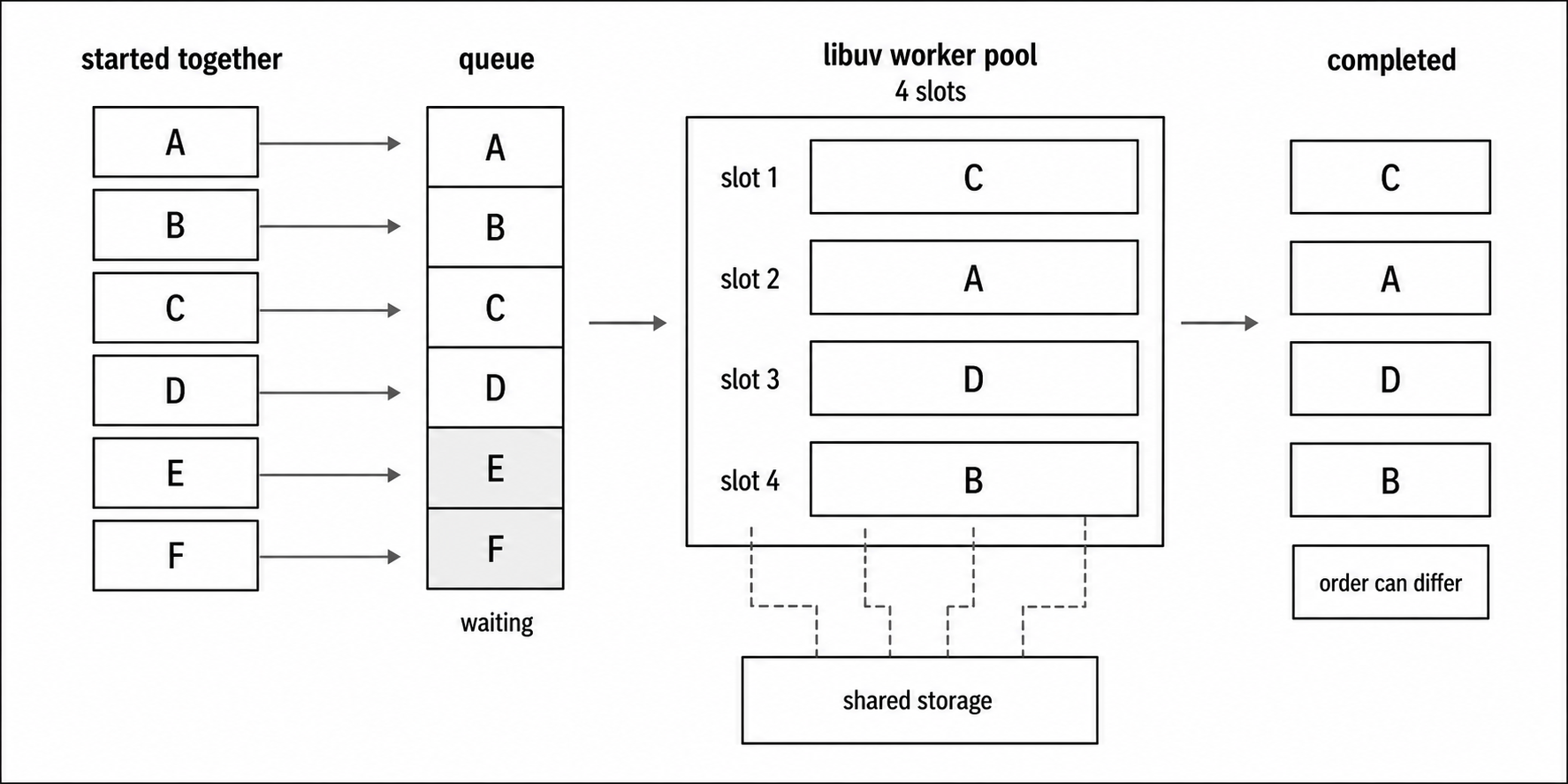
Figure 3 - Promise-based filesystem work can overlap, but it still runs through finite worker-pool capacity and storage throughput. Completion order is independent of array order.
When Parallel Hurts
Parallel file I/O is not automatically faster. The libuv worker pool defaults to four threads, so a flood of filesystem requests can end up queued behind a small pool.
Also, a helper such as readFile() may involve several internal filesystem requests. Do not assume one readFile() call occupies exactly one worker for the whole operation.
Storage has limits too. On a spinning disk, too many parallel reads can increase seek work. On SSDs, the I/O controller and filesystem can still become the limit. Network filesystems add another layer of latency and contention.
For large batches, use a simple concurrency limit. A chunked loop is often enough to start -
async function readBatch(paths, concurrency = 8) {
  const results = [];

  for (let i = 0; i < paths.length; i += concurrency) {
    const batch = paths.slice(i, i + concurrency);
    const data = await Promise.all(batch.map(p => readFile(p, 'utf8')));
    results.push(...data);
  }

  return results;
}
This reads up to concurrency files at a time, waits for that group, then moves to the next group. It is not a full dynamic worker pool, but it prevents a script from throwing thousands of filesystem requests at Node at once.
Mixing Sequential and Parallel
Most real workflows use both sequential and parallel steps.
A config file may tell you which files to read. Those files can be read together. A summary write waits until all reads finish -
const config = JSON.parse(await readFile('config.json', 'utf8'));

const datasets = await Promise.all(
  config.files.map(f => readFile(f, 'utf8'))
);

const summary = buildSummary(datasets);
await writeFile('summary.json', JSON.stringify(summary));
Read this by dependency. First you need the config. Then the data files are independent, so they can overlap. Then the summary depends on all datasets, so it waits.
One write rule is worth calling out. Do not run uncoordinated writeFile() calls against the same path. Node does not serialize those writes for you, and writeFile() may perform multiple internal writes. Same-path writes should go through one queue, one stream, or carefully positioned writes with an explicit ordering rule. Parallel writes to different files are much easier to reason about.
Migrating from Callbacks to Promises
For callback-based fs code, the conversion pattern is straightforward.
Before -
fs.readFile(path, 'utf8', (err, data) => {
  if (err) return handleError(err);

  doSomething(data);
});
After -
try {
  const data = await readFile(path, 'utf8');
  doSomething(data);
} catch (err) {
  handleError(err);
}
Callback result parameters become await assignments. Error-first checks become catch blocks. Nested callbacks become sequential lines.
Wrapping Legacy Code
For third-party libraries or older internal helpers that still use callbacks, util.promisify() converts a callback-style function into a promise-returning one -
import { promisify } from 'node:util';
import { stat } from 'node:fs';

const statAsync = promisify(stat);
const info = await statAsync('/tmp/data.txt');
You do not need this for Node's fs module itself because node:fs/promises already exists. It is useful for older modules or custom APIs that still follow the callback style.
You can also go the other way when a callback-based caller needs to call promise-based code -
function legacyReadConfig(path, callback) {
  readFile(path, 'utf8')
    .then(data => callback(null, JSON.parse(data)))
    .catch(err => callback(err));
}
Both styles can coexist during a migration. Newer code can use promises while older public surfaces keep their callback contract until you are ready to change them.
Migration Pitfalls
A few mistakes show up often during migration.
Forgetting to await is the easiest one. An async function that calls writeFile() without await returns before the write finishes. Any later code that assumes the file is already written may fail intermittently.
Double error handling makes code harder to follow. If you wrap an await in try/catch, you usually do not need .catch() on the same call. Pick one error path at each call site.
Fire-and-forget work needs an error path. If you intentionally start an async operation without waiting for it, attach a .catch() -
void writeFile('/tmp/log.txt', logData).catch(console.error);That says two things to the reader. You are intentionally not awaiting this promise, and failures still have somewhere to go.
Avoid mixing sync checks into async flows unless you have a reason. Code sometimes does fs.existsSync() before await readFile(). It works, but the sync check blocks the event loop. In async code, keep the path async -
try {
  await access(path);
} catch (err) {
  if (err.code === 'ENOENT') {
    // file does not exist
  } else {
    throw err;
  }
}
Often, the cleaner approach is to attempt the real operation and handle the error from that operation.
Promise-based filesystem errors are not special promise-only errors. They have the same useful fields as callback errors - code values such as ENOENT, EACCES, and EISDIR, syscall values such as open, read, and stat, and path information when available. Most existing error policies transfer directly into catch blocks.
How fs.promises Uses the Thread Pool
Promise-based filesystem APIs use Node's thread pool to perform filesystem work away from the event loop thread. Callback APIs use the same general path. The JavaScript difference is how completion is reported - callback invocation or promise settlement.
Do not assume every convenience helper maps to one libuv request. readFile() and writeFile() may perform multiple reads or writes internally. Path-based helpers such as stat() can use path metadata syscalls without opening the file. If you need exact syscall counts, measure the real operation on the target platform.
A path-based readFile() can be understood like this -
fsPromises.readFile(path)
  -> validate path and options
  -> open the path for reading
  -> read until the requested data is collected or an error occurs
  -> close the descriptor it opened
  -> fulfill or reject the promise
That is a teaching model, not a promise about Node's private implementation. Internal class names, request wrappers, and C++ details can change across Node versions.
FileHandle methods run against an already-open descriptor. Promise-returning methods settle when their operation completes. Stream and readline methods return objects with their own lifecycles. Their autoClose settings decide whether the stream owns handle closure or the surrounding code does.
After fh.close() completes, fh.fd is -1. Later operations fail because the handle is closed.
If a FileHandle is abandoned while still open, current Node releases can emit a garbage-collection warning and attempt cleanup. Treat that as a bug report from the runtime, not as a cleanup plan.
Combining FileHandle with Streams
FileHandle can create streams tied to its fd -
await using fh = await open('/tmp/large-file.csv', 'r');

const stream = fh.createReadStream({
  encoding: 'utf8',
  autoClose: false,
});
The stream reads from the file handle's descriptor. By default, FileHandle streams close the handle when the stream closes because autoClose defaults to true.
If the surrounding await using or try/finally block owns cleanup instead, pass autoClose: false. Then wait until the stream is finished before the handle's scope exits.
filehandle.close() waits for pending operations on the handle. A stream created from the handle is another user of that descriptor, so do not close the FileHandle while the stream is still active.
A safe read pattern is to let pipeline() define the stream lifetime -
import { pipeline } from 'node:stream/promises';

await using fh = await open('input.csv', 'r');

const readable = fh.createReadStream({ autoClose: false });
await pipeline(readable, transformStream, outputStream);
await pipeline(...) resolves when all data has moved through the pipeline, or rejects if the pipeline fails. After that, the await using scope can close the handle in the right order.
For writable streams, the safest default is to let the stream own closure -
import { finished } from 'node:stream/promises';

const fh = await open('output.log', 'a');
const writable = fh.createWriteStream();

writable.write('entry 1\n');
writable.write('entry 2\n');
writable.end();

await finished(writable);
Calling writable.end() tells the stream that no more data is coming. finished(writable) waits until the stream has completed or failed. Since autoClose stays at its default, the stream closes the FileHandle. Do not use fh after the stream finishes.
If the FileHandle scope should own cleanup, prefer direct FileHandle write methods -
await using fh = await open('output.log', 'a');

await fh.appendFile('entry 1\n');
await fh.appendFile('entry 2\n');
Avoid mixing a FileHandle write stream with autoClose: false and then expecting await using to make the timing obvious. In Node v24.15, finished(writable) can resolve while the stream still holds the FileHandle open, and filehandle.close() then waits for that pending stream state.
When to Use Which API
Node gives you three filesystem styles - synchronous APIs, callback APIs, and promise APIs.
Use sync APIs for startup code, CLI tools, and build scripts where blocking the event loop is acceptable. They are simple, but they block the thread.
Use callbacks for legacy code, libraries that still expose callback contracts, or hot paths where measurement shows the callback form is worth it.
Use promises for new application code, server handlers, middleware, batch jobs, and code already structured around async and await.
Most modern Node code is easier to read with promises. HTTP frameworks, database drivers, queue clients, and application services commonly use async and await. Filesystem code fits better when it follows the same style.
For performance, start with promises unless profiling says otherwise. In normal file I/O, structure usually has more impact than the wrapper. Avoid duplicate work, stream large files, and limit concurrency for large batches.
Newer Node documentation and examples increasingly assume async and await. New filesystem features often have promise, callback, and sync forms, but the promise versions usually compose best with contemporary application code.
glob() is still new enough that some codebases prefer third-party packages such as fast-glob or globby. It was added in Node v22 and marked stable in Node v24.0 and v22.17 -
import { glob } from 'node:fs/promises';

for await (const tsFile of glob('**/*.ts', { cwd: '/project/src' })) {
  console.log(tsFile);
}
glob() returns an async iterable of matching paths. Use for await...of to process matches one at a time. Use Array.fromAsync() when your Node baseline supports it and you want to collect all matches into an array.
The main rule is ownership. Path helpers are best when one call owns the whole operation. FileHandle is best when several operations need one open descriptor. Once you choose FileHandle, choose the cleanup path too - try/finally, await using, or a stream with clear autoClose behavior.
Related Reading
- Previous subchapter - Node.js File I/O: fs.readFile, fs.writeFile, Streams, and fsync
- Next subchapter - Node.js fs.watch: File Watching, Atomic Writes, and OS Watchers