Node.js CommonJS/ESM Interop: Edges and Dual Packages
CommonJS and ES Modules interop is the set of rules Node uses when code written for one module system has to load code written for the other one. You see it in mixed projects, dual packages, and dependency trees where some files use require() while others use import.
The direction decides almost everything. When ESM imports CommonJS, Node wraps module.exports and gives ESM a module-shaped view of it. When CommonJS loads ESM, Node either uses dynamic import() or, in newer Node versions, lets require() load ESM only when the whole ESM graph can finish synchronously.
The Interop Join
Most confusion comes from three things - timing, identity, and export shape.
Timing means CJS expects require() to return immediately, while ESM can become async because of top-level await. Identity means the same package can accidentally load twice if import and require() point at different files. Export shape means a CJS module built around module.exports does not naturally look like an ESM module with named exports and live bindings.
CJS came first in Node. It is synchronous, flexible, and built around module.exports. A CJS file can call require() anywhere, build exports at runtime, and mutate module.exports however it wants.
ESM came later. It is more structured. Imports and exports are known before evaluation. Bindings are linked before code runs. The loading process has separate parse, link, and evaluate phases. That structure is great for tooling and static analysis, but it does not match CJS perfectly.
Interop is Node's bridge between those two designs. The bridge works, but it has rules. If you know which direction the load is going, and whether the target can finish synchronously, most weird behavior becomes much easier to explain.
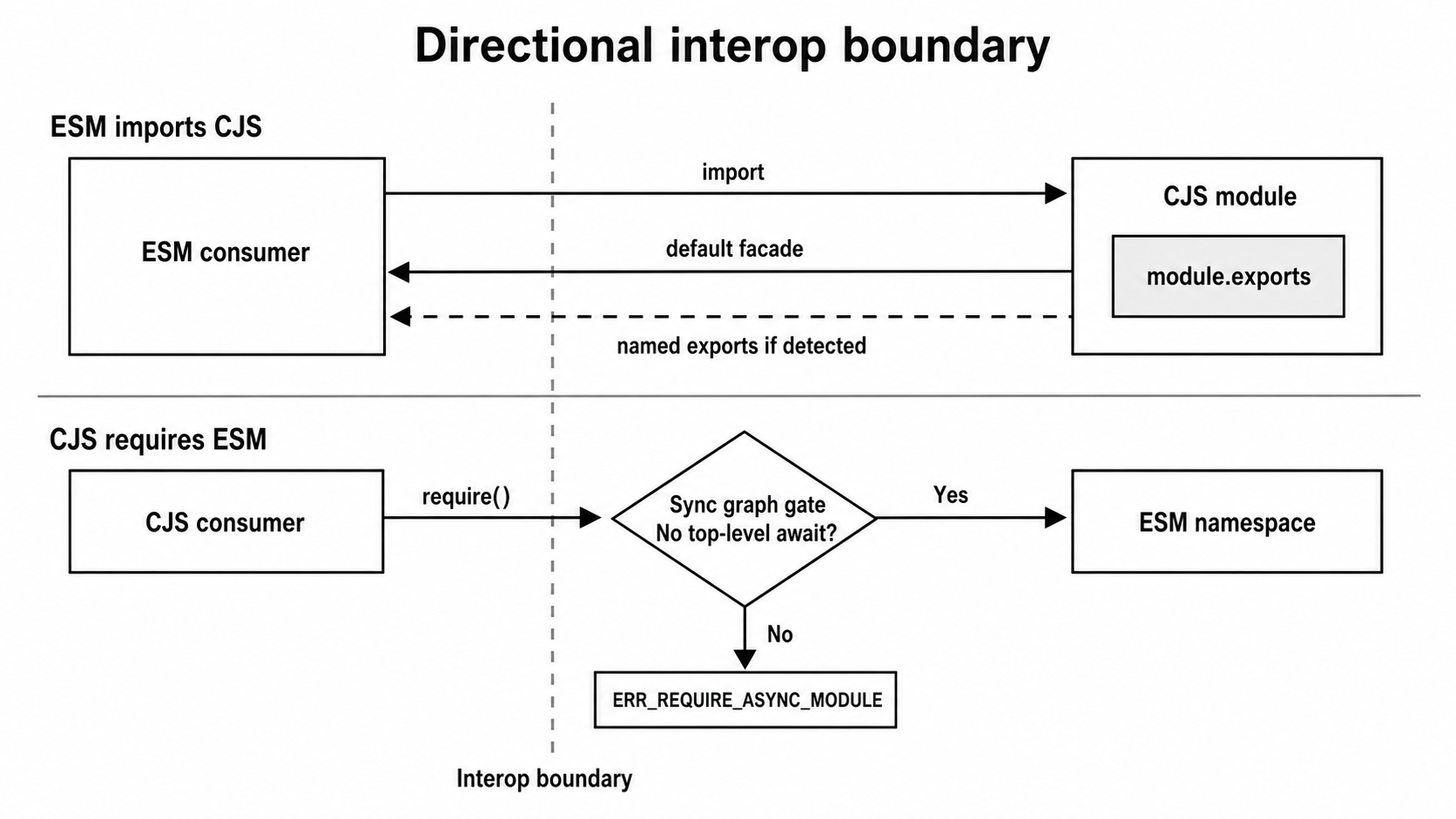
Figure 4.1 - The interop join is directional. ESM importing CJS receives a facade around module.exports; CJS loading ESM receives an ESM namespace only when the target graph can finish synchronously.
The "type" Field and File Extensions
Before Node can load a file, it has to decide whether that file is CJS or ESM. That decision happens before parsing, so it affects every interop example in this chapter.
Keep the short version close -
.mjsfiles are always ESM..cjsfiles are always CJS..jsfiles follow the nearest parentpackage.json"type"field."type": "module"makes.jsfiles ESM."type": "commonjs"or no"type"makes.jsfiles CJS.
The extension rules are fixed. Current Node can also use syntax detection for ambiguous .js files that do not have an explicit "type" field, but package authors should avoid making users depend on ambiguity.
For published packages, the "type" field is the line that decides what .js means across the package. If that line is wrong, Node may treat a file as the opposite format from what the author intended.
Importing CJS from ESM
This is the smoother direction. ESM can import CJS directly. The most reliable rule is simple - the CJS module.exports value becomes the ESM default export.
Static Import
Here is an ESM file importing a CJS file -
import config from './config.cjs';Node still loads config.cjs with the CommonJS loader. The CJS file runs, fills in module.exports, and then Node exposes that value through an ESM namespace wrapper.
If the CJS file looks like this -
module.exports = { port: 3000, host: 'localhost' };then the ESM file receives that object as config.
console.log(config.port);
console.log(config.host);
This default import is the safest way to consume CJS from ESM. It gives you the same value a CJS caller would receive from require().
Named imports from CJS are more limited.
Named Export Extraction from CJS
Sometimes this works -
import { readConfig } from './config.cjs';with a CJS file like this -
exports.readConfig = () => ({ port: 3000 });That works because Node scans the CJS source before the module runs. It looks for common export patterns and builds a list of names that ESM can import.
Node uses cjs-module-lexer for that scan. The lexer reads the source text and tries to detect likely CJS export names without executing the file. If it finds readConfig, Node exposes that name as a synthetic named export.
So ESM can receive two kinds of values from CJS -
default- the fullmodule.exportsvalue- Detected named exports - properties Node found through source analysis
This CJS shape is detected in Node v24 -
const foo = 1;
const bar = 2;

module.exports = { foo, bar };
From ESM, these imports work -
import whole from './lib.cjs';
import { foo, bar } from './lib.cjs';
import whole2, { foo as f } from './lib.cjs';
The default import gives you the full object. The named imports give you the detected properties.
Do not assume every object literal works the same way. In Node v24.15, this shape exposes only the default markers -
module.exports = { foo: 1, bar: 2 };With that source, this fails -
import { foo } from './lib.cjs';If named imports from CJS are part of your public API, use direct assignments. They are easier for Node to detect and easier for readers to understand -
exports.foo = 42;
module.exports.bar = 'hello';
The lexer can also detect common Object.defineProperty(exports, ...) patterns and some identifier-valued module.exports = { ... } assignments. But it does not run the module. It does not execute loops, evaluate computed property names, or inspect runtime objects.
That is why dynamic export patterns do not work well with named imports.
const methods = ['get', 'post', 'put', 'delete'];

methods.forEach(m => {
  exports[m] = createHandler(m);
});
At runtime, this creates get, post, put, and delete. But the lexer only sees a loop and a computed property assignment. It cannot know which names will exist after the code runs.
In that case, ESM should use the default import and read properties from it -
import pkg from './dynamic-exports.cjs';

const { get, post, put } = pkg;
That destructuring is plain JavaScript. It reads the current properties from the object. It does not create ESM live bindings.
Synthetic named exports from CJS also do not behave like real ESM live bindings. If the CJS module adds new properties to module.exports later, ESM named imports will not update to include those new names. The default import stays closer to the real CJS value.
Dynamic Import of CJS
ESM can also load CJS with dynamic import() -
const mod = await import('./config.cjs');

console.log(mod.default);
The promise resolves to a module namespace object. The default property points to the CJS module.exports value.
In current Node versions, the namespace also includes a "module.exports" marker with the same value. If cjs-module-lexer detected named exports, those names appear as additional properties.
The namespace always has a default property. If the CJS file sets module.exports to undefined, then mod.default is undefined. The property is still there because the default export always represents module.exports.
Importing ESM from CJS
This direction is stricter because require() is synchronous and ESM can be async.
A CJS file expects this shape -
const value = require('./something');That call must return a value immediately. ESM does not always fit that requirement. If any module in the ESM dependency graph uses top-level await, the graph cannot finish synchronously.
ERR_REQUIRE_ESM
Before require(esm) existed, calling require() on an ESM module threw ERR_REQUIRE_ESM.
CJS could still load ESM, but only through dynamic import() -
async function loadESM() {
  const mod = await import('./lib.mjs');
  return mod.default;
}
That works, but it changes the caller. Code that used to load synchronously now has to deal with a promise.
That is why ESM-only releases used to break many CJS consumers. A CJS app could not replace this -
const config = require('./config');with an ESM file unless the startup path became async.
The ecosystem worked around this in different ways. Some packages shipped both CJS and ESM builds. Some stayed CJS-only. Some went ESM-only and required CJS users to switch to dynamic import().
The require(esm) Path
Node now supports loading many ESM modules through require().
The feature arrived in v20.17 and v22.0 behind --experimental-require-module. It became unflagged in v20.19, v22.12, and v23.0. It stopped showing an experimental warning by default in v20.19, v22.13, and v23.5. Node v24.15 marks the feature as no longer experimental.
For packages that only need unflagged support, a practical engine range is ^20.19 || >=22.12. If you also want no default warning on the v22 line, use >=22.13.
With that support, CJS can do this when the target ESM graph is synchronous -
const { readFile } = require('./esm-utils.mjs');The rule is strict. The ESM module and everything it imports must finish without top-level await.
If the ESM file uses top-level await, require() throws ERR_REQUIRE_ASYNC_MODULE.
// async-module.mjs
await setup();

export const ready = true;require('./async-module.mjs'); // throws ERR_REQUIRE_ASYNC_MODULEThe same failure happens if top-level await appears deeper in the graph. If a.mjs imports b.mjs, and b.mjs uses top-level await, then require('./a.mjs') also fails.
When require(esm) succeeds, the usual return value is the ESM namespace object -
const utils = require('./utils.mjs');

console.log(utils.default);
console.log(utils.helperFn);
That shape is different from normal CJS. Requiring CJS returns module.exports directly. Requiring ESM returns a namespace object, so the default export is one property on that object.
There is a compatibility option for ESM modules that want CJS callers to receive a direct value. The ESM module can export a binding with the string name "module.exports" -
// point.mjs
export default class Point {}

export { Point as 'module.exports' };
Then CJS receives that value directly -
const Point = require('./point.mjs');

console.log(Point);
That can help during migrations. The tradeoff is that CJS consumers no longer receive the full namespace object. If they need named exports through destructuring, you have to attach those names to the returned value yourself.
Dynamic import() from CJS
Dynamic import() remains the broadest compatibility path from CJS to ESM because it is already async.
(async () => {
  const mod = await import('./lib.mjs');

  console.log(mod.someFunction);
  console.log(mod.default);
})();
You can use it inside async functions, or wrap top-level CJS code in an async IIFE. The promise resolves to the ESM namespace object. Named exports appear as properties, and the default export appears as default.
Use this path when any of these are true -
- The Node version does not support
require(esm). - The ESM graph uses top-level await.
- The package has version constraints that need older Node support.
- A CJS/ESM cycle blocks synchronous loading.
- You are fine making the CJS caller async.
Comparing Both Directions
The two directions return different shapes.
When ESM loads CJS -
import x from './lib.cjs'givesmodule.exportsas the default export.import { named } from './lib.cjs'works only if Node detects that name in the CJS source.await import('./lib.cjs')gives a namespace withdefault,"module.exports", and any detected names.- This path does not depend on the newer
require(esm)feature.
When CJS loads ESM -
require('./lib.mjs')can work on supported Node versions if the ESM graph is synchronous.- The usual result is the ESM namespace object.
require('./lib.mjs')can return a custom value if the ESM exports"module.exports".await import('./lib.mjs')always uses the async ESM path.require()throwsERR_REQUIRE_ASYNC_MODULEif any module in the graph uses top-level await.
The shape difference is the thing to remember. CJS imported into ESM gives you module.exports as default. ESM required from CJS gives you a namespace object, unless the ESM module uses the special "module.exports" export.
Also remember the entry point. import() enters the ESM loader. require() enters the CommonJS loader first, even when it later delegates to ESM for require(esm).
The Dual Package Hazard
A package that ships both CJS and ESM entry points can accidentally load twice.
That means this can happen -
- ESM code imports the package and gets the ESM build.
- CJS code requires the package and gets the CJS build.
- Both files evaluate separately.
- Any module-level state exists twice.
Suppose my-lib ships these two files -
dist/cjs/index.cjsdist/esm/index.js
Your app imports my-lib from ESM, so Node loads dist/esm/index.js. A dependency elsewhere calls require('my-lib'), so Node loads dist/cjs/index.cjs.
Now there are two copies of my-lib in memory. That can duplicate config caches, connection pools, singleton objects, and class definitions.
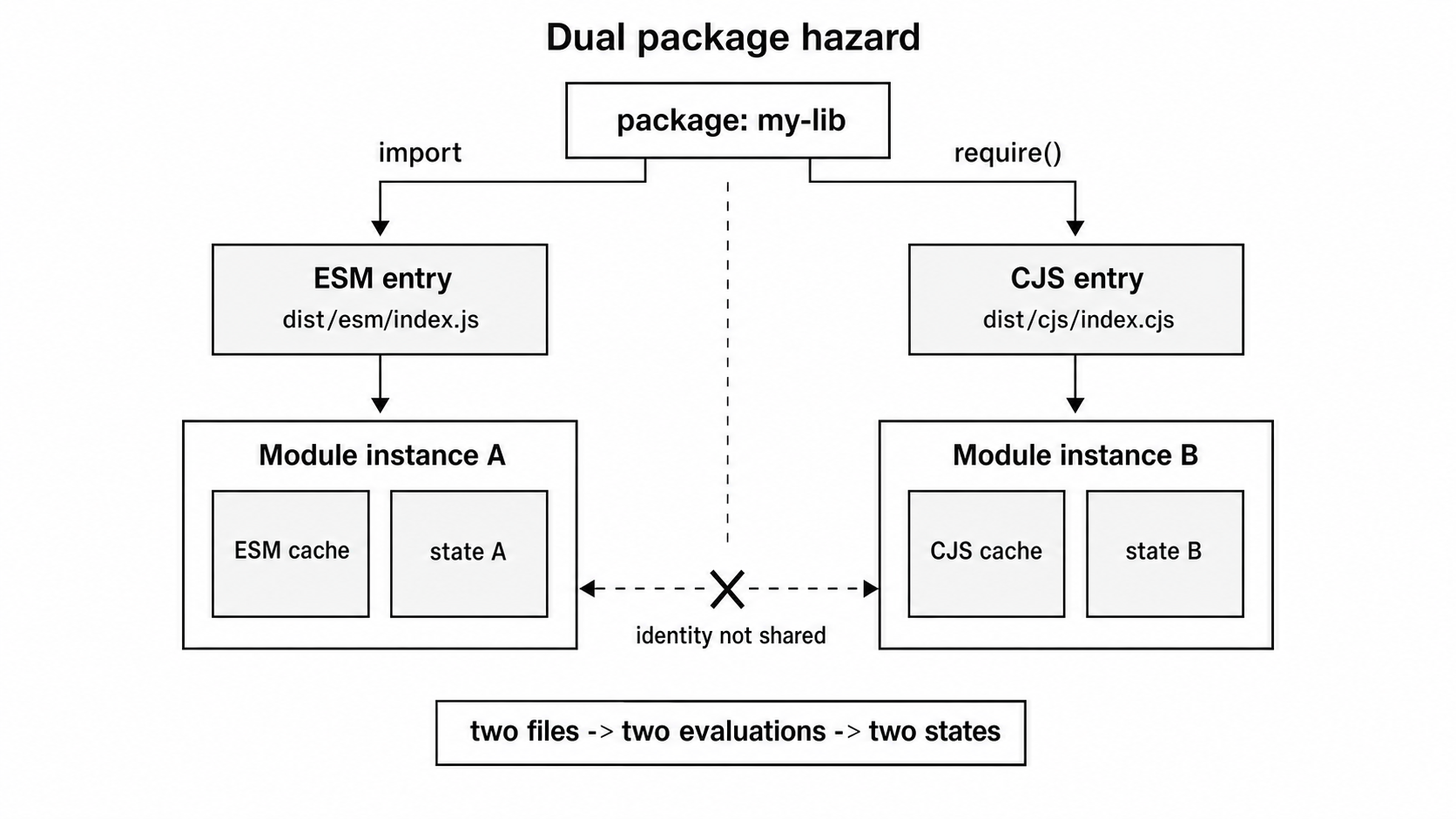
Figure 4.2 - The dual package hazard appears when import and require() resolve to different build outputs. Each output can evaluate separately, so module-level state and identity are no longer shared.
The instanceof failure is one of the easiest symptoms to recognize. An object created by the ESM copy of a class is not an instance of the CJS copy of that class. They came from the same package, but they are different runtime class objects.
Why It Happens
CJS and ESM use separate loader caches.
The CJS cache is keyed by absolute file path. The ESM cache is managed by the ESM loader and keyed by URL. If import and require() resolve to different files, they get different cache entries.
Different files mean different module evaluations. Node will not automatically decide that dist/cjs/index.cjs and dist/esm/index.js are the same package implementation, even if the source code came from the same original files.
Ways to Avoid It
Strategy 1 - Keep the package stateless
If your package exports pure functions, constants, and stateless classes, loading two copies is much less harmful. Two copies of the same pure function usually do not conflict. This is the easiest path when the library design allows it.
Strategy 2 - Use one implementation and a wrapper
A safer layout is to make one format the real implementation and make the other format a thin wrapper.
For newer Node versions, you can make ESM the main implementation and have CJS require it -
// dist/cjs/index.cjs
module.exports = require('../esm/index.js');
This works when the ESM graph is synchronous and the Node version supports require(esm). Both entry points end up using the same ESM module. CJS receives the ESM namespace by default, or a custom value if the ESM file exports "module.exports".
Before require(esm), a CJS wrapper could only reach ESM with dynamic import() -
// dist/cjs/index.cjs
module.exports = import('../esm/index.js');
That makes require() return a promise. Only use that shape when consumers knowingly accept a promise-valued API.
Strategy 3 - Put shared state in one internal module
If both entries must exist as separate files, move the state into one shared internal module. Both entries import or require that shared state module. The wrappers can differ, but the state stays in one cached place.
This is more work than a wrapper, but it helps when you cannot make one entry directly reuse the other.
Strategy 4 - Publish ESM only
If your supported Node range and users can handle it, publish only ESM. As of May 14, 2026, Node 22 and Node 24 are the supported LTS lines, and both support require(esm) in their current releases.
ESM users import normally. CJS users either use dynamic import() or run a Node version new enough for require(esm).
This simplifies the package build. The tradeoff is on the consumer side, because older CJS code may need changes.
How to Spot This in Real Projects
The symptoms usually look strange at first.
A module-level Map or Set should be shared, but one caller sees it empty. A singleton appears to initialize twice. An instanceof check returns false even though the object came from the same package name.
When that happens, log the resolved file path from both sides. If the ESM caller and CJS caller land on different files, you have two module instances.
Conditional Exports in package.json
The "exports" field tells Node which file a package exposes for each loading condition.
Here is a small dual-package map -
{
  "name": "my-lib",
  "exports": {
    ".": {
      "import": "./dist/esm/index.js",
      "require": "./dist/cjs/index.cjs"
    }
  }
}
When code writes import 'my-lib', Node uses the "import" branch. When code writes require('my-lib'), Node uses the "require" branch.
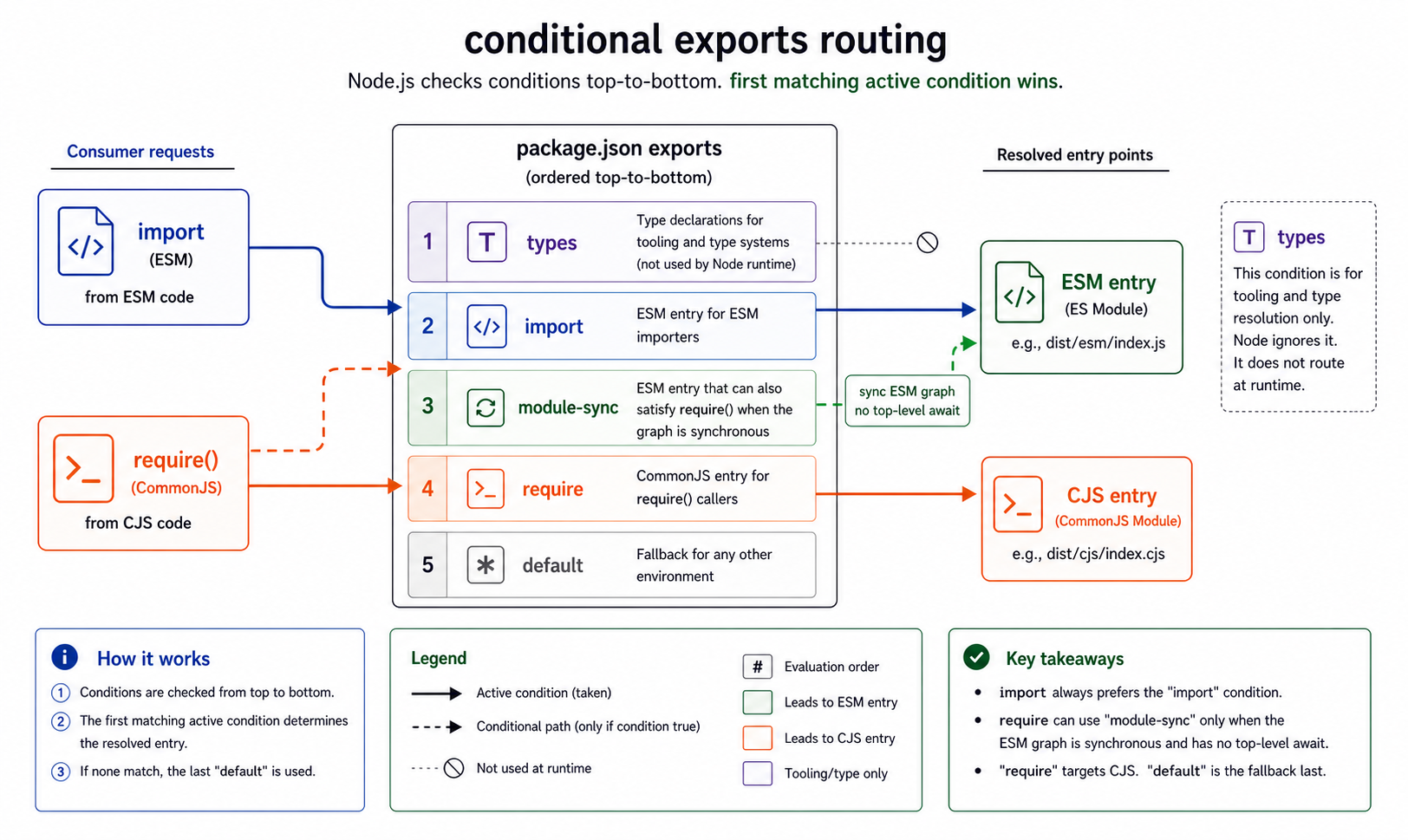
Figure 4.3 - Conditional exports make the package scope explicit. The condition map decides which entry a consumer receives, and a synchronous ESM branch can let both loaders share one implementation when its namespace shape is acceptable.
Order counts because Node checks conditions from top to bottom and uses the first match.
You will often see these conditions -
"node"- matches Node.js."module-sync"- matches bothimportandrequire()when the target is a synchronous ESM graph."import"- used for ESM imports."require"- used for CJSrequire()."default"- fallback when no earlier condition matches."types"- used by TypeScript and other type tools.- Custom conditions - enabled with the
--conditionsflag.
A fuller map might look like this -
{
  "exports": {
    ".": {
      "types": "./dist/types/index.d.ts",
      "module-sync": "./dist/esm/index.js",
      "import": "./dist/esm/index.js",
      "require": "./dist/cjs/index.cjs",
      "default": "./dist/esm/index.js"
    }
  }
}
Put "types" first because typing tools expect to match it before runtime branches. Node ignores unknown conditions by default, so "types" is mostly for tools.
Put "default" last because it is the fallback.
Use "module-sync" only when the ESM target and every module below it avoid top-level await. If CJS follows that branch with require() and the graph uses top-level await, Node throws ERR_REQUIRE_ASYNC_MODULE.
When one synchronous ESM implementation can serve both ESM and CJS consumers, "module-sync" can reduce the dual package hazard. Both loaders can land on the same file. That only works if CJS consumers are okay with the namespace shape returned by require(esm).
Subpath Exports
Packages can expose more than one entry point.
{
  "exports": {
    ".": {
      "import": "./dist/esm/index.js",
      "require": "./dist/cjs/index.cjs"
    },
    "./utils": {
      "import": "./dist/esm/utils.js",
      "require": "./dist/cjs/utils.cjs"
    }
  }
}
Now consumers can write -
import { helper } from 'my-lib/utils';or -
const { helper } = require('my-lib/utils');Each form resolves to the matching build output.
The "exports" field also defines the public package surface. If a path is not listed there, consumers cannot import it through the package name.
This fails when "./dist/internal/secret.js" is not exported -
import 'my-lib/dist/internal/secret.js';Node throws ERR_PACKAGE_PATH_NOT_EXPORTED.
Before "exports", consumers could often reach any file inside a package by path. With "exports", the package author decides which subpaths are public. This is package encapsulation, not filesystem security. A direct absolute path can still load a file, but package-specifier imports must follow the map.
The "main" and "module" Fallbacks
If "exports" is missing, Node falls back to "main" for the package entry point.
{
  "main": "./dist/cjs/index.js"
}
The "module" field is different. Bundlers like webpack and Rollup may read it, but Node does not use it for its own module resolution.
If you are building a dual package for Node, use "exports" with conditions. You can keep "module" for bundler compatibility, but it is not part of Node's package resolution.
Setting Up a Dual Build
A common setup is to write source once and build it to both formats.
A typical project layout looks like this -
src/
  index.js
dist/
  esm/index.js
  cjs/index.cjs
package.json
Build tools like tsup, unbuild, and esbuild can do this. They take ESM source and generate an ESM build plus a CJS build. In the CJS build, import becomes require() and export becomes CJS exports.
A minimal tsup configuration can look like this -
export default {
  entry: ['src/index.js'],
  format: ['esm', 'cjs'],
  outDir: 'dist',
};
Then the package map sends each consumer to the matching build -
{
  "type": "module",
  "exports": {
    ".": {
      "import": "./dist/esm/index.js",
      "require": "./dist/cjs/index.cjs"
    }
  }
}
The .cjs extension is needed here. With "type": "module", .js files in the package are ESM. The CJS output must use .cjs so Node treats it as CommonJS. Most build tools can handle that naming for you.
Some projects go the other way. They keep the real implementation in CJS and create an ESM wrapper -
// esm-wrapper.js
export { default } from './dist/index.cjs';
export * from './dist/index.cjs';
That wrapper re-exports names from the CJS build when Node can detect them. Dynamic CJS export patterns may still require explicit handling through a default import.
On Node v23 and newer, export * from a CJS module can also expose the "module.exports" marker. If you do not want that marker in your public ESM API, write explicit re-exports instead.
This wrapper approach reduces build complexity, but ESM consumers still go through the CJS loader. Named exports copied from CJS do not have true ESM live-binding behavior.
Testing Both Entry Points
A common mistake is testing the ESM build and shipping a broken CJS build, or the other way around.
The two builds can differ in small ways. A build tool can drop an export, rename a default, or transform code in a way that changes behavior.
Start with an export-name check -
import assert from 'node:assert/strict';
import * as esmExports from '../dist/esm/index.js';
import cjsExports from '../dist/cjs/index.cjs';

const esmKeys = Object.keys(esmExports)
  .filter((key) => key !== 'default' && key !== 'module.exports')
  .sort();

assert.deepStrictEqual(esmKeys, Object.keys(cjsExports).sort());
That test compares the intended exported names and ignores namespace markers. It does not prove the functions behave the same way, but it catches a lot of bad builds.
For real confidence, run your test suite against both entry points. Most test runners can run the same tests twice with different import paths.
Package.json for a Real Dual Package
A practical dual package often looks like this -
{
  "type": "module",
  "main": "./dist/cjs/index.cjs",
  "exports": {
    ".": {
      "types": "./dist/types/index.d.ts",
      "import": "./dist/esm/index.js",
      "require": "./dist/cjs/index.cjs"
    }
  },
  "files": ["dist"]
}
The "main" field helps older tools that do not understand "exports". The "type": "module" field tells Node that .js files in this package are ESM. The "files" array controls what gets published to npm. The "exports" map handles modern conditional resolution.
Common Errors and How to Debug Them
Interop errors are usually narrow. The exact message text can change between Node versions, but the error code usually tells you which rule you hit.
ERR_REQUIRE_ESM
Error [ERR_REQUIRE_ESM]: require() of ES Module /path/to/module.mjsThis means CJS is calling require() on an ESM module in a runtime that cannot use require(esm), or the feature was disabled with --no-require-module.
In Node v20.19+, v22.12+, and current v24 LTS releases, synchronous ESM normally loads through require() and returns the namespace object.
Check the runtime first -
node --versionIf the runtime is older than v20.19, or older than v22.12 on the v22 line, upgrade or switch to dynamic import().
Code that needs to check support at runtime can inspect -
process.features.require_moduleThis was the error many CJS projects saw when packages published ESM-only major versions before require(esm) was widely available. chalk v5 was a common example. CJS projects that upgraded had to pin chalk v4, switch to import(), convert to ESM, or later run on a Node version with require(esm) support.
ERR_REQUIRE_ASYNC_MODULE
Error [ERR_REQUIRE_ASYNC_MODULE]: require() cannot be used on an ESM
graph with top-level await
This means the ESM module, or something it imports, uses top-level await. require() cannot load that graph because it must return synchronously.
You have two choices -
- Use dynamic
import(). - Remove top-level await from the required ESM graph.
To find the module with top-level await, start with the stack trace. If it is hidden in a transitive dependency, run with this flag during diagnosis -
node --experimental-print-required-tla app.jsNode can evaluate far enough to print top-level await locations before reporting the error.
ERR_REQUIRE_CYCLE_MODULE
Error [ERR_REQUIRE_CYCLE_MODULE]: Cannot require() ES Module in a cycleThis happens when require(esm) runs into an immediate cycle between CJS and ESM.
A small example -
// a.mjs
import './b.cjs';// b.cjs
require('./a.mjs'); // throws ERR_REQUIRE_CYCLE_MODULEMove one side of the cycle behind a function call, use dynamic import(), or extract shared code into a third module that both sides can load without cycling.
ERR_PACKAGE_PATH_NOT_EXPORTED
Error [ERR_PACKAGE_PATH_NOT_EXPORTED]: Package subpath './internal'
is not defined by "exports"
This means the import targets a package subpath that the package did not expose through "exports".
Use a listed subpath. If you import an internal file by full path anyway, expect it to break when the package changes its layout.
Named Export Not Found
SyntaxError: Named export 'someFunction' not foundThis usually means ESM tried to import a named export from CJS, but Node could not detect that name.
The CJS module probably uses dynamic export patterns.
Use a default import instead -
import pkg from 'the-package';

const { someFunction } = pkg;
SyntaxError from Mixing Module Syntaxes
This error usually means Node treated the file as CJS, but the file contains static import statements -
SyntaxError: Cannot use import statement outside a moduleFix the format decision. Rename the file to .mjs, or set "type": "module" in the nearest package.json.
The reverse error means Node treated the file as ESM, but the file uses CJS wrapper bindings -
ReferenceError: module is not defined in ES module scopeRename the file to .cjs, or replace module.exports with ESM export syntax.
Default Export Confusion
Some interop bugs do not throw. They just give you a value with the wrong shape.
A CJS module like this -
module.exports = function greet() {
  return 'hello';
};
maps cleanly to a default import from ESM -
import greet from './greet.cjs';

greet();
But this asks for a named export -
import { greet } from './greet.cjs';That fails because the CJS module did not export a property named greet. It assigned the whole function to module.exports.
Use this mental mapping -
module.exports = Xbecomes the ESM default export.exports.foo = Ycan become a named export calledfoowhen Node detects it.
Debugging Interop Issues in Order
When the error message is not enough, debug it in a fixed order.
First, check how Node treats the file format. File extension and nearest "type" field usually answer that. You can also test with an ESM dynamic import -
node --input-type=module --eval \
  "import('./problematic-file.js').then((m) => console.log(m))"
Second, check which exports Node sees from a CJS file -
const ns = await import('./module.cjs');

console.log(Object.keys(ns));
If you only see default and "module.exports", named export extraction did not find useful names.
Third, check the package "exports" map. From CJS, use require.resolve() to inspect the require branch. From ESM, use import.meta.resolve() to inspect the import branch. Compare the resolved paths with the package map.
Fourth, check for dual loading. Add a log in the module's initialization code and see whether it runs twice. If it does, compare the resolved paths from CJS and ESM.
Most interop bugs are one of these problems - wrong file format, missing named export detection, wrong conditional export branch, async ESM graph, or two package instances.
How the CJS and ESM Bridge Works Internally
Node does not merge CJS and ESM into one system. It uses translators so one loader can present a module-shaped view to the other.
The CJS Translator Path
When an ESM import targets a CJS file, Node does not treat the CJS source as normal ESM. CJS files rely on require, exports, module, and the module.exports contract. Some CJS patterns are invalid in ESM. Others would fail because ESM does not provide those wrapper bindings.
So Node builds a synthetic ESM facade around the CJS module.
The CJS file still executes through the CommonJS loader. The facade gives the ESM loader something it can link against.
The order is the part to pay attention to.
First, Node determines that the target is CJS. Then it scans the source text to find likely named exports. ESM needs those names before evaluation because imports are linked before code runs. Later, when the facade evaluates, the CJS module runs, fills module.exports, and Node places the detected property values onto the ESM namespace.
That is why every CJS module imported from ESM has a default export pointing to module.exports. Current Node also includes a "module.exports" marker with the same value. Detected named exports are copied values, not live ESM bindings.
cjs-module-lexer
Named export detection from CJS is handled by cjs-module-lexer, which is vendored into Node.
It scans CJS source text and looks for common export assignment patterns. It does not run the module.
It can recognize patterns like these -
exports.name = value;
module.exports.name = value;
It can also recognize common Object.defineProperty() export patterns -
Object.defineProperty(exports, 'name', { value });It detects some object-literal assignments -
const foo = 1;
const bar = 2;

module.exports = { foo, bar };
It also detects some re-export patterns, including common transpiler output.
The object-literal case is best-effort. Identifier shorthand and simple identifier-valued properties can work. Arbitrary expressions are not a safe named-export contract -
module.exports = { foo: 1 };The lexer stays intentionally limited. It does not evaluate control flow, run getters, resolve objects, or execute code. That keeps loading cheap and predictable.
These patterns are invisible to the lexer -
Object.assign(module.exports, someObject);exports[dynamicKey] = value;const e = exports;
e.foo = 42;Conditional exports can also be surprising. The lexer may detect a name from a branch that never runs, because it does not evaluate the condition.
When detection fails, the fallback is simple. The CJS module still exposes default and "module.exports", but useful named exports are missing. A dynamic namespace import will simply lack those properties. A static named import will throw during module loading.
You can inspect what Node exposes with -
const ns = await import('./some-cjs-lib.cjs');

console.log(Object.keys(ns));
The Synchronous ESM Execution Path
require(esm) takes a different route from dynamic import().
When the CommonJS loader sees that the target file is ESM and the feature is available, it delegates to the ESM loader. But it keeps the old require() rule - the load must return a value now.
The internal flow looks like this -
Module._load()starts the normal CJS load.Module._resolveFilename()finds the target file.- Node detects that the file should be ESM based on extension, package
"type", or syntax detection. - The ESM loader parses, resolves, links, and evaluates the graph.
- If any module in the graph uses top-level await, Node throws
ERR_REQUIRE_ASYNC_MODULE. - If the graph crosses into an immediate CJS/ESM cycle, Node throws
ERR_REQUIRE_CYCLE_MODULE. - If evaluation finishes synchronously,
require()returns the namespace object or the special"module.exports"export value.
The loaded module is still an ESM module record. If the same ESM file is loaded by URL through import() and through require(esm), both should observe the same ESM module instance.
That does not fix the dual package hazard when "import" and "require" resolve to different files. One ESM file gives one ESM module record. Two build outputs still give two modules.
How Node Checks Synchronous Evaluation
Top-level await makes ESM evaluation async. A synchronous require() caller has no place to wait for that promise.
So Node checks the whole graph. If module A imports module B, and B uses top-level await, A cannot finish synchronously either. Requiring A throws.
The practical rule is short - if the ESM entry or anything below it uses top-level await, use dynamic import() instead of require().
The __esModule Convention
Before Node had official CJS/ESM interop, bundlers like Babel and webpack used their own convention.
Babel often compiled ESM to CJS with this property -
Object.defineProperty(exports, '__esModule', { value: true });Bundlers used that marker to decide how to treat the output of require(). If __esModule was true, they treated exports.default as the default export from transpiled ESM instead of wrapping the whole object again.
Node's ESM import of CJS does not use __esModule to decide the default export. Node uses its translator system and cjs-module-lexer.
But require(esm) may add __esModule: true to the namespace object when the ESM has a default export. That exists for compatibility with tooling that expects the convention. Application code should not depend on it.
Practical Patterns for Library Authors
If you publish a package for both CJS and ESM users, decide based on state, supported Node versions, and consumer expectations.
If the package is stateless
Ship dual builds with a tool like tsup or unbuild. Use conditional exports. Pure functions and constants handle dual builds well because two loaded copies usually do not conflict.
If the package has module-level state
Prefer one real implementation and one wrapper when your supported Node range includes require(esm). ESM can be the canonical implementation. CJS can load it with require() when the graph is synchronous.
If CJS users need the old direct-return structure, the ESM entry can export "module.exports".
If you need to support Node versions before ^20.19 || >=22.12, you have to choose between a real CJS build, an async API using dynamic import(), or accepting the risk of two module instances.
If you are writing an application
Pick one module format and use it consistently. For modern ESM apps, set "type": "module" and write ESM. You do not need a dual build for an application. Dependencies can be CJS, ESM, or both. Node handles the package-level interop.
Most ESM applications can still consume CJS dependencies through import. This becomes visible when named export extraction fails and you need to use the default import instead.
If TypeScript is involved
TypeScript adds one more layer. With "module": "commonjs", TypeScript compiles ESM-style syntax down to require() and module.exports. With "module": "nodenext" or "module": "node16", TypeScript follows Node's file extension and "type" rules.
To keep TypeScript and Node aligned, check these settings together -
modulemoduleResolution- File extensions
- Package
"type" - Package
"exports"
The same runtime rules still apply underneath.
Current Interop State
Modern supported LTS releases have fewer rough edges than older Node versions.
require(esm) works without flags for synchronous ESM. Named export extraction handles many common CJS patterns. The "exports" field gives packages a standard way to declare separate or shared entry points. Stateful libraries can often avoid the dual package hazard by routing both consumers through one synchronous ESM implementation.
The remaining limits are still real.
Top-level await prevents require() from loading the ESM graph. Immediate CJS/ESM cycles can throw ERR_REQUIRE_CYCLE_MODULE. Dynamic CJS exports can hide names from ESM named imports. Conditional exports can still send import and require() to different files and create two package instances.
When interop breaks, debug in this order -
- Direction - which system is loading which?
- Timing - can the target finish synchronously?
- Identity - did both consumers resolve to the same file?
- Shape - did you receive
module.exports, an ESM namespace, or a custom"module.exports"export?
Most CJS/ESM bugs come from one of those checks.