Node.js require() Internals: Module._load & CJS Cache
require() is the synchronous entry into Node's CommonJS loader. When you call it, Node may need to resolve the module name, check the cache, read a file from disk, pick the right file handler, compile JavaScript, run top-level code, and return whatever module.exports points to at that moment.
All of that happens before require() returns.
The internal Module._load() function coordinates most of this path. You usually do not need to call it directly, but understanding the path helps explain the behavior people run into with caching, circular dependencies, JSON imports, module.exports, and require.resolve().
How require() Works
A CommonJS module is loaded once per resolved filename in a normal process. After that first load, Node usually returns the cached export value instead of reading and evaluating the file again.
That cache is part of how CommonJS works. It is also the reason circular dependencies behave the way they do. Node puts a module into the cache before its body finishes running. If another module asks for it during that window, Node returns whatever has been exported so far.
That sounds strange the first time you see it, but the rule is simple. CommonJS returns the current module.exports value for the resolved module. If the module has finished loading, you get the final value. If it is still loading because of a cycle, you get the value in progress.
This chapter walks through that whole path - local require, filename resolution, the Module object, extension handlers, source compilation, caching, and circular dependencies.
Does require() Return the Same Object Every Time?
For the same resolved filename, CommonJS normally returns the same module.exports value.
If that value is an object or function, later require() calls receive the same reference. Node does not clone exported objects for each caller. It stores the Module instance in the cache, and that module has an exports property.
Here is the simplest version -
// state.js
module.exports = { count: 0 };

// app.js
const a = require('./state');
const b = require('./state');

a.count += 1;

console.log(a === b, b.count); // true 1
Both calls resolve ./state to the same file, so the second call uses the cached module. a and b point at the same exported object. When a.count changes, b.count reads that same changed object.
The specifier string is only the input. The cache key is the resolved filename. Two files can both write require('./state') and still reach different files if they live in different directories. Package boundaries, symlinks, and --preserve-symlinks can also change what filename a specifier resolves to.
So the practical rule is this - same resolved filename, same cached module, same exported reference.
There are exceptions when you deliberately delete from require.cache, or when loaders and symlink settings change the resolved path. In ordinary CommonJS code, the resolved filename is the thing to watch.
The Local require() Function
When you type this -
const fs = require('fs');
const helper = require('./helper');
you are calling a function that Node created for your module. require is available inside CommonJS files because Node wraps each file before running it. That wrapper gives your file a local require function, plus exports, module, __filename, and __dirname.
The rough loading path looks like this -
require(id)
  -> Module.prototype.require(id)
  -> wrapModuleLoad(id, parent, false)
  -> Module._load(id, parent, false)
  -> Module._resolveFilename(id, parent)
  -> check Module._cache
  -> module.load(filename)
  -> return module.exports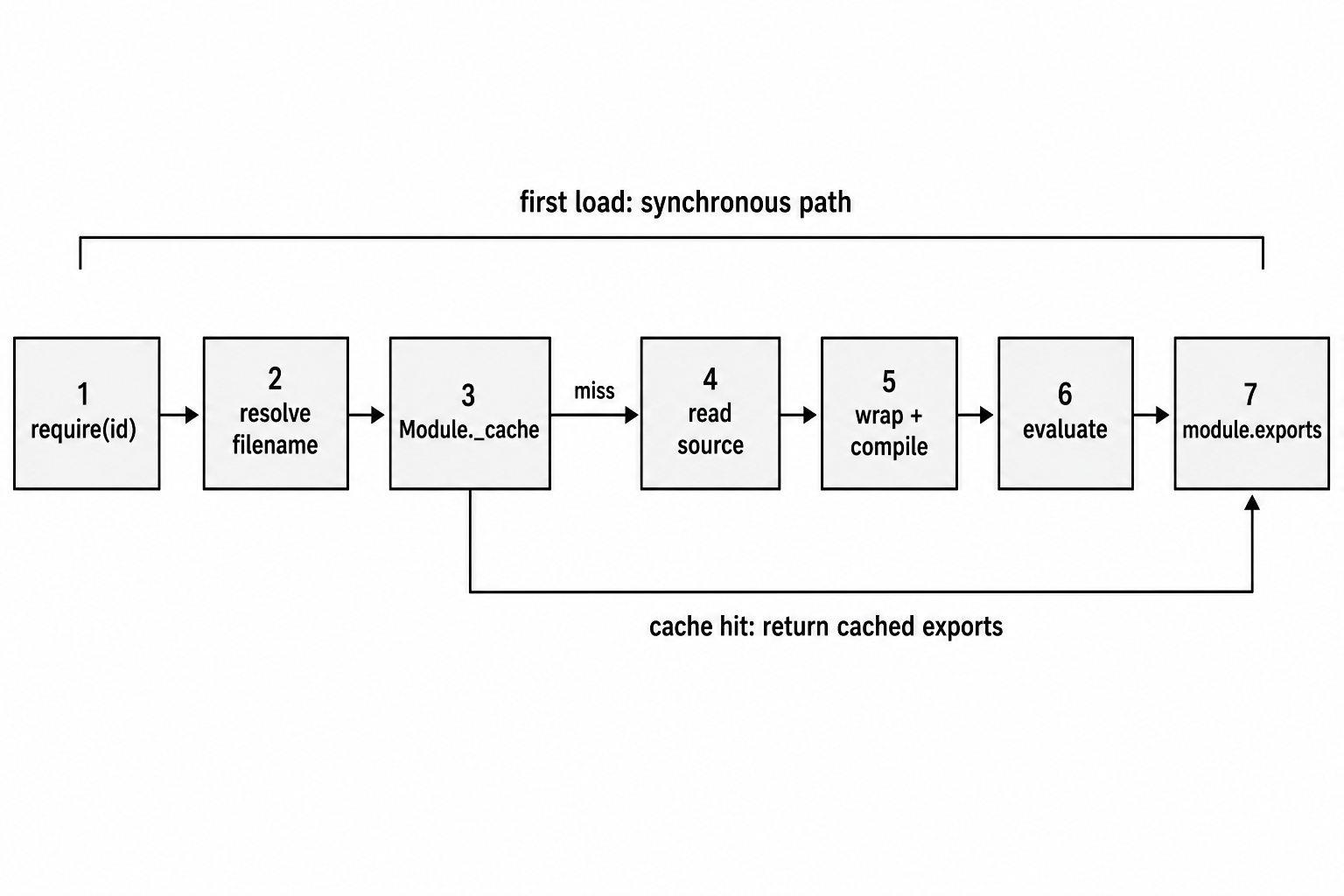
Figure 1.1 - A first-time require() follows the full synchronous path. A cache hit skips file reading and compilation, then returns the cached exports value.
Those names are private Node internals. In Node v24, names such as Module._load, wrapModuleLoad, requireDepth, and compileFunctionForCJSLoader match the loader source. They are useful for learning how Node works, but they are not public APIs. Internal names can move between releases.
The local require function eventually calls Module.prototype.require. Simplified from Node v24, the shape looks like this -
Module.prototype.require = function(id) {
  validateString(id, 'id');
  requireDepth++;

  try {
    return wrapModuleLoad(id, this, false);
  } finally {
    requireDepth--;
  }
};
The function validates the request string, increments a loading-depth counter, enters the internal loading path, then decrements the counter in finally.
The finally is there so the loader cleans up its own bookkeeping even when loading fails. If the target module has a syntax error, or if its top-level code throws, the caller still gets the error. But Node does not leave the internal requireDepth counter stuck at the wrong value.
The false argument tells the loader this module is being loaded as a dependency, rather than as the main entry file passed to node.
Module._resolveFilename
Before Node can load anything, it has to turn the request into a specific target.
This call -
require('./utils');might refer to ./utils.js, ./utils.json, ./utils.node, or an index file inside a utils directory. A package request such as this -
require('express');starts a node_modules lookup from the parent module's location.
The full resolution algorithm gets its own chapter. For now, the key job of Module._resolveFilename is to answer one question - what exact module does this request mean from here?
The method receives the request string and the parent module. First, it checks whether the request names a built-in Node module such as fs, path, http, or net.
Simplified from Node v24 -
if (BuiltinModule.normalizeRequirableId(request)) {
  return request;
}
This early check avoids filesystem work for common calls such as require('fs') and require('path').
Modern code can also use the explicit node: prefix -
const fs = require('node:fs');That prefix forces the built-in module path. It avoids userland cache tricks and has no filesystem fallback. Without the prefix, Node still recognizes names such as 'fs' as built-ins, but the CommonJS loader may check Module._cache['fs'] before loading the real built-in. Code that wants the built-in module with no ambiguity should prefer the node: form.
For non-built-in requests, _resolveFilename asks Module._resolveLookupPaths where it should search.
Relative paths such as ./ and ../ resolve from the parent module's directory. Bare package names build a chain of node_modules directories by walking upward from the parent module toward the filesystem root.
After Node has the search list, Module._findPath tries possible files and fallbacks. It checks file extensions such as .js, .json, and .node. It also checks directory entry points such as package main fields and index files.
The first match wins.
Node also keeps an internal path cache called Module._pathCache. It maps a request plus its search paths to the resolved filename. That lets repeated resolution avoid repeated filesystem checks.
The rough shape is -
const cacheKey = request + '\x00' + paths.join('\x00');
const entry = Module._pathCache[cacheKey];

if (entry) return entry;
The \x00 null byte separates the request from each lookup path while still letting Node use one string as the object key.
If no candidate works, the loader throws MODULE_NOT_FOUND. The error includes a require stack so you can see which modules led to the failed request.
When you want to inspect where Node would look for a package, use -
require.resolve.paths(request);That is often the fastest way to debug "package installed, but Node cannot find it" problems.
Module._load as Coordinator
After resolution, Module._load decides whether Node can return a cached export or whether it has to create and evaluate a new module.
The first step is filename resolution. A request like this -
require('./utils');might become a full path like this -
/home/user/project/utils.jsThat resolved filename becomes the normal cache key for file-backed CommonJS modules. Module._cache is a JavaScript object keyed by absolute filenames. If there is already an entry, _load can usually return the cached exports value immediately.
Simplified, the cache check looks like this -
const cachedModule = Module._cache[filename];

if (cachedModule !== undefined) {
  updateChildren(parent, cachedModule, true);

  if (cachedModule.loaded) {
    return cachedModule.exports;
  }
}
The cachedModule.loaded check is where circular dependencies become visible. A module can be in the cache before it finishes evaluating. If another module asks for it during that time, Node may return a partially filled exports object.
If the request names a built-in module and no earlier cache entry handled it, Node loads it through the built-in module path. Built-ins have their own internal cache separate from normal file modules in Module._cache.
For an uncached file module, _load creates a new Module instance -
const module = new Module(filename, parent);A new module starts with an empty exports object, loaded set to false, and an empty children list. Node adds more fields while loading, such as filename and paths.
Then comes the ordering detail that explains cycles. Node inserts the new module into Module._cache before reading and running the file.
That early cache insertion prevents infinite recursion. If A requires B, and B requires A, the second request for A finds A in the cache. B receives A's current module.exports value. It may be incomplete, but it exists.
Only after the cache insertion does Node call -
module.load(filename);That call reads the file, chooses the extension handler, compiles source when needed, and runs the module body.
If loading throws, Node removes the module from the cache before passing the error back to the caller.
The simplified cleanup shape looks like this -
let threw = true;

try {
  module.load(filename);
  threw = false;
} finally {
  if (threw) {
    delete Module._cache[filename];
  }
}
That keeps a failed load from becoming a permanently broken cache entry. The next require() attempt starts again.
When module.load() finishes successfully, Node sets module.loaded to true, and _load returns the current module.exports value.
Module.prototype.load
A Module instance owns the next part of the process. Its load() method takes the resolved filename and sends it to the right file handler.
Node keeps those handlers in Module._extensions.
A simplified version looks like this -
Module.prototype.load = function(filename) {
  this.filename = filename;
  this.paths ??= Module._nodeModulePaths(
    path.dirname(filename)
  );

  const extension = findLongestRegisteredExtension(filename);
  Module._extensions[extension](this, filename);

  this.loaded = true;
};
By the time load() runs, Node has already resolved extensionless requests. If you wrote this -
require('./config');Node already tried config, config.js, config.json, config.node, and directory fallbacks during resolution. load() receives a real filename.
findLongestRegisteredExtension() picks the most specific registered handler for that filename. After the handler finishes, this.loaded becomes true.
At that point, the module is considered complete, and the export value is whatever module.exports points to.
Module._extensions - The Handler Registry
Module._extensions has three default handlers -
| Extension | What Node does |
|---|---|
.js | Reads JavaScript source, compiles it, and runs it as CommonJS. |
.json | Reads the file, parses JSON, and assigns the parsed value to module.exports. |
.node | Loads a compiled native addon through the operating system's dynamic loader. |
The .js handler is the one most people think of. It reads source synchronously and calls module._compile().
The .json handler is much simpler. It reads the file, parses the JSON, and puts the parsed object directly on module.exports. There is no CommonJS wrapper and no top-level JavaScript execution.
Simplified, it looks like this -
Module._extensions['.json'] = function(module, filename) {
  const content = fs.readFileSync(filename, 'utf8');
  module.exports = JSONParse(stripBOM(content));
};
stripBOM() removes a UTF-8 byte order mark if the file has one. Some editors, especially on Windows, may add a BOM. The JSON parser should not treat that marker as part of the document.
The .node handler loads native code. It calls process.dlopen(), which asks the OS dynamic linker to load the compiled addon. On Unix systems that means dlopen. On Windows that means LoadLibrary. The addon registration code then sets module.exports.
Userland can still add handlers too -
require.extensions['.txt'] = function(mod, filename) {
  // read the file and assign mod.exports
};
That hook still works, but it is deprecated. It is synchronous, global, and hard to compose with other tooling. In most modern code, pre-compilation is cleaner.
JSON caching has one behavior worth calling out. When you require a JSON file, Node parses it once and caches the parsed object. Later calls return the same object, even if the file changes on disk.
Example -
// config.json
{ "port": 3000 }const cfg = require('./config.json');
cfg.port = 9999;
const cfg2 = require('./config.json');
console.log(cfg2.port); // 9999Both variables point at the same cached object. Mutating required JSON turns configuration into shared process state, so treat it carefully.
Module._compile - Where Source Becomes Code
module._compile() is where a .js file becomes executable CommonJS code.
It receives the raw JavaScript source string. Before V8 parses that string, Node handles a few CommonJS details. If the file starts with a shebang line such as this -
#!/usr/bin/env nodeNode strips or handles it so the JavaScript engine can parse the rest of the file. That is why CLI scripts can start with a shebang and still run as JavaScript.
Then Node gives the file its CommonJS environment. It runs the source as if it were inside a function with five parameters.
The public wrapper template looks like this -
[
  '(function(exports, require, module, __filename, __dirname) { ',
  '\n});'
]
So a file like this -
const x = 5;
module.exports = x;
effectively runs in a shape like this -
(function(exports, require, module, __filename, __dirname) {
  const x = 5;
  module.exports = x;
});
That wrapper is why these names exist inside every CommonJS file -
exports
require
module
__filename
__dirname
They are function parameters supplied by Node. They are not real globals.
In Node v24, the default CommonJS path uses an internal compile function called compileFunctionForCJSLoader in the Node source. Older paths and monkey-patched flows may still involve wrapper strings and vm.Script-style machinery. The useful mental model stays the same - Node compiles the module as a function that receives the five CommonJS values.
Compilation prepares the function. It does not run your module body yet.
After compilation succeeds, Node calls the wrapper roughly like this -
compiledWrapper.call(
  module.exports,
  module.exports,
  require,
  module,
  filename,
  dirname
);
The first argument to call() becomes top-level this, so top-level this inside a CommonJS module is module.exports. That makes this true at the top level -
console.log(this === module.exports); // trueYou usually should not build APIs around that detail, but it explains what Node is doing.
When the wrapper returns, require() returns whatever module.exports points to. If the module wrote this -
module.exports = someFunction;then callers receive someFunction.
If the module wrote this -
exports.foo = bar;then callers receive the original exports object with foo attached.
That difference leads directly into the next trap.
module.exports vs exports - The Aliasing Trap
At the start of a CommonJS module, exports and module.exports point at the same object.
You can verify that with -
console.log(exports === module.exports); // trueBecause both names point at the same object, adding a property through either name works.
exports.greet = () => 'hello';

console.log(module.exports.greet()); // 'hello'
The problem starts when you reassign exports.
exports = { greet: () => 'hello' };

console.log(module.exports); // {}
That only changes the local exports variable. It does not change module.exports.
require() always returns module.exports.
So when you want to export one complete value, write -
module.exports = class Database {
  constructor(url) {
    this.url = url;
  }

  query(sql) {
    // ...
  }
};
The caller receives the class directly -
const Database = require('./database');If the file used this instead -
exports = class Database {
  // ...
};
the caller would receive the original empty object. The local alias changed, but the actual export value did not.
Use this style when adding named exports -
exports.greet = function greet() {
  return 'hello';
};

exports.version = '1.0.0';
Use this style when replacing the whole export -
module.exports = function greet(name) {
  return `hello ${name}`;
};
One more timing detail helps explain rare bugs. The cache stores the Module instance, not a frozen snapshot of the export value. Later require() calls read the module's current module.exports property.
So if a module changes module.exports asynchronously after evaluation, later callers may see the new value. Earlier callers still hold whatever value they received the first time. In real code, assign the final module.exports value synchronously during module evaluation. It is easier to reason about and avoids split-brain behavior between old and new consumers.
Functions can also carry properties because functions are objects in JavaScript.
function greet(name) {
  return `hello ${name}`;
}

greet.version = '1.0.0';

module.exports = greet;
A consumer can call the function and also read its property -
const greet = require('./greet');

console.log(greet('world'));
console.log(greet.version);
Some packages use this shape. express is a familiar example - the export is a function you call, and it also has properties such as .Router and .static.
Module._cache and require.cache
Module._cache stores loaded CommonJS file modules. It is a prototype-less object created with Object.create(null), keyed by absolute filenames.
If require('./utils') resolves to this path -
/home/user/project/utils.jsthen that full path becomes the cache key.
Each module's local require exposes the same object as require.cache, so you can inspect it -
console.log(Object.keys(require.cache));You will see paths like this -
[
  '/home/user/project/index.js',
  '/home/user/project/utils.js'
]
Each cached value is a Module instance. It has fields such as id, filename, loaded, exports, parent, and children.
Deleting an entry makes the next require() reload and re-evaluate that file -
delete require.cache[require.resolve('./config')];

const freshConfig = require('./config');
That deletion only affects future calls. Any module that already required ./config still holds the old export reference.
After deleting and requiring again, your process can have two versions of the same module's exports alive at once. Old consumers keep the old value. New consumers get the new one.
That is why cache deletion works for small dev-time experiments, but it is fragile as a production hot-reload strategy. It does not update existing references. It also does not undo side effects from the first evaluation, such as timers, event listeners, or open connections.
The cache object uses Object.create(null) for a small defensive reason. A normal object inherits keys such as toString, constructor, and hasOwnProperty from Object.prototype. A prototype-less object avoids inherited-key collisions entirely.
The cache also connects to require.main.
require.main points to the Module instance for the entry file passed to node. A CommonJS file can compare that value with its own module object to decide whether it is being run directly.
function startServer() {
  // start the CLI or server entry point
}

if (require.main === module) {
  startServer();
}

module.exports = { startServer };
When you run this -
node server.jsthe comparison is true and startServer() runs.
When another file does this -
require('./server');the comparison is false, so the file prepares its exports without starting the server.
If the process entry point is an ES module, require.main is undefined. This guard is a CommonJS entry-point pattern.
Synchronous Loading
Every step of require() is synchronous. File reading is synchronous. Compilation is synchronous. Running the module body is synchronous.
If the module starts asynchronous work inside its top-level code, require() does not wait for that later work. It only waits for the synchronous module body to finish.
This affects where you place first-time loads.
At startup, synchronous loading is usually fine because your server has not started handling requests yet. Inside a request handler, the first load can block the event loop.
Example -
app.get('/report', (req, res) => {
  const report = require('./heavy-report-generator');
  res.json(report.generate());
});
The first request that reaches this handler pays the full loading cost. Node may read the file, compile it, run top-level setup, and load any nested dependencies. Later requests hit the cache and return much faster, but that first request still blocks while the module loads.
Stable dependencies are usually better loaded before latency-sensitive paths.
Lazy require() is still useful when a dependency is rare, optional, or expensive and only needed in one branch. Just make the first-hit cost intentional.
CommonJS stayed synchronous because old Node programs relied on this behavior. When require() returns, the module's top-level side effects have run. If a module registers a handler, patches a library, or initializes process-level state, the next line can assume that work happened.
This also lets CommonJS load modules behind runtime branches -
let parser;

if (process.env.USE_FAST_PARSER) {
  parser = require('fast-parser');
} else {
  parser = require('slow-but-safe-parser');
}
Assuming both packages exist, only the selected branch loads. The other package is not read, compiled, or evaluated.
Static ESM import declarations work differently. They must appear at the top level and participate in module linking. ESM uses dynamic import() when code needs runtime conditional loading.
That branch-friendly behavior is one reason CommonJS still appears in libraries with optional dependencies.
Startup ordering also depends on the synchronous contract. APM tools, custom exception handlers, and process-level instrumentation often need to be required early in the entry file. Since require() finishes before the next line runs, the setup happens before later CommonJS code executes.
Circular Dependencies
Circular dependencies are where the cache timing becomes visible.
Say A requires B, and B requires A. CommonJS does not fail immediately. Instead, it gives each module access to whatever the other one has exported so far.
The reason is the early cache insertion. Module._load caches a module before running its body. So when A starts loading, it enters the cache. Then A requires B. While B is loading, B requires A. Node sees A in the cache and gives B A's current module.exports.
A may not be done yet.
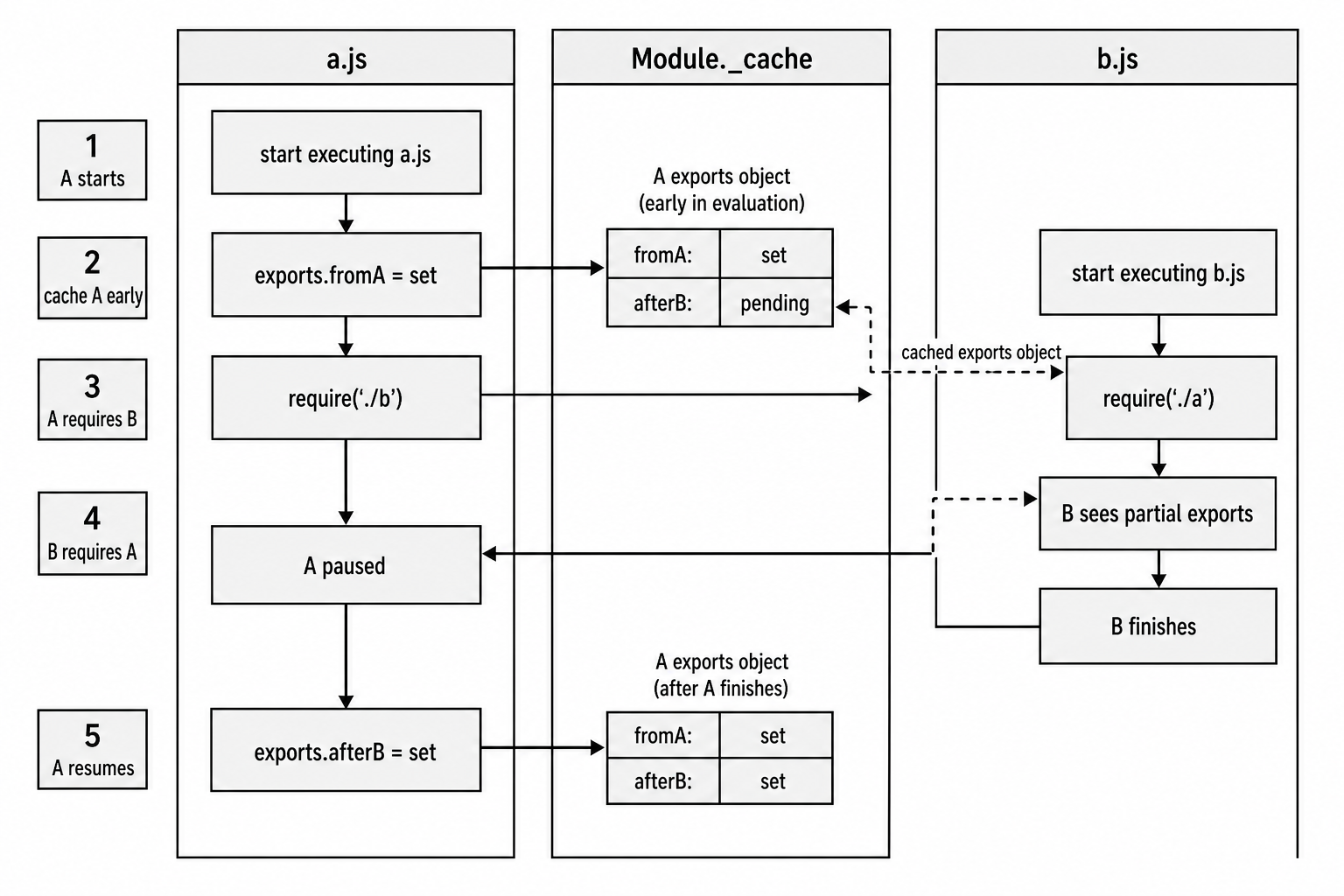
Figure 1.2 - In a cycle, the module object enters the cache before evaluation finishes. The second leg of the cycle receives the same exports object while it may still be partially filled.
Here is the classic version -
// a.js
exports.fromA = 'hello from A';

const b = require('./b');

exports.afterB = 'set after B loaded';// b.js
const a = require('./a');
console.log(a.fromA); // 'hello from A'
console.log(a.afterB); // undefinedfromA exists because A set it before requiring B.
afterB is missing because A has not reached that line yet. A is paused while B loads.
After B finishes, control returns to A, and A sets exports.afterB. If B reads a.afterB later, it will find it because B still holds a reference to A's exports object.
The read was early. The reference was still live.
The bigger failure happens when a module replaces module.exports inside a cycle.
Example -
// a.js
const b = require('./b');

module.exports = {
  ready: true
};
If B required A before that reassignment, B received the original empty exports object. Later, A points module.exports at a new object. B still holds the old one.
That is why cycles usually work better when modules add properties to exports instead of replacing module.exports after other modules may have captured the original object.
A safer shape inside a cycle is -
exports.ready = false;

const b = require('./b');

exports.ready = true;
This keeps the same exported object alive and mutates its properties over time.
The best fix is usually to remove the cycle. Move shared code into a third module, pass dependencies in from the caller, or split initialization from usage.
When you cannot change the graph right away, a lazy require() can move the lookup until the value is needed -
// a.js
exports.getB = function() {
  const b = require('./b');
  return b.value;
};
If getB() runs after both modules finish loading, require('./b') hits the cache and returns B's complete exports. If it runs during initialization, partial exports can still appear.
This pattern exists in real code, including parts of Node's own internals. It adds a function call and a cache lookup each time, but after the first load the lookup is usually cheap.
Node also gives you some graph metadata. module.children tracks modules first loaded through a given module. Following children can help reveal cycles, but it is not a full static dependency graph. In practice, the fastest debugging path is usually to trace the require() chain from the undefined value back to the cycle.
require.resolve()
require.resolve() runs the same resolution algorithm as require(), then stops after finding the path. It does not load, compile, or run the module.
Example -
console.log(require.resolve('./utils'));
// '/home/user/project/utils.js'

console.log(require.resolve('express'));
// '/home/user/project/node_modules/express/index.js'
If Node cannot find the module, require.resolve() throws MODULE_NOT_FOUND. It is not a boolean existence check, so optional dependencies usually use try/catch.
let optional;

try {
  optional = require.resolve('some-optional-package');
} catch (err) {
  if (err.code !== 'MODULE_NOT_FOUND') throw err;
}
require.resolve.paths(request) shows the directories Node would search.
Examples -
console.log(require.resolve.paths('./utils'));
// ['/home/user/project']

console.log(require.resolve.paths('fs'));
// null

console.log(require.resolve.paths('express'));
// ['/home/user/project/node_modules', ...]
A relative request uses the calling module's directory. A built-in module returns null. A package name returns the node_modules lookup chain, plus applicable legacy lookup paths. The exact output depends on the current file, platform, and process configuration.
This is a useful debugging tool. If a package is installed but Node cannot find it, require.resolve.paths() shows where that process is actually looking.
require.resolve() also accepts a paths option, which is useful in tools and plugin systems.
require.resolve('some-plugin', {
  paths: ['/custom/lookup/path']
});
For package names, Node treats each supplied path as a starting directory and builds the usual node_modules search chain from there. The package still has to exist somewhere in that lookup chain.
Resolution uses Module._pathCache, just like the loader. Resolving the same module twice with the same effective options can avoid filesystem checks the second time. If a file is deleted after the first resolution, the cached result may still point to the old path.
Long-running tools such as dev servers sometimes clear Module._pathCache, but there is no public API for that. Directly changing it means relying on private internals.
Inside lib/internal/modules/cjs/loader.js
Most of this CommonJS machinery lives in this file in the Node.js repository -
lib/internal/modules/cjs/loader.jsIn Node v24, that file is roughly two thousand lines of JavaScript. It contains Module._load, Module._resolveFilename, Module._compile, Module._extensions, and the CommonJS caches.
The Module class starts with a normal constructor. Simplified from Node v24, it has this shape -
function Module(id = '', parent) {
  this.id = id;
  this.path = path.dirname(id);
  this.exports = {};
  this.filename = null;
  this.loaded = false;
  this.children = [];
}
Every uncached file module gets one of these instances.
The fields start simple. exports begins as an empty object. filename gets filled in during loading. loaded becomes true only after the handler finishes. children records modules that this module loads.
Module._nodeModulePaths() builds the node_modules search list for package requests. It takes a directory and walks upward toward the root, appending node_modules at each level.
Simplified -
Module._nodeModulePaths = function(from) {
  from = path.resolve(from);
  const paths = [];

  for (/* each parent directory */) {
    paths.push(path.join(dir, 'node_modules'));
  }

  return paths;
};
For a file at this path -
/home/user/project/src/utils.jsNode may search paths such as -
/home/user/project/src/node_modules
/home/user/project/node_modules
/home/user/node_modules
/home/node_modules
/node_modules
Windows follows the same idea with drive letters and backslash separators. These paths become module.paths and are used for bare specifier lookup.
_compile() is where the loader crosses into the JavaScript engine. In Node v24, the default CommonJS path uses an internal compile function for the CJS loader instead of literally calling the public vm.compileFunction() API.
The useful shape for authors is still this - Node compiles the module as a function that receives exports, require, module, __filename, and __dirname.
Simplified from the internal path -
const result = compileFunctionForCJSLoader(
  content,
  filename,
  false, // is_sea_main
  shouldDetectModule
);

const compiledWrapper = result.function;
The wrapper strings still exist as Module.wrapper[0] and Module.wrapper[1], but the default path is internal. The compile call receives the source content and filename, performs CommonJS-specific handling such as syntax detection, and returns the function Node will call.
After compilation, _compile() builds the require function for that specific module. This local function has the right parent binding, plus its own resolve, cache, and main properties.
Then Node calls the compiled function with module.exports as this and passes the five CommonJS parameters. User code runs from top to bottom. Each nested require() repeats the same resolve, cache-check, load, compile, and execute sequence.
There is also a V8 compile-cache layer. When the module compile cache is enabled through NODE_COMPILE_CACHE or the node:module API, Node can store and reuse compile artifacts. That is separate from require.cache.
require.cache stores evaluated module objects inside one process. The compile cache helps reduce parse and compile work across process runs. It is a startup performance feature, not the same thing as CommonJS export caching.
The loader also handles main-module bookkeeping. When the file passed to node is loaded, Module._load receives true for isMain. It sets process.mainModule, which is deprecated in favor of require.main, and gives the main module the id '.'.
That is the state behind this pattern -
if (require.main === module) {
  // run as CLI
}
Directory loading lives in the same loader file. If you require a directory like this -
require('./myLib');Node checks that directory's package.json. If it has a usable main field, that field chooses the entry point. Without a usable package entry, Node tries index.js, then index.json, then index.node.
This behavior is why a package can expose its entry point with a field like this -
{
  "main": "lib/index.js"
}
The extension registry also explains an older tool pattern. CoffeeScript, TypeScript transpilers, and other tools used to install handlers such as -
require.extensions['.coffee'] = function(module, filename) {
  // compile and assign module.exports
};
That hook still works in Node v24, but it is deprecated. It is synchronous, global, and does not compose cleanly with ES Modules. ESM loaders use a separate hook system. For application code, pre-compiling source is usually cleaner.
There are smaller polish steps inside _compile() too. When the compiled function throws, Node adjusts stack-trace behavior so errors point at your source file, not a fake wrapper line.
Source maps connect at this layer as well. If a module contains a //# sourceMappingURL= directive and Node runs with --enable-source-maps, stack traces can point back to original TypeScript, JSX, or other source files.
Finally, the content passed to _compile() is the raw source string loaded for the module. Before or during compilation, Node handles UTF-8 byte order marks and shebang lines so CLI files beginning with #!/usr/bin/env node still compile as JavaScript.
The Full Lifecycle, Start to Finish
Now put the whole path together.
This call -
require('./math');runs through this sequence -
Module.prototype.requirereceives'./math'.Module._load('./math', parentModule, false)begins.Module._resolveFilenameresolves it to/home/user/project/math.js.Module._cache['/home/user/project/math.js']is checked.- The built-in module path does not apply because this is a file.
new Module('/home/user/project/math.js', parentModule)creates the module object.- Node stores the module in
Module._cachebefore running the file. module.load('/home/user/project/math.js')starts.- Node selects the
.jsextension handler. - The file is read synchronously into a source string.
module._compile(sourceString, filename)begins.- Node handles a shebang line if one exists.
- The CommonJS compile path compiles the source with wrapper parameters.
- The compiled function is called with
module.exports,require,module,filename, anddirname. - The module body runs and mutates or replaces
module.exports. - The wrapper returns, and
module.loadedbecomestrue. Module._loadreturnsmodule.exports.- The caller receives the export value and continues.
The whole sequence is synchronous. If reading the file takes 50ms, the process waits for 50ms. If the module loads ten nested dependencies, each nested load follows the same path unless the cache shortens it.
That synchronous design makes CommonJS easy to reason about. When require() returns, the module's top-level code has run, and its side effects have happened. Its exports are complete, except in the circular dependency case where CommonJS deliberately exposes the in-progress export object.
The trade-off is startup and first-load cost. Disk reads, parsing, compilation, and top-level execution all happen on the same synchronous path. ES Modules use a different parse, link, and evaluate pipeline, with asynchronous behavior when top-level await or loader hooks require it. Node v24 supports both systems, and their interop is covered later in this module-system chapter.