The Node.js process Object: Environment, Arguments, Exit State, and Runtime Metadata
The process object is Node's JavaScript connection to the operating-system process running your program. It is how your code reads command-line arguments, environment variables, process IDs, the current working directory, exit state, memory counters, release information, IPC channels, and a few runtime-level hooks.
Some of those values are filled in once when Node starts. Others stay connected to native runtime state or operating-system state and are read again each time you ask for them.
That difference is the main thing to keep in your head. process looks like one normal global object, but its fields do not all behave the same way. Some are startup values. Some are live process-wide state. If you treat every property like a plain JavaScript value, you can accidentally make code slower, harder to test, or unsafe for libraries to use.
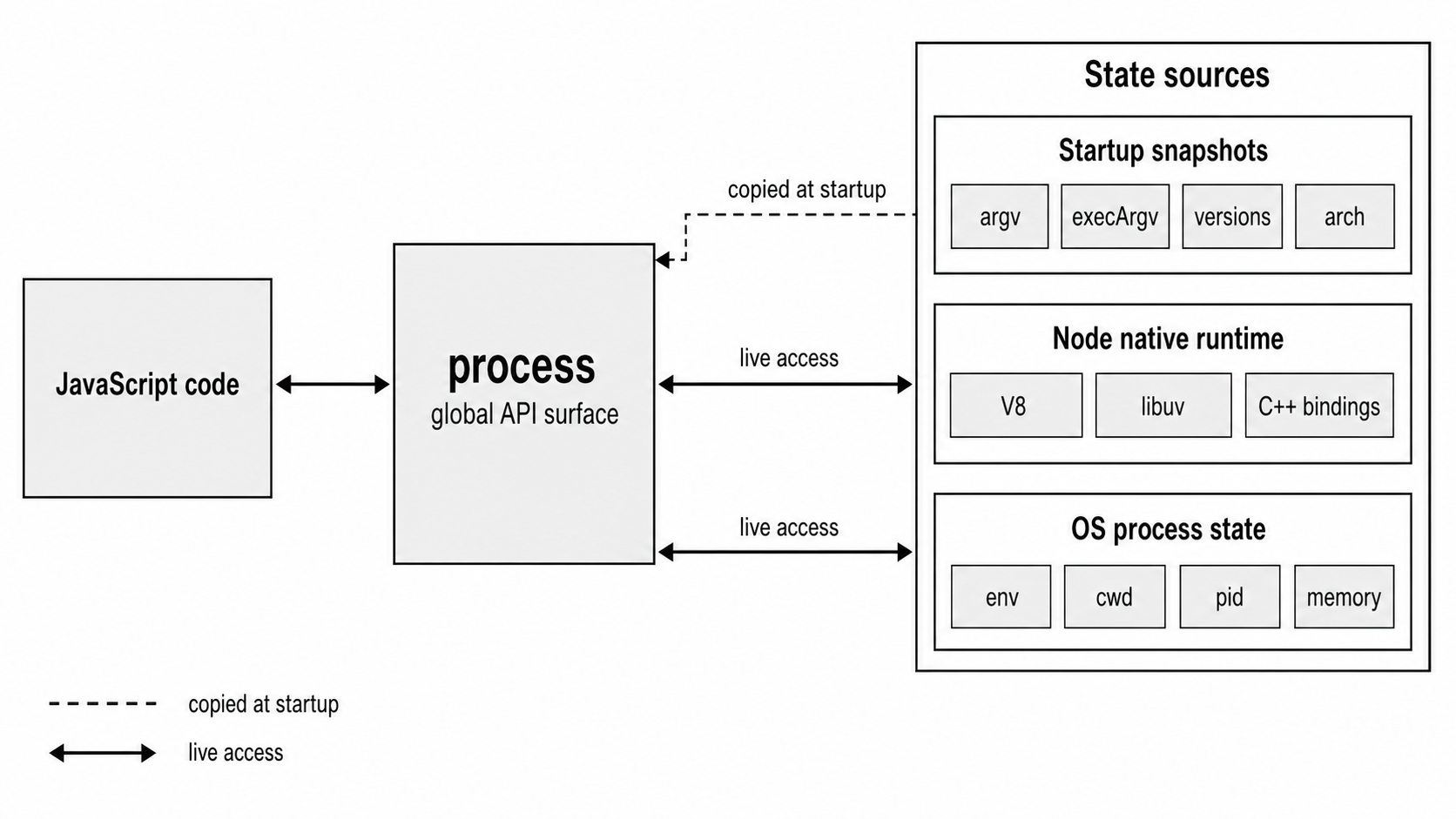
Figure 5.1 - The process object connects JavaScript code to startup data, Node runtime state, and operating-system process state.
The process Object
Every Node program gets the same global process object. It is an EventEmitter backed by native code, and it represents the whole running process. It does not belong to one file or one module.
You use it for startup data like this -
console.log(process.argv);
console.log(process.execArgv);
console.log(process.env.NODE_ENV);
process.argv contains the arguments passed to your program. process.execArgv contains the flags consumed by Node itself. process.env exposes the environment variables visible to the current process.
The big rule is simple - changing process changes the whole process.
If one file changes process.env, every other file sees that change. If one module calls process.chdir(), relative filesystem paths can change for the rest of the program. If a package sets process.exitCode, changes process.title, or installs process-wide event handlers, it is changing the host application.
That is why library code should be careful with process. Reading from it is usually fine. Mutating it should be part of the library's clear contract, because the change reaches beyond the library itself.
process.env
process.env looks like a regular JavaScript object. You can read properties, assign values, delete values, and enumerate keys -
console.log(process.env.HOME);

process.env.MY_VAR = 'hello';

delete process.env.MY_VAR;

console.log(Object.keys(process.env).length);
That object-like shape is convenient, but the main thread version is not stored like a normal JavaScript object. Reads, writes, deletes, and enumeration go through Node's native environment binding.
When you read process.env.HOME in the main thread, Node goes through libuv's uv_os_getenv(). On POSIX systems, libuv reads from the process environment block - the KEY=VALUE strings inherited when the process started.
Writes and deletes move in the other direction. Setting a value calls uv_os_setenv(). Deleting one calls uv_os_unsetenv(). Calling Object.keys(process.env) asks libuv for the environment items and converts the names into JavaScript strings.
Worker threads are different by default. They receive a copied environment store instead of directly using the main thread's real OS environment store.
The String Coercion Trap
Environment variables only store strings. When you assign a value to process.env, Node converts it before storing it -
process.env.PORT = 3000;

console.log(typeof process.env.PORT);      // 'string'
console.log(process.env.PORT === 3000);    // false
You assigned the number 3000, but the stored value is "3000". The operating-system environment is a string-to-string map. JavaScript type information does not survive that boundary.
The same thing happens with booleans and accidental values -
process.env.VERBOSE = true;
process.env.COUNT = undefined;
process.env.VALUE = null;

console.log(process.env.VERBOSE); // 'true'
console.log(process.env.COUNT);   // 'undefined'
console.log(process.env.VALUE);   // 'null'
Those values currently pass through JavaScript's ToString() conversion before storage. In the main thread, the resulting string then goes through the native environment setter.
There is a version-sensitive warning here. Node's implicit conversion is deprecated for values that are not strings, numbers, or booleans. Modern code should convert explicitly before assigning to process.env, especially for null, undefined, objects, and arrays.
String coercion also causes a very common config bug -
if (process.env.ENABLE_CACHE) {
  // This runs even when ENABLE_CACHE is 'false'
  // because 'false' is still a non-empty string.
}
If a value comes from the environment, parse it like input. Compare the exact strings you accept, and parse numbers deliberately -
const parseInteger = (value, fallback) => {
  if (!/^-?\d+$/.test(value ?? '')) return fallback;
  return Number.parseInt(value, 10);
};

const cacheEnabled = process.env.ENABLE_CACHE === 'true';
const port = parseInteger(process.env.PORT, 3000);
const maxRetries = parseInteger(process.env.MAX_RETRIES, 3);
A missing variable behaves like normal JavaScript property access -
console.log(process.env.NONEXISTENT); // undefinedIn the main thread, the getter asks the native environment store for NONEXISTENT. No key exists, so Node returns undefined to JavaScript.
The same absence shows up through object-style checks -
console.log('NONEXISTENT' in process.env); // false
console.log(Object.keys(process.env).includes('NONEXISTENT')); // false
The API feels like a normal object. The storage path behind it is different.
Inheritance and Isolation
Environment variables come from the parent process. When you run -
node app.jsthe shell's environment is copied into the new Node process at startup. On POSIX systems, that happens through the usual process creation path. Other platforms use their own process creation APIs, but the effect is the same - the child starts with a copy of the parent's environment.
Changing process.env inside your Node program does not change the parent shell. It also does not change sibling processes that were already started. Environment data flows from parent to child at spawn time.
The same copy rule applies when your Node process starts another process. By default, child_process.spawn() passes the current process.env to the child. You can override or extend it with the env option -
const { spawn } = require('node:child_process');

spawn(process.execPath, ['worker.js'], {
  env: { ...process.env, WORKER_ID: '3' },
});
This example assumes worker.js exists. process.execPath uses the same Node binary as the parent process instead of relying on PATH to find node.
The spread expression is useful, but it is not free. In the main thread, spreading process.env enumerates every key and reads every value through the native environment binding. Then spawn() serializes that object into the platform's child-process environment format.
That cost is usually fine at startup or during occasional process creation. It is not something you want inside a hot loop.
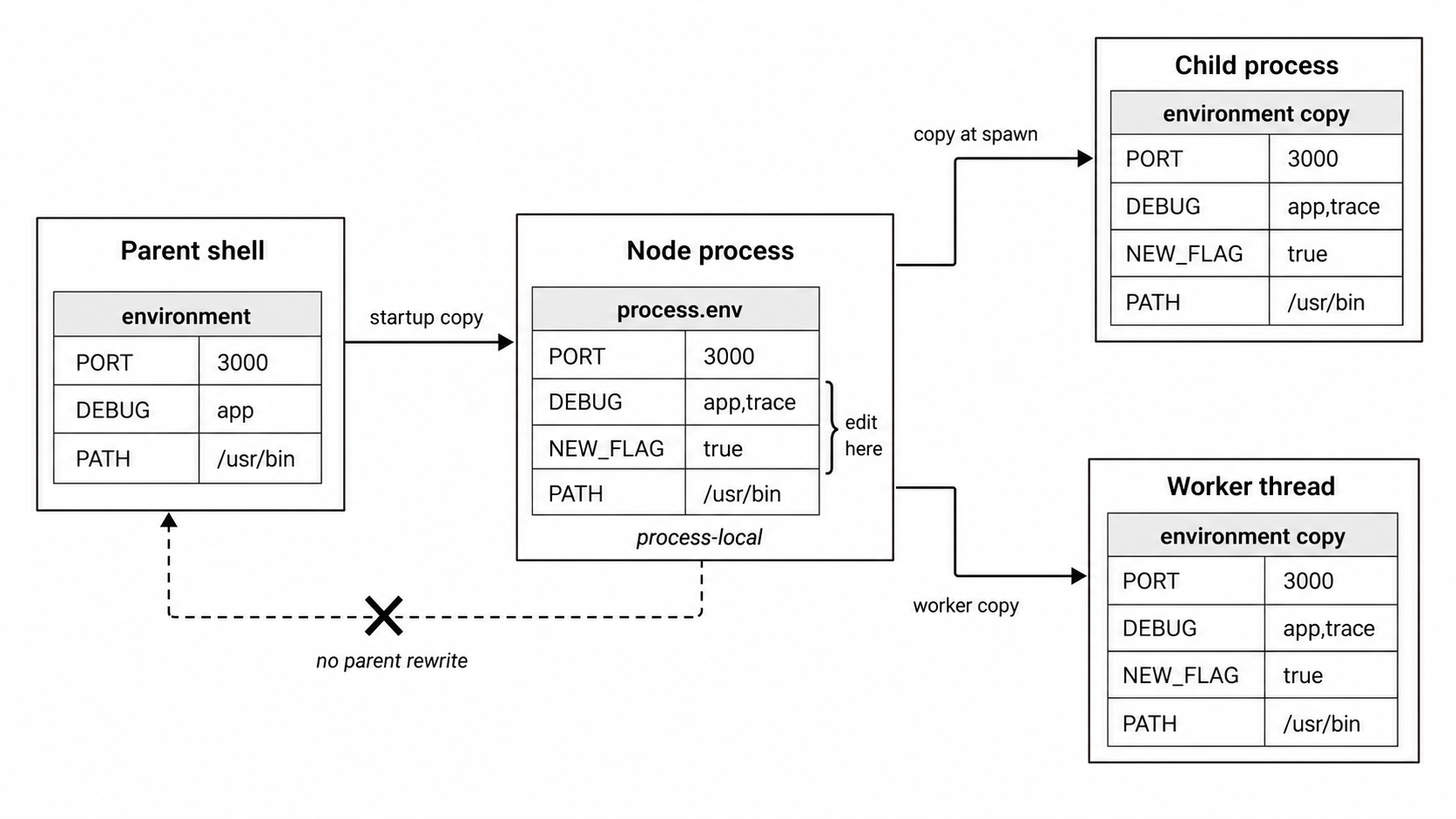
Figure 5.2 - Environment variables are copied into child scopes. Edits affect the current process and future children, not the parent shell that launched it.
Common Environment Conventions
Names like NODE_ENV, PORT, and DEBUG are conventions. Node does not give them universal behavior.
NODE_ENV changes behavior in many libraries. PORT is commonly used by hosting platforms to pass the listen port. DEBUG controls namespace-based logging in the popular debug package.
Node itself does not assign special behavior to NODE_ENV. Each library decides what to do with it. Some check for "production". Some check for "prod". Some use !== "development" instead of === "production", which means a typo like "producton" can accidentally run production-style behavior.
The .env file pattern uses the same mechanism. A startup step reads KEY=VALUE lines from a file and assigns those strings to process.env. In the main thread, those assignments go through Node's environment setter.
Node v24 also includes built-in env-file loading through process.loadEnvFile(). The runtime configuration chapter covers that flow in more detail.
Cache Your Environment Reads
Main-thread process.env reads cross into native code. A single read is cheap. Repeating the same read millions of times inside request handlers, tight loops, or stream transforms can show up in profiles.
Most applications should read environment configuration once during startup -
const nodeEnv = process.env.NODE_ENV;
const dbUrl = process.env.DATABASE_URL;
const cacheEnabled = process.env.ENABLE_CACHE === 'true';
Then the rest of the app should use those local values.
This is also cleaner design. A database URL, log level, port number, or feature flag usually should not be re-read from process.env inside every request handler. Read it once, validate it once, convert it once, and pass the application value around.
A small benchmark shows the scale. On one Node 24 machine with a few dozen environment variables, reading process.env.PATH 10 million times took about 3.8 seconds. Reading a local variable 10 million times took under 10 milliseconds. The exact numbers depend on the machine and environment size, but the direction is stable - cache configuration values that are meant to stay fixed.
process.argv
process.argv is a plain JavaScript array. Node fills it once during startup, and after that it stays as normal JavaScript data. There are no C++ traps, special accessors, or native lookups behind every read.
For a normal script entry point, the array looks like this -
// Run with - node app.js --port 8080 --verbose

console.log(process.argv[0]); // '/usr/local/bin/node'
console.log(process.argv[1]); // '/home/user/app.js'
console.log(process.argv[2]); // '--port'
console.log(process.argv[3]); // '8080'
console.log(process.argv[4]); // '--verbose'
Index 0 is the absolute path to the Node binary. It is the same value as process.execPath.
When a script file exists, index 1 is the absolute path to that script. Everything from index 2 onward belongs to your program.
That shape is common, but it is not guaranteed for every way Node can start. With node -e, stdin execution, or the REPL, there may be no script path at argv[1]. For example -
node -e "console.log(process.argv)" -- userargIn that case, process.argv contains the Node executable path and then "userarg". Use slice(2) when you know your command is a normal script entry point -
const args = process.argv.slice(2);Now args contains the user's arguments, but it still does not understand them. It does not know that --port expects a value, or that -p 8080 should mean the same thing as --port 8080.
Parsing with util.parseArgs()
Manual parsing gets annoying quickly. Once your CLI has a few flags, you need to recognize names, check whether the next token is a value, support booleans, and decide what to do with positional arguments.
Node includes util.parseArgs() for small command-line tools. It was added in Node v18.3 and v16.17, and it has been stable since Node v20.0.
Here is a basic parser -
const { parseArgs } = require('node:util');

const { values, positionals } = parseArgs({
  options: {
    port: { type: 'string', short: 'p' },
    verbose: { type: 'boolean', short: 'v' },
  },
});

console.log(values);
console.log(positionals);
Run it with either form -
node app.js --port 8080 --verbose
node app.js -p 8080 -v
In both cases, values contains -
{ port: '8080', verbose: true }The parser is strict by default. Unknown flags throw a TypeError. You can set strict: false, but then unknown flags pass through as boolean values in values instead of becoming positional arguments.
For larger CLIs, use a dedicated parser such as commander or yargs. They handle subcommands, generated help text, defaults, validation, and richer error messages. util.parseArgs() is a good fit when you only need a few flags.
One command-line convention is worth preserving - -- stops flag parsing.
Everything after -- is treated as a positional argument, even if it starts with -. When you provide an options configuration, positional arguments are disabled by default, so pass allowPositionals: true if you want this behavior.
With that enabled, this command -
node app.js --verbose -- --port 8080gives you verbose: true and these positionals -
['--port', '8080']argv0 and execPath
Two startup values tell you how Node was launched.
process.argv0 contains the original argv[0] passed by the operating system before Node resolves symlinks or adjusts it. process.execPath contains the resolved absolute path to the Node binary.
They are often the same, but they can diverge when Node is launched through a symlink.
For example, if /usr/local/bin/node is a symlink to /usr/local/lib/node/v24/bin/node, then process.argv0 might be "node" because that is the command the shell found through PATH. process.execPath is the resolved executable path.
Most applications should use process.execPath when spawning child Node processes. It keeps the child on the same Node executable as the current process.
process.exit(), exitCode, and Exit Events
Exit codes tell the parent process whether your program succeeded or failed. A CLI, shell script, test runner, process manager, or container runtime can read that code after the process ends.
There are two common ways a Node program finishes.
The first way is natural exit. The event loop runs out of work, and Node exits on its own.
The second way is forced exit. Your code calls process.exit().
Those two paths behave very differently.
Natural Exit Through Event Loop Drainage
When the event loop has nothing left to do, Node exits naturally. That means there are no pending timers, open sockets, active handles, or queued I/O callbacks keeping the process alive.
If you want the process to finish with a failure code while still allowing pending work to complete, set process.exitCode -
process.exitCode = 1;

// Async work can continue normally.
// When the loop empties, Node exits with code 1.
This is usually the best way to report failure. The process keeps running long enough to finish asynchronous work, flush streams, close connections, and then exit with the code you set.
You can pass a code directly to process.exit() -
process.exit(1);That does something much stronger.
process.exit() Stops the Process Early
process.exit() forces Node into shutdown. It runs registered "exit" handlers, then terminates. Pending timers, unresolved promises, socket work, async filesystem callbacks, and buffered writes do not get a chance to finish.
This causes real bugs. Here is a common one -
const fs = require('node:fs');

const data = JSON.stringify({ ok: true });

fs.writeFile('results.json', data, (err) => {
  if (err) console.error(err);
});

process.exit(0); // The write may not finish.
The file write is still pending in the libuv thread pool. The callback has not fired yet. process.exit() shuts the process down before the pending write can complete, so the file may be missing, empty, or truncated.
The safer version lets the event loop finish the write -
const fs = require('node:fs');

const data = JSON.stringify({ ok: true });

fs.writeFile('results.json', data, (err) => {
  if (err) {
    console.error(err);
    process.exitCode = 1;
  }
});
If the write fails, the program records a failure exit code. If nothing else keeps the process alive, Node exits naturally after the callback finishes.
The same risk applies to stdout and stderr. Depending on where they point, writes to those streams may be asynchronous. Calling process.exit() immediately after logging can cut off output.
The "exit" Event
The "exit" event fires when Node is about to terminate through normal exit paths, including natural event-loop drainage and process.exit() -
process.on('exit', (code) => {
  console.log('Exiting with code', code);
});
By the time this handler runs, the process is already shutting down. You can run synchronous code there. You cannot start useful async work.
This will not work -
process.on('exit', () => {
  setTimeout(() => {
    console.log('too late');
  }, 10);
});
The event loop will not continue after "exit" handlers return.
The code parameter is the exit code Node is about to return. You can still assign process.exitCode inside the handler, but you cannot cancel the exit.
The "exit" event does not run for every possible termination path. A default SIGTERM, default SIGINT, crash, or SIGKILL can end the process without JavaScript exit handlers running.
The "beforeExit" Event
The "beforeExit" event fires when the event loop has emptied, but Node has not been explicitly told to exit. Unlike "exit", it can schedule more async work.
If it schedules work, the event loop continues. When that work finishes and the loop becomes empty again, "beforeExit" can fire again.
let runs = 0;

process.on('beforeExit', () => {
  runs++;

  if (runs < 3) {
    setTimeout(() => {
      console.log(`run ${runs}`);
    }, 100);
  }
});
This handler runs three times. The first two runs schedule more work. The third one schedules nothing, so the process exits.
"beforeExit" does not fire when you call process.exit(). It only fires when Node is about to exit naturally because the event loop has no work left.
Default SIGINT and SIGTERM termination also skip this path. If you attach a custom signal handler, you cancel the default termination behavior. After that, Node only exits if your handler lets the loop drain or calls process.exit().
Use "beforeExit" rarely. It can help tools like test runners do last-chance reporting after scheduled work is done. It is a poor fit for servers. Long-running services should handle signals and close resources deliberately.
The Exit Sequence
A well-behaved CLI usually follows this flow -
- Do the work
- Set
process.exitCodeif something failed - Let the event loop drain
- Run
"beforeExit"if Node reaches natural exit - Continue if
"beforeExit"scheduled more work - Run
"exit"handlers for sync-only cleanup - Terminate with the final exit code
Calling process.exit(1) skips the draining path and goes straight toward shutdown. Use it when the process must stop immediately. For normal error reporting, prefer process.exitCode.
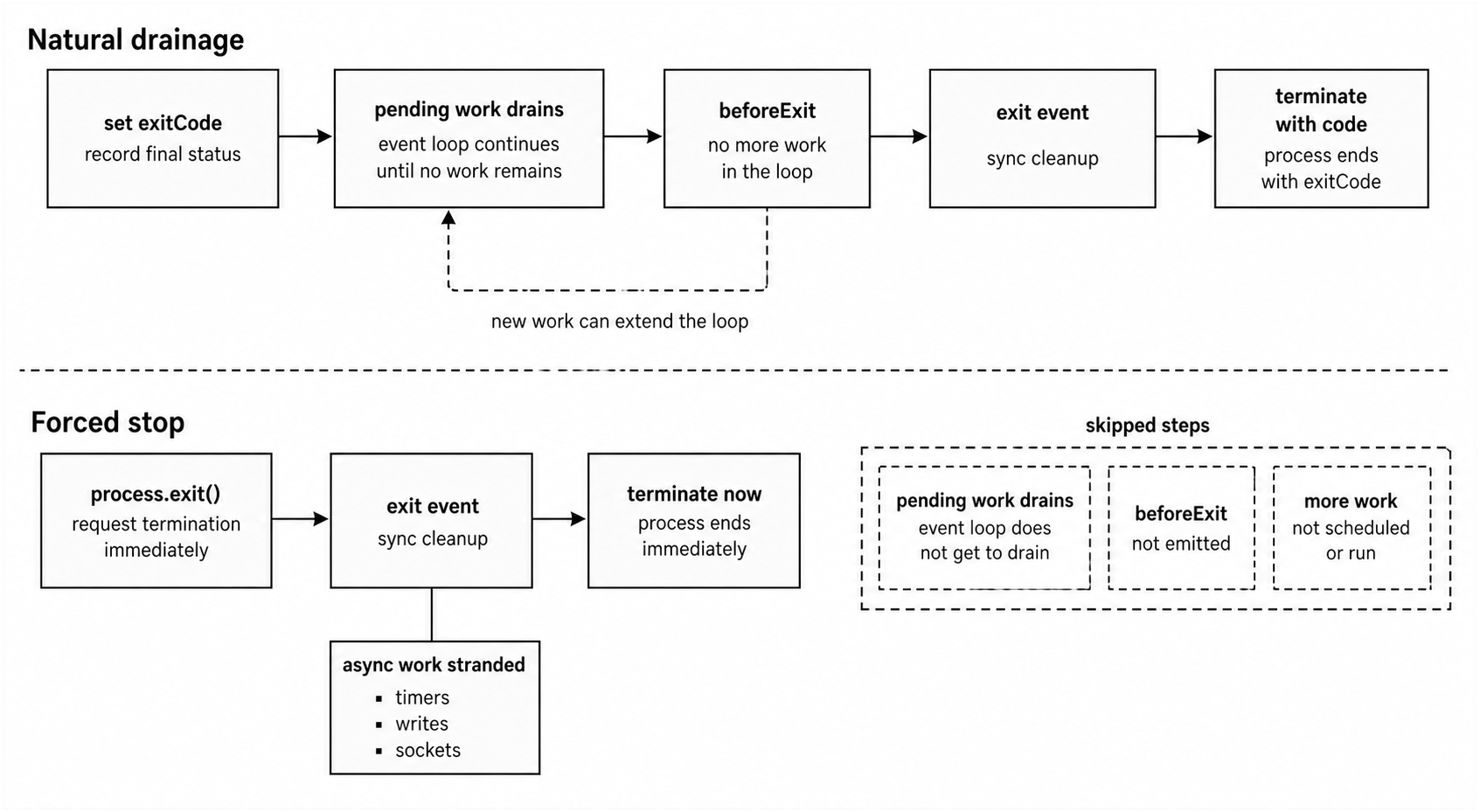
Figure 5.3 - process.exitCode records the final status while pending work can finish. process.exit() starts shutdown immediately and can leave async work unfinished.
process.cwd() and process.chdir()
process.cwd() returns the current working directory for the whole process.
At startup, this is usually the directory where the shell was standing when it ran your program. People often assume that means the project root. It might be, but it does not have to be.
console.log(process.cwd());The value comes from a live call to uv_cwd(), which uses the platform's current working directory API. If something calls process.chdir(), later calls to process.cwd() reflect the new directory.
Many relative filesystem paths resolve against the current working directory -
fs.readFile('./config.json');
fs.createWriteStream('logs/app.log');
path.resolve('data');
CommonJS require('./lib/util') is different. It resolves relative to the file doing the require, not relative to process.cwd().
This difference causes deployment bugs. If someone runs -
cd /tmp
node /home/user/my-project/app.js
then fs.readFile('./config.json') looks under /tmp, not under /home/user/my-project.
process.chdir() changes the working directory for the whole process -
const os = require('node:os');

process.chdir(os.tmpdir());

console.log(process.cwd());
Use this carefully. It changes how future relative filesystem paths resolve across the entire process, including code in third-party modules.
Worker threads cannot call process.chdir(), but they live inside the same process and can observe the current working directory through APIs that use it.
If the target path does not exist, process.chdir() throws ENOENT. If the process lacks permission to enter it, it throws EACCES. The call is synchronous and blocking because it calls the platform chdir() path directly. It does not use the thread pool.
Most production applications either set the working directory at startup or let the deployment system do it. After that, they leave it alone.
If you need to resolve paths relative to a known base directory, build the absolute path yourself -
const file = path.resolve(appRoot, 'config.json');That avoids mutating process-wide state.
pid and ppid
process.pid is the operating system process ID for the current process. The kernel assigns it when the process starts. It is unique among currently running processes, but the OS can reuse the same number after the process exits.
process.ppid is the parent process ID -
console.log(`PID ${process.pid}`);
console.log(`Parent PID ${process.ppid}`);
If you ran node app.js from a bash shell, process.ppid is the shell's PID. If another Node process started this one with child_process.fork(), process.ppid is that parent process's PID.
process.pid stays stable for the life of the process.
process.ppid has one extra detail. If the parent process dies while this process is still running, the orphaned process gets reparented by the operating system. On Linux, that usually means PID 1, which is often init or systemd. Newer Linux kernels also support subreaping through PR_SET_CHILD_SUBREAPER, where an ancestor process can claim the orphan.
Node's process.ppid may reflect this change because it queries getppid(). Some implementations cache the value, and some do not.
A common operations pattern is to write process.pid to a PID file. Monitoring tools or restart scripts can read that file and signal the process later -
const fs = require('node:fs');
const os = require('node:os');
const path = require('node:path');

const pidFile = path.join(os.tmpdir(), 'myapp.pid');

fs.writeFileSync(pidFile, String(process.pid));
If you write a PID file, clean it up with synchronous code in an "exit" handler when possible. Treat that cleanup as best-effort. Crashes, forced termination, and host restarts can still leave stale PID files behind.
Timing and Uptime
process.uptime() returns the number of seconds since the process started. The value is a floating-point number -
console.log(`Running for ${process.uptime().toFixed(2)}s`);It uses uv_hrtime() internally, so it is based on a monotonic clock. That means it will not jump backward if the system wall clock changes because of NTP or a manual time adjustment.
For high-resolution timing, use process.hrtime.bigint() -
const start = process.hrtime.bigint();

let total = 0;

for (let i = 0; i < 1_000_000; i++) {
  total += Math.sqrt(i);
}

const end = process.hrtime.bigint();

console.log(`Took ${end - start} nanoseconds`);
The older process.hrtime() form returns a tuple -
const [seconds, nanoseconds] = process.hrtime();That shape works, but arithmetic is awkward because you need to handle seconds and nanoseconds separately. The BigInt form gives you one value that can be subtracted directly.
Both APIs use the same underlying monotonic clock through uv_hrtime(). On Linux, that goes through clock_gettime(CLOCK_MONOTONIC). On macOS, it uses mach_absolute_time(). On Windows, it uses QueryPerformanceCounter(). Resolution varies by platform, but it is typically very high on modern hardware.
Date.now() answers a different question. It gives you wall-clock time. The wall clock can jump forward or backward if the system time changes. Monotonic clocks only move forward.
Use the clock based on the job -
| API | Use it for |
|---|---|
process.hrtime.bigint() | High-precision intervals as BigInt nanoseconds |
performance.now() | Monotonic intervals as millisecond numbers |
Date.now() | Wall-clock timestamps for logs, records, and databases |
performance.now() is also available in Node. It returns milliseconds as a floating-point number from a monotonic source, and it has been globally available since Node v16.
process.memoryUsage()
process.memoryUsage() returns memory counters for the current process. Every field is measured in bytes.
The object looks like this -
console.log(process.memoryUsage());

// {
//   rss: 36_798_464,
//   heapTotal: 6_066_176,
//   heapUsed: 4_230_016,
//   external: 1_036_017,
//   arrayBuffers: 10_515
// }
Here is what each field means -
| Field | Meaning |
|---|---|
rss | Resident memory attributed to the process, including code, stack, heap, shared libraries, and other mapped pages |
heapTotal | Memory V8 has allocated from the operating system for the JavaScript heap |
heapUsed | The part of the V8 heap currently occupied by live JavaScript objects |
external | Memory allocated outside the V8 heap but tied to JavaScript objects, such as many Buffer allocations |
arrayBuffers | Memory used by ArrayBuffer and SharedArrayBuffer, including Node Buffers, also counted inside external |
The gap between heapTotal and heapUsed is space V8 has reserved but has not filled with live objects. V8 grows the heap in chunks, so heapTotal is usually larger than heapUsed.
When garbage collection runs, heapUsed can drop. V8 may return some reserved memory to the operating system later, but it does not always happen immediately. Keeping some extra heap space available can make future allocations cheaper.
If you only need RSS, use the lighter API -
console.log(process.memoryUsage.rss());The full process.memoryUsage() call gathers several process and V8 counters. It can be slower because Node may inspect memory information across heap and page data. If a health check endpoint polls memory often, process.memoryUsage.rss() is cheaper because it returns only RSS.
RSS also needs careful reading. It includes memory shared with other processes, such as shared libraries. If you fork a process, some physical pages can be shared through copy-on-write until either process modifies them. RSS counts those shared pages in both processes, so adding RSS across workers can overstate total physical memory use.
On Linux, /proc/self/smaps can show the unique portions through fields like Private_Dirty and Private_Clean.
For periodic production monitoring, a simple sampler is enough -
setInterval(() => {
  const { rss, heapUsed, heapTotal } = process.memoryUsage();
  const mb = n => (n / 1024 / 1024).toFixed(1);

  console.log(`RSS ${mb(rss)}MB heap ${mb(heapUsed)}/${mb(heapTotal)}MB`);
}, 30_000);
Keep the sampling rate reasonable. process.memoryUsage() is synchronous and can take a few milliseconds on a large heap. Do not call it on every request.
versions, arch, and platform
process.versions tells you which Node version and bundled dependency versions are running -
console.log(process.versions.node); // e.g. '24.15.0'
console.log(process.versions.v8);   // e.g. '13.6...'
console.log(process.versions.uv);   // e.g. '1.51...'
Use this as diagnostic information. It is useful in logs, bug reports, startup dumps, and support output.
The modules field in process.versions is the native module ABI version. More precisely, it identifies the native module ABI accepted by this Node binary. If a native addon fails after a Node upgrade and says it was compiled against a different Node version, this ABI mismatch is usually the reason.
process.arch is the CPU architecture string, such as 'x64', 'arm64', 'arm', or 'ia32'. It matches the architecture the Node binary was compiled for, which usually matches the host machine.
process.platform is the operating-system identifier. Common values include 'linux', 'darwin' for macOS, and 'win32' for Windows. Windows reports 'win32' even on 64-bit systems.
Both values are determined when the Node binary is built -
if (process.platform === 'win32') {
  // Use Windows-specific behavior here.
}
process.config is used less often. In modern releases, it is a frozen object containing the configure options used to build the Node binary - compiler flags, feature toggles, and dependency paths. Most application code never touches it. It can help when debugging build differences or compiling native addons that need to match Node's build settings.
process.execPath and process.execArgv
process.execPath is the absolute path to the Node binary running your code.
If you installed Node through nvm, it may point somewhere under your nvm directory. If you installed Node through a system package manager, it may point under /usr/bin or /usr/local/bin.
Use process.execPath when a child process should run with the same Node executable as the parent -
const { spawn } = require('node:child_process');

const child = spawn(process.execPath, ['worker.js']);

child.on('error', (err) => {
  console.error(err);
});
This snippet assumes worker.js exists. Hardcoding 'node' depends on PATH resolution, which may find a different Node version from the one running the current process.
process.execArgv contains the Node-level flags passed before the script name -
// Run with - node --max-old-space-size=4096 --inspect app.js

console.log(process.execArgv);

// ['--max-old-space-size=4096', '--inspect']
These flags configure Node itself. They include V8 options, inspector flags, module-resolution flags, and similar runtime settings.
They are separate from process.argv because Node consumes them before your script receives its own arguments.
When you spawn child processes with child_process.fork(), process.execArgv is inherited by default. That means the child receives the same V8 flags unless you override them.
Implementation Note - process.env in the Main Thread
This section explains why process.env behaves like an object while doing work outside normal JavaScript property storage.
During startup, Node creates the process.env object from C++ code. In src/node_env_var.cc, Node uses a V8 ObjectTemplate with named property interceptors. Those interceptors let Node catch normal-looking JavaScript operations and route them through native code.
The interceptor setup includes callbacks for these operations -
- Getter - runs when you read
process.env.FOO - Setter - runs when you assign
process.env.FOO = 'bar' - Query - runs when you check
'FOO' in process.env - Deleter - runs when you call
delete process.env.FOO - Enumerator - runs when you call
Object.keys(process.env) - Definer - runs when you call
Object.defineProperty(process.env, ...)
In the main thread, the environment data lives in Node's RealEnvStore, not in ordinary V8 object slots.
When you read process.env.FOO, Node's getter callback receives the property name from V8, converts it to a platform-native string, and asks the active environment store for the value. In the main thread, that store calls uv_os_getenv().
On POSIX systems, libuv wraps the C library's environment lookup for the process environment. On common POSIX libc implementations, that lookup scans the environment block. It is not the same cost model as a normal JavaScript object property lookup. The exact lookup strategy depends on the C library and platform.
With 50 environment variables, a single lookup is still cheap. With hundreds of injected variables and repeated reads inside request paths, the cost can show up in profiles.
When you assign to process.env.FOO, Node's setter callback performs the V8 ToString() conversion. That is where values like 3000, true, null, and undefined become strings. The setter then calls uv_os_setenv() in the main-thread store. On POSIX, that reaches setenv().
Deleting a variable calls uv_os_unsetenv(), which reaches unsetenv() and removes the entry from environ.
Enumeration is the heavy path. When you call Object.keys(process.env) in the main thread, Node calls uv_os_environ(), receives the environment items, converts each item name to a V8 string, and builds a JavaScript array. That array is rebuilt each time you enumerate.
If native code in the same process modifies the environment between calls, the main thread can see the change during the next enumeration.
On Windows, the same high-level shape uses GetEnvironmentVariableW and SetEnvironmentVariableW. Windows passes strings as UTF-16 wide characters at the platform boundary, and Node converts them to and from UTF-8 JavaScript strings.
Windows environment variable names are case-insensitive. process.env.Path and process.env.PATH refer to the same variable there. Node handles this through case-insensitive comparison in the Windows path. On POSIX systems, names are case-sensitive, so PATH and Path are different variables.
The result is that main-thread process.env is backed by the actual process environment. Changes are visible to native addons, future child processes at spawn time, and code in the same process that reads the C environment.
Worker threads receive a copied environment store by default. Internally, that uses a MapKVStore copy unless the worker is created with worker.SHARE_ENV.
One special case is TZ. Setting process.env.TZ in the main thread can change the timezone state used by local time conversion on supported platforms. Node calls the platform timezone refresh path after timezone-related environment changes.
The rest of the process object is prepared earlier in startup, mainly in src/node.cc and src/node_process_object.cc. Node's C++ Environment class creates the process object, attaches the env property with its interceptors, and fills in startup values such as argv, execPath, version, versions, arch, platform, and related fields.
Methods such as process.exit(), process.cwd(), process.chdir(), process.memoryUsage(), and process.hrtime() are exposed to JavaScript as C++ functions through V8's FunctionTemplate mechanism. Each method wraps libuv, V8, the C runtime, or platform APIs.
By the time your JavaScript code touches the global process, all of that setup has already happened. The object feels familiar, but many of its reads and writes reach into native machinery.
process.release and Build Info
process.release gives metadata about the Node release -
console.log(process.release.name); // 'node'
console.log(process.release.lts);  // LTS codename or undefined
The name field is 'node'. It was historically useful for distinguishing Node from io.js, which merged back into Node in 2015.
The lts field is either the LTS codename string, such as 'Krypton' for v24 or 'Jod' for v22, or undefined for Current non-LTS releases.
sourceUrl and headersUrl point to the downloadable source tarball and C++ headers. These are mainly used by tooling such as node-gyp when compiling native addons.
process.title
You can change how your process appears in some process-listing tools -
process.title = 'my-worker-3';The implementation calls uv_set_process_title().
On Linux and macOS, the title is limited by the memory originally occupied by the binary name and command-line arguments. Assigning a value can change what tools such as ps report, but platform restrictions apply. Process-manager applications such as macOS Activity Monitor or Windows Services Manager may show something different.
This can help with worker pools. If each process sets a title with a worker ID, shard ID, or port number, ps output becomes easier to read.
process.channel and IPC
If the process was started with an IPC channel through child_process.fork(), process.channel references that channel object. Otherwise, it is undefined.
if (process.channel) {
  process.send({ status: 'ready' });
}
The IPC channel lets parent and child Node processes exchange messages. A later chapter covers that in detail. For now, the useful check is simple - if process.channel exists, this process was fork-spawned with IPC enabled.
process.connected is true while the IPC channel is open. When the parent disconnects or the channel breaks, it becomes false.
A child can close the channel from its side -
process.disconnect();Once disconnected, the IPC channel no longer keeps the event loop alive. If it was the last active handle, the process can exit naturally.
Static and Live Process Values
The process object contains two kinds of values.
Some are filled in during startup and behave like normal JavaScript data. Others read process or runtime state each time you access them.
| Category | Examples |
|---|---|
| Startup values | argv, argv0, execPath, execArgv, versions, version, arch, platform, config, release, pid |
| Live values and methods | env in the main thread, cwd(), memoryUsage(), uptime(), hrtime.bigint(), cpuUsage(), ppid in Node v24 |
If a value represents configuration, read it once near startup. Convert it into the type your app wants, validate it, and use that application value afterward.
That keeps hot paths cleaner and avoids repeated native calls for values that were meant to stay fixed.
The safest default is this -
- Read process-wide state near startup
- Convert it into explicit application state
- Avoid mutating
processfrom library code unless the library is specifically responsible for process control
Related Reading
- Previous chapter - Node.js File Permissions and Metadata - stat, chmod, symlinks, and Edge Cases
- Next chapter - Node.js Signals and Exit Codes - SIGTERM, SIGINT, and Graceful Shutdown