CommonJS Module Resolution
CommonJS resolution is the process Node uses to answer one basic question - when code says require("something"), what exactly should Node load?
That "something" can be many different things. It might be a built-in module like fs, a nearby file like ./utils, an absolute path, a package inside node_modules, or a private alias from package.json. Node has to sort out which kind of specifier it received, then follow the right lookup path.
CommonJS and ESM do not resolve modules the same way. This chapter focuses only on require(). The ESM resolver has different rules, especially around file extensions, URLs, and package metadata, so we will cover that separately in the next subchapter.
How CommonJS Resolution Works
A require() call starts with a string.
That string is called the specifier.
require("fs");
require("./utils");
require("lodash");
require("@scope/pkg");
require("#internal/logger");
Node does not treat all of these strings the same way. The first job of the CommonJS resolver is to classify the specifier. Once Node knows what kind of string it has, the rest of the algorithm becomes much easier to follow.
At a high level, require() has a few possible paths -
| Specifier | What Node does |
|---|---|
"fs" | Checks built-in modules first. |
"node:fs" | Loads the built-in module directly. |
"./utils" | Resolves from the current module's directory. |
"/home/app/utils.js" | Resolves as an absolute filesystem path. |
"lodash" | Searches node_modules directories. |
"@scope/pkg" | Searches node_modules for a scoped package. |
"#db" | Uses the nearest package's "imports" map. |
So the resolver is not simply turning a string into a file path. Sometimes it returns a built-in module identifier. Sometimes it checks the filesystem. Sometimes it reads package.json. Sometimes package metadata blocks a path that exists on disk.
The parent module also affects the result. require("./utils") depends on the file that called it. require("#db") depends on the nearest package scope. require("my-pkg") from inside my-pkg can use package self-reference. Symlinks can also affect the final cache key and dependency lookup root.
Still, the mental model starts simple - classify the specifier first, then follow the matching lookup route.
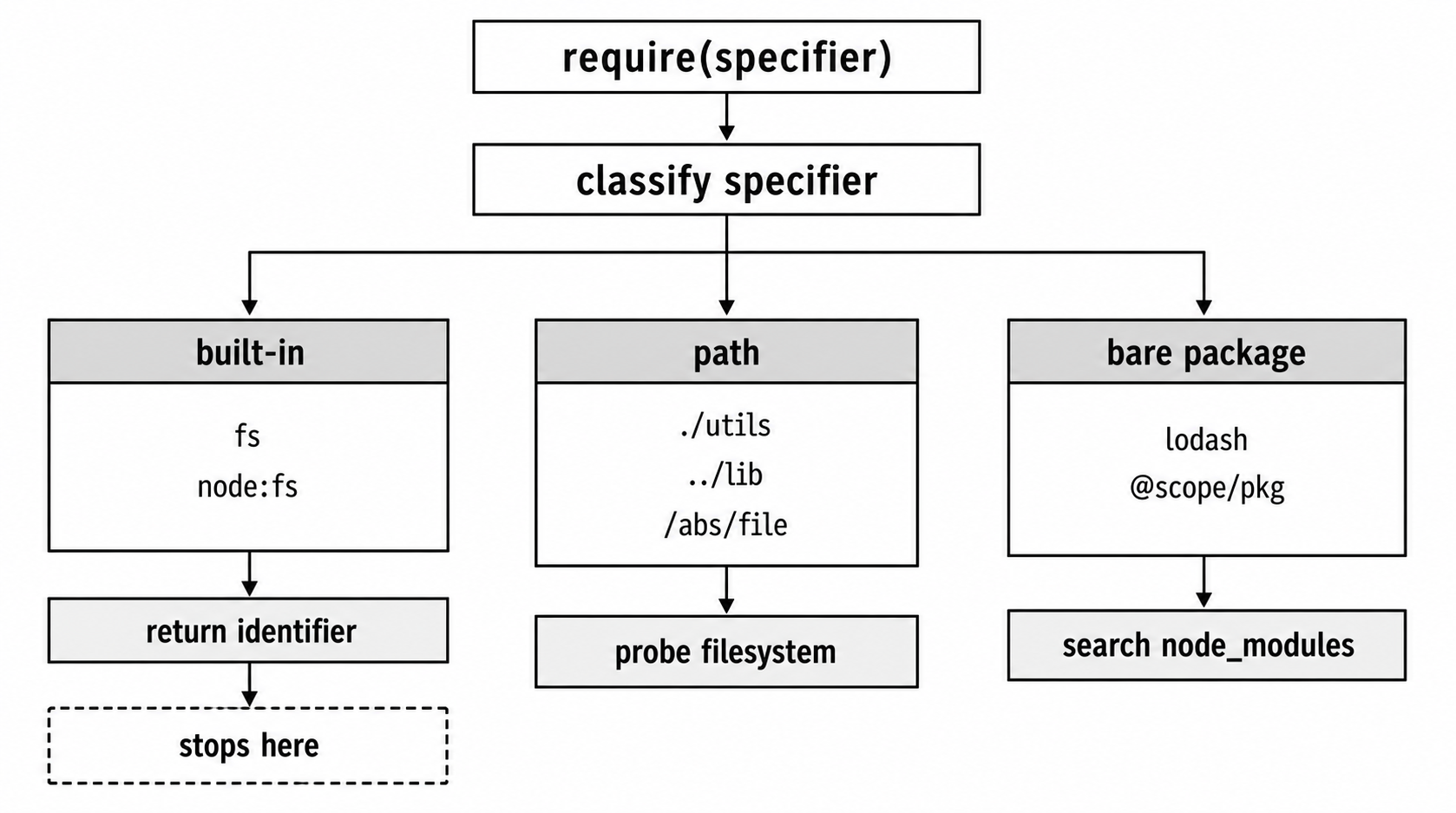
Figure 1 - CommonJS resolution starts by classifying the specifier. Built-ins finish immediately, path specifiers go through filesystem probing, and package names enter package lookup.
The older CommonJS path is still there. Node can try a path as written, try known extensions, and, if the target is a directory, look inside that directory for an entry file.
Package metadata adds rules before and around that older behavior. "exports" decides which package entry points are public. "imports" gives a package private # aliases. "main" defines the legacy entry file for a package or directory.
Once you know which branch Node took, most "Cannot find module" errors become much easier to debug.
Three Categories of Specifiers
The resolver begins by sorting the string passed to require() into one of three broad groups.
Built-in modules are names that match Node's internal module list. Examples include fs, path, http, and crypto. These are checked before Node looks at the filesystem. The explicit node: form, such as node:fs, also points at the built-in module.
Relative and absolute paths start with ./, ../, or /. Relative paths are resolved against the directory of the file doing the require(). If /home/app/src/lib/foo.js calls require("./utils"), Node starts from /home/app/src/lib/utils, then tries the path probing rules from there.
Bare specifiers are everything else. This includes package names like lodash, scoped packages like @babel/core, and package subpaths like express/lib/router. These go through the node_modules climbing algorithm.
This classification happens inside Module._resolveFilename(), the main CommonJS resolution function. The order is important. Built-ins get checked first. Path-like specifiers get handled as filesystem paths. Everything else goes through package lookup.
Built-in Modules
Built-in modules are the simplest case. When you write require("fs"), Node checks its internal built-in module registry. If the name matches a requirable built-in module, resolution ends immediately. Node does not check your project files, does not walk node_modules, and does not run extension probing.
Both of these load the same built-in module -
const fs = require("fs");
const alsoFs = require("node:fs");
The node: prefix works with require() in Node 14.18 and Node 16.0 and newer. It makes your intent explicit. It also avoids require.cache spoofing for unprefixed built-in names.
Normal built-in names still win over files and packages with the same name. If your project has a file named assert.js, this still loads Node's built-in module -
require("assert");To load your local file, you need a path specifier -
require("./assert");The difference is small but important. "assert" is a bare specifier, and Node checks built-ins first. "./assert" is a relative path, so Node resolves it from the current file's directory.
You can inspect the built-in module list at runtime -
const builtins = require("node:module").builtinModules;
console.log(builtins.length, builtins.slice(0, 5));
On Node 24.15, builtinModules returns 72 entries. Most regular built-ins appear without the node: prefix, such as fs and path. Some entries require the prefix, such as node:test, node:sqlite, node:sea, and node:test/reporters.
You may also see underscore-prefixed entries such as _http_agent and _stream_readable. Treat those as compatibility internals, not application APIs.
Relative and Absolute Paths
When the specifier starts with ./, ../, or /, Node treats it as a filesystem path.
Relative paths start from the directory of the module that called require(). This is why require("./utils") can mean different files in different folders. It is always relative to the caller, not the process working directory.
Absolute paths are used as written.
Even then, Node does not check only one filename. CommonJS has a probing system. Node can try the path exactly, then try known extensions, then check whether the target is a directory with an entry point.
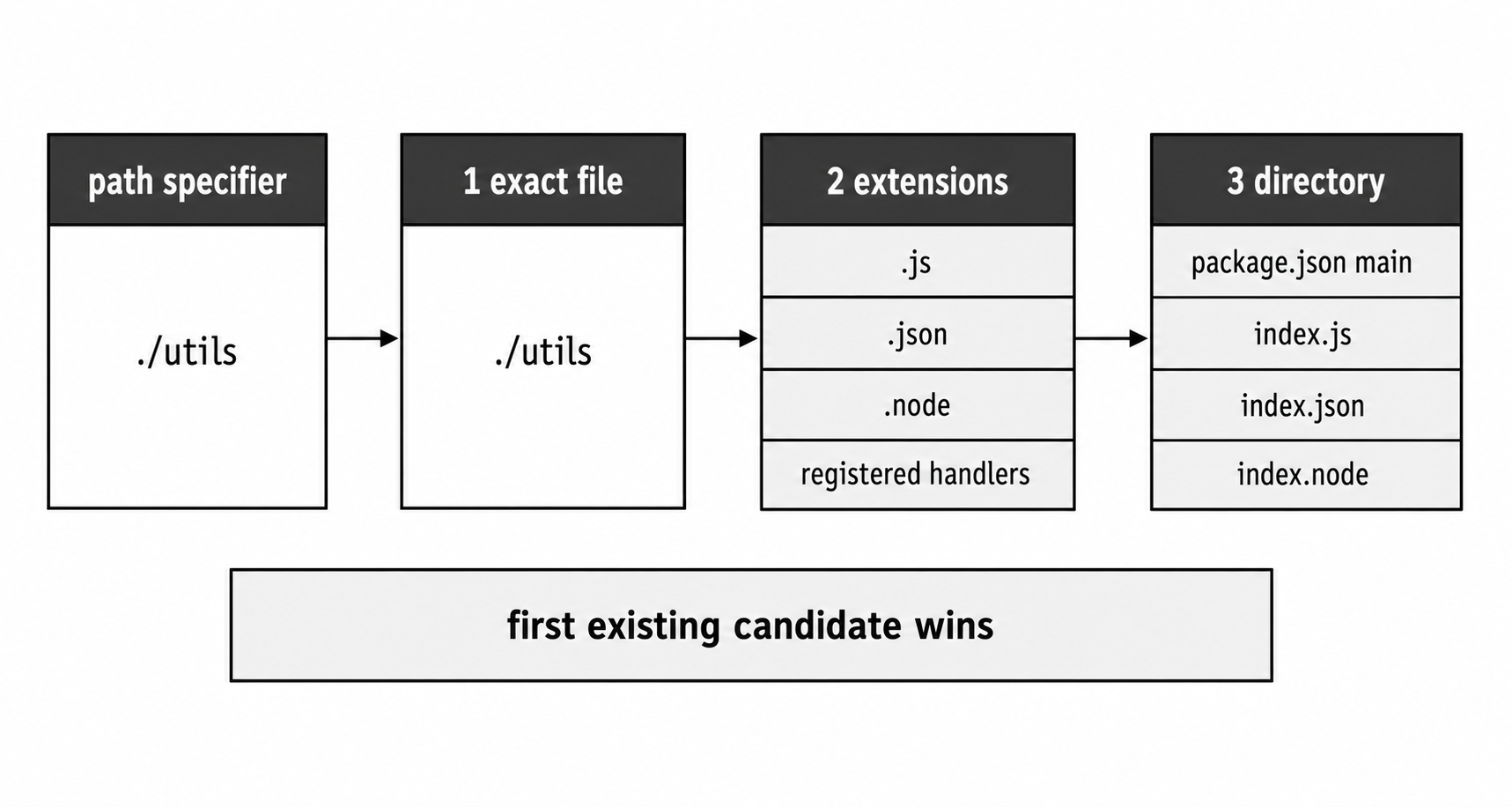
Figure 2 - Path resolution checks the exact path first, then known extensions, then directory entry rules. The first match wins.
Extension Probing
If you write this -
require("./config");Node first checks whether there is a file literally named config. If that exact file is not found, Node tries the known CommonJS extensions in this order -
.js.json.node
So require("./config") can load config.js, config.json, or config.node. If both config.js and config.json exist, config.js wins because .js is tried first.
Each extension has a different loader.
A .js file is loaded through the CommonJS wrapper. Node reads the file, wraps it in the function that provides exports, require, module, __filename, and __dirname, then runs it.
A .json file is read and parsed with JSON.parse(). The parsed object is cached. Later calls to require("./config.json") return the same object reference.
A .node file is a compiled native addon. Node loads it through the platform's dynamic library system.
Extension handlers live on Module._extensions. User code can technically register a custom handler -
require.extensions[".txt"] = function(module, filename) {
  const content = require("node:fs").readFileSync(filename, "utf8");
  module.exports = content;
};
require.extensions is documentation-deprecated, but it still exists for compatibility. Node 24.15 does not warn for this usage, even with --pending-deprecation.
Avoid it in new application code. It changes process-wide loading behavior, and every registered extension becomes part of the loader's decision process for matching files.
The JSON handler is roughly this -
Module._extensions[".json"] = function(module, filename) {
  const content = fs.readFileSync(filename, "utf8");
  module.exports = JSON.parse(stripBOM(content));
};
stripBOM removes a UTF-8 byte-order mark if the file has one. After the JSON file is parsed, Node caches the parsed object. That means this does not create a fresh object every time -
const a = require("./config.json");
const b = require("./config.json");

console.log(a === b); // true
If one part of your process mutates that object, every other module that required the same JSON file sees the mutation too.
The .node handler calls process.dlopen(). On Unix-like systems, that eventually uses dlopen(). On Windows, it uses LoadLibrary(). The shared library has to expose a Node-compatible addon initializer.
There are multiple addon styles now, including classic addons, context-aware addons, and Node-API addons. They do not all use the same internal symbol path, so it is better to describe the loading behavior than to memorize one symbol name.
Binary addons are platform-specific. A .node file built for Linux will not load on macOS. A .node file built for one CPU architecture may not load on another. Tools such as node-gyp and prebuild help compile and distribute these files.
The Exact File Check
Before extension probing, Node tries the path exactly as written.
This call first checks utils.js exactly -
require("./utils.js");If utils.js exists, resolution stops there.
If it does not exist, Node still treats ./utils.js as the base path for later probes. That means it may try files such as -
utils.js.js
utils.js.json
utils.js.node
That behavior explains why these two calls do not have the same full probe sequence -
require("./utils");
require("./utils.js");
require("./utils") checks utils, then utils.js, then utils.json, then utils.node, then directory rules for utils.
require("./utils.js") starts at utils.js. If that exact file is missing, later probes use utils.js as the stem.
Including the extension can skip some successful-path probing because the exact file check finishes immediately. Do not turn that into a broad performance rule. Startup time depends much more on filesystem cache state, storage, package layout, and how many modules your application loads.
Lint rules that require explicit extensions are usually about portability and matching the runtime contract. TypeScript projects can add another layer because TypeScript may type-check .js specifiers against .ts source files, then emit runtime-compatible JavaScript specifiers.
Directory-as-Module
If a path resolves to a directory, CommonJS can load that directory as a module.
For this call -
require("./mylib");if ./mylib is a directory, Node checks for an entry point in this order -
./mylib/package.jsonand its"main"field./mylib/index.js./mylib/index.json./mylib/index.node
A package file like this tells Node where to enter the directory -
{
  "name": "mylib",
  "main": "lib/entry.js"
}
With that package file, this call -
require("./mylib");loads this file -
./mylib/lib/entry.jsIf the directory has no package.json, or if package.json has no "main" field, Node falls back to index.js, then index.json, then index.node.
The index.js convention comes from Node's early design. Many projects still use it. You will often see an index.js file that only re-exports things from sibling files.
Node's docs now call folders-as-modules a legacy feature, but CommonJS keeps supporting it for compatibility.
If a directory has both a valid "main" field and an index.js, "main" wins -
// Assuming ./mylib/package.json has "main": "entry.js"
const lib = require("./mylib");
// Loads ./mylib/entry.js, not ./mylib/index.js
If "main" points to a missing file, Node still has an old compatibility fallback. It tries the package-root index.js, index.json, and index.node, and emits DEP0128 for the invalid "main" field. New packages should not rely on that fallback.
Internally, Node uses fast stat bindings to check what kind of path it found. If the path is a file, Node handles it as a file. If it is a directory, Node runs the directory entry logic. If the stat call fails with ENOENT, that candidate is done.
The node_modules Climbing Algorithm
Bare specifiers go through package lookup.
When you write this -
require("lodash");there is no ./, no ../, and no /. Node knows this is not a direct filesystem path. It has to search for a package named lodash.
The search starts from the directory of the calling module. From there, Node looks for node_modules directories while walking upward toward the filesystem root.
For a file at this path -
/home/app/src/lib/foo.jsNode generates a search list like this -
/home/app/src/lib/node_modules
/home/app/src/node_modules
/home/app/node_modules
/home/node_modules
/node_modules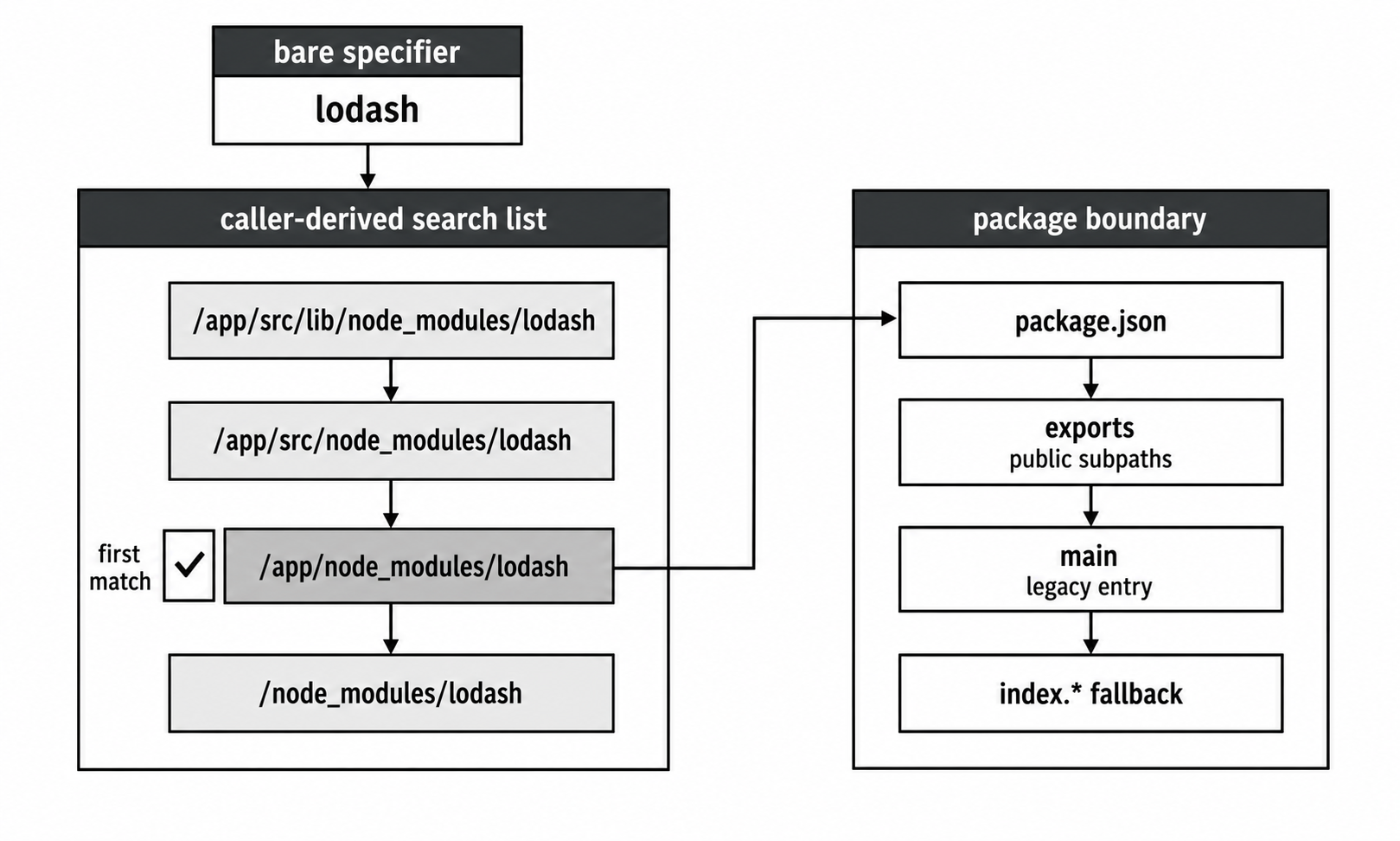
Figure 3 - Bare package lookup starts near the caller and walks upward. At each package candidate, "exports" can define the public entry points before legacy "main" and index fallback run.
So this call from /home/app/src/lib/foo.js -
require("lodash");checks these candidates in order -
/home/app/src/lib/node_modules/lodash
/home/app/src/node_modules/lodash
/home/app/node_modules/lodash
/home/node_modules/lodash
/node_modules/lodash
At each location, Node applies the same file and directory rules. If it finds a package directory, package metadata decides which file inside that package should load. The first successful match wins.
Why Node Walks Upward
This upward search is what allows nested packages to have their own dependencies.
Imagine the main app depends on accepts@2, but Express depends on accepts@1. Those can both exist in the same project -
/home/app/node_modules/accepts
/home/app/node_modules/express/node_modules/accepts
Code inside Express can get its own dependency. Code inside the app can get the app's dependency. The caller's location decides where the search begins.
npm tries to flatten and hoist dependencies when versions are compatible. When versions conflict, nested node_modules directories keep them separate. pnpm uses symlinks to a content-addressable store, but Node still follows the filesystem structure it sees.
The resolver does not care which package manager created the tree. It follows paths, symlinks, package metadata, and the normal lookup rules.
Scoped Packages
Scoped packages add one directory level.
This specifier -
require("@babel/core");means Node looks for this package path inside each candidate node_modules directory -
node_modules/@babel/core@babel is a directory. core is the package directory inside it. The upward search does not change. Node still checks each node_modules location from the caller upward.
Subpath Requires
A bare specifier can also reach inside a package -
require("express/lib/router");Node first finds the express package through the normal node_modules search. Then it appends lib/router inside that package and applies file and directory probing.
That might resolve to -
node_modules/express/lib/router.js
node_modules/express/lib/router/index.js
Package "exports" can block this kind of deep access.
If a package defines "exports", then package subpaths must be explicitly exposed. A package can allow these -
require("my-pkg");
require("my-pkg/router");
while blocking this -
require("my-pkg/lib/router");even if the file exists on disk.
Before "exports", consumers could reach almost any file inside a package. That made internal files risky to move, because some outside app might have started depending on them. "exports" gives package authors a standard way to decide which package-name paths are public.
package.json "main" Field
When Node finds a package directory in node_modules, it still needs to decide which file inside that package to load.
The older answer is the "main" field in the package's package.json.
{
  "name": "lodash",
  "version": "4.17.21",
  "main": "lodash.js"
}
The "main" value is resolved relative to the package directory. If the package is installed at -
/home/app/node_modules/lodashthen "main": "lodash.js" points to -
/home/app/node_modules/lodash/lodash.jsIf "main" points to "./dist/index.js", Node loads -
/home/app/node_modules/lodash/dist/index.jsIf "main" is missing, Node falls back to index.js in the package root.
Some packages use "main" for the CommonJS entry point and another field for ESM. You may see this in older or bundler-focused packages -
{
  "name": "some-lib",
  "main": "./dist/cjs/index.js",
  "module": "./dist/esm/index.js"
}
Node ignores "module". Bundlers such as webpack, Rollup, and esbuild may read it. Node's package resolution officially uses "main" and "exports".
For packages that ship both CommonJS and ESM, conditional "exports" is the Node-native way to publish separate entry points. Modern bundlers understand it too.
package.json "exports" Field
The "exports" field is the modern way for a package to define its public entry points.
When a package is loaded by name through node_modules, "exports" takes priority over "main". It also restricts which package subpaths can be loaded.
Here is a small package map -
{
  "name": "my-pkg",
  "exports": {
    ".": "./lib/index.js",
    "./utils": "./lib/utils.js"
  }
}
With that configuration, these work -
require("my-pkg");
require("my-pkg/utils");
The first loads ./lib/index.js. The second loads ./lib/utils.js.
But this fails -
require("my-pkg/lib/internal.js");even if this file exists -
node_modules/my-pkg/lib/internal.jsNode throws ERR_PACKAGE_PATH_NOT_EXPORTED.
That does not make "exports" a security sandbox. If code has an absolute path to the file, it can still load it -
require("/path/to/node_modules/my-pkg/lib/internal.js");"exports" protects the package-name interface. It controls what consumers can load through specifiers such as my-pkg and my-pkg/subpath.
A relative folder load behaves differently. This kind of local path -
require("./my-pkg");uses the legacy folder-as-module path. The "exports" package-name rules apply to package-name resolution and package self-reference, not every possible relative path on disk.
Conditional Exports
The "exports" field can choose different files depending on how the package is loaded.
A package can say -
{
  "exports": {
    ".": {
      "import": "./lib/index.mjs",
      "require": "./lib/index.cjs",
      "default": "./lib/index.js"
    }
  }
}
When CommonJS runs this -
require("my-pkg");Node matches the "require" branch and loads -
./lib/index.cjsWhen an ES module runs this -
import "my-pkg";Node matches the "import" branch and loads -
./lib/index.mjs"default" is the fallback branch when no earlier matching condition is selected.
Other condition names include "node" for Node, "browser" for bundlers, and custom names such as "development" or "production". Custom conditions only do something when the consumer activates or understands them. In Node, that can happen through --conditions or -C.
Node 24 adds another condition to the CommonJS path when require(esm) support is enabled - "module-sync". For package "exports" and "imports" resolution, CommonJS require() uses this condition set by default -
["node", "require", "module-sync"]If a package puts "module-sync" before "require" in a conditions object, require() can select that branch. Running with --no-require-module removes "module-sync" from the CommonJS condition set.
Condition order is part of the behavior. Node reads the condition object from top to bottom and picks the first matching key.
This order is usually useful -
{
  "exports": {
    ".": {
      "require": "./index.cjs",
      "default": "./index.js"
    }
  }
}
This order can make "require" unreachable -
{
  "exports": {
    ".": {
      "default": "./index.js",
      "require": "./index.cjs"
    }
  }
}
Since "default" matches first, the later "require" branch is not selected.
The same ordering rule applies to "module-sync", custom conditions, and nested condition objects.
Subpath Patterns
"exports" can also use wildcard patterns. Node supports this starting in Node 12.20.
A package can expose a group of files like this -
{
  "exports": {
    "./features/*": "./src/features/*.js"
  }
}
This call -
require("my-pkg/features/auth");resolves to -
./src/features/auth.jsThe * is a string replacement. It can include multiple path segments, including /.
So this can also match -
require("my-pkg/features/auth/handler");and resolve to -
./src/features/auth/handler.jsExport targets still have validation rules. Targets must be relative paths that start with ./. Node rejects traversal or invalid path segments that would escape the package. Patterns are for mapping package subpaths to files inside the package, not for exposing arbitrary filesystem paths.
Exports vs main Precedence
When both "exports" and "main" exist, "exports" wins for package-name resolution in Node versions that support it.
"main" still helps with older Node versions and legacy relative folder loads. That is why many packages keep both fields -
{
  "main": "./index.cjs",
  "exports": {
    ".": "./index.cjs"
  }
}
For modern Node, treat "exports" as the package's public map.
package.json "imports" Field
The "imports" field gives a package its own private aliases.
Where "exports" controls what outside consumers can load from the package, "imports" controls what files inside the package can refer to.
A package can define aliases like this -
{
  "name": "my-app",
  "imports": {
    "#utils": "./src/utils/index.js",
    "#db": "./src/database/client.js"
  }
}
Then files inside my-app can write -
require("#utils");
require("#db");
The # prefix is required. It tells Node that this is a package import mapping, not a normal package name.
Outside my-app, require("#utils") fails unless that other package has its own matching "imports" entry.
The same map can use conditions -
{
  "imports": {
    "#db": {
      "development": "./src/database/mock.js",
      "default": "./src/database/client.js"
    }
  }
}
Run the app with this -
node --conditions=development app.jsand require("#db") resolves to the mock. Without that condition, it resolves to the real client.
The benefit is practical. Deep relative paths are painful to maintain -
require("../../../../utils/helpers");If you move the current file, that path can break. An "imports" alias stays the same anywhere inside the package -
require("#utils/helpers");# specifiers do not use the node_modules climbing algorithm. Node finds the nearest package scope for the calling file, reads that package's "imports" field, and resolves the mapping there.
If the nearest package has no matching "imports" entry, resolution fails. Node does not keep walking upward looking for another package's "imports" map.
That scoping is intentional. Each package owns its own private aliases. Package A can define #utils, and Package B can also define #utils. Each one resolves against its own nearest package scope.
NODE_PATH
NODE_PATH is an environment variable that adds extra directories to the CommonJS package search.
On Unix-like systems, entries are separated with :. On Windows, entries are separated with ;.
Example on a POSIX shell -
NODE_PATH=/home/shared/libs:/opt/custom/modules node app.jsWith that command, this call -
require("some-lib");checks the normal node_modules locations first. If Node does not find the package there, it then checks -
/home/shared/libs/some-lib
/opt/custom/modules/some-lib
NODE_PATH is legacy. Node keeps it for compatibility, but normal projects should use local node_modules, workspaces, or package-manager features instead.
You may still see NODE_PATH in older monorepos, Docker images with shared dependency folders, or CI environments with pre-cached modules. For new code, avoid depending on it. It makes resolution depend on the environment that launched the process, which can make bugs harder to reproduce.
Global Folders
After normal lookup and NODE_PATH, Node also has a few historical global folders it can check as a last resort -
$HOME/.node_modules$HOME/.node_libraries$PREFIX/lib/node
$PREFIX is Node's configured install prefix. With version managers, containers, or custom installs, it may not be the path you expect.
You can inspect the runtime list directly -
console.log(require("node:module").globalPaths);These global folders exist for historical reasons. Modern applications rarely use them. They are checked near the end of the lookup process before Node throws a module-not-found error.
require.resolve()
require.resolve() runs the CommonJS resolution algorithm without loading and evaluating the module.
It answers this question - if I called require() with this specifier from here, what would Node resolve it to?
Example -
const p = require.resolve("lodash");
console.log(p);
That might print -
/home/app/node_modules/lodash/lodash.jsFor built-ins, it returns the built-in identifier -
console.log(require.resolve("fs"));      // "fs"
console.log(require.resolve("node:fs")); // "node:fs"
If the module cannot be found, require.resolve() throws MODULE_NOT_FOUND, just like require().
You can pass a paths option to change the search starting points -
require.resolve("lodash", {
  paths: ["/custom/search/path"]
});
Each entry in paths becomes a starting point for the normal node_modules hierarchy search. Built-ins still finish immediately.
require.resolve.paths() shows the directories Node would search for a bare specifier -
const dirs = require.resolve.paths("lodash");
console.log(dirs);
For a normal package name, this returns the lookup directories, including the caller-based node_modules chain, NODE_PATH entries, and global folders.
For a built-in, it returns null -
console.log(require.resolve.paths("fs")); // nullNo filesystem lookup is needed for a built-in module.
Because require.resolve() resolves without evaluating the target, it is useful for optional dependencies -
let yamlPath;

try {
  yamlPath = require.resolve("js-yaml");
} catch (err) {
  if (err.code !== "MODULE_NOT_FOUND") throw err;
}

const yaml = yamlPath ? require(yamlPath) : null;
This checks whether js-yaml exists. If it does not, the optional feature can turn off cleanly. If the package exists but throws during evaluation, the error still shows up when require(yamlPath) runs. That is usually what you want. A found-but-broken dependency should not be silently ignored.
You can also use require.resolve() to find a package directory -
const path = require("node:path");

const pkgDir = path.dirname(require.resolve("lodash/package.json"));
console.log(pkgDir);
That resolves lodash's package.json, then removes the filename to get the package root.
This pattern only works when the package allows access to package.json. If the package has an "exports" field and does not export ./package.json, this can fail. Node may read package.json internally for resolution, but that does not mean the package exposes it as a public subpath.
Symlink Behavior
By default, after Node resolves a file path, it calls fs.realpathSync() and uses the real path as the module cache key. That means symlinks are resolved to their targets.
Suppose you have these two symlinks -
/home/app/node_modules/my-pkg -> /opt/packages/my-pkg
/home/app/vendor/my-pkg -> /opt/packages/my-pkg
Both point to the same real directory. By default, if Node loads either one, the cache key becomes the real path -
/opt/packages/my-pkg/index.jsSo both paths return the same module instance.
This behavior is useful in symlink-heavy installs because two symlink paths that land on the same real file collapse to one cache entry. But it also means the real path affects where that module looks for its own dependencies.
--preserve-symlinks changes this behavior. With that flag, Node keeps the symlink path as the cache key. Two symlink paths to the same real file can become two separate module instances, each with its own exports object.
That can help in setups where the apparent location of the file is important, such as tooling that expects __dirname to reflect the symlink location.
--preserve-symlinks-main applies the same idea only to the main entry script, the file passed to node.
Without this flag, this command resolves the symlink before deciding __dirname for the entry module -
node /path/to/symlink.jsWith --preserve-symlinks-main, __dirname reflects the symlink location for the main module.
Most projects never need either flag. If npm link or pnpm creates duplicate module instances, and checks such as instanceof fail across what looks like the same package, symlink resolution is one of the first places to inspect.
Do not rely on realpath to fix filename casing. Node's docs warn that on case-insensitive filesystems, different resolved filenames can point at the same file while still producing different cache entries. That gives you two module instances with separate state. On a case-sensitive filesystem, an incorrectly cased specifier fails instead.
Inside Module._resolveFilename
The CommonJS resolution algorithm lives in Node's source in lib/internal/modules/cjs/loader.js, inside this function -
Module._resolveFilename(request, parent, isMain, options)This function receives the specifier and decides what identifier Node should use for loading.
The parameters are -
| Parameter | Meaning |
|---|---|
request | The specifier string, such as "fs", "./utils", or "lodash". |
parent | The Module object for the file that called require(), or null for the entry point. |
isMain | Whether this is the main module loaded by node app.js. |
options | Optional configuration, mainly used by require.resolve(). |
The first check is for built-in modules. In Node 24, that path uses BuiltinModule.normalizeRequirableId(request). It checks the specifier against the built-in registry compiled into Node.
If the request is a built-in, _resolveFilename returns the built-in specifier. No file path is needed.
If the request is not a built-in, Node prepares the search paths.
For relative specifiers, the starting point is the parent module's directory. For absolute specifiers, _findPath handles the filesystem path directly. For bare specifiers, _resolveFilename calls Module._resolveLookupPaths(request, parent), which combines the caller's module.paths chain with global lookup paths.
Before normal package lookup, _resolveFilename also handles # imports. If the request starts with #, Node finds the nearest package scope for the parent file, reads that package's "imports" field, and resolves the mapping. It does not climb outward looking for another package's "imports" map.
After the search paths are ready, _resolveFilename calls -
Module._findPath(request, paths, isMain)That is where filesystem probing happens.
_findPath has its own cache. The cache key is built from the request and the search paths -
request + "\x00" + paths.join("\x00")If the cache has a match, _findPath can return without repeating the filesystem checks.
On a cache miss, _findPath walks the search paths. For each path, it builds a candidate filename. For relative paths, it joins the parent directory with the request. For bare package names, it joins the candidate node_modules directory with the package name.
Then it tries the candidate as a file. Internally, this uses a fast C++ binding called internalModuleStat, rather than creating full JavaScript fs.Stats objects for every check.
If the exact file is not found, Node tries the registered extensions from Module._extensions, usually -
.js
.json
.node
If user code or tooling has registered more extension handlers, those extensions join the probing list too. The first match wins.
For bare package requests, _findPath checks package "exports" before falling back to old file and folder probing. That is where conditional exports, subpath matching, and pattern expansion run.
If "exports" does not apply and the candidate is a directory, tryPackage() reads package.json, checks "main", and resolves the legacy package entry point.
If none of the probes succeeds, _findPath returns false, and _resolveFilename throws MODULE_NOT_FOUND.
The familiar error looks like this -
Cannot find module 'whatever'The Synchronous Cost
CommonJS resolution does filesystem work synchronously while modules are loading.
That includes stat checks, package metadata reads, and realpath work for symlink handling. During that work, JavaScript does not continue running. Node avoids extra overhead where it can, but failed path checks still cost time.
This cost is easiest to notice during startup. Large applications may resolve thousands of modules before the server is ready. Slow filesystems, network mounts, Docker volume setups, cold filesystem caches, and deeply nested package trees can make that startup work much more visible.
A failed stat call is work that found nothing. If this file -
/home/app/src/lib/utils/helpers/foo.jsruns this -
require("lodash");Node may check several intermediate node_modules directories before finding the package at the project root.
_pathCache helps with repeated lookups inside the same process, but the first resolution of each unique specifier and search-path combination still pays the probing cost.
You can see these checks with system tools. On Linux, strace can show stat-family syscalls during startup. On macOS, dtrace can show similar filesystem activity. Many of those calls may return ENOENT for node_modules directories that do not exist.
Bundlers avoid this runtime lookup cost by resolving modules at build time. Tools such as webpack and esbuild produce output where those imports no longer need the same package lookup at runtime.
After Node finds a path, it may still canonicalize it with fs.realpathSync(), unless symlink preservation is enabled. This resolves symlinks and gives Node the real path used for cache identity.
The CommonJS loader also keeps an internal realpath cache, so repeated canonicalization can reuse cached path parts. Most application code never needs to think about that. It becomes useful only when startup profiling points at realpath work or duplicate module identity problems.
The Resolution Cache
Node keeps two separate caches here.
The loaded module cache is require.cache. It stores evaluated modules. Its keys are resolved filenames, usually absolute paths after symlink resolution.
You can inspect it -
console.log(Object.keys(require.cache));Each value is a Module object with properties such as exports, filename, loaded, and children.
The resolution cache is Module._pathCache. It stores the answer to "where does this request resolve from these paths?" That cache can be warmed by require.resolve() without loading or evaluating the target module.
Deleting from require.cache forces a module to load again next time -
delete require.cache[require.resolve("./myModule")];

const fresh = require("./myModule");
That removes the loaded module object. The next require() evaluates the file again and creates a new exports object.
This technique is fragile for hot reloading. Parent modules can still hold the old module object in their children array. Other modules may already have references to the old exports. Deleting require.cache also does not clear every internal loader cache. Tools such as nodemon usually restart the whole process instead because it is cleaner.
Debugging Resolution
When a module will not resolve, start with the tools Node gives you.
The first check is require.resolve() -
console.log(require.resolve("some-pkg"));If it throws, Node cannot find that module from the current location. If it returns a path you did not expect, that path usually explains the bug. You may be loading a different copy from a higher-level node_modules, a symlink target, or a package subpath you did not intend.
You can inspect the node_modules search list from the current working directory -
const Module = require("node:module");

console.log(Module._nodeModulePaths(process.cwd()));
You can inspect the search paths for a specific package name -
console.log(require.resolve.paths("some-pkg"));For built-ins, this returns null because there is no filesystem search.
For loader-level logging, use NODE_DEBUG=module. This is separate from the userland DEBUG convention.
Run your app like this in a POSIX shell -
NODE_DEBUG=module node app.js 2>&1 | head -20Typical output in Node 24.15 has lines like this -
MODULE 12345: Module._load REQUEST ./dep parent: .
MODULE 12345: looking for "./dep" in ["/home/app/src"]
MODULE 12345: load "/home/app/src/dep.js" for module "/home/app/src/app.js"
The number is the process ID. Search the output for the specifier you care about. You can usually see whether Node treated it as a path, package name, built-in, or cached module.
For targeted local debugging, you can preload a small script with --require and patch an internal hook -
const Module = require("node:module");
const orig = Module._findPath;

Module._findPath = function(request, paths, ...rest) {
  console.log("findPath", request, paths);
  return orig.call(this, request, paths, ...rest);
};
This uses an internal API. Keep it as a local diagnostic trick, not production code. Internal loader functions can change across Node versions.
For a quick one-off check from the command line, use -
node --print "require.resolve('some-pkg')"That tests resolution from the current directory without changing your app.
Edge Cases Worth Knowing
Self-referencing packages let a package require itself by name. Starting in Node 13.1 and 12.16, a package with an "exports" field can do this from inside its own files -
require("my-pkg");Inside my-pkg, that goes through the package's own "exports" map. Without "exports", there is no package self-reference branch. The name may still resolve through ordinary node_modules lookup if another package by that name exists.
This is useful when internal code wants to use the same public subpaths as external consumers.
The "type" field affects what happens after resolution. It can be "commonjs" or "module", and it controls whether .js files are treated as CommonJS or ESM.
The path lookup is mostly the same, but the loader after lookup changes. In Node 24.15, require() can load a synchronous ES module graph and return a module namespace object. If that ESM graph uses top-level await, require() throws ERR_REQUIRE_ASYNC_MODULE, and the caller needs dynamic import().
Circular references happen during loading, not resolution. Resolution only turns a specifier into an identifier. It does not execute the target module. The classic circular require() issue happens when module A loads module B, and module B loads module A. Node handles that by returning a partially built exports object.
Case sensitivity depends on the filesystem. On case-insensitive filesystems, these two calls can point at the same file but still create separate cache entries if the resolved filenames differ -
require("./Utils");
require("./utils");
On Linux with a case-sensitive filesystem, one of those may simply fail if the casing does not match the real filename.
Enforce import casing in lint or CI. These bugs can stay hidden on macOS or Windows and then fail on Linux.
A package.json does not need a "name" field for ordinary resolution. "main", "exports", and "imports" can still work. The "name" field is needed for npm publishing and package self-reference, but Node can still use the other fields without it.
CommonJS and ESM treat relative specifiers differently. In CommonJS, this can work because extension probing exists -
require("./foo");In ESM, this usually needs the full filename -
import "./foo.js";ESM does not use the same extension probing rules. Keep that distinction in mind when moving code between CommonJS and ESM.
Nested packages can create multiple package scopes. A monorepo may have several package.json files. The relevant one depends on the resolution branch.
For package lookup, Node reads the package.json inside the resolved package. For # imports, Node reads the nearest package scope above the calling file. Those can be different package files.
When resolution fails, do the checks in this order -
- Classify the specifier.
- Check whether the caller's location is the one you expect.
- Check the nearest package scope.
- Check the
node_modulessearch paths. - Check
"exports","imports", and"main". - If symlinks are involved, compare the symlink path, real path, and cache key.
Most CommonJS resolution bugs come from one wrong branch, one unexpected package scope, or one duplicate module instance.