Node.js EventEmitter: Listeners, Errors & Leak Warnings
EventEmitter is Node's built-in way to let one object announce that something happened, and let other parts of your code react to it.
At the simplest level, an EventEmitter keeps a list of event names and the functions that should run for each name. When you call emit(), Node looks up the listeners for that event and calls them right away, one after another, in the order they were registered.
That "right away" part is the detail people miss most often. EventEmitter does not put your listener into a background queue. It does not wait for the next event loop turn. It calls the listener on the same call stack as emit().
Streams, servers, sockets, child processes, and plenty of userland libraries all use this same pattern. A server emits "connection" when a client connects. A stream emits "data" when a chunk is ready. A child process emits "exit" when it finishes. The object owns the state, and events give other code a way to react as that state changes over time.
EventEmitter Internals
Most EventEmitter bugs come from two simple rules.
First, an unhandled "error" event throws. If an emitter emits "error" and nobody is listening for it, Node treats that as a serious failure and throws the error.
Second, listener-count warnings usually mean code is attaching listeners repeatedly without removing them. The default warning appears when more than 10 listeners are added for the same event name on the same emitter. That number is not a hard limit. Node still adds the listener. The warning is there because this pattern often points to a memory leak.
Most core I/O objects developers work with directly, including streams, sockets, servers, and child processes, inherit this behavior. The implementation lives in lib/events.js inside the Node.js source. The public API gives you familiar methods like on(), emit(), and off(), but the behavior underneath is worth understanding because it explains the bugs you actually see in production.
The big idea is simple. An EventEmitter is a synchronous listener registry. It stores listeners by event name. When an event is emitted, it walks that stored list immediately.
This chapter looks at how that storage works, why "error" is special, how listener leaks happen, and how EventEmitter fits beside callbacks, promises, and async iterators.
The _events Object
The fields in this section describe Node v24's current implementation. They are useful for learning how EventEmitter behaves, but they are not public API. Production code should use documented methods such as eventNames(), listenerCount(), listeners(), and rawListeners() instead of depending on private fields like _events.
When you create a new EventEmitter, Node sets up a few internal fields -
const EventEmitter = require('node:events');

const ee = new EventEmitter();

console.log(ee._events);       // [Object: null prototype] {}
console.log(ee._eventsCount);  // 0
console.log(ee._maxListeners); // undefined
The examples that follow assume the same EventEmitter import and an emitter named ee, unless they show their own setup.
The main field is _events. It is a null-prototype object. In practice, that means it behaves like a clean key-value map for event names. It does not inherit toString, hasOwnProperty, constructor, or any other properties from Object.prototype.
That design avoids weird collisions. If someone uses "toString" or "constructor" as an event name, Node should look for a listener registered under that exact event name. It should not accidentally find something inherited from the prototype chain. A null-prototype object keeps those lookups clean.
The keys inside _events are event names. The values are listener functions.
There is a small optimization here. If an event has only one listener, Node stores the function directly. It does not create an array. When a second listener is added for the same event, Node changes the value into an array of listeners. If listeners are later removed and only one remains, Node can go back to storing a single function.
That saves allocations for a very common case. Many events only have one listener, especially events like "error", "close", and "finish" on streams.
So the storage looks roughly like this -
{
  error: onError,              // one listener stored directly
  data: [onDataA, onDataB]     // multiple listeners stored as an array
}
The next field, _eventsCount, tracks how many event names currently have at least one listener. It is not the total listener count. If an emitter has 5 listeners for "data" and 1 listener for "error", _eventsCount is 2 because there are two event names being tracked.
Node can use that number for fast checks. For example, if _eventsCount is 0, eventNames() can return an empty array without scanning _events.
The third field, _maxListeners, starts as undefined. That means the emitter uses the default listener warning limit, which is 10. The default comes from EventEmitter.defaultMaxListeners.
You can change the limit per emitter with setMaxListeners(). Setting it to 0 or Infinity disables the warning. That can be valid, but do it on purpose. The warning is often your first sign that listener cleanup is broken.
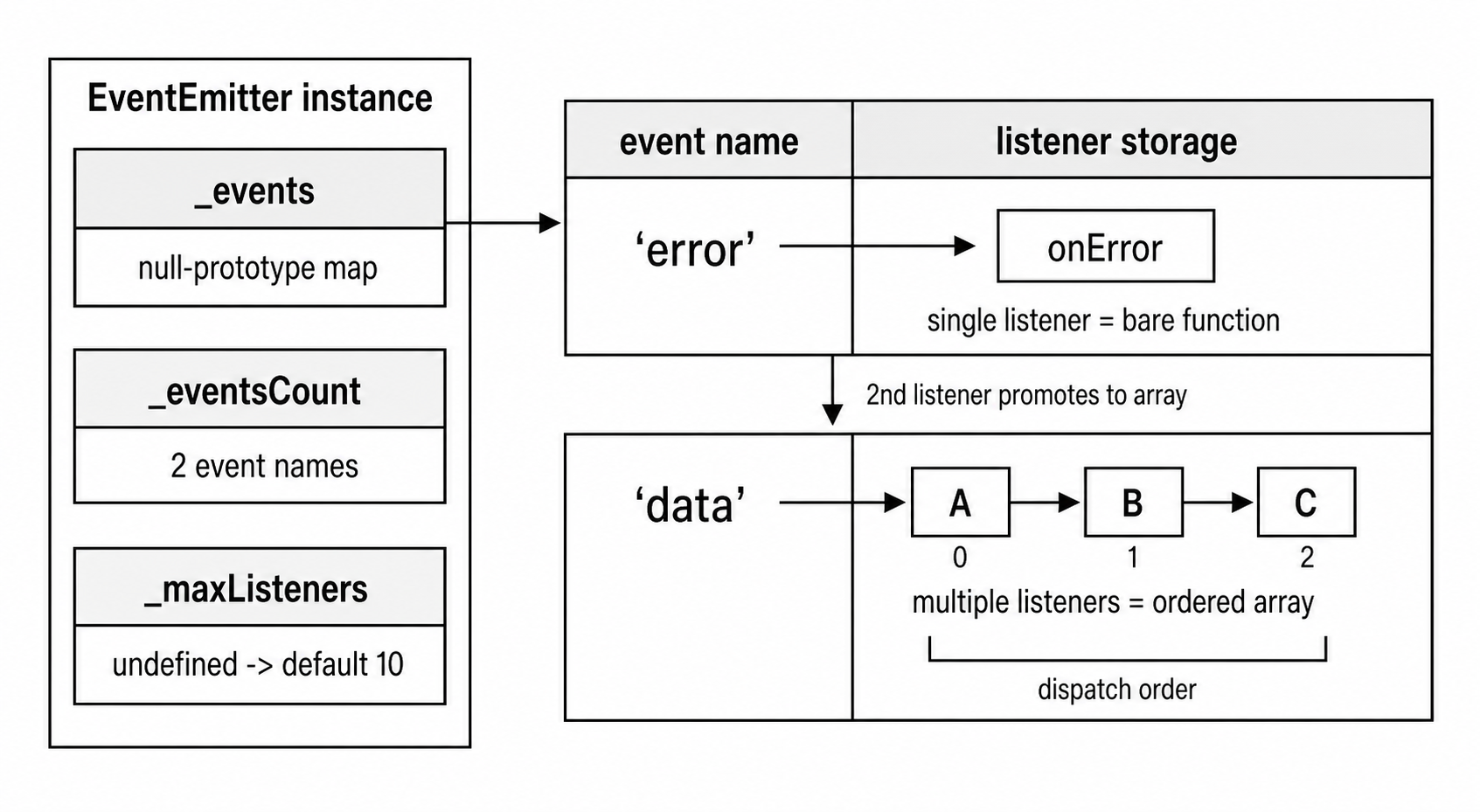
Figure 7.10 - EventEmitter keeps a small event-name map beside listener-count state. A name with one listener can point directly at a function. Multiple listeners become an ordered listener array.
EventEmitter.init()
Construction does not do much more than set up the internal fields. EventEmitter.init() is called by the constructor, and subclass constructors can call it directly.
Its job is to make sure the emitter has its own _events object, its own _eventsCount, and the right _maxListeners value.
The "own _events object" part is easy to overlook. JavaScript objects can inherit properties from their prototype. If a subclass accidentally puts _events on its prototype, then every instance could see the same listener storage through the prototype chain. That would be a disaster. Two different emitter instances could accidentally share listeners.
Node checks for that case. If this._events is missing, or if it is the same object as the prototype's _events, Node creates a fresh null-prototype object for the instance.
That is why each emitter gets its own listener storage, even when subclassing is involved.
These fields are regular enumerable properties, so they can appear in places you may not expect. Object.keys() can see them. Spread operations can copy them. Some serialization paths may include them. JSON.stringify() includes enumerable values that can be represented as JSON, so a fresh emitter can serialize _events and _eventsCount, while _maxListeners is skipped when it is undefined.
If you serialize an EventEmitter subclass, add a toJSON() method or explicitly filter out these internal fields.
Listener Registration
on() and addListener()
on(eventName, listener) and addListener(eventName, listener) do the same thing. In Node, addListener is an alias for the same method.
Both methods add the listener to the end of the listener list for that event name. If there is no listener yet, Node stores the function directly. If there is already one listener stored as a bare function, Node promotes it to an array.
You can see that storage change here -
const ee = new EventEmitter();

function fn1() {}
function fn2() {}

ee.on('data', fn1);
console.log(ee._events.data === fn1); // true - stored as a bare function

ee.on('data', fn2);
console.log(Array.isArray(ee._events.data)); // true - promoted to an array
console.log(ee._events.data.length);         // 2
This storage detail does not change the order. Listeners still fire in the order they were added.
on() appends to the end. prependListener() adds to the beginning. prependOnceListener() does the same thing, but the listener removes itself after the first run.
The prepend methods are useful when one listener needs to run before the rest. Logging, validation, instrumentation, and compatibility layers sometimes need that.
Before Node registers a listener, it checks that the listener is actually a function. Passing a string, number, object, or undefined throws a TypeError. That validation happens inside the internal _addListener function, which all registration methods use.
The newListener Event
EventEmitter has a special "newListener" event. It fires after validation, but before the listener is actually added.
That timing is unusual, but intentional. A "newListener" handler gets a chance to observe the registration before it changes the emitter's listener list.
Here is the basic behavior -
ee.on('newListener', (event, listener) => {
  console.log(`Adding listener for ${event}`);
});

ee.on('connection', () => {});
// logs - "Adding listener for connection"
The "newListener" event fires for on(), once(), addListener(), prependListener(), and prependOnceListener().
The matching "removeListener" event fires after a listener has been removed.
That before-and-after difference gives each hook a different view of the emitter. "newListener" runs while the new listener is still pending. "removeListener" runs after the listener is already gone.
There is one behavior that can surprise you. If a "newListener" handler adds another listener for the same event, that extra listener can be inserted before the listener that caused "newListener" to fire.
This is powerful, but easy to misuse. These hooks are mostly for debugging, instrumentation, and framework-level code. Most application code should not need them.
One sharp edge is self-observation. Once you register a "newListener" handler, later registrations for "newListener" also emit "newListener". If your handler keeps adding more "newListener" handlers without a guard, you can create an infinite loop. Node does not protect you from that. The listener code has to guard itself.
once()
once(eventName, listener) registers a listener that runs one time.
The listener does not get stored directly. Node wraps it in another function. When the event fires, the wrapper removes itself first, then calls your original listener.
ee.once('ready', () => {
  console.log('fired once');
});

ee.emit('ready'); // logs - "fired once"
ee.emit('ready'); // nothing
The wrapper is needed because Node has to remove the listener before calling it. That gives once() clean behavior even when the listener throws or emits the same event again.
Because Node stores a wrapper, it also keeps a link back to your original function. The wrapper has a .listener property that points to the function you passed to once().
That link is what lets this work -
function onReady() {}

ee.once('ready', onReady);
ee.off('ready', onReady);
Even though _events.ready stores the wrapper, off() can still find it because it checks both the stored function and the wrapper's .listener property.
When a once() listener fires, the order is -
emit()reaches the wrapper.- The wrapper removes itself from the emitter.
- The wrapper calls your original listener.
- If your listener throws, the listener is already gone.
That order is deliberate. If your once() listener throws, the error propagates, but the listener will not fire again. If your listener emits the same event again while it is running, the once listener has already been removed, so it will not recurse into itself.
off() and removeListener()
off() is an alias for removeListener().
It searches the listener set for a matching function. Matching uses strict equality with ===. For once() listeners, it also checks the wrapper's .listener property so you can remove the original function you passed to once().
off() removes one matching registration. That detail is useful when the same function is registered multiple times for the same event.
function handler() {}

ee.on('data', handler);
ee.on('data', handler);

ee.off('data', handler);
console.log(ee.listenerCount('data')); // 1
Calling off() once removes one registration, not all of them.
In Node v24, removal walks from the end of the listener array. If the same function appears multiple times, the most recently added matching registration is removed first.
If removing a listener leaves only one listener for that event, Node can demote the array back to a bare function. If no listeners remain, Node deletes the event name from _events and decrements _eventsCount.
If a listener is removed while an emit() is already running, that current emission keeps using the listener set that existed when it started. Later emissions see the updated list.
rawListeners()
Inspection gets slightly more interesting because once() stores wrappers.
listeners(eventName) returns the listener functions most code expects to see. For once() registrations, it unwraps the wrapper and returns your original listener.
rawListeners(eventName) returns what Node actually stored. For once() registrations, that means you get the wrapper function.
Use listeners() when you want the normal application-level view. Use rawListeners() when you are debugging or writing tooling and need to inspect the wrapper itself.
The wrappers created by once() have a .listener property that points to the original function. That property is useful, but it is not proof that the function came from once(). User code can add a .listener property to any function.
Synchronous Dispatch with emit()
emit() is synchronous.
When you call emit('data', chunk), Node immediately looks up the listeners for "data" and calls them on the current call stack. It calls them in registration order. emit() does not return until those listeners finish.
Here is the simplest version -
ee.on('tick', () => console.log('A'));
ee.on('tick', () => console.log('B'));

console.log('before');
ee.emit('tick');
console.log('after');

// before
// A
// B
// after
The output order tells the whole story. "A" and "B" print before "after", because both listeners run inside the emit() call.
This is the behavior you would get from normal function calls. EventEmitter gives you named listener lists, but dispatch itself is still a synchronous loop of function calls.
That means slow listeners block everything above them on the stack. If the first listener does 500ms of CPU work, the second listener waits. The code after emit() waits too. The event loop cannot move to the next phase while that listener is still running.
You can see the blocking behavior here -
ee.on('work', () => {
  const start = Date.now();

  while (Date.now() - start < 200) {}

  console.log('listener done');
});

console.log('before emit');
ee.emit('work');
console.log('after emit'); // prints about 200ms later
This is why EventEmitter performance bugs often feel strange at first. The code looks event-driven, but the listener still runs like a direct function call.
For streams, a heavy "data" listener delays the stream from delivering the next chunk to JavaScript. For servers, a slow "connection" listener blocks JavaScript from processing later connection events until it returns. The kernel may still queue connections according to the socket backlog, but your JavaScript cannot process the next event while it is busy inside the current listener.
How emit() Actually Works
The implementation in lib/events.js follows a small set of steps.
When emit(type, ...args) runs, Node roughly does this -
- If the event name is
"error", use the special error handling path. - Look up
this._events[type]. - If there is no listener, return
false. - If the value is a single function, call it directly.
- If the value is an array, walk the listener array in order.
The single-function case is the fast path. Many events only have one listener, so Node avoids array work entirely.
The array case has one extra complication. Listeners can add or remove listeners while an emit is already in progress. Node has to avoid breaking the current iteration.
Consider this example -
ee.on('test', function handler() {
  ee.off('test', handler);
});

ee.on('test', () => console.log('second'));

ee.emit('test'); // "second" still fires
The first listener removes itself, but the second listener still runs during that same emit() call.
Node keeps the current emission stable. Listeners that existed when the emission began keep their turn. Listeners added during the emission do not run until the next emission.
Without that protection, normal array mutation could skip listeners. Imagine the active listeners are [A, B, C]. The loop calls A at index 0. A removes itself, so the array shifts to [B, C]. The loop increments to index 1, which is now C. B gets skipped.
Node avoids that class of bug by separating the active pass from later mutations.
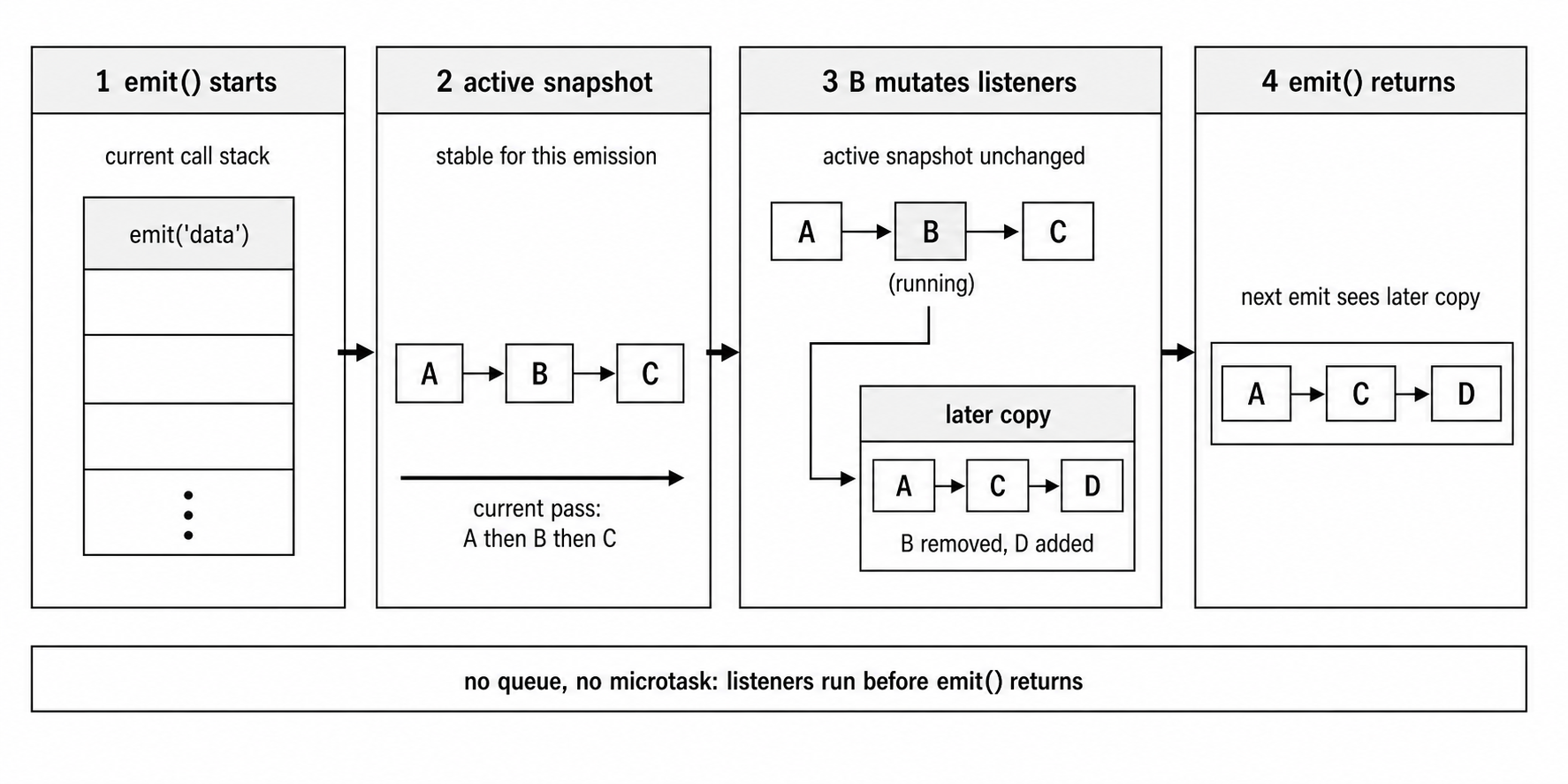
Figure 7.11 - emit() runs on the current call stack and walks the listener set in order. If that listener set changes mid-emit, the active pass keeps its current listener view while later emissions see the updated copy.
Arguments and Return Value
emit() passes every argument after the event name directly to each listener.
ee.emit('data', chunk, encoding);Each listener receives the same values -
ee.on('data', (chunk, encoding) => {
  console.log(chunk, encoding);
});
Node does not clone the arguments. If you pass an object, every listener receives the same object reference.
ee.on('req', (ctx) => {
  ctx.modified = true;
});

ee.on('req', (ctx) => {
  console.log(ctx.modified); // true
});

ee.emit('req', { modified: false });
The first listener modifies the object. The second listener sees that modification because both listeners received the same object.
That can be useful when listeners are meant to cooperate, but it can also create ordering bugs. A listener that changes shared arguments is changing what later listeners see. If you do this, treat listener order as part of the design.
The return value of emit() is a boolean. It returns true if at least one listener was registered for that event. It returns false if no listener existed.
const handled = ee.emit('optional-event');That return value is useful when an event is optional and the caller wants to know whether anyone handled it. It is also part of how the special "error" behavior makes sense, because an unhandled "error" event cannot be treated like a normal unhandled event.
When a Listener Throws
Because emit() is synchronous, a thrown error behaves like a normal thrown error.
If a listener throws, emit() stops immediately. The remaining listeners for that event do not run. The error travels back up to the code that called emit().
ee.on('save', () => {
  console.log('first');
});

ee.on('save', () => {
  throw new Error('save failed');
});

ee.on('save', () => {
  console.log('third');
});

ee.emit('save');
The third listener does not run.
Node does not wrap every listener call in try/catch. That is intentional. If a listener fails after changing shared state, silently continuing to later listeners could leave the program in a bad state. Stopping and surfacing the error keeps the failure visible.
If you want each listener to fail independently, you need to write that behavior yourself -
for (const listener of ee.listeners('data')) {
  try {
    listener(chunk);
  } catch (err) {
    console.error('Listener failed', err);
  }
}
That changes EventEmitter semantics, so use it only when that isolation is part of your design. Most code should rely on the default behavior - a thrown listener stops the current emission.
Walking Through lib/events.js
The EventEmitter source lives in lib/events.js. The file is larger than the core idea because it handles validation, warnings, compatibility, and edge cases. The main behavior is still small enough to reason about.
The details below match Node v24. Public APIs are the stable part. Helper names and private markers can change across Node versions.
The _addListener Internal
All listener registration paths eventually go through an internal _addListener function. That includes on(), addListener(), once(), prependListener(), and prependOnceListener().
At a high level, _addListener does this -
- Make sure the listener is a function.
- Create
_eventsif the emitter does not have one yet. - Emit
"newListener"first if someone is listening for it. - Look up the current value for that event name.
- Store the listener directly if it is the first one.
- Convert the value to an array if this is the second listener.
- Push or unshift the listener when an array already exists.
- Check whether the listener count passed the warning limit.
The max-listener warning uses a warned flag on the listener array. That keeps Node from printing the same warning again and again for the same event name. If the 11th listener triggers a warning, the 12th and 13th listeners do not trigger new warnings for that same listener array.
If all listeners are removed and then the count grows past the limit again, the warning can appear again because the old listener array is gone.
The "newListener" step happens before the listener is stored. That means a "newListener" handler sees the old state. If it calls listenerCount() for the event currently being registered, the new listener is not included yet.
If the "newListener" handler throws, the new listener is not added. The throw comes out of on(), once(), or whichever registration method was used.
The emit() Implementation
The actual emit() method accepts an event name and any number of arguments.
function emit(type, ...args)The fast path is the single-listener case. If _events[type] is a function, Node calls it directly.
If _events[type] is an array, Node walks the listeners in order. In Node v24, it avoids copying the listener array on every emit. Instead, it tracks when a listener array is being emitted. If code mutates that event's listener list during the emit, Node clones the array at mutation time. The current emit keeps using the old array. Later emits use the updated one.
That gives Node two benefits. The common path stays fast, and mid-emit listener changes do not corrupt the current dispatch order.
Each listener is called with this set to the emitter instance.
ee.on('event', function () {
  console.log(this === ee); // true
});
That only applies to regular functions. Arrow functions do not use their caller's this, so this binding does not affect them.
Older Node code often uses this inside listeners to access the emitter. Modern code often captures the emitter in a closure instead. Both patterns exist in real code, so the this binding is still part of EventEmitter behavior.
Error Event Special Handling
Before normal dispatch, emit() checks whether the event name is "error".
That event has its own contract. If there is no regular "error" listener, Node throws.
If the first argument is an Error, Node throws that exact error. If the first argument is something else, such as a string, number, or undefined, Node creates an ERR_UNHANDLED_ERROR wrapper and throws that instead. The wrapper keeps the original value on its .context property.
That is why this -
ee.emit('error', 'connection refused');throws a Node error wrapper instead of throwing the string directly.
Node also supports events.errorMonitor, which is a symbol used to observe "error" events without handling them. Monitor listeners run before the normal "error" handling path, but they do not count as "error" handlers. If there is no real "error" listener, the process can still crash after monitor listeners run.
getEventListeners() and eventNames()
eventNames() returns the event names that currently have listeners.
It uses Reflect.ownKeys(), so it includes string event names and Symbol event names. Symbols are useful when a library wants an internal event name that cannot accidentally collide with user-defined names.
getEventListeners(emitter, eventName) is a static function from the events module. It returns a copy of the listeners for the given event. Changing the returned array does not change the emitter.
This function also works with EventTarget instances, so tooling can inspect both Node-style EventEmitters and Web-style EventTargets through one API.
listenerCount() exists as an instance method -
ee.listenerCount('data');There is also an older static form kept for compatibility -
EventEmitter.listenerCount(ee, 'data');For normal code, use the instance method.
captureRejections
EventEmitter dispatch is synchronous, but listeners can still be async functions. An async listener returns a promise. If that promise rejects and nobody handles it, you get an unhandled rejection.
captureRejections gives EventEmitter a way to catch those rejected listener promises and route them through the emitter's error handling path.
You can enable it per instance -
const ee = new EventEmitter({ captureRejections: true });

ee.on('event', async () => {
  throw new Error('async failure');
});

ee.on('error', (err) => {
  console.log(err.message); // "async failure"
});

ee.emit('event');
The "error" listener does not run before emit('event') returns. The async listener starts synchronously, returns a promise, and that promise rejects later. EventEmitter observes that rejection and routes it afterward.
Without captureRejections, the rejected promise is not handled by EventEmitter. It goes through the process unhandled-rejection path. Depending on Node version and flags, that may terminate the process.
With captureRejections, Node checks the return value from each listener. If the return value is not null or undefined and behaves like a promise, Node attaches a rejection handler.
When the promise rejects, Node can either call a custom rejection handler on the emitter using Symbol.for('nodejs.rejection'), or fall back to emitting "error" with the rejection reason.
This does not make EventEmitter async. The listener still starts on the current call stack. Only the rejected promise handling happens later.
There is also a cost. When captureRejections is off, Node does not need to inspect listener return values for promise behavior. When it is on, Node has to do that extra work. For emitters that fire thousands of times per second, that overhead can show up. That is why the feature is opt-in.
The Error Event Contract
The "error" event is special.
For a normal event, no listener means emit() returns false and nothing else happens. For "error", no listener means Node throws.
const ee = new EventEmitter();

ee.emit('error', new Error('boom'));
// Throws - Error: boom
// The process crashes if nothing catches this.
This rule exists because EventEmitter is often used for resources that can fail - sockets, streams, servers, files, TLS sessions, child processes. If those failures were ignored by default, programs would keep running while data was lost, connections were broken, or cleanup never happened.
So Node makes unhandled "error" events loud. Either you handle the error, or the process fails.
The thrown error travels up from emit(). If the emit() call is inside a try/catch, the catch block can see it. Otherwise, it becomes an uncaught exception. In production, an uncaught exception handler usually logs the failure and exits the process.
The practical rule is simple. If an emitter can emit operational errors, attach an "error" listener. That includes streams, sockets, servers, child processes, and long-lived custom emitters.
const net = require('node:net');

const server = net.createServer();

server.on('error', (err) => {
  console.error('Server error', err.message);
});

server.listen(0);
Without the error handler, a bind failure such as EADDRINUSE could throw from inside the server's "error" emission and crash the process. With the handler, the application gets a chance to log, retry, switch ports, or shut down cleanly.
This example uses listen(0), which asks the OS for an available port. Application servers usually listen on a configured port.
Why This Design Exists
Many emitters sit in front of external resources. A socket can reset. A file stream can fail. A server can fail to bind. A child process can error before it starts.
Those failures need an owner. Someone has to log them, clean up, retry, or decide the process cannot safely continue. The "error" event contract makes that ownership explicit.
Most core classes that extend EventEmitter and can hit operational failures follow this pattern. That includes net.Server, net.Socket, http.Server, http.IncomingMessage, fs.ReadStream, child_process.ChildProcess, and tls.TLSSocket.
captureRejections and the Error Event
captureRejections also feeds into the "error" contract.
If an async listener rejects and captureRejections is enabled, Node routes the rejection through the emitter. By default, that means emit('error', rejectionReason).
If there is no "error" listener, the same crash behavior applies. Enabling captureRejections without adding an "error" listener can turn an unhandled rejection into an unhandled "error" event.
The timing is different from a synchronous throw. The original emit() call returns first. The async listener's promise rejects later. Then Node routes that rejection through the emitter.
So the crash can still happen, but it happens later than the original event emission.
Domain Integration
Domains can still affect EventEmitter error handling for domain-bound emitters. Domains come from the node:domain module and are deprecated, but compatibility code remains in Node.
You may still see domain-related branches while reading Node source or older applications. New code should use normal "error" listeners, structured cleanup, and process-level crash handling instead of domains.
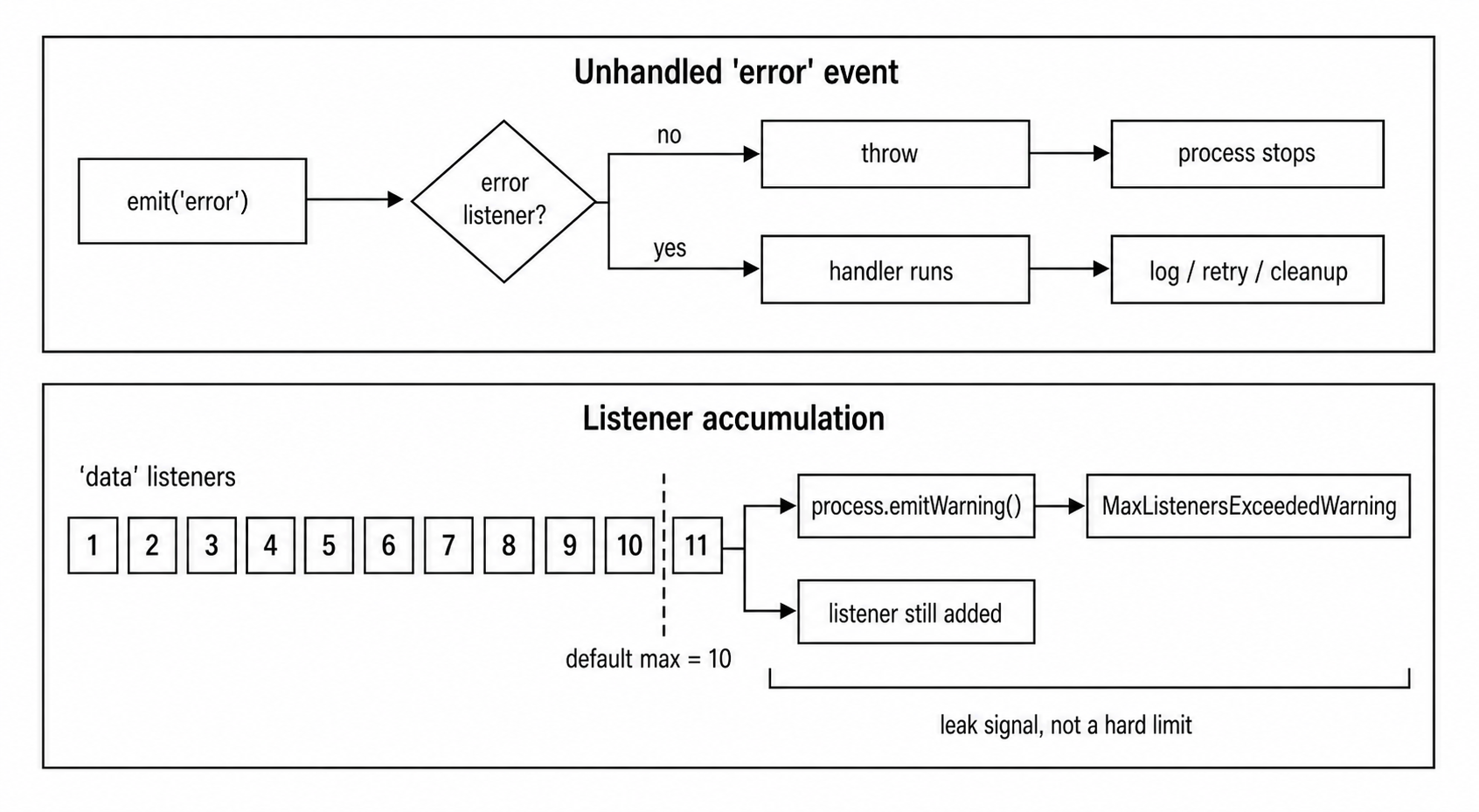
Figure 7.12 - EventEmitter has two production guardrails. Unhandled "error" events fail loudly, and growing listener counts produce max-listener warnings before the leak becomes harder to diagnose.
Memory Leaks and maxListeners
The default max-listener warning limit is 10.
When you add the 11th listener for the same event name on the same emitter, Node prints a warning through process.emitWarning().
Representative output looks like this -
MaxListenersExceededWarning: Possible EventEmitter memory leak
detected. 11 data listeners added to [EventEmitter]. MaxListeners
is 10. Use emitter.setMaxListeners() to increase limit.
This is a warning, not an exception. The listener still gets added, and the emitter still works.
The warning exists because repeated listener registration is one of the most common memory leaks in Node.
Here is the classic bug -
function handleRequest(req, res) {
  db.on('change', () => {
    // respond to change
  });
}
Every request adds a new "change" listener to db. Nothing removes it.
After 1000 requests, db has 1000 listeners. After 100,000 requests, it has 100,000 listeners. Each listener may also keep req, res, and other request data alive through its closure.
Now every time db emits "change", Node has to synchronously call all of those listeners. Memory grows, and event dispatch gets slower.
The warning object has a stack trace. Run Node with --trace-warnings to see where the 11th listener was added.
node --trace-warnings app.jsThat stack trace is usually where you start. The warning message also includes the emitter type and event name, which helps you find the part of the application that is accumulating listeners.
You can also listen for warnings in code -
process.on('warning', (warning) => {
  if (warning.name === 'MaxListenersExceededWarning') {
    console.log(warning.emitter, warning.type, warning.count);
  }
});
For MaxListenersExceededWarning, Node includes the emitter instance, the event name, and the current listener count on the warning object. Those fields are useful for logging and production leak detection.
Controlling the Limit
If a higher listener count is expected, set a higher limit on that emitter.
ee.setMaxListeners(20);You can disable the warning entirely -
ee.setMaxListeners(0);
ee.setMaxListeners(Infinity);
That should be rare. Disabling the warning removes a useful signal. If you expect around 25 listeners, setting the limit to 30 is usually better than setting it to Infinity.
There is also a global default -
EventEmitter.defaultMaxListeners = 20;Changing the global default affects emitters that have not set their own limit. The check reads the default when listeners are added, so even existing emitters can observe the new default if they still use the shared default value.
Node also provides a static helper for setting the limit on multiple targets -
const { setMaxListeners } = require('node:events');

setMaxListeners(50, server, db, cache, queue);
Current Node releases also provide events.getMaxListeners(emitter), which returns the effective listener limit. It works with both EventEmitter and EventTarget instances.
Legitimate High Listener Counts
More than 10 listeners is not always a bug.
A process-level emitter may have many "SIGTERM" listeners because several subsystems need shutdown cleanup. A shared database pool may have many "error" listeners because different modules subscribe independently. A plugin system may have many listeners by design.
In those cases, raise the limit to match the design.
The limit should still say something useful. If you expect 25 listeners, set the limit near that number. If the count grows to 200, you still want to know.
Infinity should be reserved for cases where unbounded listener growth is truly expected and monitored another way.
Detecting Leaks in Practice
The max-listener warning fires once per event name. After that, you need metrics if you want continuous visibility.
A simple check can use listenerCount() -
setInterval(() => {
  const count = ee.listenerCount('data');

  if (count > 100) {
    console.warn(`data listeners - ${count}`);
  }
}, 60_000);
In production, export listener counts as metrics. A count that keeps rising under steady traffic is a leak signal. A count that rises and falls during reconnects, deployments, or short bursts may be normal.
Event forwarding is another common source of leaks.
source.on('data', (chunk) => {
  dest.emit('data', chunk);
});
If this forwarding object is created per request, but source is long-lived, every request adds another listener to source. The fix is to remove the listener when the forwarding object is done.
removeAllListeners and Cleanup
removeAllListeners() is the broad cleanup method.
With no argument, it removes every listener from every event on that emitter. With an event name, it removes all listeners for that one event.
ee.removeAllListeners();
ee.removeAllListeners('data');
Use it carefully. Removing listeners you do not own can break other parts of the program. It is usually safer for code to remove only the listeners it registered.
A clean subscription pattern returns an unsubscribe function -
function subscribe(emitter) {
  const handler = (data) => {
    handleUpdate(data);
  };

  emitter.on('update', handler);

  return () => {
    emitter.off('update', handler);
  };
}

const unsubscribe = subscribe(db);

// later
unsubscribe();
This pattern keeps ownership clear. The function that creates the subscription also gives the caller a way to tear it down.
once() removes itself after the event fires, but that only helps if the event actually fires. If the event never happens, the once() listener stays registered.
That can leak too. For example, code may wait for "drain" on a writable stream, but if the stream never actually needs to drain, that listener can sit there forever.
Modern Node APIs help by supporting AbortSignal with events.once() and events.on(). Aborting the signal removes the internal listener.
With once imported from node:events, a timeout wrapper looks like this -
const { once } = require('node:events');

async function waitWithTimeout(server) {
  const ac = new AbortController();

  const timeout = setTimeout(() => {
    ac.abort();
  }, 5000);

  try {
    await once(server, 'listening', { signal: ac.signal });
  } finally {
    clearTimeout(timeout);
  }
}
If "listening" does not fire within 5 seconds, the signal aborts. The promise rejects with an AbortError, and the internal listener is removed.
Async Context for Custom Emitters
Normal EventEmitter listeners run in the async context of whatever code calls emit().
Most of the time, that is fine. If a timer callback emits an event, listeners run in that timer's async context. If a stream implementation emits an event, listeners run in that stream operation's context.
Custom infrastructure code sometimes needs something stricter. If an emitter represents a long-lived async resource, diagnostics and AsyncLocalStorage may need every listener to run in that resource's context.
Node provides EventEmitterAsyncResource for that case -
const { EventEmitterAsyncResource } = require('node:events');

const bus = new EventEmitterAsyncResource({ name: 'JobBus' });

bus.on('done', () => {
  // runs in the bus async context
});

bus.emit('done');
bus.emitDestroy();
EventEmitterAsyncResource extends EventEmitter. Its emit() runs listeners inside the async resource context owned by the emitter. Call emitDestroy() when that resource lifecycle is finished so async-hooks consumers can observe cleanup.
Most application emitters do not need this class. It is mainly for infrastructure code that must preserve async context across custom event dispatch.
EventEmitter in the Async Pattern Landscape
Callbacks, promises, and async functions usually model one result.
A callback is usually called once. A promise resolves or rejects once. An async function returns one final result.
EventEmitter is for repeated signals over time.
A server can emit "connection" many times. A stream can emit "data" many times. A watcher can emit "change" many times. A child process can emit output lines until it exits.
That is why EventEmitter fits long-lived objects. Multiple parts of your code can listen to the same object and react independently whenever something happens.
Callbacks give one function a completion signal.
Promises give one awaitable a final result.
EventEmitter gives many listeners repeated notifications across an object's lifetime.
The tradeoff is cleanup. With a promise, the result arrives and the promise is done. With an EventEmitter, listeners can stay attached forever unless someone removes them. That is where listener leaks come from.
When to Use Which
Choose the pattern based on how many results you expect and who controls the timing.
For one result with a clear completion point, use a promise or callback. Examples include a database query, a file read, or an HTTP request.
For one event-driven result, use events.once(). Examples include waiting for a server to start listening, waiting for the first connection, or waiting for a child process to exit.
For many push-based results over time, use EventEmitter with on(). Examples include stream chunks, socket messages, file changes, or process output.
For many results where the consumer should control the pace, use an async iterator with events.on(). The next subchapter covers that pattern in more depth.
EventEmitter sits under a lot of Node's runtime. Streams extend EventEmitter. net.Server extends EventEmitter. http.Server extends net.Server, which extends EventEmitter. child_process.ChildProcess extends EventEmitter. fs.FSWatcher extends EventEmitter. The process object is also an EventEmitter instance.
Once you understand EventEmitter, a lot of Node's I/O behavior becomes easier to read.
Bridging EventEmitter to Promises and Async Iteration
The events module gives you two helpers for adapting EventEmitter to modern async code.
events.once(emitter, eventName) returns a promise. The promise resolves when the event fires.
The resolved value is an array of the arguments passed to emit().
const { once } = require('node:events');
const net = require('node:net');

const server = net.createServer();
const listening = once(server, 'listening');

server.listen(0);

await listening;

console.log('Server is ready on', server.address().port);
server.close();
This is the clean way to wait for a one-time event inside async code.
events.once() also handles the error path for you. If the emitter emits "error" before the target event, the promise rejects. The exception is when you are waiting for "error" itself. In that case, "error" is treated as the event you asked for, and the promise resolves with the emitted arguments.
When the promise settles, Node removes the internal listeners.
For events with arguments, the promise resolves to an array -
const [socket] = await once(server, 'connection');
const [code, signal] = await once(child, 'exit');
The array shape stays the same no matter how many arguments the event provides.
There is one timing trap. If multiple events can fire in the same synchronous batch, create all the promises before starting the work.
const ready = once(ee, 'ready');
const opened = once(ee, 'opened');

startWork();

await Promise.all([ready, opened]);
This installs both listeners before startWork() can emit.
This version can miss an event -
await once(ee, 'ready');
await once(ee, 'opened');
If "ready" and "opened" both fire before the first await continuation runs, the second listener is installed too late.
events.on(emitter, eventName) returns an async iterator. Each event becomes one iteration.
const { on } = require('node:events');

async function consume(stream) {
  for await (const [chunk] of on(stream, 'data')) {
    process.stdout.write(chunk);
  }
}
Each yielded value is an array of the arguments passed to emit().
The iterator buffers events that arrive while the loop is busy, then yields them in order. By default, it can run forever. You can use an AbortSignal to cancel it, and options such as close, highWaterMark, and lowWaterMark to control completion and buffering behavior on supported emitters.
That buffer has a cost. If the producer emits faster than the loop consumes, memory can grow. Use cancellation, close events, or watermarks when the producer can outpace the consumer.
Both events.once() and events.on() support AbortSignal. That is the recommended way to add cancellation or timeouts.
async function waitForListening(server) {
  const ac = new AbortController();

  const timeout = setTimeout(() => {
    ac.abort();
  }, 10_000);

  try {
    await once(server, 'listening', { signal: ac.signal });
  } catch (err) {
    if (err.code === 'ABORT_ERR') {
      console.log('Timed out');
    }
  } finally {
    clearTimeout(timeout);
  }
}
The timeout aborts the wait, and Node removes the internal listener.
EventTarget - The Web Standard Alternative
Node also provides EventTarget, which is the browser-style event API.
EventTarget uses methods such as addEventListener(), removeEventListener(), and dispatchEvent(). Instead of passing arbitrary arguments, it dispatches Event objects with a type property.
EventTarget exists mainly for Web API compatibility. AbortController uses it. MessagePort uses it. Web-compatible APIs use it when they need browser-style behavior.
EventEmitter and EventTarget feel similar at a glance, but they use different models.
EventEmitter emits an event name and any number of raw arguments -
ee.emit('data', chunk, encoding);EventTarget dispatches an Event object -
target.dispatchEvent(new Event('data'));EventEmitter has the special "error" contract. EventTarget does not. EventEmitter has once() as a method. EventTarget uses { once: true } as an option to addEventListener().
For runtime-native Node code, EventEmitter is still the standard choice. EventTarget appears when Web compatibility is the goal.
Some tooling APIs work with both. events.getEventListeners() and events.setMaxListeners() support EventEmitter and EventTarget, which gives diagnostics code one surface for both kinds of event source.
The final rule is simple. Treat EventEmitter as a synchronous listener system. Handle "error". Watch listener growth. Remove long-lived subscriptions when they are done. Once those rules are clear, streams, servers, sockets, child processes, and async-iterator adapters all become easier to reason about because they share the same event behavior.