Node.js Request Path: DNS, TCP, libuv & Callbacks
By the time a request reaches your application code, a lot of lower-level work is already done. The hostname got resolved, an address got picked, the OS chose a route and a local port, and TCP connected. On the server side the kernel had to match the incoming packet to a listening socket, finish the TCP handshake, put the connection somewhere Node can accept it, and hand that work back to libuv so it ends up in JavaScript.
Your application code sees a net.Socket, a 'connect' event, a 'connection' callback, or a 'data' event. Those are the JavaScript entry points. Underneath them, the request has already passed through DNS, routing, kernel socket state, TCP queues, libuv readiness, and Node's stream layer.
Tracing the whole path is useful because every failure sits at a specific point on it. A name that will not resolve fails at lookup, before any TCP packet leaves the host. Refused connections show up during TCP setup. Accept-queue pressure builds before your request handler runs at all, and the 'data' event only fires once the socket exists and Node has bytes ready to hand up.
The Request Path from Client to Node.js Process
Debugging gets easier once you can place each event on the path. DNS resolution runs first, before any TCP packet. ECONNREFUSED shows up later, while the client is still trying to connect. Backlog pressure builds before your server callback runs at all. HTTP comes last, and it cannot start until the transport path has produced a connected byte stream.
A client call returns a net.Socket object before the TCP connection exists -
import net from 'node:net';

const socket = net.connect(3000, 'api.internal');

socket.on('connect', () => {
  socket.write('ping\n');
});
That first call creates JavaScript state and nothing more. The object can hold listeners, queue writes, and later emit an error. But the real TCP connection only arrives after Node resolves the name, chooses an address, asks the OS for a route, gets a local endpoint, and waits for the handshake to finish.
So net.connect() only kicks off the work. You hold the socket object immediately, but Node still has to resolve the name, choose an address, get a route and local endpoint, and finish the handshake before any connection exists.
Call the client side of this the outbound path, running from a Node connection request to a connected socket. It runs through the JavaScript net.Socket, Node's native socket wrapper, libuv, the OS resolver path when dns.lookup() behavior is used, the routing table, the kernel socket table, and the remote peer's response.
The server has its own path -
import net from 'node:net';

net.createServer(socket => {
  console.log(socket.remoteAddress, socket.remotePort);
  socket.end('pong\n');
}).listen(3000, '0.0.0.0');
The inbound path starts when a packet reaches the server machine. The kernel matches that packet to a listening socket, advances TCP state, places a completed connection into the accept queue, and notifies libuv that the listening socket has work waiting. Node then accepts the connection, wraps the connected descriptor, creates the JavaScript net.Socket, and runs your callback.
Client and server are both working on the same TCP connection, but they observe it from their own side.
The full sequence, client to server, is -
client JavaScript
  -> lookup
  -> address selection
  -> route and local address
  -> TCP connect
  -> server TCP queues
  -> libuv readiness
  -> server JavaScript callback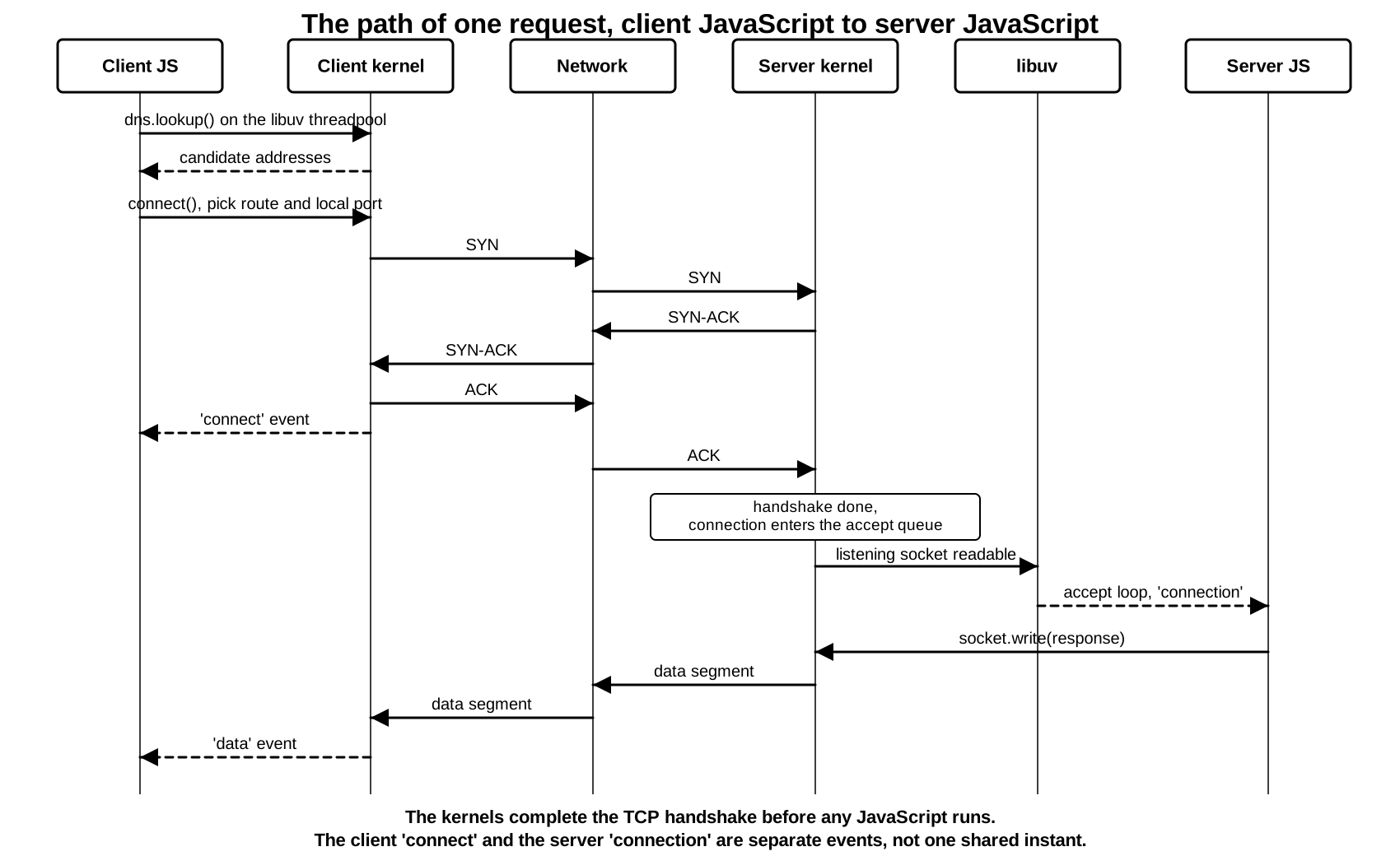
Learning the path pays off here. A DNS lookup that succeeds only hands you candidate addresses, which proves nothing about whether a TCP listener exists at any of them. And a TCP connect that succeeds only gives you a byte stream, so the peer might still not speak the protocol you expect. NAT, a proxy, or a load balancer can also rewrite the address the server sees before it reaches your process.
From here on, short JavaScript examples reuse surrounding variables such as net, server, or socket when repeating setup would get in the way.
Outbound From Hostname to TCP Socket
net.connect() can accept a host and a port. If the host is a name, Node has to resolve that name before the kernel can connect -
const socket = net.connect({
  host: 'example.com',
  port: 80,
});
A hostname works for humans and for application config, but the kernel cannot connect with it. It needs an IP address, a port, and an address family. Node gets there through the lookup behavior covered earlier in this chapter. The short version - dns.lookup() style resolution uses the OS resolver path, and the order of the returned addresses depends on Node options, OS resolver behavior, and the records the name actually returns.
net.connect() with a hostname resolves through dns.lookup(), which sends getaddrinfo to the libuv threadpool. That pool defaults to four threads and is shared with file I/O and several crypto calls. A slow resolver blocks one of those threads. Under concurrency, name resolution can queue behind unrelated work and add latency before any packet leaves the host. dns.resolve() uses c-ares instead and never touches the threadpool. Raise UV_THREADPOOL_SIZE only after you confirm the pool is the bottleneck.
After Node has candidate addresses, the OS has to choose a local endpoint. That means a source IP address and a source port for the outbound connection. The OS chooses those from the destination address, address family, routing table, configured interfaces, and any explicit localAddress supplied by your code.
You can pin the local address yourself -
const socket = net.connect({
  host: 'example.com',
  port: 80,
  localAddress: '192.168.1.20',
});
That option tells the OS which source address you want. The OS still has to accept that address as local, match the address family, and find a route from that address to the destination. If the address is missing, bound to the wrong interface, or unusable for the chosen destination, the connection fails before the remote server is involved.
Most client code leaves localAddress unset, which is normally what you want. Source selection then falls out of the route lookup. The kernel checks the routing table for the destination IP, and the selected route points at an output interface or next hop. The local address usually comes from that interface, and the kernel picks an ephemeral port to complete the client-side socket address.
At that point, TCP has enough information to send a SYN -
remote address - 93.184.216.34
remote port    - 80
local address  - 192.168.1.20
local port     - 52744
protocol       - TCP
state          - connecting
The local port changes from run to run. The source address depends on the host's network setup. In a container, the first source address may be a container-side address, then NAT may rewrite it later. On a laptop with a VPN enabled, the selected route may use a tunnel interface. None of this is Node's policy to set - Node asks the OS to connect, and the OS builds the local endpoint from its own routing rules.
The JavaScript object moves through a smaller set of visible states. Writes can queue inside Node before connect completes. A successful TCP connect makes the socket emit 'connect', while a failure in either lookup or connect makes it emit 'error'.
Several pieces of state exist during the same operation -
JavaScript net.Socket
  -> native TCP wrapper
  -> libuv TCP handle
  -> kernel socket table entry
  -> route-selected local endpoint
  -> remote endpoint candidate
Your code holds the JavaScript object. Node's native wrapper connects that object to the C++ side. The libuv handle connects the socket to event-loop I/O readiness. The kernel socket table owns TCP state and the local descriptor. The local endpoint is the source address and port the OS selected. The remote endpoint candidate is one resolved address plus the requested port.
Each of those steps can fail.
Descriptor allocation can fail before DNS if the process cannot create more sockets. Lookup can fail before any packet reaches the remote network. A connect attempt can fail after the kernel created a local socket but before the peer accepted anything. A successful TCP connect can still be followed by an immediate close if the server accepts the socket and then rejects the session at the application level.
socket.pending exposes a small part of this from JavaScript -
const socket = net.connect(3000, '127.0.0.1');

console.log(socket.pending);

socket.on('connect', () => {
  console.log(socket.pending);
});
The socket reports as pending while the connection is still being set up. Once connect finishes, it becomes a live connected stream. A failure in lookup or connect leaves the socket in a state that never becomes useful for normal reads and writes, and your error handler receives the failure from that path.
The address family is also chosen before the kernel can make the socket call. IPv4 and IPv6 use separate socket families below Node. A hostname can produce both, so Node may try candidate addresses from more than one family. A numeric host skips DNS, but it still goes through route lookup and local endpoint selection -
net.connect(5432, '::1');
net.connect(5432, '127.0.0.1');
Those calls target loopback addresses from separate families. A server listening only on IPv4 loopback will not receive the IPv6 connection. A dual-stack listener may receive both, depending on OS socket options from the previous subchapter. The client-side request has to match how the server is bound.
Explicit local ports are rare, but they show one more place where the OS can reject the request -
net.connect({
  host: '127.0.0.1',
  port: 3000,
  localPort: 40000,
});
Now the client asks for a specific local port instead of letting the kernel choose one. That can fail if another socket already uses the same local tuple, or if the platform rejects the reuse pattern. Most outbound clients leave localPort alone and let the kernel assign an ephemeral port, since that is what ephemeral ports are for.
Local address selection gets harder to reason about on hosts with multiple routes.
A developer laptop might have Wi-Fi, loopback, a VPN tunnel, and a container bridge all at once. A cloud VM often has a primary interface, an extra private interface, and IPv6 on only one of them. Inside a container, the process may see a smaller network view that maps through host networking rules. In every case the same net.connect() call runs against whatever route table is visible to that process. Move the process into another network namespace and the route table can change while the JavaScript stays identical.
The route lookup starts from the destination candidate and works outward. A public IPv4 destination might match the default route over Wi-Fi. A private corporate address could match a VPN route instead. Loopback handles 127.0.0.1, and IPv6 loopback handles ::1. Whatever the kernel picks, the local address follows from it unless your code pins localAddress.
Pinning a local address can help in tests and on multi-homed systems, but it moves the responsibility for a correct source address from the kernel to your code. Pin one from the wrong interface and the connect fails. Choose an IPv4 local address while the remote candidate is IPv6, and the families will not match. Worst of all, pin an address that exists on the host but cannot reach the destination, and the error will point at the remote server even though the real problem is local.
Here is a request that mixes address families -
net.connect({
  host: '2001:db8::10',
  port: 443,
  localAddress: '192.168.1.20',
});
The remote address is IPv6 and the local address is IPv4. The OS cannot build a single TCP socket across two families, so the request fails during connection setup.
The local endpoint also decides what the server logs. With no NAT or proxy in the way, the server sees the client's selected source address and ephemeral port. Add NAT and it sees the translated tuple instead. Add a proxy and it sees the proxy's tuple. The client still chose a real local endpoint either way, but that endpoint is not always what the backend server gets to see.
For debugging, log the selected local address after connect -
const socket = net.connect({ host, port });

socket.on('connect', () => {
  console.log('selected local', socket.address());
});
Here, host and port are the endpoint values for the operation you are tracing.
That log only works after connect, because the kernel may not have selected the final local tuple any earlier. Until the connection completes, the address you asked for is just a request. Once it completes, the socket carries the real values the OS assigned.
At the end of a successful outbound path, the connected socket has four values -
local address
local port
remote address
remote port
For TCP, that four-value tuple is what identifies the connection inside the host's TCP state. Many client sockets can talk to the same remote address and port at once, because each one gets a distinct local port. The same server port can hold thousands of clients, since every client brings its own remote endpoint. The listening socket only owns the local listen address and port, while each accepted socket owns a full connected tuple.
Lookup failures happen before TCP -
const socket = net.connect(80, 'bad.invalid');

socket.on('error', err => {
  console.error(err.code);
});
A failed name lookup commonly reports ENOTFOUND. A temporary resolver failure can report EAI_AGAIN. In both cases, no SYN went to the application server because Node never got a usable destination address.
A refused connection happens later -
const socket = net.connect(9, '127.0.0.1');

socket.on('error', err => {
  console.error(err.code);
});
If no process is listening on that port, the attempt commonly reports ECONNREFUSED. By that point the address existed and the route worked - TCP got all the way to a host stack, which then rejected the connection because nothing was bound to that port.
Timeouts sit in another part of the path. A connect timeout means the client waited long enough without a successful TCP connection. The cause might be packet loss, a firewall that drops traffic, routing failure, a remote host that never answered, or a middle system that quietly absorbed the attempt. All a timeout really tells you is that the connect path did not complete in time. Finding out why takes more evidence.
Address Racing
Resolved addresses are only candidates. The client still has to turn one of them into an actual connection.
A hostname can return IPv6 and IPv4 addresses. If a client tries only the first address, it can sit on a broken path while another address family would have connected quickly. Address order helps, but it is a weak tool when one family works and the other is slow or broken.
Happy Eyeballs is a client connection strategy that keeps the client from waiting too long on a bad candidate. It works in a few steps. Try one candidate, often IPv6 first. Wait a short delay. If that has not connected, start another attempt, often IPv4. Take the first one that connects and close or abandon the others.
A connection race means several connection attempts can be in flight at the same time, with the client committing to whichever one succeeds first. DNS only supplies the candidate list. How aggressively those candidates get tried is up to the connection logic.
Node's low-level net module has changed in this area over the years. Current releases can auto-select among multiple addresses, depending on the options you pass and the defaults in play. The exact timing knobs live in the API reference. The behavior itself is straightforward - Node may get more than one candidate address, and it may try more than one before reporting a final result.
This is easy to see when you debug a localhost connection.
const socket = net.connect({
  host: 'localhost',
  port: 3000,
});
On one machine, localhost may resolve to ::1 before 127.0.0.1. On another, IPv4 may come first. If your server listens only on 127.0.0.1, an IPv6 attempt to ::1 can fail while the IPv4 attempt succeeds. The app may still work, but with a small delay. A trace can show a refused IPv6 attempt followed by a successful IPv4 connection.
The reverse happens just as easily. A service might listen on IPv6 only, so a client that tries IPv4 first has to fall back and recover through IPv6. One address can route through a VPN while another stays on the local network. The hostname never changed, but the network path the connection takes is completely different.
When every candidate fails, the error you see may summarize several attempts. One address can produce ECONNREFUSED, another can time out, and another can fail for a routing reason. The final JavaScript error depends on the policy that collected those attempts. So treat a final connect error as the combined result of candidate selection and several connection attempts, not as a verdict on one DNS answer.
In practice, the fix is to log the selected local and remote endpoints right after connect.
socket.on('connect', () => {
  console.log(socket.address());
  console.log(socket.remoteAddress, socket.remotePort);
});
socket.address() shows the local address after the OS picked it. remoteAddress and remotePort show the peer for the connected socket. With address racing, those values tell you which candidate actually won.
Node also has to clean up the attempts that did not win the race. One of them may still be in progress when another connects first. Node closes or abandons the extra handle so your application only ever sees one connected socket. That discarded attempt can still leave traces below JavaScript - a SYN may have left the host, a refusal may have come back, or a timeout may have been left pending.
That extra work can surface in packet captures and server logs. A dual-stack server might record a short-lived attempt on one address family alongside the real session on another. Look at a firewall log and you may find blocked IPv6 attempts even while the application is happily running over IPv4. Even a passing local test can quietly spend time on a doomed first candidate.
The stagger delay is deliberately short. Make it long and you bring back the exact user-visible stall Happy Eyeballs exists to remove. Fire every possible attempt at once and you get extra network noise and connection churn for no real gain. Most modern clients settle on staggered attempts as the middle ground. The precise delay is a policy knob, and the goal behind it does not change - overlap enough work that the client never sits too long on a bad path.
When every candidate fails, the reporting gets messier. Some APIs surface only the last error, others aggregate them, and Node's own low-level behavior depends on the connect options and the version. However the error arrives, read it the same way - candidate generation and candidate connection are two separate parts of the path. A resolver failure means Node never got useful candidates in the first place. A connect failure means at least one candidate existed and the attempt reached the network. A raced connect failure can stand in for several attempts that all failed for different reasons.
A small script makes the result visible on machines where localhost resolves to both families -
import net from 'node:net';

const socket = net.connect(3000, 'localhost');

socket.on('error', err => console.error(err.code));

socket.on('connect', () => {
  console.log(socket.remoteFamily, socket.remoteAddress);
});
remoteFamily tells you which family came out on top. When the server binds only to 127.0.0.1, an IPv4 127.0.0.1 result confirms the IPv4 path connected or recovered. When it binds only to ::1, an IPv6 result confirms the same on the IPv6 side. Printing the family takes most of the confusion out of localhost tests.
Inbound From SYN to connection
The server path starts before JavaScript sees anything -
const server = net.createServer(socket => {
  console.log('accepted', socket.remoteAddress);
});

server.listen(3000, '0.0.0.0');
listen() creates a listening socket in the kernel, with Node and libuv handles attached above it. After that, every incoming TCP attempt lands in kernel state before JavaScript hears about it. Your callback has been registered, but nothing calls it until the kernel has work to hand up.
A normal inbound TCP path looks like this -
client SYN
  -> server interface and TCP receive path
  -> listening socket match
  -> TCP handshake completion
  -> accept queue
  -> readiness notification
  -> libuv I/O watcher
  -> accept loop
  -> JavaScript connection callback
When the kernel says a descriptor is ready, it means that descriptor can make progress without blocking. For a listening socket, readable readiness specifically means completed connections are sitting in the queue, waiting to be accepted. That signal carries no application data up to JavaScript. It only tells libuv that the listening socket has work waiting.
libuv tracks that interest through an I/O watcher, which is just libuv's record that it cares about readiness on a given descriptor or the platform's equivalent of one. For a TCP server, the watcher sits on the listening socket, because a readable listening socket is the signal that accept() can return a connected socket.
When the kernel completes the TCP handshake, the new connected socket waits in the accept queue. The listening socket becomes readable from the event system's point of view. libuv receives that readiness during the event loop's I/O processing. Node's native TCP server code runs, accepts pending connections, wraps each accepted descriptor as a net.Socket, and emits the JavaScript event.
That native loop pulling connections off the listening socket is the accept loop. It keeps calling accept() until the kernel reports nothing immediately available, or until Node hits its own per-iteration limit. It loops at all because readiness only promises one available connection when there could be dozens.
Under load, you can watch this happen. A spike of incoming connections can fill the completed accept queue faster than JavaScript callbacks run. The backlog from the previous subchapter controls part of that capacity, with platform caps and SYN queue behavior below it. Once the accept queue is full, new handshakes may be delayed, reset, or dropped depending on OS policy and network conditions.
JavaScript sees the accepted socket after that native work -
server.on('connection', socket => {
  console.log(socket.localAddress, socket.localPort);
  console.log(socket.remoteAddress, socket.remotePort);
});
By the time your callback runs, the socket already carries its local and remote endpoint metadata, and it already holds a descriptor. Destroy it on the first line of the callback and the connection still happened - the process accepted it and then closed it.
server.maxConnections and application-level admission checks run above the kernel accept path. They can close a socket or refuse to do work after the process has accepted the connection. They do not undo the fact that the TCP handshake already completed. You can see this in metrics, where a server accepts connections and closes them right away while clients report resets or early EOFs.
The listening socket and accepted sockets have separate lifetimes -
const sockets = new Set();

const server = net.createServer(socket => {
  sockets.add(socket);
  socket.on('close', () => sockets.delete(socket));
});
Closing the server stops future accepts. Existing accepted sockets stay open unless your code ends or destroys them. During shutdown, a process often calls server.close() to stop accepting new connections, then drains or terminates the connected sockets it already owns.
The timing here is what catches people out. The kernel can finish the TCP handshake and drop the connection into the accept queue before Node runs your callback at all. The client sees its connect succeed inside that window, while the server application has not touched the connection in JavaScript yet. The OS has accepted it for the listening socket, and Node still has to pull it off the queue and wrap it.
This is exactly what you see in a load test that looks confusing at first. The clients all report successful TCP connects, while the server reports fewer application-level accepts at that same instant. The gap can come from accept queueing, event-loop delay, process CPU, descriptor pressure, or even logging delay. TCP state and your JavaScript callbacks track the same connections, but they never share a single timestamp.
Descriptor pressure hits this path too. Each accepted TCP connection consumes a descriptor in the process. If the process is near its descriptor limit, accept can fail even though the listening socket is readable. Node may emit an error on the server or close accepted state depending on where the failure occurs. The client may see a reset or a close right after the handshake. Underneath all of it, the kernel had a working connection and the process simply could not attach all the user-space state to it.
The accept loop also competes with JavaScript work already queued. A burst of completed connections can produce many 'connection' callbacks. Each callback can attach listeners, allocate buffers, start timers, and add the socket to application structures. If the callback does heavy synchronous work, the event loop spends less time returning to I/O readiness. The kernel keeps receiving packets, queues fill, and the next batch of callbacks arrives later.
Keep connection callbacks lean when connection volume is high -
const server = net.createServer(socket => {
  socket.setNoDelay(true);
  socket.on('error', logSocketError);
  handOff(socket);
});
Here, logSocketError and handOff are application functions.
The callback sets socket policy, attaches failure handling, and hands the socket to the next part of your program. It does not parse a huge config file, run CPU-heavy authentication, or block on synchronous filesystem work. Higher protocols may need more work soon after accept, but the first callback should stay small under load.
pauseOnConnect gives you another control point -
const server = net.createServer({ pauseOnConnect: true }, socket => {
  socket.resume();
});
With pauseOnConnect, accepted sockets arrive paused. Node has accepted the descriptor and created the net.Socket, but readable data will not flow into your JavaScript code until the socket resumes. Process managers and handoff patterns can use this to transfer sockets or attach setup before data events begin. The TCP connection already exists. The read side is being held inside Node's stream layer.
The Readiness Path Inside Node
The interesting machinery sits between the kernel and your JavaScript callback.
libuv does not ask the kernel to run JavaScript. It registers native interest in descriptor readiness, then reports readiness to Node-owned callbacks inside the event loop. The event API underneath changes with the platform - epoll on Linux, kqueue on macOS and BSD, and IOCP on Windows, whose completion model does not resemble Unix readiness at all. libuv hides those differences behind one common handle and callback model.
For a server socket on Unix-like systems, the listening descriptor is watched for readability. Readability on a listening socket means accept() can return a connected descriptor without blocking. libuv keeps a watcher associated with the TCP handle. When the event loop reaches the poll provider and the kernel reports the descriptor as readable, libuv runs the native connection callback associated with that handle.
Node's native TCP server code then accepts the connection through libuv. The accepted descriptor comes from the kernel. Node builds the native wrapper for it, ties it to a JavaScript net.Socket, sets up the stream state, and emits the event through the server object. The handoff runs from a readiness signal, to an accept() that returns a descriptor, to that descriptor wrapped as a stream your code can use.
Reads work through the same readiness machinery. A connected socket becomes readable when its kernel receive buffer holds bytes, or when TCP state changes in a way the read path has to surface, such as the peer shutting down. From there libuv picks up the readability and Node asks for the bytes. The kernel copies them into a buffer the runtime owns, Node pushes them through the readable side of the net.Socket, and your 'data' listener or async iterator finally sees the chunks.
The chunks Node hands you do not line up with messages. A single TCP segment can arrive as several JavaScript chunks when reads are small, and several segments can collapse into one chunk when bytes have piled up in the buffer. Any protocol that needs discrete messages has to parse them out of the byte stream itself. HTTP parsing is Chapter 10's job. For raw net.Socket code, framing is on you.
Writes run the same way in reverse. socket.write() drops bytes into Node's writable path. As long as Node can pass them to libuv and the kernel accepts them into the socket send buffer, the write keeps moving. Once user-space buffering climbs past the stream threshold, socket.write() returns false, and a later 'drain' event tells you the writable side has room again. TCP flow control and the kernel send buffers all sit below that signal, so a true return only confirms the local writable path took the bytes. The peer reading them is a separate question entirely.
Shutdown comes up through the same path. A FIN from the peer eventually shows up as end-of-stream on the readable side, while a RST usually surfaces as an error or an abrupt close. On your side, socket.end() asks Node to finish pending writes and send a graceful TCP close, and socket.destroy() tears the local state down more aggressively. The full state machine belongs to the TCP chapter. The thing to hold onto here is the route - a low-level TCP state change becomes readiness, libuv reports it, and Node turns it into a stream event.
That translation is not free of latency. While JavaScript is busy with CPU-heavy code, the kernel keeps receiving packets and filling buffers, and the callbacks just wait. The readiness may already be recorded, but the event loop has to get back to I/O processing before Node can run the handler. This is the reason a networking bug can present as remote slowness when the real problem is a process that is busy above libuv.
The same watcher model is why a single event-loop pass can handle several accepts or reads at once. Readiness only says work is available, so native code may loop until the operation would block before handing control back up. The order your JavaScript callbacks fire in still follows Node's event-loop rules, even though the work originated in descriptor state below JavaScript.
Kernel APIs disagree on how they report readiness, and libuv smooths those differences into one behavior. The working idea underneath stays the same. When readiness fires, native code wants to drain enough work that the descriptor no longer needs immediate service. Drain too little and the event provider just reports readiness again on the next pass. Drain too much in a single pass and other handles end up waiting longer for their turn. Runtime code tunes that balance with per-handle loops and event-loop iterations.
JavaScript only ever sees the final scheduling point. By the time a 'data' event fires, the kernel may have had those bytes for a while. A 'connection' event can mean the TCP handshake finished some time before. A 'drain' event can mean user-space buffering dropped below the threshold only after the lower writes had already made progress. The timestamp on the callback records when JavaScript observed the event, which is later than when the network event actually happened.
That becomes obvious when a process is CPU-bound -
server.on('connection', socket => {
  const start = Date.now();
  while (Date.now() - start < 200) {}
  socket.end('late\n');
});
Clients can finish their TCP handshakes while the server is still stuck in that loop from an earlier callback. The kernel queues them, and libuv can only deliver their JavaScript callbacks once control returns to the event loop. So a packet capture can show the packets arriving on time while the application log shows the accepts landing late. Both are accurate at the same time, because they measure different points.
Data After Both Sides Connect
After connect and accept, both processes have connected sockets. From here, the path is mostly byte movement and state changes.
const socket = net.connect(3000, '127.0.0.1');

socket.write('one\n');
socket.write('two\n');
The peer might read that as one chunk, as two, or as some other grouping. TCP delivers an ordered stream of bytes and keeps no record of where your individual write() calls began and ended. Node's streams just hand you whatever the reads pulled out of that byte stream. Each write() is an event on the sending side, and it has nothing to do with how the receiving side splits that stream back into chunks.
One socket.write() does not produce one 'data' event on the peer. TCP guarantees ordered bytes and says nothing about boundaries, so two writes can arrive as one chunk, as three chunks, or split in the middle of a token. Any protocol that needs discrete messages has to add its own framing, such as a length prefix, a \n delimiter, or fixed-size records, and then parse the accumulated buffer. Code that treats each 'data' chunk as one complete message breaks the moment segmentation changes under load.
On the server -
server.on('connection', socket => {
  socket.on('data', chunk => {
    console.log(chunk.toString());
  });
});
The chunk here is a Buffer from Node's read side, holding whatever bytes were available when Node read from the socket. If your protocol uses newline-delimited messages, length prefixes, or fixed-size frames, this callback is where your parser has to pull them back apart.
Backpressure crosses several layers here. The receiving process can stop reading from the net.Socket, either directly with pause() or indirectly because downstream work slows down. From there the effects stack up - Node's readable-side buffering grows, the kernel receive buffer can fill, and TCP flow control reduces the sender's usable window. Over on the sending side, write() starts returning false as Node's writable buffering grows.
Handle that signal before producing more bytes -
if (!socket.write(payload)) {
  socket.once('drain', sendMore);
}
Here, payload is the next bytes from your protocol code, and sendMore is the continuation that resumes production after Node reports writable room.
That code handles pressure at the Node stream level and leaves the peer's receive buffer to TCP. It follows one rule - stop adding bytes the moment the writable side reports it is backed up, then start again when 'drain' fires.
When socket.write() returns false, the writable side is already backed up. More write() calls still return and do not block, and Node keeps the unsent bytes in user-space memory with no upper limit. A fast producer feeding a slow or stalled peer can run the process out of memory while the socket still reports as connected. Pause production until 'drain' fires before you write more.
Reads can also report teardown -
socket.on('end', () => {
  console.log('peer finished writes');
});

socket.on('close', hadError => {
  console.log({ hadError });
});
'end' means the readable side saw the peer finish writing in an orderly way. 'close' means the local socket handle itself has shut down. The first tells you the incoming byte stream is done; the second tells you the local resource has been released. Those are genuinely separate events, and code often needs to watch both.
Errors follow the same path. ECONNRESET usually means the peer reset the connection or an intermediate device generated reset behavior. EPIPE can happen when code writes after the peer has closed enough state that the local write cannot continue. The exact event depends on timing, platform, and which operation notices the failure.
When you debug, the first thing to do is locate the error on the path. A resolver error, a connect error, an accept-then-close, a read or write error, an idle timeout, a reset - each of those points you toward a different investigation.
There is a subtle ordering problem on the byte path too. The first application bytes can show up before your server callback has even finished its setup.
TCP allows the client to send data as soon as the connection is established. On the server, the kernel can receive those bytes and hold them in the socket receive buffer before JavaScript attaches every listener. Node stream state controls when those bytes move upward. If the socket is in flowing mode because a listener was attached, data events can fire quickly. If the socket is paused, bytes stay buffered until code reads or resumes.
Normal behavior looks like this -
server.on('connection', socket => {
  socket.pause();
  queueMicrotask(() => socket.resume());
});
Pausing does not stop the peer from sending. It only stops Node from emitting readable data up to your JavaScript until you resume. The kernel receive buffer keeps filling, and TCP flow control can still push back on the sender if the process waits too long. What you are making is an application-side flow decision, and the network has not admitted or rejected anything because of it.
Servers that feed sockets into a protocol parser usually follow the same order - accept, attach error and close handling, attach the parser or stream pipeline, then resume if the socket was paused. Skip the error handler and an unhandled 'error' event can take the process down. Forget the parser setup and you can lose structure when bytes get consumed before anything parses them. Node's buffering covers the normal setup window, but careless flowing-mode code can still get you into trouble.
A net.Socket that emits 'error' with no listener throws an uncaught exception and can take down the whole process. Resets and pipe failures arrive on individual connections at any time, so attach an 'error' handler as the first step in the 'connection' callback, before parser setup or any async work that could let an error fire first. One unhandled reset on a single connection should not crash a server that is serving every other client.
One Connection, Two Observation Points
The client and server do not observe the same connection at the same instant.
Client code watches its own outbound socket. The server watches an accepted socket on its side. In between, the kernel and the network deal in packets and TCP state that neither JavaScript object can see directly. A client 'connect' and a server 'connection' describe the same connection, but neither callback is a shared clock reading.
Take the server side first -
const server = net.createServer(socket => {
  console.log('server accepted');
  socket.end('ok\n');
});
The server callback fires after the kernel has finished the accept path and Node has wrapped the descriptor. That puts it some time after the TCP handshake and some time before any application protocol parsing.
Client side -
const socket = net.connect(3000, '127.0.0.1');

socket.on('connect', () => {
  console.log('client connected');
});
The client callback fires when the client-side connect path completes. The server process may already have accepted the socket, or the connected socket may still be waiting in the server's accept queue. Either situation still produces a successful client connect.
Add first-byte logging -
socket.on('data', chunk => {
  console.log('client read', String(chunk));
});
Now the trace has three JavaScript observations - client connected, server accepted, client read. The network path has more events below that - SYN sent, SYN-ACK received, ACK sent, accept queue insertion, libuv readiness, server write into the send buffer, packet transmission, client receive readiness, and JavaScript data delivery. Logs from the two processes can appear in several valid orders because scheduling on each side is independent.
Latency analysis depends on that split. A single slow request can lose time in many places - before connect, during connect, in the server accept queue, waiting on server JavaScript, in the server write path, on the trip back across the network, or waiting for client JavaScript to read it. Higher-level timing tools tend to collapse all of that into one number. Tracing at the socket level lets you put the delay where it actually happened.
For a raw TCP service, the client can mark the point where the connection became usable -
socket.on('connect', () => {
  socket.write('hello\n');
});
The write goes out right after the client connect event. The peer can receive those bytes before its own application code is ready to parse them, because the kernel receive buffer sits below JavaScript, and Node's stream buffering then decides when they move up. At the TCP level there is no such thing as waiting for the server callback to finish setting up. The connection is able to carry bytes, and that is all TCP tracks.
Servers that expect a first message immediately after connect should set up reads before optional work -
server.on('connection', socket => {
  socket.on('data', onData);
  socket.on('error', onError);
  startSession(socket);
});
The handlers exist before startSession() runs. If startSession() performs synchronous work, data may still wait in Node or kernel buffers, but the socket already has an error path and a read path attached. For protocols with strict first-message timeouts, start the timer after accept and clear it after enough bytes arrive.
server.on('connection', socket => {
  const timer = setTimeout(() => socket.destroy(), 5000);
  socket.once('data', () => clearTimeout(timer));
});
That timer measures application-level first-byte arrival at the server process. It does not measure DNS, route selection, the client TCP handshake, or the time the connection spent in the server accept queue before your callback. If you need those timings, collect client-side timestamps, server-side accept timestamps, and sometimes kernel or proxy data.
A load balancer adds another observation point. The client may connect to the balancer, and the balancer may connect to the backend. The backend's accept timestamp measures the balancer-to-backend TCP connection, not the original client-to-balancer connection. If the balancer waits for backend selection, health state, or a free upstream connection, the client can see connect success while the backend sees nothing yet. Later HTTP chapters cover headers and proxy behavior. At this layer, just remember that the backend socket can be a completely separate TCP connection from the one the client opened.
The same reasoning is why remoteAddress can be correct and still not tell you what you want. It is correct about the immediate TCP peer. It says nothing reliable about the user or device that started the request several hops upstream. It is a fact about the socket, and you should not read it as a fact about identity.
socket.remoteAddress identifies the immediate TCP peer only. Behind NAT, a proxy, or a load balancer it reports the translator's or balancer's address rather than the real client. Do not use it for authentication, allow-lists, audit trails, or per-client rate limiting in those topologies. The value is wrong for every client, and when it reflects a trusted forwarder it can become a security hole. Recover the original client from a trusted, validated channel such as the PROXY protocol or a forwarded-for header you control.
Connection lifetime has the same two-sided quality. When the client calls end(), it has finished writing, but the server may still have unread bytes sitting in its receive buffer. When the server calls end(), the client can read those final bytes some time afterward. A reset can wipe out delivery that was still pending. Two logs that disagree by a few milliseconds, one saying the socket closed and the other saying it just read data, can both be right once clocks, buffers, and scheduling are in play.
For local debugging, keep a compact timeline -
client lookup start
client connect start
client connect event
server connection event
server first data
client first data
client close
server close
You rarely need all of these lines in production logs, but during a local failure the sequence shows you where the path falls apart. If the client-connect line never appears, suspect lookup or connect. No server-connection line points at routing, bind, firewall, backlog, or a middlebox. A missing server-first-data line usually means client writes, buffering, or an early close. And when client-first-data never shows up, look at the server write path, a peer close, or response-side routing.
Middleboxes Change What Each Side Sees
A direct client-to-server path is the easy case. Real production paths usually put other systems between the two processes.
NAT, or Network Address Translation, rewrites packet addresses or ports as traffic crosses from one network into another. A client process may bind a local address such as 10.0.0.20:52744, while the server sees a source such as 203.0.113.7:61002. The connection is still TCP across the translated path, but the visible address tuple changes before it reaches the server.
That changes logs -
server.on('connection', socket => {
  console.log(socket.remoteAddress, socket.remotePort);
});
Those fields show the peer address visible to the server's kernel. Behind NAT, that may be the translated address, not the original client host address. With raw TCP, Node cannot recover the pre-translation address unless a higher protocol or infrastructure passes it along. HTTP forwarded-address headers belong to later chapters.
A firewall is policy that permits, rejects, or drops traffic based on packet fields, connection state, process rules, or host configuration. For the Node process, firewall behavior often appears as a refused connection, a timeout, or traffic that works in one direction but fails in the other. The observed error depends on whether the firewall actively rejects or silently drops.
Proxy hops change ownership more completely. The client connects to an intermediate process, and that process opens or manages a separate connection toward the next destination. The client's TCP connection terminates at the proxy, and a fresh one begins from the proxy, or from yet another proxy layer beyond it. HTTP proxying, CONNECT, and reverse-proxy behavior are Chapter 10 material. For now, the backend sees the proxy as its TCP peer, not the client that started the request.
A load balancer sits at the edge, taking traffic into a balancing system before it ever reaches a backend process. At the TCP layer it can pass connections straight through, terminate them and open new ones, or use some platform-specific forwarding. The balancing algorithms come later. The smaller facts are what you need here - the backend often sees the balancer as its peer, the client connects to an address the balancer owns, and a connection can fail entirely before any backend process receives it.
Source addresses can also change more than once. A laptop behind home NAT connects to a cloud load balancer, the balancer forwards to a backend, and the backend Node process sees the balancer-side address. If the application needs the original client address, that address has to be carried above TCP by a protocol or side channel with clear trust rules.
Middle systems also change how timeouts behave. The timeout might be the client's own timer firing. It might be a load balancer cutting an idle connection, or a firewall dropping idle flow state, or a backend destroying sockets during shutdown. Because the same JavaScript error code can follow any of these lower-level events, timing and address evidence end up telling you more than the code by itself.
NAT also creates state that lives outside both endpoint processes. The translator has to remember how an internal tuple maps to an external one, and idle mappings can expire. Once a mapping expires, later packets get dropped or remapped in a new way. Long-lived TCP connections lean on real traffic, TCP keep-alive, or application-level pings to keep that middle state from going stale. Keep-alive came up in the previous subchapter. On the path, the consequence is concrete - a connection can stop working because the middle state vanished, even while both endpoint processes still hold their socket objects.
Firewalls add an ambiguity of their own. A reject policy sends back a response that the client stack turns into a quick error. A drop policy stays silent instead, so the client keeps waiting until its own timeout or TCP retransmission gives up. The same port can be protected either way, so the timing of the client error is often your best clue about which one is in play.
Proxy hops break the assumption that the socket peer is the client. The backend sees the proxy's TCP connection, and the original client only exists inside protocol metadata that you have to trust according to your deployment's trust model. Raw TCP has no standard field for the original client at all. Some proxy protocols add one ahead of the application bytes, and many HTTP deployments carry it in a header instead. Those mechanics come later. At the network level, one thing is already settled - socket.remoteAddress is the immediate TCP peer and nothing more.
Load balancers can also mask a missing backend. A client connects to the balancer even though no healthy backend is available behind it. The client-side TCP connection may succeed, and then the balancer closes, resets, or just holds the connection depending on the product and the protocol mode. The backend Node process never fires a 'connection' event, because the connection never reached it. The client, for its part, found the remote endpoint perfectly reachable. The real failure lives between the balancer and the backend.
Middle systems can also affect MTU behavior, route selection, and idle policies, and those details turn platform-specific fast. It helps to keep the debugging question narrow - work out which TCP peer your process actually connected to, then which middle system could have rewritten the tuple before it got there.
Placing Errors on the Path
Error codes are more useful when you attach them to the operation that produced them.
DNS stage -
net.connect(80, 'missing.invalid')
  .on('error', err => console.error(err.code));
ENOTFOUND means the name did not resolve to a usable answer. EAI_AGAIN points at a temporary resolver failure. Both happen before TCP connects to the target service. Changing server listen code will not fix these.
Bind stage -
net.createServer().listen(3000);

net.createServer()
  .on('error', err => console.error(err.code))
  .listen(3000);
EADDRINUSE means the local bind conflicted with existing socket state. EADDRNOTAVAIL means the requested local address is not available for binding in that host or namespace. These errors belong to server startup or explicit local client binding.
Connect stage -
net.connect(65000, '127.0.0.1')
  .on('error', err => console.error(err.code));
ECONNREFUSED means the remote stack rejected the connection for that address and port. A common local repro is connecting to a port with no listener. ETIMEDOUT means the connect path did not complete before the timeout policy fired. The cause can be routing, firewall behavior, packet loss, or an unresponsive endpoint.
Accept pressure has no clean single JavaScript error. Clients may see timeouts, resets, or slow connects. Server logs may show fewer 'connection' callbacks than incoming attempts. Local socket-table tools can show queue depths or many half-open states, depending on OS and permissions. The backlog chapter owns queue details. Here, just place the symptom before the JavaScript connection callback.
Read and write stage -
ECONNRESET usually lands during read, write, or idle handling after a connection existed. EPIPE usually lands when writing to a socket whose peer side has already gone away far enough for the local stack to reject the write. Timing changes what you see. A reset can arrive while your code is doing unrelated work, then surface on the next read or write.
Close stage -
'end', 'close', and 'error' are separate signals. A clean peer FIN tends to produce a readable end followed by close. A reset shows up as an error plus close. A local destroy produces a close that came from your own code. Close logs are weak evidence on their own, without endpoint addresses and socket state attached.
Timeout stage -
socket.setTimeout(5_000, () => {
  socket.destroy(new Error('idle socket'));
});
setTimeout() on a socket is an inactivity timer at Node's socket layer. It is separate from TCP keep-alive probes and separate from a load balancer's idle timeout. When it fires, your callback decides what to do. Destroying the socket creates local teardown, which the peer may observe as an abrupt close depending on pending data and platform behavior.
A useful error report includes the operation, local address, remote address, and stage. "connect to 203.0.113.10:443 timed out from 10.0.0.5" points at a very different investigation from "write to accepted socket reset after 12 minutes idle."
The same placement fits into a compact table -
stage        common signal
lookup       ENOTFOUND, EAI_AGAIN
bind         EADDRINUSE, EADDRNOTAVAIL
connect      ECONNREFUSED, ETIMEDOUT
accept       missing callback, reset, slow connect
read/write   ECONNRESET, EPIPE, unexpected close
idle         socket timeout, keep-alive failure, middlebox close
The table is not every possible code, just a starting position for the next command you run. A lookup error sends you to resolver configuration. A bind error keeps you in local socket state. Connect errors open up route, firewall, listener, and address-family checks. Accept pressure pushes you toward backlog, descriptor limits, CPU, and event-loop delay. Read and write errors take you into peer teardown and protocol state.
One code can show up in more than one place depending on timing. ECONNRESET during connect means the attempt was reset before it ever became a usable stream. The same ECONNRESET during a write means an already-connected peer or a middle system reset an established connection. The code itself only says a reset happened - it is the operation it fired on that tells you where in the path your process observed it.
For raw net.Socket services, add stage context close to the operation -
socket.on('error', err => {
  console.error('socket error', {
    stage: socket.connecting ? 'connect' : 'connected',
    code: err.code,
  });
});
That one extra field heads off a lot of false leads. A reset at the connect stage points at reachability or listener behavior, while a reset on an already-connected socket points at session lifetime, peer process behavior, or a middlebox tearing things down.
Making the Path Visible
Start tracing from inside Node itself, where a first pass needs very little tooling -
const server = net.createServer(socket => {
  console.log('local', socket.localAddress, socket.localPort);
  console.log('remote', socket.remoteAddress, socket.remotePort);
});

server.listen(0, '127.0.0.1', () => {
  console.log('listen', server.address());
});
Port 0 asks the OS to choose an available port. server.address() prints the bound socket address after listen() succeeds. The accepted socket prints the endpoint tuple visible to the server.
Client side -
const socket = net.connect(server.address().port, '127.0.0.1');

socket.on('connect', () => {
  console.log('client local', socket.address());
});
The output shows the ephemeral local port selected for the outbound connection. It also confirms the address family and source address the OS chose for that route.
On Linux, ss shows kernel socket table state -
ss -tanpDo not start with every flag. Start with the fields - local address, peer address, TCP state, and process ownership when permissions allow it. A listening socket appears with local address and port. Connected sockets show both endpoints. Many sockets in TIME-WAIT, SYN-SENT, or ESTAB place the process at separate parts of the path.
Routing is visible too -
ip route get 93.184.216.34That command asks the kernel which route it would use for a destination. On Linux, the output commonly includes the selected interface and source address. Compare that source with socket.address() after connect. If they differ because NAT happens later, the Node value still tells you what the local kernel chose.
For DNS, log both the original name and the final socket endpoint. A list of resolved addresses on its own hides which one address racing actually used. A connected endpoint on its own loses the resolver context that produced it.
socket.on('connect', () => {
  console.log({
    host: 'example.com',
    local: socket.address(),
    remote: `${socket.remoteAddress}:${socket.remotePort}`,
  });
});
Those fields are often enough for local debugging. Packet capture can confirm lower packet flow, but it creates volume quickly and belongs in a narrower debugging task. Start with process logs, socket table state, route lookup, and the exact error stage.
A small end-to-end local trace can be more useful than a large framework test -
const server = net.createServer(socket => {
  socket.end('ok\n');
});

server.listen(0, '127.0.0.1', connectBack);
The server listens on a kernel-chosen port. The callback runs after bind and listen succeed. At that moment, server.address() has real data.
function connectBack() {
  const { port } = server.address();
  const socket = net.connect(port, '127.0.0.1');
  socket.on('data', chunk => console.log(String(chunk)));
}
The client connects over loopback, so route, source address, remote address, connect, accept, read, and close all happen on a single host. When this version fails, the problem is local - the process or the local socket state. When it works but the remote version fails, move on to name resolution, routing, firewall policy, middle systems, or the remote listener.
Add endpoint logging once the minimal case works -
socket.on('connect', () => {
  console.log('client', socket.address());
  console.log('server', socket.remoteAddress);
});
For a real remote connection, run ss alongside those logs while the socket is established. The process output shows what Node wrapped, the kernel output shows what the OS owns, and the route output shows how the host chose the path. Get those three views to agree before you decide the application protocol is at fault.
Containers add yet another network context. A process inside a container can see a different interface list, route table, and local address than the host does. 127.0.0.1 inside the container is the container's own loopback, and a host port mapping or bridge can rewrite the visible path. Your Node code does not change across these environments, but the kernel context wrapped around it does, so run your route and socket-table commands from the same network namespace as the process whenever you can.
When you cannot run host tools, log what Node can see - server.address(), socket.address(), socket.remoteAddress, socket.remotePort, and error codes with stages. Those values do not reveal every network hop, but they expose many bad assumptions.
A local trace has to separate two things that look the same from a distance - whether TCP worked and whether the protocol worked.
A listening TCP socket can accept a connection well before the application behind it is ready to speak the protocol. The process might be starting up, warming caches, loading configuration, or waiting on a dependency. In that state the port is open and the accept path works fine, yet the higher-level service can still fail to answer with anything meaningful.
Raw TCP tooling proves only socket-layer reachability -
const socket = net.connect(port, host);

socket.on('connect', () => {
  console.log('tcp ok');
});
Here, host and port are the exact endpoint under test.
That log proves the outbound and inbound TCP paths completed - the client picked a local endpoint, the route worked, the server accepted, and JavaScript saw a connected socket. What it cannot tell you is anything about the parser, the request handler, a database call, or the response logic that runs next.
Server-side readiness checks often blur this same line. A port check only verifies that the listener is reachable. A protocol check goes further and confirms the service can parse and answer a valid request. A dependency check covers even more of the application graph behind it. The deployment chapters get into these later, but the TCP layer is what explains why they are not interchangeable - only the port check lives entirely on the path from this chapter, and the rest begin where it ends.
For a raw service, a tiny protocol check can be enough -
socket.write('ping\n');

socket.once('data', chunk => {
  console.log(String(chunk));
});
Now the trace crosses into the byte-stream layer. The client sent application bytes, the server read them, applied some protocol rule, and wrote bytes back. Once ping carries meaning, you have moved past pure TCP and into application protocol behavior.
The Edge Before HTTP
After the inbound accept path completes, Node has a connected TCP byte stream.
The networking foundation ends right there.
That stream might carry an HTTP request, a PostgreSQL startup packet, a Redis command, a custom binary protocol, or just arbitrary bytes. TCP has no way to tell which, and net.Socket cannot tell either until code above it parses the bytes. The next chapter takes over HTTP wire format, request semantics, parsing, agents, pools, proxies, and streaming bodies.
The dividing line falls here -
DNS resolved
  -> TCP connected
  -> socket accepted
  -> bytes readable
  -> protocol parser runs
Chapter 9 owns everything through "bytes readable on a connected socket." Chapter 10 starts when those bytes have HTTP meaning.