Node.js Socket Options: Keep-Alive, Nagle & Backlog
Node.js socket options tell the operating system how to handle a socket. The JavaScript calls look small, but the real state lives below JavaScript in kernel socket tables, TCP settings, UDP settings, and per-socket queues.
These options control TCP keep-alive probes, Nagle behavior through setNoDelay(), send and receive buffer sizes, address reuse, IPv4 and IPv6 binding, and the listen backlog. Each one touches a different part of the socket's life, and the part it touches decides when you set it. Some have to be in place before the socket binds to an address. The rest only take effect later, when the socket becomes a listener or after a TCP connection exists.
Socket Options and Backlog in Node.js
A socket has a lifecycle. It gets created, configured, bound to a local address, turned into a listener or connected to a remote peer, then used for reads and writes. Socket options attach to that lifecycle at different points, and the timing is what makes socket behavior confusing at first.
You can set an option in JavaScript and watch the bind fail anyway. Raise the backlog, and clients still time out. Turn on TCP keep-alive, and you still need an application timeout on top of it. The option itself can be correct and still land on the wrong socket, or on the right socket at the wrong stage.
You see this most often as EADDRINUSE during a restart. Node creates the JavaScript server object, parses the listen options, and reaches the native socket path through libuv. The bind still fails, because the operating system rejects it. The local address and port already belong to an entry in the OS socket table.
import net from 'node:net';

const server = net.createServer(socket => {
  socket.end('ok\n');
});

server.listen({ host: '127.0.0.1', port: 3000 });
Run a second copy while the first one is still listening. The second process asks the operating system for the same local TCP endpoint. The kernel already holds a listening socket for 127.0.0.1:3000, so Node emits an error with code: 'EADDRINUSE'.
The error comes from the bind path. Node created the JavaScript state and libuv prepared the TCP handle, but the OS made the final call when Node asked it to claim the local address.
The options attached to that socket decide things like these.
whether this address can be reused
whether an IPv6 wildcard also accepts IPv4 traffic
whether idle TCP probes run
whether small writes are sent immediately
how many completed connections can wait before JavaScript accepts them
A socket option is a setting attached to an OS socket. Some have to be present before bind(), others get read when listen() runs, and a last group applies only to a connected TCP socket after the connection exists. The timing changes the outcome because the kernel reads different state during different operations.
JavaScript sees a compact options object.
server.listen({
  host: '::',
  port: 3000,
  backlog: 1024,
  ipv6Only: true
});
The OS sees a socket with a protocol family, socket type, local address, local port, queue limits, and option bits. Node exposes only a small set of socket options, because most of them are platform-specific or too tied to OS internals for a stable JavaScript API. The ones Node does expose still change real network behavior.
For TCP servers, server.listen() accepts bind and listen options such as host, port, backlog, ipv6Only, and, in current Node v24, reusePort on supported platforms.
Accepted TCP sockets and outbound client sockets get their options through net.Socket methods such as setKeepAlive(), setNoDelay(), and setTimeout().
On the UDP side, dgram.createSocket() can take options such as reuseAddr, reusePort, ipv6Only, recvBufferSize, and sendBufferSize. The UDP socket object also exposes buffer setters after bind.
Those APIs sit at different layers. socket.setTimeout() is a Node-level inactivity timer. TCP keep-alive is transport-level probing handled by the OS. HTTP keep-alive is HTTP connection reuse handled by the HTTP client or server layer.
The names overlap because all three involve idle connections, but a different layer handles each one. This chapter stays at the socket layer, meaning OS socket options and Node's direct wrappers around them.
Where Options Attach
Socket options live on a kernel socket object. Node reaches them through native code and libuv, usually through platform calls equivalent to setsockopt(). The JavaScript API does not expose that name directly, because each platform has its own handles, constants, validation rules, and timing rules.
The setup path usually looks like this.
create socket
  -> set options needed before bind
  -> bind local address
  -> set options needed before listen
  -> listen or connect
  -> set connected-socket options
Options that affect address ownership need to be set before bind(). reuseAddr, reusePort, and ipv6Only fall in that group. If a socket already failed to bind because the option was missing, setting it afterward does not change the failed bind. You need a new socket, or a fresh call through the sequence Node supports.
Listener queueing belongs to listen(). backlog is passed when a bound TCP socket becomes a listening socket, and the OS can clamp the value to host limits.
Connected-socket behavior needs a TCP socket that already represents a connection. SO_KEEPALIVE and TCP_NODELAY fall here. A server usually sets them inside the connection callback, because the accepted net.Socket exists there. A client can set them after connect starts, and Node applies them as the socket handle becomes available.
const socket = net.connect(3000, '127.0.0.1');

socket.setNoDelay(true);
socket.setKeepAlive(true, 60_000);
The code is valid. The net.Socket has a native handle path before the connect event fires, so Node applies the settings while the socket works through the connection attempt. If the lower operation fails, the errors still surface through the socket.
Server-wide defaults for accepted sockets can also live in net.createServer().
const server = net.createServer({
  noDelay: true,
  keepAlive: true,
  keepAliveInitialDelay: 60_000
}, socket => attachProtocol(socket));
Node applies those accepted-socket options after it accepts a new incoming connection and before it runs your connection listener. The callback is still useful when the policy depends on the peer, on authentication state, or on protocol negotiation.
UDP has a simpler lifecycle from the JavaScript side, but the order of calls still counts. Creation options can request receive and send buffer sizes. Setter methods such as setRecvBufferSize() require a bound socket. That requirement is Node's public API contract. Other operating systems do not all share the rule.
You can group the options by the resource they affect.
bind options affect who can own a local endpoint
listen options affect pending connection queues
connected TCP options affect packet behavior and idle probing
buffer options affect kernel memory attached to the socket
Node leaves many OS socket settings out of the public API on purpose. TCP congestion control selection, quick ACK behavior, corking details, packet marks, interface binding, and many platform flags exist below Node. Some can be reached with native addons, host tools, container settings, or sysctl values. Stable backend code should treat those as host policy, unless the app has a measured need and a clear deployment rule for it.
Inherited sockets add one more wrinkle. A process manager, systemd socket activation, a parent process, or a cluster primary can create the socket before your code sees it. If your code calls server.listen(handle), the handle may already carry kernel state. Your JavaScript still gets a net.Server, but the earliest socket choices happened somewhere else.
It explains a class of bugs where the same code behaves one way under a supervisor and another when run with node server.js. The JavaScript object looks the same. The socket history below it does not.
The listen path is a good place to see the order clearly.
net.createServer()
  -> JavaScript server object
  -> server.listen(options)
  -> native TCP handle
  -> socket()
  -> setsockopt()
  -> bind()
  -> listen()
net.createServer() creates JavaScript state and stores the connection listener. The OS socket does not need to exist yet. When listen() runs, Node validates the options object, resolves the host path as needed, and enters the native networking path. libuv creates the TCP handle and asks the OS for a socket in the chosen address family.
Options needed before bind are applied before the local endpoint is claimed. ipv6Only changes how an IPv6 wildcard bind behaves. reusePort changes whether this socket can join a group of sockets bound to the same endpoint. Node's default TCP SO_REUSEADDR handling also belongs in this setup path.
The kernel's bind conflict check reads the option state that already exists on the socket, so the order of these calls decides the result.
bind() attaches the local address. The socket moves from a created TCP socket to a TCP socket bound to this local endpoint. 127.0.0.1:3000 is IPv4 loopback. 0.0.0.0:3000 is IPv4 wildcard. :::3000 is IPv6 wildcard, with dual-stack behavior controlled by platform defaults and ipv6Only.
listen() turns the bound TCP socket into a listening socket. That operation creates or configures the kernel state used for incoming handshakes and completed-connection queueing. The backlog argument lands here. After that, the socket can receive incoming SYN packets for the local endpoint.
Only after the OS accepts the listen operation does Node emit "listening".
server.on('listening', () => {
  console.log(server.address());
});
The callback means the lower listener exists. It does not mean a client has connected, and it does not mean the endpoint is reachable from another machine. Reachability still depends on routing, firewalls, network namespaces, and external network policy.
The accept path runs later. libuv watches the listening socket. When the OS reports completed connections waiting, Node accepts them, wraps each connected descriptor, creates a net.Socket, and emits "connection".
listening descriptor ready
  -> accept()
  -> connected descriptor
  -> net.Socket wrapper
  -> connection listener
Every accepted descriptor has its own socket state. The OS may inherit some settings; others need explicit per-connection calls. In Node code, assume accepted sockets need their own setNoDelay() and setKeepAlive() calls when those choices affect behavior.
The listener's bind options and the accepted socket's packet options belong to different socket objects.
Bind Reuse
EADDRINUSE means the local address request conflicts with existing socket state. For TCP servers, that usually means another listening socket already holds the requested local address and port in the same address family, or a wildcard bind already covers the address you asked for.
const a = net.createServer();
const b = net.createServer();

a.listen(3000, '127.0.0.1');
b.listen(3000, '127.0.0.1');
The second server fails because both listeners ask for the same IPv4 loopback endpoint. This can happen inside a single process. The kernel compares bind requests against active socket state, not against your deployment intention.
EADDRNOTAVAIL means the requested local address is not available inside the current network namespace. Usually the address is not assigned to any local interface, or the address family does not match usable local state.
net.createServer().listen({
  host: '192.0.2.44',
  port: 3000
});
192.0.2.44 is documentation address space. On a normal machine, the OS has no local interface with that address, so the bind fails. Node does not invent the address for you. It asks the OS to bind to local state that must already exist.
Restart bugs get harder to read because TCP keeps teardown state after connections close. A process may exit, the listening descriptor may close, and old accepted connections may still leave TCP state behind for a while. Chapter 9.3 covered TIME_WAIT. The same vocabulary applies here.
SO_REUSEADDR is a socket option that allows some local address reuse under OS rules. On Node TCP sockets, Node sets SO_REUSEADDR for net.Socket handles. In practice, normal server restarts are less likely to be blocked by leftover teardown state from earlier connections.
SO_REUSEADDR still does not let two independent TCP servers both receive the same address and port. An active listener still holds the endpoint. SO_REUSEADDR smooths restart behavior around closed or closing state, and it does nothing for spreading load across processes.
On Linux, SO_REUSEADDR and SO_REUSEPORT solve different problems. SO_REUSEADDR relaxes some address reuse checks. SO_REUSEPORT lets multiple sockets bind the same address and port, then lets the OS distribute incoming connections or datagrams across them.
SO_REUSEADDR only relaxes bind conflicts against closed or closing connection state, which is what makes restarts succeed despite lingering TIME_WAIT sockets. It never lets two live listeners share one address and port. To run several processes accepting on the same endpoint with kernel-side distribution, use reusePort: true on every participating listener, which sets SO_REUSEPORT.
Node exposes reusePort on server.listen() options for TCP servers in Node v24 when the platform supports it.
server.listen({
  host: '0.0.0.0',
  port: 3000,
  reusePort: true
});
SO_REUSEPORT is the underlying socket option. With it enabled on every participating listener, several processes can bind the same TCP address and port. The OS chooses which listener receives each incoming connection. The distribution policy belongs to the OS.
Unsupported platforms raise an error when Node tries to use reusePort. Treat it as a platform capability. It is available on several Unix-like systems, including modern Linux and recent BSD variants, and absent or different elsewhere. Code that depends on it needs a startup check.
reusePort is also different from Node cluster's shared-handle model. Cluster can share one underlying handle between workers. reusePort creates several separate listening sockets. Chapter 14 covers cluster. The ownership model is the thing to keep visible here, one shared kernel listener versus several kernel listeners joined by reuse-port behavior.
UDP has related options, and they are easier to misread because UDP has no accept step.
import dgram from 'node:dgram';

const socket = dgram.createSocket({
  type: 'udp4',
  reuseAddr: true
});

socket.bind(41234);
For node:dgram, reuseAddr: true changes address reuse behavior for the bind. In the Node v24 docs, reuseAddr permits binding even when another process already bound that address, but only one socket receives a given datagram. reusePort: true permits port reuse with OS distribution of incoming datagrams on supported platforms.
Multicast code often uses reuseAddr because several receivers may need to bind the same multicast port. The multicast group membership decides which traffic is relevant. Chapter 9.5 covers group behavior. The narrower point here is that address reuse changes kernel bind rules. It does not create a general user-space fanout contract.
Binding behavior also depends on wildcard addresses. A listener on 0.0.0.0:3000 covers all suitable IPv4 local addresses. A second listener on 127.0.0.1:3000 may conflict, because loopback is already covered by the wildcard listener. The exact rules vary by OS and option state, especially with IPv6 dual-stack sockets.
Log the bind result exactly.
server.on('listening', () => {
  console.log(server.address());
});

server.on('error', err => {
  console.error(err.code, err.message);
});
The address printed after "listening" is the address the OS accepted. The error code printed on failure is the OS answer carried into JavaScript. For bind bugs, those two outputs beat guessing which process holds the port.
On Linux, ss -ltnp shows TCP listeners and ss -lunp shows UDP sockets. The Local Address:Port column is the kernel view Node has to satisfy. If that column shows *:3000 or [::]:3000, that listener may cover more local addresses than the application log makes obvious.
Bind inputs combine quickly, but the checks are small.
protocol - TCP or UDP
family - IPv4 or IPv6
local address - exact address or wildcard
local port - requested or chosen by the OS
reuse option - default, reuseAddr, or reusePort
Changing any one field can change the kernel's answer. TCP and UDP have independent port spaces. IPv4 and IPv6 may stay separate or be coupled by dual-stack behavior. A wildcard address covers many local addresses. Port 0 asks the OS to choose an unused port. reusePort changes multi-listener ownership where supported.
For TCP restarts, TIME_WAIT usually belongs to accepted connections rather than the listening socket itself. The old listener closed. Accepted connections may still leave teardown state. SO_REUSEADDR lets the new listener bind in common restart cases, because the conflict check can tolerate that leftover state. An active listener is different, because it still has an open listening descriptor and receives new connection attempts.
For UDP, there is no accepted connected socket per peer by default. The bound datagram socket itself receives messages, which makes reuse behavior easier to observe. Two UDP sockets can bind the same address under reuse settings, but the OS still needs a delivery rule for each incoming datagram. reuseAddr and reusePort lead to different delivery behavior in Node v24.
The startup handler should handle the two bind failures differently.
server.on('error', err => {
  if (err.code === 'EADDRINUSE') process.exitCode = 1;
  else throw err;
});
Retrying blindly can turn a configuration bug into a slow boot loop. A retry may make sense during a controlled restart when the previous process is still closing. A retry can also hide a real conflict when another service holds the port. At the socket level, EADDRINUSE means the request for that local endpoint was refused.
EADDRNOTAVAIL needs a different response. Retrying the same absent address rarely helps, unless network interfaces are still starting. Check the interface list available to the process. In containers, check inside the container namespace, because the host's address list may not be the namespace your process sees.
Keep-Alive Probes
TCP keep-alive is OS-level liveness probing for an idle TCP connection. After a connection has been quiet for a configured period, the operating system can send TCP probes. If the peer's TCP stack still knows about the connection, it answers. If enough probes go unanswered, the local stack can mark the connection dead, and Node eventually sees an error or close path.
SO_KEEPALIVE is the socket option that turns this on. In Node, socket.setKeepAlive(true, initialDelay) enables it for a net.Socket.
server.on('connection', socket => {
  socket.setKeepAlive(true, 30_000);
});
The second argument is the first idle delay in milliseconds before the OS sends the first keep-alive probe. A value of 0 leaves the existing OS default or previous value in place. In Node v24, enabling keep-alive also asks the platform for Node's configured probe count and interval values where supported.
A keep-alive probe is a TCP packet at the transport level. It does not ask whether your service is healthy or whether the database is reachable. It only checks whether the local TCP stack can still get enough response from the peer TCP stack to keep the connection alive.
Keep-alive helps most during idle network failures. A process can hold a TCP socket whose peer disappeared without sending FIN or RST. Power loss, NAT expiry, firewall drops, mobile network changes, and virtual network rewrites can all remove the path while the local socket stays open. The local OS learns about the failure only when it sends data, receives an error signal, or runs keep-alive probes to failure.
TCP keep-alive is often slow by default. Many systems historically wait hours before the first probe. Node's initialDelay changes the first idle delay for that socket, but the full probe sequence still depends on the platform. Probe count, probe interval, and final error timing come from OS support and host settings.
An idle timeout is a different thing. Node's socket.setTimeout() creates a Node-level inactivity notification. TCP keep-alive creates OS-level probes. The two can work together, but they answer different questions.
socket.setTimeout(45_000);

socket.on('timeout', () => {
  socket.destroy();
});
The "timeout" event fires because Node observed no socket activity for the configured period. Node does not close the socket for you. Your handler decides whether to end(), destroy(), or keep waiting. That makes setTimeout() good for application policy, though it does not report the exact TCP state below it.
TCP keep-alive runs below JavaScript.
socket.setKeepAlive(true, 45_000);After the socket is idle for the requested delay, the OS can send probes. If the peer stack answers, JavaScript may see nothing, and that silence is the normal success path. If the probes fail according to platform rules, Node eventually receives an error or close path from the socket.
HTTP keep-alive sits higher up. It means the HTTP layer keeps a TCP connection open for more than one request-response exchange. HTTP agents and connection pools decide when to reuse or retire those connections. A TCP socket can have SO_KEEPALIVE enabled while an HTTP agent also manages HTTP keep-alive. They are different layers with different timers.
A common production bug is mismatched idle timing. Your Node socket may wait minutes before TCP probes. A proxy or load balancer may drop idle flows sooner. A client may keep a pooled HTTP connection and later write a request into a path the network already removed. Chapter 10 and later platform chapters cover the pool and infrastructure policy. At the raw socket level, start by naming the timers.
Node inactivity timeout
TCP keep-alive probe delay
external idle timeout from proxy, firewall, NAT, or load balancer
Keep-alive also has a cost. Every idle connection with probes enabled can generate periodic packets and kernel timer work. On a small service, the cost is usually small. On a server holding hundreds of thousands of mostly idle sockets, probe settings become capacity settings. Lower delays detect dead peers sooner and spend more network and CPU budget doing it.
Use TCP keep-alive for stale TCP path detection. For application health, use application messages. A custom protocol that needs to know whether the remote application loop is responsive should use protocol-level heartbeats or deadlines. TCP keep-alive sees only the peer TCP stack.
A delay also sits between the last successful byte and the final error. Suppose a connection sits idle for 60 seconds. The local keep-alive delay expires. The OS sends a probe. A network device has already forgotten the flow and drops it. The OS sends more probes according to its configured count and interval. Only after the probe sequence fails does the socket move into an error or close path visible to Node.
JavaScript sees the result, not every probe.
socket.on('error', err => {
  console.error(err.code);
});

socket.on('close', hadError => {
  console.log({ hadError });
});
Depending on platform and timing, the code may be ETIMEDOUT, ECONNRESET, or another socket error. A close can also arrive with limited detail. Treat keep-alive failure as transport liveness failure, then reconnect or tear down according to the protocol policy.
Outbound clients often need keep-alive more than servers do. A server can accept a fresh client later. A client holding a long-lived connection to a broker, database proxy, or custom TCP service may sit idle for long periods and then write into a dead path. TCP keep-alive helps the client discover stale paths before the next application write, though detection still depends on timers.
Accepted server sockets need their own settings. Setting keep-alive on the listening server object aims at the wrong target. The accepted net.Socket is the connected TCP socket.
const server = net.createServer(socket => {
  socket.setKeepAlive(true, 120_000);
});
Each accepted connection gets its own OS socket, so each one needs its own keep-alive state. If the server handles long-lived idle clients, set keep-alive as part of connection initialization, alongside protocol parser setup and timeout policy.
For one policy across every accepted TCP socket, the server factory can carry the defaults.
const server = net.createServer({
  keepAlive: true,
  keepAliveInitialDelay: 120_000
}, socket => attachProtocol(socket));
This keeps common keep-alive setup near server construction. Connection callbacks still handle protocol-specific deadlines, authentication state, and per-client overrides.
Nagle and Small Writes
With small writes, latency and packet count start working against each other.
socket.write('A');
socket.write('B');
socket.write('C');
JavaScript made three writes. TCP does not preserve those write boundaries for the receiver. TCP sends a byte stream. The kernel can combine bytes, delay transmission, or send them in chunks that do not match your write() calls. The peer may receive one "data" event, several "data" events, or chunk boundaries unrelated to your JavaScript calls.
Nagle's algorithm is TCP send-side batching for small writes. When it is enabled, the TCP stack tries to avoid sending many tiny TCP segments while earlier small data is still unacknowledged. It may hold new small data briefly so more bytes can go out together after an ACK arrives or after enough data accumulates.
TCP_NODELAY is the socket option that disables Nagle's algorithm. Node exposes it through socket.setNoDelay().
server.on('connection', socket => {
  socket.setNoDelay(true);
});
The method name is inverted because it names the option. setNoDelay(true) disables Nagle. setNoDelay(false) enables Nagle. With no argument, Node uses true.
When a TCP connection is created, the TCP stack starts with Nagle enabled. Node applications commonly call setNoDelay(true) for interactive protocols and HTTP paths, where lower latency is more useful than reducing tiny segments. Many Node internals and higher-level modules already make that choice. Raw net.Socket code should make the choice visible when the protocol uses small messages.
Delayed ACK is the receive-side behavior that may wait briefly before sending an ACK. The peer may delay the ACK to combine acknowledgment with outbound data or to reduce ACK traffic. This is TCP stack behavior rather than a Node API, and the timer is platform-specific.
Nagle and delayed ACK can interact badly. One side sends a small segment and waits for an ACK before sending more small data. The peer delays the ACK briefly. Both processes stay alive and the network works. No Node error fires, and the application still sees latency.
Nagle waiting on an ACK that the peer is delaying produces a fixed stall of tens to hundreds of milliseconds on small request-response writes, with no error, low CPU, and no backpressure signal. The two fixes are socket.setNoDelay(true) to disable Nagle, or batching a full protocol frame into one write() so the segment is large enough to send immediately. Measure against the real peer and RTT, because loopback tests hide both the delayed ACK and the network latency that trigger the interaction.
In a raw protocol, the symptom often looks like a tiny request or partial response that pauses for tens or hundreds of milliseconds. A packet capture may show small segments and delayed acknowledgments. Application logs show gaps between writes and reads, CPU stays low, and backpressure may be absent because the amount of data is tiny.
One fix is setNoDelay(true). The other is to batch the application writes yourself.
socket.write('AUTH user\r\n');
socket.write('PASS secret\r\n');
socket.write('PING\r\n');
Those calls hand three small chunks to the socket path. With Nagle enabled, the kernel may batch them. With Nagle disabled, the kernel can send sooner, subject to other TCP constraints.
socket.write(
  'AUTH user\r\n' +
  'PASS secret\r\n' +
  'PING\r\n'
);
Now JavaScript hands one larger chunk to Node. You reduce write-path overhead and avoid some tiny-segment behavior without depending only on TCP_NODELAY. For a protocol parser or serializer, batching complete frames or commands is usually cleaner than issuing byte-sized writes.
There is no single fastest setting. Disabling Nagle often helps latency-sensitive small messages. Keeping Nagle enabled can reduce packet count for chatty code that emits many tiny writes and can tolerate delay. The right choice depends on the protocol, RTT, message size, peer behavior, and whether the application already batches writes.
Backpressure is a separate concern. setNoDelay(true) changes small-write send timing. It does not give the peer more receive buffer space, and it does not make a slow remote application read faster. Large writes and sustained throughput still hit Node stream buffering, kernel send buffers, TCP flow control, and congestion control.
For raw TCP protocols, decide during connection setup, then measure with the real message pattern. Toggling TCP_NODELAY in the middle of a connection is legal, but it makes packet behavior harder to reason about. A server should usually set it once when accepting the socket and keep application batching rules visible in code.
socket.cork() and socket.uncork() may come up nearby because writable streams expose them. They are stream-level batching tools that control how Node buffers writes before flushing them to the underlying resource. TCP_NODELAY controls TCP's Nagle behavior below that.
socket.cork();
socket.write('header\r\n');
socket.write('body\r\n');
socket.uncork();
The code asks Node's writable stream machinery to group writes before sending them down. Once bytes reach the TCP stack, Nagle and TCP_NODELAY still affect small-segment behavior. Application batching should happen where the protocol knows frame boundaries. TCP batching happens where the kernel sees bytes and ACK state.
The bad version is accidental byte-by-byte writes from a parser or serializer.
for (const byte of payload) {
  socket.write(Buffer.of(byte));
}
Even with Nagle disabled, that loop creates unnecessary JavaScript calls, stream operations, native transitions, and possible tiny packets. setNoDelay(true) can reduce waiting, but it cannot fix bad write granularity. Build the buffer or string for the protocol unit, then write it once.
Backlog and Accept Pressure
A TCP server does work before the "connection" event ever fires.
server.listen({
  host: '0.0.0.0',
  port: 3000,
  backlog: 1024
});
The backlog value asks the OS to set a limit for pending connections. Node passes it into the listen path. The OS applies its own caps and internal queue rules. On Linux, settings such as somaxconn and tcp_max_syn_backlog can bound the result. Node's default backlog is 511 when you omit it.
The backlog value passed to server.listen() is a request the kernel can silently lower. On Linux the effective accept-queue length is min(backlog, net.core.somaxconn), and older kernels defaulted somaxconn to 128. No error fires when the value is capped. Run sysctl net.core.somaxconn on the host before you assume a large literal took effect, and raise the host limit in deployment automation alongside the application setting.
Backlog is easiest to follow if you walk through a single TCP connection attempt.
client sends SYN
  -> server tracks handshake progress
  -> handshake completes
  -> completed connection waits for accept
  -> libuv accepts
  -> Node emits connection event
Common TCP stacks have two queue areas involved here. The SYN backlog tracks connection attempts still in the handshake path. A SYN arrived, the server replied with SYN-ACK, and the final ACK may not have completed the path yet, or the kernel is still tracking the partially established attempt. The exact representation varies by OS, especially with SYN cookies and flood protection.
The accept queue holds completed TCP connections the application has not accepted yet. The handshake is done. The kernel has enough state to create the connected socket. JavaScript has not received the "connection" event yet.
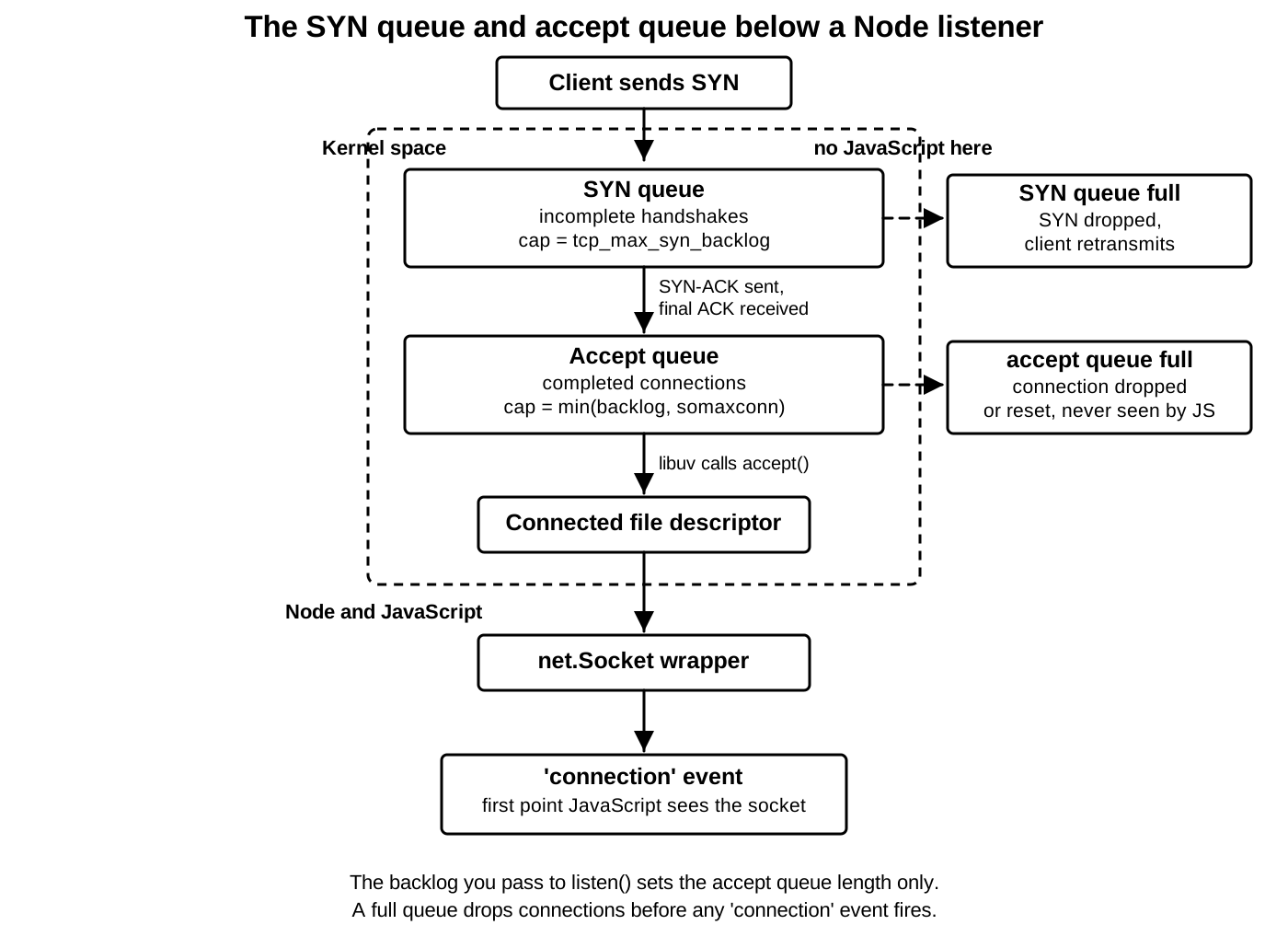
Node sits after those queues. libuv watches the listening socket for readiness. When the OS says completed connections are available, Node's native path calls accept, gets connected socket descriptors, wraps them, and emits "connection" events with net.Socket objects.
A connection can be fully established before your JavaScript callback runs.
During a connection spike, these queues absorb the gap between network arrival and application accept. Handshakes arriving faster than the OS can track or complete them put pressure on the SYN backlog. Completed connections arriving faster than the process accepts them fill the accept queue. Once JavaScript accepts sockets and then stalls during per-connection setup, application memory and descriptor counts become the next pressure point.
The backlog argument mostly controls pending completed connections from the application point of view, but OS documentation and implementation details often use backlog language across the whole listen path. Linux has distinct knobs for SYN backlog and accept queue behavior. Other platforms expose different limits. Node gives you one portable argument and leaves host-level tuning to the OS.
Queue overflow behavior is platform-specific. A TCP client may see a connection timeout, a connection reset, slower handshake completion, or success after retransmission. The server process may see nothing for dropped or incomplete attempts, because no accepted socket reached JavaScript. Logs that start at the "connection" callback miss everything below accept.
The accept path has a descriptor cost too. Every accepted TCP connection consumes a file descriptor in the Node process. A larger backlog can let more completed connections wait below JavaScript, but it does not raise the process descriptor limit. If the process cannot accept because it is out of descriptors, a larger backlog only changes where pressure builds up.
server.maxConnections is a Node-level connection count limit. Node must accept a connection before it can count it as a net.Socket. In current Node.js releases, the server's "drop" event can report dropped connections when maxConnections is reached. That is a Node server policy above the kernel queues. Read it alongside backlog, not as a replacement for it.
Backlog also interacts with CPU scheduling. If JavaScript blocks the event loop during a burst, libuv cannot run the accept path. Completed connections can sit in the accept queue. The kernel may complete handshakes while Node is busy. When the event loop returns, Node accepts what remains. Some clients may already have timed out.
Here is the path for one accepted connection.
SYN received
SYN-ACK sent
ACK received
connected socket queued
accept returns descriptor
net.Socket created
connection event emitted
The "connection" event lands near the end. Anything before accept returns descriptor is OS state. Application metrics that count only "connection" events observe accepted work, not attempted work.
Backlog selection is usually simpler than tuning guides make it sound. For local development and ordinary services, the default is usually fine. For servers that receive bursts of short connections, a larger backlog can reduce refused or delayed handshakes when the process is temporarily busy. Host limits still cap it. Deployment chapters cover host-level tuning, because the right value depends on process count, load balancer behavior, descriptor limits, SYN flood settings, and admission policy.
Use backlog to reason about accept pressure, not total server capacity. A server can accept thousands of connections and still be slow, and a large backlog still rejects clients if descriptors, CPU, memory, or upstream policy fail first. Backlog is the limit on a single queue.
The accept queue also explains a misleading benchmark pattern. A load generator opens many connections at once. The server logs a burst of "connection" events later. The benchmark treats all of them as accepted at the start time. In reality, some connections completed the TCP handshake and waited in the accept queue while JavaScript was busy. Measuring only from the callback skips queue time.
You can make that timing visible indirectly.
server.on('connection', socket => {
  console.log(Date.now(), socket.remotePort);
});
The timestamp records JavaScript acceptance, not handshake completion. Compare it with client-side connect timing when diagnosing spikes. A client can report "connected" before the server application logs the socket, because the OS completed the handshake and queued the connection before Node accepted it.
Slow connection handlers make the problem worse.
net.createServer(socket => {
  JSON.parse(expensiveConfigBlob);
  socket.end('ready\n');
});
The synchronous parse blocks the event loop during accept handling. While it runs, libuv cannot keep draining the accept queue, so new completed connections build up below JavaScript. Move heavyweight setup out of the connection path, cache parsed state, or hand work off after the socket is accepted and bounded by application admission rules.
Backlog tuning also interacts with load balancers, but this chapter only needs the socket side. A load balancer may retry another backend when one refuses or delays a connection. It may also hold its own connection pool and hide client spikes from Node. The raw socket handoff still affects behavior, because every backend process has its own listener queues and descriptor limits.
Buffer Sizes
Socket buffers hold bytes below JavaScript. Chapter 9.3 introduced send buffers and receive buffers for TCP flow control. Here, focus on the option names and what they change.
SO_SNDBUF is the socket send buffer size option. SO_RCVBUF is the socket receive buffer size option. They set or request maximum buffer sizes for the OS socket. The OS may round, double for bookkeeping, cap, or autotune the actual value depending on platform.
For UDP, Node exposes these options directly.
const socket = dgram.createSocket({
  type: 'udp4',
  recvBufferSize: 1 << 20,
  sendBufferSize: 1 << 20
});
Those creation options set SO_RCVBUF and SO_SNDBUF during socket setup. dgram.Socket also exposes setters after bind.
socket.bind(41234, () => {
  socket.setRecvBufferSize(1 << 20);
  socket.setSendBufferSize(1 << 20);
});
Node's UDP docs require a bound socket for these setters. Calling them too early throws a socket-buffer-size error. This is another timing rule. Some options can be set during creation, while these setter methods require an open, bound OS socket.
For TCP through node:net, Node does not expose general-purpose setRecvBufferSize() or setSendBufferSize() methods on net.Socket. You mostly observe pressure through stream behavior and OS tools. Native addons or platform-specific setup can change more, though that leaves the stable Node API path.
A larger receive buffer can absorb short bursts before the application reads. For UDP, that can reduce packet drops when JavaScript falls behind briefly. It also increases per-socket kernel memory that the OS may reserve or grow toward. With many sockets, that becomes real memory pressure.
A larger send buffer lets the local process hand more bytes to the kernel before backpressure reaches JavaScript. That can improve throughput on high-latency paths when the transport needs enough data in flight. It can also hide downstream slowness longer. More bytes sit below your application, and cancellation or failure has more queued data to discard.
Backpressure crosses layers, and JavaScript does not see one shared flag for every queue.
const ok = socket.write(Buffer.alloc(64 * 1024));

if (!ok) {
  socket.once('drain', resumeWork);
}
The boolean return is Node writable stream pressure. The kernel send buffer has its own capacity. TCP flow control has the peer's receive window. Congestion control has its own sending limit. Those states influence each other, but JavaScript sees the stream abstraction.
UDP fails differently. A full receive buffer can drop datagrams before Node emits a "message" event. UDP preserves message framing only for datagrams that reach the socket receive path and fit. If the kernel drops a datagram because the receive buffer is full, JavaScript usually receives no event for it. That is normal UDP behavior.
TCP receive buffer pressure feeds back to the peer through the advertised receive window. If your process stops reading a TCP socket, the kernel receive buffer fills, the receive window shrinks, and the peer slows or stalls. That can look quiet from JavaScript for a while, because no error fires. The connection is applying flow control.
Buffer sizing affects latency too. A large buffer can smooth bursts, but it can also let old bytes wait longer before the application notices overload. For request-response protocols, smaller and better-managed queues can fail earlier and keep latency bounded. For streaming transfers, larger buffers may improve throughput, so the workload sets the right size.
When debugging, first locate where bytes are waiting or disappearing.
Node stream buffer
kernel socket receive buffer
kernel socket send buffer
TCP sender state
UDP datagram loss
Once you know which queue, the option changes become targeted instead of guesswork.
Receive buffering has one more consequence for UDP services. A large SO_RCVBUF can make short bursts survivable, but it cannot recover datagrams already dropped before they reached the socket. If packets arrive faster than the process can drain the receive buffer for long enough, the kernel discards the excess datagrams. JavaScript sees a gap only if the protocol has sequence numbers or counters.
socket.on('message', msg => {
  const seq = msg.readUInt32BE(0);
  checkSequence(seq);
});
The sequence check is application-level detection. UDP itself reports no missing-message event. Buffer sizing reduces one local drop source, and it does not add delivery accounting.
Send buffering has its own failure mode. A large send buffer can make a producer look healthy because socket.write() or socket.send() accepts work quickly, while the peer or network may still be slow. Data waits in the kernel, and application latency grows somewhere the JavaScript heap profiler will not show. For TCP, "drain" eventually gives a stream signal. For UDP, send callbacks report local send completion timing, not peer receipt.
Memory accounting varies by OS. Requested socket buffer sizes may be doubled internally to account for metadata. Autotuning can grow TCP buffers based on path behavior. Container memory limits may count kernel socket memory in ways that surprise application dashboards.
Larger buffers spend kernel memory to absorb bursts or to fill high-latency paths, and that cost sits below the V8 heap.
IPv4, IPv6, and Dual Stack
Binding to :: can create one of the more surprising port conflicts in Node.
net.createServer().listen(3000, '::');
net.createServer().listen(3000, '0.0.0.0');
On many systems, the first listener may cover both IPv6 wildcard and IPv4 wildcard traffic. The second bind then fails with EADDRINUSE. On systems or configurations where IPv6-only behavior is active, the two listeners may coexist. Platform defaults decide the starting point.
When IPv6 binds default to dual-stack, a listener on :: already owns the IPv4 wildcard, so a later bind on 0.0.0.0 for the same port fails with EADDRINUSE. Set ipv6Only: true on the IPv6 listener if you intend to run a separate IPv4 listener on that port. Do not rely on the platform default to keep the families separate, because that default differs across kernels and container configurations.
A dual-stack socket is an IPv6 socket that also accepts IPv4 traffic through IPv4-mapped IPv6 addresses when bound to the IPv6 wildcard address. In Node terms, a server bound to :: may also cover 0.0.0.0 unless IPv6-only behavior is enabled.
An IPv6-only socket accepts IPv6 traffic for its bound address family and keeps IPv4 binding independent. Node exposes that with ipv6Only: true for TCP servers and UDP sockets.
server.listen({
  host: '::',
  port: 3000,
  ipv6Only: true
});
With ipv6Only: true, binding to :: does not also bind 0.0.0.0. You can run a separate IPv4 listener on the same port if the OS permits that bind combination.
net.createServer().listen(3000, '::');When host is omitted, Node listens on the unspecified IPv6 address :: when IPv6 is available, or on 0.0.0.0 otherwise. That default can surprise code that assumes an omitted host means IPv4 only. It can also surprise code that starts one listener with no host and another with 0.0.0.0.
Address family is part of the socket address. 127.0.0.1:3000 and ::1:3000 are different local endpoints. A dual-stack wildcard listener can cover both families for wildcard traffic, but loopback-specific binds and wildcard binds still follow OS conflict rules.
UDP has the same option.
const socket = dgram.createSocket({
  type: 'udp6',
  ipv6Only: true
});

socket.bind(41234, '::');
The socket binds the IPv6 wildcard for UDP port 41234 and keeps the IPv4 wildcard independent. Without ipv6Only, a UDP IPv6 wildcard socket may also cover the IPv4 wildcard on platforms with dual-stack enabled.
Use numeric hosts when debugging address-family conflicts. localhost can resolve to ::1, 127.0.0.1, or both, with ordering controlled by the OS and Node lookup behavior. If the bind or connect result affects the bug, write the address you mean.
EADDRNOTAVAIL can show up here too. Binding ::1 requires IPv6 loopback to exist. An IPv6 address on a host with IPv6 disabled or unavailable fails to bind. An IPv4 address routed through an IPv6-only socket path fails as well. The message varies, but the cause is local address-family state.
Containers add another layer of scope. The available addresses are the addresses inside the process's network namespace. A host may have IPv6 enabled while a container namespace has only IPv4, or the reverse. Node reports the namespace it runs in.
The least surprising production bind is explicit.
server.listen({
  host: process.env.HOST ?? '0.0.0.0',
  port: Number(process.env.PORT ?? 3000)
});
For IPv6 service, be just as explicit.
server.listen({
  host: '::',
  port: 3000,
  ipv6Only: false
});
This spells out that the process wants dual-stack behavior where the platform supports it. If you need separate IPv4 and IPv6 listeners, set ipv6Only: true on the IPv6 listener and bind the IPv4 listener on its own.
Dual-stack behavior also affects client logs. A server may print :: as its listening address while IPv4 clients connect successfully. Accepted sockets may then show IPv4-mapped IPv6 addresses on some platforms, or ordinary IPv4 addresses depending on the path Node receives from the OS.
server.on('connection', socket => {
  console.log(socket.remoteAddress, socket.remoteFamily);
});
Record both fields when address family affects behavior. String matching on addresses alone breaks easily around IPv4-mapped forms, zone IDs, and name-resolution ordering. remoteFamily and localFamily make the family visible.
Security policy also needs exact bind behavior. Binding :: with dual-stack enabled may expose IPv4 traffic too. A bind to 0.0.0.0 exposes all suitable IPv4 interfaces, while a loopback bind exposes only the local namespace. Firewalls and security groups can still block traffic, but the process should bind only the surface it intends to serve.
Binding 0.0.0.0 exposes the service on every IPv4 interface in the namespace. Binding :: with dual-stack enabled adds IPv4 on top of IPv6. A service that should only receive local or internal traffic must bind 127.0.0.1, ::1, or a specific internal address. Firewalls and security groups add a second layer, and they do not replace binding the intended surface, because a process bound to a public interface is reachable the moment that filtering is misconfigured.
Choosing Options in Node
Most raw TCP servers need only a few choices at startup. Pick the exact host and port, set the backlog when bursty accepts are part of the workload, and turn on reusePort only when you intentionally want OS-level distribution across separate listeners. Let Node's default SO_REUSEADDR behavior handle ordinary restarts.
const server = net.createServer({
  noDelay: true,
  keepAlive: true,
  keepAliveInitialDelay: 60_000
}, socket => attachProtocol(socket));

server.listen({ host: '0.0.0.0', port: 3000 });
This server accepts IPv4 traffic on all suitable local interfaces, disables Nagle for accepted sockets, and turns on TCP keep-alive probes after one idle minute. It still needs application deadlines if the protocol has request-level timing, and it still needs shutdown handling for accepted sockets. Those are higher-level policies.
When the policy depends on the peer or on protocol negotiation, keep the setup in the callback.
const server = net.createServer(socket => {
  socket.setNoDelay(true);
  socket.setKeepAlive(true, 60_000);
});
Both forms target accepted net.Socket objects. The options form covers common defaults. The callback form covers choices that need connection data.
For local development, port 0 avoids accidental conflicts.
server.listen(0, '127.0.0.1', () => {
  const { port } = server.address();
  console.log(port);
});
Tests should prefer that over hard-coded shared ports. SO_REUSEADDR can make restarts smoother, but it cannot give two test processes the same listener. Port 0 asks the OS for a free port and then reads the actual result.
For UDP multicast or several local UDP consumers, choose between reuseAddr and reusePort with care.
const socket = dgram.createSocket({
  type: 'udp4',
  reuseAddr: true
});
reuseAddr changes bind permissiveness and multicast-style receiver setups. reusePort creates OS distribution across sockets where supported. Those are different contracts. Use reusePort only when one datagram should go to one of several listeners selected by the OS.
For latency-sensitive small TCP messages, start with application batching and setNoDelay(true). Batching controls your own write pattern. TCP_NODELAY controls TCP's small-write delay policy. Measure with real RTT and peer behavior, because loopback tests hide delayed ACK and network timing.
For long-lived mostly idle TCP connections, combine the layers deliberately. socket.setKeepAlive(true, delay) helps the OS discover dead TCP paths eventually. socket.setTimeout(ms) lets your application retire idle sockets on its own schedule. Protocol heartbeats prove the remote application is still participating. Those three timers answer different questions.
For backlog, set a value only when you have a reason.
server.listen({
  host: '0.0.0.0',
  port: 3000,
  backlog: 2048
});
Then verify host limits. If the OS caps the queue below your requested value, the JavaScript literal becomes a request, not actual capacity. On Linux, somaxconn and TCP-specific settings apply. Keep host tuning in deployment automation, not buried in application code comments.
For buffer sizes, prefer defaults until measurements point at socket-buffer pressure. UDP receivers that drop bursts may need a larger SO_RCVBUF. Bulk senders on high-latency paths may benefit from more send buffering. Many request-response services get worse tail latency when queues grow without admission control.
For bind errors, separate local ownership from reachability. EADDRINUSE and EADDRNOTAVAIL happen before any remote client is involved. DNS, routing, firewalls, and load balancers can be broken while bind still succeeds. A successful bind means the local OS accepted the endpoint. It says nothing about whether another host can reach it.
For restarts, prefer clean shutdown and exact ownership over reuse assumptions. Close the listening server. Track accepted sockets. Let the process manager wait for exit or readiness according to its contract. Socket options can make restart behavior smoother, but they cannot replace knowing which process owns which endpoint.
A raw TCP service usually ends up with a small connection initializer.
function configureSocket(socket) {
  socket.setNoDelay(true);
  socket.setKeepAlive(true, 60_000);
  socket.setTimeout(120_000);
}
Call it from the server's connection handler when connection-specific logic exists, and from any client code that creates long-lived outbound sockets. For one server-wide accepted-socket policy, the net.createServer() options object can replace the server-side part. Bind policy stays near server.listen(). UDP bind policy stays in dgram.createSocket() and socket.bind().
const server = net.createServer(socket => {
  configureSocket(socket);
  attachProtocol(socket);
});
Group the choices by where they apply.
host, port, ipv6Only, reusePort, and backlog are listener choices
setNoDelay(), setKeepAlive(), and setTimeout() are connected-socket choices
recvBufferSize and sendBufferSize are UDP socket storage choices
Mixing all of them into one generic network config object can hide when each setting is applied. Keep listener policy near listen(), connected-socket policy near connection setup, and UDP storage policy near UDP socket creation and bind.
For command-line services, print the accepted listener address at startup and the chosen socket policy at debug level. Avoid printing every accepted socket in normal logs, because high connection rates turn that into log pressure. During a bind or latency incident, the exact listener address, address family, backlog request, and reuse mode tell you which kernel path the process asked for.
The set of choices stays small.
bind options decide who can own an address
keep-alive controls idle TCP probing
Nagle controls small-write batching
backlog controls pending accept capacity
buffer sizes control kernel byte storage
ipv6Only controls wildcard family coverage
Every item in that list changes state below JavaScript. Node gives you the API. The kernel applies the setting. The result depends on the platform, the socket's current state, and the timing of packets arriving while your process is busy.