Node.js UDP & dgram: Broadcast, Multicast & Connect
Node.js exposes UDP through the node:dgram module. TCP gives you a byte stream. UDP gives you one message at a time. A UDP socket sends one datagram and receives one datagram, and Node hands each received datagram to your code as a single message event.
The rest of the API follows from that. There is no byte stream to reassemble, no connection to set up, and no automatic retry when a packet goes missing. A successful send() also tells you less than people expect. It tells you that your local machine accepted the datagram for sending. The remote machine might never get it. It might get it and never read it. There might be no program listening on that port at all.
So your code handles the messages that go missing, arrive twice, arrive late, or arrive out of order. UDP does not.
UDP and dgram in Node.js
UDP keeps each message separate. Each call to send() produces one datagram payload, and each datagram that arrives becomes one message event. TCP gives you a byte stream instead, so one write on the sender does not promise one read event on the receiver.
Here is a tiny UDP receiver -
import dgram from 'node:dgram';

const socket = dgram.createSocket('udp4');

socket.on('message', (msg, rinfo) => {
  console.log(msg.toString(), rinfo.address, rinfo.port);
});

socket.bind(41234, '127.0.0.1');
Run that process first, then send one payload at it -
import dgram from 'node:dgram';

const socket = dgram.createSocket('udp4');

socket.send('ping', 41234, '127.0.0.1', err => {
  if (err) throw err;
  socket.close();
});
The receiver gets one Buffer containing ping. It also gets rinfo, which tells you where the datagram came from. That metadata includes the sender's address and port.
A UDP datagram carries one application payload plus a small UDP header. That header has a source port, destination port, length, and checksum. IP handles the address and routing part below UDP. Node's node:dgram module sits close enough to UDP that the transport rules affect how you design the application protocol.
UDP tracks nothing past the single message. Connections, ordering, acknowledgements, retries, duplicate suppression. None of that lives in the protocol. If your application needs any of it, you build it into the payload and your own state, or you pick a protocol that already provides it.
Datagram Semantics
Each datagram stays a separate message. If one process sends 12 bytes in one socket.send(), the receiver gets those 12 bytes as one message when the datagram arrives. If the sender sends two 6-byte datagrams, the receiver gets two separate messages when they arrive.
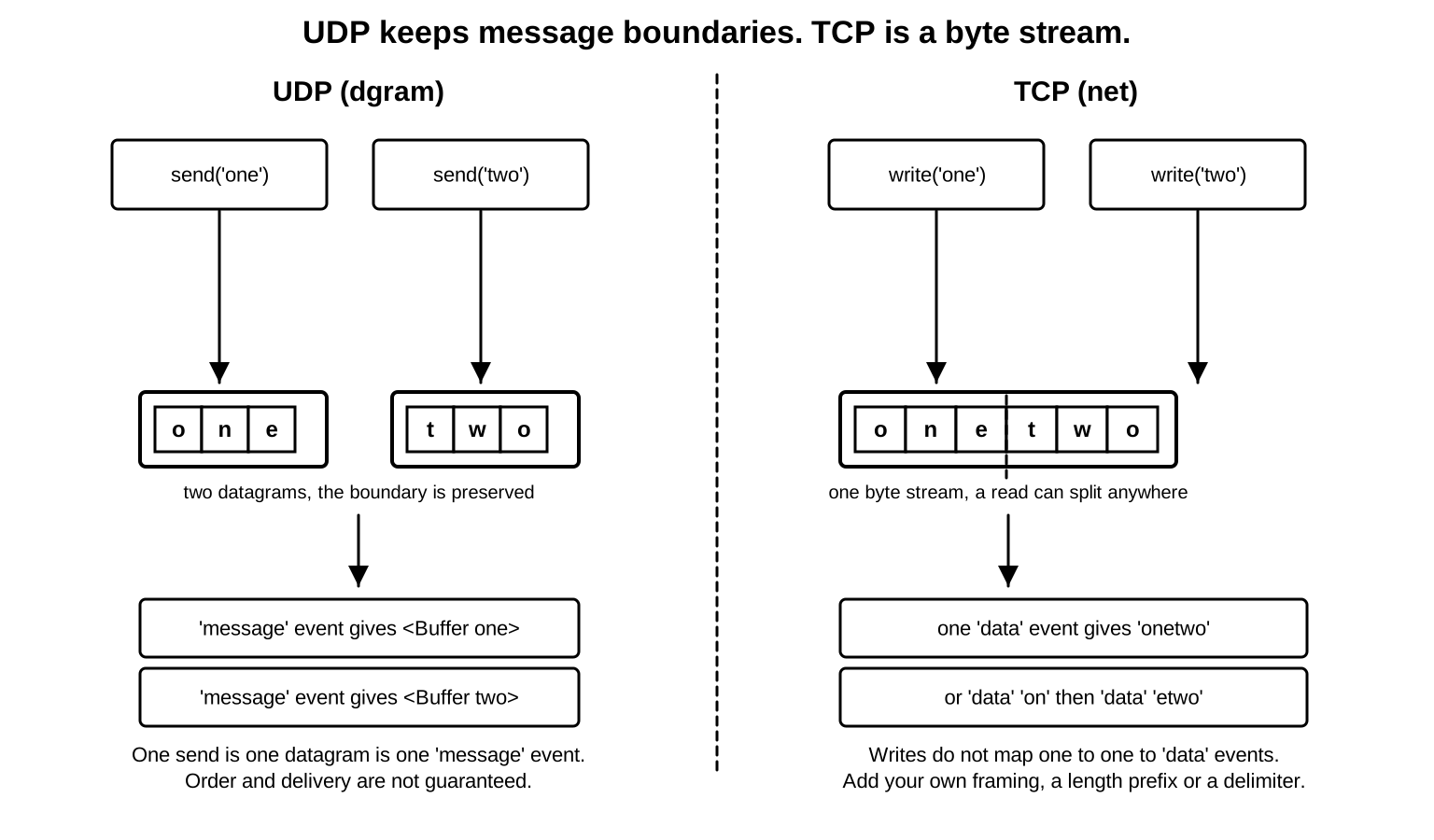
None of those arrivals is guaranteed. A datagram can arrive late. Two datagrams can arrive in another order. One can disappear entirely. Once in a while, the receiver sees the same payload twice.
socket.send('one', 41234, '127.0.0.1');
socket.send('two', 41234, '127.0.0.1');
Those calls create two UDP datagrams. On loopback you will usually see both in order, because everything stays inside the local machine. Loopback is fine for a quick test. It will not show you how UDP behaves on a real network.
Across a real network, the receiver might see one then two, or two then one, or only one of them, or neither, or a repeated payload if the network duplicated a packet. Which of those outcomes you can tolerate is up to your application.
Packet loss means a datagram leaves one endpoint and never reaches the receiving application. The drop can happen at the sender's kernel, a local firewall, a router along the path, a remote firewall, the receiver's kernel, or a receive buffer that is already full. UDP never retransmits the missing payload.
Reordering is when datagrams arrive in a different order than they were sent. Routing, host scheduling, interface queues, and receive processing can all shift timing. There is no application message sequence number in the UDP header, so if your receiver needs to notice reordering, you put a sequence number in the payload yourself.
Duplication is rarer. The receiver sees more than one copy of what looks like the same datagram. It happens less often than loss, and you still need to know what a duplicate would do to your code. If duplicates would cause trouble, give each message an identifier and keep a short record of recently processed IDs.
Here is a tiny duplicate-suppression sketch -
const seen = new Set();

socket.on('message', msg => {
  const id = msg.subarray(0, 8).toString('hex');
  if (seen.has(id)) return;
  seen.add(id);

  // Continue processing the message.
});
That snippet only handles the first step. The payload itself has to carry an ID for duplicate detection to be possible, because all UDP delivers is the bytes and the sender metadata.
The UDP header is small - source port, destination port, length, and checksum. The length covers the UDP header plus payload. The checksum lets the receiver reject corrupted transport data when checksum validation applies. IPv4 allows a zero UDP checksum for normal UDP. IPv6 requires UDP checksum coverage for regular UDP.
Node does not emit a message event for datagrams the kernel rejects during checksum validation. JavaScript only sees datagrams the kernel accepted for that socket.
That can confuse debugging. A packet capture might show traffic on the interface while your Node handler stays quiet. The packet may have failed checksum validation, address matching, firewall rules, socket filtering, or receive-buffer admission before Node could emit message for it.
Read the source port carefully too. Many UDP servers listen on a fixed destination port, while clients use temporary source ports the OS assigns. The server replies to the source address and source port from rinfo.
socket.on('message', (msg, rinfo) => {
  console.log(`${rinfo.address}:${rinfo.port}`, msg.length);
});
That remote address and port tell you where this one datagram came from. They do not add up to a session. If the same peer sends again from another source port, Node reports a different tuple. If a NAT device rewrites the source port, Node reports the rewritten value, because that is what reached the local machine.
Application protocols usually put a message type near the beginning of the payload. That lets the receiver decide what to do without guessing from the source address.
socket.on('message', msg => {
  if (msg.length < 1) return;

  if (msg[0] === 1) handleHeartbeat(msg);
  if (msg[0] === 2) handleMeasurement(msg);
});
Length checks come first. UDP makes it easy to receive a short payload, an empty payload, or bytes from some other protocol that happened to land on the same port. The kernel checks the UDP fields. Your application format is yours to check.
Datagram size also needs care. A UDP datagram has one payload, and the practical payload size depends on IP packet size and the path MTU from Chapter 9.1. A payload can fit the theoretical UDP limit and still work badly on real networks, because IP fragmentation may be needed below it. If one fragment is lost, the receiver loses the whole UDP payload.
For ordinary IPv4 UDP, the maximum UDP payload is 65,507 bytes - 65,535 bytes of IPv4 packet size minus a 20-byte IPv4 header and an 8-byte UDP header. IPv6 uses different header rules. Real applications usually choose payloads far below those limits because Ethernet paths, tunnels, VPNs, and cloud overlays reduce the safe size.
Node will let you try a large send. The OS may reject it -
const payload = Buffer.alloc(70_000);

socket.send(payload, 41234, '127.0.0.1', err => {
  console.error(err?.code);
  socket.close();
});
On many systems, that prints EMSGSIZE. The exact result depends on address family, platform, interface, and route state.
The send callback belongs to the local send request. It reports local failures. It stays silent about peer receipt, because UDP carries no acknowledgement back from the receiver.
Payload sizing is one of the easiest places for local tests to mislead you. Loopback may carry large datagrams because the path stays inside the local stack. A real path may include Ethernet, Wi-Fi, VPN encapsulation, cloud overlay headers, or a tunnel. Each layer consumes space below your application payload. If the final IP packet is too large for the path, fragmentation or rejection becomes possible.
Many production UDP protocols stay under roughly 1,200 bytes per payload when they must cross unknown Internet paths. That number comes from protocol guidance rather than from Node. On a private LAN with a known MTU, you might pick something larger. From Node's side it stays plain. socket.send() takes the bytes you give it, and whether those bytes survive as one datagram depends on the network path.
Keep payloads small on paths you do not control. The IPv4 UDP payload ceiling is 65,507 bytes, but Ethernet, Wi-Fi, VPN, and overlay headers shrink the size that can cross a path without IP fragmentation. A datagram large enough to fragment is lost in full if any single fragment is dropped, so many Internet-facing UDP protocols cap payloads near 1,200 bytes.
The node:dgram Surface
node:dgram is Node's built-in UDP module. It creates datagram sockets, sends datagrams, receives datagrams, joins multicast groups, and exposes socket controls. The API is lower-level than node:http and narrower than node:net because UDP gives you fewer built-in behaviors than TCP.
Create an IPv4 or IPv6 UDP socket like this -
import dgram from 'node:dgram';

const udp4 = dgram.createSocket('udp4');
const udp6 = dgram.createSocket('udp6');
The type chooses the address family. udp4 creates an IPv4 UDP socket. udp6 creates an IPv6 UDP socket. That choice affects address parsing, wildcard binds, multicast behavior, and connected UDP defaults.
A dgram.Socket is the JavaScript object Node gives you for a UDP socket. It extends EventEmitter, so events such as message, listening, error, and close follow the EventEmitter behavior from Chapter 7.4.
The JavaScript object wraps native socket state. The kernel still owns the local port, receive queue, send queue, address filters, and multicast membership state. Your object is the handle you use to operate that socket from JavaScript.
dgram.createSocket() accepts a type string or an options object -
const socket = dgram.createSocket({
  type: 'udp4',
  reuseAddr: true
});
reuseAddr asks Node to set address-reuse behavior for the underlying socket. You see it often with multicast receivers and with some local restart workflows. Platform details around address reuse can be tricky, so choose it deliberately instead of adding it everywhere.
The options object can also request receive and send buffer sizes in current Node.js releases. For udp6, it can also request IPv6-only behavior. Those settings still pass through OS policy. The kernel may clamp, round, or reject values.
const socket = dgram.createSocket({
  type: 'udp6',
  ipv6Only: true
});
ipv6Only controls whether the IPv6 socket should avoid IPv4-mapped address behavior. The full dual-stack discussion belongs with socket options in Chapter 9.6. During early UDP debugging, make the address family explicit and use numeric addresses first.
One datagram socket can talk to many peers. It receives from many remote endpoints through a single local port, and it sends to many remote endpoints from that same local socket. Binding chooses the local address and port. Sending chooses the remote address and port, unless the socket has a connected UDP peer configured.
The common lifecycle looks like this -
create socket
  -> bind local address and port
  -> receive message events
  -> send datagrams
  -> close
There is no accept step. A UDP server has one socket that receives datagrams from whichever peers the kernel admits through local filtering. Node reports each peer through rinfo.
socket.on('message', (msg, rinfo) => {
  console.log(rinfo);
});
rinfo includes the remote address, remote port, address family, and message size. That remote port often comes from the sender's ephemeral port. It is usually the address you reply to in an echo-style protocol.
dgram.Socket supports ref() and unref() like other Node handles. A UDP socket with an active native handle can keep the process alive while it can receive work. Calling unref() lets the process exit if the UDP socket is the only remaining active handle.
const socket = dgram.createSocket('udp4');

socket.unref();
socket.bind(41234);
That pattern appears in telemetry emitters and discovery helpers that should run only while the process has other work. It is easy to misuse in servers because the process can exit while the socket is still bound. Use it only when some other part of the program owns process lifetime.
The close event means Node closed the socket handle. After that, the JavaScript object still exists, but its native socket is gone. Later sends or binds on the same object fail through Node's socket state checks. If you need a socket again, create a fresh one.
Binding and Receiving
socket.bind() attaches the UDP socket to a local port and optionally a local address. A bound socket can receive datagrams addressed to that local socket address.
const socket = dgram.createSocket('udp4');

socket.on('listening', () => {
  console.log(socket.address());
});

socket.bind(41234, '0.0.0.0');
The listening event fires after bind completes. For UDP, listening means the socket is bound and ready to receive datagrams. There is no TCP accept queue and no per-peer connection state.
When the address is omitted, the OS binds to the wildcard address for the socket family. For udp4, that means the IPv4 wildcard path. For udp6, that means the IPv6 wildcard path, with platform and socket-option behavior deciding dual-stack behavior.
When the port is omitted or set to 0, the OS chooses an ephemeral port -
socket.bind(0, '127.0.0.1', () => {
  console.log(socket.address().port);
});
That pattern is useful for tests and temporary clients that need a stable local socket without hard-coding a port. The chosen port belongs to the local process until the socket closes.
Bind can fail. Common errors include EADDRINUSE when another socket owns the same local address and port combination, EADDRNOTAVAIL when the address is not present on the host, and EACCES for permission-sensitive ports or platform policy. Node emits error for asynchronous socket errors. Some invalid API calls throw before native work starts.
Binding to a specific address narrows what the socket can receive. Bind to 127.0.0.1 and you get loopback traffic only. Bind to a LAN address and you get datagrams addressed to that interface. The wildcard address lets the kernel deliver datagrams addressed to any suitable local address for that family.
socket.bind({ port: 41234, address: '127.0.0.1' });The object form is easier to read once you add options such as exclusive. In ordinary single-process UDP code, the positional form and object form reach the same kind of kernel bind. Clustered or shared-handle setups have more ownership details and belong outside this foundation chapter.
A bound UDP socket can receive from many peers without any per-peer setup -
const peers = new Map();

socket.on('message', (msg, rinfo) => {
  const key = `${rinfo.address}:${rinfo.port}`;
  peers.set(key, Date.now());
});
That map is application state. The kernel does not create one connected socket per peer for you. If a peer stops sending, no close notification arrives, because UDP has none. Your code decides how long to keep a remembered peer in memory.
The rinfo.size field is the received payload size in bytes. It should match msg.length for the delivered buffer. Prefer msg.length when parsing because the bytes live in msg. Use rinfo for remote metadata.
Add the error listener before binding in examples and small tools -
socket.on('error', err => {
  console.error(err.code);
  socket.close();
});
A UDP process with an unhandled error event can exit the same way any EventEmitter can.
Attach an error listener before calling bind(). A dgram.Socket follows EventEmitter rules, so an error event with no listener throws and can terminate the process. Asynchronous failures such as EADDRINUSE on bind arrive through this event, so a try/catch around the call will not see them.
The main receive event is message -
socket.on('message', (msg, rinfo) => {
  socket.send(msg, rinfo.port, rinfo.address);
});
That is a UDP echo server. It replies to the address and port from the incoming datagram, and the reply is just another datagram. There is no per-client socket here, and no connection object for that peer, unless your application builds one in JavaScript.
The msg argument is a Buffer. It contains the payload bytes from exactly one datagram. Decode it as text or parse binary fields out of it, depending on your protocol. Chapter 2 covered Buffer mechanics. The UDP-specific point is that this buffer holds one protocol message.
socket.on('message', msg => {
  if (msg.length < 5) return;

  const type = msg.readUInt8(0);
  const value = msg.readUInt32BE(1);

  console.log(type, value);
});
The parser can rely on msg belonging to one datagram. It still has to validate length before reading fields. A short, malformed, or hostile payload can reach the handler.
socket.close() closes the underlying socket and stops new receive events. A close callback attaches to the close event -
socket.close(() => {
  console.log('closed');
});
Closing a UDP socket discards local receive state. Datagrams may still exist in the network or in OS queues, but this JavaScript socket will not deliver more message events.
Payload parsing deserves care, because UDP hands your code one complete message with no schema attached. The text might be invalid UTF-8. The binary payload might be shorter than your parser expects. Some unrelated program might even be sending on the same port with a different protocol. None of that is checked for you below the application.
Here is a parser that accepts exactly six bytes -
socket.on('message', msg => {
  if (msg.length !== 6) return;

  const type = msg.readUInt16BE(0);
  const value = msg.readUInt32BE(2);

  handle(type, value);
});
The early length check protects the reads. readUInt32BE(2) needs four bytes starting at offset two. Without the check, malformed input becomes a JavaScript exception inside the receive handler. Exceptions in message listeners follow ordinary EventEmitter behavior and can take down the process if they escape.
For binary-framed text protocols, check the header before decoding text -
socket.on('message', msg => {
  if (msg.length < 1) return;
  if (msg[0] !== 1) return;

  const name = msg.subarray(1).toString('utf8');
  handleName(name);
});
The subarray() call creates a Buffer view over the same memory. Chapter 2 covered Buffer views. For UDP handlers, what you do next depends on timing. If the bytes will be stored for later, store parsed values or copy the bytes on purpose. If the handler processes them right away, passing the Buffer through synchronous code is usually fine.
Zero-length datagrams are valid UDP payloads. Node can deliver an empty Buffer in message.
socket.on('message', msg => {
  if (msg.length === 0) handleEmptyProbe();
});
Some discovery protocols use empty or tiny probes because the address and port metadata carry most of the signal. Your protocol decides whether an empty payload is valid.
Source address validation is application logic. rinfo.address and rinfo.port say where the datagram appeared to come from in the received packet. UDP does not prove who the peer is. Local networks, NAT, spoofing rules, and firewall policy all affect how much you should trust that tuple. A private health probe might be fine trusting it. Anything security-sensitive needs authentication at the protocol layer.
One dgram.Socket can handle many logical peers, but the handler still runs on the single JavaScript thread. A slow parser delays every other peer sharing that socket. At low control-traffic rates that delay is invisible. Push high-rate telemetry or realtime data through the same socket and it turns into real packet loss, because the receive queue below Node holds datagrams in arrival order and starts dropping them once it fills, with no regard for which peer is most important to you.
Keep the receive handler simple. Validate length. Parse the smallest useful header. Move expensive work away from the immediate event path. Count accepted, rejected, and malformed messages separately. Those counters will never fully describe network loss, but they make your local parser behavior visible.
Version fields are cheap and useful. A one-byte version at the front of the payload gives the receiver a quick way to reject old senders, new senders, and random traffic on the same port.
socket.on('message', msg => {
  if (msg.length < 2) return;
  if (msg[0] !== 1) return;

  dispatch(msg[1], msg.subarray(2));
});
That is still a tiny protocol, but it gives you two useful properties. The receiver can reject unknown versions before parsing the body, and the message type is explicit. Since the wire only carries raw bytes, a small fixed header is what makes those bytes easy to identify.
For binary messages, reserve fields intentionally. A spare flag byte or reserved integer gives later versions room to evolve without changing the whole datagram layout. The receiver can require reserved fields to be zero today and reject messages that set them early. That helps during rolling deploys where old and new processes may share a port for a while.
A small header like this makes logs, packet captures, and compatibility checks much easier to read later.
The Path Through Node and libuv
The JavaScript object is only the part you touch directly.
dgram.createSocket('udp4') creates a JavaScript dgram.Socket, sets up EventEmitter state, records the address family, and prepares native binding state. JavaScript calls into Node's UDP binding. Node uses libuv's UDP handle type to talk to the operating system socket API.
libuv is the event-loop layer here. For UDP, libuv exposes uv_udp_t for socket state and uv_udp_send_t for individual send requests. V8 does not receive packets directly. V8 runs your JavaScript callback after Node has already gone through native code, libuv, and the kernel.
A bind call follows this path -
dgram.Socket.bind()
  -> Node UDP binding
  -> libuv UDP handle
  -> OS UDP socket
  -> bind local address and port
After bind, Node starts receiving on that handle. Underneath, libuv registers interest in readability for the UDP socket with the platform event backend. On Linux, that usually goes through epoll. On macOS and BSD systems, it usually goes through kqueue. On Windows, it uses IOCP-oriented machinery.
The backend differs by platform, but Node receives the same kind of handoff. When the OS reports UDP receive work, libuv calls back into Node, and Node emits message.
The kernel stores received UDP datagrams in the socket receive queue. Each queued datagram has payload bytes plus peer address metadata. When Node reads one, the OS copies that payload into memory supplied by the native path. Node then gives JavaScript a Buffer and the rinfo metadata.
That has one practical consequence. Stream backpressure does not apply to dgram.Socket receive events. A dgram.Socket is an EventEmitter, so it has no Readable-stream flow control to slow the producer down. If JavaScript spends too long on CPU work, the event loop stops draining receive callbacks, and the kernel receive queue fills. Once it is full, later UDP datagrams get dropped, and the sender gets no normal UDP signal for that drop.
A dgram.Socket delivers datagrams through EventEmitter events, so its receive path has no backpressure. When the event loop stalls on CPU work, the kernel receive queue fills and later datagrams are dropped before Node emits message. The sender gets no signal for these drops, and application-level counters undercount the traffic that was actually sent. Compare host-level UDP drop counters against your own counts to detect this.
Receive buffers exist below Node. You can query or request sizes with getRecvBufferSize() and setRecvBufferSize(), subject to OS limits. Chapter 9.6 covers buffer tuning. For now, one point is enough. A larger receive buffer absorbs a bigger burst, and it still cannot make UDP reliable. It only changes how much the local kernel can queue before it starts dropping.
Sends follow their own local path -
socket.send(Buffer)
  -> validate target or connected peer
  -> optional DNS lookup for hostnames
  -> libuv UDP send request
  -> OS send path
  -> callback or error
When the target address is a hostname, Node resolves it before it has a numeric address for the UDP send. That lookup can delay the send and can fail with DNS errors from Chapter 9.2. Numeric addresses skip name resolution.
The send callback belongs to the local send request. For a buffer payload, the callback is the point where it becomes safe to reuse or mutate the memory the send needed. Small examples rarely notice this. High-rate UDP code that reuses buffers has to respect it.
const buf = Buffer.from('stats');

socket.send(buf, 41234, '127.0.0.1', err => {
  if (err) console.error(err.code);
});
The callback can report local errors such as DNS failure, invalid address family, oversized datagram, closed socket state, or platform send failure. What it cannot tell you is whether the peer did anything with the message. Maybe nothing was listening. Maybe a firewall dropped the packet, or the remote process was overloaded. The local callback still runs with no error in all of those cases.
Send buffering also has less behind it than TCP. TCP has a byte stream, peer flow control, and drain behavior. UDP sends are individual datagram requests. The OS may queue them briefly, and there is still no per-peer receive-window negotiation and no stream drain signal.
Node v24 exposes send queue inspection methods for dgram sockets. Those methods describe send requests queued locally. Remote delivery is not part of what they report.
Receive readiness reaches JavaScript as a message event, and send completion reaches it as the send callback. Errors can show up as callbacks, thrown exceptions, or error events, depending on where they happen. Argument validation can fail before native code runs. Bind and send failures can surface asynchronously. ICMP errors, when the platform reports them to the socket, can surface later, and they often show up more clearly with connected UDP.
That delayed error behavior is normal for UDP. There is no setup phase where the peer confirms that it is ready. The first sign of a bad remote port might be a later ICMP message. There may also be no sign at all.
Sending Datagrams
socket.send() sends one UDP datagram payload. For an unconnected UDP socket, pass the message, destination port, and destination address.
const socket = dgram.createSocket('udp4');

socket.send('hello', 41234, '127.0.0.1', err => {
  if (err) console.error(err.code);
  socket.close();
});
The message can be a string, Buffer, TypedArray, DataView, or an array of supported binary chunks. Strings are encoded as UTF-8 bytes. Binary payloads make size accounting easier because UDP limits are byte limits.
socket.send() can also send part of a buffer with offset and length arguments -
const buf = Buffer.from('xxpayloadxx');

socket.send(buf, 2, 7, 41234, '127.0.0.1', err => {
  if (err) console.error(err.code);
});
That sends payload. Offsets and lengths are byte offsets. Multi-byte text characters do not change that rule once the data is already in a Buffer.
An unbound socket can send. Node will bind it implicitly to a wildcard local address and an ephemeral port before sending. That is convenient for one-shot clients.
const socket = dgram.createSocket('udp4');

socket.send('probe', 41234, '127.0.0.1', () => {
  console.log(socket.address());
  socket.close();
});
The printed address shows the local port the OS assigned. The receiver sees that source port in rinfo.port. If the receiver replies, it sends back to that port.
For request-response UDP, keep the socket open long enough to receive the reply. The reply targets the source address and port from the original datagram. If you close immediately after send(), the OS can release that local port before the reply arrives.
const socket = dgram.createSocket('udp4');

socket.on('message', msg => {
  console.log('reply -', msg.toString());
  socket.close();
});

socket.send('hello', 41234, '127.0.0.1');
There is still no connection here. The client is only keeping its local UDP socket alive so a datagram sent back to its local port can reach the process.
Hostnames work too -
socket.send('hello', 41234, 'localhost', err => {
  if (err) console.error(err.code);
});
That send includes name resolution. localhost may resolve to IPv4, IPv6, or both depending on OS and Node lookup behavior. A udp4 socket needs an IPv4 destination. A udp6 socket needs an IPv6 destination unless platform behavior and socket options allow an IPv4-mapped path. Numeric addresses remove that ambiguity while debugging.
The send target has three pieces - remote address, remote port, and address family. The local endpoint has its own address and port. With UDP, a single local endpoint can send to many remote endpoints.
for (const port of [41234, 41235, 41236]) {
  socket.send('tick', port, '127.0.0.1');
}
Every call creates a separate datagram. The same local socket can receive replies from all three peers. If your protocol needs to match replies to requests, put request IDs in the payload or keep application state by remote endpoint.
Datagram sends are atomic at the UDP API level. One send request describes one payload. If the OS accepts it and the receiver eventually gets it, the receiver gets that payload as one datagram. Node will not split one datagram across two message events. IP fragmentation can happen below UDP, but reassembly finishes before delivery to the UDP socket. Failed reassembly means no delivered datagram.
Arrays of buffers are useful when your protocol has a small header and a payload you already have in another buffer -
const header = Buffer.alloc(3);
header[0] = 2;
header.writeUInt16BE(payload.length, 1);

socket.send([header, payload], 41234, '127.0.0.1');
The header uses one type byte and a two-byte big-endian payload length. Node treats the array as one UDP datagram payload built from the chunks. The chunks do not create separate datagrams. The receiver sees one message event containing the combined bytes.
This can reduce avoidable copying in application code, but it makes length accounting easier to get wrong. Count bytes after encoding. A string's character count and its datagram byte count can differ.
const text = 'snowman: \u2603';
const bytes = Buffer.byteLength(text);

socket.send(text, 41234, '127.0.0.1');
console.log(bytes);
The send size is the UTF-8 byte length, not the number of JavaScript string code units. Binary protocols should usually build a Buffer explicitly before sending so the byte layout is visible.
Send callbacks are optional, but skipping them hides local errors. For fire-and-forget telemetry, that may be a deliberate choice. For tools, tests, and service protocols, log the error code while building the path.
socket.send(payload, port, host, err => {
  if (err) console.error('udp send failed', err.code);
});
That callback helps you separate local rejection from possible network loss. Whether the receiver actually handled the message stays outside its reach.
A successful send() callback means the local kernel accepted the datagram for transmission. It does not confirm that the datagram left the host, reached the destination, or was processed by a receiver. UDP carries no transport-level acknowledgement, so build delivery confirmation into your own protocol when the application needs it.
Sending too fast can create local queue pressure. UDP has no TCP-style backpressure signal from a peer, and Node and the OS still have finite queues. Node v24 exposes getSendQueueSize() and getSendQueueCount() on dgram sockets. Those values cover send work queued inside Node and libuv. They say nothing about remote delivery.
console.log(socket.getSendQueueCount());
console.log(socket.getSendQueueSize());
If those numbers grow during a burst, JavaScript is producing send requests faster than the local runtime can hand them down. Treat that as a local pacing signal about your own process. Receiver health is a separate question it cannot answer.
Implicit binding has a downside. socket.send() binds the socket for you when it is not already bound, which is convenient, but it hides the chosen local address and port. In code that expects replies, an explicit bind() is easier to debug because the listening callback hands you the local endpoint before the first send.
socket.bind(0, '0.0.0.0', () => {
  socket.send('hello', 41234, '192.0.2.20');
});
The local port is chosen once for that socket. Later sends from the same socket use the same local port until the socket closes.
Connected UDP
A connected UDP socket stores a default remote address and port in kernel socket state. It also filters inbound datagrams so the socket receives messages only from that remote peer.
const socket = dgram.createSocket('udp4');

socket.connect(41234, '127.0.0.1', () => {
  socket.send('ping');
});
UDP connect() does far less than the TCP handshake from Chapter 9.3. It records a remote socket address for this UDP socket in the local kernel, and that is the whole operation. No SYN goes out, and nothing is accepted on the other side. Node emits connect once that local association completes, or it calls the callback you passed.
After connect(), socket.send() uses the stored remote endpoint, so you omit the target arguments. socket.remoteAddress() returns that associated endpoint.
socket.on('connect', () => {
  console.log(socket.remoteAddress());
});
Connected UDP is useful when one socket talks to one peer. It removes the repeated target arguments and lets the kernel reject inbound datagrams from other remote addresses before JavaScript ever sees them. That filtering is a local socket convenience. It proves nothing about who the peer really is.
socket.on('message', (msg, rinfo) => {
  console.log('from connected peer -', rinfo.port);
});
For a connected UDP socket, random datagrams from other ports will not reach that handler on typical platforms. The kernel checks the remote tuple before delivery to that socket.
That filter can make measurements cleaner. Suppose a local process sends periodic datagrams to one collector and only expects replies from that collector. A connected UDP socket keeps unrelated packets on the same local port away from JavaScript. The kernel still receives and classifies packets, but your message handler only sees the associated peer.
Connected UDP also fixes the default destination for send() -
socket.connect(41234, '127.0.0.1', () => {
  socket.send(Buffer.from([1]));
  socket.send(Buffer.from([2]));
});
Both sends target the same remote socket address. The local source port also stays stable for that socket. That is useful for request IDs, counters, and peer-local state in small protocols.
The local bind can still be explicit -
socket.bind(0, '127.0.0.1', () => {
  socket.connect(41234, '127.0.0.1');
});
Here the OS chooses the local ephemeral port during bind, then records the connected UDP peer. Explicit bind helps when the local address affects behavior, such as a host with several interfaces or a test that needs to print the source port before sending.
If you need another peer, creating another socket is usually easier to read than reusing one connected socket. Each JavaScript object then has one peer association and one error stream. Reusing a single socket for several connected peers can work, but timing around in-flight sends and later ICMP errors becomes harder to follow.
disconnect() removes the associated remote endpoint -
socket.disconnect();
socket.send('next', 41235, '127.0.0.1');
After disconnecting, the socket can send to explicit targets again. Calling disconnect() on a socket that is already disconnected raises a Node error.
Connected UDP can also make some network errors more visible. If the remote host replies with ICMP Port Unreachable, some platforms report an error to the connected UDP socket. Node can surface that as an error event or send callback error depending on timing and platform behavior. Linux commonly reports ECONNREFUSED for connected UDP after an ICMP port-unreachable response. Other systems differ, and firewalls often drop traffic without sending ICMP.
ICMP Port Unreachable means a host received traffic for a UDP port that had no receiver. That feedback comes from the network layer itself, not from the application sending a UDP response.
This affects debugging. A connected UDP send to a closed local port may produce ECONNREFUSED on one platform. The same code across a network may report nothing, because a firewall dropped either the UDP datagram or the ICMP error. Take ICMP as a useful hint when it shows up, and never build your protocol around it arriving.
The timing can also surprise you. The send callback can fire first, because the local send completed. The ICMP error can arrive later and surface through the socket. A successful callback confirms only that the local send request finished. The peer port may or may not exist.
Unicast, Broadcast, and Multicast
Unicast sends one datagram to one destination socket address. Most examples so far used unicast - 127.0.0.1:41234, one destination address and one destination port.
Broadcast sends one IPv4 datagram to a broadcast address so hosts on the addressed local network can receive it, subject to interface, router, firewall, and socket policy. Node requires broadcast mode on the socket before sending to an IPv4 broadcast address.
const socket = dgram.createSocket('udp4');

socket.setBroadcast(true);
socket.send('who is there?', 41234, '255.255.255.255');Broadcast and multicast both need an explicit opt-in. Call setBroadcast(true) before sending to an IPv4 broadcast address. Call addMembership() on the correct group and interface before a socket can receive multicast. The two failures look different. Sending to a broadcast address without setBroadcast(true) fails loudly with EACCES, delivered to your send() callback or raised as an 'error' event. Missing addMembership() fails silently, with the datagrams never arriving. Container, VM, Wi-Fi-isolation, and cloud networks can suppress this traffic even when every socket call is correct.
255.255.255.255 is the limited IPv4 broadcast address. Directed broadcast addresses such as 192.168.1.255 depend on the local network prefix and network policy. Many routed networks block broadcast forwarding. Local development can succeed on one interface and fail on another because route and interface choice changed.
Broadcast receivers are ordinary bound UDP sockets -
const socket = dgram.createSocket('udp4');

socket.on('message', (msg, rinfo) => {
  console.log(msg.toString(), rinfo.address);
});

socket.bind(41234, '0.0.0.0');
Binding to the wildcard address gives the OS room to deliver datagrams received on suitable local IPv4 addresses. Bind to loopback instead and the socket stays loopback-only. Interface choice still comes from the OS routing table and socket options.
Broadcast is IPv4 behavior. IPv6 uses multicast for cases where IPv4 code might reach for broadcast. That shows up in Node because setBroadcast() is an IPv4 socket behavior. A udp6 socket uses multicast methods instead.
Directed broadcast needs the network prefix. On a 192.168.1.25/24 interface, the directed broadcast address is commonly 192.168.1.255. On another prefix, it changes. The OS route table and interface mask decide where a directed broadcast send goes. Routers often block directed broadcasts because they can amplify traffic.
Broadcast is easy to lose inside virtualized setups. Docker bridge networks, VM host-only adapters, corporate Wi-Fi isolation, and VPN clients can all change broadcast reachability. Your Node send can be correct while the local network policy prevents receivers from seeing anything.
Multicast sends one datagram to an IP multicast group address. A multicast group is an address that receivers join through the kernel. Senders target the group address. Receivers ask the kernel to deliver datagrams for that group on one or more interfaces.
const socket = dgram.createSocket({ type: 'udp4', reuseAddr: true });

socket.on('message', msg => {
  console.log(msg.toString());
});

socket.bind(41234, () => {
  socket.addMembership('239.255.0.1');
});
239.255.0.1 sits in the administratively scoped IPv4 multicast range. The exact group address should belong to the protocol or environment you control. Random multicast groups can collide with other software on the same network.
addMembership() tells the kernel to join the multicast group. When you pass only the group address, the OS chooses eligible interfaces. Passing an interface address makes the membership more explicit.
socket.bind(41234, () => {
  socket.addMembership('239.255.0.1', '192.168.1.25');
});
That second argument is a local interface address for IPv4. IPv6 multicast interface selection uses IPv6 rules and may require scoped interface names in some calls. Production multicast code usually needs environment-specific tests because platform behavior and network policy both affect results.
Leaving a group is explicit -
socket.dropMembership('239.255.0.1');Closing the socket also releases membership state for that socket. Explicit leave calls are still useful in long-running processes where subscriptions change at runtime. A process that joins several groups should track which socket joined which group on which interface.
Sending multicast uses the same send call as normal UDP, with the group address as the destination -
const socket = dgram.createSocket('udp4');

socket.setMulticastTTL(1);
socket.send('announce', 41234, '239.255.0.1');
setMulticastTTL() controls how far multicast packets can travel in hop-count terms. A value of 1 usually keeps the packet on the local network segment. Higher values move into multicast routing policy, which many networks restrict or disable.
setMulticastLoopback(false) controls whether the sender can receive its own multicast datagrams on the same host. Default behavior can surprise local tests because a process may observe its own announcements.
reuseAddr is common with multicast because multiple receivers on one host may need to bind the same port to receive the same group traffic. Unix-like systems and Windows have different edge cases around address reuse. Chapter 9.6 covers that socket-option layer. For this chapter, remember the normal multicast pattern - create the socket with { reuseAddr: true } when multiple listeners may share the multicast port.
Broadcast and multicast are local-network mechanisms more than Internet mechanisms. Containers, VM networks, cloud VPCs, host firewalls, Wi-Fi isolation, and VPN routes can all change whether packets leave, arrive, or loop back. Node gives you the socket calls. Whether the packets actually reach anyone is up to the network in between.
Multicast also has a port requirement. Joining a group controls which group traffic the kernel can deliver. Binding controls which local UDP port the socket receives on. Senders usually target the group address plus the shared protocol port. A receiver that joins the right group but binds the wrong port receives nothing.
socket.bind(9999, () => {
  socket.addMembership('239.255.0.1');
});
That receives datagrams sent to group 239.255.0.1 on port 9999, subject to interface and network policy. A sender using port 41234 is sending to another UDP socket address.
Failure Modes
Most UDP failures are quiet. A TCP connection attempt can fail during connection setup. UDP has no connection setup, so an unconnected UDP send to a valid-looking address can complete locally while the datagram disappears before any receiver sees it.
Start by separating local failure from remote absence.
Local failures happen while Node or the OS handles your socket operation. Bad arguments throw. Bind conflicts produce errors. DNS lookup can fail before send. Oversized datagrams can produce EMSGSIZE. Sending after close can fail through Node's socket state. These failures are visible because they happen on the local path.
Remote absence is quieter. A process may be listening on the wrong port. A host firewall may drop inbound UDP. A NAT rule may be missing. A receiver may drop packets because its socket receive buffer is full. An intermediate device may drop fragments. Your send callback can still report success because the local kernel accepted the datagram for sending.
There is a third category - local success followed by remote rejection feedback. ICMP Port Unreachable belongs there. A remote host or the local host can report that a UDP port is closed. That report is separate from the original UDP datagram. It may arrive late, it may be filtered, or it may reach the socket in platform-specific ways. Connected UDP gives the kernel a clearer peer association, so these errors are more likely to reach Node.
This classification keeps logs easier to read -
argument or state error
  -> Node throws or calls back with error
bind or send kernel error
  -> error event or callback error
remote or path drop
  -> no Node event
ICMP feedback
  -> platform-dependent socket error
Silence is only a useful signal after you have ruled out the local path. Before that, silence could mean the process bound the wrong address, the sender used another address family, DNS resolved differently, the datagram exceeded local size limits, or the receiver exited before a handler ran.
Use the smallest local test first -
socket.on('message', (msg, rinfo) => {
  console.log(msg.length, rinfo.address, rinfo.port);
});

socket.bind(41234, '127.0.0.1');
Loopback removes interface routing, Wi-Fi policy, and remote firewall behavior. It still exercises Node, libuv, the kernel UDP socket path, port binding, and message event delivery.
After loopback works, bind to a real interface address or wildcard address and test from another process on the same host. Then test from another host on the same network. Each step adds one new layer of possible loss.
Two local processes are better than one process pretending to be both sides. A single process can accidentally share variables, exit too early, or hide timing problems because all callbacks run through one event loop. Separate processes force the reply path through real socket state.
Receiver -
const socket = dgram.createSocket('udp4');

socket.on('message', (msg, rinfo) => {
  console.log(msg.toString(), rinfo);
});

socket.bind(41234, '127.0.0.1');
Sender -
const socket = dgram.createSocket('udp4');

socket.send('probe', 41234, '127.0.0.1', err => {
  if (err) console.error(err.code);
  socket.close();
});
After that works, keep the receiver unchanged and move the sender to another terminal. Then change only the bind address. Then change only the target host. This slow testing path keeps DNS, routing, binding, and parser bugs from collapsing into one silent UDP failure.
When a test crosses hosts, log both endpoints. On the receiver, log rinfo. On the sender, log socket.address() after bind or after the first send callback. The two logs should line up - sender local address and port on one side, receiver rinfo on the other. NAT, containers, and wildcard binds can make those values look different from what you expected.
Use numeric addresses while isolating UDP. A hostname target mixes DNS behavior into the send path. 127.0.0.1 and ::1 are different families. A udp4 socket sending to localhost may behave differently from a udp6 socket sending to the same name.
Next, narrow the problem to receive path or send path.
For receive bugs, check the bound local address and port. socket.address() reports what the OS assigned. A socket bound to 127.0.0.1 receives loopback traffic, not traffic sent to the host's LAN address. A socket bound to 0.0.0.0 can receive on suitable IPv4 local addresses, subject to firewall policy.
socket.on('listening', () => {
  console.log(socket.address());
});
Check whether another process owns the port. On Linux, ss -lunp shows UDP sockets with local addresses and process data when permissions allow it. ip addr shows interface addresses. ip route shows route selection. Packet capture tools can show whether the datagram reaches an interface, but packet capture belongs to the debugging workflow, not the Node API itself.
For local server bugs, log from the listening event instead of assuming bind succeeded -
socket.on('listening', () => {
  const { address, port, family } = socket.address();
  console.log({ address, port, family });
});
That output anchors the process to an actual local socket address. If the address is 127.0.0.1, remote hosts have the wrong target. If the family is IPv6, an IPv4 sender has the wrong family. If the port differs from the expected value, implicit bind or test setup changed the endpoint.
For send bugs, log the destination address, destination port, local socket address after bind or implicit bind, and callback error. Hostnames add DNS behavior, so switch to a numeric address while isolating UDP behavior. Large messages add fragmentation or size rejection, so test with a tiny payload while isolating routing and binding.
socket.send('x', 41234, '192.0.2.10', err => {
  console.error(err?.code ?? 'sent locally');
});
sent locally confirms the local send request completed. A remote handler is entirely outside what that line can show.
For protocol bugs, add a tiny header with version and message type before adding more complexity -
const msg = Buffer.from([1, 3, 0, 0]);

socket.send(msg, 41234, '127.0.0.1');
Version and type fields make packet captures and logs easier to line up. They also give the receiver a cheap rejection path for old senders. The bytes on the wire have no meaning on their own, so your protocol has to make them self-describing enough for your deployment.
Receive buffer overflow is the failure that catches people off guard during load tests. The receiver process is alive. The socket is bound. Small tests pass. Then under burst traffic, messages vanish. The kernel receive queue filled while JavaScript was busy, or while the process could not be scheduled fast enough. UDP drops the excess, and Node emits no event for datagrams the kernel discarded before Node read them.
socket.on('message', msg => {
  while (expensiveWork(msg)) break;
});
CPU-heavy message handlers make this easy to reproduce. Move expensive work away from the receive path, batch carefully, or use a protocol with explicit feedback when the sender needs to know the receiver is keeping up. Bigger receive buffers can buy time, but the receiver still has a finite queue.
Handler allocation pressure can cause the same kind of loss. A high-rate UDP listener that allocates objects per packet, parses JSON per packet, and writes logs per packet can fall behind even when the network rate looks modest. The kernel drops datagrams before JavaScript sees them, so application-level counters undercount attempted traffic. Compare sender counts, receiver counts, and host-level UDP drop counters when the platform exposes them.
The Node process can also lose messages during startup and shutdown. A sender can transmit before the receiver has completed bind. At that point, the process has no socket endpoint for the datagram. During shutdown, closing the socket releases the port while senders may still be sending. UDP has no close handshake to coordinate that transition.
ICMP errors deserve their own check. With unconnected UDP, many platforms deliver ICMP Port Unreachable in ways Node may not associate with a specific socket operation. With connected UDP, the kernel has a peer tuple attached to the socket, so it has a better place to report the error.
const socket = dgram.createSocket('udp4');

socket.on('error', err => console.error(err.code));

socket.connect(9, '127.0.0.1', () => {
  socket.send('test');
});
Port 9 may be closed on your machine. On Linux, that can produce ECONNREFUSED after the local stack receives ICMP Port Unreachable. On another OS, or across a firewall, the same test may produce no error. The absence of an error is normal UDP behavior.
Broadcast and multicast add their own failure modes. Broadcast send requires setBroadcast(true). Multicast receive requires membership on the right group and interface. Multiple local multicast receivers often need reuseAddr. VM and container networks may suppress broadcast or multicast. Cloud networks commonly restrict both. A local process can be correct and still receive no packets because the network dropped that traffic class.
Another common bug comes from treating UDP as if it were a stream. A receiver that expects one large logical record spread across several datagrams needs its own record assembly rules. Lose one datagram and the record has a missing piece. Reorder the datagrams and the record needs sequence numbers. Duplicate one and the assembler needs duplicate handling. None of those rules come from UDP.
For many backend services, the cleaner design is to keep UDP messages independent. Metrics packets, local discovery announcements, health probes, and some telemetry messages can tolerate missing samples. The data model accepts absence. A request that changes money, inventory, access control, or user-visible state usually needs stronger behavior than raw UDP gives by itself.
The practical debugging loop stays simple -
verify bind address and port
  -> verify tiny numeric-address send
  -> verify local receive event
  -> verify interface and route
  -> verify firewall and network policy
UDP gives Node a precise local API over a loose delivery model. The API can tell you when the socket bound, when a datagram arrived, when a local send request completed, and when the OS reported an error. Delivery, ordering, duplicate suppression, and peer readiness are not in that list. They live above the API or outside the host entirely.
node:dgram is a thin wrapper around datagram sockets. A successful UDP send proves very little beyond local acceptance. Anything beyond that is something you build in your own protocol and your own code.
Related Reading
- Previous - Node.js net Module: net.Server, net.Socket, and IPC
- Next - Node.js Socket Options: Keep-Alive, Nagle, and Backlog
- Node.js Buffer Operations: Views, Copies, and Memory Ownership
- Node.js EventEmitter: Listeners, Errors & Leak Warnings
- Node.js Event Loop Explained: Phases, Microtasks, nextTick, and setImmediate