Node.js TCP/IP Networking: OS Sockets & Ports
Write some Node networking code and it looks like Node is doing the work. Most of the time it is the operating system doing it. Node hands almost all of the real networking down to the OS and waits for the answer.
Your JavaScript creates objects, calls methods, reads events, and writes bytes. The sockets, routes, buffers, interfaces, packet handling, and connection state all live in the operating system. Node and libuv sit between your code and that machinery. They turn your JavaScript calls into OS networking calls, then carry the results back to you as callbacks, events, streams, and errors.
Call listen(), connect(), or socket.write() and Node kicks off the operation, but the OS makes most of the decisions after that. It decides how the socket behaves, which address is valid, which interface gets used, whether a port is already busy, whether a route exists, and when the socket is ready again.
TCP/IP Networking in Node.js
A lot of common Node networking errors make more sense once you know which layer made the decision.
EADDRINUSE usually means the OS could not bind your socket, because that address and port are already taken or otherwise unavailable. ECONNREFUSED means the remote endpoint rejected the connection setup. All the confusing cases, localhost, wildcard binds, the IPv4 and IPv6 split, containers, VPNs, multiple network interfaces, trace back to one lower layer, the host network state.
A listening Node server is really two things at once. One is the JavaScript object you call methods on. The other is the operating-system socket that actually receives connection attempts.
Before you call listen(), Node has nothing but a server object and a callback sitting in memory. Once listen() succeeds, the kernel has a real bound listening endpoint attached to your process.
import net from 'node:net';

const server = net.createServer(socket => {
  socket.end('hi\n');
});

server.listen(3000, '127.0.0.1');
net.createServer() only builds JavaScript state. It stores the callback that should run for each accepted connection and sets up a server object with the usual stream and event behavior. Nothing has touched the kernel yet.
listen() is where that setup turns into real OS socket state. Node asks libuv for a TCP handle, libuv asks the OS for a socket, and the OS does the actual work. It creates kernel socket state, hands your process a descriptor, binds the socket to 127.0.0.1:3000, and marks it as listening.
One line, and now there is state in several places.
Your process now holds three things that point at each other through handles and descriptors. There are JavaScript objects inside V8, native objects inside Node and libuv, and socket state inside the kernel. You only see the net.Server. libuv quietly watches for readiness, and the kernel is the part actually holding the socket that incoming connections land on.
server.on('listening', () => {
  console.log(server.address());
});
server.address() shows you the part Node can expose cleanly, the address, port, and address family. The deeper state sits outside that JavaScript object. You can remove listeners from it, hold references to it, or close it, and none of that changes the fact that the kernel socket table still holds the actual bind state for as long as the descriptor stays open.
That socket table is the operating system's own bookkeeping for every socket in the current host or container network context. It keeps track of which sockets are listening, which are connected, their local and remote addresses, protocol state, buffers, and which process holds each descriptor. Node reads and changes that table through native calls.
A syscall is the moment user-space code asks the kernel to do work, and JavaScript never makes that request itself. It goes through Node's native layer and libuv, and those layers call the platform networking APIs, things like socket(), bind(), listen(), accept(), connect(), read(), write(), and close(), with platform-specific calls underneath.
That handoff is the reason Node networking is so easy to call and still throws errors that come straight from the OS. You are working with a friendly JavaScript object, but the thing it represents is a kernel socket you do not directly control.
The Edge Below listen()
On Unix-like systems, a socket uses up a file descriptor. The earlier file-system chapters talked about descriptors for files, and the same idea carries over here. A descriptor is a small integer the process holds, and for a socket it points at a kernel socket object instead of an open file.
The call path for the server above runs roughly like this.
net.Server.listen()
  -> Node TCP binding
  -> libuv TCP handle
  -> OS socket
  -> bind 127.0.0.1:3000
  -> listen
The names change across operating systems, but the arrangement does not. JavaScript holds a server object. Node's native layer wraps that in something able to talk to libuv, libuv keeps a handle wired into the event loop, and the OS sits underneath with the socket state, notifying libuv whenever it changes.
For network I/O, your JavaScript runs after the lower layers report that something is ready. The kernel notices a socket state change, libuv picks that up, and Node turns it into callbacks and stream events.
For a listening TCP server, the kernel can hold finished incoming connections until your process gets around to accepting them. Node does the accept work down in its native path, wraps each accepted socket in a JavaScript net.Socket, and emits the connection event. So by the time your callback runs, the connected socket already exists in the OS.
const server = net.createServer(socket => {
  console.log(socket.remoteAddress, socket.remotePort);
});

server.listen(3000, '127.0.0.1');
The socket passed into the callback is a JavaScript wrapper around a connected OS socket. Its remoteAddress and remotePort come from the peer, while localAddress and localPort describe your end of the connection.
Descriptors are behind a few common network bugs. A process can run out of them. A socket can stay open long after you expected, because some JavaScript object or native handle is still holding it. A bind can fail because another process already has that endpoint in the kernel socket table. In each case Node reports the error, but the decision was made one layer down.
import net from 'node:net';

net.createServer().listen(3000);

net.createServer().listen(3000).on('error', err => {
  console.error(err.code);
});
The second server usually reports EADDRINUSE. The OS refused the bind because the local socket address you asked for clashed with socket state it already had. Socket options change some of this, which is a later topic. At this level, a bind error is a kernel answer showing up as a Node error.
A listening TCP socket moves through a few states, and it helps to know them.
created socket
  -> bound local address
  -> listening socket
  -> accepted connected socket
A freshly created socket has a protocol family and a type, which for this server means an IPv4 or IPv6 TCP socket. It has no local port yet. The bind step attaches a local socket address to it. After listen, it starts accepting connection attempts for that address. And when accept happens, the kernel hands back a brand new connected socket descriptor while the original listening socket carries on listening.
That split is why net.Server and net.Socket are separate OS objects. The server object wraps the listening socket, and the socket in your connection callback wraps one accepted, connected socket. Close an accepted socket and you end that single connection. Close the server and it stops accepting new ones, though any connections already accepted keep running until your code closes them as well.
const sockets = new Set();

const server = net.createServer(socket => {
  sockets.add(socket);
  socket.on('close', () => sockets.delete(socket));
});
That set is plain JavaScript bookkeeping sitting on top of the lower socket state. Your set is tracking the accepted socket wrappers, the kernel is tracking the connected socket objects underneath them. A typical shutdown closes the listening socket first, then drains or closes the accepted sockets, and those are separate steps because each one targets a different descriptor.
The listening socket also has queue state under JavaScript. Once TCP connection setup finishes, the OS can hold those connections until your process accepts them, and Node's native accept loop pulls from that kernel queue whenever libuv says it is ready. The backlog and accept-queue details come up in a later chapter. The thing to take now is that a connection event means the kernel already has a connected socket waiting for that peer.
Your callback runs only after all of that. By then the remote endpoint is known, the local endpoint is known, and the connected descriptor is open. You can read from the socket, write to it, pause it, destroy it, or hand it off to another part of the program. The one thing you cannot do is take back the accept, since it has already happened.
Writing to the network shows the same handoff.
socket.write(Buffer.from('hello\n'));socket.write() takes bytes from JavaScript. The stream layer might buffer them for a moment before native code even sees them. From there Node passes the bytes to libuv, which asks the OS to send them on the socket. The kernel often copies them into a send buffer and returns right away, before the peer has received anything. Sometime after that, the TCP/IP stack packages the bytes and pushes them out through an interface, once routing and link-layer state allow it.
The pieces on that lower path each have a name.
The Network Stack Below Node
The TCP/IP stack is the operating system's implementation of internet networking. It handles transport protocol state, IP addressing, route selection, building packets, the handoff to the link layer, receive processing, and the socket interface your processes call into.
For backend Node work, this is the path you care about.
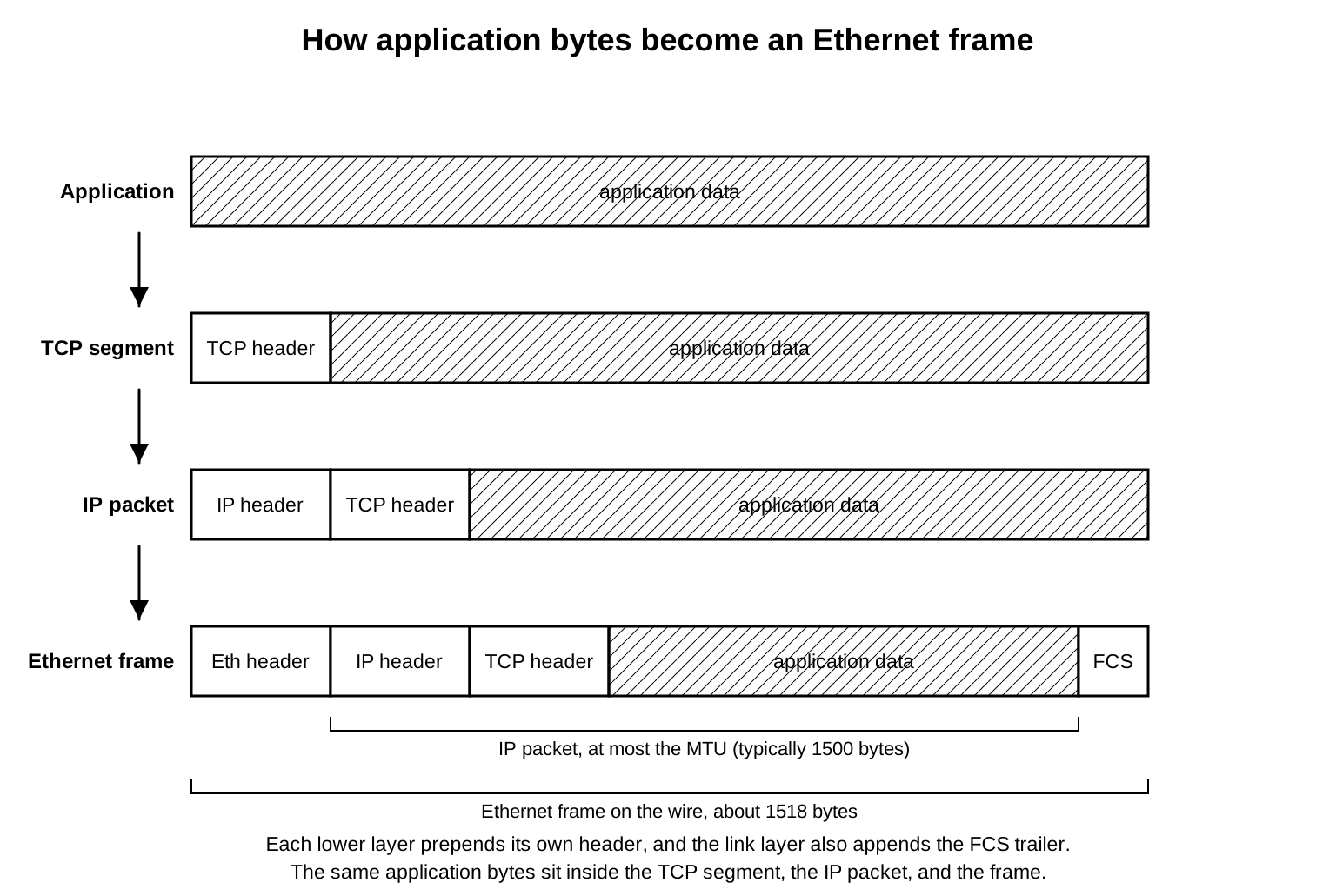
Application bytes are the bytes your code writes. They might come from a string, a Buffer, a serialized request, a response body, or a custom protocol message.
A packet is a bounded unit of data the network stack moves around. People use the word loosely for anything on the network, and that is fine in conversation, but debugging gets easier once you name the units precisely.
A TCP segment is the unit TCP works in. It carries TCP header fields plus a slice of your application bytes. TCP is what handles connection state, ordering, retransmission, and flow control. When a Node TCP socket sends bytes, those bytes turn into one or more segments.
A UDP datagram is the equivalent unit for UDP. It holds a UDP header and a single message payload. UDP gets its own chapter later, but the word earns a place here because it sits at the same transport layer as a TCP segment.
An IP packet is an IP header wrapped around a transport payload. That payload is a TCP segment for TCP traffic, or a UDP datagram for UDP. The IP header carries the source and destination IP addresses, along with the metadata needed to move the packet toward where it is going.
An Ethernet frame is the link-layer unit on Ethernet networks. It wraps an IP packet in link-layer headers plus a trailer so it can travel across the local link. Wi-Fi and other link types use their own frame formats, but Ethernet terms come up constantly in packet captures, MTU discussions, and Linux tooling.
IPv4 and IPv6 use different packet header formats, but their job in this chapter is identical. Each one carries a source address, a destination address, protocol metadata, and a payload. You do not have to memorize every header field to write Node networking code. You do have to pay attention to address family, because IPv4 and IPv6 keep separate addresses, socket structures, route tables, and packet headers.
TCP gives the peer a byte stream. Your application does not get one callback per TCP segment. A single socket.write() can turn into many segments, and several writes can show up at the peer inside one data chunk. Node's data events come from stream reads out of the receive buffer, so the way they break up has nothing to do with the way you called write.
UDP keeps message framing right at the socket API. One send call makes one UDP datagram payload, within the size limits and whatever IP does to it. The UDP chapter gets into the consequences. The short version is that TCP carries a byte stream while UDP carries individual messages.
To the IP layer both are payload. It has no idea whether Node wrote an HTTP request, a Redis command, a custom binary protocol, or nothing at all. All it sees is a transport protocol number, a source and destination IP address, and some bytes that need to move toward the next hop.
Layer names can get academic quickly, so here is the backend version. Node hands bytes to a socket, the socket runs a transport protocol, that protocol uses IP for host addressing, IP picks a route and a network interface to get off the machine, and a local link format carries the packet across the immediate network segment.
A TCP write runs roughly like this.
socket.write(Buffer)
  -> Node stream and native write queue
  -> kernel TCP send buffer
  -> TCP segment
  -> IP packet
  -> interface transmit queue
  -> link-layer frame
Backpressure lives in this path too, in more than one spot. A Node writable stream can tell you its own queue crossed highWaterMark. The kernel socket has a send buffer with a fixed amount of room. TCP applies its own flow control based on the peer's receive window. Those are three different pressure points, and each belongs to a different layer.
When socket.write() returns false, that is the Node stream layer asking the producer to wait for drain. It only tells you about Node's own writable-side buffering, nothing more. The peer might have received nothing yet, and the packet might still be sitting inside the local network stack. All the false means is slow down.
When socket.write() returns false, stop writing and wait for the drain event before sending more. If you ignore the return value, the writable queue grows without limit, and a slow or stalled peer turns that into unbounded process memory growth.
The kernel's TCP send buffer sits below all of that. Node can pass bytes to the OS and get back a successful local write because the kernel took them into its buffer. Those bytes might still be waiting on segmentation, congestion window space, link availability, or a retransmission. A successful socket write tells you the local stack accepted your bytes for transmission, and nothing about whether the remote application has read them.
Receiving data walks the same layers in reverse. A network interface takes in a frame, the link-layer code pulls out the IP packet, and the IP layer checks the destination address and protocol. From there TCP or UDP gets the transport unit, and a matching socket receives the data or a state change. The kernel marks the socket readable, libuv notices, and Node finally reads the bytes and pushes them into a JavaScript stream.
interface receive
  -> link-layer frame
  -> IP packet
  -> TCP segment
  -> socket receive buffer
  -> libuv readiness
  -> net.Socket data
Node only enters at the top of that path, which is exactly why so many networking bugs come from further down it.
Interfaces and Local Addresses
A network interface is one way for the host to send and receive packets. It might be physical hardware, a virtual device, a tunnel, a bridge, a container interface, or the loopback interface. The OS attaches addresses and link-layer properties to each one.
Node exposes interface data through node:os.
import os from 'node:os';

for (const [name, entries] of Object.entries(os.networkInterfaces())) {
  console.log(name, entries.map(e => `${e.address}/${e.family}`));
}
What you get back depends on the machine. There is almost always a loopback interface plus one or more non-loopback interfaces. A laptop has Wi-Fi, a server might have several network cards, a container often sees virtual interfaces, and a VPN adds a tunnel interface. On cloud hosts the names come from the guest OS, which are not always the names you see in the provider's dashboard.
An IP address is the network-layer address attached to an interface, or the address you are trying to reach. In Node code it is usually a string. Down in the OS it is structured address data tagged with an address family.
A single interface can carry several addresses, and a single host can have several interfaces. IPv4 might be on one interface and missing from another, with IPv6 present right alongside it. That is all normal host state, and Node inherits whatever the host has.
os.networkInterfaces() can return entries that look like this.
{
  address: '127.0.0.1',
  netmask: '255.0.0.0',
  family: 'IPv4',
  internal: true,
  cidr: '127.0.0.1/8'
}
The cidr and netmask fields describe the local address range tied to that interface. Subnet design is its own topic and outside this chapter, but the effect on you is easy to state. The OS uses these ranges to work out whether a destination sits on a directly connected network, by comparing it against the interface routes derived from them.
On a normal workstation your Wi-Fi interface might have an IPv4 address like 192.168.1.25/24. A destination of 192.168.1.40 probably matches the same local network route, while 203.0.113.10 probably goes out the default route. Your Node code only names the destination. Everything about which address and route get used is decided by the OS.
IPv4 is the 32-bit address family, written in dotted decimal like 127.0.0.1 or 192.0.2.10. IPv6 is the 128-bit family, written as hexadecimal groups like ::1 or 2001:db8::10. A single host can run both at once.
The loopback interface stays local to the host. Anything sent to a loopback address never leaves the host's network stack. For IPv4 that address is usually 127.0.0.1, and for IPv6 it is ::1.
server.listen(3000, '127.0.0.1');Binding to 127.0.0.1 puts the server on IPv4 loopback. No other machine can reach it there, since loopback never leaves the host. A different process on the same host can connect to it without trouble.
server.listen(3000, '0.0.0.0');0.0.0.0 is the IPv4 wildcard bind address. It tells the OS to accept connections for that port across the host's suitable IPv4 addresses. Whichever interface address the client used becomes the local address for that accepted connection.
This trips people up constantly. A process bound to 127.0.0.1 can pass every test on your machine and still be completely unreachable from another container, VM, or host. Bind that same process to 0.0.0.0 and it may be reachable through every IPv4 address the host has, depending on firewall and routing policy.
Binding to 0.0.0.0 opens the port on every IPv4 address the host holds, including addresses that other machines can reach. A development database or debug endpoint bound this way is reachable from the network whenever no firewall blocks it. Bind internal-only services to 127.0.0.1 and keep 0.0.0.0 for services you intend to publish.
IPv6 has a catch of its own.
server.listen(3000, '::1');::1 is IPv6 loopback, and it is a different address family from 127.0.0.1. Connect to IPv4 loopback and you reach IPv4 sockets, connect to IPv6 loopback and you reach IPv6 sockets. Dual-stack behavior and IPv6-only options come up later. Until then, treat the address family as part of the endpoint, not an afterthought.
localhost brings name resolution into it. On many machines it resolves to both ::1 and 127.0.0.1, and the order depends on OS and runtime policy. DNS and lookup ordering are the next chapter's job. While you are trying to understand the socket handoff, stick to numeric addresses so name resolution does not add noise.
The address family can change which error you get. A server on 127.0.0.1 is an IPv4 listener, and a client reaching for ::1 is aiming at IPv6 loopback. The port number lines up, yet the connection still fails, because that address family points at a different socket-table entry. So when a bug report says "port 3000 is open", the next questions are which address family and which local address.
Interfaces show up on outgoing connections too. Usually your code provides a remote address and port.
import net from 'node:net';

const socket = net.connect(80, '93.184.216.34');

socket.on('connect', () => {
  console.log(socket.localAddress, socket.localPort);
});
Unless you specify them, the OS picks the local address and local port for you. The local address usually comes from whichever outbound interface route lookup selected, and the local port is usually an ephemeral one. The two together make up the local endpoint for that connection.
Binding and connecting are doing different jobs. A server bind decides where your process receives traffic. A client connect picks the remote endpoint, and then the OS picks a local endpoint that can actually reach it.
Ports and Socket Addresses
A port is a 16-bit transport-layer number that TCP and UDP both use. It picks out a local endpoint within a given IP address and protocol. Ports run from 0 through 65535, and operating systems usually hold back the low ones for privileged or policy-controlled binding, with the exact rule depending on the OS and its configuration.
A socket address is an IP address plus a port, carrying an address family with it. In Node you usually meet it as { address, port, family }, or as separate host and port arguments. At the OS level it becomes structured binary data handed to calls like bind() and connect().
server.listen({ host: '127.0.0.1', port: 3000 }, () => {
  console.log(server.address());
});
Here the local socket address is 127.0.0.1:3000 in the IPv4 family. On a listening server, that is the address the OS accepts incoming connections on. A connected socket has two endpoints instead, one local and one remote.
A TCP connection is normally identified by these fields.
protocol
local IP
local port
remote IP
remote port
The protocol is in there because TCP and UDP have completely separate transport spaces. Both the local and remote sides are in there because one server port can hold many connected TCP sockets at the same time. A web server can listen on 0.0.0.0:443 and accept thousands of connections from different remote IP and port pairs, and every one of them gets its own tuple.
socket.on('connect', () => {
  console.log(socket.localAddress, socket.localPort);
  console.log(socket.remoteAddress, socket.remotePort);
});
The local endpoint is your side, the remote endpoint is the peer, and TCP uses the whole tuple to keep connections apart. That is how a single Node process can open many outbound connections to the same remote server, since each one gets its own local ephemeral port.
An ephemeral port is a temporary local port the operating system hands out for an outbound connection, or for a bind to port 0. The OS pulls it from a configured range and tracks what is in use in the socket table.
const server = net.createServer();

server.listen(0, '127.0.0.1', () => {
  console.log(server.address());
});
Port 0 asks the OS to choose an open port for you. Test code leans on this constantly, because it avoids hard-coding 3000 across parallel runs. The port the OS chose still lives in the kernel socket table, so read it back only after the server is listening, then pass that exact value to your clients.
Ephemeral ports turn up on the client side too.
const socket = net.connect(3000, '127.0.0.1');

socket.on('connect', () => {
  console.log(socket.localPort);
});
That local port came from the OS. A test suite that opens thousands of short-lived outbound connections in a hurry can put real pressure on the ephemeral port range, because TCP keeps a port unavailable for reuse for a while after close. The TIME_WAIT state and teardown get full treatment in the TCP chapter. The first symptom usually shows up right here, with local tests failing on address or connect errors even though the remote server is perfectly healthy.
Opening many short-lived outbound connections can exhaust the local ephemeral port range, because closed TCP sockets hold their port in TIME_WAIT for a while after teardown. The remote service stays healthy while local connects start failing with address errors. Reuse connections through keep-alive or a connection pool instead of opening a new socket per request.
Which socket holds a port depends on protocol and address family. A TCP listener and a UDP socket are on separate transport protocols, so they do not collide. IPv4 and IPv6 can also bind differently depending on socket options and platform defaults. A wildcard bind can still clash with a specific-address bind, because the OS has to decide which socket would receive traffic for the same address and port.
Use exact addresses while you are debugging binds. 127.0.0.1:3000, ::1:3000, and 0.0.0.0:3000 are three separate binding requests. localhost:3000 is a name plus a port, and that name can resolve to more than one address.
Privileged ports come down to host policy. On Unix-like systems, binding a port below 1024 has traditionally needed elevated privileges, though capabilities and container settings can change that. Node adds no privilege of its own, it only calls the OS and reports back whatever happened. A bind to 80 can fail on permission policy even when no process is holding that port at all.
Port 0 has one special meaning at bind time, which is to ask the OS to allocate a real port. It is never a reachable service port a client would dial directly. Once the bind succeeds the socket has a genuine port from the OS, and server.address().port is the value to use in your process or test.
The Kernel Path for One Write
A single write is enough to trace the whole path.
socket.write('GET / HTTP/1.0\r\n\r\n');The string turns into bytes using the stream's encoding rules, and Node takes those bytes into the writable side of net.Socket. If the write can go ahead, Node creates or extends native write state and asks libuv to submit the operation through the OS socket descriptor. That call reaches the kernel, which receives a pointer to your user-space memory and a byte length, then copies or stages the bytes according to the platform path.
Once the system call returns, your JavaScript carries on. A write callback, if you passed one, fires when the local write finishes, which says nothing about whether the remote process has read anything. The other side has its own receive buffers, its own scheduling, and its own application code to get through first.
A returned write call and a fired write callback mean the local kernel accepted the bytes for transmission. They do not mean the peer received or read them. To confirm delivery at the application level, wait for a response from the remote side. A successful local write only proves the kernel took the bytes.
The kernel socket object keeps track of the protocol, the local endpoint, the remote endpoint when connected, the send and receive buffers, error state, and protocol-specific fields. For a connected TCP socket it also holds sequence tracking, retransmission state, timers, congestion state, and the peer's window. Those TCP fields come back in a later chapter. The split to remember is that Node holds the JavaScript object and native wrapper, while the kernel holds the transmission state.
Segmentation happens below Node. Your socket.write() might pass 20 bytes or 200 KiB, and TCP is the one that decides how to cut that byte stream into segments under the current network constraints. Each segment then gets wrapped in an IP packet, framed by the link layer for the chosen interface, and queued for transmission by the interface driver.
Routing is already in play before a packet leaves. For a connected TCP socket, the OS has picked a route to the remote address, and that choice fixes the source address, the outbound interface, and the next hop. A loopback destination keeps the whole path inside the host. A destination on a directly attached network goes out that interface to the peer's link-layer address. Anything else heads to a gateway that the routing table chose.
The receive side works the same way in the other direction. Node can read only after the kernel has taken data into the socket receive buffer and marked it readable. If your JavaScript stops reading, data piles up in both the Node stream buffers and the kernel receive buffer, and TCP can shrink the advertised receive window, which slows the peer down. Backpressure runs across all these layers, with each layer signaling it in its own way.
Errors travel up the same way. A failed route lookup can come back as a connection error, a peer reset can surface as a socket error, and a write after teardown can report a broken-pipe style error. The exact code depends on the platform and the timing. Node delivers all of them to JavaScript as code values, but the real cause is often a kernel socket transition that happened before your callback even ran.
UDP takes its own path, because it keeps one payload per datagram, but the same layers are still involved. Node hands bytes to a datagram socket, the OS builds UDP datagrams, IP packets carry them, and an interface sends the frames.
Routing Decides the Interface
A routing table is the host's set of rules for deciding where an IP packet goes next. It maps ranges of destination addresses to local delivery, to an interface, or to a next-hop gateway. The kernel consults it for every outbound packet.
On Linux, ip route prints the IPv4 table.
ip routeTypical output includes a default route plus local network routes. The default route is used when no more specific route matches the destination. It usually points at a gateway through one interface.
The exact output depends on the host, but it often looks like this.
default via 192.0.2.1 dev wlan0
192.0.2.0/24 dev wlan0 proto kernel src 192.0.2.10
The second line says the host can reach 192.0.2.0/24 directly through wlan0, using 192.0.2.10 as the preferred source address for that route. The default line says other IPv4 destinations go to 192.0.2.1 through wlan0.
Route lookup always prefers the most specific matching route. A loopback destination matches the local loopback route, a local subnet destination matches the directly connected network route, and a public address usually falls through to the default route on a small host. Servers, containers, VPNs, and policy routing pile on more rules, but the core idea holds. A destination address goes in, and a route result comes out.
Linux can show you the route result for a single destination.
ip route get 93.184.216.34That command often prints the selected interface, source address, gateway, and cache-related fields. It shows the same kind of decision the kernel makes during connect.
IPv6 keeps its own route table.
ip -6 routeA dual-stack host can have working IPv4 routing and broken IPv6 routing, or the reverse. To Node they are both network operations. The address family chosen before routing decides which table the OS reaches for.
For a normal net.connect() call, the kernel chooses the outbound interface. Node asks to connect to a remote socket address. The OS picks a source address and route based on the destination and any local bind settings.
const socket = net.connect({
  host: '93.184.216.34',
  port: 80,
  localAddress: '192.0.2.10'
});
localAddress pins the source address. The OS still checks that the address really exists on the host and can serve that route. A local address that is not present fails the connect. An address that exists but sits behind a blocked route fails it too.
Loopback routing never leaves the host stack.
net.connect(3000, '127.0.0.1');The destination matches loopback, so the packet goes through host-local delivery rather than out a physical network card. It is still TCP, and the kernel still tracks the endpoints. Link-layer resolution and any external network gear stay out of it, because the destination is on the same host.
Containers make this easy to see. Inside a container, 127.0.0.1 refers to that container's own network namespace. A service bound to loopback in one container is reachable only inside that namespace, and getting to another container or to the host needs an address and route that leave it. The Kubernetes specifics come later, but one rule already pays off. Loopback always belongs to whichever network namespace is doing the lookup.
Wildcard binds interact with routing on the receive side. A server bound to 0.0.0.0:3000 can accept connections addressed to any suitable local IPv4 address. The incoming packet's destination address becomes the local address for that accepted connection. server.address() on the listening server may print 0.0.0.0, but each accepted socket has its own localAddress.
net.createServer(socket => {
  console.log(socket.localAddress, socket.localPort);
}).listen(3000, '0.0.0.0');
That callback prints the address the client reached. On a host with several interfaces, clients can produce several local addresses on the same listening server.
Routing failures tend to look like timeouts, unreachable errors, or connections that never arrive at the server you had in mind. When you check route behavior, use the destination address rather than the URL string. Name resolution can lock in an address family first, and only then does routing decide how that address travels. The DNS chapter handles the name-resolution half.
Route lookup also explains source-address surprises on hosts that have several interfaces up at once. A process can be running over Wi-Fi, Ethernet, a VPN, and container interfaces all at the same time. The destination address selects a route, and that route selects a preferred source address. If your logs record only the remote URL, that second choice is invisible. Logging socket.localAddress during connection setup brings the chosen route back into view without any packet capture.
Local delivery is itself a route result. When the destination is one of the host's own addresses, the kernel can deliver it internally, and that reaches beyond 127.0.0.1. Connecting to the machine's own non-loopback address from the same machine can still stay on local delivery paths, depending on the OS. Reading the local and remote socket fields beats guessing from interface names.
ARP, Neighbor Discovery, and MTU
Routing chooses an interface and maybe a next hop. The link layer still needs a delivery target on the local link.
ARP, the Address Resolution Protocol, maps an IPv4 address on the local link to a link-layer address such as a MAC address. If the route says an IPv4 packet should go directly to a peer or gateway on an Ethernet-like link, the host needs the link-layer address for that next hop. ARP supplies it and caches the result.
Neighbor Discovery is the IPv6 mechanism for resolving neighbor addresses and handling related local-link tasks. For debugging purposes it plays the same role ARP does. IPv6 local delivery needs neighbor information before any frame can go out on the link.
From Node you usually meet ARP and Neighbor Discovery only through their symptoms. A connect call can stall while the OS tries to resolve the next hop. A packet capture might show ARP requests going out ahead of any TCP packets. A route can be perfectly correct while the next-hop neighbor is unreachable. What JavaScript gets is either slow connection progress or an error once the OS gives up.
MTU means Maximum Transmission Unit. It is the largest packet size a link can carry at that layer without fragmentation. Ethernet commonly has an MTU of 1500 bytes for IP packets, though many environments use other values.
MTU comes up because Node writes byte streams while the network moves bounded units. A large socket.write() never becomes one giant packet. The stack splits the bytes into pieces that fit the transport, IP, and link limits. A packet that is too big for some segment of the path can be fragmented or dropped with an error signal, depending on the protocol, the flags set, and how the network behaves.
Most backend developers meet MTU through production symptoms. Small requests work fine, larger payloads stall, and VPN paths behave differently again. Packet captures show retransmissions clustering around a particular payload size. Node only sees the result, which is slow writes, stalled reads, connection resets, or timeouts. The actual fix usually sits below Node, in the interface MTU, tunnel settings, firewall policy, or path MTU discovery.
Application payload size and packet size can be a long way apart.
socket.write(Buffer.alloc(64 * 1024));That write hands 65,536 bytes to the socket path. Ethernet with a 1500-byte MTU cannot carry that in a single IP packet. TCP segmentation and offload features change what a packet capture shows, and the interface driver can do some of the work late in the transmit path. The JavaScript byte count stays what it always was, the application byte count.
Packet capture tools muddy this further, because modern network cards and kernels use offloads. A capture taken before segmentation offload can display large pseudo-packets bigger than the physical MTU, while a capture taken at a different point shows smaller on-wire frames. Read each capture as one observation from one spot in the stack.
Keep your packet-capture vocabulary precise when you debug this layer.
Ethernet frame
  -> IP packet
  -> TCP segment
  -> application bytes
Say someone tells you "the packet is 1514 bytes on the wire". That figure probably includes Ethernet framing. "MTU 1500" usually refers to the IP packet size on Ethernet. "TCP payload" means the application bytes inside the segment, after the TCP and IP headers come off. The numbers disagree because each layer adds its own headers.
A Node Buffer length is an application byte count, never a packet size. A 64 KiB Buffer can become many TCP segments, and several small writes can be merged together lower down, depending on buffering and TCP behavior. Nagle, delayed ACK, and the relevant socket options all come later. The point for now is that application byte ranges and packet framing belong to separate layers.
ARP and Neighbor Discovery keep caches too. A host usually resolves a next hop once, stores the answer, and reuses it until that entry expires or changes. The first connection to a peer can pay the resolution cost while later ones skip it. Stale neighbor state can also cause failures that clear up after the cache expires or an interface changes. Node gives you no special net API for that cache, so reach for OS tools whenever the symptom points below IP routing.
Observing the Host From Node
os.networkInterfaces() gives JavaScript a view of the interface addresses. It will not show you the full routing table, the neighbor cache, or the socket table. It is still a good first check, because it tells you which addresses this host currently presents to Node.
import os from 'node:os';

console.dir(os.networkInterfaces(), { depth: null });
Each entry carries fields like address, netmask, family, mac, internal, and CIDR information where the platform provides it. An internal: true marks the loopback-style addresses, and family tells you whether the address is IPv4 or IPv6.
That data helps explain bind behavior.
import net from 'node:net';

const host = process.argv[2] || '127.0.0.1';

net.createServer().listen(3000, host, () => {
  console.log(`listening on ${host}:3000`);
});
Run it once with 127.0.0.1, again with a real interface address from os.networkInterfaces(), and again with 0.0.0.0. Your server code is almost identical across all three, yet the kernel bind request behind it is completely different each time.
Port conflicts call for a socket-table view. On Linux, ss can list the listening TCP sockets.
ss -ltnpThe output names the local addresses and ports, and with the right permissions it shows process information too. That is exactly the view you want when Node reports a bind error. Start from the socket address that is already sitting in the kernel table, then track down which process is holding it.
Node can report its own chosen address once it has bound.
const server = net.createServer();

server.listen(0, '127.0.0.1', () => {
  console.log(server.address());
});
That pattern beats fixed ports for parallel tests. You let the OS choose, read back the selected port, hand it to the client, and close the server when the test ends. Fixed ports make your tests depend on global host state, which is what you are trying to avoid.
Remote connections expose the local state that routing picked.
const socket = net.connect(80, '93.184.216.34');

socket.on('connect', () => {
  console.log(socket.localAddress, socket.localPort);
  socket.end();
});
The local address here came from route selection, and the local port came from ephemeral allocation. Run the same snippet on Wi-Fi, on a VPN, inside a container, and on a CI runner, and the values shift around, because the host's interface and routing state shifted underneath you.
Accepted sockets show both sides of the inbound state.
net.createServer(socket => {
  console.log({
    local: `${socket.localAddress}:${socket.localPort}`,
    remote: `${socket.remoteAddress}:${socket.remotePort}`
  });
}).listen(3000, '0.0.0.0');
That log beats a generic "client connected" line every time. It records which local address took the connection and which remote endpoint the kernel reported. Behind proxies, NAT, or port publishing, those fields show the immediate peer at this layer rather than the original client. Proxy headers and higher-level identity are jobs for later chapters.
Errors deserve the same endpoint discipline.
server.on('error', err => {
  console.error(err.code, err.address, err.port);
});
Bind errors often carry the address and port that were attempted. Log them. A service that only prints "failed to start" has thrown away the one detail you need, the exact socket address the OS rejected.
A few local errors point straight back to the socket layer.
bind failed
  -> local address absent, busy, or blocked by policy
connect failed
  -> remote path, peer state, or local route problem
write failed
  -> connected socket state changed below JavaScript
The exact code depends on the operation and the platform. EADDRINUSE on a bind means the address is already taken in the socket table, or socket state and options have made it unavailable. EADDRNOTAVAIL means the host cannot use that local address for the bind or connect you asked for. ECONNREFUSED on a connect means the destination host turned the attempt away at the transport layer, usually because nothing was listening on that endpoint. Later subchapters give these their full TCP and socket-option backstory. At this level they all say the same thing, that the OS rejected or changed your socket operation below JavaScript.
Print the fields Node hands you.
socket.on('error', err => {
  console.error({
    code: err.code,
    address: err.address,
    port: err.port
  });
});
Sometimes the fields are missing, because the error surfaced after the operation had already moved past the original address arguments. When they are there, they tell you which endpoint request failed. Log the endpoint, then go inspect the host state behind it.
Loopback gives you a clean local trace.
const server = net.createServer(s => s.end('ok\n'));

server.listen(0, '127.0.0.1', () => {
  const { port } = server.address();
  const client = net.connect(port, '127.0.0.1');
  client.on('close', () => server.close());
  client.pipe(process.stdout);
});
No remote network is involved at all. The server binds to IPv4 loopback on an ephemeral port, and the client connects to that exact socket address. TCP still runs end to end, the accepted socket still has both local and remote endpoints, and routing selects loopback. Link-layer resolution never enters the path.
IPv6 loopback needs its own address.
const server = net.createServer(s => s.end('ok\n'));

server.listen(0, '::1', () => {
  const { port } = server.address();
  const client = net.connect(port, '::1');
  client.on('close', () => server.close());
  client.pipe(process.stdout);
});
If this fails on some machine, check IPv6 availability and local policy before you blame Node. ::1 and 127.0.0.1 are separate socket addresses, and localhost can land on either one after lookup.
A short debugging path works well at this layer.
numeric destination address
  -> address family
  -> local bind address, if any
  -> route result
  -> socket table entry
  -> interface and neighbor state
Stay numeric until the route and bind behavior make sense, then add names back in. DNS brings another moving piece into it, and the next chapter gives that its own walkthrough.
Wildcards, Localhost, and Other Sharp Edges
Wildcard bind addresses are receive-side instructions.
0.0.0.0 stands for all suitable IPv4 local addresses on that port, and :: is the IPv6 unspecified address. An IPv6 wildcard socket may or may not also take IPv4-mapped connections, depending on the platform and the socket options in play, so treat that as platform and option dependent. The full dual-stack story is in the socket-options chapter.
The listening server's address can look less specific than the traffic it actually accepts.
const server = net.createServer(socket => {
  console.log('accepted on', socket.localAddress);
});

server.listen(3000, '0.0.0.0');
server.address() reports the bind address you listened on. On each accepted socket, socket.localAddress reports the local address used for that specific connection. When you need to know which interface address a client actually reached, read it off the accepted socket.
localhost is a hostname that resolves to one or more addresses. It usually goes through host files and resolver policy, and it can return both IPv6 and IPv4 answers. Bind your server only to 127.0.0.1, have a client reach for localhost, and that client may try ::1 first and fail before it ever gets to IPv4, depending on lookup behavior and client policy. The next chapter covers that lookup behavior in full. The bind-side lesson is already clear. Match the address family you mean to use, or bind in a way that covers both families under your platform's policy.
A server bound only to 127.0.0.1 is an IPv4 listener. A client that resolves localhost to ::1 first will hit ECONNREFUSED on the IPv6 attempt. Node's default autoSelectFamily (Happy Eyeballs, on by default since Node v20) usually recovers by falling back to 127.0.0.1, so the connection still succeeds. The failure does bite when autoSelectFamily is off, when the resolver returns only ::1, or when the client is not Node and tries a single address. While debugging, connect with the explicit numeric address that matches the bind.
Ephemeral port exhaustion is another local-state bug. It shows up when a process or test suite opens outbound connections faster than the OS can recycle local ports. The remote service can be perfectly healthy while your local machine has run out of usable endpoint combinations. The symptoms vary by OS and timing, but the cause is steady. Every local endpoint tuple needs a unique ephemeral port, and the kernel socket table is still holding too much active or recently closed state to supply one.
Binding test servers to port 0 avoids fixed listen-port conflicts, but those tests can still open a lot of outbound client sockets. Closing the server does not drain every client connection on its own. A test that spins up and tears down hundreds of local TCP connections should close the accepted sockets, wait for their close events, and never assume a port is reusable the instant JavaScript drops the last reference.
Containers bring address-scope problems. A service inside a container bound to 127.0.0.1 is listening inside that container's namespace and nowhere else. Publishing a port through the container runtime will not turn a loopback-only service into one that listens on every container interface, not unless the runtime or a proxy builds a forwarding path for it. Bind to 0.0.0.0 inside the container and the service appears on the container's IPv4 interfaces, and from there the host's publishing rules decide what reaches it from outside.
VPNs and extra interfaces bring route surprises. A destination that worked yesterday can take a tunnel route today, with nothing in your Node code touched and only the routing table different. socket.localAddress is often the first clue, since it shows the source address chosen for the connection. When that address belongs to a VPN or container interface, route lookup is already pulling traffic away from the interface you expected.
Packet size bugs rarely show up labeled as MTU bugs. They look like partial progress instead. Small payloads go through, larger ones hang or reset. TLS and HTTP can dress the symptom up as something higher-level, while the real trouble down the path is link MTU or fragmentation. Keep MTU on your list of suspects whenever the payload size lines up with the failure, especially across tunnels.
Three Paths From the Same Code
The same Node call can take several host paths depending on the destination address.
import net from 'node:net';

const socket = net.connect(3000, process.argv[2]);

socket.on('connect', () => socket.end('ping\n'));
Run that code three ways, with 127.0.0.1, with another address on the same local network, and with a remote public address. The JavaScript never changes. Only the socket address changes, and the kernel path after connect() changes right along with it.
For IPv4 loopback, the route result is local.
127.0.0.1:random -> 127.0.0.1:3000
  -> loopback route
  -> local TCP processing
  -> peer socket in the same host
There is no ARP here, no gateway, no transmission out a physical interface. The packet still runs through the IP and TCP logic, but the host delivers it internally. That is why loopback tests run fast and stay stable next to remote ones. It is also why a passing loopback test only proves so much. All it shows is that the process can bind, route locally, and move bytes through the local TCP stack.
For a destination on the same local network, route lookup usually picks a directly connected interface.
192.0.2.10:random -> 192.0.2.40:3000
  -> route matches local subnet
  -> ARP for 192.0.2.40
  -> frame leaves wlan0 or eth0
The source address usually comes from that same interface. ARP resolves the peer's link-layer address, unless the cache already has a usable entry for it. The frame goes out through the selected interface, and the peer's kernel takes it in and matches it to a listening or connected socket.
For a remote destination, route lookup usually picks a gateway.
192.0.2.10:random -> 203.0.113.20:3000
  -> default route via 192.0.2.1
  -> ARP for the gateway
  -> frame leaves toward the gateway
The link-layer target becomes the gateway, while the IP destination stays the remote address. That is why a packet capture can show a frame addressed to the router's MAC while the IP packet inside it still points at the final destination. Each router then repeats its own forwarding decision until the packet reaches the destination network or gives out.
Node never sees those lower steps directly. What it sees is connection progress, errors, and whether the socket is readable or writable. A single timeout can mean the remote host never answered, a gateway dropped packets, a firewall blocked the path, a route diverted traffic into a tunnel, neighbor resolution failed, or TCP slipped into retries. The JavaScript error shows up later, usually without any of that lower detail attached.
Logging the endpoint tuple gives you somewhere solid to start.
socket.on('connect', () => {
  console.log(socket.localAddress, socket.localPort);
  console.log(socket.remoteAddress, socket.remotePort);
});
The local address tells you which source address the kernel chose. The remote fields tell you the numeric peer the socket actually reached after any lookup. Pair those with ip route get for the remote address and ss for the local socket state, and you can inspect the whole host path without touching application logic.
Inbound traffic works the same way. A server on 0.0.0.0:3000 can take a loopback connection, a same-LAN connection, or a routed connection that came through a gateway or a port-forwarding hop. JavaScript gets the identical connection callback every time. The accepted socket fields are what carry the local and remote endpoints for that particular path.
net.createServer(socket => {
  console.log(socket.localAddress);
  console.log(socket.remoteAddress);
  socket.end();
}).listen(3000, '0.0.0.0');
Connect from the same host over 127.0.0.1, then over its non-loopback address, then from another host entirely. The addresses it prints reveal separate routing and delivery paths, all under the same server object. That is the whole reason per-socket address fields exist. The listening socket's wildcard address is only the receive policy, and the connected socket is what records the real endpoint pair.
What Node APIs Hide on Purpose
Node's networking APIs expose the state your application code needs and hide the kernel detail that would tie the API to a single platform.
The division is consistent. net.Socket gives you the resulting local and remote addresses, while OS tools are where you find the route chosen for that connection. os.networkInterfaces() gives you interface addresses, while the neighbor cache lives in OS tools. server.listen() reports success or an error and the bound address, while the socket options and kernel state behind that result sit in platform tooling.
That split is deliberate API design. Node runs on Linux, macOS, Windows, the BSD variants, containers, and managed environments. The socket APIs share the same core ideas everywhere, but route tables, neighbor caches, interface names, privilege models, and dual-stack defaults all differ. So Node keeps the JavaScript surface on the operations that stay stable across platforms, which are bind, connect, read, write, close, and reading endpoint addresses.
The missing fields still exist. You reach for OS tools to see them.
Node API                 Host detail
os.networkInterfaces()   interface addresses
ss -ltnp                 listening TCP sockets
ip route get ADDRESS     route decision
ip neigh                 neighbor cache
This split keeps your debugging grounded. Reach for Node to see what the process asked for and which endpoint it got back. Reach for OS tools to see how the host decided to move packets. Reach for packet capture once the question gets down to frames, packets, segments, and retransmission. Each tool stays pinned to the layer that holds the state you are asking about.
Timing is the other half of this. Node can read a socket address right after bind or connect, but route and neighbor state can change a moment later. An interface can go down, a VPN route can appear, a gateway can stop responding, and DNS can start returning a different address. A socket that connected cleanly can still fail on a later write, because the state underneath it changed after setup.
Long-lived services have to assume exactly that. A startup check only proves the startup state. The OS goes on making route, neighbor, buffer, and interface decisions for every packet, long after your server has logged "listening".
Where Node Ends
Node's low-level networking APIs hand you objects, events, streams, buffers, addresses, ports, and errors, all of it sitting above the host networking stack. Below that, the kernel socket table decides whether a bind is valid, the routing table chooses the outbound interface, and ARP or Neighbor Discovery resolves the next hop on local links. MTU caps the packet size, and the interface is what actually sends and receives frames.
It helps to be clear about which questions belong to Node and which belong further down.
If the server never emits connection, check the listening address and the socket table before you go anywhere near application logic. A client arriving from an unexpected source address is a routing question, so treat it as one rather than reaching for retry codes. When localhost works but a container cannot reach the service, the usual culprit is loopback scope and bind address well before anything in HTTP. Large writes that stall point at buffering, backpressure, and MTU long before they point at serialization.
Higher protocols all build on these primitives. DNS turns names into candidate addresses. TCP layers on the connection lifecycle, flow control, retransmission, and teardown. The node:net module wraps the socket APIs in stream behavior, UDP gives you message-oriented datagrams instead, and HTTP and TLS stack their own state on top of transport.
Underneath, the base path does not move. JavaScript hands bytes to Node, Node goes through libuv and the native bindings, and the kernel is where the sockets, addresses, routes, packet construction, and interfaces live. Your process gets control back when the lower layers report a result that Node can turn into a callback, an event, a stream chunk, or an error.
Related Reading
- Previous - Node.js REPL, Inspector, Watch Mode, and SEA
- Next - Node.js DNS Resolution: dns.lookup, dns.resolve, and c-ares
- Node.js os Module: CPU, Memory & Network Interfaces
- Node.js Event Loop Explained: Phases, Microtasks, nextTick, and setImmediate
- What Is a Buffer in Node.js? Bytes, Encoding, and TypedArray Memory