Startup Configuration: CLI Flags, NODE_OPTIONS, and Preloads
The command you type might look simple -
node app.jsBut that is only the part you can see. Before your application file runs, a lot can already happen.
A shell wrapper can inject NODE_OPTIONS. A service manager can add memory flags. A preload file can run before your app. A package script can change the actual command. An experimental config file can also feed runtime settings into Node before your code gets control.
So when a Node process starts strangely, do not begin by only reading app.js. First ask how Node was launched.
The examples in this chapter were checked against Node v24.15, which is the v24 LTS baseline for this book. The version matters here because several startup features are recent or experimental in this line - TypeScript input modes, --require with synchronous ES modules, --max-old-space-size-percentage, node --run, and configuration files.
CLI Flags and Runtime Configuration
Node reads startup input before it runs your file. That input can come from the shell command, the environment, preload flags, V8 flags, source-map flags, warning policy, and a few newer configuration surfaces.
The rough order looks like this -
shell command
  -> environment variables and argv
  -> Node option parser
  -> V8 options and Node runtime setup
  -> preload modules
  -> entrypoint source
  -> script arguments
That order is the mental model for this whole chapter. Your application starts near the end of that list. By then, Node has already made several decisions.
Here is a startup command with a few different layers mixed together -
NODE_OPTIONS="--trace-warnings" \
node --enable-source-maps --require ./boot.cjs app.mjs -- --port=3000
The shell starts the process and gives Node two things -
environment variables
argument vector
Node reads both. It pulls --trace-warnings from NODE_OPTIONS, consumes --enable-source-maps, consumes --require ./boot.cjs, chooses app.mjs as the entrypoint, and leaves --port=3000 for your application because it appears after the -- separator.
Inside your app, you can inspect what survived that split -
console.log(process.execArgv);
console.log(process.argv);
process.execArgv shows Node execution flags that came from the command line. process.argv shows the executable path, the entrypoint, and the application arguments.
That sounds simple, but there is a catch. These arrays do not show the entire startup story. NODE_OPTIONS can change the process without appearing in process.execArgv as a normal command-line flag. Experimental configuration files can also affect runtime state before your app starts.
So when startup behavior looks wrong, inspect more than process.argv. Check the command, the environment, the wrapper script, the service file, and any config file used during launch.
A CLI flag is an option consumed by the node executable itself. It can change how Node starts, parses source, loads modules, reports warnings, sizes V8 memory, enables diagnostics, or runs package scripts.
Runtime configuration is the full startup state Node builds from those flags, environment variables, and configuration surfaces before your entrypoint runs.
By the time your first line of application code executes, some things are already fixed.
Source maps have either been enabled or left alone. Preload modules have already run. V8 has already received its heap options. Package resolution has already received its condition set. Warning output policy has already been chosen.
Your app can still read environment variables, load modules, and install handlers. But it starts inside a process whose runtime shape was chosen earlier.
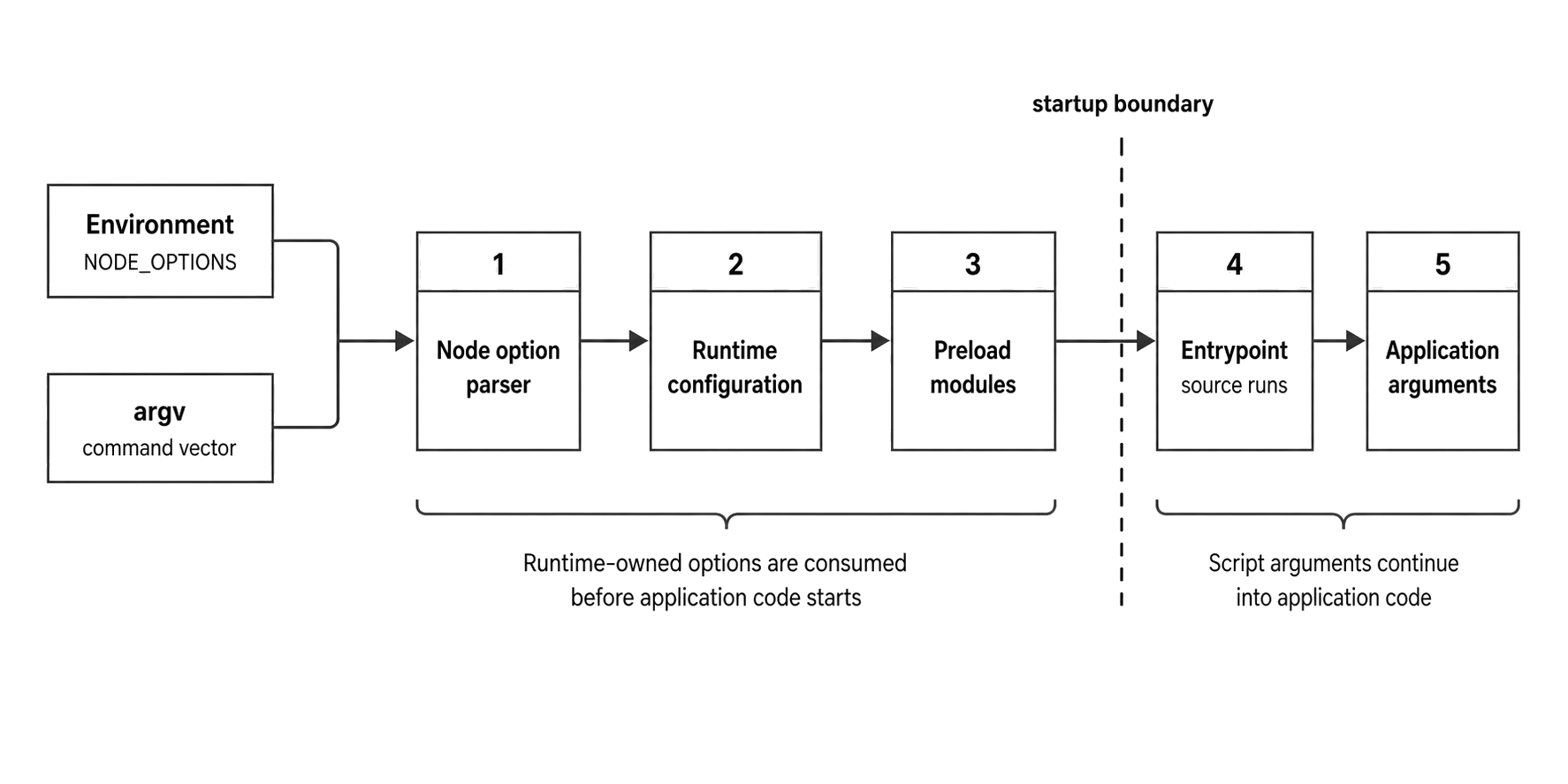
Figure 1 - Node consumes runtime-owned inputs before the entrypoint runs. Script arguments continue beyond that startup checkpoint.
When a production command looks strange, read it from left to right. Stop where Node stops consuming options. Everything after that belongs to the program.
Startup State Before JavaScript
Node startup begins in native code. Your JavaScript entrypoint arrives late.
The operating system starts the node executable and gives it argc, argv, and the process environment. Before that handoff, the shell has already done its own work. Quotes have been removed. Variables have been expanded. Redirections have already been applied. Some shells have expanded globs too.
Node receives strings. It does not receive the original shell text.
That explains many startup bugs. Node can parse this because the shell gave it two argv entries -
--require ./boot.cjsIt can also parse this because the flag and value are packed into one argv entry -
--require=./boot.cjsBut Node cannot tell whether a final argv value came from a literal string, a shell variable, or a wrapper script unless that wrapper leaves evidence somewhere. By the time Node starts parsing, the shell layer is gone.
Node then reads startup input in layers.
The first layer is the environment. Some variables are general process data, such as PATH and TZ. Some are Node-specific. NODE_OPTIONS is special because it feeds the Node option parser. Other Node variables affect subsystems directly, such as NODE_NO_WARNINGS, NODE_PENDING_DEPRECATION, NODE_REDIRECT_WARNINGS, NODE_V8_COVERAGE, and UV_THREADPOOL_SIZE.
The shared idea is timing. Node reads these values during process initialization or early subsystem setup. Your application has not had a chance to rewrite process.env yet.
The second layer is the command-line option region. Node parses flags until it reaches the entrypoint form or the argument separator. During that parse, it builds internal option state for Node-owned settings and collects supported V8 settings for engine initialization. Bad flags, invalid combinations, and malformed startup values fail here before your module graph begins.
The third layer is engine and environment creation. V8 needs its options before the isolate exists. Node needs process-wide options before it creates the JavaScript environment that will contain globalThis, process, built-in modules, and the module loaders.
After that, Node can expose the parsed result back to JavaScript. process.execArgv is the visible list of Node execution arguments from the command line. process.argv is the program argument vector.
Treat both arrays as snapshots of the startup checkpoint. If you mutate process.execArgv later, you only changed an array. You did not reconfigure source maps, warning policy, V8 heap sizing, or preloads for the current process.
Preload modules run next. At that point, Node has enough JavaScript runtime online to load modules, but your application entrypoint has not started. That is a short phase with process-wide reach. Preloads can install handlers, patch modules, initialize instrumentation, or create global state before your app's dependency graph executes.
They can also throw. A thrown preload error aborts startup before the app appears to start.
Only after those steps does Node evaluate the entrypoint. For a file, Node passes the path into the CommonJS or ESM loader. For --eval and stdin, it compiles the provided string with the selected input type. For --check, it parses and exits. For --run, it enters the package-script runner instead of loading an application file.
That is why startup flags feel different from normal app configuration. Your app can inspect some of them, but it arrives after many of them have already been used.
The Argument Split
Node's command shape is easiest to read in regions -
node [options] [V8 options] [entrypoint | -e script | -] [--] [arguments]The first region belongs to Node and V8. The middle region tells Node where the program source comes from. The final region belongs to your program.
Here is a normal command -
node --trace-warnings --max-old-space-size=2048 server.js --verbose--trace-warnings changes Node warning output. --max-old-space-size=2048 affects V8 heap sizing. server.js is the entrypoint. --verbose is passed to server.js because Node has already found the program file.
The explicit -- marker makes the split clear -
node --trace-warnings server.js -- --trace-warningsThe first --trace-warnings changes Node behavior. The second one is only a string in process.argv. Node leaves it for the app.
You can see the split with a tiny script -
console.log({ execArgv: process.execArgv });
console.log({ argv: process.argv.slice(2) });
Run it like this -
node --trace-warnings args.js --name=apiThe output has two separate buckets -
{ execArgv: [ '--trace-warnings' ] }
{ argv: [ '--name=api' ] }
That simple check is often enough to debug a broken command. If a flag should change Node but appears in process.argv, it landed after the entrypoint or after --. If a flag should belong to the app but Node rejects it, it landed before the split.
The runtime-owned region can also contain V8 flags. Memory flags are the usual example -
node --max-old-space-size=4096 worker.js--max-old-space-size belongs to V8. Node accepts it, forwards it during startup, and V8 uses it while sizing the old generation heap. Your script sees the flag in process.execArgv, but the heap sizing already happened before your first line ran.
Some Node flags can be repeated. Some take one value. That difference becomes important when NODE_OPTIONS joins the launch.
A preload flag can accumulate. An inspector port has one winning value.
There is also a small argv detail that tools often forget. process.argv[0] is Node's executable path, matching process.execPath. If launch mechanics provide a custom original argv[0], Node preserves that original value on process.argv0.
process.argv[1] is usually the entrypoint path when a file is involved. With --eval, --print, stdin, and --run, there may be no normal script file there. Tooling that assumes process.argv[1] always points at a real file will break under those modes.
Process managers add another layer. A service file, shell script, Docker entrypoint, or package script can wrap the final Node command. The wrapper may inject flags before your app command, append arguments after it, or set NODE_OPTIONS.
When behavior is surprising, inspect the effective process. On Linux, /proc/<pid>/cmdline shows the null-separated argv for a running process. /proc/<pid>/environ shows the environment if permissions allow it. That lives outside Node, but it is often the fastest way to prove what the process actually received.
For child Node processes, process.execArgv becomes useful again. APIs that start new Node instances often inherit or reuse the parent's execution arguments. That can be exactly what you want for debugging and preloads. It can also spread a memory flag, warning suppression, or inspector setting into helper processes that were supposed to stay small.
Treat inherited exec arguments as part of the child-process contract, even when the spawn call is far away from the service startup command.
Entrypoint Modes
After Node consumes runtime options, it still needs to decide where the program source comes from.
A file path is the common mode -
node ./src/server.jsNode resolves the path from the current working directory, then loads the file through the CommonJS or ESM path. The entrypoint path becomes part of process.argv. Flags before it belong to Node. Arguments after it belong to the program.
--eval runs source from the command line -
node --eval "console.log(process.execArgv)"--eval, usually written as -e, tells Node to run the following string as program source. There is no file entrypoint. The source text comes from argv itself, so file-based details behave differently. For example, metadata tied to a disk file does not behave the same way as it does inside ./src/server.js.
The current working directory becomes more visible in eval mode because relative require() calls and dynamic import() calls still need a base. For CommonJS eval, Node evaluates the string in a synthetic main context. For ESM eval with --input-type=module, the source has module semantics, including top-level await.
That makes eval useful for quick inspection commands. It also means scripts that assume file-local metadata exists can fail in eval mode.
--print evaluates a string and prints the result -
node --print "process.version"--print, or -p, is useful for quick runtime checks because the output comes from Node itself under the same startup configuration. If NODE_OPTIONS sets --trace-warnings, node -p inherits that too.
--check parses a file and stops after syntax validation -
node --check ./src/server.jsNode reads the file, parses it, reports syntax errors, then exits. The program body does not run.
Use --check for the narrow job it does. It catches syntax failures. It does not prove that imports resolve, that ESM linking succeeds, or that runtime features are available. A file can pass node --check and still fail when executed.
String input can also arrive through stdin -
printf "console.log(1 + 1)\n" | node -The - entrypoint tells Node to read source text from standard input. Without a file extension or package scope, Node may need another signal for module shape when the input uses ESM syntax or TypeScript stripping modes.
That signal is --input-type -
node --input-type=module --eval "await Promise.resolve()"--input-type tells Node how to interpret string input from --eval or stdin. In Node v24, values include commonjs, module, commonjs-typescript, and module-typescript.
The key rule is narrow. --input-type applies to string input, not file entrypoints. --print uses eval-style string input, but --print does not support ES module syntax, so --input-type=module --print throws instead of printing a module result.
Node's default behavior for ambiguous string input has changed over releases as syntax detection improved. In current Node, ESM syntax can be detected in ambiguous input under default settings. Still, startup commands that need stable behavior across shells, CI machines, and Node minor versions should say what they mean. If your eval command uses await or import, write --input-type=module.
A common mistake is expecting --input-type to turn a disk file into a module -
node --input-type=module ./script.jsOn Node v24.15, that still runs a normal file entrypoint. It does not force script.js to become an ES module. File-backed module shape comes from .mjs, .cjs, the nearest package "type" field, or syntax detection rules for ambiguous .js files.
The flag is for strings from eval and stdin.
This rejected form shows the boundary -
node --input-type=module --check ./script.jsThat fails during startup with ERR_INPUT_TYPE_NOT_ALLOWED because --check is working on a disk file while --input-type describes string input.
Use file metadata for file-backed modules. Use --input-type for eval and stdin.
Interactive mode has its own startup path too. For this chapter, keep the source choices separate - file, eval string, print string, stdin, syntax check, or package script.
NODE_OPTIONS Enters Before the Command Line
NODE_OPTIONS lets the environment feed options into Node startup.
NODE_OPTIONS="--trace-warnings" node app.jsThe visible command only names node and app.js, but startup has already changed. Inside the script, you can inspect both fields -
console.log("execArgv", process.execArgv);
console.log("NODE_OPTIONS", process.env.NODE_OPTIONS);
When this runs inside app.js, process.execArgv is empty because the Node flag did not come from the command line. The environment still carries the evidence in process.env.NODE_OPTIONS.
The useful part is the timing. NODE_OPTIONS changes the process before user code can clean it up.
That inheritance is useful when a platform intentionally applies source maps, diagnostics, memory policy, or preloads to every process it launches. It is risky when it leaks from a shell profile, CI job, test harness, process manager, or parent process into a command that was supposed to start clean.
A common failure looks like this -
export NODE_OPTIONS="--require ./instrumentation.cjs"
node tools/migrate.js
That is POSIX shell syntax. PowerShell uses this form -
$env:NODE_OPTIONS = "--require ./instrumentation.cjs"cmd.exe uses this form -
set NODE_OPTIONS=--require ./instrumentation.cjsThe shell syntax changes. The startup behavior does not. Node receives an environment string and parses it before your entrypoint runs.
So tools/migrate.js starts after instrumentation.cjs has already run. If that preload changes globals, installs hooks, changes warning policy, or reads configuration, the migration now runs in that modified process.
The bug usually shows up as two launches of the same file producing different behavior. A developer runs node app.js in a clean shell and sees one result. CI runs node app.js under a job environment and sees another. The file is the same. The dependency graph on disk is the same. The startup state differs.
When debugging, print early. Put the print before the app loads its full dependency graph. That tells you which direct Node flags reached process.execArgv and which inherited flags came from the environment. For preloads, a print inside the entrypoint runs after preloads, so add a print inside the preload too if ordering is suspicious.
Node restricts which flags are accepted in NODE_OPTIONS. The allowlist includes many runtime flags, preload flags, source-map and warning flags, diagnostic toggles, condition flags, selected permission flags, selected inspector flags, and selected V8 flags.
Node rejects flags that would make environment injection too ambiguous or unsafe for the command. Script filenames come from the real command. Entrypoint mode comes from the real command. Application arguments come from the real command.
Once environment options are allowed into startup, precedence decides who wins when the same setting appears more than once. For single-value flags, the command line wins over NODE_OPTIONS -
NODE_OPTIONS="--inspect=127.0.0.1:4444" \
node --inspect=127.0.0.1:5555 app.js
The inspector listens on port 5555. The environment supplied a default. The command line supplied the final value.
Repeatable flags combine in order. NODE_OPTIONS entries come first, then command-line entries -
NODE_OPTIONS="--require ./a.cjs" \
node --require ./b.cjs app.js
That behaves as if the command had listed --require ./a.cjs and then --require ./b.cjs. Ordering is part of the startup behavior because preload modules run in order and can mutate process state.
Quoting deserves care. NODE_OPTIONS is a string parsed by Node's option parser. Spaces split arguments unless quoting survives the shell layer and reaches Node in the expected shape.
In practice, keep it plain. Use full flag names. Quote paths only when needed. Prefer visible command-line flags when a setting belongs to one command instead of the whole process tree.
Cross-platform quoting is another reason to keep NODE_OPTIONS small. POSIX shells, PowerShell, cmd.exe, service managers, and container runtimes all have their own quoting rules before Node receives the string. A flag that works in an interactive shell can fail under a service wrapper because the quoting changed before Node started.
For stable operations, separate defaults from command-specific policy. A default such as --enable-source-maps may belong in a launcher if every service ships transformed code. A one-off preload for a migration should live on the migration command. A memory flag for a worker should live on that worker command.
Broad environment injection is convenient until a helper process inherits a setting it was never designed to carry.
NODE_OPTIONS also interacts with environment-file loading. Node v24 can load environment variables from files, and those files can contain NODE_OPTIONS. That gives you multiple configuration layers. The precedence rules decide which one wins. The parsing details belong with environment-file configuration. For startup review, the rule is enough - environment-provided Node options can shape the process before the entrypoint runs.
Preloads Run Before the Entrypoint
Preload flags let you run code during startup. Node resolves and evaluates preload modules before it evaluates your entrypoint.
--require is the traditional CommonJS preload path -
node --require ./boot.cjs app.js--require loads ./boot.cjs with the CommonJS loader before app.js. Resolution follows the same CommonJS rules as a later require() call. The module runs once and lands in Module._cache. If app.js later calls require("./boot.cjs"), it gets the cached exports instead of running the file again.
In Node v24.15, --require can also preload a synchronous ESM graph because require(esm) support is enabled by default. The graph must stay synchronous. If it contains top-level await, startup fails with ERR_REQUIRE_ASYNC_MODULE. If the process starts with --no-require-module, a synchronous ESM preload through --require fails too.
Keep that version detail visible when a command has to support older Node lines or mixed developer machines.
A practical split works well -
use --require for CommonJS setup
use --import for ESM setup
Use --import when the preload needs top-level await or should follow the ESM-native startup path.
The CommonJS cache behavior has real effects. A preload that exports mutable state can become the shared instance the application later imports -
module.exports.startedAt = Date.now();
module.exports.mode = process.env.NODE_ENV;
If the entrypoint requires that module, it reads the instance initialized during preload. The same object identity comes back. That can be a clean way to centralize tiny startup state. It is a poor place for large application configuration because it couples startup order to module state and makes tests harder to reason about.
The timing also makes --require a common place for instrumentation and process-wide setup. A preload can install a warning handler before the app begins loading modules -
process.on("warning", warning => {
  console.error(warning.stack);
});
Put that in boot.cjs, pass it with --require, and the handler exists before the entrypoint loads its dependency graph. A handler installed inside app.js can miss warnings emitted while app.js imports its dependencies.
Instrumentation packages use this startup phase because they often need to wrap APIs before the application imports them. If an HTTP library loads before the instrumentation module, the instrumentation may miss the chance to wrap exported functions or constructors. Preload order turns that race into a startup rule - instrumentation first, app second.
Patching carries a cost. When a preload changes a built-in module export, modifies globals, or installs async hooks, every later module runs in that modified runtime. The application source may look clean while behavior comes from earlier startup code.
For production, keep preload configuration in the deployable command or service config. Avoid hiding it in a local shell setting.
Repeated --require flags run in the listed order -
node --require ./env.cjs --require ./tracing.cjs app.jsenv.cjs runs first. tracing.cjs runs second. Then app.js starts. If tracing.cjs reads configuration prepared by env.cjs, that order is part of the startup contract.
The ESM-native preload path is --import -
node --import ./boot.mjs app.mjs--import resolves and evaluates the module through the ES module loader before the entrypoint. It follows ESM resolution rules, participates in the ESM module map, and can use top-level await.
That last point changes startup timing. If a preloaded ESM module awaits a promise, Node waits for that module evaluation before it runs the entrypoint -
await connectTelemetry();
globalThis.telemetryReady = true;
connectTelemetry() is application setup here, not a Node global. This pattern works in an ESM preload, but it also delays the entrypoint. If the awaited operation hangs, the program hangs before app.mjs starts. Entry-point code runs too late to install a timeout around a preload that has already taken control.
ESM preloads also link their static imports before evaluation. A failure anywhere in that preload graph aborts startup before the entrypoint graph begins. The stack trace points at the preload graph, which is correct, but teams often search inside the app entrypoint because that is the file named in the service command.
When both preload families are present, CommonJS preloads run before ESM preloads -
node --import ./esm-boot.mjs --require ./cjs-boot.cjs app.mjsThe text order there is misleading. Node runs --require preloads before --import preloads. Treat the order like this -
NODE_OPTIONS --require entries
command-line --require entries
NODE_OPTIONS --import entries
command-line --import entries
entrypoint
Within each family, repeatable flags preserve their source order, with NODE_OPTIONS entries before command-line entries. Across families, CommonJS preloads go first.
Preloads can also apply beyond the main thread. Worker threads, forked child processes, and clustered processes can inherit preload behavior when they start new Node instances with inherited exec arguments.
That is useful for instrumentation. It is risky for code that mutates globals, patches built-ins, or opens resources during preload. A preload written for one host process can run once per Node instance.
A clean preload is small and predictable. Install a hook. Register instrumentation. Set a global bridge only if the application already owns that convention. Then stop.
Heavy I/O, network calls, and process.exit() inside preload code create startup failures that are hard to attribute because the application entrypoint may never appear in the stack.
A good preload test is to run only the preload and a tiny eval command -
node --require ./boot.cjs --eval "console.log('ready')"For ESM -
node --import ./boot.mjs --eval "console.log('ready')"If that command hangs, throws, opens handles, or prints warnings, the preload owns that behavior. The app may still have bugs, but it reached the app after startup state had already changed.
Conditions Change Package Selection
After Node chooses a loader path, package resolution can still be shaped by conditions. --conditions adds custom condition names to the package exports resolver -
node --conditions=development app.mjsConditional exports let a package expose different files for different resolution conditions. Node already has built-in conditions such as node-addons, node, import, require, module-sync, and default. A custom condition adds another selector.
Here is a package export map with a development branch -
{
  "exports": {
    ".": {
      "development": "./dev.js",
      "default": "./prod.js"
    }
  }
}
Running with --conditions=development can select ./dev.js for that package entry. Running without that custom condition selects the default path.
That means a startup flag can change which file a package loads. The import string in source code can stay the same while the process builds a different module graph.
Use this deliberately. A custom condition is clean when a package intentionally publishes separate runtime entries. It becomes confusing when teams use it as a hidden environment switch. If two commands import the same package name but use different conditions, they may execute different source files with different side effects and different dependencies.
The flag affects resolution before evaluation. Once a specifier resolves to a file URL or CommonJS filename, the loader proceeds with that file. The cache key follows the resolved target. Two processes with different condition sets can build different module graphs from the same import strings.
Inside one process, the condition set is startup state. Changing process.env halfway through loading modules does not change the condition set the resolver received at startup.
That makes --conditions useful for process-level variants. It is awkward for request-level behavior. A service process has one condition set, and every request in that process shares it. If behavior varies per request, put the branch in application code. If package resolution should vary for the whole process, put the condition in the startup command and treat it as part of process identity.
Repeated conditions accumulate -
node -C development -C local app.mjsBoth custom conditions become available to resolution. The package's "exports" object still controls the final match, including key order and fallback behavior. Earlier condition keys take precedence over later keys, so package authors usually order conditions from most specific to least specific and put "default" last.
The flag only adds condition names. Package metadata decides which target wins.
Condition names are plain strings. Pick names that belong to the package contract rather than one laptop or branch. development and production are common because many tools understand them. A team-specific name can work when the package publishes it intentionally.
If you see a surprising condition in a startup command, go straight to the package's "exports" field and check which file it selects.
Source Maps, Warnings, and Deprecation Policy
Some startup flags do not change which code runs. They change what you see when something goes wrong.
Source map support maps generated stack traces back to original source locations when source maps are available -
node --enable-source-maps dist/server.jsWith source maps enabled, Node consults source map data while formatting stack traces. That is useful for bundled or transformed code, including code that was originally TypeScript.
Node still runs dist/server.js. The source map changes the locations printed in errors.
The cost is usually on the error path, especially when Error.stack is accessed, and in metadata handling. For backend services, source maps are often worth enabling when deployed code differs from authored code.
Keep the setting visible. A crash report with mapped paths is much easier to read. A stale or broken map can point at lines that no longer match the deployed artifact.
Source maps also affect V8 coverage metadata. Node consumes source map comments and map data that already exist. The compiler, bundler, or TypeScript stripping path produced those files earlier. If the map is missing, stale, or points at paths absent from the runtime image, Node has limited information to work with.
Warnings have their own policy flags -
node --trace-warnings app.js
node --no-warnings app.js
node --redirect-warnings=warnings.log app.js
--trace-warnings prints stack traces for process warnings, including deprecations. --no-warnings suppresses the default warning output to stderr. --redirect-warnings writes warnings to a file, falling back to stderr if the file write fails.
Warning controls affect how warnings surface. A deprecated API call still happened. A max-listeners warning still means an emitter crossed its configured listener count. Suppressing output only changes visibility.
Node also has targeted warning controls -
node --disable-warning=ExperimentalWarning app.jsThat disables warnings by code or type. It can quiet a known noisy path during a migration. It can also hide the only startup signal that a flag, API, or dependency is using an unstable path.
Use the narrowest control that matches the problem. While investigating, prefer trace output.
Deprecation mode gives you a smaller set of warning policies -
node --pending-deprecation app.js
node --throw-deprecation app.js
node --trace-deprecation app.js
node --no-deprecation app.js
--pending-deprecation enables pending deprecations that are quiet by default. --trace-deprecation prints stack traces for deprecations. --throw-deprecation turns deprecations into thrown errors. --no-deprecation suppresses deprecation warnings.
Different environments can use different policies. CI can run with stricter deprecation behavior to catch usage early. Production may use trace output during a short investigation window. Blanket suppression should have an owner and an expiry date because it removes one of Node's built-in migration signals.
Warnings also have environment-variable forms. NODE_NO_WARNINGS=1 suppresses warnings. NODE_PENDING_DEPRECATION=1 enables pending deprecations. NODE_REDIRECT_WARNINGS=file redirects warning output.
Those variables are startup configuration too, even though they are not spelled as CLI flags. When warning output differs between two environments, inspect both the command and the environment.
Promise rejections have a separate policy -
node --unhandled-rejections=strict app.jsThis flag changes how Node reacts when a promise rejection remains unhandled. In Node v24, the default mode is throw. A startup command that changes it can alter whether the process warns, throws, exits with a code, or stays quiet for that class of failure.
V8, Memory, and Diagnostics
Some startup flags cross from Node into V8. Node owns the CLI. V8 owns the JavaScript engine.
You can print the V8 options accepted by the embedded engine -
node --v8-optionsThe full list rarely belongs in application docs or service manifests. During startup review, separate engine flags such as heap sizing from Node flags such as warnings, reports, or source maps.
Memory limit flags are the common case -
node --max-old-space-size=2048 app.js--max-old-space-size sets the maximum size, in MiB, of V8's old generation heap. The old generation stores long-lived JavaScript objects. When that space approaches the limit, garbage collection runs more aggressively. If V8 cannot free enough memory, the process can terminate with an out-of-memory failure.
This flag is read before V8 builds the heap for the isolate. That gives it different timing from app configuration. A config file loaded by your app can decide how many jobs to run or how large a cache should be. V8 heap size has already been chosen by then.
If heap size is part of the service contract, put it in the startup command or the process manager config that launches Node.
This flag caps one V8 heap region. It does not cap the whole process. Buffers can use external memory. Native code can allocate memory. Node internals, OpenSSL, zlib, mmap-backed data, thread stacks, and allocator behavior all add memory outside the old generation heap.
That explains a common surprise. A service with --max-old-space-size=512 can still show RSS above 512 MiB. The JavaScript old generation has a limit. The process has more memory regions. Container limits, operating-system accounting, native allocations, and external buffers all count.
Use the V8 flag to control V8 heap pressure. Use platform memory limits for whole-process memory policy.
There is also --max-semi-space-size, which affects the young generation semi-space size. Most backend services touch it less often. Guessing here can trade allocation throughput against garbage collection frequency in ways that vary by workload. Identify it when you see it. Profile before changing it.
Node v24 also has --max-old-space-size-percentage, which sizes old space as a percentage of available system memory. When both --max-old-space-size-percentage and --max-old-space-size are specified, the percentage flag takes precedence.
That can be useful in constrained environments, but the result depends on how the operating system, architecture, and container runtime expose memory. Treat it as startup policy, then check the behavior in the same environment that will run the service.
Memory flags also change how failures appear. A lower heap limit can make leaks fail earlier and more predictably. A higher heap limit can delay failure while increasing garbage collection pause cost and memory pressure on the host. Neither setting fixes retention. It only changes how much space the process has before retention becomes visible.
Diagnostics follow the same startup pattern. Flags turn on data capture or change failure output before the process reaches the failure they are meant to record -
node --report-uncaught-exception app.js
node --report-on-fatalerror app.js
node --trace-uncaught app.js
--report-uncaught-exception writes a diagnostic report when an uncaught exception reaches the top. --report-on-fatalerror writes a report for fatal errors inside the runtime. --trace-uncaught prints stack information for uncaught exceptions with extra throw-site context.
The startup idea is simple - a dead process can only produce artifacts that were configured before it died.
Diagnostic flags often need companion path flags -
node --report-dir=./reports --report-filename=crash.json app.jsThose paths are evaluated in the process environment. Relative paths resolve from the current working directory, which may differ under a service manager. If reports are part of the production contract, use a directory that exists, has write permission for the service user, and is collected by your log or artifact system.
A report flag that writes into a missing or unwritable directory gives you less than the command suggests.
Heap and CPU profiling flags sit in the same startup category -
node --cpu-prof app.js
node --heap-prof app.js
They can create files, add overhead, and produce data that needs separate interpretation. In a startup command review, spot that the process is collecting profile data and ask three questions -
where do the files land
how do they rotate
does this overhead belong in this environment
Some diagnostic flags run continuously. Some trigger on failure. Some trigger on a signal. That difference changes operational risk. A startup command with --heap-prof asks the process to collect heap profile data. A command with --heapsnapshot-signal=SIGUSR2 asks the process to react when that signal arrives.
Inspector flags are startup flags too -
node --inspect=127.0.0.1:9229 app.jsInspector flags open a debugging endpoint during startup. Binding that endpoint to a public interface exposes a protocol that can inspect and control the process, including code execution paths. Keep it on loopback unless the surrounding network and access controls are part of the debugging plan.
The same review habit applies to permission flags, TLS flags, test flags, and OpenSSL flags. Real commands often mix concerns -
node --test --enable-source-maps --trace-warningsThat command uses the test runner, source-map support, and warning policy at the same time. Separate the layers during review.
Some flags are platform-limited. Some V8 options exist only on Linux or Windows. Some Node flags are experimental in v24. The command parser can reject unsupported combinations before the entrypoint runs. That early failure is useful because the process dies before partially initialized application code starts doing work.
node --run Runs Package Scripts
node --run is another command mode. Instead of loading a file entrypoint, Node runs a script from package.json -
node --run testNode walks upward from the current directory until it finds a package.json. It then looks inside that file's "scripts" object for test.
The selected script runs from the directory containing that package.json. If the script is missing, Node reports the missing script and lists the scripts from that package file. It does not continue upward looking for another parent package that has a script with the same name.
Node also prepends matching node_modules/.bin directories from the current path upward so local package binaries can resolve.
This directory walk is easy to overlook in monorepos. Running this from packages/api/src -
node --run testselects the first package.json Node finds above that directory. If that file has no scripts.test, the command fails even if the repository root has a test script.
The executed command runs from the selected package directory. A script that assumes process.cwd() equals the shell's starting directory can behave differently under --run.
After Node selects the package script, arguments after -- pass to that script -
node --run test -- --watchThe --watch string belongs to the package script command. Node watch mode has its own flag region. The split is the same as a normal entrypoint command - Node consumes --run test, then -- separates script-runner arguments from the child command's arguments.
node --run is intentionally smaller than package-manager script runners. It runs the named script directly. npm lifecycle scripts such as pretest and posttest stay in npm's runner. npm-specific environment variables stay in npm's runner too.
Node sets Node-specific script metadata through NODE_RUN_SCRIPT_NAME and NODE_RUN_PACKAGE_JSON_PATH, then runs the configured command.
That narrower behavior is useful because it removes package-manager lifecycle behavior from the startup path. The script must contain the setup it needs.
Compatibility depends on the script's assumptions. If npm run build works because prebuild generates files, node --run build skips that lifecycle script and the build may fail. If a script reads npm-specific environment variables, direct Node execution changes its inputs.
This shape works well for simple package scripts -
{
  "scripts": {
    "lint": "eslint .",
    "test": "node --test"
  }
}
Run one directly with -
node --run lintIf your project relies on npm lifecycle behavior, node --run changes the contract. You get direct script execution, Node metadata, and local binaries on PATH. Use it where the script command has all required setup inside the script itself.
--run also interacts with other startup modes because it is a command mode of its own. Watch mode, eval mode, and syntax-check mode have their own expectations. During command review, parse node --run name as package-script execution and treat everything after -- as arguments to that script.
Startup Source Priority
Startup review gets easier when each input source has a place in the stack.
| Source | How to read it |
|---|---|
| Command-line flags | Strongest visible input for the command being executed. Singleton flags here override matching singleton values from NODE_OPTIONS. |
Real environment NODE_OPTIONS | Parsed before command-line flags and inherited by child processes unless the parent environment is changed. It can affect startup without appearing as a command-line entry in process.execArgv. |
| Experimental configuration file | Structured startup input below direct CLI and real environment state. Treat it as version-sensitive in Node v24. |
Dotenv-provided NODE_OPTIONS | Lower priority than the experimental configuration file for tested options such as source-map support. The environment-file parsing details belong to the next subchapter. |
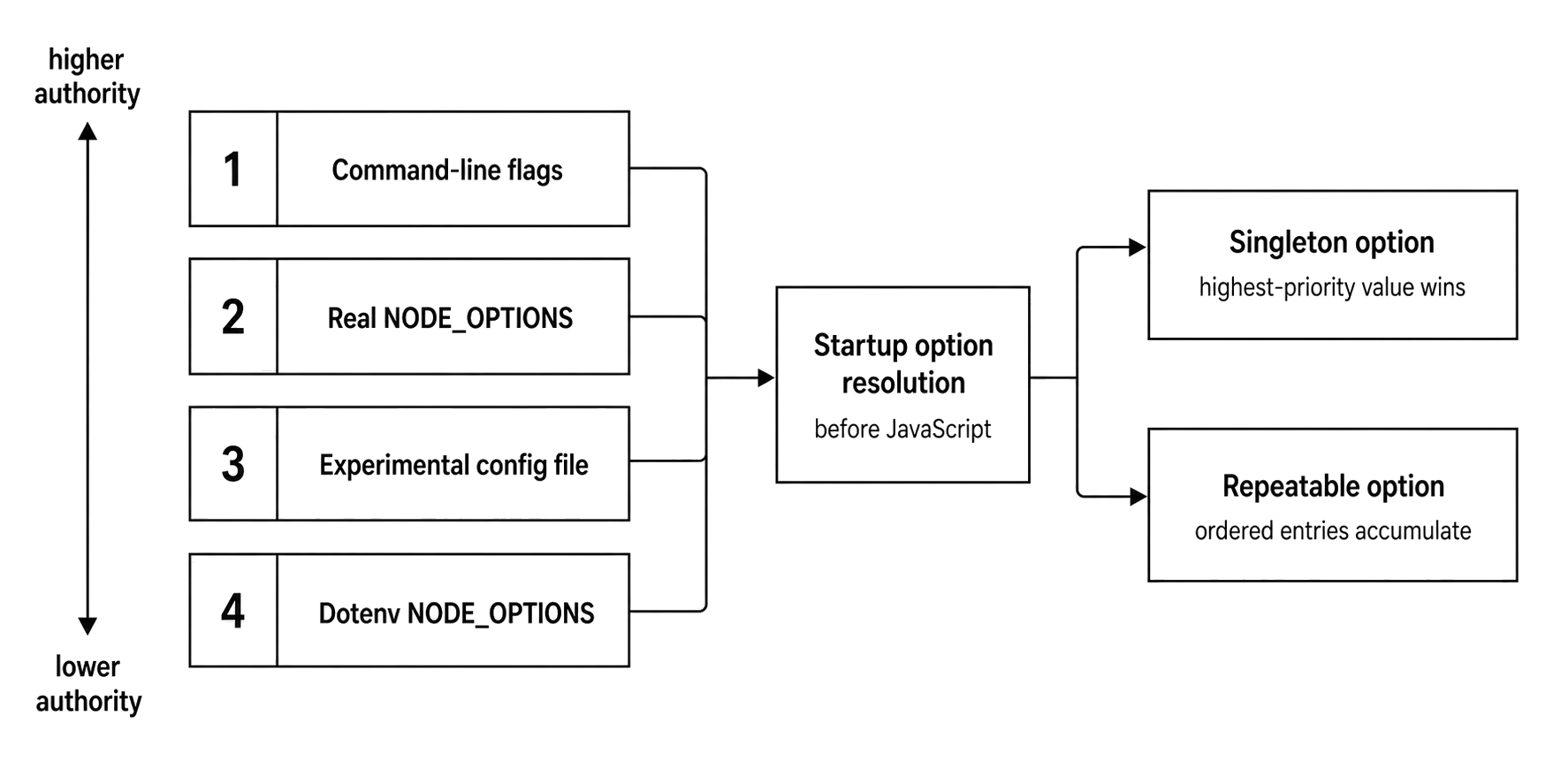
Figure 2 - Startup sources have different authority. Singleton options choose one effective value, while repeatable options preserve ordered entries from the contributing layers.
Repeatable flags such as --require, --import, and --conditions still accumulate according to their own ordering rules. Single-value flags need one winner. Use the table as a review aid, then test the exact Node minor and launch environment.
Experimental Configuration Files
Node v24.15 adds another startup source - an experimental configuration-file surface.
node --experimental-config-file=node.config.json app.jsA Node configuration file is a JSON file for supported runtime options. It can hold nodeOptions and namespace-specific settings for supported subsystems.
In Node v24.15, the official schema exposes top-level testRunner and watch namespaces. Permission options are represented as CLI-style keys under nodeOptions, not as a separate top-level permission namespace. The versioned schema for these examples is https://nodejs.org/download/release/latest-v24.x/docs/node-config-schema.json.
Here is a small config file -
{
  "nodeOptions": {
    "enable-source-maps": true,
    "trace-warnings": true
  },
  "testRunner": {
    "test-isolation": "process"
  },
  "watch": {
    "watch-preserve-output": true
  }
}
The file is still startup input. Node reads it before the entrypoint runs, applies supported values, and can fail early for unsupported keys inside a namespace such as nodeOptions.
Values under nodeOptions are limited to options allowed in NODE_OPTIONS. Namespace blocks configure the matching subsystem through configuration. The result is more structured than a long environment variable, but the exact schema and runtime behavior still count.
Do not treat the experimental config file as full protection against every mistake. Runtime checks on Node v24.15 rejected an unsupported nodeOptions.eval key, but a separate top-level permission object was ignored rather than used to enable the permission model.
The schema is the contract you should follow. The runtime surface is still young enough that production launchers should not depend on it to catch every misplaced top-level field.
The documented priority gives you an audit path. Command-line options and real environment NODE_OPTIONS sit above the configuration file. The configuration file sits above NODE_OPTIONS loaded from dotenv files.
Runtime verification in Node v24.15 confirmed that the config file beat dotenv NODE_OPTIONS=--no-enable-source-maps for source-map support.
The same verification showed a sharper edge. A real environment NODE_OPTIONS=--trace-warnings prevented config-file nodeOptions.enable-source-maps from applying, even though a command-line --trace-warnings did not. The docs still describe the intended priority. For experimental config files, verify interactions under the exact Node version and launch environment that will run the process.
Configuration-file options do not appear in process.execArgv as if someone typed them on the command line. The command shows the config-file flag. The effective settings live in Node startup state.
If behavior differs between two launches, inspect the command, the real environment, dotenv inputs, and the config file together.
Long commands make this surface tempting. In Node v24 it is still experimental. For a production startup contract today, a small shell command or process-manager command with explicit flags is easier to audit than a config file whose stability, precedence behavior, and namespace handling can still change.
Startup Debugging Pass
Startup debugging becomes easier when you sort the problem into a few groups.
The first group is misplaced flags. A Node flag after the entrypoint becomes an application argument. A script flag before the entrypoint gets parsed by Node and can fail the process. The fix is usually the -- separator or a reordered command.
This sends --trace-warnings to the app -
node app.js --trace-warningsThis changes Node warning policy -
node --trace-warnings app.jsSame string. Different region.
The second group is inherited runtime state. NODE_OPTIONS, NODE_NO_WARNINGS, NODE_PENDING_DEPRECATION, and related variables can arrive from the parent process. The visible command can look clean while the real process starts with extra configuration. Print process.execArgv, inspect the environment, and check the wrapper that launches Node.
The third group is preload side effects. A preload can throw, hang, patch a built-in, open a handle, or install a handler before the entrypoint runs. Reproduce with --eval "0" and the same preload flags. If the reduced command fails, the startup hook owns that behavior.
The fourth group is loader selection. --conditions, --input-type, package "type", file extensions, and preload kind all affect which loader path runs. Keep the boundaries straight. --input-type shapes eval and stdin. File entrypoints use extension and package metadata. --require uses CommonJS. --import uses ESM. --conditions affects package exports resolution.
The fifth group is output policy. --no-warnings, --redirect-warnings, deprecation flags, and source-map settings can change what operators see while the underlying runtime behavior remains present. A quiet log can mean the process is healthy. It can also mean warning output moved or was suppressed.
The sixth group is resource envelope mismatch. V8 heap flags affect V8 heap regions. Total process memory includes more regions. Diagnostic flags create files only where the process can write. Inspector flags open endpoints only where the interface and port bind.
Classify the flag. Find the split. Identify the layer that supplied it. Then verify that layer in the failing environment.
Command Review Pass
A dense command is the same review pass compressed into one line -
NODE_OPTIONS="--require ./otel.cjs --trace-warnings" \
node --max-old-space-size=2048 --conditions=prod \
  --enable-source-maps ./dist/server.mjs -- --port=8080
Read it in layers.
NODE_OPTIONS injects a CommonJS preload and warning traces. The command line sets the V8 old-space limit, adds the prod condition for package exports, enables source maps, and picks ./dist/server.mjs as the entrypoint. --port=8080 belongs to the application.
The execution order follows from that split -
parse NODE_OPTIONS
parse command-line runtime flags
configure V8 heap and Node warning/source-map policy
run ./otel.cjs preload
resolve and evaluate ./dist/server.mjs
leave --port=8080 in process.argv
Small edits change behavior.
Move --enable-source-maps after ./dist/server.mjs, and Node stops treating it as a runtime flag. Add -- before --conditions=prod, and package resolution never sees the condition. Put another --require on the command line, and it runs after the one from NODE_OPTIONS. Replace --require with --import, and CommonJS cache behavior becomes ESM module-map behavior.
Keep that habit. Read the command as startup state. The runtime begins before your file, and the flags that shape the process are often the ones your application never gets to parse.