Node.js .env Files and Runtime Configuration
When a Node process reads the wrong config value, the .env file is only one place to look. The final value in process.env can come from the shell, a service manager, a test runner, a deployment platform, one or more env files, NODE_OPTIONS, or JavaScript code that loads more values later.
That is why debugging env issues by opening .env alone wastes time. The file may say PORT=3000, but the running process may still see PORT=9000 because a stronger layer already set it before Node read the file.
The examples in this chapter assume Node v24 behavior.
Version details are worth keeping in view because Node's built-in env-file support is still fairly recent. --env-file arrived in Node v20.6. Multiline values were added in v20.12 and v21.7. process.loadEnvFile() and util.parseEnv() also arrived in v20.12 and v21.7. --env-file-if-exists arrived in v22.9. On the active LTS lines, these CLI flags and APIs are stable by v22.21 and v24.10.
Environment Files
Environment files are part of startup configuration. They let Node read key-value pairs from a file and add them to the environment before your application starts.
By the time your app reads process.env, Node may have already combined several sources. The parent process can provide values first. Env files can add values during startup. Node-specific options can be consumed before your entrypoint runs. Programmatic helpers can add more values later, but those later changes affect only the current process.
The first source to check is the parent process. That parent could be your shell, a service manager, a test runner, a CI job, or a deployment platform. If it already set a variable, the same key in .env may lose.
PORT=9000 node --env-file=.env server.jsInline variable assignment in shell examples uses POSIX syntax. PowerShell and cmd.exe set environment variables differently before invoking node.
Now say .env contains this -
PORT=3000The process still starts with this value -
console.log(process.env.PORT); // "9000"The parent environment wins. Node reads .env, sees PORT, notices that the process already has that key, and keeps the inherited value.
That gives you the first rule for Node's CLI env-file path - inherited environment values sit above env-file values.
The sequence looks like this. The operating system starts the process with arguments and an environment block. Node reads both during native startup. If the command includes --env-file, Node reads that file before user JavaScript runs. Then Node creates the JavaScript environment, exposes process.env, runs preloads, and evaluates the entrypoint.
By the time server.js starts, the startup merge has already happened -
console.log(process.env.PORT);
console.log(process.env.NODE_ENV);
That code only sees the final result. It does not know which layer supplied each value.
Application configuration and Node runtime configuration share the same storage place, but Node may consume them at different times. PORT usually belongs to your app. NODE_OPTIONS can change Node's own startup behavior when it is present early enough. Both are strings in the environment, but they are read by different parts of the process.
The Startup Checkpoint
Node v24 gives you two CLI flags for env files.
Use --env-file when the file is required -
node --env-file=.env server.jsIf .env is missing, Node fails before the entrypoint runs. Your app never starts. That is useful when the file is required for the process to run correctly.
Use --env-file-if-exists when the file is optional -
node --env-file-if-exists=.env.local server.jsThis uses the same parser and assignment rules, but it keeps going when the file is absent. That makes it a good fit for developer-local overrides. One developer can have .env.local, while CI can omit it.
Both flags must appear before the entrypoint -
node --env-file=.env server.jsThis loads the file.
This does not -
node server.js --env-file=.envIn the second command, Node has already reached the entrypoint. Everything after server.js is passed to your application as an argument. Node will not treat --env-file=.env as a runtime flag there.
Multiple env files are loaded in command order -
node --env-file=.env --env-file=.env.local server.jsNode parses .env, then .env.local. If both files define the same key, the later env file wins inside the env-file layer.
For example -
# .env
PORT=3000
LOG_LEVEL=info

# .env.local
LOG_LEVEL=debug
With no inherited LOG_LEVEL, the process sees this -
console.log(process.env.LOG_LEVEL); // "debug"Now add a stronger value in the shell -
LOG_LEVEL=warn node --env-file=.env --env-file=.env.local server.jsThe process sees this -
console.log(process.env.LOG_LEVEL); // "warn"So the useful precedence model for Node's CLI env-file path is -
parent environment
  beats later env file
  beats earlier env file
Later env files can override earlier env files. They still cannot override a key that already came from the parent environment.
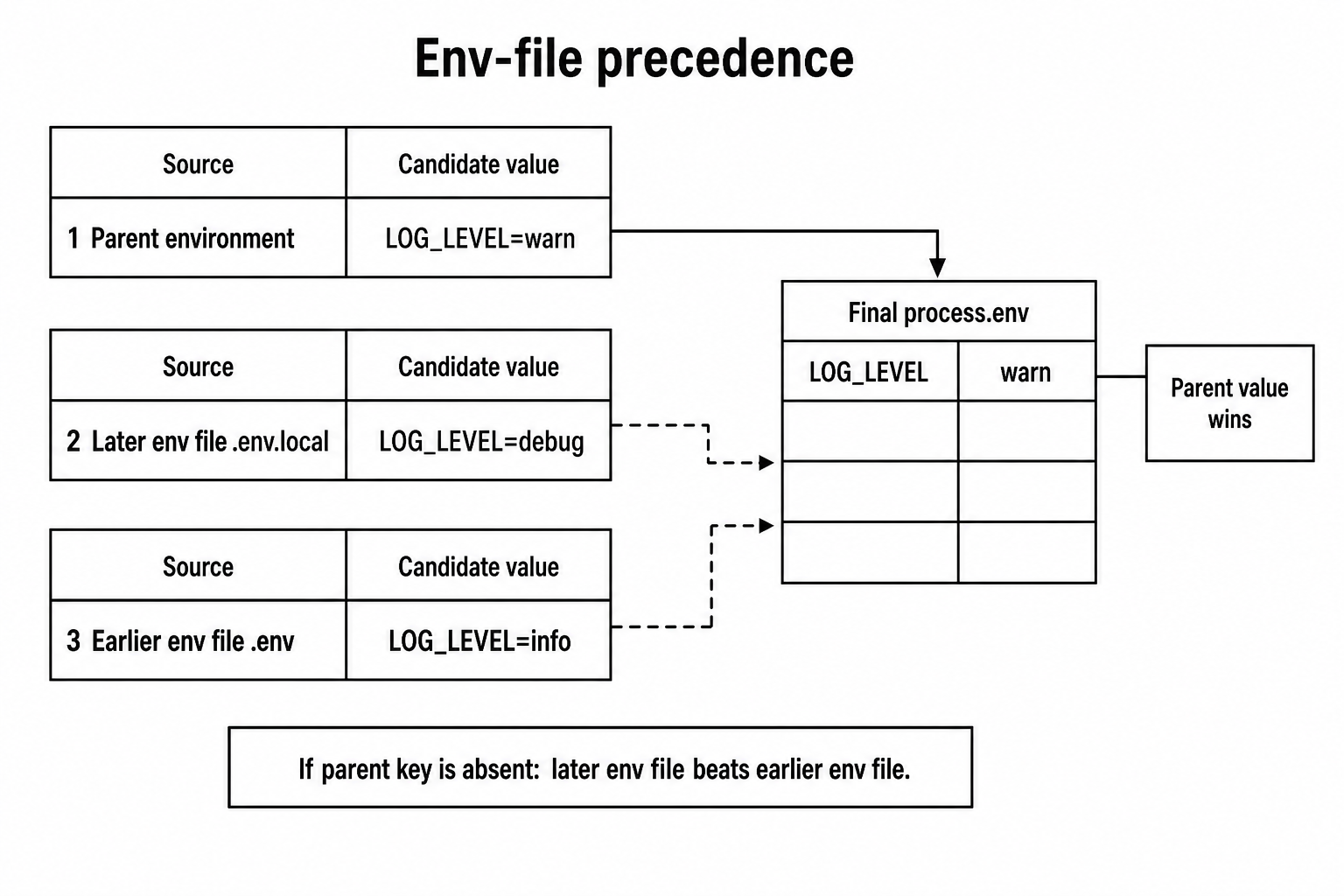
Figure 1 - Environment values already present in the parent process outrank env-file values. Inside the env-file layer, later files override earlier files.
A common local setup loads base defaults first, then development overrides -
node --env-file=.env --env-file=.env.development app.jsThat order reads well. .env describes the base values the app expects. .env.development changes the values needed for local development. The shell or service manager can still override any key for a specific run.
Reverse the order, and the command can still run while using the wrong values -
node --env-file=.env.local --env-file=.env app.jsWith no inherited value, .env can overwrite .env.local. The service may start with the wrong database, wrong port, or wrong log level. File order is part of the startup contract.
When debugging, inspect the running process, not only the file -
console.log({
  port: process.env.PORT,
  execArgv: process.execArgv,
});
process.execArgv shows Node execution arguments such as --env-file=.env. It does not show effective options supplied through NODE_OPTIONS. If startup behavior looks strange, inspect that key separately -
console.log(process.env.NODE_OPTIONS);Keep prints like these temporary. Environment values often include secrets from layers your env file never mentioned.
The DotEnv Grammar
A .env file is a text file with environment variable assignments. The name .env is only a convention. Node will read any path you pass to the flag or API.
These are all just files to Node -
.env
.env.local
.env.test
config/service.env
Node documents its own DotEnv grammar because the ecosystem had .env conventions before Node had a built-in parser. Most files are intentionally simple -
PORT=3000
NODE_ENV=development
API_BASE_URL=https://api.local
Each line has a name, an equals sign, and a value. After parsing, Node stores the value as a string. 3000 becomes "3000". true becomes "true". JSON-looking text stays text.
FEATURE_ENABLED=true
RETRY_LIMIT=3
JSON_VALUE={"debug":true}
Node does not infer booleans, numbers, arrays, or objects from env-file text. Your application owns that conversion.
The documented portable variable-name grammar is -
^[a-zA-Z_]+[a-zA-Z0-9_]*$Names begin with a letter or underscore. After that, the documented form allows letters, digits, and underscores. Uppercase with underscores is still the safest convention because shells, service managers, CI systems, and deployment tools all handle it cleanly.
DATABASE_URL=postgres://localhost/app
LOG_LEVEL=debug
_BOOTSTRAP=1
Current Node parsers are permissive in some places. A few names outside the documented pattern may still be accepted because the native parser largely separates text around the first equals sign and then trims. Treat those names as outside the documented contract. If your project wants strict names, validate the parsed keys or the final config object.
Whitespace around unquoted keys and values gets trimmed -
PORT = 3000
TOKEN =   abc123
Node stores these values -
process.env.PORT;  // "3000"
process.env.TOKEN; // "abc123"
Quoted values keep whitespace inside the quotes -
GREETING=" hello "GREETING contains two leading spaces and two trailing spaces. Node removes the quote characters and keeps the inner text.
A hash begins a comment in an unquoted value -
LOG_LEVEL=debug # local override
PASSWORD_HASH="abc#123"
LOG_LEVEL becomes "debug". PASSWORD_HASH keeps the hash because it is inside quotes. Outside quotes, # starts ignored text through the end of the line.
Node v24 accepts single quotes, double quotes, and backticks around values -
SQL='select * from users'
RAW=`literal text`
NAME="node"
Quotes are useful when the value contains spaces, #, =, or leading and trailing whitespace.
Single and double quotes are the safest convention across tools and across Node's general DotEnv documentation. Backticks work in the current Node v24 parser, but only use them when your target parser is Node's built-in parser and your project has tested that behavior.
In current Node v24 parser behavior, double-quoted values get one extra feature. \n becomes an actual newline character -
PRIVATE_KEY="line1\nline2\nline3"
LITERAL='line1\nline2'
PRIVATE_KEY contains real newline characters. LITERAL contains the two characters backslash and n. Single quotes and backticks preserve that pair as ordinary text, so the quote style changes the resulting string.
Multiline values are quoted values that continue across physical lines -
CERT="-----BEGIN-----
abc123
-----END-----"
Node stores one string containing newline characters. Use this carefully. Large secrets in environment variables can leak through debug prints, diagnostic reports, crash dumps, and process inspection tools. Multiline support is useful, but it is not a reason to turn env files into a secret store.
The export prefix is accepted and ignored -
export PORT=3000Node stores PORT. This exists so simple assignment files can also be sourced by a shell in some workflows.
That compatibility has limits. Shell expansion, command substitution, and shell-specific quoting are outside Node's DotEnv grammar.
Duplicate keys inside one parsed input use the later value -
PORT=3000
PORT=4000
The parsed result is -
{ PORT: "4000" }The parser overwrites the previous value inside its temporary result before merging anything with process.env.
Use the documented format as the contract. Current Node releases may recover from some odd lines by skipping them or accepting non-portable keys. If you want bad lines rejected, add application validation. Missing required files and invalid startup options can fail startup, but a strange line inside an env file should not be your only validation boundary.
Line endings are another cross-platform detail. Node's parser handles common text-file line endings, including files created on Windows. If a parsed value contains unexpected control characters, check the parent environment, generated input, or any non-Node parser in your toolchain before blaming Node's env-file path.
Variable expansion is not built in -
ROOT=/srv/app
LOG_DIR=$ROOT/logs
Node stores LOG_DIR as "$ROOT/logs". It does not read ROOT and substitute it. Each assignment is parsed on its own. Projects that want expansion need a userland parser or an application-level expansion step. Keep that step visible because expansion rules affect quoting and security.
Shell command substitution is also not part of the grammar -
BUILD_ID=$(git rev-parse HEAD)Node stores the text. It does not run a command. Env-file parsing reads configuration text. It does not execute code.
The Startup Path Underneath
The CLI env-file path runs early. That is why it can change both the application-visible environment and some Node startup behavior.
Startup begins in native code. Node receives argv and the inherited environment from the operating system. --env-file is a Node CLI flag, so Node consumes it before the entrypoint and before application arguments.
The env-file path does three things. It resolves the path relative to the current working directory unless you give an absolute path. It reads the file. It parses DotEnv text into key-value pairs, then merges those pairs into the environment Node will expose as process.env.
Because this happens during CLI startup, NODE_OPTIONS from an env file can still affect the same process -
NODE_OPTIONS=--trace-warnings
APP_MODE=localnode --env-file=.env app.jsIn this launch path, --trace-warnings can affect the current process because Node sees it during startup. That is easy to miss if you think of env files only as app configuration. When loaded through the CLI flag, the file can feed Node's own startup configuration too.
Precedence still applies. Direct command-line options and inherited environment values have their own authority. Env-file NODE_OPTIONS enters during startup, but it is still below values supplied directly by the parent environment when the same environment key already exists.
For example -
NODE_OPTIONS="--trace-warnings" \
node --env-file=.env app.js
If .env says this -
NODE_OPTIONS=--enable-source-mapsthe inherited value wins for the environment key. Node keeps "--trace-warnings" and ignores the env-file value for NODE_OPTIONS. Direct command-line flags can still override singleton options or combine with repeatable options according to Node's option parser rules.
The allowlist is visible from JavaScript -
console.log(
  process.allowedNodeEnvironmentFlags.has("--enable-source-maps"),
);
That check is useful for tooling that validates env files before launch. If your project allows NODE_OPTIONS in env files, validate the exact flags. A typo should fail in CI instead of failing inside a service wrapper during deploy.
Preloads also see env-file values -
node --env-file=.env --import ./boot.mjs app.mjsboot.mjs runs after env-file loading. If .env defines APP_MODE=local, the preload can read it from process.env.APP_MODE.
That ordering makes env files useful for local instrumentation toggles, test setup, and small bootstrap switches. It also means env-file content becomes part of the startup surface. A value loaded before a preload can affect code that runs before the entrypoint.
Missing files split into two cases.
A required file fails startup -
node --env-file=.env.required app.jsAn optional file keeps going when absent -
node --env-file-if-exists=.env.local app.jsRead errors are startup errors for required files. Permissions, invalid paths, and filesystem problems surface before user code installs its own error handling. That is usually what you want for required startup configuration - fail early, before the app starts doing work.
From your application's point of view, CLI env-file loading is already finished before JavaScript begins. There is no moment where the app can observe a half-loaded environment. Node either finished reading and merging the files, or startup failed before the entrypoint ran.
This is different from loading config inside your app with fs.readFile() or a later JavaScript helper. That later shape can race with imports, snapshots, and code that already read process.env.
The event loop is not involved in CLI env-file timing. No timer, promise job, stream callback, or application preload runs halfway through CLI env-file processing. Node is still building the process state that JavaScript will see.
The merge is string-to-string. Parsed keys and values become environment entries. No type metadata travels with them. No source metadata travels with them either. Once a value lands in process.env, the object does not tell you whether it came from the shell, a service manager, .env, .env.local, or a test harness.
That loss of source information is why config bugs can be annoying to trace -
console.log(process.env.LOG_LEVEL);The value might have come from a shell export six hours ago. It might have come from CI. It might have come from the second env file. Node's job is to produce the final environment view. Your app should validate that view and make the chosen application config observable without dumping secrets.
NODE_OPTIONS gets one extra pass because Node itself consumes it. Env-file loading can feed that pass only when it happens through the CLI flag.
This line has different effects depending on when it is loaded -
NODE_OPTIONS=--trace-warningsLoaded by --env-file, it can affect warning traces for the current process. Loaded by process.loadEnvFile(), it becomes a string in process.env after warning behavior has already been chosen.
Same key. Same parser. Different point in startup.
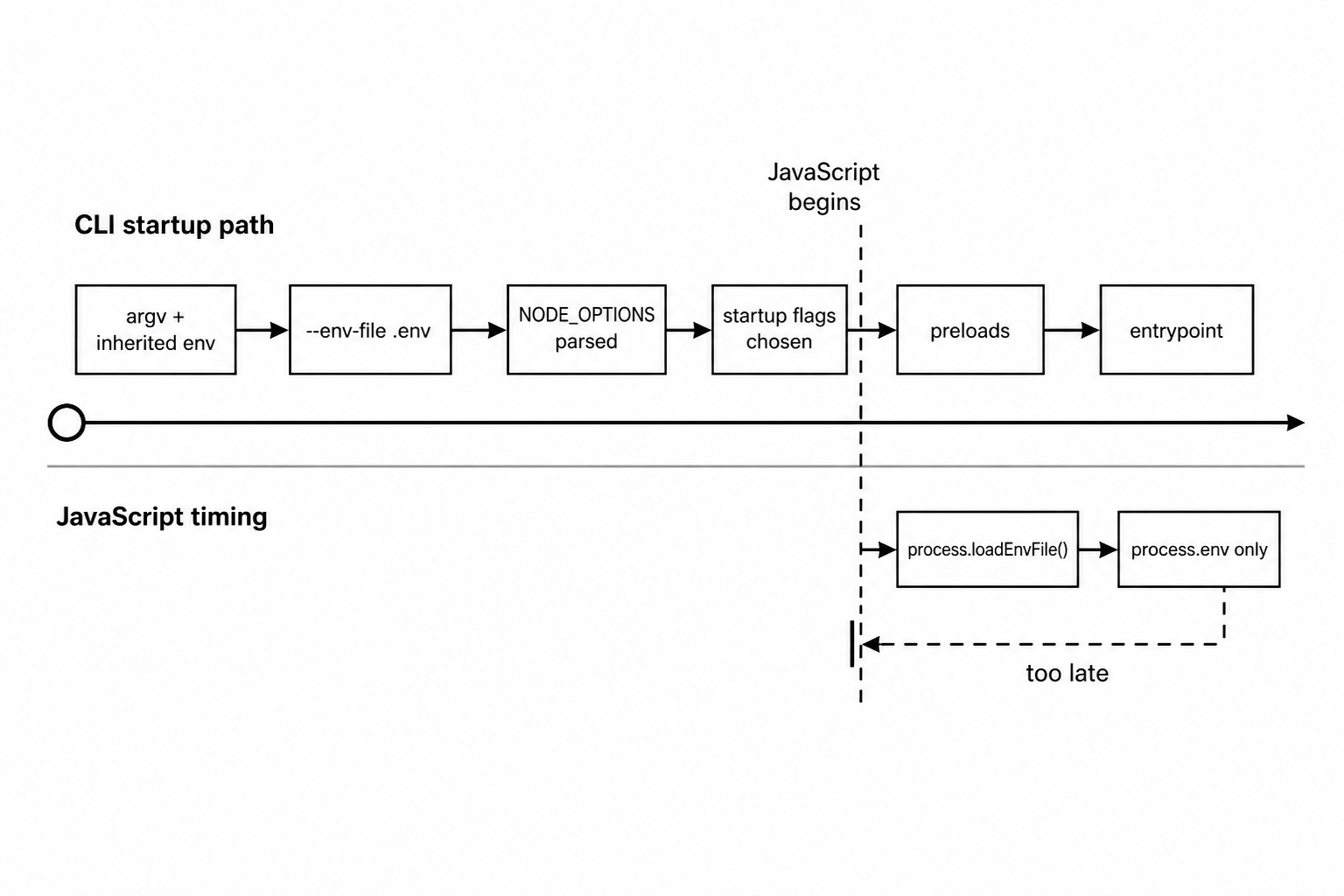
Figure 2 - The CLI flag participates in Node startup. The programmatic loader runs after JavaScript has started, so it cannot change startup flags retroactively.
The merge step preserves existing keys. If the environment already has DATABASE_URL, the env-file value for DATABASE_URL stays below it. The guard is based only on the key. Node does not know which value is safer, newer, or better.
An empty inherited string still counts as an existing value -
DATABASE_URL= node --env-file=.env app.jsIf .env contains a real DATABASE_URL, the process still sees this -
console.log(process.env.DATABASE_URL); // ""Empty string is still a value. If empty is invalid, your validation step has to reject it.
Userland dotenv packages run at a different time.
import "dotenv/config";
import "./server.js";
That preload is JavaScript. It can populate environment values before server.js runs, as long as it runs before the app graph. It cannot change V8 heap sizing, inspector startup, preloaded modules that already ran, or command-line option parsing that Node already completed.
This shape is still JavaScript preload timing -
node --require dotenv/config server.jsThis shape moves env-file parsing into Node startup -
node --env-file=.env server.jsThat is the main runtime difference. The npm package ecosystem still has extension behavior, older Node compatibility, and expansion packages. Node core owns the common built-in parser and startup loading path. Package-specific features stay package-specific.
Migration from a package preload is simple when the project used only basic DotEnv loading.
Use the built-in flag -
node --env-file=.env app.jsThen remove the JavaScript preload from the entrypoint -
import "./server.js";Run config tests after that change. Pay attention to variable expansion, override behavior, multiline values, duplicate keys, and quote behavior. Projects that rely on package-specific features should keep the package or replace those features with explicit app code.
A temporary switch can keep old launchers alive during migration -
if (process.env.LOAD_DOTENV === "1") {
  await import("dotenv/config");
}
That can help while service files, package scripts, and CI jobs move to --env-file. Remove it once the launchers have moved. Startup switches that nobody owns become hidden configuration layers.
The clean migration is visible in the command -
{
  "scripts": {
    "dev": "node --env-file=.env.local src/main.js"
  }
}
A reviewer can see where configuration enters. The entrypoint can focus on validation and app startup.
Precedence Bugs Look Boring
Most env-file bugs show up as ordinary wrong values. They usually do not look like parser failures.
PORT=9000 node --env-file=.env app.jsconsole.log(process.env.PORT); // "9000"A developer opens .env, sees PORT=3000, edits it, restarts, and still gets 9000. The file was never the winning layer.
The fastest debug step is to inspect the final environment value and the launch command together. For local work, check the shell state before launch -
env | grep PORTFor a running Linux process, /proc/<pid>/environ can show the inherited environment when permissions allow it. Keep that outside normal app logs. Environment output often contains secrets.
File order can cause the same kind of quiet bug. Loading local overrides before base defaults lets the base file win for keys that the parent environment left open. Use base first, override second.
Configuration drift is the gap between the values you think the process has and the values it actually has. Env files can create that gap because local files, inherited shell values, service-manager values, CI variables, and deployment variables all write to the same final environment.
A very common failure is a present but invalid value -
DATABASE_URL=postgres://localhost/appDATABASE_URL= node --env-file=.env app.jsThe process starts. The key exists. The value is empty. Code that checks only for key presence accepts bad configuration.
Validate the value itself -
const url = process.env.DATABASE_URL;

if (typeof url !== "string" || url.trim() === "") {
  throw new Error("DATABASE_URL is required");
}
Put checks like this near startup. Reject missing and empty strings before the app opens sockets, starts workers, or begins background work.
NODE_OPTIONS is another source of drift. Loaded through --env-file, it can affect startup. Loaded later with process.loadEnvFile(), it becomes plain environment text.
import { loadEnvFile } from "node:process";

loadEnvFile(".env");
console.log(process.env.NODE_OPTIONS);
If .env contains this -
NODE_OPTIONS=--trace-warningsthat call prints the string. It does not retroactively enable trace warnings. Node has already parsed startup options, created the runtime, and chosen warning behavior.
Spelling errors are boring too -
DATABSE_URL=postgres://localhost/appNode can parse that line. Your app probably reads DATABASE_URL. A check for the wrong key tells you nothing. Unknown-key validation catches this before the app falls back to a default or starts with an empty value.
const allowed = new Set(["DATABASE_URL", "PORT"]);
const extra = Object.keys(parsed).filter((key) => !allowed.has(key));

if (extra.length > 0) {
  throw new Error(`unknown env ${extra.join(", ")}`);
}
Run that check against parsed env-file data or a known config object. Do not run it against the entire parent environment unless you are ready to allow many platform-provided keys. Shells, CI systems, containers, and service managers add plenty of unrelated variables.
Windows has one platform edge to remember. Environment variable names are case-insensitive in the main thread on Windows, while Node exposes them through process.env with platform-specific behavior. Worker threads get environment copies with case-sensitive behavior. Keep project keys case-stable. PORT, port, and Port should be treated as different spellings in review, even when a platform may collapse them later.
When a command has several layers, read it from left to right as a startup trace -
NODE_ENV=production \
node --env-file=.env --env-file=.env.local src/main.js
NODE_ENV is already present before Node reads files. If either env file defines NODE_ENV, the parent value still wins. Then Node reads .env. Then it reads .env.local, with later-file values overriding earlier-file values for keys that the parent environment did not already set. Only after that does src/main.js start.
Now add an application argument -
node --env-file=.env src/main.js --env-file=.otherThe first env-file flag belongs to Node. The second string belongs to the app because it appears after the entrypoint. If your app has its own argument parser, it may see --env-file=.other and do something with it. Node will not.
Add a preload -
node --env-file=.env --import ./boot.mjs src/main.jsThe env file loads first. The preload evaluates next. The entrypoint evaluates after that. If boot.mjs reads process.env.FEATURE_X, it sees the loaded value. If boot.mjs copies that value into an exported object, later mutation of process.env.FEATURE_X will not update that object.
Add inherited NODE_OPTIONS -
NODE_OPTIONS="--import ./trace.mjs" \
node --env-file=.env src/main.js
The inherited NODE_OPTIONS value enters before the visible command-line option layer. If .env also provides NODE_OPTIONS, the inherited value has higher precedence for that key. The exact interaction between repeatable flags and singleton flags follows Node's option parser rules from the previous subchapter.
A config issue visible in the app may have been caused by a preload that never appears in the visible node ... command.
When debugging a bad value, separate two phases -
environment population - parent env > later env files > earlier env files
option consumption - effective NODE_OPTIONS + CLI flags -> preloads -> entrypoint
Then ask two questions. Which layer supplied the key? Which part of startup consumed it?
Guessing from .env alone is a weak debugging loop because .env is only one layer.
Programmatic Loading With process.loadEnvFile()
process.loadEnvFile(path) is the JavaScript loading path. It reads a DotEnv file and writes keys into process.env.
import { loadEnvFile } from "node:process";

loadEnvFile(".env.test");
The default path is ./.env when you omit the argument. The path can be a string, URL, or Buffer. The function returns undefined. The mutation is the effect.
Because this is ordinary JavaScript, timing is now your responsibility. Call it at a controlled bootstrap point -
import { loadEnvFile } from "node:process";

loadEnvFile(".env");

const { start } = await import("./server.js");
await start();
The import() expression is doing real work here. Static imports run before the importing module body. If server.js reads configuration at top level, a static import would evaluate it before loadEnvFile() runs. Dynamic import lets you load the env file first, then evaluate the app.
CommonJS has the same shape with different syntax -
const { loadEnvFile } = require("node:process");

loadEnvFile(".env");
require("./server.cjs");
Here, require("./server.cjs") happens after the env file load. Modules required by server.cjs then see the loaded values.
Loading later creates stale assumptions -
import "./server.js";
import { loadEnvFile } from "node:process";

loadEnvFile(".env");
server.js has already evaluated before the load call. Any top-level reads from process.env inside that graph saw the old environment. A config object may already exist.
A config snapshot is any value captured from the environment at one point in time. It could be a variable, an object, a module export, or a client constructed from env values.
export const config = {
  port: process.env.PORT ?? "3000",
};
That module reads once. Later changes to process.env.PORT do not change config.port. The value still needs validation before the app treats it as a TCP port.
process.loadEnvFile() preserves existing environment keys. That includes keys set by the parent environment and keys set by earlier programmatic loads.
loadEnvFile(".env");
loadEnvFile(".env.local");
These calls do not behave like repeated CLI --env-file flags. After the first call writes LOG_LEVEL, the second call sees an existing process.env.LOG_LEVEL and keeps it. Use util.parseEnv() and explicit object merging when programmatic layering needs later files to win.
Path choice is more visible with programmatic loading because the call may live inside a package, script, or test helper.
This ties the env file to the module location -
loadEnvFile(new URL("../.env.test", import.meta.url));A plain relative string is resolved from process.cwd() -
loadEnvFile(".env.test");Both can be correct. The wrong one breaks when an IDE, package script, or test runner starts the same file from a different working directory.
CommonJS preloads can run loadEnvFile() before the application entrypoint -
node --require ./load-env.cjs server.cjsconst { loadEnvFile } = require("node:process");
loadEnvFile(".env");That is early enough for application modules loaded after the preload. It is still JavaScript timing, so NODE_OPTIONS inside the loaded file remains ordinary text for the current process.
ESM preloads use --import -
node --import ./load-env.mjs server.mjsimport { loadEnvFile } from "node:process";
loadEnvFile(".env");This can populate process.env before server.mjs evaluates. It cannot rewind startup flags.
Keep preloads small. A preload that reads env, validates config, opens database connections, patches globals, and starts metrics creates startup order that is hard to inspect. Keep env loading close to config creation. Hand the resulting config object to the app.
Error handling differs from the CLI path. A thrown error from loadEnvFile() is a JavaScript exception. You can catch it, wrap it, or decide which files are required.
try {
  loadEnvFile(".env.local");
} catch (err) {
  if (err.code !== "ENOENT") throw err;
}
That gives code-level control, but it also moves failure later. If the app already imported modules that read configuration, catching a missing file there may be too late.
Use CLI loading for process-wide startup configuration. Use programmatic loading for scripts, tests, and carefully ordered boot modules where code owns the timing.
Parsing Without Mutating
util.parseEnv(content) parses DotEnv text without touching process.env.
import { parseEnv } from "node:util";

const parsed = parseEnv("PORT=3000\nLOG_LEVEL=debug\n");
console.log(parsed);
The return value is a plain object containing strings. The process environment stays unchanged.
That is useful in tests -
import assert from "node:assert/strict";
import { parseEnv } from "node:util";

const before = process.env.PORT;
const env = parseEnv("PORT=0\nLOG_LEVEL=test\n");

assert.equal(env.PORT, "0");
assert.equal(process.env.PORT, before);
No global process state changed. A test can parse several cases without cleaning up process.env after each one.
It is also useful before validation -
import { readFileSync } from "node:fs";
import { parseEnv } from "node:util";

const raw = readFileSync(".env", "utf8");
const parsed = parseEnv(raw);
Now you have data, not global state. You can inspect keys, reject unknown names, merge objects, convert values, and decide what the application should receive.
Explicit merging is easier to read than hidden mutation -
const base = parseEnv(readFileSync(".env", "utf8"));
const local = parseEnv(readFileSync(".env.local", "utf8"));

const merged = { ...base, ...local, ...process.env };
That follows the same shape as the CLI layering model. Base first. Local second. Parent environment last.
You can choose a different policy too -
const merged = { ...process.env, ...base, ...local };That gives files the last word, including over inherited values. Some tools may want that. It differs from Node's CLI env-file precedence, so name the policy and test it.
Parsing without mutation also lets tools validate env files before launching Node -
import { readFileSync } from "node:fs";
import { parseEnv } from "node:util";

function validateKey(key) {
  if (!/^[A-Z_][A-Z0-9_]*$/.test(key)) {
    throw new Error(`bad key ${key}`);
  }
}

const parsed = parseEnv(readFileSync(".env.example", "utf8"));

for (const key of Object.keys(parsed)) {
  validateKey(key);
}
That can run in CI. It checks names, required placeholders, reserved runtime keys, and value structure without depending on the developer's current shell.
Reserved-key checks are cheap -
for (const key of ["NODE_OPTIONS", "NODE_EXTRA_CA_CERTS"]) {
  if (Object.hasOwn(parsed, key)) {
    throw new Error(`reserved ${key}`);
  }
}
Some teams allow Node runtime keys in env files. Some ban them because runtime behavior should stay visible in the launch command. Either rule can work. The risky version is having no rule.
After validation, keep the parsed object out of process.env unless a library requires environment variables. A cleaner app shape is a typed configuration object.
function readPort(value = "3000") {
  if (value.trim() === "") throw new Error("PORT is required");

  const port = Number(value);

  if (!Number.isInteger(port) || port < 0 || port > 65535) {
    throw new Error("PORT must fit a TCP port range");
  }

  return port;
}
Then use that parser when constructing app config -
const config = {
  port: readPort(merged.PORT),
  logLevel: merged.LOG_LEVEL ?? "info",
};
A typed config object is application-owned data created from raw environment strings. "Typed" here means the app has converted strings into the shapes it actually uses - number, boolean, enum string, URL object, duration, byte size, or whatever the domain needs.
Schema validation libraries can automate this pattern, but the split is the same. Raw environment values enter at startup. The app validates once. The rest of the code receives an object with application-level values.
parseEnv() also makes parser behavior easy to test -
import assert from "node:assert/strict";
import { parseEnv } from "node:util";

const parsed = parseEnv('A="x#y"\nB=one # two\n');

assert.equal(parsed.A, "x#y");
assert.equal(parsed.B, "one");
Duplicate handling is testable too -
import assert from "node:assert/strict";
import { parseEnv } from "node:util";

const parsed = parseEnv("PORT=3000\nPORT=4000\n");

assert.equal(parsed.PORT, "4000");
That is parser behavior only. Once values are merged into process.env, existing-key preservation can change the outcome. Keep parser tests separate from merge-policy tests.
The Validation Step
Parsing gives you strings. Validation is where those strings become values your application can safely use.
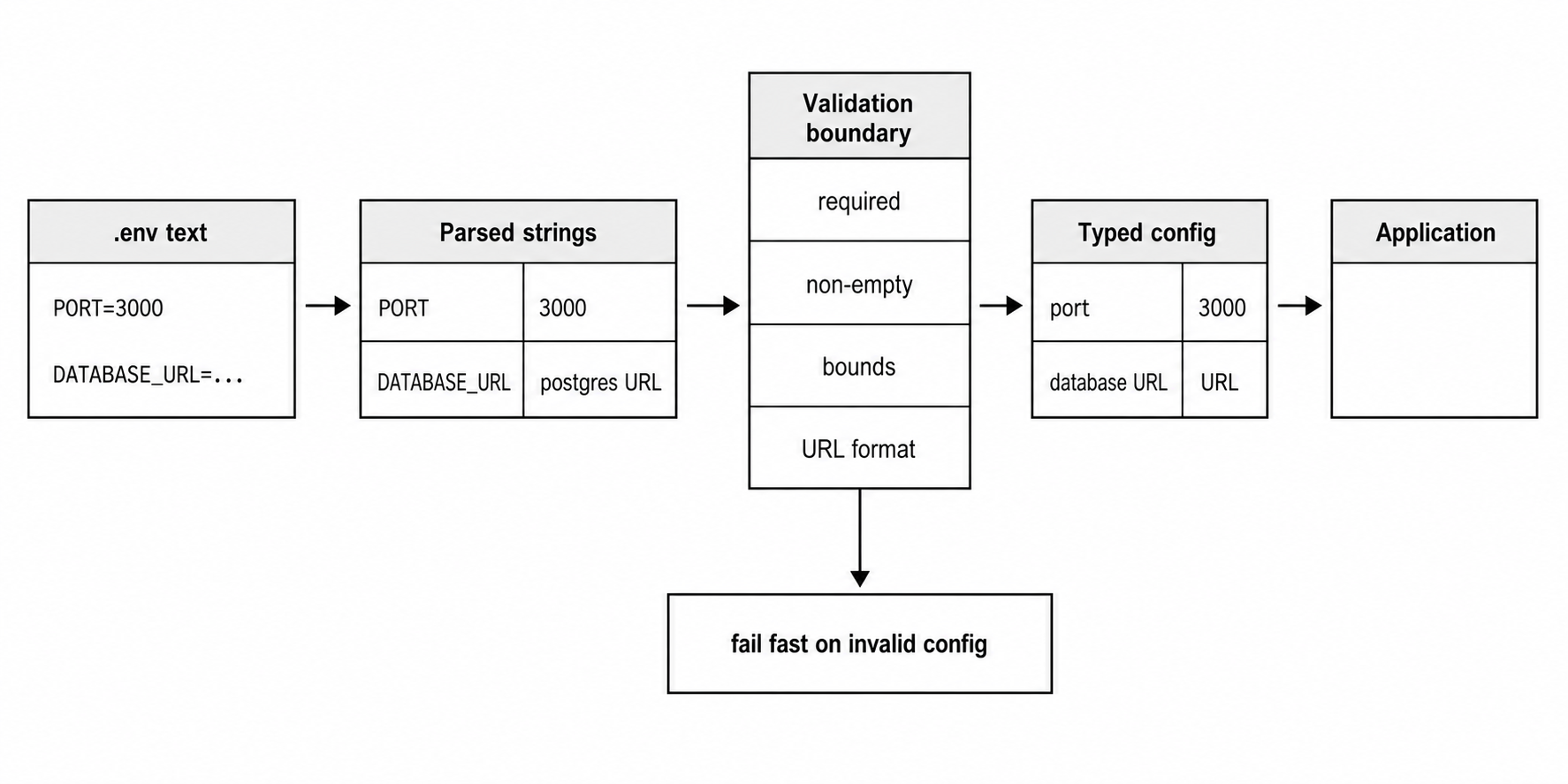
Figure 3 - Parsing gives you strings. Validation turns those strings into application-owned values with meaning, bounds, and failure behavior.
Start by collecting only the keys your app cares about -
const raw = {
  PORT: process.env.PORT,
  DATABASE_URL: process.env.DATABASE_URL,
};
That object is still raw. It can contain missing values, empty strings, misspelled values, and values from whichever layer won precedence.
Then convert deliberately -
const port = readPort(raw.PORT);
const databaseUrl = new URL(required(raw, "DATABASE_URL"));
That code can throw. Let it throw during startup, or catch it and replace it with a clearer configuration error. The timing is the part to protect - fail before the app accepts traffic or starts background jobs.
After validation, pass the result -
export const config = Object.freeze({
  port,
  databaseUrl,
});
Freezing is optional. The stronger habit is reading the environment once and passing config as data. Reaching into process.env from every module creates hidden dependencies and makes tests depend on global mutation.
A small helper is often enough -
function required(env, key) {
  const value = env[key];

  if (value === undefined || value.trim() === "") {
    throw new Error(key);
  }

  return value;
}
That function treats missing and empty as invalid. It accepts an env object, so production can pass process.env and tests can pass a plain object.
Booleans need an explicit rule.
This line accepts only "true" as true -
const debug = raw.DEBUG === "true";It treats "false", "0", "no", "", and absence as false. If your app accepts several spellings, put that rule in one parser function and test it.
function readBool(value) {
  if (value === "true") return true;
  if (value === "false") return false;

  throw new Error("expected boolean");
}
That parser rejects "1" and "yes". Another app may accept them. The value is in having one rule, not scattered comparisons.
Numbers need blank-value checks and bounds -
const port = readPort(raw.PORT);Node will not do that for you. Env-file parsing produced a string. Number("") returns 0, so reject blank text before converting unless blank has a special meaning in your app.
URLs should be parsed once too -
const databaseUrl = new URL(required(raw, "DATABASE_URL"));

if (databaseUrl.protocol !== "postgres:") {
  throw new Error("DATABASE_URL must use postgres:");
}
The rest of the app can receive a URL object or a validated string. It should not repeat protocol checks in every module that creates a client.
Unknown keys are worth checking when you parse a known env file -
const allowed = new Set(["PORT", "DATABASE_URL", "LOG_LEVEL"]);
const unknown = Object.keys(parsed).filter((key) => !allowed.has(key));
That catches typos such as DATABSE_URL. Node may parse the misspelled key just fine. Your config layer can reject it before the process starts with a default by accident.
Keep config snapshots intentional. Reading once at startup makes the app predictable. Reading process.env repeatedly during request handling makes behavior depend on mutable global state.
This assignment changes only the current process environment object -
process.env.LOG_LEVEL = "debug";It does not notify modules that already captured a log level. It does not recreate clients. It does not re-run validation. Hot config reload is a separate design problem. Startup loading ends at validation.
A Bootstrap Shape That Holds Up
A stable startup path has a narrow shape - load, parse, validate, create config, then start the app.
import { loadConfig } from "./config.js";
import { createServer } from "./server.js";

const config = loadConfig(process.env);
const server = createServer(config);

server.listen(config.port);
loadConfig() receives raw environment data. createServer() receives app-ready data. The server module does not need to know whether values came from --env-file, a shell, a test object, or a deployment platform.
The config module can stay small -
export function loadConfig(env) {
  const port = readPort(env.PORT);
  const databaseUrl = readUrl(env.DATABASE_URL);

  return Object.freeze({ port, databaseUrl });
}
That function does no file I/O. It only turns strings into application data. That makes it easy to test without touching process.env.
const config = loadConfig({
  PORT: "0",
  DATABASE_URL: "postgres://localhost/test",
});
Tests can pass exactly the keys they care about. They can also test bad values without mutating global state for the rest of the test process.
File loading can live in a separate wrapper when the app needs programmatic loading -
import { loadEnvFile } from "node:process";
import { loadConfig } from "./config.js";

loadEnvFile(".env.test");

export const config = loadConfig(process.env);
That wrapper owns mutation. The config reader owns validation. The rest of the app receives the frozen result.
For CLI loading, the wrapper can disappear -
node --env-file=.env --env-file=.env.local src/main.jssrc/main.js can call loadConfig(process.env) immediately because Node already populated the environment before entrypoint evaluation.
Libraries should usually stay out of env-file loading unless their job is configuration. A database package that reads process.env.DATABASE_URL during import has chosen a global source before the application can validate it. Passing config into a factory keeps ownership with the application.
const db = createDatabaseClient({
  url: config.databaseUrl,
});
That call is direct. The database client receives a validated value. The config source remains outside the client.
The same rule applies to loggers, HTTP clients, feature flags, and worker setup. Read the raw environment once. Convert it. Pass data. A module that reads process.env at import time can be fine for small scripts, but service code becomes easier to follow when configuration flows through function arguments.
Generated config should follow the same handoff -
const envText = renderEnvFile(templateData);
const parsed = parseEnv(envText);
const config = loadConfig(parsed);
That validates generated env text before it reaches the process-wide environment. Tooling can fail on invalid keys, empty required values, or reserved runtime keys without mutating process.env.
A child process needs an explicit environment too -
import { spawn } from "node:child_process";

spawn(process.execPath, ["worker.js"], {
  env: { ...process.env, WORKER_MODE: "jobs" },
  stdio: "inherit",
});
That object becomes the child's parent environment. If the child also uses --env-file, the same precedence rule applies inside the child. The inherited WORKER_MODE value outranks env-file values for that key.
Real child-process code should still observe the child's error and exit events. The config part is the env object. Process supervision is a separate concern.
Operational Edges
Env files are convenient because they are files. That convenience brings risk.
A checked-in .env file can expose credentials. A copied local file can drift from production. A file with loose permissions can be readable by another local user. A diagnostic report or debug log can include environment values. Secrets management and credential rotation belong in the security chapters, but the local habit starts here - commit examples, not secrets.
An example file documents required keys without carrying live values -
# .env.example
PORT=3000
LOG_LEVEL=info
DATABASE_URL=
SESSION_SECRET=
Safe defaults can be filled in. Sensitive or deployment-specific values should be blank or fake. A reviewer should be able to see which keys exist without seeing a real credential. The real file stays local or comes from the deployment platform.
File permissions still count for local env files -
chmod 600 .env.localThat command is Unix-specific, and the file-system chapter already covered permission bits. The point here is simple - a local env file containing secrets should be less readable than normal source files.
Deployment-provided environment variables usually outrank env files because they arrive in the parent environment. That includes service managers, CI jobs, container runtimes, and orchestration platforms. The mechanics belong to later deployment chapters. The precedence result belongs here - if the platform sets PORT, your env file probably loses.
File names carry meaning because Node accepts any filename -
.env.defaults
.env.development
.env.test
.env.local
Those names tell a maintainer the intended layer. Names like .env2, .env.new, and .env.prod.bak force the reader to inspect content and command history. Node will accept them. The project has to keep the naming clear.
A test env file can contain values production would reject -
PORT=0
LOG_LEVEL=warn
DATABASE_URL=postgres://localhost/app_test
PORT=0 asks the operating system to choose an available port when the server binds. The parser still returns the string "0". Your validator needs to allow it for the test path if the app intentionally uses ephemeral ports.
Give each source a job.
The committed example file documents shape, safe defaults, and empty placeholders. The local env file describes a developer machine. The deployment environment describes the running service. The command line describes Node runtime policy. A secret manager describes sensitive values. Mixing those jobs turns config into guesswork.
# .env.local
DATABASE_URL=postgres://localhost/app
SESSION_SECRET=dev-only
That file belongs on a developer machine. It belongs in .gitignore. The values may be low-risk development values, but treating the file as local-only builds the right habit.
Node runtime flags deserve a separate review path -
node --report-on-fatalerror --env-file=.env dist/server.jsThe command carries two kinds of data. The report flag changes Node behavior. .env supplies strings. Keeping that split visible helps reviewers see which part changes the runtime and which part changes the app.
Putting runtime flags in NODE_OPTIONS can work, but the project should have a rule for it -
NODE_OPTIONS=--report-on-fatalerror --enable-source-maps
PORT=8080
Some platforms want one mounted env file to carry every startup value. Some teams keep runtime flags in service definitions and app values in env files. Pick one, then validate for it.
Be careful with diagnostic output -
console.log(process.env);That print can include tokens, database URLs, private keys, and service credentials. It can also include values from the parent environment that the env file never mentioned. Debug the smallest key you need, then remove the print.
Node's diagnostic reports have controls for excluding environment data. That belongs to observability later, but the risk starts with the same storage place - process.env is easy to inspect, easy to log, and easy to leak.
Use env files for local development, test setup, and small startup inputs. Use the deployment platform for production values when the platform owns them. Convert strings into application config once. After that, the rest of the code should depend on config data, not whatever string happens to be in process.env when a module evaluates.
Related Reading
- Previous - "Node.js CLI Flags and Runtime Configuration - NODE_OPTIONS, Preloads, and Diagnostics"
- Next - "Node.js Web Platform APIs - fetch, Web Streams, Blob, FormData, and structuredClone"