Node.js TypeScript: Type Stripping and Compile Cache
Node.js v24 can run supported TypeScript files directly. That sounds bigger than it really is, so start with the simple version.
Node is not running the TypeScript type system. It is taking a .ts file, removing the parts that only exist for type checking, and then running the JavaScript that remains.
So this works well for TypeScript that mostly looks like modern JavaScript with annotations. It does not replace tsc. It does not check your types. It does not read your whole TypeScript project setup before deciding what is valid. It prepares one file for execution, then hands that prepared source to Node's normal module system.
That narrow design is the reason the feature is useful. It keeps small scripts, config files, local tools, and modern Node services easy to run without a build step. It also explains the limits. If TypeScript syntax would require Node to generate new JavaScript, such as an enum in the default strip-only path, Node stops instead of pretending it has done a full compile.
The examples in this chapter were verified on Node.js v24.15. Type stripping is stable in late v24 releases starting with v24.12, and the compile-cache API status described here reflects v24.15. The directory and portable object options for module.enableCompileCache() require v24.12 or newer.
TypeScript Support and the Compile Cache
Node's built-in TypeScript path starts with erasure. It removes annotations, interfaces, type aliases, and other type-only syntax. After that, the remaining program goes through the same CommonJS or ESM loading path Node already uses for JavaScript.
You can think of it as a cleanup step before execution. The source enters as TypeScript. The type-only parts disappear. The executable JavaScript continues.
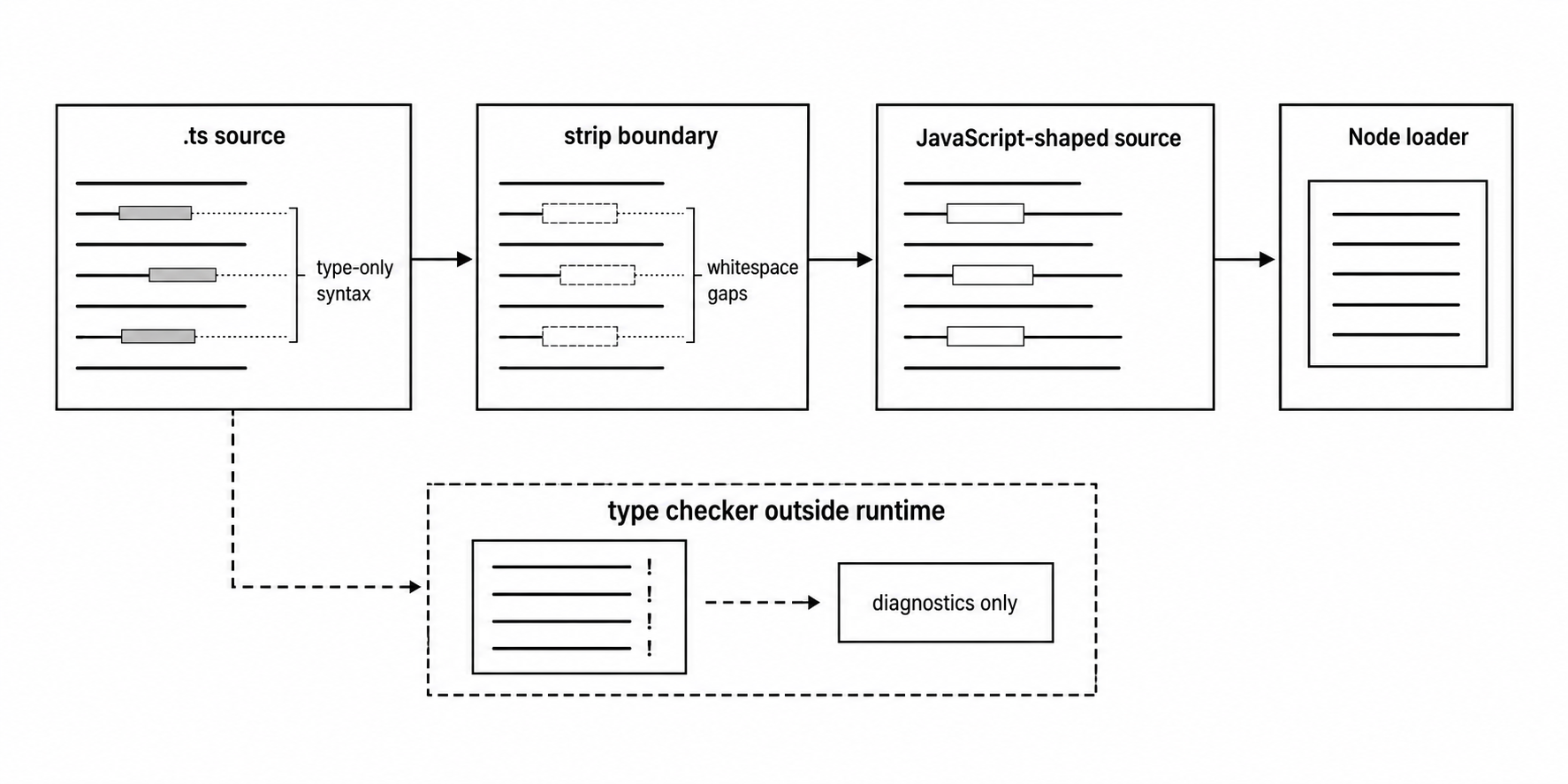
Figure 8.1 - Type stripping prepares the source. Type-only syntax disappears, and the executable JavaScript continues into Node's normal loaders.
Here is the basic idea -
interface Config {
  port: number;
}

const config: Config = { port: 3000 };
console.log(config.port);
Run that file with Node v24.15 and the output is 3000. There is no build command and no generated .js file on disk. Node reads the TypeScript source, removes the type-only syntax it supports, and sends the remaining JavaScript into the normal module path.
The key thing to remember is that the type checker is not part of this run.
const port: number = '3000';
console.log(port + 1);
Node runs that and prints 30001.
Why? Because : number disappears before execution. The value '3000' stays exactly what it is - a string. JavaScript then performs string concatenation.
A TypeScript checker can reject this program. Node can still run it. Those are two different jobs. TypeScript tooling checks the type model. Node prepares and executes JavaScript.
That split shows up throughout the chapter.
Node can remove syntax that has no runtime effect. It needs a transform when TypeScript syntax would have to become new JavaScript. Some .ts files run directly. Some fail before evaluation. Imports still need real runtime targets. Module format rules still apply. After the source is prepared, the module compile cache can store V8 compilation data for future process starts.
The Stripping Step
The first question is simple - can Node delete the TypeScript syntax and leave a valid JavaScript program behind?
If the answer is yes, the syntax is erasable.
Parameter annotations, return annotations, interfaces, type aliases, type assertions, and type-only imports fall into that category. They help TypeScript understand your program, but they do not create runtime values.
type UserId = string;

function loadUser(id: UserId): Promise<UserId> {
  return Promise.resolve(id as string);
}
In that file, type UserId = string disappears. So do : UserId, : Promise<UserId>, and as string. The function body still returns Promise.resolve(id). There is no runtime object named UserId, so Node has nothing to create for it.
Node's default path is called strip-only mode. It parses enough TypeScript to find erasable syntax, then replaces those spans with whitespace. It does not reprint the whole file like a compiler usually would.
That whitespace behavior helps stack traces and syntax locations stay useful. Lines and columns mostly stay where the original source put them. Because pure stripping keeps the source layout in place, the default path does not need a source map.
A compiler usually has a much bigger job. It may rewrite imports, lower newer syntax, add helpers, normalize formatting, emit different files, and produce source maps. Node's built-in path is smaller. It blanks out type-only syntax and keeps the rest of the source where it was.
That also keeps the runtime path file-local. Node prepares the file it is about to run. It does not build a full project graph. It does not read declaration files. It does not walk a tsconfig.json inheritance chain. It gets the current source ready for execution.
Here is the failure mode that catches people early -
function listen(port: number) {
  console.log(port.toFixed(0));
}

listen('3000' as any);
Node strips : number and as any, then runs the call. At runtime, port is a string. Strings do not have toFixed(), so the program throws.
A type checker could catch the bad call earlier if your project avoids any. Node is already past that layer. Direct TypeScript execution is for running code. Your editor, tests, and CI still own the type-quality gate.
You can turn stripping off completely -
node --no-strip-types app.tsWith stripping disabled, a .ts file containing TypeScript syntax reaches the JavaScript parser as-is. If JavaScript cannot parse that syntax, the file fails.
That flag is useful when a wrapper wants to make sure no direct TypeScript execution happens, or when another tool owns TypeScript transformation and stray .ts input should be treated as a mistake.
On the TypeScript side, erasableSyntaxOnly helps you line up editor feedback with Node's strip-only path. It asks TypeScript to reject syntax that would require transformation before Node ever sees the file. Node ignores this option at runtime, but it is useful because it catches unsupported patterns earlier.
For direct-run TypeScript files, these compiler options usually point in the right direction -
{
  "compilerOptions": {
    "target": "esnext",
    "module": "nodenext",
    "erasableSyntaxOnly": true,
    "verbatimModuleSyntax": true,
    "rewriteRelativeImportExtensions": true
  }
}
That configuration is for TypeScript diagnostics and editor behavior. Node still does not read tsconfig.json while running the file.
Some TypeScript syntax cannot be handled by deletion. Enums are the easy example.
enum Level {
  Info = 1,
  Warn = 2,
}

console.log(Level.Warn);
An enum creates a runtime value. TypeScript normally emits JavaScript for it. If Node simply deleted the enum, Level.Warn would have no value. In the default strip-only path, Node rejects this with ERR_UNSUPPORTED_TYPESCRIPT_SYNTAX.
Parameter properties have the same problem.
class User {
  constructor(public id: string) {}
}

console.log(new User('42').id);
public id: string is more than an annotation. It also declares and assigns an instance property. JavaScript needs emitted code for that assignment. Strip-only mode has no emitted assignment to keep, so Node reports unsupported syntax.
Namespaces split depending on what they contain. A namespace with only types can disappear. A namespace that creates runtime values needs emitted JavaScript. Import aliases and older TypeScript-only constructs can hit the same limit.
The working rule is easier than memorizing every edge - if deleting the TypeScript syntax leaves valid JavaScript with the same runtime behavior, stripping can work. If Node would need to create runtime JavaScript, the default path stops.
--experimental-transform-types asks Node to handle some of that transform-required syntax -
node --experimental-transform-types level.tsIn Node v24, that flag enables transformation for supported TypeScript syntax that needs emitted JavaScript, such as enums and parameter properties. Node also prints an ExperimentalWarning for the flag.
Use it as a runtime convenience for controlled cases. Project compilation still belongs to tools that own type checking, declaration emit, downlevel output, JSX, path aliasing, and build artifacts.
Stripping and transforming are different promises. Stripping removes type-only text. Transforming generates JavaScript. Once JavaScript is generated, output style, source maps, and compatibility choices enter the picture. That is why full project builds still belong to a TypeScript-aware toolchain.
Decorators sit outside this direct path in another way. They depend on JavaScript parser support and TypeScript transform behavior. If a TypeScript file uses decorator syntax under a Node version where the JavaScript parser rejects it, the error may be a parser error rather than ERR_UNSUPPORTED_TYPESCRIPT_SYNTAX. Either way, that file needs a transform toolchain.
The practical test is quick. Open the file and mentally delete the type-only text. If the remaining source is valid modern JavaScript and behaves the same way, Node's default path probably handles it. If a TypeScript feature needs to create a value, assign a property, rewrite an import, or lower syntax for older JavaScript, use a transform path.
Files Choose Module Shape
After TypeScript source is prepared, Node still has to decide how to load the file. That part works like JavaScript.
A .ts file can be treated as ESM or CommonJS depending on package settings and file extension rules. The TypeScript extension says the source may need stripping. It does not automatically decide the module system.
A nearby package.json can mark the package as ESM -
{
  "type": "module"
}
With that package file nearby, node app.ts treats app.ts as ESM, just like a .js file in that package. The file does not need import or export syntax for the package marker to choose ESM.
In a package with CommonJS defaults, a .ts file follows the same detection and package rules as .js under the current Node version. The .ts extension starts TypeScript preparation. Package rules and file syntax still choose the loader.
That means a .ts file can change behavior when it moves into another package scope.
tools/app.ts
package.json
packages/api/package.json
packages/api/app.ts
If the root package uses "type": "module" and packages/api/package.json uses "type": "commonjs", those two app.ts files inherit different defaults. The extension stays the same. The package scope changes the module format.
Syntax detection can also affect ambiguous input in Node v24. A file containing ESM syntax can push Node toward ESM handling under the documented detection rules. Service entrypoints should avoid relying on surprise detection. Use .mts, .cts, or an explicit package "type" field when the module format should be obvious.
.mts and .cts remove the guesswork -
node server.mts
node worker.cts
A .mts file is an ES module entrypoint. A .cts file is a CommonJS entrypoint. They mirror .mjs and .cjs, with TypeScript stripping before compilation.
Use those extensions when the file's module format should stay the same even if it moves across package folders.
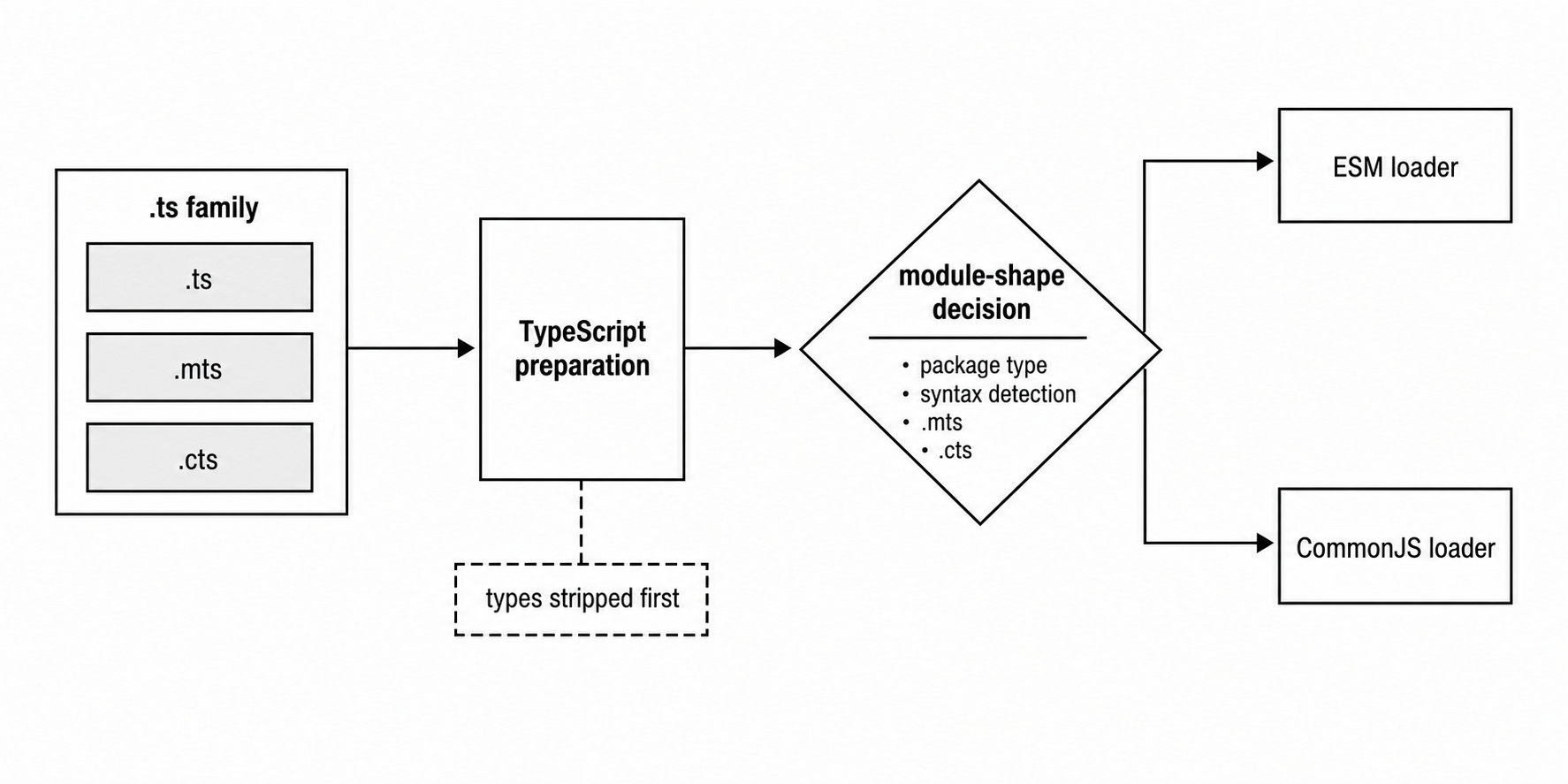
Figure 8.2 - The .ts family starts TypeScript preparation. Package metadata, syntax detection, .mts, and .cts still choose the loader.
The extension rule also applies to dependencies in your module graph. An ESM .mts file can import another .mts file. A CommonJS .cts file can require() another .cts file. Mixed graphs still follow the CJS and ESM interop rules from Chapter 6. TypeScript stripping only prepares source for those existing loaders.
.tsx is a separate edge. In current Node v24, a .tsx entrypoint fails as an unknown file extension before Node can execute it. Use a compiler, bundler, or third-party runner for that case.
That split is useful. A backend script named .ts can often run without build output. A React component in .tsx needs JSX handling, and JSX needs transformation. Node's direct runtime path does not try to become a frontend build pipeline.
Node also keeps your module syntax as written. It strips types, then gives the result to the selected loader. Assume data.txt exists beside the entrypoint -
import { readFile } from 'node:fs/promises';

const text: string = await readFile('data.txt', 'utf8');
console.log(text.length);
That file needs ESM module shape because it uses static import and top-level await. The type annotation can disappear. The module form remains. If the file is treated as CommonJS, normal module parsing rules decide what happens. TypeScript support does not move that split.
The same preparation step can feed CommonJS -
const path = require('node:path');

const file: string = path.join('logs', 'app.log');
module.exports = { file };
After stripping, that file is ordinary CommonJS source. Module._compile() still wraps and compiles it. Module._cache still caches the evaluated module value. Type stripping only changes the source text that the loader receives.
One CommonJS edge deserves attention. Static import syntax belongs to ESM. A .cts file with static import syntax asks CommonJS to parse ESM syntax. TypeScript can sometimes rewrite that during compilation. Node's strip-only path leaves the module syntax alone. Use CommonJS syntax in .cts, or make the file ESM with .mts or package metadata.
Relative imports should name the real TypeScript file -
import { readConfig } from './config.ts';

console.log(readConfig().port);
Write ./config.ts. Node's resolver works with runtime files. TypeScript can type-check extension-bearing imports when configured for that workflow. allowImportingTsExtensions helps no-emit workflows, and rewriteRelativeImportExtensions helps emitted JavaScript. Node ignores tsconfig.json while running the file.
The runtime sees the specifier string exactly as written. If that specifier does not point to a real file, resolution fails before evaluation.
The same idea applies to require() -
const config = require('./config.cts');

console.log(config.port);
CommonJS has historical extension probing for JavaScript files, but Node's TypeScript documentation tells you to include the TypeScript extension for TypeScript files. Use the exact file. Direct TypeScript execution already depends on Node-specific runtime behavior, so hiding the extension creates more confusion than value.
When you publish JavaScript output, your imports need to match the emitted files. A source file that imports ./config.ts for direct execution cannot be copied unchanged into dist/app.js unless dist/config.ts also exists and is meant to run through Node's TypeScript path. That is where rewriteRelativeImportExtensions helps during compilation. Direct-run source names .ts. Emitted JavaScript names .js.
Imports That Exist Only for Types
A common direct-run failure starts with an import that looks fine to TypeScript but asks Node for something that does not exist at runtime.
import { UserRecord, readUser } from './user.ts';

const user: UserRecord = readUser('42');
console.log(user.id);
If UserRecord is only an interface or type alias in user.ts, there is no runtime export named UserRecord. TypeScript understands the type name. Node is building an executable module graph. A normal import names runtime bindings unless you mark a binding as type-only.
The fix is to say it directly -
import { type UserRecord, readUser } from './user.ts';

const user: UserRecord = readUser('42');
console.log(user.id);
Now Node can erase UserRecord during stripping and leave readUser as the runtime import. ESM linking then checks a binding that actually exists.
Exports have the same split -
export type { UserRecord } from './user.ts';
export { readUser } from './user.ts';
The first line disappears during stripping. The second line stays and participates in runtime linking. A barrel file that re-exports both types and values needs to mark the type side clearly.
Default type imports need the same treatment -
import type Config from './config-type.ts';

const config: Config = { port: 3000 };
console.log(config.port);
If Config is an interface exported as a default type, a plain import Config from './config-type.ts' asks ESM linking for a default runtime export. The module has none. import type makes the import disappear before linking.
This problem often appears during migrations. TypeScript may infer that an import is only used as a type, and older compiler settings may remove that import during JavaScript emit. Node's direct runtime path does not use the TypeScript emitter. It works from the source text. If a name is type-only, the source should say so.
verbatimModuleSyntax helps enforce that discipline during development. With it enabled, TypeScript preserves your import and export syntax instead of rewriting imports based on usage. That lines up with Node's view of the file. A runtime import stays a runtime import. A type-only import needs the type marker.
Node still ignores tsconfig.json during execution. The option is there to improve editor and CI feedback.
rewriteRelativeImportExtensions helps a different part of the workflow. It tells TypeScript to rewrite relative TypeScript extensions when emitting JavaScript, so ./config.ts can become ./config.js in build output. For direct Node execution, the .ts file is the runtime file and should appear in the import. For emitted JavaScript, the emitted extension should appear.
That is why many projects use one config for direct TypeScript scripts and another config for distributable build output.
Package "exports" maps add another layer. Node honors "exports" during package resolution. TypeScript path aliases stay on the compiler side unless some loader or bundler adds runtime support.
Path aliases do not work by default in Node's built-in TypeScript path -
import { loadConfig } from '@app/config';

console.log(loadConfig().port);
If @app/config only exists as a tsconfig.json path alias, Node treats it like a package-style specifier. It looks for a package or import-map entry through normal resolution. If it cannot find one, it fails.
Node's built-in type stripping ignores compilerOptions.paths. A third-party runner, custom loader, or bundler can add that behavior. The built-in path keeps resolution as Node resolution.
The clean rule is this - every runtime import left after stripping must resolve through Node's normal resolver, and every type-only binding needs the type marker so it disappears before linking.
That keeps failures easier to diagnose. A direct .ts run usually fails in one of a few places. Stripping rejected the syntax. Resolution missed a runtime file. Linking missed a runtime export. Evaluation threw. Compiler rewrites can blur those lines, so direct execution works best when the source says exactly what it means.
Eval, Print, and Stdin
Disk files have extensions. String input does not. That is where TypeScript --input-type values come in.
node --input-type=module-typescript \
  --eval "const n: number = 1; console.log(n)"
--input-type=module-typescript tells Node to treat --eval or stdin source as TypeScript with ESM semantics. Node strips the annotation, then runs the remaining module source. Top-level await belongs to module mode, so it works there.
The command-line string is still source text. Your shell handles quoting before Node receives it. If the snippet contains quotes, newlines, or shell metacharacters, the shell can change what Node actually sees. When an eval command behaves oddly, inspect the final argument or move the snippet into stdin.
CommonJS string input has its own mode -
printf "const n: number = 1; console.log(n)\n" \
  | node --input-type=commonjs-typescript
--input-type=commonjs-typescript tells Node to strip TypeScript syntax and run the result as CommonJS. It is handy for shell probes and small generated scripts where writing a temporary file would be annoying.
--print pairs with the CommonJS TypeScript input type -
node --input-type=commonjs-typescript \
  --print "const x: number = 2; x * 10"
Node strips the annotation, evaluates the CommonJS-style input, and prints 20.
--input-type=module-typescript --print reports ERR_EVAL_ESM_CANNOT_PRINT because printed expression output is a CommonJS-style CLI probe.
--input-type is for string input. Disk files use extension and package-scope rules.
node --input-type=module-typescript app.tsOn the verified Node v24.15 runtime, Node accepts that command, but app.ts still follows the file-entrypoint path. The file extension and package scope decide how that disk file runs. --input-type does not override it.
Flag position also counts.
node app.ts --no-strip-typesHere, --no-strip-types appears after the entrypoint. Node treats it as an application argument. To disable stripping, the flag must appear before the entrypoint -
node --no-strip-types app.tsNODE_OPTIONS can carry the same setting because Node reads it before command-line option parsing. A service wrapper that exports NODE_OPTIONS="--no-strip-types" can make direct TypeScript execution fail even when the visible command is only node app.ts.
When startup behavior looks strange, trace the inputs in order. Environment variables enter first. Node options are parsed next. The entrypoint mode decides whether --input-type can apply. Disk files use extension and package rules. Then TypeScript preparation runs, if enabled for that file.
Keeping that order straight removes most CLI confusion around .ts execution.
Dependencies Under node_modules
Node's built-in TypeScript path stops at node_modules.
That choice keeps package execution predictable. Direct stripping is for source you control - application files, local scripts, and local tooling. Published dependencies are expected to provide executable JavaScript.
If Node stripped TypeScript from dependencies by default, a package could behave differently depending on the consumer's Node version and parser support. Package authors would also be tempted to publish source that only works under one runtime stripping implementation.
The error code is explicit - ERR_UNSUPPORTED_NODE_MODULES_TYPE_STRIPPING.
node_modules/some-package/index.tsIf an import resolves to that file and Node would need built-in type stripping to run it, Node stops with that error.
The fix belongs at the package boundary. Consume JavaScript output. Ask the package to publish executable files. Or use a toolchain that deliberately transforms dependencies. Node's built-in path keeps the dependency expectation simple - packages under node_modules should already be runnable by Node.
The rule applies even when the TypeScript syntax is erasable. A dependency file under node_modules with only annotations still hits the restriction if Node would need the stripping path. The location controls the policy.
Workspaces can make this surprising. A symlinked package, a package-manager workspace, or a vendored dependency can resolve under a node_modules path. The restriction follows the resolved file location, not what you meant by "local." When this error appears, inspect the final resolved path before changing flags.
The packaging answer stays boring and reliable. Publish JavaScript for runtime. Ship types for TypeScript consumers. Keep source TypeScript in the repository if you want, but the runtime artifact should be JavaScript unless the consumer explicitly chose a tool that transforms dependencies.
Failure Order
Direct TypeScript execution becomes easier to debug when you identify the layer that failed.
Node reaches those layers in order. Startup flags are parsed first. Module resolution finds files. TypeScript preparation strips or rejects syntax. JavaScript compilation runs. ESM linking checks imports and exports. Evaluation runs the program. The compile cache, when enabled, helps around compilation. Each layer has its own kind of error.
Start with source selection -
node --input-type=module-typescript \
  --print "const n: number = 1; n"
This fails before TypeScript syntax is relevant. The CLI selected printed expression output with ESM input, so Node reports ERR_EVAL_ESM_CANNOT_PRINT. No file has resolved. No stripping has happened.
A missing file fails during resolution -
import { readConfig } from './missing.ts';

console.log(readConfig());
Node can parse the importer enough to discover the static import, then resolution fails because the target file does not exist. The error is about the specifier and resolved URL. readConfig is a runtime binding, so changing this to import type would be wrong. The target file has to exist as an executable module.
Unsupported TypeScript syntax fails during source preparation -
enum Mode {
  Dev,
  Prod,
}
In strip-only mode, Node reports ERR_UNSUPPORTED_TYPESCRIPT_SYNTAX. Resolution already found the file. The loader reached TypeScript preparation. The file still contains syntax that needs transformation. Enabling the compile cache does not help because compilation never receives prepared JavaScript for that file.
A value import that names only a type usually fails during ESM linking -
import { Settings } from './settings.ts';

const settings: Settings = { port: 3000 };
console.log(settings.port);
If Settings is an interface, the annotation can be stripped, but the import still asks for a runtime export named Settings. ESM linking checks exports across module records and rejects the graph. The correct source uses import type { Settings } ... so the import disappears during preparation.
Runtime exceptions come last -
const port: number = JSON.parse('"3000"');
console.log(port.toFixed(0));
The syntax is erasable. The file compiles. Linking succeeds. Evaluation throws because the runtime value is a string. TypeScript might catch this in a separate check depending on the code and settings, but Node has already done its job - it prepared and executed JavaScript.
The same order explains confusing cache observations. A program can populate compile-cache files and still fail later during linking or evaluation. A program can fail during stripping and create no useful V8 code-cache artifact for that module. A program can get a compile-cache hit and still throw every time. The cache helps one layer. It does not change the rules after that layer.
When a direct .ts run fails, classify the error before changing tools. A resolver error wants a real specifier. A stripping error wants erasable syntax or a transform path. A linking error wants runtime exports to match runtime imports. An evaluation error wants ordinary JavaScript debugging. A type-checking error from tsc belongs to the checker and may have no runtime symptom.
Programmatic Stripping
node:module exposes the stripping operation directly.
import { stripTypeScriptTypes } from 'node:module';

const code = 'const port: number = 3000;';
console.log(stripTypeScriptTypes(code));
module.stripTypeScriptTypes() accepts a source string and returns JavaScript text with TypeScript types stripped. The default mode is 'strip', matching the runtime's erasable-syntax path. If the code contains transform-required syntax, such as an enum, the call throws.
In Node v24, this API also prints an ExperimentalWarning. Runtime file stripping is stable. This helper API is still release-candidate.
The returned string preserves locations in strip mode by leaving whitespace behind -
const js = stripTypeScriptTypes('const a: number = 1;');
console.log(js);
The output still has space where : number used to be. That helps when the next step is vm.compileFunction() or another execution path that reports positions against the prepared source. It only feels odd if you expected pretty output. Pretty output is a compiler job.
The API is useful when your program already owns source text and wants Node to prepare it before passing it to a lower-level execution API. It does not type-check. Its output is documented as unstable across Node versions because parser and printer details can change. If you persist that output as a build artifact, you tie the artifact to Node's implementation details.
Source URLs are a small diagnostic hook. Continuing from a source string -
stripTypeScriptTypes(source, {
  mode: 'strip',
  sourceUrl: 'virtual.ts',
});
Node appends a source URL comment so stack traces and tooling can name the virtual source. In strip mode, sourceMap: true is invalid because stripped output preserves locations by leaving the source layout in place. In transform mode, source maps can exist because emitted JavaScript may no longer line up with the input.
Transform mode is available through the same API -
stripTypeScriptTypes(source, {
  mode: 'transform',
  sourceMap: true,
});
With mode: 'transform', Node can emit JavaScript for supported transform-required syntax and can generate a source map. That is a different job from whitespace-preserving stripping. Once you ask for generated JavaScript, output decisions become part of the tool. For application builds, use tsc, a bundler, or a TypeScript-aware runner.
The programmatic API also makes the runtime order clear. TypeScript support prepares source before JavaScript compilation, linking, and evaluation. Once the source is prepared, Node's existing loaders do the rest.
That makes the API a good fit for small controlled tools - a config runner, a migration script, or a code-generation helper that executes user-owned TypeScript snippets. It is a poor fit for project-wide compilation because project-wide compilation needs graph awareness, checker state, output rules, and often declaration behavior. This API takes one string.
The Compile Cache Path
The module compile cache stores V8 compilation data on disk.
Place it after TypeScript preparation in your head. Node has already decided whether the source can become executable JavaScript. The compile cache begins when prepared JavaScript reaches the V8 compilation layer.
There are two different caches to keep separate.
A module value cache keeps evaluated module results inside one process. For CommonJS, Chapter 6 covered Module._cache. After a module evaluates, later require() calls in the same process get the cached exports object. ESM has similar process-local state through the module map.
The module compile cache works at a lower level. It stores V8 code-cache data on disk so a later Node process can compile the same module source faster. It does not store the result of running your module. It stores compilation data tied to source text and runtime details.
This distinction is especially useful with TypeScript. The compile cache is not a hidden dist folder. It does not write stripped JavaScript for you to inspect. Node prepares the source, V8 compiles it, and V8 can serialize code-cache data. The cache directory contains Node and V8 private data, not generated JavaScript output.
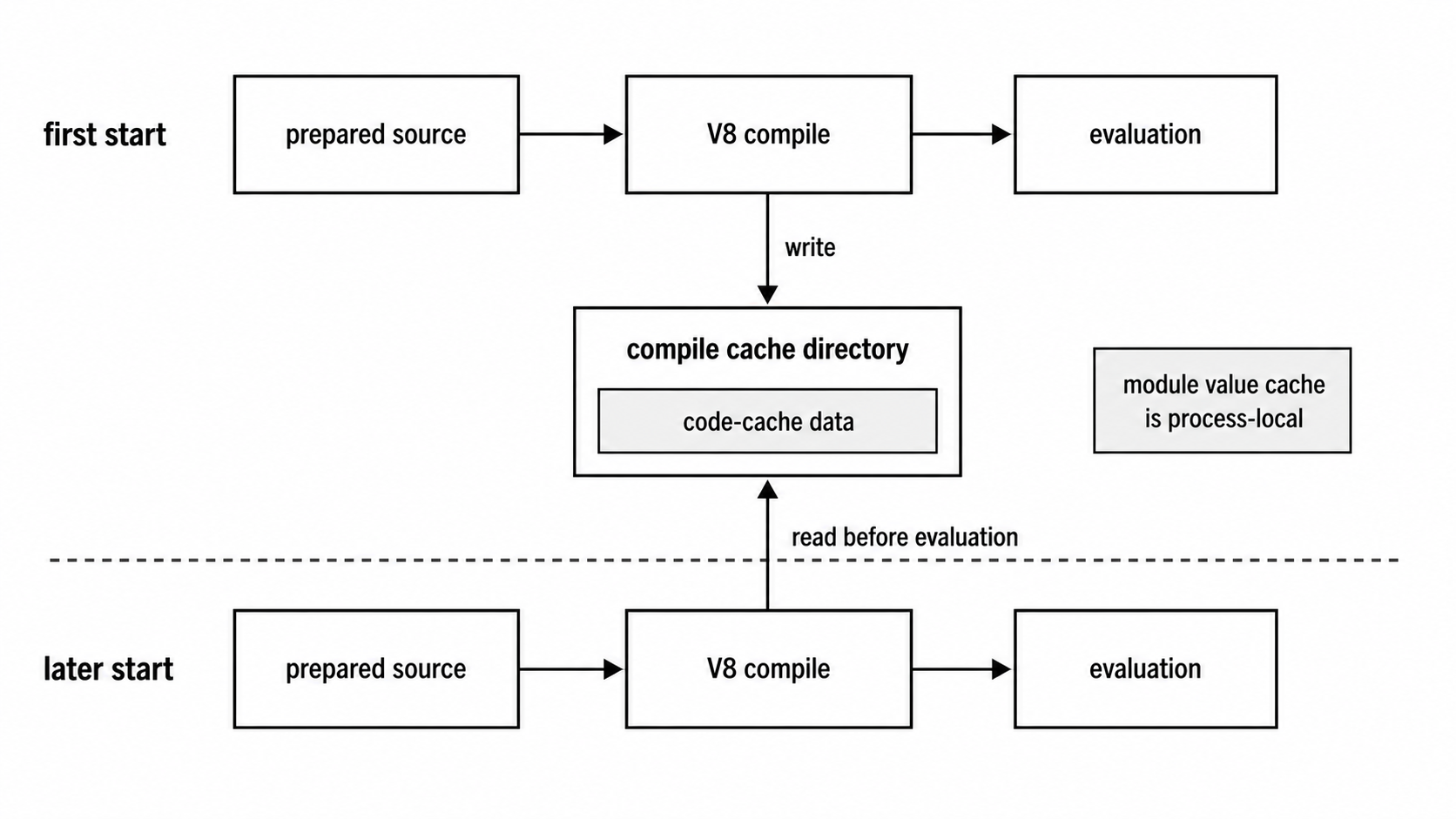
Figure 8.3 - The compile cache sits at the V8 compilation layer. It can reuse compilation data across process starts, while resolution, linking, and evaluation still follow the same rules.
The path looks like this -
resolve specifier
  -> load source
  -> strip or transform TypeScript
  -> compile prepared JavaScript
  -> link if ESM
  -> evaluate module
The compile cache participates in the compile step. Resolution has already found a file. TypeScript preparation has already accepted or rejected it. ESM link-time export checks still have to finish before evaluation can run.
Trace a .ts ESM file through that path -
import { readConfig } from './config.ts';

const config: { port: number } = readConfig();
console.log(config.port);
Node resolves the entrypoint, reads the source, and strips the annotation. The prepared JavaScript still has an import, so Node resolves and loads ./config.ts, prepares that source too, and hands prepared JavaScript to V8. With the compile cache enabled, Node can look for V8 code-cache data for each compiled CommonJS, ESM, or TypeScript module.
For ESM, V8 compilation creates module records from the prepared source. Linking then checks imported and exported bindings across those records. Evaluation runs after linking succeeds.
That order explains why the compile cache can exist beside a linking failure. Suppose app.ts imports { missing } from ok.ts, and ok.ts exports only present. Node may still compile both prepared module records and produce code-cache data before ESM linking reports the absent binding. The next run can reuse compilation data and still fail with the same linking error.
CommonJS has a different loader path, but the cache still sits after source preparation -
const config: { port: number } = require('./config.cts');
console.log(config.port);
Node strips the type annotation, wraps the prepared source for CommonJS, and compiles it. With the compile cache enabled, that compile can use or produce on-disk V8 code-cache data. After evaluation, Module._cache holds the exported value for the current process. On the next process start, Module._cache starts empty again, while the disk compile cache may already contain compilation data from the previous run.
Inside one process, Module._cache hides repeated CommonJS compilation because a second require() returns the same evaluated exports object. The compile cache helps across processes. That makes it more useful for CLIs, short-lived scripts, serverless-style launchers, and test workers than for a long-running service that starts once and stays up.
At this point, keep three states separate -
- source preparation state - TypeScript annotations removed or transform-required syntax rejected
- compilation state - V8 parses and compiles prepared JavaScript, with optional on-disk code-cache help
- evaluation state - module code runs and produces process-local module state
Those states explain cache behavior that can look strange at first. A compile-cache hit still runs the module. Top-level side effects run again on every process start. A missing file still fails during resolution. A missing ESM export still fails during linking. A thrown error still happens during evaluation. A type-checking error from TypeScript belongs to another tool.
Top-level side effects are worth keeping in mind. If config.ts opens a socket, mutates a database, or logs a startup record at top level, the compile cache may reduce compilation time before that code runs. The side effect still runs during evaluation.
Cache key details are implementation details. Node's docs are explicit about that. Cache files are usually reusable only under the same Node version, and different Node versions keep separate cache data under the same base directory. Absolute paths can participate in invalidation unless portable cache mode is enabled. Source content changes invalidate useful cache data because V8 code cache has to match the source it came from.
Node also protects correctness when cache data goes stale. If source or engine details stop matching, Node compiles normally and can write newer cache data later. A stale compile cache should cost time and disk, not change program behavior. If deleting the cache directory changes what your program does, the problem is somewhere else in the launch setup.
Cache writing has one timing detail. Node v24 generates code-cache data when a module is loaded fresh, but writes accumulated data to disk when the process is about to exit. module.flushCompileCache() forces an earlier write. That is useful when a parent process loads modules, then spawns child Node processes that should reuse cache data before the parent exits.
Abnormal termination can leave less cache data behind. A SIGKILL gives Node no JavaScript-level cleanup path. Treat the cache as opportunistic performance data.
The first process can be slower because it does extra cache generation and disk work. Later process starts may be faster if they load the same module graph under compatible conditions. Measure before treating the cache as a guaranteed startup fix. Startup time also includes file I/O, resolution, module graph size, CPU, storage, invalidation, and work outside JavaScript compilation.
TypeScript can make the cache more appealing for scripts because the path includes source preparation and compilation. Still, the compile cache stores V8 compilation data after source preparation. If stripping, file reads, or module resolution dominate startup, the cache may help less than expected.
Enabling the Compile Cache
The programmatic switch lives in node:module -
import module from 'node:module';

const result = module.enableCompileCache();
console.log(result);
module.enableCompileCache() enables the module compile cache for the current Node instance. Called with no directory, it uses NODE_COMPILE_CACHE if that environment variable is set. Otherwise it defaults to a directory under the operating system temp directory. The returned object includes a status value and, when enabled, a directory.
The method reports failure instead of throwing. That is deliberate. The compile cache is an optimization. If the directory cannot be created, is read-only, or is disabled by environment, the application should usually keep starting. The returned object gives launch code enough information to log the problem without making cache setup a fatal dependency.
Production launchers should branch on status -
import module from 'node:module';

const { compileCacheStatus } = module.constants;
const result = module.enableCompileCache();

if (result.status === compileCacheStatus.FAILED) {
  console.warn(result.message);
}
The status tells you what happened. ENABLED means the current call turned the cache on. ALREADY_ENABLED means an earlier call or NODE_COMPILE_CACHE already enabled it. FAILED means Node tried and could not enable it. DISABLED means NODE_DISABLE_COMPILE_CACHE=1 blocked it.
Use status for control flow. Treat message as supporting diagnostic text.
This also helps with repeated setup. A preload can enable the cache before the entrypoint. The entrypoint might call enableCompileCache() again. ALREADY_ENABLED is still a good state. Use the returned directory if your code needs to pass the cache location to child processes.
The environment form is usually cleaner for services -
NODE_COMPILE_CACHE=/var/tmp/node-compile-cache node server.tsNODE_COMPILE_CACHE enables the cache before application code runs and chooses the base directory. That is often better than putting enableCompileCache() in application code, especially when the goal is startup behavior across scripts, CLIs, and services.
Environment setup also reaches preloads. If you enable the cache from application code, every preload has already loaded and compiled. If you enable it with NODE_COMPILE_CACHE, preloads can participate because Node sees the environment variable during startup. That can help tooling that uses --require or --import.
Programmatic setup still has a place. An ESM bootstrap file can enable the cache before importing the rest of the command graph -
import module from 'node:module';

module.enableCompileCache();
await import('./cli-main.ts');
That gives the cache a chance to cover cli-main.ts and everything loaded after it. Static imports at the top of the same file would load before the call runs, because ESM dependencies are loaded and linked before the module body executes. Use a small bootstrap file when ordering counts.
CommonJS has a compact bootstrap version -
const moduleApi = require('node:module');

moduleApi.enableCompileCache();
require('./cli-main.cts');
Here the call runs before the later require(). The same rule applies in both module systems - enable the cache before loading the modules you want covered.
The cache directory should be disposable. Node can recreate it. Deleting stale cache data is a valid cleanup step. A temp directory is usually a better fit than a project source directory because the layout is owned by Node and can vary by version.
Permissions still apply. The process user needs access to create directories and files under the chosen base path. A read-only filesystem, locked-down service account, or container image path can make setup return FAILED. The application can continue, but the returned status should show up in logs.
You can inspect the active directory -
import module from 'node:module';

module.enableCompileCache();
console.log(module.getCompileCacheDir());
module.getCompileCacheDir() returns the active compile-cache directory. It returns undefined while the cache is disabled or inactive. When you pass an explicit base directory to enableCompileCache(), the active directory can be a Node-version-specific subdirectory under that base. The getter is useful for diagnostics and child-process setup.
Child Node processes are separate instances. The compile cache setting is process-local unless it is inherited through environment. If a parent calls enableCompileCache() and then spawns node child.ts, the child needs NODE_COMPILE_CACHE in its environment or its own call to enableCompileCache().
Flushing is explicit -
import module from 'node:module';

module.enableCompileCache();
await import('./worker-entry.ts');
module.flushCompileCache();
module.flushCompileCache() writes accumulated compile-cache data for modules already loaded in the current instance. Node also writes on exit. An early flush gives later Node processes a chance to reuse artifacts while the current process keeps running. Flush failures are silent because compile-cache misses should not break the application.
Use enableCompileCache() status for setup diagnostics. Use flushCompileCache() when timing is relevant. Avoid correctness checks based on files inside the cache directory, because Node owns that layout and can change it across versions.
Portable mode is available in Node v24.12 and newer -
import module from 'node:module';

module.enableCompileCache({
  directory: '.cache/node-compile',
  portable: true,
});
Portable mode tells Node to make cache reuse less tied to absolute project paths when it can compute paths relative to the cache directory. It is best-effort. It helps when a project directory moves together with its cache directory. Cache contents still depend on Node version and source compatibility, so portable mode belongs in startup optimization, not packaging.
The environment form is -
NODE_COMPILE_CACHE_PORTABLE=1Use it when the cache directory moves with the project, such as a workspace restored into a different absolute path. Keep expectations modest. If Node cannot compute a useful relative path for a module, that module may skip caching.
Coverage needs a warning. V8 coverage can become less precise for functions deserialized from code cache. For test commands that collect coverage, disable the compile cache with -
NODE_DISABLE_COMPILE_CACHE=1Coverage accuracy should win over faster startup in test runs.
The disable variable wins over convenience. NODE_DISABLE_COMPILE_CACHE=1 blocks the cache even if code calls enableCompileCache() or NODE_COMPILE_CACHE is set. That gives CI and coverage jobs a clean override without changing application startup code.
The operational setup is straightforward - enable the cache early, use a disposable directory, inspect status instead of assuming success, flush only when another process needs early access, and expect modules to resolve, link, and evaluate exactly as they would without the cache.
TypeScript stripping and compile caching meet at one specific point. Node prepares TypeScript into JavaScript first. V8 compilation comes next. The cache can help repeat that compilation on a later process start, but the runtime still has to load the same graph, validate the same imports, and run the same code.
Keep the final split clear. TypeScript stripping prepares source. The compile cache stores V8 compilation data for prepared source. Type checking, import correctness, and runtime safety are still handled by their own layers.
Related Reading
- Previous - Node.js Web Platform APIs - fetch, Web Streams, Blob, FormData, and structuredClone
- Next - Node.js REPL, Inspector, Watch Mode, and Single Executable Apps