HTTP/2 Multiplexing and Flow Control
Two requests can share one TLS connection after ALPN selects h2.
That single sentence is most of what separates HTTP/2 from HTTP/1.1. An HTTP/1.1 keep-alive connection can be reused, but it still carries one complete request-response exchange at a time. HTTP/2 lets several of those exchanges run on the same connection together.
All the HTTP pieces you already know stay the same. Methods, status codes, headers, bodies. What HTTP/2 changes is the way those pieces travel across the connection.
It moves them as binary frames. HTTP/1.1 writes a text request line, text headers, a blank line, and raw body bytes straight onto the socket. None of that text exists in HTTP/2. Every part of a message travels inside a frame, which is the basic protocol record. Each frame carries a type, some flags, a length, a stream ID, and a payload.
HTTP/2 also adds the protocol stream, which is one logical request-response exchange inside the connection. Every stream gets a numeric ID, and all the frames for that exchange carry it. A different request gets a different ID. So the session can mix frames from many streams on one connection and still keep each stream's own frames in the order they were sent.
Node hands you the HTTP/2 connection as an Http2Session, and each protocol stream as an Http2Stream.
The word stream now means two different things here, so keep them apart. One is the HTTP/2 protocol stream, the thing identified by a stream ID. The other is Http2Stream, which is also a JavaScript Duplex stream, so reading or writing a body uses the same stream APIs from Chapter 3.
A stuck HTTP/2 stream can be stuck at any of several layers. It might have run out of HTTP/2 flow-control credit, or be held up by JavaScript stream backpressure, or be waiting on the TCP connection underneath.
Here are the layers.
TLS connection selected h2 by ALPN
  -> HTTP/2 session
  -> frames
  -> stream 1, stream 3, stream 5
  -> Node Http2Stream objects
ALPN already picked which protocol Node runs over the TLS connection. After it settles on h2, the HTTP/2 session takes over all the protocol state sitting above TLS. That includes the settings, the stream IDs, the compression tables, the flow-control windows, the ping state, the graceful-shutdown state, and every active stream.
The Session Starts After ALPN
Chapter 11.5 stopped at protocol selection. The TLS handshake had finished and both sides agreed on h2. From that point on, every application byte on the connection is HTTP/2 data.
An HTTP/2 connection is the transport connection plus the HTTP/2 protocol state attached to it. Over HTTPS that transport is a TLS connection. Local cleartext HTTP/2, usually called h2c, runs the same protocol state over plain TCP. Browsers always use the TLS form, so a Node server talking directly to a browser is built with http2.createSecureServer().
The runtime object tracking one such connection is the HTTP/2 session. Node's Http2Session wraps the nghttp2 session state and wires it to the socket, the parser, the serializer, the JavaScript events, and the stream wrappers. Every frame on the connection passes through it. What your code gets out of it is narrower, mostly request events, decoded headers, and body chunks.
A session holds the HTTP/2-specific bookkeeping. The next stream ID, the open streams, the local and remote settings, the HPACK compression state in both directions, the connection-level flow control, and the flag for whether GOAWAY has started. Stream errors are tracked apart from session errors, which is why one route handler can reset its own stream and leave every other stream running, while a single bad connection-level frame can take the whole session down.
The protocol engine here is nghttp2, and the JavaScript object is the wrapper you actually call. That split has a few timing consequences. A stream event arrives only after nghttp2 has checked the frame sequence and decoded the header block. A write can return to you before the peer has the DATA, because the bytes still have to pass through JavaScript buffers, nghttp2 output queues, TLS, and TCP. The session can also fire connection-level events while not one request handler is doing anything.
The first application bytes are the connection preface, the fixed HTTP/2 startup sequence that confirms the protocol and kicks off the settings exchange. The client sends the same 24 bytes every time.
PRI * HTTP/2.0\r\n\r\nSM\r\n\r\nAfter that the client sends a SETTINGS frame, and the server sends its own SETTINGS frame back. Node takes care of all those startup bytes. Your code only gets the connection once it has entered HTTP/2 state, followed by a stream event per incoming request.
This startup handshake helps during debugging, because a protocol mismatch fails right away instead of halfway through. Send GET / HTTP/1.1 to a server that expects h2c prior knowledge and the very first bytes are already wrong for HTTP/2. A TLS client that negotiates http/1.1 when the application wanted h2 only gets an HTTP/1.1 path if the server was set up for fallback. The allowHTTP1 option from the ALPN chapter is what controls that here, deciding whether a secure HTTP/2 server will also serve HTTP/1.1 traffic.
A minimal secure HTTP/2 server needs certificate material and a decision about that HTTP/1.1 fallback.
import http2 from 'node:http2';
import { readFileSync } from 'node:fs';

const server = http2.createSecureServer({
  key: readFileSync('localhost-key.pem'),
  cert: readFileSync('localhost-cert.pem'),
  allowHTTP1: true
});
http2.createSecureServer() gives you a TLS-backed HTTP/2 server. TLS still does its full job first, the handshake, the certificate selection, the client-side validation, and the ALPN negotiation. Only once h2 comes out of that does Node build an HTTP/2 session for the connection. Setting allowHTTP1: true lets a client that negotiated http/1.1 fall back to the compatibility path rather than failing negotiation outright.
This is a different connection model from https.createServer() running HTTP/1.1. There, each connection has a single HTTP parser working through one ordered sequence of messages. An HTTP/2 session instead reads frames, sorts them by stream ID, and keeps several Http2Stream objects active on the one socket. So a single socket, carrying a single TLS connection and a single HTTP/2 session, ends up serving many streams at once.
It also changes which layer the socket belongs to. HTTP/1.1 code can get away with treating one request as the temporary holder of a socket. In HTTP/2 the socket stays with the session for the whole connection, and every stream uses it. Any code that reaches down to the socket from inside one request is really reading connection-level transport state.
All of this changes how you set up timeouts and logging. A socket timeout tracks transport activity. The stream timeout is scoped to one HTTP/2 stream. A session PING tests the peer across the entire connection, while request duration measures a single application exchange on one stream. Keep those identifiers separate in your logs, so a line can show the remote address and port for the socket, an identifier for the session, the stream ID for the HTTP/2 exchange, and your own request ID for the route-level work.
Frames Are the Unit on the Wire
A frame is how the protocol moves. It has a 9-byte header followed by a payload. The header holds the payload length, the frame type, the flags, and the stream ID, and the type decides how to read the payload that follows.
Most Node code never handles a frame on its own. The API still reads better once you know what the frames underneath are doing.
A request begins with HEADERS frames, and the request body comes after as DATA frames. A response is built the same way, HEADERS first and then DATA for the body. The SETTINGS, PING, GOAWAY, and RST_STREAM frames adjust connection or stream state, and the body bytes themselves always travel in DATA frames.
The stream ID field is what routes a frame inside the session. Stream 0 is held for connection-level frames such as SETTINGS, PING, and GOAWAY. Actual request streams use positive IDs, with odd numbers for client-created streams and even numbers for server-created ones, which mostly means server push. A typical client request shows up as stream 1, then 3, then 5.
Here is a short trace.
stream 0 - SETTINGS
stream 1 - HEADERS  :method GET  :path /users
stream 3 - HEADERS  :method GET  :path /teams
stream 1 - DATA     request body bytes
stream 3 - DATA     request body bytes
Inside a frame, the type tells the receiver how to read the payload, and the stream ID tells the session which HTTP/2 stream the frame is part of. Flags add control bits on top. END_STREAM is one of them, and it means the sender is done sending in that direction for that stream. A request with no body can set END_STREAM right on its HEADERS frame, while a response with a body sends its DATA frames and puts END_STREAM on the last one.
END_HEADERS is another flag you see often. When a header block is large, it gets split across a HEADERS frame and one or more CONTINUATION frames, and END_HEADERS marks where the block ends. Node folds that whole sequence into a single decoded header object before your handler runs. The protocol layer has to collect and decode the full block first, which is why CONTINUATION can show up in protocol errors and header-size limits.
The stream state machine is short. A stream begins idle, and HEADERS can open it. Each side ends its own sending direction with END_STREAM. Once one side has finished, the stream is half-closed in that direction; once both sides have, it is closed. RST_STREAM can end it earlier than that, with an error code.
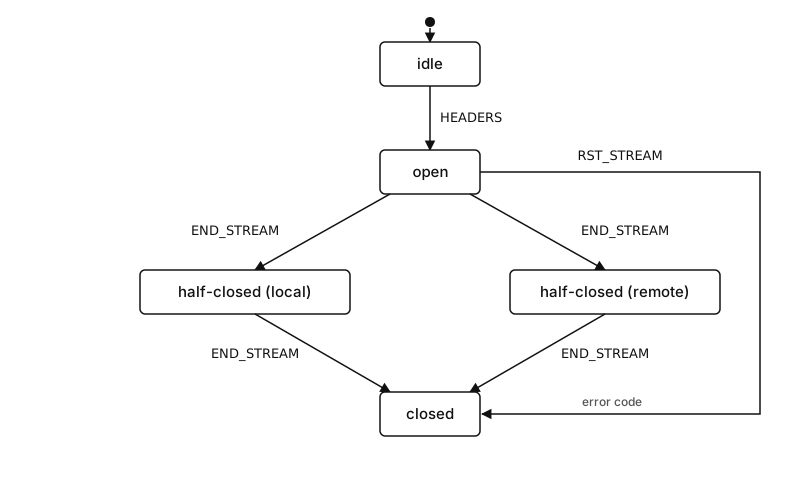
Figure 11.1 - The stream state machine. HEADERS opens a stream, END_STREAM half-closes then closes it, and RST_STREAM ends any active stream with an error code.
For normal Node code you can skip the full set of RFC state names. The short version covers it. HEADERS open an exchange, DATA carries the body bytes, END_STREAM closes one direction, and a reset stops the exchange.
All of this runs below your handler. A handler can be called with the request headers while the body is still on its way in. Sometimes it can send a response before the whole body has arrived, and it can close the stream outright when it rejects the request. Whether each of those is legal depends on the current stream state, and Node enforces the rules through Http2Stream methods and nghttp2 errors.
Message control data travels in pseudo-headers, which are HTTP/2 header fields whose names start with :. On a request those are :method, :scheme, :authority, and :path. On a response there is :status.
So in a Node handler you read keys like headers[':path'] and headers[':method'].
server.on('stream', (stream, headers) => {
  console.log(stream.id, headers[':method'], headers[':path']);
  stream.respond({ ':status': 200 });
  stream.end('ok\n');
});
Here the stream argument is the Http2Stream for that one request, and headers holds the pseudo-headers together with the ordinary header fields. Calling stream.respond() sends the response headers, and stream.end() finishes the response body side of the stream.
The fields that used to live in the HTTP/1.1 start line are carried differently here. The request method, path, scheme, and authority all arrive as pseudo-headers, and the response status arrives as :status. None of the old semantics went away. HTTP/2 still has a method, a path, an authority, a status, headers, and a body. They move through frames and pseudo-headers now, and the text start line is gone.
Header names also have to be lowercase. An uppercase field name is a protocol error, which can trip up code that leaned on the original header casing back in HTTP/1.1. Chapter 10 went through rawHeaders and the parsed header object. HTTP/2 applies the stricter naming rule first, and then Node hands you a JavaScript object that also carries the pseudo-header keys.
Send header names in lowercase, on both requests and responses. An uppercase field name is an HTTP/2 protocol error, and Node rejects the whole header block in that case, which can reset the stream. If you port code from an HTTP/1.1 path that copied header names through verbatim, lowercase them before you hand the object to respond() or request().
The frame parser is strict as well. A few frame types are only allowed on stream 0, DATA frames only make sense on a real stream, and HEADERS has to land at a valid point in the stream state machine. When a peer sends a sequence that breaks one of these rules, Node either resets the single stream or closes the entire session, depending on which rule broke.
This is also why a failure can land at different scopes. A single stream can fail and leave the others running, yet one bad connection-level frame can take down the session and every stream on it.
Node surfaces a lot of this through events. A stream emits 'error', 'aborted', or 'close'. The events on a session are 'error', 'frameError', 'goaway', and 'close', and the server has its own 'sessionError'. When you read back an incident later, whichever object emitted the event already tells you the scope.
Stream 0 is the connection-level marker, so a frame error reported there belongs to the session, while a reset on, say, stream 17 is one exchange and a socket error is lower than either. Your logs need to keep these three levels apart, otherwise the failures blur together.
Multiplexing Is Interleaved Frames
Several streams can be active on one connection at the same time, and that is what multiplexing means. The session does it by interleaving frames from different stream IDs on the wire.
Take two requests.
request A - GET /slow
request B - GET /fast
Both can go out on the same session.
client -> server  stream 1 HEADERS /slow END_STREAM
client -> server  stream 3 HEADERS /fast END_STREAM
The server then answers in whatever order the work actually finishes.
server -> client  stream 3 HEADERS 200
server -> client  stream 3 DATA "fast\n" END_STREAM
server -> client  stream 1 HEADERS 200
server -> client  stream 1 DATA "slow\n" END_STREAM
Stream 3 came back before stream 1, on the same connection, with each stream's own frames still in order. The /fast response did not have to wait for /slow to finish.
This is the real difference from HTTP/1.1 keep-alive. A reused HTTP/1.1 connection runs its exchanges one after another. Pipelining does exist there, but the responses still have to come back in request order. HTTP/2 drops that constraint by tagging everything with stream IDs, so a request sent later can get its response back before an earlier one is done.
The same thing happens with response bodies broken into chunks and interleaved.
server -> client  stream 1 HEADERS 200
server -> client  stream 3 HEADERS 200
server -> client  stream 1 DATA 16KB
server -> client  stream 3 DATA 4KB
server -> client  stream 1 DATA 16KB
server -> client  stream 3 DATA END_STREAM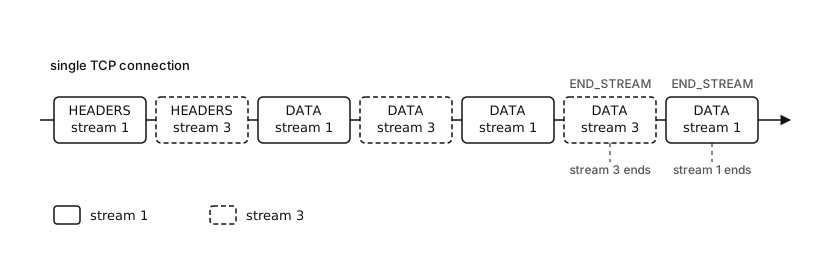
Figure 11.2 - HEADERS and DATA frames for stream 1 and stream 3 share one connection. Solid boxes are stream 1, dashed boxes are stream 3, and stream 3 finishes before stream 1.
On the client side you read two response bodies off two Http2Stream objects. Below that, the session is pulling one ordered byte stream out of TLS, parsing the frame records, and handing each payload to the stream object it belongs to.
What multiplexing buys you is more concurrency at the protocol level on a single connection. It does not touch how JavaScript runs, which is still everything from Chapter 1. Handlers run on the event loop, so CPU-heavy work in one handler delays callbacks for the others, and a stalled database pool can hold up many responses even while the HTTP/2 session is sitting there ready to send frames. The protocol stopped forcing responses into order. Whether a given response is ready still comes down to your application's own resources.
The write side has scheduling too. With several streams holding outgoing DATA, nghttp2 decides which frames to serialize next from the protocol state, the windows it has, and its own scheduling rules. The older HTTP/2 priority signals are still there, but browser behavior around them has drifted over the years, and application code in Node rarely gets dependable control from that layer. The controls that actually work in service code are smaller and more practical. Bound your concurrency, keep reading from streams, respect backpressure, and do not let one large body use up all the shared connection credit.
Two rules cover the ordering.
Within a single stream, order is preserved. The receiver handles the frames for stream 1 in the order they showed up on the connection, and the DATA payloads for that stream turn into body bytes in that same order.
Between streams, the lifetimes are independent. One stream can finish while another is still open, a third can be reset without touching the rest, and a long upload can run the whole time next to a handful of quick GETs.
Underneath all of it, TCP is still one ordered byte stream. HTTP/2 runs over TLS over TCP, and that bottom layer is a single sequence. Lose one TCP segment and everything after it has to wait for TCP to retransmit and repair the order, which means the frames for every HTTP/2 stream sitting behind that gap wait too. That waiting is head-of-line blocking at the TCP layer.
Chapter 10 described HTTP/1.1 head-of-line blocking at the application protocol level, where response ordering on a reused connection makes later responses wait for earlier ones. HTTP/2 clears up that protocol-level version with stream IDs and interleaved frames. The TCP version stays, because every frame still travels on the one ordered transport stream.
HTTP/3 and QUIC rework the transport layer itself, which is a later topic. For HTTP/2 the point is smaller. Multiplexing raises HTTP concurrency on one connection, and packet loss can still stall every stream that shares it.
Multiplexing takes away protocol-level response ordering, but a single lost TCP segment still stalls every stream on the connection. The bytes after the gap wait for retransmission, so DATA frames for completely unrelated streams queued behind that byte are stuck waiting too. When one lossy network path keeps freezing many streams at once, spread the load across separate connections or move to HTTP/3.
All of this tells you where to look when a stream drags. A single slow request usually means its handler is slow, and you can confirm that because the other streams are still producing frames. When every stream stops getting DATA at once and the socket is still established, the cause is lower down, somewhere in connection-level flow control, TCP loss, a blocked TLS write, or a process-wide stall. And if new streams start failing while the existing ones finish normally, that points at MAX_CONCURRENT_STREAMS, a GOAWAY, or a server drain.
HPACK Changes Header Movement
With headers, HTTP/2 drops the text format completely.
An HTTP/1.1 message has a plain-text header section. In HTTP/2 the headers go inside HEADERS frames as header blocks, and those blocks are run through HPACK, the header compression format for the protocol. HPACK encodes each field using a static table, an optional dynamic table, and literal representations for whatever is left.
The point of it is that a repeated header name or value can be sent as a small index instead of the full bytes every time. Once the compression state has built up useful entries, common fields like :method, :path, content-type, and a repeated cookie shrink on the wire.
That dynamic table is compression state that lives on the connection. Each direction keeps its own HPACK state for decoding what the peer sends. When the encoder on one side adds an entry to its dynamic table, the decoder on the other side adds the matching entry as it works through the header block, and any later header block can point at that entry by index.
Keeping state like that has a few real consequences.
A broken header block can corrupt parser state for the whole connection. A bad HPACK index, or pseudo-headers in an invalid order, is a worse problem than a malformed JavaScript object would be, because it is a protocol error in the middle of decoding the connection's compression stream. Node reports it as either a stream error or a session error, depending on how nghttp2 classifies the failure.
SETTINGS negotiates the table size, and the choice is a memory question. A smaller table holds less compression state and uses less memory. A bigger one can compress repeated headers harder. Which way to go depends entirely on the traffic. A JSON API whose requests carry small stable headers and a short bearer token gets very little out of a large table, whereas a browser loading a page, with its cookies, cache validators, and wide assortment of request headers, can compress a great deal.
HPACK also changes what "header size" means in your logs. The wire bytes may be compressed, but the peer's MAX_HEADER_LIST_SIZE is measured against the decoded header list, so a request can look compact in HPACK and still blow past the limit once it expands. Node only hands your handler the decoded headers after the protocol layer has accepted the whole block.
Sensitive headers need a little care, because in some protocols compression state can interact with attacker-controlled input. Node gives you http2.sensitiveHeaders to mark fields the HTTP/2 implementation should treat as sensitive. The practical advice is short. Do not reflect secrets into header values another party controls, and do not log decoded header objects without thinking about what is in them.
Your handler never has to deal with any of the HPACK machinery.
server.on('stream', (stream, headers) => {
  const path = headers[':path'];
  const type = headers['content-type'];
  stream.respond({ ':status': 204 });
});
You get decoded headers in, and you write response headers out as a plain object. Node and nghttp2 take care of encoding the outgoing block into HPACK, and the compression tables stay with the connection.
In the protocol, pseudo-headers come ahead of the ordinary headers and carry the message control fields. On a request, :method, :scheme, :authority, and :path stand in for the HTTP/1.1 request line and its Host-based target. On a response, :status stands in for the status line.
Chapter 10 went through Host, and Chapter 11.2 went through hostname validation. HTTP/2 puts the authority component of the target URI in :authority. Node carries some compatibility around :authority and host, since older code tends to look for host, but inside a core HTTP/2 handler you should treat :authority as the real field.
For most Node services this is as deep into HPACK as you need to go. The headers are compressed, the compression state belongs to the connection, and a header failure can reach past a single request. The bit-level encoding almost never comes up while writing application code.
SETTINGS Defines Peer Limits
Plenty of confusing HTTP/2 behavior traces straight back to settings.
A SETTINGS frame carries configuration values from one end of the connection to the other, and the values apply per direction. When the server sends SETTINGS_MAX_CONCURRENT_STREAMS, it is telling the client how many concurrent streams the client is allowed to open on this connection. The value the client sends back governs the server's own stream creation, which mostly comes up for server push and similar cases.
Because settings apply to the session as a whole, the SETTINGS frame goes on stream 0. The receiver acknowledges the settings once it has applied them, and Node lets you read the current local and remote values through session properties and events.
These are the ones that come up in practice.
MAX_CONCURRENT_STREAMS  active streams the peer may create
INITIAL_WINDOW_SIZE     starting flow-control window per stream
MAX_FRAME_SIZE          largest DATA frame payload size
MAX_HEADER_LIST_SIZE    accepted decoded header list size
HEADER_TABLE_SIZE       HPACK dynamic table size
ENABLE_PUSH             server push permission
MAX_CONCURRENT_STREAMS is usually the first setting whose effect you notice. If the server advertises 100, the client can keep up to 100 client-created streams active on that session at once. Anything beyond that waits for a slot, opens a second session, or gets refused, and the client library decides which.
This is only a protocol admission limit, though. Your route concurrency, your database pool, your CPU budget, and the JavaScript scheduler all still need limits of their own. A server can admit 100 HTTP/2 streams and overload a downstream dependency anyway. Setting the stream limit lower is one way to keep the process calmer when clients show up in bursts.
Set maxConcurrentStreams explicitly instead of leaning on Node's high default. A peer can open streams and reset them in a tight loop, which makes the session allocate and free stream state faster than your handlers can retire it, so CPU and memory climb while nothing useful gets done. Put a bound on the concurrency limit, and also cap how many resets a single session is allowed before you close it.
You can pass initial HTTP/2 settings when you create the server.
const server = http2.createSecureServer({
  key,
  cert,
  settings: {
    maxConcurrentStreams: 100,
    initialWindowSize: 1024 * 1024
  }
});
These become part of the session negotiation. The peer gets them as HTTP/2 protocol settings, not as headers, and what it does with them is its own behavior. A client that honors the stream limit keeps its active streams under the cap on a single session, while one that ignores the limit can earn stream refusals or connection errors in return.
Sessions also raise events when settings change.
server.on('session', session => {
  session.on('remoteSettings', settings => {
    console.log(settings.maxConcurrentStreams);
  });
});
remoteSettings is what the peer advertised, and localSettings is what Node has applied on this side. To change settings later, session.settings() sends new SETTINGS on an existing session, and server.updateSettings() changes what new server sessions start with. When you need to push a new limit onto sessions that are already live, collect them from the 'session' event and call session.settings() on each.
http2.getDefaultSettings() returns the settings object Node starts from. On Node v24 the default initialWindowSize is 65,535 bytes and the default maxFrameSize is 16,384 bytes. The default maxConcurrentStreams is set very high, and production servers usually set it lower, since heavy protocol concurrency just moves the pressure into your application code.
The default per-stream window is 65,535 bytes. A sender fills that window and then has to wait for a WINDOW_UPDATE before sending any more DATA, which caps a single stream's throughput on a high-latency path no matter how much bandwidth is available. For large body transfers, raise initialWindowSize, and pick the value against how much in-flight memory you are willing to hold across all the active streams at once.
Settings are also what drive flow control. INITIAL_WINDOW_SIZE sets the starting per-stream flow-control window for new streams, so changing it changes how DATA moves. The connection level keeps its own separate window on top of that, and a stalled HTTP/2 connection very often comes down to one of those two windows.
Settings also do not take effect the instant they are sent. One peer sends SETTINGS, the other applies them and sends an acknowledgement, and in the gap the sender sits in a pendingSettingsAck state. If you change settings on a live session, new and existing streams can pick up the change differently, depending on the setting. An INITIAL_WINDOW_SIZE change adjusts the existing stream windows by the protocol's rules. A concurrency limit only affects streams admitted after it takes hold.
What counts as an active stream feeds the stream limit too. A fully closed stream stops counting. A stream that has sent its headers but still has an open body counts, and so does one sitting idle while it waits on a slow response. A stream that stays open a long time keeps holding part of the peer's concurrency budget, which is why a long streaming response over HTTP/2 needs more thought than a quick JSON call.
Pick maxConcurrentStreams to match what the application can actually afford. If each stream can tie up a database connection, size the limit against the database pool. Streams that are mostly cache hits with tiny bodies leave room for a much higher limit. The protocol gives the server one connection-level point to admit or refuse streams. How expensive each admitted stream turns out to be depends on your own code.
HTTP/2 Flow Control Has Two Windows
HTTP/2 flow control works as byte credit handed out by the receiver, and it applies to DATA frames only. There are two windows running the whole time, one for the connection as a whole and one for each stream.
Only DATA frames spend that credit. HEADERS, SETTINGS, PING, RST_STREAM, and GOAWAY each run under their own separate limits. A large response body spends window credit, and so does a large upload, while a request with a lot of headers pushes on the header limits and HPACK state rather than on a flow-control window.
The receiver advertises how much DATA it is ready to accept, and the sender draws its window down as it sends DATA. Once the receiver has consumed some of those bytes, it returns credit with WINDOW_UPDATE frames. A stream whose window hits zero can send no more DATA on that stream, and a connection whose window hits zero blocks DATA on every stream sharing it.
A write needs room in both windows to go out.
stream 1 window      32KB available
connection window   8KB available
write body chunk    16KB
result              at most 8KB can move as DATA now
The connection window is what capped this write. Stream 1 had room to spare, but the session-level window did not, and every other stream is drawing on that same connection window because the whole session shares it.
It also runs the other way around.
stream 1 window      0KB available
connection window   256KB available
write body chunk    16KB
result              stream 1 waits for WINDOW_UPDATE
Here the connection has plenty of credit while stream 1 has none left. DATA for stream 3 can still move as long as stream 3 has window of its own and the connection window holds up.
This is a level of control TCP does not give you by itself. The TCP receive window sits underneath TLS and HTTP/2 and governs how many encrypted transport bytes can arrive on the connection at all. The HTTP/2 windows sit above TLS, after the frames are decoded, and they govern how many actual HTTP body bytes can arrive per stream and per session.
Node's own stream backpressure is separate again, living in the JavaScript and native buffers. When stream.write() returns false, the Http2Stream has buffered enough on this side that you should wait for 'drain' before writing more. That false can come from local buffering, from an exhausted protocol window, from socket buffering, or from a mix of them, and either way your code should respect it.
Stacked up, the buffering looks like this.
Http2Stream write buffer
  -> HTTP/2 stream flow-control window
  -> HTTP/2 connection flow-control window
  -> TLS record writes
  -> TCP send buffer
  -> peer TCP receive buffer
  -> peer HTTP/2 receive windows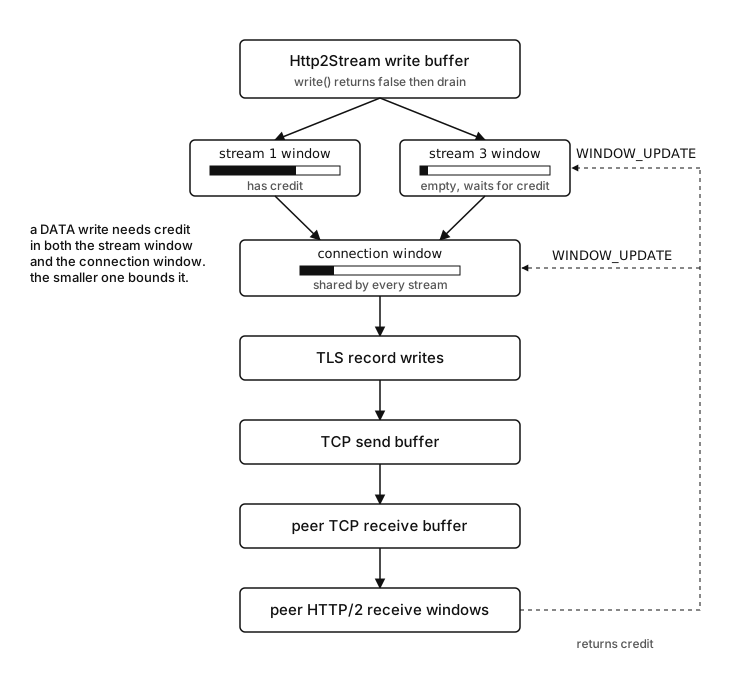
Figure 11.3 - A DATA write needs credit in both the stream window and the shared connection window, then passes down through TLS and TCP buffers. WINDOW_UPDATE returns credit at the stream and connection levels.
Any layer in that stack can slow down the one above it. Code that honors backpressure stops producing body bytes before it buffers more than memory can hold.
A stalled download often starts at the client. The client is receiving DATA frames, but its application code slows down or stops reading the response stream. From the HTTP/2 implementation's view those bytes are not consumed yet, so Node holds back the WINDOW_UPDATE. The server's stream window falls to zero, its writes stop making progress, and the TCP connection underneath can still look completely healthy.
A stalled upload is the same problem pointed the other way. The server pauses the request Http2Stream, or just works through the bytes slowly, and the client's send window shrinks. The client can still open other streams as long as connection-level credit and the concurrent-stream limit allow it.
Connection-level starvation is the broader version.
stream 1             large response, client reads slowly
stream 3             small response, ready to send
connection window    0
result               stream 3 DATA waits too
Here the small response is held up by the session's DATA credit even though its own stream window has room to spare. It is ready to send and still cannot move, because at the protocol layer every DATA frame is drawing on the one shared connection window.
When just one stream stalls, look at that stream's own window first. If they all stall at once and the socket is still writable, the shared connection window is the more likely cause, since one slow-reading client can pull the connection window down to zero and stop DATA for every other stream on the session. To find the empty window, watch write() for a false return, watch whether 'drain' ever fires, and check remoteSettings.initialWindowSize.
Movement picks back up with WINDOW_UPDATE. When the receiver works through some body bytes and frees up receive capacity, it sends a window update for the stream, for the connection, or for both, and the sender can serialize more DATA.
The question to ask while debugging is where the blocked byte is actually sitting.
JavaScript write buffer full        -> wait for drain
HTTP/2 stream window empty          -> wait for stream WINDOW_UPDATE
HTTP/2 connection window empty      -> wait for connection WINDOW_UPDATE
TCP send buffer full                -> wait for socket writability
peer stopped reading application    -> upstream window updates slow down
Node does expose some session and stream state you can inspect, but most of the time you diagnose this from the outside, from write() return values, a 'drain' that takes too long, large response bodies, remoteSettings.initialWindowSize, the active stream count, and whether the stalls track with slow consumers.
For most Node code, you run into all of this at the write call.
import { once } from 'node:events';

const ok = stream.write(chunk);

if (!ok) {
  await once(stream, 'drain');
}
That stays the right contract on your side. stream.write() takes the chunk into the Http2Stream write path. A true return means Node has room under its buffering thresholds right now. A false return means you should stop producing body chunks until 'drain' fires.
All of that flow control is sitting under that one signal. Say a route streams a file out to a client, calling write() over and over. Node keeps serializing DATA frames as long as the stream window and the connection window both have credit. The moment either one hits zero, nghttp2 stops producing DATA for that stream, the JavaScript write buffer fills up, and write() starts returning false. As the client reads the response it sends WINDOW_UPDATE, Node pushes out more DATA, and 'drain' can fire once the local buffer drops back under its threshold.
How soon any of this shows up depends on several buffers at once. A small response can finish before there is any backpressure to see at all. Send a large response to a slow client and the backpressure is obvious. Put a large response on a session crowded with small ones and you get connection-level interference on top of it. None of that changes what your code does. Stop writing on a false, start again on 'drain', and use pipeline() or async iteration where they fit.
Request bodies work the same way with the direction flipped. The client might upload slowly, or the server might read slowly. When the server pauses the request stream, incoming DATA piles up until the HTTP/2 receive-window policy throttles the client. That backpressure keeps an uploaded body from growing in memory without any limit. It also means a handler that forgets to read or close a request body it does not want can tie up that stream, and some connection credit with it.
A rejected upload needs you to make a call about the body. If the server already knows from the headers that it will reject a large upload, it can send the error response and close or reset the stream right there. Leaving the body streaming in while the handler quietly ignores it wastes stream window, connection window, and the peer's upload effort for nothing.
For high-throughput transfers, raising initialWindowSize can help. A larger window lets a peer send more DATA before it has to stop and wait for window updates. The cost is more in-flight body data the receiver has to be ready to account for across all its active streams. A server that allows both many concurrent streams and large initial windows has signed up for a larger memory and buffering budget.
Base that decision on real measurements from your own workload. The arithmetic is simple enough. The stream count times the per-stream window, plus the connection window, tells you roughly how much DATA can be outstanding before the protocol starts pushing back.
One trace pattern for a stalled response looks like this.
stream.write() returns false
no drain for seconds
remoteSettings.initialWindowSize is small
several large streams active
small responses also delayed
That set of symptoms points at connection-level or shared session pressure. A different pattern points lower down.
all sessions to one host slow
socket writes delayed
packet loss visible in host metrics
HTTP/2 windows still available
That one points at TCP or the network. HTTP/2 just adds one more layer that can hold DATA back for a legitimate reason, so a stalled response is not automatically a bug.
Core node:http2 API
node:http2 actually gives you two API styles to choose from. The core API works directly in terms of HTTP/2 sessions and streams. The compatibility API stays close to node:http, with request and response objects you already know.
The core API comes first. It fires a stream event for every new HTTP/2 stream.
server.on('stream', (stream, headers) => {
  stream.respond({
    ':status': 200,
    'content-type': 'text/plain'
  });
  stream.end('hello\n');
});
stream.respond() sends the response header block, with :status as the HTTP/2 response pseudo-header. stream.end() writes any final body data and then closes the writable side of the Http2Stream.
An Http2Stream is a Duplex stream tied to one HTTP/2 stream ID. When the request has a body, its readable side gives you the request body chunks, and its writable side is what sends the response DATA frames. The same object also carries HTTP/2-specific state like id, session, and the reset information.
The protocol engine assigns the ID. On the server, the first ordinary client request usually shows up as stream 1 and the next as 3. Those IDs earn their keep in logs, because they show which streams share a session and let you piece the frame interleaving back together from the events.
A small handler can stay right down at the protocol level.
server.on('stream', stream => {
  stream.respond({ ':status': 404 });
  stream.end('missing\n');
});
respond() sends the headers once, and after that the body methods write DATA. Calling respond() a second time is a state bug, and so is writing anything after end(). These are the same mistakes you can make on ServerResponse, except the failure here shows up as HTTP/2 stream state instead of HTTP/1.1 message serialization.
When you want connection-level visibility, the 'session' event gives it to you.
server.on('session', session => {
  console.log(session.alpnProtocol, session.encrypted);
  session.on('goaway', (code, lastID) => {
    console.log(code, lastID);
  });
});
session.alpnProtocol reports what ALPN selected on a secure session, and session.encrypted reports whether the session is running over TLS at all. A secure browser-facing session should come back as h2 and encrypted. An h2c session is cleartext, and you mostly see those in controlled service-to-service or local setups.
The client side is built the same way.
const client = http2.connect('https://localhost:8443', { ca });
const req = client.request({ ':path': '/health' });

req.on('response', h => console.log(h[':status']));
req.on('data', chunk => process.stdout.write(chunk));
req.on('end', () => client.close());
req.end();
http2.connect() creates a client Http2Session, and client.request() opens a new client-initiated stream on it, returning a ClientHttp2Stream. The response headers come in through the 'response' event, and the body bytes come through the readable side of the stream.
One session can run several requests at once.
const a = client.request({ ':path': '/a' });
const b = client.request({ ':path': '/b' });

a.resume();
b.resume();
a.end();
b.end();
Both of those streams can be live on the one connection at the same time, and the remote server's settings still apply to them. If that peer advertised a low maxConcurrentStreams, the client library has to do something about the overflow, whether that is queuing, opening another session, or failing the extra streams.
Handlers on the core API have to follow the HTTP/2 header rules directly, which means pseudo-headers where the protocol requires them and lowercase names on the regular fields. Node checks the names and the protocol state, and an invalid header can close the stream with a protocol error.
You never construct Http2Session or Http2Stream yourself. Node creates them and hands them to you through server events, through the client connect call, and through request calls. Building those classes by hand is outside the public API contract, so stick to the factory functions and the events.
The lifecycle methods come in a gentle form and a hard form. session.close() begins a graceful close, where existing streams are allowed to finish while the closing state refuses any new ones. session.destroy() tears the session and all its streams down at once. Graceful close is for a planned server drain. Destruction is for a session that is already broken, for shutting down after a deadline has passed, or for an error that leaves the session unusable.
Streams have the same two choices at a smaller scope. stream.end() ends your sending direction the normal way, while stream.close(code) does a reset-style close on that stream carrying an HTTP/2 error code. A per-route timeout usually belongs at the stream scope, whereas a protocol violation coming from the peer is more likely a session-scope problem.
A Request Trace in Core API
A single client request passes through the same objects in the same order every time.
http2.connect()
  -> ClientHttp2Session
  -> connection preface and SETTINGS
  -> client.request()
  -> ClientHttp2Stream
  -> HEADERS frame
For a secure URL, http2.connect() first goes through TLS and ALPN before any HTTP/2 session exists. Certificate validation and trust configuration were covered in earlier subchapters. The HTTP/2 part starts once h2 is selected. From there Node creates the client session, sends the client preface, takes in the server's settings, and opens streams as you call client.request().
Logging the client events separates the layers for you.
client.on('remoteSettings', s => console.log(s.maxConcurrentStreams));

const req = client.request({ ':path': '/users' });

req.on('ready', () => console.log(req.id));
req.on('response', h => console.log(h[':status']));
req.on('close', () => console.log(req.rstCode));
req.resume();
req.end();
remoteSettings is a session fact, telling you what the server advertised for the whole connection. ready is a stream fact, firing once the stream has an assigned ID and is usable. response carries the decoded response header block for that stream. close marks the stream closing, and rstCode carries the reset details if the stream ended in an RST_STREAM.
That snippet shows a logging habit. Session facts and stream facts come off different objects. With several requests sharing one session, the client logs one remote-settings event and many stream IDs, and that stream ID is what lets you match up client logs, server logs, and frame traces from a packet capture or nghttp2 debug output.
On the server the same path runs the other way.
session receives HEADERS
  -> nghttp2 validates stream state
  -> headers decode through HPACK
  -> Node creates ServerHttp2Stream
  -> server emits stream
Your handler runs once the protocol layer has taken in enough of the stream to expose the headers. There may still be DATA frames arriving if the request has a body. And if the handler answers immediately with an error and closes the stream, the peer might still be in the middle of sending more DATA, which is why you handle a rejected upload by closing or resetting the stream, instead of leaving an unwanted body to keep streaming in.
Writing the response runs back the other way.
stream.respond()
  -> response HEADERS
stream.write()
  -> DATA while windows permit
stream.end()
  -> final DATA or END_STREAM
stream.respond() commits the response header block. stream.write() produces DATA frames whenever the buffering and flow-control state allow. stream.end() finishes the writable direction. A response with no body can send its headers with END_STREAM set, and a response that has a body sends HEADERS first and puts END_STREAM on the final DATA frame.
All of the Node stream behavior is here because Http2Stream implements it, but the protocol below it is still frames. Every read and every write turns into frame parsing or frame serialization inside the session in the end.
Compatibility API Looks Like node:http
The compatibility API exists for code that would rather keep the request and response objects it knows from node:http.
Pass a handler to http2.createSecureServer(options, handler) and that handler is called with Http2ServerRequest and Http2ServerResponse objects.
const server = http2.createSecureServer(options, (req, res) => {
  console.log(req.stream.id, req.headers[':path']);
  res.writeHead(200, { 'content-type': 'text/plain' });
  res.end('ok\n');
});
Http2ServerRequest gives the incoming HTTP/2 stream an IncomingMessage-style surface, and Http2ServerResponse gives the outgoing side a ServerResponse-style one. Both are wrappers around an HTTP/2 stream, and req.stream and res.stream reach the underlying Http2Stream when you need it.
This is the API that makes porting a small HTTP handler easy. The same wrapping can also keep details out of view that you actually want while debugging HTTP/2 behavior. With the core API the stream IDs, pseudo-headers, and session state are right in front of you. The compatibility API folds those pieces into the familiar request and response fields instead.
The mapping does not cover everything. HTTP/2 carries the response status as :status and has no reason phrase, since reason phrases were an HTTP/1.1 thing. One HTTP/2 session also carries many streams, so code written on the assumption that a request has a socket to itself will read the wrong state. req.socket is there for compatibility, but that socket belongs to the session and can have many streams running on it.
The compatibility layer also changes which events land in front of you. On the core API the 'stream' and session events are the obvious ones, and on the compatibility API it is 'request'. To debug flow control or GOAWAY through the compatibility objects, you often have to go from req or res back to .stream and then .session, which is reasonable in throwaway debugging code. For code you are going to keep, settle on one of the two API styles and stay with it.
Server push is in the API as well, though it is best used sparingly. It lets the server open an associated stream and send a response of its own that is tied to an existing client request, which in Node core comes through stream.pushStream() or the compatibility helpers. It is really a legacy HTTP/2 capability at this point. Support varies across peers, the cache interaction is awkward, and browser behavior has shifted over time, so it is not a good basis for new application design.
For cleartext HTTP/2, there is h2c. http2.createServer() builds an unencrypted HTTP/2 server, which fits controlled environments and tests. Browsers use secure HTTP/2 in practice, so anything facing public browser traffic should come in through http2.createSecureServer(), or through a proxy that terminates TLS and forwards a protocol your Node process is expecting.
gRPC runs its own RPC semantics and Protocol Buffers payloads over HTTP/2 as the transport, and Chapter 12 takes that up. WebSocket comes in Chapter 13. HTTP/3 and QUIC rework the transport itself and are outside this chapter.
Shutdown Uses Frames Before Sockets
Shutting down an HTTP/2 connection happens with protocol frames first, and the TCP close only comes afterward. Those frames operate at different scopes, anywhere from a single stream up to the whole connection.
Start with PING. It is a connection-level liveness and round-trip check that carries opaque bytes and expects an acknowledgement back. session.ping() sends one and reports the timing through its callback, and because PING is a session thing it travels on stream 0.
A PING checks the peer at the HTTP/2 session layer, nothing more. It is an application health signal only if your application chooses to treat it as one. A peer can answer a PING fine while one of its handlers is stuck waiting on a database call, and it can also have entirely healthy handlers while a single stream is blocked on flow control. Use PING to check the connection, and lean on stream-level and application-level signals to judge whether a request is healthy.
GOAWAY handles the graceful side of session shutdown. The frame tells the peer that the sender is done accepting new streams on this connection. It carries an error code and the last stream ID the sender actually processed, so every stream up to that ID has a known processing point, and anything newer may need the caller or the client library to retry it.
GOAWAY goes out inside a connection that is still alive. The session can keep running long enough for the existing streams to finish. Node's session.goaway() sends the frame and leaves the rest of the shutdown to later state changes. On the receiving side, GOAWAY raises a session event, and Node winds the session down according to its state. A planned drain usually calls session.close(), which makes Node refuse new streams while letting the ones already open finish.
RST_STREAM is the abrupt one, stopping a single stream with an error code while every other stream on the session keeps going. Node surfaces it through stream close and reset behavior, including stream.close(code).
Operationally these sit at three separate levels.
RST_STREAM  -> one stream stops
GOAWAY      -> session stops accepting newer streams
TCP RST     -> transport connection is reset
A server draining for a deploy might send GOAWAY, let the active streams finish, and close the session once the drain is done. A route handler that rejects one request body resets just that stream. A connection that breaks underneath shows up as a socket error and pulls the whole session down with it.
Before reacting, client code should read which level the failure came from. A reset stream is one exchange that failed. A GOAWAY says the session is draining or closing. A socket reset means the transport underneath is gone.
The last stream ID in a GOAWAY is the useful part when a client had requests in flight. Any stream with an ID above it may not have reached application handling on the server yet. Streams at or below it need the normal response-or-error check, because the server is claiming it got that far. A client library can use that cutoff to work out which requests are safe to retry, though the retry policy itself is a topic for later chapters.
The last stream ID in a GOAWAY frame is the highest stream the sender had started processing. Anything with a higher ID was never handled at all, so those requests had no effect on the server. Read lastID off the 'goaway' event and compare it against each in-flight stream ID before you decide what to do with the requests caught mid-drain.
RST_STREAM carries an error code as well, and CANCEL, REFUSED_STREAM, and NO_ERROR each mean different things. A client cancelling its request tends to produce one of those codes, and a server refusing a stream under concurrency or drain pressure tends to produce another. Log the code next to the stream ID and you take most of the guesswork out of reading these later.
A planned server drain usually begins at the session level. The server stops taking new work, asks the existing sessions to close gracefully, and gives the active streams a chance to reach their own end or hit a deadline. The full policy is a deployment-chapter topic, but you can see the underlying primitive here.
const sessions = new Set();

server.on('session', session => {
  sessions.add(session);
  session.on('close', () => sessions.delete(session));
});
Now the shutdown code has every live HTTP/2 session in one place. A later drain path walks the set and calls session.close() on each, which gives the existing streams their chance to finish, and once a deadline passes session.destroy() is the blunt way to clean up whatever is left.
Cancellation should happen at the scope that actually failed. An upload that goes over a body limit is one stream's problem, so closing that stream with an HTTP/2 error code leaves the rest of the session working. Invalid connection-level frames from the peer are a session problem, so the session is the right thing to close. Closing higher up than the real failure just takes out streams that were doing nothing wrong.
The same care shows up again in the logs. A burst of RST_STREAM on one route usually means application behavior or client cancellation. A lot of GOAWAY frames usually means a server drain, a peer drain, or some connection-level policy. A run of TCP resets is something below HTTP/2 entirely. The symptom a user sees can be identical across all three even though the thing that failed is not.
Here is the whole sequence end to end.
TLS handshake completes
ALPN selects h2
client sends connection preface and SETTINGS
server sends SETTINGS
client opens stream 1 and stream 3
frames interleave by stream ID
DATA spends stream and connection windows
WINDOW_UPDATE adds credit
GOAWAY drains the session
That is the model to hold onto while reading Node HTTP/2 logs. The Http2Session holds the connection state, an Http2Stream is a single request-response exchange, the frames are the records on the wire, and the flow-control windows decide whether body bytes can move at this moment. The socket can stay open and working while one stream sits stalled, and a single reset stream can be nothing more than one failed exchange inside a session that is otherwise working normally.