HTTPS Servers and Clients
https.createServer() gives you the same request handler style you already know from node:http, but the request reaches that handler much later.
import { readFileSync } from 'node:fs';
import https from 'node:https';

https.createServer({
  key: readFileSync('localhost-key.pem'),
  cert: readFileSync('localhost-cert.pem'),
}, (req, res) => res.end('ok\n')).listen(8443);
The callback still receives req and res. What changes is everything that has to happen before that callback runs.
TCP connects to the listening port first. Then TLS begins. The client may send SNI during the handshake if it has a hostname to send. The server picks its certificate material, proves it holds the matching private key, and negotiates a TLS version and cipher suite before any encrypted application data flows. Node decrypts HTTP bytes only after all of that. Then it feeds them to the HTTP parser and constructs IncomingMessage and ServerResponse.
The incoming path runs in this order.
client TCP connect
  -> TLS handshake
  -> server certificate sent
  -> client validation path
  -> encrypted HTTP request bytes
  -> HTTPS server emits request
HTTPS is still ordinary HTTP. TLS goes first and builds the protected connection, and HTTP runs inside it once that connection exists.
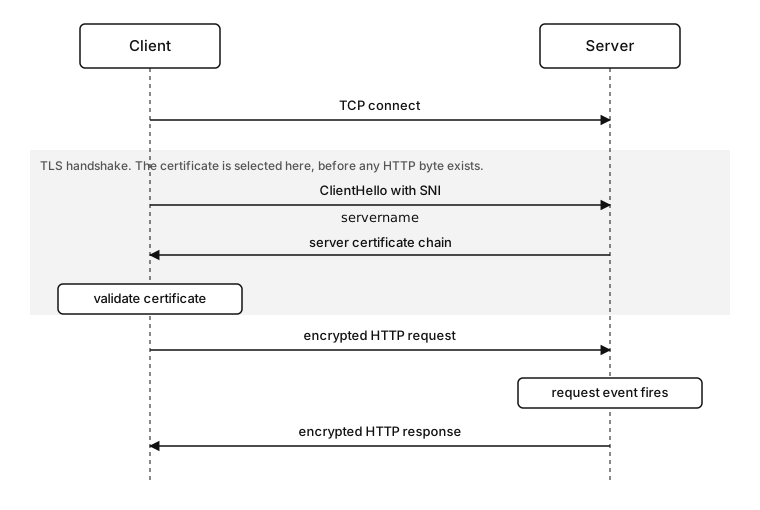
Figure 11.1 - An HTTPS request in time order. TCP connects, the TLS handshake selects a certificate and finishes, and only then do HTTP request and response bytes travel inside TLS.
Once the TLS connection exists, the HTTP rules stay the same. Methods, request targets, headers, bodies, status codes, keep-alive, and streaming behavior all still belong to HTTP. TLS protects the bytes that carry those messages. The HTTP request stays exactly the same. Its bytes now travel inside TLS records, where before they travelled as plain TCP payload.
That ordering helps a lot when you debug. If the TLS handshake fails, Node has no valid HTTP request to hand to your route. A certificate name error happens before your handler. A malformed HTTP request line happens later, after TLS has already produced decrypted bytes. A response stream error happens even later, after the handshake, certificate validation, and request parsing are already done.
Keep those stages separate in logs.
The URL scheme also starts carrying policy. https://api.local/users tells the client to use HTTPS for api.local, usually on port 443 unless a port is supplied. The hostname affects DNS, SNI, and certificate hostname verification. The HTTP request still carries a Host header too. Usually all of those values line up. They drift apart in tests, proxies, custom DNS, and local routing.
Plenty of HTTPS bugs come from that drift.
const req = https.request({
  hostname: '127.0.0.1',
  servername: 'api.local',
  headers: { host: 'api.local' },
});

req.end();
That request connects to 127.0.0.1, sends api.local as the TLS SNI value, and sends Host: api.local in the HTTP request.
Each field belongs to its own layer. hostname chooses the TCP destination. servername feeds TLS certificate selection and hostname verification. Host feeds HTTP routing after the handshake. Because they move independently, local routing and private-service tests are exactly where they drift apart and cause trouble.
hostname, servername, and the Host header set three independent destinations. hostname selects the TCP target, servername drives TLS certificate selection and hostname verification, and Host drives HTTP routing after the handshake. Set each one deliberately when they differ. A mismatch surfaces as a certificate name error or a wrong-route response while the connection itself still succeeds, which makes it slow to diagnose.
HTTPS also changes when a request can fail. Over plain HTTP, the client writes the request line as soon as TCP connects. Over HTTPS it first has to finish TLS and accept the server identity, so https.request() can fail before a single HTTP byte goes out. A wrapper that only logs status codes will never see those failures, since at that point no response object exists yet.
The server sees the same sequence from the other side. If a client sends plain HTTP to an HTTPS port, those bytes reach TLS first. TLS rejects them before the HTTP parser gets involved. Server logs may show errors such as wrong protocol version or unknown protocol. If a client completes TLS and then sends malformed HTTP, the failure belongs to the HTTP parser instead. Same port, but the failure now comes from a later stage.
The same timing explains why curl -k is useful for a quick manual check but should never become your fix in real code. The flag tells curl to skip certificate validation. It proves the server is reachable and speaking TLS. What it does not tell you is whether your Node client has the right CA, SNI name, or hostname verification. In application code, keep validation on and fix the trust input instead.
node:https Is HTTP With A TLS Listener
node:https is the HTTP machinery you already use, running on top of a TLS connection. It opens or accepts TLS connections through node:tls, then runs the same HTTP/1.1 server or client code on the decrypted byte stream.
https.Server is the server object created by https.createServer(). It exposes the same request and response event surface you used with http.Server, while the listening side runs through TLS. The public API looks the same because the HTTP objects are the same. The difference is the socket underneath, where a plain net.Socket becomes a tls.TLSSocket.
const server = https.createServer(options);

server.on('request', (req, res) => {
  res.end(`${req.socket.getProtocol()}\n`);
});
The request event still fires after the HTTP request head is parsed. Since req.socket is now a TLS socket, it can report TLS metadata such as the negotiated protocol version. By the time this handler runs, TLS has already accepted the connection.
https.createServer(options, listener) receives TLS and HTTP configuration in one object. TLS identity and policy options include key, cert, ca, pfx, minVersion, and SNICallback. Secure-context options feed OpenSSL's per-connection setup. HTTP server options include values such as requestTimeout, headersTimeout, custom message classes, and the HTTP parser controls from the HTTP chapter.
One object configures all of it, but the layers underneath still do separate jobs.
https.createServer(options)
  -> TLS server state
  -> default secure context
  -> HTTP request handling
The key and cert values give the server its default identity. The private key stays on the server. The certificate chain is sent to the client during the handshake. The client validates that chain and hostname using the rules from the certificate chapter. If validation fails, the client closes the connection before it sends a normal HTTP request.
In ordinary HTTPS, the server proves its identity to the client. Client certificate authentication is mutual TLS, and that path belongs to the next subchapter. For this chapter, the server presents identity, and the client decides whether that identity is acceptable.
The cert value should usually contain the leaf certificate plus any required intermediate certificates. A server that sends only the leaf certificate can work on a developer laptop that has cached intermediates, then fail in a container, CI job, or another runtime with a smaller trust path. So the server has to send the chain clients need, and the private key has to match the leaf certificate.
Put the leaf certificate plus every intermediate into cert. A server that sends only the leaf often works on a laptop that already cached the intermediates, then fails with UNABLE_TO_VERIFY_LEAF_SIGNATURE in a container or CI runner that has a smaller trust store. Build the full chain file and validate it from a clean environment before you deploy.
Node validates that key and certificate pairing when it builds the secure context. A mismatched key and certificate can throw during server construction or startup, before the listener accepts traffic. Put certificate file reads and secure-context creation near startup so the process fails before accepting partial traffic.
const options = {
  key: readFileSync('api-key.pem'),
  cert: readFileSync('api-fullchain.pem'),
};
The api-fullchain.pem name is only a convention. What counts is the content - the server identity certificate plus intermediates that lead clients toward a trusted root. The private key stays in api-key.pem.
You can also hand the server the same identity material as a PFX bundle.
https.createServer({
  pfx: readFileSync('api.p12'),
  passphrase: process.env.PFX_PASSPHRASE,
}, handler);
The PFX or PKCS#12 file can contain private-key and certificate-chain material in one encoded bundle. Node accepts it through the same secure-context path. Secret storage policy belongs later. Either way, the secure context needs usable identity material before the first handshake.
Then the listener starts accepting TLS connections.
server.listen(8443, '127.0.0.1');.listen() binds the endpoint and starts accepting incoming TCP connections. Each accepted connection then enters the TLS server path, where its application bytes need a handshake before HTTP parsing can begin.
After that, the HTTP lifecycle looks familiar. headersTimeout still covers incomplete HTTP headers, requestTimeout the full HTTP request, and keepAliveTimeout an idle reusable connection after a response. HTTP parser errors after TLS decryption surface through clientError. TLS handshake errors surface through TLS server paths such as tlsClientError. On an https.Server, some lower socket or TLS errors can also reach clientError, so use the event, the error code, and whether secureConnection or request fired.
One server can produce errors from several places.
listen or bind error
TCP accept succeeds
TLS handshake error
certificate or SNI selection error
HTTP parse error
request handler error
response stream error
All of those come from the same https.Server object. The layer that produced the failure decides the event and error code, so check both before you name the stage.
Server creation also keeps the HTTP request-listener timing from the HTTP chapter.
const server = https.createServer(options);

server.on('request', handler);
server.on('connection', socket => console.log('tcp'));
The lower connection event still exists because the server ultimately accepts TCP sockets. For HTTPS, that event fires before TLS is established. Put application request logging on request, low-level connection counting on connection, and TLS acceptance logging on secureConnection. Fold all three into one metric and a storm of new connections gets counted as a storm of requests.
The secureConnection event is emitted by the TLS server side.
server.on('secureConnection', socket => {
  console.log(socket.getProtocol());
});
That socket has completed TLS. It still may never produce an HTTP request. The client can close immediately, send malformed HTTP, or sit idle. A high secureConnection count with a lower request count points below the application handler and above TCP accept.
Timeouts need the same care. handshakeTimeout covers TLS setup. headersTimeout and requestTimeout cover HTTP parsing and body receipt. keepAliveTimeout covers an idle HTTP connection after a response. A log line that just says timeout does not tell you which of those fired, so record the stage.
Where HTTP Starts
The incoming HTTPS path has two parsers in sequence, with OpenSSL between Node's socket wrapper and Node's HTTP parser.
Start with an accepted TCP socket. The kernel owns the connected socket state. libuv reports readiness. Node wraps the accepted endpoint and attaches it to the TLS server machinery. At this point, the socket is carrying TLS handshake bytes. HTTP request bytes come later. OpenSSL consumes the TLS records through Node's TLS binding layer, tracks handshake state, and ends with either an established TLS session or a failure.
During the handshake, Node needs a secure context. A secure context is the configured TLS identity and policy bundle used by OpenSSL for a connection. It contains certificate material, private-key material, trusted CA data when supplied, TLS version policy, cipher policy, ticket settings, and other TLS options. A SecureContext is the JavaScript-facing object returned by tls.createSecureContext(). Application code usually treats it as an opaque object and passes it back into TLS APIs.
https.createServer({ key, cert }, handler) builds a default secure context from those options. If every hostname uses the same certificate chain and TLS policy, that default context is enough. When SNI chooses certificates by hostname, the server still has a default context, then selects another one for a matching hostname during the handshake.
The handshake has to finish before the HTTP parser can do useful work. TLS records have their own framing before HTTP framing exists. OpenSSL reads TLS records, authenticates and decrypts them after keys exist, and hands Node plaintext application bytes. Those plaintext bytes are what the HTTP parser expects - request line, headers, optional body framing, and later more HTTP messages if the connection stays reusable.
Node hands the bytes off in stages.
net.Socket bytes
  -> TLS record processing
  -> decrypted application bytes
  -> llhttp
  -> IncomingMessage / ServerResponse
The HTTP parser inspects a request line only after TLS hands it plaintext. The handler reads headers only after the parser has a valid request head. Certificate selection cannot wait for any of that, because it happens during the handshake, before HTTP headers exist. So multi-tenant HTTPS servers select certificates from SNI. The Host header arrives too late to make that choice.
Backpressure travels through those layers too. If a handler reads a request body slowly, the IncomingMessage readable side can pause. That pressure can reduce reads from the TLS socket. The TLS socket can then stop pulling encrypted records from the underlying TCP socket. The transport, TLS, parser, and stream layers each keep their own buffers and state, but the practical result is the stream backpressure model applied after decryption.
Writes move the other way. res.write() serializes HTTP response bytes into the outgoing HTTP stream. The TLS layer encrypts those bytes into TLS records. The encrypted records go through the socket write path and eventually into the kernel send buffer. A large response can back up at the stream layer, inside TLS, or near the socket and kernel send buffer. JavaScript sees writable stream signals. Lower queues stay below that API.
Handshake timing creates another kind of delay. A client can connect, then stall before finishing TLS. Node's TLS server has a handshake timeout option through the TLS server path. HTTP headersTimeout starts after the connection reaches the HTTP parser path. A slow TLS handshake and slow HTTP headers are handled by separate knobs.
Connection reuse sits above the handshake. Once one TLS connection carries a complete HTTP exchange, Node can reuse the same TLS socket for another HTTP/1.1 exchange if HTTP keep-alive allows it. That reuse keeps the same negotiated TLS session alive because the same socket stays open.
TLS session resumption is a different optimization. It lets a later TLS connection reuse cryptographic session state after a brand-new TCP connection starts. With keep-alive the whole socket stays open. With resumption the socket is new, but its TLS setup is shorter.
Agents can use both ideas. A client can reuse an existing HTTPS socket from the free pool and skip DNS, TCP, and TLS setup for the next exchange. Or it can open a new TCP connection and use cached TLS session data to reduce handshake work. Both can happen in one process, but they use separate pieces of state.
The server's request listener runs late on purpose. It sees HTTP state only after the transport is ready for application bytes. That keeps route code simple. It also means route handlers are the wrong place to fix TLS identity mistakes. A handler can read req.socket.getProtocol(), req.socket.getCipher(), and req.socket.encrypted. It can log TLS metadata. Certificate choice has already finished by then.
Because the listener runs that late, HTTPS leaves route code mostly unchanged. The route sees req.method, req.url, req.headers, and a readable body stream. Those values arrive from the same HTTP parser path after decryption. A framework running on top of https.Server receives the same HTTP objects it would receive from http.Server. The transport work sits below the framework.
Most handlers can stay focused on HTTP and application behavior. That same simplicity can mislead a team when Node sits behind a TLS-terminating proxy. req.socket.encrypted describes the connection into the current Node process, and it says nothing about earlier hops.
https.createServer(options, (req, res) => {
  console.log(req.socket.encrypted);
  res.end('ok\n');
});
For a direct HTTPS connection into Node, that prints true. For an http.Server behind a proxy that ended TLS earlier, Node has a plain socket, so the same field is absent or false. Forwarded metadata can describe the public hop, but only the deployment setup can make that metadata trustworthy.
Tests need the same care. A unit test that calls a handler directly skips TLS completely. An integration test that uses http.request() against an HTTPS port fails before the handler. One with https.request() and rejectUnauthorized: false exercises TLS framing but skips certificate validation. Supplying a real ca gets closest to the production path. Pick the test based on the part of the system you want to cover.
Secure Contexts And SNI Selection
That secure context is the configured TLS state OpenSSL uses during a handshake. In a small HTTPS server, the context usually comes from the options object passed to https.createServer().
const context = tls.createSecureContext({
  key: readFileSync('api-key.pem'),
  cert: readFileSync('api-chain.pem'),
});
tls.createSecureContext() turns certificate and policy options into a SecureContext. The returned object is compiled TLS configuration. Application code usually creates it, stores it, and passes it back into TLS APIs.
SNI is why many Node servers need more than one context. The client includes the hostname it wants during the TLS handshake. Node can use that hostname to select a context before sending a certificate. This has to happen before HTTP parsing, because HTTP headers have not arrived yet.
const contexts = new Map([
  ['api.local', tls.createSecureContext(apiOptions)],
  ['admin.local', tls.createSecureContext(adminOptions)],
]);
The map stores prebuilt contexts by hostname. Prebuilding avoids file reads or certificate parsing during the handshake.
SNICallback performs the selection.
const server = https.createServer({
  ...defaultOptions,
  SNICallback(servername, cb) {
    cb(null, contexts.get(servername));
  },
}, handler);
The callback receives the SNI server name and an error-first callback. Passing a SecureContext as the second argument selects that context for the connection. Passing a falsy context makes Node use the server's default secure context. Throwing or passing an error fails the handshake.
The callback runs while TLS is being set up, so keep the work small. A map lookup is fine. Reading certificate files, querying a database, or calling another service from this callback leaves the client waiting during the handshake. If runtime certificate loading is required, load into memory before traffic uses it, then update the map or server context from a control path.
SNICallback runs inside the TLS handshake, so a file read, database query, or outbound call placed there blocks the connecting client until it resolves. Keep the callback to an in-memory lookup over prebuilt SecureContext objects, and refresh certificate material from a separate control path before traffic uses it.
Node also has server.addContext(hostname, contextOptions) on TLS servers. It registers SNI contexts with the server. SNICallback gives you explicit selection logic. addContext() gives you a built-in hostname match path. Both run before HTTP parsing.
Replacing a context affects future handshakes. Existing HTTPS connections keep the TLS state they already negotiated. A keep-alive socket accepted before a context update keeps carrying HTTP requests until connection policy closes it. You usually want that. Replacing a certificate should not cut off a live TLS session halfway through a response body.
server.setSecureContext(options) replaces the server's default secure context for future connections. SNI-specific maps or addContext() registrations still need their own update path when multiple hostnames are involved. Certificate renewal automation belongs to deployment chapters. At runtime, context updates apply when a new handshake starts, and HTTP keep-alive can keep older accepted connections around for a while.
SNI selection should treat names carefully. Normalize hostname data you control. Reject or fall back for names outside your allowlist. Avoid hand-written wildcard logic unless the rule is small and tested. Node's addContext() can handle hostname and wildcard matching for registered contexts. A custom SNICallback owns whatever lookup logic you write.
SNI mistakes usually surface as certificate failures on the client. The server may have accepted TCP and completed TLS, but it sent the default certificate or the wrong tenant certificate. The client then fails hostname verification with an error such as ERR_TLS_CERT_ALTNAME_INVALID.
Local testing has a smaller trap. A client connecting by IP address usually sends an empty SNI name by default in Node's https.Agent path. The docs spell this out - the default servername is empty when the target host is given as an IP address. If the server needs SNI to pick the certificate, set servername explicitly while still connecting to the chosen address.
Connecting to an IP address leaves servername empty by default, so the server receives no SNI value and answers with its default certificate. Set servername explicitly when you target an IP and the server selects certificates by hostname. Otherwise the client validates the wrong certificate and fails with ERR_TLS_CERT_ALTNAME_INVALID.
https.request({
  host: '127.0.0.1',
  servername: 'api.local',
  port: 8443,
});
The TCP connection goes to 127.0.0.1. The TLS handshake sends api.local as the SNI name and uses it for hostname verification. That combination is common in local tests, private routing, and custom lookup code.
The default context still deserves attention even when every expected hostname has an SNI context. Plenty of connections never give you a usable name to match on. A client might omit SNI, a probe might connect by IP address, and old tooling might send the wrong name entirely. The default certificate should be a deliberate choice - either a safe fallback for a primary hostname, or one that fails validation for unknown names on purpose. Leaving an old certificate as the default creates noisy, misleading failures later.
HTTPS Clients Use The Same Request Object
https.request() is the core HTTPS client call. It returns an http.ClientRequest, the same writable request object structure from the HTTP client chapter.
import https from 'node:https';

const req = https.request('https://api.local/users', res => {
  console.log(res.statusCode);
  res.resume();
});

req.end();
The request object owns headers, method, path, upload body state, response event timing, and stream behavior. HTTPS adds TLS connection setup before any HTTP request bytes can be written to the peer.
The defaults change from http.request() - protocol is https:, default port is 443, and the default agent is https.globalAgent. The accepted options include ordinary HTTP client options plus TLS options such as ca, cert, key, pfx, servername, and rejectUnauthorized.
The URL feeds more than one layer.
https://api.local:8443/users
  -> TCP destination - api.local:8443
  -> TLS SNI and hostname verification input - api.local
  -> HTTP request target - /users
https.request() normalizes the URL into connection options and HTTP request options. It asks the agent for a socket. The agent may reuse an existing TLS socket, open a new TCP connection and perform TLS, or queue the request behind socket limits. Only after a socket is ready can the client flush the serialized HTTP request bytes.
The client lifecycle usually goes like this.
create ClientRequest
  -> acquire or open socket
  -> complete TLS if socket is new
  -> write HTTP request
  -> parse HTTP response
  -> return or close socket
The callback passed to https.request() fires at the same moment as the HTTP version - final response headers have been parsed and res is available. DNS errors, TCP refusal, TLS alerts, and certificate validation failures land on the request's error path instead.
Private CAs should be configured as trust input instead of bypassing verification.
const agent = new https.Agent({
  keepAlive: true,
  ca: readFileSync('local-ca.pem'),
});
The agent uses the supplied CA data for connections it creates. In this form, the ca option defines the trusted CA set for that TLS path. Reach for the agent when one upstream needs one trust policy across many requests.
A request-level ca works too.
https.get('https://api.local', {
  ca: readFileSync('local-ca.pem'),
}, res => res.resume());
That form is fine for one-off scripts. Service code usually wants the agent form because it keeps trust policy, socket limits, keep-alive, and session-cache policy tied to one upstream client.
Attach the agent per request.
https.request('https://api.local/users', { agent }, res => {
  res.resume();
}).end();
https.Agent is the HTTPS version of the core agent. It owns outbound HTTPS socket reuse, active and free socket pools, pending request queues, and TLS connection creation. It also owns TLS session caching for connections it creates. The pool decides whether a request gets an existing TLS socket. The session cache can help when the agent opens a new TLS socket to the same compatible endpoint.
The global HTTPS agent has keep-alive enabled and a five-second timeout in current Node v24. A custom new https.Agent() should still make policy explicit.
const agent = new https.Agent({
  keepAlive: true,
  maxSockets: 50,
  maxFreeSockets: 10,
});
Those values control connection reuse and concurrency for requests using that agent. Node's built-in fetch() uses Undici underneath, so core https.Agent options apply to core https.request() and https.get(). Fetch policy belongs to dispatcher configuration or Node's global dispatcher path.
The HTTPS agent session cache is easy to confuse with free sockets. The free-socket pool holds open TLS connections after complete HTTP exchanges. The session cache holds TLS session material that may permit session resumption on a later connection. Node's https.Agent accepts maxCachedSessions. The default is 100, and 0 disables TLS session caching.
const agent = new https.Agent({
  keepAlive: true,
  maxCachedSessions: 0,
});
That code keeps reusable sockets but disables cached TLS session resumption. This is rare in ordinary service clients, but useful in tests and diagnostics when you want every new connection to perform a full handshake. A reused socket from the free pool still skips the handshake because the socket itself stayed open.
Agent pool keys also affect reuse. Core agents group sockets by destination and relevant connection options. Two requests to the same host can land in separate pools when their TLS options are not the same. A call with one CA set needs socket state opened under that same CA policy. When debugging low reuse, compare the full agent options, not only the URL string.
servername can also change the TLS setup. A custom lookup function might connect to one IP address while keeping another server name for validation. One request that omits servername and another that supplies it can end up with separate TLS setup paths. Keep that field inside the client wrapper instead of scattering it across call sites.
https.get() is the convenience version.
https.get('https://api.local/health', { agent }, res => {
  res.resume();
});
It calls req.end() for a bodyless GET, like http.get(). The same response body rule applies - consume, drain, or destroy. A health check that reads only the status code and returns without draining can hurt socket reuse under load.
Response body rules do not change. A status-only branch still has to drain, consume, or destroy the response body. Otherwise the HTTPS socket cannot cleanly return to the agent's free pool. TLS changes how bytes are protected on the connection. HTTP message completion rules still apply.
Fetch is a separate path from this one. Global fetch() in Node uses Undici. It still performs HTTPS validation and TLS connection setup, but it uses Undici dispatcher policy instead of your core https.Agent. If one upstream client uses https.request() with an agent and another uses fetch() with default dispatcher policy, they have separate connection pools and may have separate proxy behavior. Both can work. Just make sure that split in pooling and proxy behavior is a choice you made and not one you find out about later.
Uploads And Keep-Alive Over HTTPS
HTTPS request uploads use the same writable ClientRequest stream as plain HTTP. TLS adds work below the stream. From JavaScript's side, the commit point for the HTTP body is still req.end().
const req = https.request(url, { method: 'POST', agent }, res => {
  res.resume();
});

req.end(JSON.stringify({ ok: true }));
req.end() finishes the outbound HTTP message body from JavaScript's side. For a new HTTPS socket, Node has to complete TLS before it can write those HTTP bytes to the peer. If the request object receives body bytes before the socket is ready, Node buffers through the writable stream path and flushes after connection setup.
So a write can fail in several places. DNS resolution fails before any buffering is relevant. TLS fails after TCP connects but before the upload starts. The peer resets midway, while the request body is still being encrypted and written. Or the server takes the whole upload and answers with an error status. A log line that just says POST failed, with no phase attached, leaves you guessing which one happened.
phase=connect   -> TLS session absent
phase=tls       -> HTTP request not accepted yet
phase=upload    -> request body path started
phase=response  -> status or body read failed
For small JSON payloads, req.end(body) is usually enough. For streamed uploads, the stream rules come back.
pipeline(source, req, err => {
  if (err) req.destroy(err);
});
The pipeline covers the upload stream into the ClientRequest writable side. A successful callback reports completion of that local stream pipeline. Peer acceptance and application processing show up later through the response status and body. HTTPS adds one more reason to keep response handling attached - a TLS socket can only return to the agent after the HTTP response body ends cleanly or the socket is deliberately destroyed.
Server uploads follow the same order. The request handler runs after TLS and after the HTTP request head exists. The body may still be arriving.
https.createServer(options, async (req, res) => {
  const body = await readBody(req);
  res.end(String(body.length));
});
While readBody(req) waits, encrypted TLS records can continue arriving from the client. Node decrypts them and feeds body bytes into the request stream according to HTTP framing. If the handler pauses or reads slowly, backpressure can move down through the TLS socket and into the underlying TCP path.
Early rejection needs an explicit connection decision. A server can reject based on headers before reading the whole body. If it wants to keep the HTTPS connection reusable, it has to consume or discard the remaining request body until the HTTP parser reaches the message end. If it closes instead, the TLS socket goes away and the client loses reuse.
if (req.headers['content-type'] !== 'application/json') {
  req.resume();
  res.writeHead(415).end();
  return;
}
That pattern drains the request body and sends a response. It works for bounded, expected bodies. For untrusted or large bodies, destroying the connection is often the better local call, since draining spends bandwidth on a request the server has already rejected. You decide that policy in the handler. The draining itself is just HTTP running over the TLS socket that is already up.
Keep-alive over HTTPS keeps both HTTP and TLS state alive. After a complete exchange, the agent can retain the TLS socket as a free socket. The next request can reuse the same socket, which means no DNS, no TCP connect, and no TLS handshake for that exchange. The server still sees a new HTTP request on an existing TLS connection.
TLS session resumption only enters when a new TLS connection starts. A client can close a socket, then later connect again and resume part of the TLS session if both peers and the agent/session settings permit it. A reused keep-alive socket keeps the existing handshake in force.
Three counters make this easy to read.
new TLS handshakes
reused HTTPS sockets
resumed TLS sessions
When new handshakes spike, new connections are replacing reusable sockets, or traffic is outrunning the free pool. When reused sockets drop, suspect unread response bodies, server Connection: close, low free-socket limits, proxy behavior, or mismatched agent options. When resumed sessions drop, the session cache or server ticket behavior changed, even though keep-alive still works.
You can skip those counters early on. During an HTTPS rollout they become worth watching, because they tell you whether you lost pooling, lost session resumption, or started opening far more connections than before.
Termination And Passthrough
TLS termination happens wherever the encrypted connection ends and decrypted HTTP bytes first become available. The component that does that decryption is the one that terminated TLS.
When Node runs the HTTPS server itself, Node owns TLS termination.
client
  -> TLS connection
  -> Node https.Server
  -> request handler
The client validates Node's certificate. Node owns SNI selection, handshake policy, certificate files, TLS socket metadata, and HTTP parsing after decryption.
A reverse proxy can terminate TLS before traffic reaches Node.
client
  -> TLS connection
  -> reverse proxy
  -> HTTP or HTTPS upstream
  -> Node server
The proxy handles TLS for the public client connection. From there, Node either receives plain HTTP from the proxy, or the proxy opens a second HTTPS connection to Node. These are two separate protected spans. Plain HTTP means protection ended at the proxy. A second HTTPS connection means the proxy-to-Node hop gets its own TLS.
That placement changes what Node can know. A plain http.Server behind a TLS-terminating proxy only sees the proxy connection. The client's TLS cipher, certificate, and TLS protocol version live at the proxy. Node sees the proxy as the TCP peer. It can receive forwarded metadata only if the proxy adds it and the deployment contract says Node should trust it.
A second HTTPS hop changes the trust question.
client
  -> HTTPS to reverse proxy
  -> HTTPS to Node
The client validates the proxy-facing certificate. The proxy validates Node's upstream certificate if configured to do so. Node validates nothing about the public client in ordinary HTTPS because the proxy is Node's TLS peer. The user-facing request and the proxy-to-origin request are separate HTTP exchanges with separate TLS sessions around them.
When someone says "end-to-end TLS", ask which two ends. Public client to proxy is one protected span. Proxy to Node is another. Public client straight to Node through passthrough is a third. Naming the actual components removes the ambiguity.
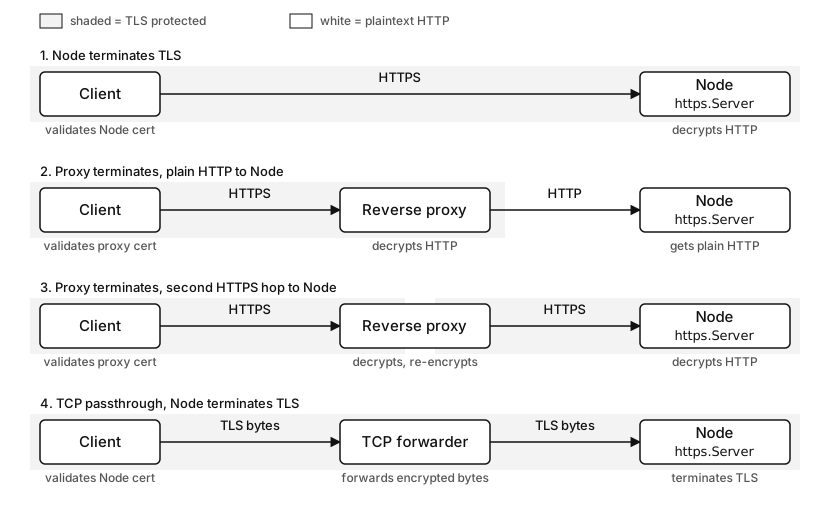
Figure 11.2 - Four TLS termination layouts. The shaded span marks where bytes stay encrypted, and the labels show which component decrypts HTTP and which certificate the client validates.
TLS passthrough keeps the TLS handshake owned by Node.
client
  -> TCP forwarder or load balancer
  -> unchanged TLS bytes
  -> Node https.Server
The intermediate component forwards connection bytes without terminating TLS. Node receives the client's TLS handshake, chooses the certificate, and decrypts the HTTP bytes. Passthrough keeps Node responsible for certificate selection and TLS policy. It also means the intermediary has less HTTP-level information because the HTTP request stays encrypted until it reaches Node.
Placement depends on ownership. Node termination gives application code direct TLS state and can simplify local development or small deployments. Proxy termination centralizes certificates, public listener policy, and platform routing. Passthrough keeps client-to-Node TLS state while still using an intermediate connection router. Later platform chapters own load balancer and ingress operations. Locally the thing to pin down is narrower. Name the termination point before you debug certificates, forwarded-proto headers, or missing TLS metadata.
Show the protected spans directly in diagrams and logs.
public client -> proxy - HTTPS
proxy -> Node - HTTP
That line says the public path is protected to the proxy, then plain HTTP runs from proxy to Node. If policy requires protection on the second hop, the second line should say HTTPS too.
Forwarded headers such as X-Forwarded-Proto: https or Forwarded: proto=https are HTTP metadata a proxy writes into the request. They carry whatever the proxy observed about the public connection. They do not come from Node's own TLS socket, so Node cannot verify them on its own. You can trust them only inside a trusted proxy path. A direct client can send the same headers unless the proxy strips or overwrites them before forwarding.
X-Forwarded-Proto and Forwarded are plain HTTP headers that any client can set. Trust them only on a listener that sits behind a proxy you control and that overwrites or strips client-supplied copies. A direct public listener that reads these headers lets a caller claim the request arrived over HTTPS when it did not, which can bypass scheme-based security checks.
For application code, read forwarded protocol only from a known proxy path. A direct public listener should ignore caller-supplied forwarded headers. A backend listener behind a trusted proxy should expect the proxy to overwrite those fields and remove untrusted client values. Framework "trust proxy" settings exist for this reason, but framework policy belongs to Chapter 12 and security chapters.
TLS termination also decides who owns a given error. A certificate renewal mistake at the proxy fails before Node ever sees a connection. A wrong certificate inside Node fails in Node's own HTTPS server path. A proxy-to-Node HTTPS failure can show up as a proxy upstream error at the same time Node logs a TLS handshake error. The user sees one broken page, but the component that has to fix it is different in each case.
Placement also affects local health checks. A platform can check the proxy listener over HTTPS while checking Node over HTTP. Or it can check Node over HTTPS directly. A failing public certificate may break real users while an internal HTTP health check remains green. Health-check policy comes later. Right now, make sure the endpoint you check actually crosses the protected span you care about.
Configuration Footguns
NODE_TLS_REJECT_UNAUTHORIZED is a process-level environment variable. When its value is '0', Node disables certificate validation for TLS connections. HTTPS still encrypts bytes, but it no longer authenticates the peer identity. Node's own docs strongly discourage using it.
That variable is dangerous because it is so broad. A single test command can leak it into a shell, and one line in a .env file can switch off validation for every outbound HTTPS request in the process. Your own https.request() calls, any library that uses core HTTPS, and code you never thought about all inherit the disabled policy.
Setting NODE_TLS_REJECT_UNAUTHORIZED=0 turns off peer identity checks for every TLS connection the process opens, including third-party libraries and code you do not control. The bytes stay encrypted, but any certificate is accepted, which removes protection against an intercepting peer. Configure trust with a ca option or NODE_EXTRA_CA_CERTS instead, and keep this variable out of any service that handles real traffic.
Per-request bypass is narrower and still risky.
https.get(url, { rejectUnauthorized: false }, res => {
  res.resume();
});
rejectUnauthorized: false tells the TLS client to accept an unauthorized server certificate for that connection. The encrypted channel still exists. The identity check has been skipped. That changes the security contract of the request, and it often hides the real problem - missing local CA, incomplete chain, wrong hostname, expired certificate, or wrong SNI.
Use a CA file for private trust.
https.get(url, {
  ca: readFileSync('dev-root-ca.pem'),
}, res => res.resume());
That code tells the client to trust certificates issued by the given CA set. Certificate validation stays active. For a reusable client, put the ca option on an agent instead of repeating it at every call site.
NODE_EXTRA_CA_CERTS is the process startup tool for adding extra trusted CA certificates to Node's default set. Node reads it when the process launches. Runtime changes to process.env.NODE_EXTRA_CA_CERTS do not change the current process trust set. Also, an explicit ca option on a TLS or HTTPS client defines the CA set for that connection path, so that path uses the explicit CA list.
Local development should still use validation. A local root CA, a development certificate with a SAN for localhost or the test hostname, and a client ca option produce the same kind of failures production has. Disabling validation removes the checks your code needs to exercise.
One more SNI trap shows up in tests. Connecting to https://127.0.0.1:8443 while using a certificate for localhost gives the client an IP address as the hostname. Hostname verification follows that input. Use https://localhost:8443 with a cert containing localhost, or set servername: 'localhost' when a test must connect to an IP address.
Configuration also has timing concerns. Environment variables are usually read once, at process startup. Agents are often created during module initialization. TLS sessions can be cached after the first request. So changing trust policy at runtime, after clients have already opened or cached sessions, leaves you with mixed behavior, where some requests ride old sockets, some open new ones under the new options, and some resume cached sessions. Restarting the process is usually the cleanest way to apply a trust change.
For local scripts, make the validation choice loud.
if (process.env.NODE_TLS_REJECT_UNAUTHORIZED === '0') {
  throw new Error('TLS verification disabled');
}
The guard throws instead of warning, so a service that requires verified upstreams refuses to start when the process-wide bypass is set. Test code that genuinely needs a bypass can isolate it in a child process or a one-off script, so it never leaks into the application runtime.
For internal services, prefer one exported client object.
export const apiAgent = new https.Agent({
  keepAlive: true,
  ca: readFileSync('internal-ca.pem'),
});
That module turns trust policy into reviewable code. It also prevents each call site from inventing its own rejectUnauthorized, servername, timeout, and pool settings.
Reading HTTPS Errors By Stage
An HTTPS error gets much easier to understand once you place it before TLS, during TLS, or after TLS.
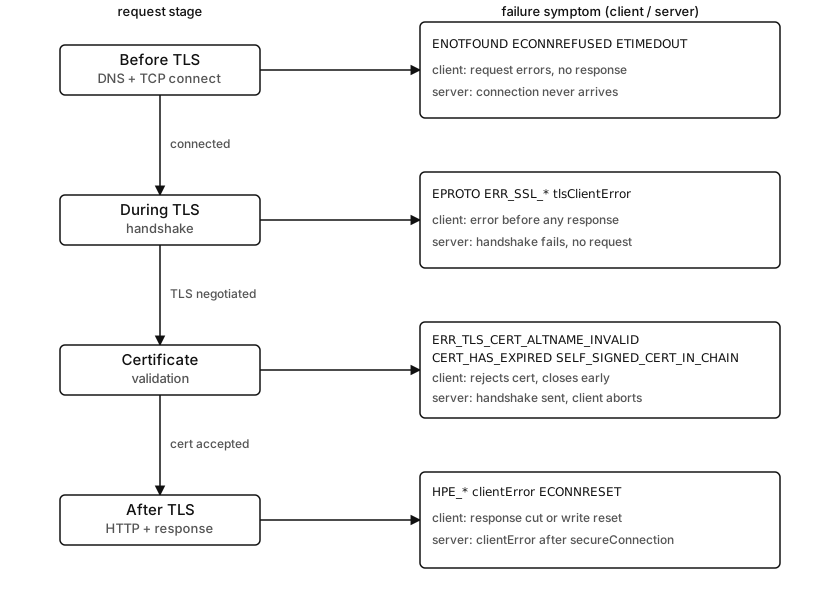
Figure 11.3 - HTTPS failures sorted by the stage that produced them. Each stage lists the error codes plus the client-side and server-side symptom you would see.
DNS and TCP failures happen before TLS starts.
ENOTFOUND      -> name lookup failed
ECONNREFUSED   -> TCP listener refused the connect
ETIMEDOUT      -> connect or network path timed out
These errors mean the client never reached a usable TLS handshake with the intended endpoint. Certificate options only take effect after the socket connects, so none of this is about certificates yet. When the failure is DNS or a refused connect, you fix it in routing or the listener, and changing your ca or servername does nothing.
TLS handshake failures happen after TCP connect and before HTTP.
wrong protocol version
cipher or policy mismatch
TLS alert from peer
handshake timeout
wrong SNI context
The exact Node error code can depend on OpenSSL, peer behavior, and where the failure surfaced. Logs often include ERR_SSL_*, EPROTO, or a TLS alert description. A common server-side symptom is tlsClientError before any request event. A common client-side symptom is an error on the ClientRequest before a response event.
Certificate validation failures are a specific TLS-client stage.
ERR_TLS_CERT_ALTNAME_INVALID
UNABLE_TO_VERIFY_LEAF_SIGNATURE
SELF_SIGNED_CERT_IN_CHAIN
CERT_HAS_EXPIRED
These failures mean the client received certificate material and rejected it. In an HTTPS client trace, they appear before request bytes are safely exchanged. The fix usually belongs to hostname, chain, CA trust, or validity period rather than an HTTP header change.
HTTP parser and request lifecycle failures usually appear after TLS has already produced plaintext.
clientError on server
bad request line
header overflow
request timeout
response body cut short
At that point the connection was already encrypted. The remaining problem belongs to HTTP syntax, message framing, body streaming, timeouts, or application code. On https.Server, clientError is still a broad client-connection signal. An HPE_* code, a prior secureConnection, or request-stage data makes the HTTP-parser classification more reliable.
Write failures can happen after TLS has succeeded. A client can complete TLS, start writing an HTTP request body, then receive ECONNRESET because the server closed the TLS socket. The local error may arrive on the request object. The peer's reason may be an HTTP policy decision, a TLS close, a process restart, or a network reset. For uploads, the client often cannot prove how many body bytes reached the peer.
Response read failures happen later. The client may receive a valid status code and headers, then the response stream closes before the body framing completes. In core HTTP, check res.complete during close or error diagnosis. HTTPS keeps the same body-completion problem while protecting the bytes in transit.
This stage-based view also helps server operators. A tlsClientError spike with a flat request count points at handshake, certificate, protocol, or clients speaking plain HTTP to the HTTPS port. A clientError spike needs grouping by code - HPE_* points at HTTP parser work after TLS, while ERR_SSL_* can point back into the TLS or socket path. A handler-level 4xx spike points at application routing or validation. Counting all three as bad requests throws away the one distinction that tells you where to look.
For client wrappers, attach error handling before ending or writing the request.
const req = https.request(url, { agent }, res => {
  res.resume();
});

req.on('error', err => log(err.code));
req.end();
That listener can see DNS, TCP, TLS, certificate, write, and early response failures depending on timing. Response-stream failures still need response-side handling when the body is important. Small wrappers often centralize both paths so callers do not have to remember every event.
For staged logging, record facts instead of guessing.
origin=api.local:443
phase=tls
code=ERR_TLS_CERT_ALTNAME_INVALID
servername=api.local
reused=false
reused=false says the request used a new socket. That makes a stale free-socket explanation less likely. phase=tls says there was no response object. servername tells you which SNI and hostname verification input the client used. None of these fields is expensive to log, and together they replace a lot of guesswork in a vague outage report.
Server logs should name the layer.
server.on('tlsClientError', err => {
  console.warn('tls', err.code ?? err.message);
});

server.on('clientError', err => {
  console.warn('client-socket', err.code ?? err.message);
});
The first listener catches failures in the TLS server path during pre-secure setup. The second catches HTTP parser failures such as HPE_*, plus forwarded socket or TLS errors. Keep code-level buckets inside counter labels instead of treating the event name as the full diagnosis.
The handler still owns ordinary application errors.
https.createServer(options, async (req, res) => {
  try {
    res.end(await render(req));
  } catch (err) {
    res.destroy(err);
  }
});
That catch block handles handler-stage failures only. If this code never runs, the failure happened earlier.
Inspecting Live HTTPS State
Runtime inspection starts from req.socket on the server and res.socket on the client. In HTTPS, those sockets are tls.TLSSocket instances.
Start on the server.
https.createServer(options, (req, res) => {
  console.log(req.socket.getProtocol());
  console.log(req.socket.getCipher().name);
  res.end('ok\n');
});
getProtocol() reports the negotiated TLS protocol version, such as TLSv1.3. getCipher() reports the selected cipher information. The handler runs after negotiation, so those methods have useful values for accepted requests.
Now the client.
https.get(url, { agent }, res => {
  console.log(res.socket.getPeerCertificate().subject);
  console.log(res.socket.getProtocol());
  res.resume();
});
getPeerCertificate() reports certificate data for the remote peer while the connection is open. On a client, the peer is the HTTPS server. On an ordinary HTTPS server, the peer is a client that usually omits a certificate. Mutual TLS changes that in the next subchapter.
For agent behavior, log reuse and TLS metadata together.
const req = https.get(url, { agent }, res => {
  console.log(req.reusedSocket, res.socket.getProtocol());
  res.resume();
});
req.reusedSocket comes from the HTTP client layer. getProtocol() comes from TLS. A reused socket should already have a negotiated TLS protocol because the connection stayed open from an earlier exchange. A new socket can still use TLS session resumption during handshake, but reusedSocket stays false because the socket itself is new.
Connection events help separate accepts from requests.
server.on('secureConnection', socket => {
  console.log(socket.getProtocol(), socket.servername);
});
secureConnection fires when TLS has completed for a server-side TLS socket. The request event comes later, after HTTP parsing. A spike in secureConnection with fewer request events points at clients that complete TLS and then stall, close, or send invalid HTTP.
Agent inspection should keep TLS and pool state separate. Core agents expose sockets, freeSockets, and requests objects. Those are implementation-level diagnostics rather than a stable metrics API, but they are useful during local debugging.
console.log(Object.keys(agent.sockets));
console.log(Object.keys(agent.freeSockets));
Active sockets are carrying exchanges, free sockets are held for reuse, and pending requests are waiting for a socket to open up. TLS session cache state is separate and has less direct inspection surface. When reuse looks wrong, start with active, free, and pending counts, then check whether TLS options vary between calls.
On a server behind a proxy, inspection needs two layers of data. req.socket.getProtocol() reports the TLS protocol only when Node owns the TLS connection. req.headers['x-forwarded-proto'] reports proxy metadata only when the proxy sent it. Logging both without labels creates false certainty. Prefer names such as nodeTlsProtocol and forwardedProto.
Avoid turning TLS inspection into application policy inside route handlers. Logging negotiated version and cipher can help diagnose rollout issues. Certificate selection, trust anchors, and TLS termination placement belong in server and client configuration before requests run.
HTTPS keeps HTTP familiar and adds a protected transport stage before HTTP begins. Once the handshake, certificate selection, and secure-context work are correct, the rest of the request path goes back to the same server, client, agent, stream, timeout, and parser behavior you already know from the HTTP chapter.