ALPN and Protocol Negotiation
Most people assume HTTP/2 starts when a client sends a request and the server upgrades the connection. For h2 over TLS, the choice comes earlier, before either side sends a single HTTP/2 byte.
The client opens a TCP connection. TLS begins. During the TLS handshake the client lists which application protocols it can speak on this encrypted connection. The server picks one from that list and sends the choice back inside the same handshake.
That TLS extension is ALPN, short for Application-Layer Protocol Negotiation.
For Node HTTPS and HTTP/2 servers, the choice is almost always between h2 and http/1.1. If TLS selects http/1.1, the decrypted bytes go to the HTTP/1.1 implementation. A selection of h2 sends them to HTTP/2 over TLS instead. Either way, the handshake settles that routing for the whole connection.
This decision happens before JavaScript ever sees a request object. By the time your handler gets req, Node has already accepted the TCP connection, finished TLS, let ALPN pick an application protocol, attached the matching protocol implementation, and started turning decrypted bytes into request-level objects.
Most of the confusing failures come from those layers being set up for work they cannot do together.
Take a server that presents a valid certificate and finishes TLS cleanly, then fails before any route runs because the client required h2 and the server selected http/1.1. Or a client that connects fine, then hits a parser error because it advertised h2 from code that only writes HTTP/1.1 bytes. The third case is harder to spot. Node logs http/1.1 while the browser shows HTTP/2 in DevTools, because a reverse proxy negotiated h2 with the browser and opened a separate HTTP/1.1 connection to Node.
ALPN is one extension inside TLS, and it runs early enough to decide which HTTP implementation receives the connection.
The TLS Handshake Carries the Protocol Choice
Chapter 11.1 covered the TLS handshake. Add ALPN to that same setup and the order becomes this.
TCP connected
client hello - SNI, TLS versions, cipher data, ALPN list
server hello - selected TLS version, cipher data
ALPN selection - ServerHello extension in TLS 1.2 or EncryptedExtensions in TLS 1.3
certificates and key exchange finish
encrypted application data begins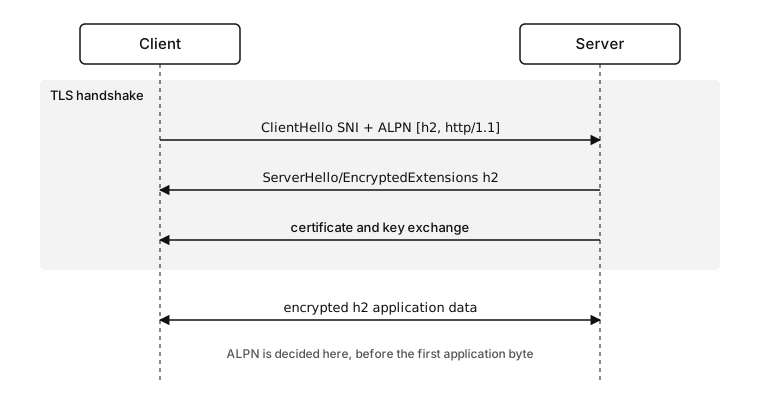
Figure 11.1 - The client sends an ordered ALPN list in ClientHello, the server returns one selected value such as h2 inside the handshake, and that choice is fixed before the first application byte.
ALPN is carried inside the TLS handshake messages. The client sends a list of protocol names. The server sends back one selected value. After that, both peers know which application protocol this TLS connection will use.
The exact server message depends on the TLS version. TLS 1.2 sends the selected ALPN value in a ServerHello extension. TLS 1.3 sends it in EncryptedExtensions, which is the encrypted server-parameter message sent after ServerHello.
The protocol has to be settled before application data starts, because the first decrypted bytes mean separate things under each protocol. In HTTP/1.1, the first client bytes are usually a request line such as GET / HTTP/1.1. In HTTP/2 over TLS, the first client bytes belong to the HTTP/2 startup sequence. So one protocol implementation takes the connection from the first application byte, and the choice is fixed up front rather than deferred to the parser.
The client puts its protocol list in the client hello. The server's pick comes back during the same handshake, before any application data. So the moment the handshake finishes, the protocol for this connection is already fixed.
That also means the selected protocol exists before Node creates an HTTP request object. By the time a request handler runs, the protocol is already chosen. Headers arrive inside whichever application protocol ALPN selected, and that selection decided which implementation parses them.
The selected value is a property of the TLS connection, and it holds for the whole life of that connection. On an HTTP/1.1 keep-alive socket, every request uses the same ALPN result. On an HTTP/2 connection, every stream inside the session uses it too. A new request reuses the existing result, and only a new TLS connection runs the negotiation again.
Session resumption keeps ALPN tied to each connection rather than to the hostname or certificate. A resumed TLS connection still ends with an application protocol selected for that connection, and the current connection needs its own selected value before application data can be handled.
Node later exposes that selected ALPN value on the TLS socket. It is the exact protocol string both peers agreed to use for application data on that connection. Once TLS finishes, Node can send decrypted bytes to the right protocol implementation.
For HTTP/1.1, the byte stream goes into the HTTP parser covered in Chapter 10. Request lines, headers, body framing, keep-alive state, and agent pooling follow HTTP/1.1 rules.
For HTTP/2 over TLS, the decrypted stream belongs to the HTTP/2 connection model. The startup sequence, frames, streams, and settings are covered in the next subchapter. At the ALPN level only one thing happens. h2 tells Node to use the HTTP/2 implementation for this connection.
One TLS port can therefore serve more than one application protocol across separate connections -
client A -> TLS -> selected ALPN = h2       -> HTTP/2 implementation
client B -> TLS -> selected ALPN = http/1.1 -> HTTP/1.1 implementation
The port and the certificate can be identical across both connections. The selected ALPN value is what decides which application protocol handles the decrypted bytes after TLS.
So ALPN belongs inside TLS. HTTP headers exist only once an HTTP parser has started, and that parser gets chosen before the first header byte. Each connection commits to one parser up front, and that commitment holds. An HTTP/1.1 parser handed an HTTP/2 connection preface fails, and a connection that opened with an HTTP/1.1 request line stays HTTP/1.1 the whole way.
ALPN also runs before routing. Routes deal with methods, paths, headers, and bodies. ALPN decides which protocol decoder creates those values in the first place.
SNI and ALPN are often logged together because both appear during the TLS handshake, but they answer separate questions. SNI tells the server which hostname the client is trying to reach. ALPN tells the server which application protocols the client can use after TLS. A server can use SNI to choose certificate material and ALPN to choose the protocol implementation for the same accepted socket.
They also fail in separate ways. A bad SNI or certificate path usually appears as a certificate selection or validation problem. A bad ALPN path can appear as no_application_protocol, false, unknownProtocol, or a parser error after TLS. A certificate error and an ALPN error live in different parts of the stack, so the failure name tells you where to look.
Protocol Identifiers Are Exact Bytes
You write an ALPN identifier as a JavaScript string in Node, but what goes on the wire is an exact byte sequence inside the TLS extension. The string has to match those bytes exactly. Two identifiers do almost all the work in this chapter.
const protocols = ['h2', 'http/1.1'];h2 is the ALPN identifier for HTTP/2 over TLS. http/1.1 is the ALPN identifier for HTTP/1.1. These names are case-sensitive. H2, http2, and HTTP/1.1 are separate byte sequences, so they are separate protocol names.
Node passes these values into OpenSSL as ALPN protocol names. When you pass an array of strings through ALPNProtocols, Node handles the packed wire format for you. You can also pass a Buffer using the length-prefixed ALPN wire format, but that is rarely useful in application code. The array form is easier to read in code review.
const ALPNProtocols = ['h2', 'http/1.1'];That says the endpoint supports HTTP/2 over TLS and HTTP/1.1. The order expresses preference to the TLS stack. In server code, put the protocol you prefer first, followed by fallback values you are willing to support.
These names come from a registry of protocol identifiers, each one a fixed byte sequence. The spelling is part of the contract.
const wrong = ['http2', 'HTTP/1.1'];Those strings can still be encoded into an ALPN extension, but they do not match the registered identifiers for HTTP/2 over TLS or HTTP/1.1. A peer following the registry will not treat them as those protocols. The result is either no shared protocol or a selected value that a normal HTTP implementation will not understand.
Node does not check your intent here. It accepts protocol strings and hands them to the TLS stack. The peer decides whether any name overlaps with its own list. The same behavior supports custom protocols over TLS, and it turns spelling mistakes into runtime negotiation failures.
Protocol order needs the same care. A server that advertises ['http/1.1', 'h2'] is telling the TLS stack that HTTP/1.1 is preferred over HTTP/2. Some deployments may want that during a controlled rollout. Most public HTTP/2 endpoints prefer h2 first and keep http/1.1 as the fallback.
The server picks the winner when several offered protocols overlap, and it picks by the order of its own ALPNProtocols list, not the client's. A server that lists ['http/1.1', 'h2'] selects http/1.1 even for a browser that prefers h2. Put h2 first on any endpoint meant to serve HTTP/2.
One common copy-paste mistake is h2c. h2c names cleartext HTTP/2 over TCP, a different transport from secure HTTP/2. A secure Node server that needs HTTP/2 advertises h2.
HTTP/3 has identifiers such as h3, but HTTP/3 runs over QUIC. That path belongs outside this chapter. A Node node:http2 server uses h2 for HTTP/2 over TLS.
Node hands your ALPN strings straight to the TLS stack and never checks them against the registry. H2, http2, and h2c are different byte sequences from h2, so a typo gives you either no shared protocol or a selected value the peer's HTTP stack rejects. Write h2 for HTTP/2 over TLS and http/1.1 for HTTP/1.1, exactly.
Exact names also affect logs. A proxy log that says alpn=h2 tells you the client-to-proxy TLS connection selected HTTP/2. A Node log that says alpn=http/1.1 tells you the connection visible to Node selected HTTP/1.1. Both can be true when the proxy terminates TLS and opens a new upstream connection.
Configuring ALPN on a TLS Client
The simplest useful Node example is a raw TLS client. It has no HTTP parser, no request object, and no response handling. It connects, offers protocols, and prints what TLS selected.
import tls from 'node:tls';

const socket = tls.connect({
  host: 'example.com',
  port: 443,
  servername: 'example.com',
  ALPNProtocols: ['h2', 'http/1.1'],
});
The client hello contains the ALPN list. servername still feeds SNI, covered earlier in this chapter. Certificate validation still runs. ALPN only adds a protocol offer to the TLS handshake, so certificate checks, cipher negotiation, and TLS version selection all run exactly as before.
Read the selected value once TLS completes.
socket.on('secureConnect', () => {
  console.log(socket.alpnProtocol);
  socket.end();
});
tlsSocket.alpnProtocol is the selected ALPN protocol for this connection. It is usually 'h2', 'http/1.1', or false. false means no ALPN protocol was selected. That can happen because one side did not send ALPN, or because the generic TLS path completed without a selected application protocol.
Switching protocols deep in application code based on socket.alpnProtocol does not work. The implementation that writes the bytes has to match the value TLS selected.
A raw TLS client can inspect socket.alpnProtocol and then decide what bytes to write. A higher-level client such as https.request() already has an HTTP/1.1 implementation attached. If that code advertises h2 and the server selects h2, the HTTPS client still writes HTTP/1.1 bytes. That creates a protocol mismatch.
Each client API fixes who writes the application bytes -
tls.connect()      -> caller owns the application bytes
https.request()    -> HTTP/1.1 client owns the application bytes
http2.connect()    -> HTTP/2 client owns the application bytes
With raw tls.connect(), you can write your own protocol bytes after secureConnect. With https.request(), Node's HTTPS client writes HTTP/1.1. With http2.connect(), Node's HTTP/2 client handles the HTTP/2 session.
The raw TLS example is still useful because it removes HTTP request handling from the test. When a service claims it supports HTTP/2, a raw ALPN probe can tell you whether TLS selects h2 before any HTTP request exists.
Higher-level client APIs should keep their ALPN offer aligned with the code that writes bytes. An HTTPS client should offer HTTP/1.1.
import https from 'node:https';

const req = https.request({
  hostname: 'example.com',
  ALPNProtocols: ['http/1.1'],
}, res => res.resume());

req.end();
That client uses the core HTTPS path, so it offers HTTP/1.1. The response handler still consumes the body for the same connection-reuse reason covered in Chapter 10. ALPN only decides which application protocol is allowed on the TLS connection.
An HTTP/2 client should use the HTTP/2 module.
import http2 from 'node:http2';

const client = http2.connect('https://example.com');

client.on('connect', () => {
  console.log(client.alpnProtocol);
  client.close();
});
The client session exposes the selected ALPN protocol after connection setup. If the session cannot negotiate HTTP/2, the error belongs to connection setup, a different stage from routing or reading a response body.
Sharing one TLS options object between HTTPS and HTTP/2 clients causes a predictable failure. An option object with ALPNProtocols: ['h2', 'http/1.1'] works for a raw probe, or for code that can pick the right protocol implementation after selection. The same object on an HTTPS-only request path breaks, because the module still sends HTTP/1.1 bytes whatever got selected.
Reusing one options object that sets ALPNProtocols to ['h2', 'http/1.1'] across https.request() and http2.connect() breaks the HTTPS path. The HTTPS client writes HTTP/1.1 bytes no matter what value got selected, so when the server picks h2 the connection fails right after TLS. Give the HTTPS path its own object that offers ['http/1.1'].
Configuring ALPN on a TLS Server
A generic TLS server can advertise supported application protocols too.
const server = tls.createServer({
  key,
  cert,
  ALPNProtocols: ['h2', 'http/1.1'],
}, socket => {
  console.log(socket.alpnProtocol);
});
The callback runs after the TLS handshake. At that point, socket.alpnProtocol contains the selected value or false. The server now has a protected byte stream. Your code still has to write and read bytes that match the selected protocol.
One common HTTP/2 mistake starts from this socket.
tls.createServer() gives you a TLS socket and nothing above it. Advertising h2 at the TLS layer only allows TLS to select h2, and the code behind the socket still has to implement HTTP/2 itself. A plain text HTTP/1.1 response written after selecting h2 reaches the peer's HTTP/2 stack as invalid bytes.
Advertising h2 on tls.createServer() only lets TLS select h2, and it leaves no HTTP/2 implementation behind the socket. When the code there writes an HTTP/1.1 response on a connection that selected h2, the peer's HTTP/2 parser rejects the bytes. Use http2.createSecureServer() when the endpoint should speak HTTP/2.
For an HTTP/1.1-only TLS server, advertise only http/1.1, or omit ALPN and rely on normal HTTPS behavior for clients that use HTTP/1.1. For a server that supports HTTP/2, use the node:http2 secure server API so Node attaches the right implementation after ALPN.
An HTTPS-only server looks like this.
const server = https.createServer({
  key,
  cert,
  ALPNProtocols: ['http/1.1'],
}, (req, res) => res.end('ok\n'));
That server is still HTTPS because TLS protects the HTTP bytes. The application protocol behind it is HTTP/1.1. Advertising only http/1.1 keeps the ALPN offer aligned with the module.
Mixed support belongs in the HTTP/2 secure server, because that API handles both protocol paths.
const server = http2.createSecureServer({
  key,
  cert,
  allowHTTP1: true,
});
Node's HTTP/2 server configures the TLS side for the protocols it can accept. allowHTTP1 decides whether HTTP/1.1 fallback is allowed.
Here are two client cases that end differently. One client sends ALPN with no overlapping protocol. The other sends no ALPN at all.
If a client sends an ALPN extension and none of the offered protocols overlap with a tls.createServer() ALPNProtocols list, current Node terminates the incoming connection with the fatal TLS alert no_application_protocol. That failure happens during TLS, before the application callback would ever get a usable socket.
If the client sends no ALPN extension, a generic TLS server can still complete the handshake. socket.alpnProtocol is false. At that point, your application needs a configured default or some other rule for deciding what protocol to speak. Older HTTPS clients commonly expect HTTP/1.1 in that case.
A client that offers ALPN with no overlapping protocol and a client that sends no ALPN at all are separate cases. The first fails the TLS handshake with the no_application_protocol alert and never reaches the application callback. The second completes the handshake with socket.alpnProtocol === false, leaving the protocol choice to your default rule.
The server-side outcomes are easier to read as connection cases.
client offers h2, http/1.1 -> server selects h2       -> h2 bytes
client offers http/1.1     -> server selects http/1.1 -> HTTP/1.1 bytes
client offers acme-tls/1   -> no overlap              -> TLS alert
client offers nothing      -> no ALPN selected        -> configured default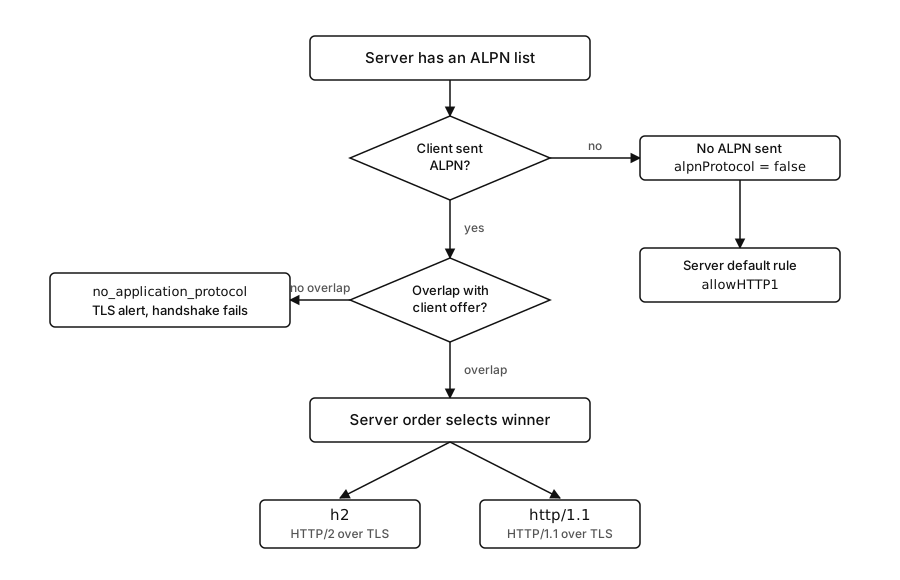
Figure 11.2 - One decision graph for ALPN on a server. Overlap and server order pick h2 or http/1.1, no overlap raises the no_application_protocol alert, and a missing ALPN extension falls through to the server default.
The exact policy depends on the server API. A raw TLS server leaves the choice in user code. An HTTPS server has HTTP/1.1 behavior. An HTTP/2 secure server uses allowHTTP1 for fallback.
How Node Uses the Selected ALPN Value
ALPN enters Node through the TLS layer. The HTTP modules then use the result to decide how decrypted bytes should be handled.
An incoming server connection reaches ALPN through a few layers. The kernel accepts a TCP connection, libuv reports the socket is readable, and Node wraps the accepted socket. The TLS server attaches OpenSSL state to that socket and starts feeding it encrypted bytes as they arrive. OpenSSL parses the client hello, including TLS versions, SNI, cipher data, and any ALPN extension.
The ALPN extension contains a length-prefixed list of protocol identifiers. Each protocol name is a non-empty byte string. The client orders the list by preference. Node gave OpenSSL the server-side ALPN configuration earlier through ALPNProtocols, so OpenSSL can compare the client list with the server list during handshake processing.
A selected protocol is one of those identifiers, recorded in TLS connection state before any HTTP parser exists. Node later reads that value from the TLS socket and exposes it as tlsSocket.alpnProtocol.
What happens next depends on which Node server API you used.
With tls.createServer(), Node emits a secure TLS socket to JavaScript. The selected ALPN value is visible, and the higher-level application parser is left to you. User code writes and reads the application bytes. A raw TLS socket works well as an ALPN probe for that reason, and it becomes an HTTP/2 server only once you implement the protocol yourself.
With https.createServer(), Node builds an HTTPS server, which means HTTP/1.1 over TLS in core Node APIs. The TLS layer protects the bytes. The HTTP layer expects HTTP/1.1 wire format after decryption. If you configure ALPN on that server, the values need to match the HTTP/1.1 implementation behind it. Selecting h2 and then feeding decrypted bytes into an HTTP/1.1 parser breaks the connection.
With http2.createSecureServer(), Node creates a TLS-backed HTTP/2 server. The TLS layer performs ALPN. The HTTP/2 layer uses the result to choose whether the connection becomes an HTTP/2 session or, when configured, an HTTP/1.1 fallback request path. The request handler may look similar because Node provides a compatibility API, but the runtime underneath is separate. For HTTP/2, the connection becomes an HTTP/2 session with streams. For HTTP/1.1 fallback, the connection follows the HTTP/1.1 request and response lifecycle from Chapter 10.
ALPN therefore runs before request objects are created. It decides which kind of connection JavaScript receives.
A simplified order looks like this.
TLS handshake completes
selected ALPN value is available on the TLS socket
server implementation checks the selected value
HTTP/2 session or HTTP/1.1 request path is created
JavaScript receives request-level objects
After that path exists, request handling follows the selected protocol's lifecycle. In HTTP/2, request streams are created under a session. In HTTP/1.1 fallback, requests are parsed from the socket byte stream in sequence.
The HTTP parser is downstream of ALPN. Parser errors usually mean one of two things. Either the wrong parser received the bytes, or the peer sent malformed bytes for the selected protocol. TLS success only proves the secure transport was established. Whether the next decrypted bytes match h2 or http/1.1 is a separate question.
The client side follows the same rule. A raw TLS client receives a TLSSocket and must decide what to write after secureConnect. An HTTPS client has already committed to HTTP/1.1 request serialization. An HTTP/2 client has already committed to the HTTP/2 session path. The ALPN selection has to match the client module that writes application data.
This timing is useful for debugging because application logs often start too late.
Say ALPN fails with no_application_protocol. Route logs come up empty, because the failure landed during TLS, well before any handler. In another case, ALPN selects h2 and the next bytes turn out to be HTTP/1.1, which surfaces as a protocol parser error after TLS, before a normal request object exists. In a third, ALPN selects http/1.1 while an HTTP/2-only client required h2, and the client may close right after the handshake or report that the negotiated protocol was unacceptable.
The selected ALPN value is connection state. One HTTP/2 connection can carry many request streams, but the ALPN value remains one value on the TLS connection. One HTTP/1.1 keep-alive connection can carry many sequential requests, and the selected ALPN value stays http/1.1 for that connection.
ALPN also runs before HTTP keep-alive and connection pooling. A pooled HTTPS socket already has a selected ALPN value. Reusing that socket means reusing the same application protocol. A pooled HTTP/1.1 TLS socket keeps sending HTTP/1.1 bytes on every later request, because the protocol was fixed when the socket was created.
So client pools are usually tied to the protocol implementation. HTTP/1.1 agents pool HTTP/1.1 sockets. HTTP/2 clients keep HTTP/2 sessions open according to their own rules. The pool key has to carry enough state to keep a request from landing on a socket whose protocol implementation is wrong for that request.
Connection reuse does not rerun ALPN. Several client behaviors follow directly from that.
An HTTPS agent can keep a TLS socket open after a response finishes. The selected ALPN protocol belongs to that socket. If the socket was created by the HTTP/1.1 HTTPS path, every later request assigned to that socket has to be HTTP/1.1 too. The agent can reuse the transport, TLS session state, kernel buffers, and file descriptor. The application protocol stays fixed from the first request through every later one.
HTTP/2 clients reuse connections another way. A client session sits on one TLS connection selected as h2. New request streams use that session. The client can open another session to the same origin when policy allows it, but each session has its own TLS connection and its own ALPN result.
That behavior affects rollout tests. Suppose a process starts with an HTTP/1.1 agent and warm pooled sockets, and you then enable HTTP/2 on the server. Existing pooled HTTP/1.1 sockets stay HTTP/1.1 until they close. New HTTP/2-capable client sessions can negotiate h2, while the old HTTP/1.1 agent sockets remain HTTP/1.1. During the overlap, logs can show both protocols for the same origin.
The reverse can happen during rollback. Existing h2 sessions can keep running until the session closes or the server sends an HTTP/2 shutdown signal. New connections may negotiate http/1.1 after a config change. ALPN reports what each connection selected. The deployment's current overall preference is a separate thing you track elsewhere.
Server-side reuse follows the same rule. A keep-alive HTTP/1.1 socket that selected http/1.1 carries HTTP/1.1 requests until it closes. An HTTP/2 session that selected h2 carries streams until it closes. Each keeps its selected protocol for the entire connection.
If a migration needs a clean cutover, close old connections deliberately. For core HTTP/1.1, Chapter 10 covered idle connection shutdown methods. For HTTP/2, the next subchapter covers session shutdown. ALPN happens before both. It gives the connection its protocol when the TLS handshake completes.
Fallback Is a Negotiated Result
Fallback is what happens when peers settle on a lower-preference protocol that both support. In Node HTTPS and HTTP/2 deployments, that usually means an h2-capable server also accepts http/1.1.
All of it gets negotiated during the TLS handshake, the one point where the protocol can still change. After the wrong bytes reach the wire, the connection is already committed.
A client might offer both protocols -
ALPNProtocols = h2, http/1.1A server that supports both can select h2. A server that only supports HTTP/1.1 can select http/1.1. The client then reads the selected value and uses the matching implementation.
A client that offers only h2 has made a stricter connection contract -
ALPNProtocols = h2If the server has no h2 support, the two lists share nothing. A server configured with its own ALPN list can fail the handshake with no_application_protocol. An endpoint that completes TLS but selects nothing leaves the client with no h2 value at all, and the client should treat that connection as unusable for HTTP/2.
Servers work off the same logic. One that supports HTTP/2 with an HTTP/1.1 fallback advertises both names. One that supports HTTP/2 alone advertises h2 by itself and rejects clients that negotiate anything else.
Node exposes the HTTP/2 fallback policy through allowHTTP1 -
import http2 from 'node:http2';

const server = http2.createSecureServer({
  key,
  cert,
  allowHTTP1: true,
});
allowHTTP1: true tells the secure HTTP/2 server to accept HTTP/1.1 clients on the same TLS port. Clients that negotiate h2 use the HTTP/2 path. Clients that negotiate http/1.1, or clients accepted through the compatible path, use HTTP/1.1.
The default is stricter. Leave allowHTTP1 as false and the secure HTTP/2 server expects HTTP/2, so a client that cannot negotiate h2 stays outside the normal HTTPS request path. Node v24 splits this into two outcomes. When a client sends ALPN with no acceptable protocol, the TLS handshake fails. When a client sends no ALPN at all, it can reach the HTTP/2 server's unknownProtocol event instead. Either way, the server ends up without an acceptable HTTP/2 selection.
Use allowHTTP1: true when a public service needs to support older clients, health checkers, internal scripts, or tools that only speak HTTP/1.1. Leave it false when the endpoint contract is HTTP/2-only and every client is expected to support that.
Each setting fits a different contract. Match the failure mode to the contract the endpoint promises.
Client expectations change with fallback too. A browser offers h2 and http/1.1, accepts whichever value comes back, and renders the response. A service client built only on node:http2 usually expects h2, while one built only on node:https expects HTTP/1.1. A custom client that offers both has to branch after the handshake and pick the implementation that matches the selected value.
That branch belongs close to the connection code. A socket with alpnProtocol === 'h2' passed into an HTTP/1.1 serializer is a bug, and so is an http/1.1 socket passed into an HTTP/2 session implementation.
Servers need one extra rule for clients that send no ALPN at all. A public HTTPS endpoint usually treats that as HTTP/1.1 compatibility, an HTTP/2-only endpoint can reject it outright, and a raw TLS server picks whatever default its code decides. Write that default into the server contract, because missing ALPN and negotiated HTTP/1.1 can look identical in request logs.
The fallback cases are easier to review as connection outcomes.
client offers h2,http/1.1 + server supports h2,http/1.1 -> selected h2
client offers http/1.1    + server supports h2,http/1.1 -> selected http/1.1
client offers h2          + server supports http/1.1    -> no shared ALPN
client sends no ALPN      + server allows HTTP/1.1      -> HTTP/1.1 policy path
client sends no ALPN      + server requires h2          -> rejected connection
The fourth line is the compatibility case. A connection with no ALPN and a connection that selected http/1.1 are two different things at the TLS layer. Your application can still treat the no-ALPN one as HTTP/1.1, yet tlsSocket.alpnProtocol stays false the whole time. Track that case separately in metrics.
A graph that counts only h2 and http/1.1 can miss no-ALPN traffic. Add a separate bucket for false or none. Otherwise an old health checker, an old runtime, or a TLS probe can reach the server without appearing in selected-ALPN metrics.
The third line is the strict-client case. A client that offers only h2 has no fallback. Server operators sometimes expect it to retry with HTTP/1.1 because browsers often offer both. That retry exists only when the client implementation includes it. ALPN itself selects one value or fails.
http2.createSecureServer() Uses ALPN for Protocol Selection
The secure HTTP/2 server API is the normal Node path for HTTP/2 over TLS.
import http2 from 'node:http2';

const server = http2.createSecureServer({
  key,
  cert,
  allowHTTP1: true,
}, (req, res) => {
  res.end(req.httpVersion);
});
With fallback enabled, one request handler can receive both HTTP/2 and HTTP/1.1 traffic, and req.httpVersion tells you which protocol reached it. An HTTP/2 request arrives as HTTP/2 request and response objects wrapped in a compatibility surface. An HTTP/1.1 fallback request runs the plain HTTP/1.1 path.
The selected ALPN value is still available from the lower TLS socket. The access path depends on the protocol -
function selectedProtocol(req) {
  if (req.httpVersion === '2.0') {
    return req.stream.session.socket.alpnProtocol;
  }

  return req.socket.alpnProtocol;
}
An HTTP/2 request reaches the TLS socket through req.stream.session.socket. An HTTP/1.1 fallback request exposes req.socket. Both point back to the TLS connection state, where the selected ALPN protocol lives.
Keep this helper for diagnostics. Ordinary routing rarely needs it, since most routes work in HTTP semantics - method, path, headers, body, and auth context. Branch on the protocol only where a protocol feature actually comes into play. An HTTP/2 optimization, for instance, can check req.httpVersion === '2.0' before reaching for HTTP/2-specific state. A normal JSON handler meant to run on both protocols should stay on the compatibility surface.
The secure HTTP/2 server also changes what a single connection can carry. Pick HTTP/1.1 fallback and one TLS connection carries sequential HTTP/1.1 requests under the keep-alive rules from Chapter 10. Pick h2 and one TLS connection carries an HTTP/2 session, which can hold multiple concurrent request streams. The next subchapter covers that model. For ALPN, all that counts is that it chooses the protocol path before the request object exists.
Use https.createServer() for HTTPS with HTTP/1.1. Use http2.createSecureServer() for HTTP/2 over TLS. Add allowHTTP1: true when the same endpoint should accept HTTP/1.1 clients too. Avoid advertising h2 from an HTTP/1.1-only server.
Most application-level protocol mismatch bugs come from breaking one of those four lines.
HTTPS Compatibility Has Two Meanings
The term "HTTPS" gets used two ways during ALPN debugging.
At the transport level, HTTPS means HTTP carried over TLS. With that broad meaning, HTTP/1.1 over TLS and HTTP/2 over TLS are both secure HTTP traffic.
Inside Node's core modules, node:https means the HTTP/1.1 API over TLS. The module gives you https.Server, https.request(), and https.Agent. Those objects follow the HTTP/1.1 lifecycle from Chapter 10, with TLS underneath.
That distinction affects ALPN configuration.
An https.Server can expose a TLS socket with ALPN state, but the server implementation is still HTTP/1.1. A secure HTTP/2 endpoint should use node:http2. A mixed endpoint should use http2.createSecureServer({ allowHTTP1: true }).
Client code follows the same rule. https.request() creates a client request through the HTTP/1.1 path. If a custom TLS option advertises h2 and the server selects h2, the HTTPS client has committed to the wrong protocol. Use http2.connect() for HTTP/2 client sessions.
This gap produces a production trace teams hit often. TLS succeeds, and then the request fails right away. The transport worked correctly, and the problem sits one layer up, in the protocol chosen on top of it.
Protocol Mismatch
The phrase protocol mismatch covers two separate failures. In one, the selected ALPN protocol and the bytes sent after TLS disagree. In the other, the selected protocol fails the endpoint contract before any application bytes move.
Common cases look like this.
selected h2       -> peer sends HTTP/1.1 request line
selected http/1.1 -> peer sends HTTP/2 connection preface
selected false    -> client required h2
selected h2       -> server code is HTTPS/HTTP/1.1 only
Each case fails in its own layer.
If there is no shared ALPN protocol and the server enforces ALPN during TLS, the handshake fails with a TLS alert. Node may surface that as a TLS client error on the server and an error event on the client. The failure stays entirely in TLS, ahead of any HTTP parser.
If TLS completes and the selected protocol is unacceptable to one side, that side can close the connection. An HTTP/2 client that requires h2 treats a result of http/1.1 or false as a failed connection instead of sending an HTTP/1.1 request.
If TLS completes and the peers start writing bytes for separate protocols, a parser fails. The HTTP/2 parser expects HTTP/2 startup bytes. The HTTP/1.1 parser expects an HTTP/1.1 start line or response status line. Parser errors at this stage can look unrelated to TLS because the secure connection already exists.
The fix is usually configuration alignment.
HTTP/1.1 server    -> advertise http/1.1 or omit ALPN
HTTP/2 server      -> advertise h2
mixed server       -> advertise h2 and http/1.1
HTTP/1.1 client    -> offer http/1.1
HTTP/2 client      -> offer h2, or offer both with real fallback code
The last line carries a real condition. A client offers both values only when it has code to handle both selected outcomes.
Proxies Move Where ALPN Happens
A reverse proxy can terminate TLS before traffic reaches Node. Chapter 10 covered the proxy hop for HTTP. ALPN adds one more field to that hop.
browser -> TLS with proxy -> ALPN h2
proxy   -> HTTP to Node   -> HTTP/1.1
The browser's connection selected h2. Node's connection selected HTTP/1.1, or used no TLS at all if the proxy forwarded cleartext HTTP to the backend. Node logs req.httpVersion === '1.1'. The browser UI says HTTP/2. Both observations are true because they describe separate connections.
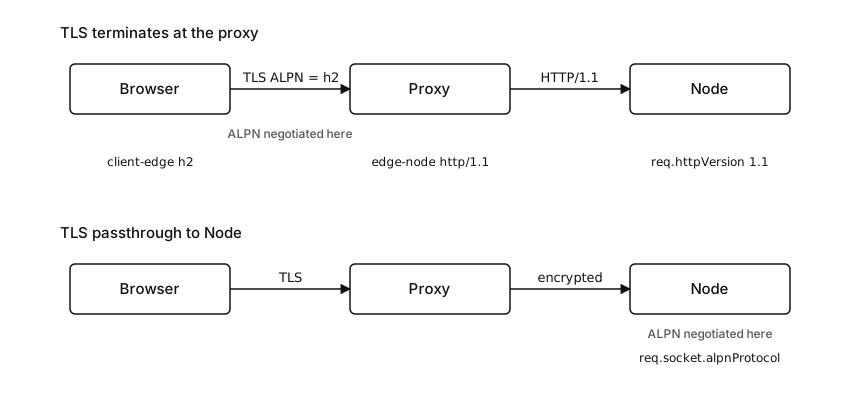
Figure 11.3 - When the proxy terminates TLS, ALPN is decided on the browser-to-proxy hop and Node sees a separate protocol. When the proxy passes TLS through, Node negotiates ALPN itself.
Another deployment keeps TLS passthrough -
browser -> TLS passthrough through proxy -> Node
Node    -> ALPN h2 or http/1.1
With TLS passthrough, the proxy routes encrypted bytes without ending TLS. Node handles the TLS handshake, certificate selection, ALPN, and the application protocol choice. req.socket.alpnProtocol in Node describes the client-to-Node TLS connection because that TLS connection reaches Node.
Load balancers and platform routers usually carry their own protocol policy. One listener might accept HTTP/2 from clients and forward HTTP/1.1 to targets. Another might negotiate HTTP/2 on both the public hop and the upstream hop. A third might pass TLS straight through. The setting names belong to platform chapters later in the book. To debug any of them, find which component terminates TLS, then read ALPN at that component.
This changes what Node can know.
If TLS terminates before Node, tlsSocket.alpnProtocol inside Node tells you nothing about the public client connection because Node never saw that TLS handshake. You need proxy logs, load balancer access logs, or forwarded metadata from a trusted component. Treat forwarded protocol headers as deployment metadata. They are trustworthy only when the proxy strips client-supplied copies and writes its own values.
Trust a forwarded protocol header only when the proxy that ends TLS strips any client-supplied copy and writes its own value. A client can set that header itself, so an unstripped value lets the client spoof the negotiated protocol that your backend logs and branches on.
If TLS reaches Node, log the selected protocol directly from the socket. That value came from the TLS handshake Node completed.
Mixed deployments can be especially confusing during migrations. A public edge enables HTTP/2 for browsers while the backend stays HTTP/1.1. Latency, header casing at the proxy hop, and connection counts all shift, the last because one client-side HTTP/2 connection can feed many upstream HTTP/1.1 connections. Every one of those shifts comes from the proxy hop. Node serves the protocol used on the connection it receives, and ALPN answers one connection at a time.
The backend protocol is often chosen for operational reasons. A proxy may keep HTTP/2 at the client edge because browsers support it well, then use HTTP/1.1 upstream because the backend fleet already has HTTP/1.1 health checks, request logs, and middleware assumptions. Another proxy may use HTTP/2 upstream to reduce connection count between the proxy tier and service tier. Either design works as long as the handoff points are written down.
The failure comes from assuming ALPN travels through the proxy. ALPN stays inside one TLS handshake. A proxy that terminates TLS ends that handshake, and the upstream connection makes its own protocol choice. A cleartext HTTP upstream has no ALPN on that hop. An HTTPS upstream runs a second TLS handshake with its own selected ALPN value.
During a migration, log these three values separately -
client-to-edge selected protocol
edge-to-node selected protocol
node request httpVersion
The first value lives at the proxy or load balancer. The second exists only when the upstream hop uses TLS. The third exists in Node for every request. When those three do not match, the deployment is translating protocols somewhere along the path, which is a normal thing to do. Without per-hop logging, reconstructing that translation later takes far longer than it should.
Debugging Negotiation
Read the selected value first. Knowing what TLS chose narrows down everything that follows.
On a TLS client socket -
socket.on('secureConnect', () => {
  console.log({
    alpn: socket.alpnProtocol,
    tls: socket.getProtocol(),
  });
});
That log separates TLS version from application protocol. socket.getProtocol() might print TLSv1.3. socket.alpnProtocol might print h2. Those are separate layers.
The OpenSSL command-line client is a quick external probe -
openssl s_client -connect example.com:443 \
  -servername example.com -alpn h2,http/1.1
The useful output is the selected ALPN protocol and the certificate path. If the command reports h2, the endpoint selected HTTP/2 over TLS for that connection. If it reports http/1.1, the endpoint selected HTTP/1.1. If it reports no ALPN protocol, either the peer did not negotiate ALPN or you reached the service through a connection path that changed what you were testing.
On a secure server, log after the handshake.
server.on('secureConnection', socket => {
  console.log(socket.alpnProtocol);
});
That event belongs to the TLS server path. For HTTP/2 servers, request-level logging can also print req.httpVersion, but the socket value shows what ALPN selected.
For a mixed HTTP/2 server -
function logProtocol(req) {
  console.log({
    http: req.httpVersion,
    alpn: selectedProtocol(req),
  });
}
http and alpn should line up with the accepted connection. HTTP/2 requests usually pair with h2. HTTP/1.1 fallback usually pairs with http/1.1, or sometimes a no-ALPN legacy path depending on server policy. A mismatch here usually points to a helper bug, proxy-hop confusion, or lower-level protocol mismatch.
Several failure patterns repeat.
Missing ALPN shows up as false on tlsSocket.alpnProtocol. For a generic TLS or HTTPS endpoint, that may be acceptable. For an HTTP/2-only endpoint, it violates the endpoint contract.
Wrong protocol order looks like a server that should prefer h2 but keeps selecting http/1.1 for clients that offer both. Check the server-side ALPNProtocols order and the component that terminates TLS. Also check whether the client actually offered h2. Many command-line clients need an explicit flag or a build with HTTP/2 support.
No shared protocol surfaces as a TLS failure. On a Node TLS server with ALPNProtocols set, a client that sends ALPN with no overlap can receive the no_application_protocol alert. Server logs may show a TLS client error rather than an HTTP request error.
An HTTP/2-only server without fallback breaks the moment an HTTP/1.1 health checker hits an http2.createSecureServer() endpoint. Add allowHTTP1: true if that health checker is part of the supported contract. Move the health checker to HTTP/2 if the endpoint is meant to stay strict.
Edge termination confusion appears when client-side tooling reports HTTP/2 but Node logs HTTP/1.1. Find the TLS termination point. If the proxy terminates client TLS, Node is logging the proxy-to-origin protocol.
Application parser errors after a successful TLS handshake usually mean the selected protocol and the application bytes do not agree. Check for custom ALPNProtocols on https.request() or https.createServer(). Look for a generic tls.createServer() that advertises h2 without an HTTP/2 implementation behind it. And watch for tests that grab a raw TLS socket and then write HTTP/1.1 bytes after negotiating h2.
The useful debug record is small.
local component - Node, proxy, load balancer
TLS owner - component that terminates TLS
offered ALPN protocols - client list if known
selected ALPN protocol - socket or platform log
application module - https, http2, raw tls
observed failure - TLS alert, closed connection, parser error
That record keeps the layers separate. It also stops a frequent wrong turn, where a team changes certificates to fix an HTTP/2 mismatch. Certificates can be valid while ALPN is wrong.
Keep connection metrics and request metrics separate.
ALPN is negotiated once per TLS connection. req.httpVersion is observed per request. Under HTTP/1.1 keep-alive, those counts may look close. Under HTTP/2, one selected h2 connection can produce many request logs. If you count req.httpVersion === '2.0' lines, you are counting requests handled over HTTP/2. If you count socket.alpnProtocol === 'h2' at secure connection time, you are counting TLS connections that negotiated HTTP/2.
The two counts answer separate questions.
A rollout graph that shows request share tells you how much application traffic is using HTTP/2. A connection graph tells you whether clients are negotiating the protocol successfully. The numbers can look uneven for healthy reasons. A handful of long-lived HTTP/2 connections can carry thousands of requests between them, while many short-lived HTTP/1.1 connections can carry one request each. Request volume stays a separate measurement from ALPN selection.
The same rule helps with proxy debugging. The edge might count client-side h2 connections. Node might count backend HTTP/1.1 requests. Put those graphs on the same screen only after labeling the connection they measure. Otherwise the numbers look contradictory when they are scoped to separate hops.
Where ALPN Hands Off to HTTP/2
ALPN stops at protocol selection.
After h2 is selected, the connection enters HTTP/2 processing. The next layer has a connection preface, sessions, streams, frames, settings, flow-control windows, and shutdown frames. Those are separate mechanisms. ALPN only says which implementation receives the decrypted byte stream.
Selecting http/1.1 keeps the connection in the HTTP/1.1 processing model from Chapter 10 - start lines, header sections, message bodies, keep-alive reuse, and agent pools.
A selection of h2 moves the same secure transport into the HTTP/2 processing model - one connection-level protocol with multiple request streams and its own flow-control rules.
The handshake already selected the protocol. Every byte after it has to match that selection.