Certificates, Chains, CAs, and Trust Stores
When a Node client connects to an HTTPS server, a lot happens before your code sees a single byte of HTTP response. The server sends its certificate data, and OpenSSL tries to build a trusted chain from it. Node then checks whether that certificate is valid for the hostname you asked for. The TLS socket is accepted or rejected on the outcome of those checks, before any HTTP moves.
Here is a normal HTTPS request with no custom TLS settings -
import https from "node:https";

https.get("https://api.internal/health", res => {
  res.resume();
}).on("error", err => {
  console.error(err.code, err.message);
});
Even this short snippet runs a full certificate check. Node loads its default trusted CA set, has OpenSSL validate the server certificate, then checks that the certificate is valid for api.internal.
When this request fails, the cause could be any of several things. Maybe the certificate expired. The server might have forgotten to send an intermediate certificate, or the internal company CA could be missing from this particular Node process. Or the certificate is valid for api.company.test while the client connected to api.internal.
All of those fail at roughly the same spot, so the symptom looks the same even though each one needs a different change. Certificate validation pulls from a few separate inputs - certificate files, hostnames, the structure of the chain, trust stores, and the Node TLS options you passed. Once you know which input is wrong, the error gets much easier to fix.
The Files Node Reads
Node TLS code reads two main kinds of certificate material.
Server identity material is what a local TLS server presents to a peer. Trust material is what a local process uses to decide which remote certificates it accepts. Mixing those two up is a common way to break local HTTPS.
A TLS server usually starts with a private key and a certificate chain -
import { readFileSync } from "node:fs";
import tls from "node:tls";

const server = tls.createServer({
  key: readFileSync("server-key.pem"),
  cert: readFileSync("server-cert.pem"),
});
key is the server's private key. cert is the certificate chain the server presents during the handshake. Node passes both into OpenSSL when preparing the server's TLS identity.
The server needs both pieces because the handshake has to prove that the server owns the private key matching the public key inside the certificate. The certificate is public. The private key must stay secret.
An X.509 certificate is structured certificate data. It contains identity fields, validity dates, a public key, issuer information, extensions, and a signature over the certificate contents. Node usually leaves the parsing work to OpenSSL until JavaScript asks for certificate details through APIs such as tlsSocket.getPeerCertificate().
The public key is the half you can share, and the private key is the half you protect. The certificate carries the public key, and the endpoint keeps the matching private key.
A leaked certificate usually exposes only metadata. A leaked private key is the serious case, because anyone holding it can prove possession of the key until the certificate is replaced and clients stop accepting the old trust path.
File extensions are only hints.
PEM is a text encoding for certificate and key data. It wraps base64 data between header and footer lines such as -----BEGIN CERTIFICATE-----. DER is the binary encoding of the same certificate data. PKCS#12, also called PFX, is a bundle format that can hold certificate chains and private keys together, often protected with a passphrase.
Node TLS options accept strings and Buffers for these values. The bytes still need to be in a format OpenSSL understands for that option.
A server can also load identity material from a PKCS#12 bundle -
const server = tls.createServer({
  pfx: readFileSync("server.p12"),
  passphrase: process.env.PFX_PASSPHRASE,
});
In this version, the private key and certificate material live inside server.p12. Node loads the bytes, OpenSSL parses them, and the TLS handshake uses that identity when a peer connects.
The order of certificates in a server certificate file is fixed. The server certificate comes first, then the intermediate certificates. The root certificate usually does not belong in the served chain, because the client should already have that root, or another accepted trust anchor, in its own trust store.
A typical PEM chain looks like this -
-----BEGIN CERTIFICATE-----
leaf certificate for api.example.com
-----END CERTIFICATE-----
-----BEGIN CERTIFICATE-----
intermediate certificate
-----END CERTIFICATE-----
That file gives the peer enough information to connect the server certificate to a root it already trusts. If the intermediate certificate is missing, the client may have the root and still fail validation because it cannot connect the server certificate to that root.
Client trust material uses the ca option -
import { readFileSync } from "node:fs";
import tls from "node:tls";

const socket = tls.connect({
  host: "api.internal",
  port: 443,
  ca: readFileSync("company-root.pem"),
});
Here ca is the set of CA certificates this client trusts for this connection. It controls how the client validates whatever the server presents. The client sends nothing to the server from this option.
In Node TLS options, cert and key describe local identity, and ca describes the trust material used to validate the peer.
That distinction becomes even more important with mutual TLS. A client certificate goes in cert with its matching key. The CA material used to validate the server goes in ca. Subchapter 4 covers client-certificate authentication. For now, one-way server validation is enough.
Identity Fields
Hostname mismatch is often the first certificate error you run into. Everything up to the name check works. The service is reachable, the handshake starts, the certificate is present, and then verification rejects the name.
ERR_TLS_CERT_ALTNAME_INVALID is Node's hostname verification failure code. It means the host name or IP address being verified did not match the certificate identity. For current service certificates, the field you usually need to inspect is SAN. When supported SAN identifiers are absent, Node's default verifier can fall back to subject CN for DNS hostnames.
Certificate identity starts with two fields that sound related.
The subject is the entity the certificate describes. For a server certificate, that is the server identity being presented.
The issuer is the entity that signed the certificate.
A self-signed certificate has the same entity as subject and issuer, and the signature is made with its own private key.
Common Name, usually written as CN, is one subject attribute. It used to hold the service name. Current service certificates put DNS names and IP addresses in the Subject Alternative Name extension, usually shortened to SAN.
SAN is the main field Node clients use for hostname verification. A certificate can contain several DNS names and IP addresses there -
Subject - CN=api.example.com
Issuer - CN=Example Intermediate CA
Subject Alternative Name -
  DNS - api.example.com
  DNS - api.internal.example.com
  IP Address - 10.0.0.12
When a Node client connects to https://api.example.com, the certificate should contain a DNS SAN entry for api.example.com. A client connecting by IP address needs an IP address SAN instead. DNS and IP are separate identity types inside SAN, and CN fallback only applies to DNS hostnames when supported SAN identifiers are absent.
Hostname verification compares the verified name against the SAN entry of the same type. Reaching the service at 10.0.0.12 needs an IP Address SAN entry, and a DNS SAN that holds the same digits as text does not satisfy it. CN fallback, where the verifier reads the subject Common Name, applies only to DNS hostnames and only when no supported SAN entries are present. Issue the certificate with the SAN type that matches how clients reach the service.
Wildcard SANs have narrow behavior. A certificate for *.example.com can cover api.example.com. It does not cover v1.api.example.com, because that name has another label before example.com. Wildcards also belong in DNS-name entries, not IP-address entries.
SAN entries are separate from HTTP routing. A reverse proxy can route api.example.com and admin.example.com to the same Node origin. The certificate still needs identity entries for the names clients verify during TLS. HTTP Host handling happens later, after the TLS socket is accepted.
The name Node verifies comes from the connection options. With https.request() and https.get(), the URL hostname usually becomes both the network destination and the TLS server name. With lower-level tls.connect(), host controls where the socket connects, while servername controls SNI and hostname verification.
This connects to an IP address but verifies the certificate as api.internal.example.com -
const socket = tls.connect({
  host: "10.0.0.12",
  port: 443,
  servername: "api.internal.example.com",
});
The server also receives api.internal.example.com through SNI, which the previous subchapter covered. The same connection can fail if servername is omitted, because the certificate is issued for the DNS name rather than the IP address.
Certificates also have a validity period. The common X.509 fields are notBefore and notAfter. Node exposes them on the peer certificate object as values such as valid_from and valid_to. Validation checks the current time against that range. If a client machine has the wrong clock, a good certificate can look invalid from that process.
You can inspect the peer certificate after the secure connection is established -
socket.once("secureConnect", () => {
  const cert = socket.getPeerCertificate();
  console.log(cert.subject, cert.issuer);
  console.log(cert.valid_from, cert.valid_to);
});
getPeerCertificate() returns certificate data for the connected peer. Without the detailed flag, Node returns just the leaf certificate. With detailed output, Node can include issuer-chain data when available. The method is useful while the TLS connection is open.
The returned object is already normalized for JavaScript. subject and issuer are objects. subjectaltname is a string containing the SAN entries OpenSSL exposed. valid_from and valid_to are date strings. fingerprint256, serialNumber, and raw are useful when comparing what Node saw with what an external tool saw. Treat those fields as debugging data. The validation itself stays with OpenSSL.
Detailed output can follow the chain Node received -
let cert = socket.getPeerCertificate(true);

while (cert?.issuerCertificate && cert !== cert.issuerCertificate) {
  console.log(cert.subject, cert.issuer);
  cert = cert.issuerCertificate;
}
The loop prints the leaf, then follows issuer links while Node has them. The self-reference guard handles the common root case where a certificate's issuer link points back to itself. The output tells you what the peer sent and how Node represented it. OpenSSL's authorization result still decides whether the chain is accepted.
Read the SAN string carefully. DNS:api.internal, DNS:api.example.com means either DNS name can satisfy hostname verification. IP Address:10.0.0.12 satisfies an IP-address verification path. A text field containing 10.0.0.12 as a DNS name is the wrong identity type for a client that verifies an IP address.
Subject, issuer, SAN, and validity dates are easy to read, so they draw attention during debugging. They can also point you at the wrong cause. A certificate can show exactly the right name and still fail, because the chain behind it never reaches trusted CA material.
Identity and trust are two different questions. Identity fields tell you which peer a certificate is for. Chain validation tells you who vouched for that certificate and whether this process trusts that path. A correct-looking name still leaves the trust question wide open.
Certificate Chains And Trust Anchors
The leaf certificate is the end-entity certificate presented for the service. It carries the service identity and public key.
A root certificate is one a local trust store trusts directly.
Between those two sits the intermediate certificate. It is signed by a root or another intermediate, and it signs the certificates below it.
Put those together and you have a certificate chain, the validation path running from the service certificate up toward trusted CA material.
The chain lines up like this -
leaf - api.example.com
  issuer - Example Service CA 2026

intermediate - Example Service CA 2026
  issuer - Example Root CA

root - Example Root CA
  trusted locally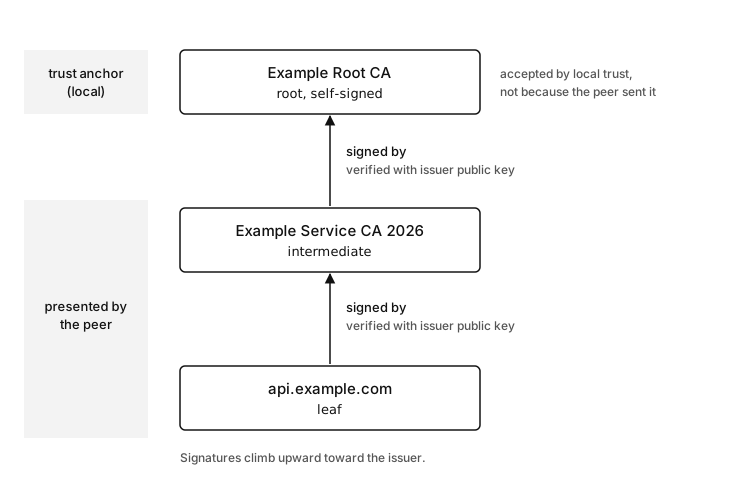
Figure 11.1 - The leaf and intermediate are sent by the server during the handshake, each signature is checked with the issuer public key one step up, and the root is trusted because local configuration holds it, not because the peer sent it.
The peer usually sends the leaf and intermediates, and the local process supplies the trust anchor. A trust anchor is certificate or public-key material the validator accepts directly as trusted. In everyday Node work, that usually means a root certificate from Node's default CA set, an operating-system trust store selected at startup, NODE_EXTRA_CA_CERTS, or the ca option.
A certificate authority, or CA, is an issuer trusted to sign certificates for some scope. Public CAs follow public root-program rules, and internal CAs follow company policy. At runtime, Node only sees certificate data and configured trust.
A certificate signature connects one certificate to the issuer's private key. During validation, the validator uses the issuer certificate's public key to check that signature. If the signature checks and the issuer is allowed to sign certificates, the validator can move one step up the chain.
That repeats until the path reaches local trust.
The leaf signature is checked by the intermediate. The intermediate signature is checked by the root or another intermediate. The root is accepted because local configuration placed it in the trusted set.
Every step also has rules attached - validity dates, certificate purpose, CA capability, path length limits, and key usage constraints. Chapter 23 covers the cryptographic primitives. This chapter is focused on how Node and OpenSSL decide whether a presented certificate is acceptable for a connection.
Node delegates the heavy certificate-chain work to OpenSSL. JavaScript does not walk ASN.1 fields itself. Node gathers TLS options, gives OpenSSL the peer chain and trusted CA material, and receives an authorization result. Node then exposes that result through socket state and errors.
The server's configured cert chain is what the peer sends. The client's configured trust store is local. The root certificate usually appears only on the local side. Sending a root certificate from the server wastes bytes and gives the client no new trust. The client decides trust from its own configuration, and a root arriving in the handshake gets no special standing.
Missing intermediates are common. The server presents a valid leaf certificate, and the client has the public root. The validator still needs the intermediate certificate that connects them. Some clients can fetch missing intermediates through platform behavior or cached state, but a Node service should be deployed as if the peer must send the chain it needs.
The server should send the intermediate in its cert file.
A broken server chain can look like this -
sent by server -
  leaf only

available locally -
  root

missing during validation -
  intermediate
That often produces errors such as UNABLE_TO_VERIFY_LEAF_SIGNATURE or another OpenSSL verification code about issuer lookup. The exact code depends on the chain OpenSSL could build and the trust material available to the process. The fix usually belongs in the server certificate bundle or the client CA configuration. HTTP code is the wrong place to look for it.
Server chain packaging is a deployment responsibility. A TLS server can start successfully with only a leaf certificate and private key, because those two pieces are enough for local identity setup. A clean start says nothing about whether remote clients can build a trusted path. It confirms that the server loaded its own identity material and nothing more.
A TLS server starts up fine with only a leaf certificate and its key, because that pair is enough for local identity. A clean startup does not prove a remote client can build a trusted path to it. Clients outside a cached or platform-assisted environment fail with UNABLE_TO_VERIFY_LEAF_SIGNATURE once the intermediate is missing. Serve the full chain in the cert file, leaf first and intermediates after.
A Node server can accept connections with a short cert value, while clients outside a cached or platform-assisted environment fail validation. The fix is to deploy the certificate chain in the file Node sends, with the leaf first and intermediates after it.
tls.createServer({
  key: readFileSync("api-key.pem"),
  cert: readFileSync("api-fullchain.pem"),
});
api-fullchain.pem should contain the leaf certificate followed by the issuing intermediates. The name "fullchain" varies by certificate tooling, so inspect the file instead of trusting the filename. The first certificate should be for the service. The next certificate should have a subject matching the leaf issuer. Continue until the path reaches the root the peer already trusts.
A CA bundle is one file containing multiple CA certificates, usually PEM-encoded one after another. Bundles are convenient because Node's ca option can accept a single Buffer with several PEM certificates inside it. The bundle can hold public roots, internal roots, or selected intermediates, depending on the trust policy.
Treat a CA bundle as trust input. Whoever can add a CA to that file can change which peer certificates this process accepts.
Self-signed certificates need special handling. A self-signed certificate has a signature made by the same private key associated with its public key. That fact alone gives no local trust. For validation to pass, the self-signed certificate must be configured as trusted CA material, or the chain must end at another configured trust anchor.
Private CA deployments usually work better than leaf-by-leaf self-signed deployments. A company root or intermediate signs service certificates. Node clients trust the company CA. Services can rotate leaf certificates without touching every client trust bundle, because the leaf changes while the trust anchor stays put.
The trust anchor is the local end of the validation path. People talk about a server being trusted as if trust were one yes-or-no fact, but two separate checks decide it. A server is accepted for one connection when its presented certificate chain reaches a configured trust anchor and the verified name matches the requested name.
Both checks run on every connection. A deployment can pass chain validation and still fail hostname verification. Another one passes the name check while never building a path to a trust anchor. A failure on either check stops the connection by itself.
Inside Node's Verification Flow
At the JavaScript layer, a client call carries a destination and TLS options. https.get("https://api.internal") gives Node a hostname, a default port, an HTTP request target for later, and TLS defaults. tls.connect() gives you the lower-level version - a transport destination, a server name when supplied, and certificate options such as ca, cert, key, pfx, and rejectUnauthorized.
Below JavaScript, OpenSSL owns certificate parsing and path validation. Node hands it configured trust material and the peer's presented chain. That chain arrives during the handshake, the trust material comes from the default CA set or explicit options, and the current time comes from the process environment. Verification parameters also include certificate purpose, because a certificate used to sign other certificates has separate permissions from one used as a server identity.
A change to any one of those inputs can change the authorization result.
This connection setup has enough information for both chain validation and hostname verification -
host - api.internal
servername - api.internal
ca - company-root.pem
peer chain - leaf + intermediate
Swap ca for a bundle that lacks the company root, and chain validation fails. Set servername to api.company.test and the name check can fail even with the same chain. If the peer chain drops the intermediate, validation can fail before the name check ever runs.
The leaf certificate is checked as a server identity certificate. It needs to be valid for server authentication, valid at the current time, and issued by something OpenSSL can find through peer-supplied intermediates or local trust material. Its signature must verify with the issuer's public key.
The intermediate certificate is checked as a CA certificate. It needs permission to issue certificates, it needs its own issuer, and its signature must verify against that issuer. It carries its own validity period too. A chain with a fresh leaf and an expired intermediate still fails, because the path includes both certificates.
Validity dates are checked on every certificate in the path, not just the leaf. A current leaf with an expired intermediate still fails with CERT_HAS_EXPIRED. Certificate dashboards often watch only the service-facing leaf, so an expired intermediate slips by. When you triage an expiry error, write down valid_to for the leaf and for every intermediate, then compare each against the process clock.
The trust anchor is handled in a special way. It is accepted because local configuration placed it in the trusted set. The validator still has to connect the presented path to it. The peer cannot create local trust by sending that same root certificate during the handshake.
OpenSSL may have more than one possible path to try. A server might send an older intermediate and a newer intermediate. The local trust store might contain several roots with similar subject names. OpenSSL tries to build an acceptable path according to its rules and configured store. The error code tells you where the accepted path search failed. It does not explain every path OpenSSL considered.
Two clients can even see separate certificate errors against the same server. One process might carry an extra root from NODE_EXTRA_CA_CERTS, another replaced the default roots with an explicit ca option, and a third runs with the system CAs included. The peer chain is identical for all of them. The local trust input is what differs.
Hostname verification uses another set of data. Node has a host name from the client call and a certificate object from OpenSSL. tls.checkServerIdentity() checks the certificate identity against that host. The host name used for this check can differ from the TCP destination when code supplies servername. That is expected for private IP targets, test tunnels, and proxy paths, and it produces a steady stream of bugs.
This client connects to loopback and verifies api.internal -
const socket = tls.connect({
  host: "127.0.0.1",
  port: 9443,
  servername: "api.internal",
});
A certificate with DNS:api.internal can pass that name check. A certificate with only IP Address:127.0.0.1 will fail, because the verified name is api.internal, not the socket address.
The opposite setup fails as well -
const socket = tls.connect({
  host: "127.0.0.1",
  port: 9443,
});
Here the verified input is 127.0.0.1, because servername is absent and host is an IP address. A DNS-only service certificate has the wrong identity data for this call. Either fix the call site or issue a certificate that carries the intended IP SAN.
Node combines these checks into user-facing behavior. With default client verification, an authorization failure becomes an error on the socket or request. With rejectUnauthorized: false, the lower-level failure is kept on the socket as state. You can read it through authorized and authorizationError.
For debugging, group the inputs like this -
destination - host, port, servername
peer identity - subject, SAN, public key
peer chain - leaf, intermediates
local trust - default roots, extra roots, explicit ca
Every certificate failure fits into at least one of those rows. A name mismatch shows up across destination and peer identity. Both unknown-issuer and self-signed failures live in the peer chain and local trust rows. Expiration sits with peer identity or the chain dates.
Once those rows are visible, rejectUnauthorized: false shows up as a bypass. It lets application bytes flow while the broken input stays in place.
Trust Stores In Node
A trust store is the set of CA certificates a process uses as trust anchors for certificate validation. Node's default trust store depends on runtime configuration and Node version. In Node v24, tls.getCACertificates("default") is the direct API for the CA certificates current TLS clients will use by default.
The default usually includes Node's bundled Mozilla CA snapshot. Startup flags can select OpenSSL's default store or include the operating system's trusted certificates. NODE_EXTRA_CA_CERTS can append more PEM certificates at process startup. The exact set comes from the Node binary, process startup flags, the container image, and environment configuration.
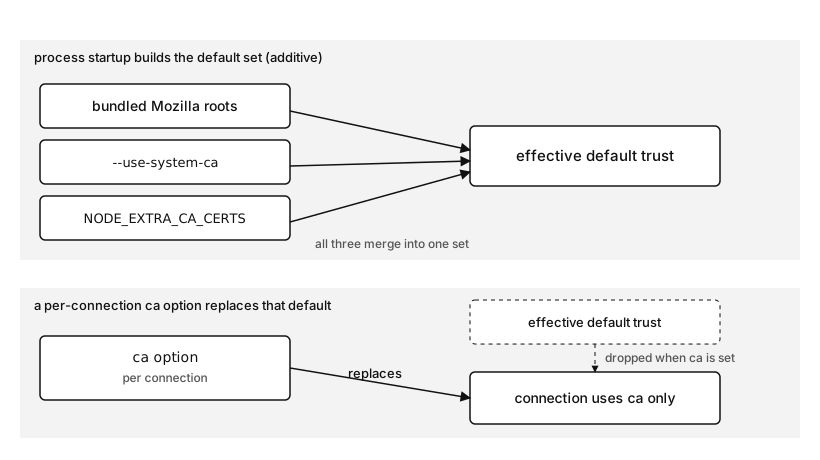
Figure 11.2 - The bundled roots, the system store, and NODE_EXTRA_CA_CERTS merge at startup into one default trust set, while a per-connection ca option replaces that default instead of joining it.
That bundled snapshot is part of a Node release. It gives official Node binaries a consistent baseline across supported platforms. System trust is separate. It follows the machine or image where the process runs.
A managed laptop might trust a company inspection CA. The same code in a minimal container could trust far fewer roots until the image installs a CA package, and a CI image runs whatever trust setup it was built with. When a certificate succeeds in curl and fails in Node, or passes in Node and fails elsewhere, check the trust source before you suspect the certificate.
The active trust store is an input to the process. Nothing the remote service sends can change it.
tls.rootCertificates exposes Node's bundled root certificates. That is the bundled set. It is not always the full answer to "what will this process trust right now" when startup flags or extra CA files are active. For the active default set, use tls.getCACertificates() in Node versions that provide it.
Trust gets configured at three scopes in Node, and each one behaves differently.
Process startup trust applies to default TLS clients. NODE_EXTRA_CA_CERTS=file extends the well-known CA set with PEM certificates from that file. Node reads it once when the process starts. Changing process.env.NODE_EXTRA_CA_CERTS after boot changes a JavaScript string. It does not reload certificate trust for the running process.
Per-connection trust applies through TLS options. The ca option replaces the default trusted CA list for that connection setup. Node's docs are direct about this behavior. Specifying ca does not automatically add to the bundled roots.
The ca option replaces the whole default trust list for that connection, it does not extend it. A call that worked against public HTTPS endpoints starts failing the moment you add an internal ca, because the public roots are gone. To trust an internal CA and the public CAs at once, build one list with [...tls.getCACertificates("default"), readFileSync("company-root.pem")] and pass it only to the client that needs it.
This request trusts certificates chaining to company-root.pem for this connection path -
import { readFileSync } from "node:fs";
import https from "node:https";

https.get("https://api.internal/health", {
  ca: readFileSync("company-root.pem"),
}, res => res.resume());
Because ca replaces the default list, the same options object can break calls to normal public HTTPS endpoints. To extend trust inside code, build a CA list that includes both existing defaults and the additional CA. Or keep private trust scoped to the internal client that needs it.
Server-side trust uses the same ca option name in the other direction. A TLS server uses ca when it verifies client certificates. Mutual TLS covers that path later. The option name is manageable once the peer direction is clear - client ca validates servers, server ca validates clients.
NODE_EXTRA_CA_CERTS is useful for local development, private CAs in a controlled process environment, and container images that need extra trust without changing every call site. Two limits apply. Node reads the file once at startup and never rereads it. An explicit ca option still replaces the combined default-plus-extra CA set for that one connection, which drops everything NODE_EXTRA_CA_CERTS added.
--use-system-ca and NODE_USE_SYSTEM_CA=1 add another Node v24 deployment choice. They make Node include system trusted certificates with the other configured trust sources. That can match how other tools on the same machine validate internal certificates, especially in managed workstations or enterprise images. It can also make container behavior depend on the image's CA installation state.
When a Node client fails certificate validation, start by identifying which trust source is active -
default Node trust
default plus NODE_EXTRA_CA_CERTS
system trust included at startup
explicit ca option
custom TLS options
Then inspect the chain the server presented. The fix you want repairs the trust path and keeps verification on.
Replacing trust is sometimes the right design. A locked-down client for one internal CA can pass only that CA and reject public internet certificates by construction. That holds up while the wrapper only ever talks to that one class of destination. As soon as the same helper is reused for a public endpoint, the call fails, because the public roots are gone.
Extending trust in code should be explicit -
import { readFileSync } from "node:fs";
import tls from "node:tls";

const ca = [
  ...tls.getCACertificates("default"),
  readFileSync("company-root.pem", "utf8"),
];
The array holds Node's active default CA certificates plus one company root. Pass it as ca only where that combined trust set is intended. The explicit list also makes tests clearer, because the wrapper owns its trust material instead of depending on the whole process environment.
Process-wide trust belongs in bootstrap. Per-client trust goes in the client wrapper, and test-only trust stays in the test setup. When the scopes get mixed, the failure reproduces in only one environment, one CI image or one developer's laptop, which makes it slow to track down.
NODE_EXTRA_CA_CERTS behaves quietly when its file is wrong. A missing or malformed file produces a warning, then Node keeps going. Startup survives the bad config, and the bad config stays hidden until some later HTTPS call fails for no obvious reason. If a service requires an internal CA, validate the file path during startup with normal filesystem checks and log the effective trust mode. Do that before the first outbound HTTPS request, while a configuration error still points back to startup.
The Validation Path
Certificate validation is the runtime step that takes the peer's certificate data and the local trust settings and decides whether to accept or reject the TLS peer. Chain validation builds and verifies a path from the leaf certificate to a trust anchor. Hostname verification checks the requested host or server name against the certificate identity.
These checks happen in a set order, and which one fails first decides the error code you see.
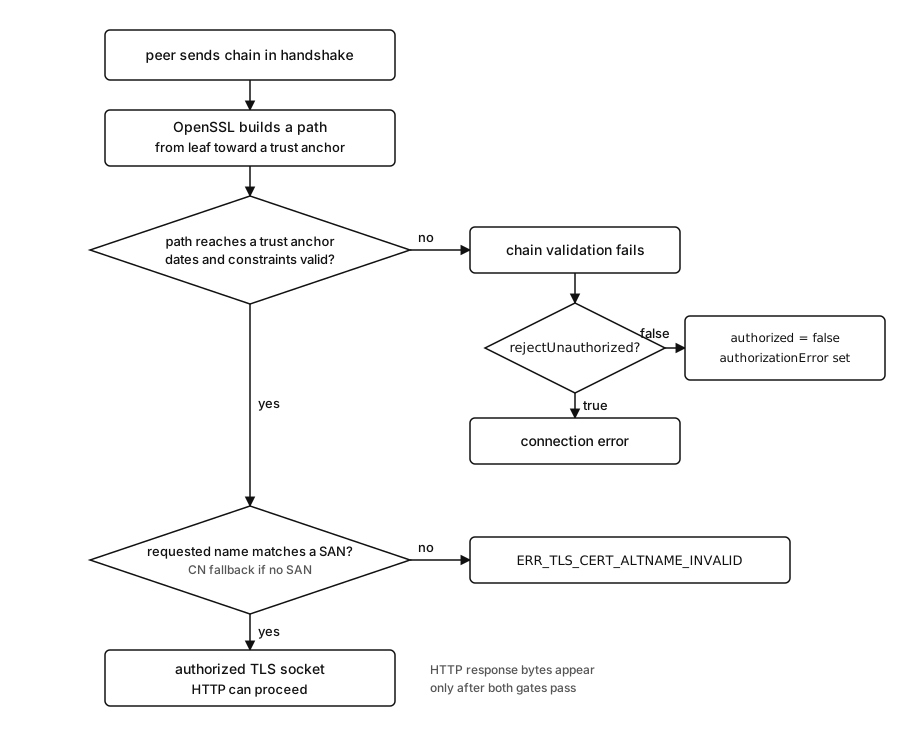
Figure 11.3 - Chain validation runs first and name verification runs second, each failure lands on its own error path, and HTTP bytes move only after both checks pass.
The peer sends certificate data during the TLS handshake. For a normal server-authenticated client connection, the server sends its leaf certificate and usually its intermediate certificates. Node receives that chain through OpenSSL as handshake data. JavaScript has not received HTTP response bytes yet.
OpenSSL parses the certificates and builds possible paths. It starts with the leaf. It looks at issuer fields and authority data, then tries to find an issuer certificate from the presented intermediates or local trust material. Each possible issuer has to validate the signature below it and satisfy certificate constraints for issuing certificates.
The leaf has service identity and a public key. The intermediate has CA capability. The root or configured trust anchor ends the path. OpenSSL checks validity periods across the path. A single expired intermediate can break a chain even when the leaf certificate has future dates. A certificate with the wrong purpose can break the path even when signatures verify.
If no acceptable path reaches local trust material, chain validation fails. Node receives the OpenSSL verification result. With default client behavior, the TLS connection emits an error and application code never receives a normal secure socket for HTTP work.
If the chain validates, Node applies hostname verification for client connections. The default check uses the hostname associated with the connection and compares it to the peer certificate identity data. It checks supported SAN entries first. It can fall back to subject CN for DNS hostnames when supported SAN identifiers are absent. tls.checkServerIdentity(hostname, cert) is the public helper for that default behavior.
A custom callback can preserve Node's default hostname check like this -
import tls from "node:tls";

function checkServerIdentity(host, cert) {
  const err = tls.checkServerIdentity(host, cert);
  if (err) return err;
  return undefined;
}
Real custom checks should start with the default helper and then add narrow local policy. Replacing the check with a callback that always returns undefined accepts names the certificate never claimed. That changes what the client is willing to trust.
rejectUnauthorized controls whether failed authorization rejects the connection. For TLS clients, verification is on by default. Set it to false and Node lets the connection continue after failed verification, recording the failure on the socket. Use it for controlled diagnostics. Reaching for it in application code only hides the broken input.
const socket = tls.connect({
  host: "api.internal",
  port: 443,
  rejectUnauthorized: false,
});
This connection can reach secureConnect even when authorization failed. The socket then exposes tlsSocket.authorized and tlsSocket.authorizationError. Application traffic sent after this point is talking to a peer the client did not authenticate.
With rejectUnauthorized: false the socket reaches secureConnect even after authorization failed, so every byte you send next goes to a peer whose certificate was never checked. Keep this flag in throwaway diagnostic scripts only. In application code, fix the trust input instead, by adding the CA, sending the missing intermediate, or correcting the verified name.
socket.once("secureConnect", () => {
  console.log(socket.authorized);
  console.log(socket.authorizationError);
});
tlsSocket.authorized is the boolean authorization state. tlsSocket.authorizationError is the reason recorded when authorization is false. A production client should normally use authorized sockets only. A diagnostic script can inspect the false state and close without sending an HTTP request.
socket.once("secureConnect", () => {
  const cert = socket.getPeerCertificate(true);
  console.log(cert.subjectaltname);
  console.log(cert.issuerCertificate?.subject);
  socket.end();
});
The true argument asks Node for detailed certificate data, including issuer certificate links when available. The output helps you see what the peer actually sent. Use it to compare the peer's chain and identity fields against the failure, not as a stand-in for validation.
A successful TLS handshake and an authorized peer are related, but they answer separate questions. The handshake can negotiate a protocol and cipher, exchange keys, and complete encrypted record setup. Certificate authorization can still fail.
With the default client setting, Node turns that authorization failure into a connection error. With verification disabled, the socket remains usable and the failure moves into socket metadata.
secureConnect on its own is a weak log line. For handshake negotiation, log the protocol and cipher. For trust, log the authorization state and the certificate error. Those answer different questions.
Socket reuse also affects what you observe.
An HTTPS agent can reuse a TLS socket after an authorized connection completes an HTTP exchange. Certificate validation happens when that TLS socket is created, not before every request sent over the same HTTP/1.1 keep-alive connection. If the certificate changes on the server while a client still has an existing authorized socket, requests on that socket continue using the already-established TLS session until the socket closes. New sockets validate against the new certificate.
During certificate rollouts, this can create mixed behavior. Some requests succeed on old authorized sockets. New connection attempts may fail against the new certificate. Logs may show requests succeeding and failing against the same origin at the same time. The reason is connection lifetime. Chapter 10 covered agents and socket pools. The certificate rule that applies here is short. Validation runs once, when the TLS connection is established, and every later request sent over that same socket reuses the result.
Session resumption, from the previous subchapter, works the same way during a rollout. A resumed TLS session still belongs to a server identity and validation context. When you replace certificates, watch new connection creation, session cache behavior, and agent socket lifetime during the rollout. The handshake chapter covers resumption in depth. For debugging a rollout, the connection-lifetime rule is the part that applies.
Self-Signed And Private CA Setups
Local development certificates push people toward an easy mistake, setting rejectUnauthorized: false to make the error go away.
Keep verification on and add the certificate to the client's trust material.
A self-signed certificate can be trusted directly by passing it as CA material to the client. In that setup, the self-signed certificate is both the presented leaf and the trust anchor. That is acceptable for a narrow local tool or a pinned internal test path. It scales poorly because every leaf rotation changes client trust material.
https.get("https://localhost:8443", {
  ca: readFileSync("localhost-cert.pem"),
}, res => {
  res.resume();
});
The client accepts the self-signed localhost certificate because it passed that certificate as trusted CA material for the request. A current localhost certificate should include DNS:localhost in SAN so the identity check uses the current field. Node's default verifier can accept a CN-only DNS certificate when supported SAN identifiers are absent, but CN-only certificates depend on legacy fallback. Trusting the certificate solves chain validation while identity validation still runs.
Private CA setups are cleaner. Generate a private root or intermediate CA outside the application runtime. Issue service certificates from that CA. Install the CA certificate as trust material for clients that call those services. The server presents the leaf plus intermediates. Clients trust the private CA.
client trust -
  company-root.pem

server presents -
  api.internal leaf
  company intermediate
Leaf certificates can now rotate without touching any client. One CA can also issue certificates for several internal hosts, as long as each leaf lists its host in SAN.
The ca option is precise. Put it on the client that needs private trust. Avoid sharing an https.Agent or options object with ca: companyRoot across public and private calls, unless the CA list intentionally includes public trust as well. Adding an internal CA to a shared agent is what breaks calls to public endpoints, because the replacement semantics drop the public roots that agent relied on.
NODE_EXTRA_CA_CERTS is broader. It changes default trust for the whole process from startup. That can be the right call for a service that treats the company CA as part of its runtime environment. It is harder to reason about in test suites and CLIs that call many unrelated HTTPS endpoints.
A workable local setup looks like this -
application code -
  verification on
  no rejectUnauthorized false

local environment -
  NODE_EXTRA_CA_CERTS=./dev-root.pem
The application code stays close to production behavior. The local environment supplies local trust. When the same code runs in production, trust comes from production startup configuration or from per-client ca.
Self-signed and private CA failures happen at the TLS layer, before request parsing, response status, or any redirect handling runs. Debug them there. After the TLS socket is authorized, the rest of the HTTPS lifecycle is ordinary HTTP over the protected socket.
Reading Node Certificate Failures
Certificate errors become easier once you connect each code to the validation step that failed.
ERR_TLS_CERT_ALTNAME_INVALID is the name mismatch path. Chain validation may have succeeded. The certificate may be signed by a trusted CA. The requested hostname or IP can still fall outside the certificate's accepted identity data, usually the SAN set.
Common causes include -
- connecting to an IP address with a DNS-only certificate
- using an internal alias missing from SAN
- setting
servernameto the wrong value - proxy or tunnel code connecting to one host while verifying another
- reusing a certificate after a service rename
The fix is usually to connect with the correct verified name or issue a certificate with the right identity entries. For current service certificates, those entries belong in SAN. A name mismatch is an identity problem, so its fix lives in the certificate SAN entries or the verified name, and adding a CA changes a different input.
UNABLE_TO_VERIFY_LEAF_SIGNATURE points at chain construction. OpenSSL could not verify the leaf certificate signature through available issuer material. The server may have omitted an intermediate. The client may have the wrong trust store. The certificate may be issued by a private CA this process never loaded.
Start by inspecting what the server presents. The leaf issuer should match the subject of an intermediate in the served chain or a locally trusted certificate. If the server sends only the leaf, fix the server certificate bundle. If the server sends the full chain to a private root, add the private CA to client trust.
DEPTH_ZERO_SELF_SIGNED_CERT is the usual code for a directly self-signed leaf certificate that lacks a local trust anchor in this process. A local server with one self-signed localhost certificate and a client using default public roots commonly fails this way.
SELF_SIGNED_CERT_IN_CHAIN means the presented path contained a self-signed issuer or root certificate outside the process's configured trust anchors. In private CA setups, it can mean the internal root is present in the peer chain but absent from local trust.
The fix is trust configuration. Put the self-signed leaf certificate or private CA certificate in the correct trust input. For a one-off client, use ca. For process-wide trust, use startup configuration such as NODE_EXTRA_CA_CERTS when that matches the deployment policy.
CERT_HAS_EXPIRED means one certificate in the relevant validation path is outside its validity period. Check the leaf and the intermediates. People often check the visible service certificate first and miss an expired intermediate.
The local clock participates too. Containers, VMs, and developer machines with bad time can reject certificates that are valid everywhere else. The certificate dates and process clock are both part of the observed result.
A small error logger helps here -
https.get(url, res => {
  res.resume();
}).on("error", err => {
  console.error(err.code, err.reason, err.host);
});
err.code gives the stable Node or OpenSSL-facing code you can route on in diagnostics. err.reason may carry OpenSSL reason text. err.host can appear on name mismatch errors. In real client wrappers, log the URL hostname separately so you can compare destination construction with certificate identity.
Write down the failed row before you change any code.
For a name mismatch, the row is usually small -
verified name - api.internal
certificate SAN - DNS:api.company.test
error - ERR_TLS_CERT_ALTNAME_INVALID
That failure says the client asked for api.internal as the verified identity, and the certificate offered api.company.test. The TCP destination may be correct. DNS may be correct. The trust chain may be correct. The broken input is the identity relationship between the client call and the certificate.
A missing intermediate produces a different row -
leaf issuer - Example Service CA
served intermediates - none
local trust - Example Root CA
error - UNABLE_TO_VERIFY_LEAF_SIGNATURE
The client has the root. The server sent the leaf. The intermediate that connects them is absent. Adding the root again to ca changes nothing because the validator still lacks the issuer certificate needed for the leaf. Fix the server's cert chain.
A directly self-signed local leaf gives a shorter row -
leaf issuer - localhost
served intermediates - none
local trust - public roots only
error - DEPTH_ZERO_SELF_SIGNED_CERT
That failure says the presented leaf is also its own issuer and this client lacks a trust anchor for it. Add that local certificate, or a private CA that issued it, through the right trust input.
With private trust, the row often shows a peer chain that includes an internal root and a local trust gap -
leaf issuer - Company Issuing CA
served chain -
  Company Issuing CA
  Company Root CA
local trust - public roots only
error - SELF_SIGNED_CERT_IN_CHAIN
Here the presented chain points at the company root, and the client process lacks that root as a configured trust anchor. Add the company root through NODE_EXTRA_CA_CERTS, an explicit ca list, or the runtime trust-store mechanism your deployment owns.
For expiration, write down every date in the accepted path -
leaf valid_to - Aug 12 2026
intermediate valid_to - Jun 01 2026
process date - Jun 10 2026
error - CERT_HAS_EXPIRED
The leaf can look fine while the intermediate has expired. Certificate dashboards sometimes focus on leaf certificates because those are service-facing. Node validates the path it received. That path includes intermediates.
Avoid the broad fix. Setting rejectUnauthorized: false hides the symptom while leaving the bad input in place. Adding a CA everywhere can fix one client and create trust-scope problems somewhere else. Start with the row that failed, then change the one input responsible for it.
Request construction is its own row in that table. Client wrappers often build URLs from base origins, paths, proxy settings, and service names. One wrapper may connect to 10.0.0.12 with servername: api.internal, and another calls https://10.0.0.12 directly. Both reach the same machine, but they verify separate identities.
Log the verified name when the client wrapper can do it safely. For https.request(), that is usually the URL hostname unless options override servername. For tls.connect(), log both host and servername. If a proxy tunnel is involved, log the tunnel authority separately from the TLS server name. Chapter 10 covered proxy tunnels. The TLS rule here is that the certificate belongs to the destination inside the tunnel, not to the proxy that opened it.
The same habit helps with agents. A shared https.Agent can carry TLS options. If the agent was created with an explicit ca, every request using that agent inherits that trust scope. A call site can look clean while the agent quietly replaced default trust. Put the agent name or client wrapper name in certificate logs. It saves time when one outbound path fails and another path to the same origin works.
tlsSocket.getPeerCertificate() helps after a connection is allowed to continue. For failed default client verification, the normal socket often never reaches application use. A separate diagnostic script can set rejectUnauthorized: false, read certificate metadata, print it, and close. Keep that script out of the application request path.
checkServerIdentity() is another useful probe. Node calls it after the certificate is otherwise trusted. It receives the hostname and certificate object. Returning an Error rejects the connection. Returning undefined accepts the name check. A custom callback that skips tls.checkServerIdentity() should be treated as a local trust policy change, not as logging.
This callback logs the name inputs and keeps Node's default result -
function checkServerIdentity(host, cert) {
  console.log(host, cert.subjectaltname);
  return tls.checkServerIdentity(host, cert);
}
It is a useful temporary probe when a proxy, tunnel, IP connection, or custom servername value makes the name path unclear.
Error codes do not tell the whole story alone. Put each one next to the hostname Node verified, the chain the peer sent, and the trust material the process used. Most certificate incidents get much smaller once those are visible.
Certificate Requests And Issuance
Runtime validation starts after certificates already exist.
A certificate signing request, or CSR, is used during issuance. It contains requested subject data, requested extensions such as SAN, and the public key that should appear in the final certificate. The CSR is signed with the matching private key, which proves the requester controls that key pair at issuance time.
The CA reads the CSR, applies its issuance policy, and returns a signed certificate. Public CAs check domain control and root-program rules. Internal CAs check company policy. The returned certificate may include only the leaf. The deployment still needs the intermediate chain file and private key in the right place for Node.
The CSR is not runtime configuration for a Node server. Node does not load the CSR when accepting HTTPS traffic. It loads the issued certificate and the private key. This comes up during rotation because teams often keep all three files in the same directory - api.key, api.csr, and api.crt. Only the key and the issued certificate belong in the TLS server options. The CSR can stay in issuance records.
The private key has to match the public key in the issued certificate. If a service generates a new key pair, submits a CSR, then deploys the new certificate beside the old private key, startup or handshake setup can fail before client validation begins. That is a local identity-material problem. The peer never gets far enough to judge the chain because the server cannot prove possession of the key named by the certificate.
There are two sane rotation patterns -
same key pair -
  new certificate for existing key

new key pair -
  new private key plus new certificate
The first pattern keeps the key file stable and replaces the certificate chain. The second pattern replaces both identity files together. Both still need the served chain to include intermediates. Both still need clients to trust the issuing CA. Runtime validation sees the final deployed result, not the ticket or command that produced it.
CSR fields can also be rewritten by the CA. A request can ask for DNS:api.internal, and the CA can reject it or issue a certificate with another SAN set according to policy. Debug the issued certificate, not the CSR. The certificate presented during the TLS handshake is the identity document the client validates.
Node does not care how the certificate was issued when it validates a peer at runtime. It sees the final certificate, the chain sent by the peer, and the local trust material. ACME, renewal jobs, certificate inventory, secret storage, and rollout automation belong to later deployment and security chapters.
This separation is useful during debugging.
Wrong SAN values mean issuance produced the wrong identity data. Reissue the certificate.
A private key that does not match the certificate breaks server startup or handshake setup. Fix the deployed identity material.
A missing intermediate is a server certificate-chain packaging problem. Fix the cert file or platform certificate bundle.
When the chain ends at an internal CA the client never loaded, the gap is in client trust configuration. Add the CA through the process or connection setup that matches the deployment.
A hostname that does not match the certificate identity comes from one of two places. Either the client is verifying the wrong name, or the certificate was issued for the wrong name. Pick the right fix. Changing rejectUnauthorized hides both.
Certificate validation is strict because every accepted connection has to prove the peer owns the private key, the presented chain reaches local trust, and the certificate identity covers the name the client intended to reach. Node exposes enough of that process to debug a failure without turning verification off in application code. Find the input that broke, fix that input, and leave the TLS socket strict.