WebSocket Protocol and Node Servers
A WebSocket connection doesn't start out as a WebSocket. It starts as a plain HTTP/1.1 GET request on a normal TCP socket, read by the same HTTP parser that handles your REST routes. One header does the work, Upgrade: websocket. It tells HTTP/1.1 to switch the current connection into WebSocket protocol mode.
Once the server accepts it, the socket stays open, but the HTTP request/response cycle is done reading bytes off it. A WebSocket protocol parser takes over that same connected socket and starts reading binary frames.
The opening bytes still look familiar:
GET /chat HTTP/1.1
Host: api.example.test
Connection: Upgrade
Upgrade: websocket
Sec-WebSocket-Key: dGhlIHNhbXBsZSBub25jZQ==
Sec-WebSocket-Version: 13
Those bytes are a WebSocket upgrade request, an ordinary HTTP/1.1 request that asks the server to switch the current connection into WebSocket mode. The method is GET, the request target is still routeable HTTP text, and the headers carry the protocol selection data.
The successful response is short:
HTTP/1.1 101 Switching Protocols
Upgrade: websocket
Connection: Upgrade
Sec-WebSocket-Accept: s3pPLMBiTxaQ9kYGzzhZRbK+xOo=
101 Switching Protocols is the status code that commits the switch. Once those response bytes go out, the server has accepted the WebSocket handshake. It is the same TCP connection as before, except now it carries WebSocket frames in both directions.
A WebSocket protocol connection has three broad stages:
HTTP upgrade request
  -> 101 Switching Protocols response
  -> bidirectional WebSocket frames
  -> close handshake or transport failure
That opening HTTP exchange is the WebSocket handshake. It decides whether the socket is allowed into WebSocket mode. Most of its work is protocol validation, though it can also carry the route, cookies, auth headers, a subprotocol choice, and extension negotiation. We cover auth policy later in this chapter. What to get right now is the order. The upgrade request reaches Node's HTTP parser first, and once the server accepts, that same socket stops running through the HTTP parser.
The split is strict. Up until the 101, the server can still answer with an ordinary HTTP response and reject the request. After it, application code is writing WebSocket frames and ServerResponse is out of the picture. So a route handler that sets res.statusCode = 401 runs before the switch, while a close code like 1008 only means something once you are past the switch and writing frames.
The Upgrade Handoff
WebSocket carries messages in both directions over a connection that is already open. It starts through HTTP/1.1 because that gives the client and server a deployment-compatible way to negotiate the switch on a port that may also be serving ordinary API routes.
On the wire, it starts as HTTP:
TCP connection
  -> HTTP parser reads request line and headers
  -> server accepts upgrade
  -> HTTP parser pauses at upgrade boundary
  -> WebSocket frame parser owns later bytes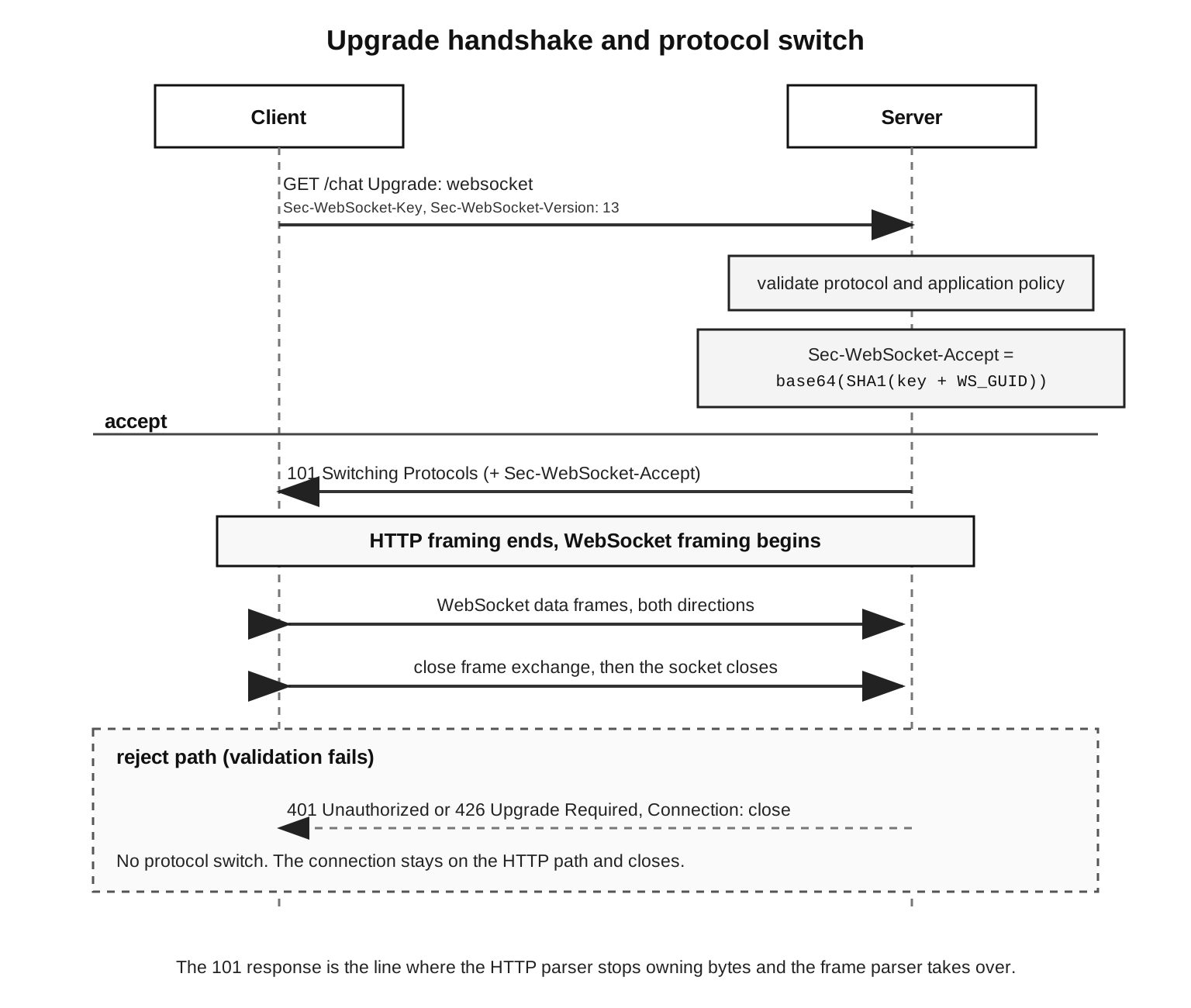
Chapters 9 and 10 cover the TCP and HTTP pieces, so the new thing here is the switch itself. A WebSocket upgrade request is still parsed as HTTP first, so Node reads enough bytes to build an IncomingMessage. The request comes out with req.method, req.url, req.headers, and the same socket reference an ordinary HTTP handler gets.
The headers are few but specific. Upgrade: websocket names the protocol the client is asking to switch to. Connection: Upgrade marks that upgrade token as connection-specific HTTP metadata. Sec-WebSocket-Version: 13 picks the protocol version that RFC 6455 standardized, and Sec-WebSocket-Key gives the server a per-handshake value it turns into Sec-WebSocket-Accept.
That key is protocol material. All it does is prove the response was generated from this specific request. It says nothing about who the user is, and session state and room permission come from separate application checks.
The URI scheme only changes the transport underneath. ws:// runs the HTTP upgrade over a plain TCP connection, and wss:// runs it inside TLS. Either way, once the transport is up, the WebSocket handshake headers and the frame format are identical. Chapter 11 covers the TLS mechanics, so here wss:// is the same WebSocket protocol running over a secure transport.
HTTP/2 has a separate extended CONNECT path for WebSocket tunneling. You can treat that as background for now. Most Node WebSocket server code still starts from an HTTP/1.1 upgrade event, often behind a proxy that forwards the upgraded connection. With HTTP/1.1 the WebSocket work begins at the accepted raw socket. With HTTP/2 extended CONNECT it begins on an accepted Http2Stream instead. Either way you land at a long-lived bidirectional frame stream once the HTTP selection step is done.
The server's 101 response has to echo the switch:
status: 101 Switching Protocols
header: Upgrade: websocket
header: Connection: Upgrade
header: Sec-WebSocket-Accept: ...
Once the client validates that response, it treats the connection as open. In the browser that shows up as WebSocket.OPEN. Node server libraries expose a similar ready state, or they emit a connection event once they have accepted the handshake and set up their frame parser.
The request URL still picks the endpoint. /chat, /events, /graphql, and /terminal can all be separate WebSocket endpoints on one HTTP server. Node hands your upgrade handler the parsed request, so you choose based on req.url, headers, cookies, and host. Whatever WebSocket endpoint you commit to starts right after that choice.
That routing choice is also the last ordinary routing decision before a long-lived connection shows up. A REST route can finish in milliseconds and let go of its socket. A WebSocket endpoint might keep one open for hours. So an upgrade rule that accepts every path quietly turns typos, scanner traffic, and stale clients into sockets that stay open. The protocol keeps working, but the server is now spending memory and file descriptors on connections it never intended to keep.
A rejected upgrade never leaves HTTP. The server can turn down /admin-stream with 401, 403, 404, or 426 while the connection is still in HTTP mode, write normal HTTP response headers, and close the connection after. No WebSocket frame parser is ever involved.
An accepted upgrade is the opposite. Node hands your code a raw socket plus any bytes it already read past the HTTP headers. From there, whatever holds the socket is responsible for everything WebSocket, parsing incoming frames, writing outgoing frames, answering pings, handling close frames, and enforcing message size limits.
One server can still run ordinary HTTP routes and WebSocket routes side by side, because the split happens per connection inside the same process. A request to /healthz can return 200 OK through the regular request handler while /chat on another connection upgrades and stays open. Both start at the same listening socket and the same HTTP parser, and they only diverge at the upgrade decision.
Handshake Validation
The server's decision comes down to two things. The request has to be a valid WebSocket opening handshake, and your application has to actually want this particular connection.
Protocol validation starts with the request head:
method: GET
http version: 1.1 or higher
upgrade: websocket
connection includes: Upgrade
sec-websocket-version: 13
sec-websocket-key: base64 value for 16 bytes
Each line rules out an ambiguity before the socket switches over. GET gives the upgrade request a target and headers. HTTP/1.1 is what provides the upgrade mechanism in the first place. The Upgrade and Connection fields mark this connection as the one being switched, and version 13 selects the RFC 6455 framing rules that current clients speak.
The general header parsing is back in Chapter 10. The thing that trips people here is token handling. The Connection header can carry more than one token, so server code has to look for an upgrade token inside it, not compare the whole field against one fixed string. Header names are case-insensitive too, and the values often need to be split into tokens before you check them. A library does this for you. Hand-rolled upgrade code has to do it on purpose, because a sloppy string comparison either rejects clients that are perfectly valid or lets malformed ones through.
Match the upgrade token, do not compare the whole header. A valid client or proxy can send Connection: keep-alive, Upgrade, so a check like req.headers.connection === 'Upgrade' throws it out. Split the field on commas, trim and lowercase each piece, then look for upgrade in the list. Read Upgrade: websocket the same way, case-insensitively.
Sec-WebSocket-Key is a base64-encoded 16-byte value the client generates fresh for each handshake, and the server feeds it into the accept transform. The server takes that header value as a string, appends the fixed WebSocket GUID, runs SHA-1 over the result, and base64-encodes the digest.
The fixed GUID is:
258EAFA5-E914-47DA-95CA-C5AB0DC85B11In Node the transform is a few lines:
const accept = createHash('sha1')
  .update(key + WS_GUID, 'binary')
  .digest('base64');
key is the received Sec-WebSocket-Key string, and accept becomes the Sec-WebSocket-Accept response header. The client computes the same transform and compares the result. A mismatch means the peer didn't complete the WebSocket server side of the handshake correctly.
That Sec-WebSocket-Accept value also protects the switch against stale or accidental responses. A cached 101 with the wrong accept value fails the client's check, and so does a plain HTTP server that happens to answer with something unrelated. All the check proves is that the protocol ran correctly. Authentication is separate, and it rides on its own headers, cookies, tokens, or session state.
A successful response commits more than a status code. It commits the parser switch:
HTTP response headers sent
  -> WebSocket opening handshake complete
  -> HTTP message framing ends for this connection
  -> WebSocket frame parsing begins
The server can name a chosen subprotocol and chosen extensions in that response. From here on, HTTP response bodies stop being a thing. A 101 carries no body for the WebSocket conversation, and the application bytes that come after it are WebSocket frames.
Subprotocol negotiation happens right alongside that transform. A subprotocol here is an application protocol name that both sides agree on during the handshake. The client offers a list:
Sec-WebSocket-Protocol: chat.v2, graphql-transport-wsThe server picks one value from that list and echoes it back in Sec-WebSocket-Protocol. That chosen name is how both ends agree to interpret messages once the connection is open. If the server returns a subprotocol the client never offered, the client is required to fail the connection, which keeps the message contract honest.
An extension is a negotiated change to how frames or messages get processed, also settled during the handshake. The one you actually run into on Node servers is permessage-deflate, negotiated through Sec-WebSocket-Extensions.
Keep that negotiation narrow. Return only the extensions you actually implement, and only the parameters you can enforce. An extension changes the bytes the frame parser has to handle, so saying yes to one affects parsing, memory, and CPU at the same time.
Picking a subprotocol and picking an extension are separate decisions. One server might select graphql-transport-ws and decline permessage-deflate. Another might choose no subprotocol at all and still accept compression. The subprotocol tells your application code how to read messages. The extension tells the frame layer how to transform bytes before a message reaches that code.
Version checking should be dull and strict. Version 13 is the current WebSocket version. The older draft versions behaved differently and are not part of the modern Node server model. If the server sees any other value, it should reject the upgrade while the connection is still HTTP, usually with 426 Upgrade Required and a Sec-WebSocket-Version: 13 header. Libraries do this for you. If you write it by hand, make sure the rejection goes out before the 101.
Your application checks also belong before the 101. Look at the path, the host policy, and whatever auth material you are willing to accept in the opening request, and apply your size and header limits at the HTTP layer while you do. Later subchapters get into auth refresh, Origin checks, reconnects, and presence. The rule for now is short. Accept the upgrade only once the request is both protocol-valid and allowed by your application.
When you reject, write a normal HTTP response while the socket is still in HTTP mode:
socket.write(
  'HTTP/1.1 401 Unauthorized\r\n' +
  'Connection: close\r\n\r\n'
);
socket.destroy();
Those bytes are an ordinary HTTP response, and they only make sense before the 101. Once the server has sent 101 Switching Protocols, that same rejection has to happen through WebSocket close behavior instead, usually with a policy close code.
Node's Upgrade Event
Node exposes accepted upgrades through the HTTP server's upgrade event.
import http from 'node:http';

const server = http.createServer();

server.on('upgrade', (req, socket, head) => {
  console.log(req.url, head.length);
  socket.destroy();
});
The event hands you three things, req, socket, and head. req is the parsed HTTP request. socket is the connected stream the HTTP server was using a moment ago. head is a Buffer holding bytes that were already read off the socket, past the end of the HTTP headers.
That head buffer is the part people drop, and dropping it loses real data. A single low-level read can hold the end of the HTTP request and the start of the first WebSocket frame, because a client can send the upgrade request and that first frame close together. Node's HTTP parser consumes the HTTP bytes, stops at the switch, and passes whatever is left over to you as head. A WebSocket implementation has to feed head into its frame parser before it waits on the socket for anything more.
On a local box, head is usually empty, which is the reason this bug slips through testing. With real clients, buffering, TLS record boundaries, proxy behavior, and event-loop timing can all land the first frame's bytes in the same read as the end of the headers. Drop head and you drop real protocol bytes. The first message from the client can vanish, or the parser starts mid-frame and closes with a protocol error.
Feed head into the frame parser before you read another byte from the socket. Node's HTTP parser already pulled those bytes off the socket, and they will not appear again in a later data event. If you sit and wait for the socket to deliver that first frame, you wait forever, because you are already holding it, and the message looks dropped. When a library is handling the connection, pass head straight into handleUpgrade() and do not read from the socket yourself.
After the switch, what you have is a raw upgrade socket, the same connected socket Node is no longer treating as an HTTP request/response. In the normal TCP case it is still a net.Socket, with the same stream backpressure, error and close events, remote address, and kernel socket buffers it always had. The one thing that changed is who reads and writes it. HTTP has handed the readable and writable bytes to your upgrade handler.
That handoff also changes what timeouts mean. server.headersTimeout and the HTTP request timeouts protect the opening request only. Once the upgrade goes through, the WebSocket server has to bring its own idle and liveness policy. The socket still exposes a low-level timeout API, but a WebSocket-aware timeout usually watches ping/pong or application heartbeats, because those are what tell you the endpoint on the other side is still responding.
Node v24.9 and newer add one extra gate before upgrade, called shouldUpgradeCallback.
const server = http.createServer({
  shouldUpgradeCallback: req => req.url === '/chat'
});
The callback receives the incoming request and returns a boolean. A true result makes Node emit upgrade. A false result makes it emit request instead, which lets ordinary HTTP code answer. With no callback set, Node falls back to whether an upgrade listener exists at all. In v24.9 and newer, an accepted upgrade with no upgrade listener has its socket destroyed. That is the right outcome, because an upgraded socket with nothing reading it just leaks.
The rejection can reuse your normal request listener:
const server = http.createServer({
  shouldUpgradeCallback: req => req.url === '/chat'
}, (req, res) => {
  res.writeHead(404).end();
});
An upgrade attempt for /chat ends up at upgrade. One for /other arrives at the request listener as a plain HTTP request. So the server can turn down an unknown upgrade target with normal HTTP, rather than half-accepting a socket and then destroying it without ever answering.
There is one trap here. shouldUpgradeCallback only decides whether Node accepts the upgrade at the HTTP server level. The real WebSocket validation is still the WebSocket implementation's job, the Sec-WebSocket-Key, the version, subprotocols, extensions, and the frame rules. Use the callback as an early filter for routing and policy you can decide from the request head alone.
Returning true from shouldUpgradeCallback only tells Node to emit upgrade instead of request. It checks nothing about Sec-WebSocket-Key, the version, subprotocols, extensions, or frame rules. All of that still runs inside your upgrade handler or the WebSocket library. Use the callback for path and host routing you can decide from the request head, and leave protocol validation to the WebSocket code that runs after it.
Most production Node servers hand the socket off to a library, and ws is the usual low-level pick. It does the handshake response, the frame parser, masking, ping/pong, close frames, and extension negotiation, then gives you a message-oriented API on top of all of it.
One common ws setup uses noServer so the existing HTTP server stays in charge of routing:
const server = http.createServer();
const wss = new WebSocketServer({ noServer: true });

server.on('upgrade', (req, socket, head) => {
  const path = new URL(req.url, 'ws://local').pathname;
  if (path !== '/chat') return socket.destroy();
  wss.handleUpgrade(req, socket, head, ws => wss.emit('connection', ws, req));
});
handleUpgrade() takes the parsed request, the raw socket, and those leftover head bytes. Once it accepts the handshake and sets up its parser, ws emits a connection at the WebSocket level. After that, you are done with HTTP request handlers and working with WebSocket messages and control events instead.
That division keeps the routing clear. The HTTP server decides which upgrade attempts reach the WebSocket server, and the WebSocket server takes care of frame parsing and message delivery. If you read from socket by hand before the WebSocket library has consumed head, you have mixed the two jobs, and you will lose bytes.
Keep error handling on both sides of the handoff. While you are still in the window before handleUpgrade() succeeds, attach a socket error listener, so a reset during auth or route checks has somewhere to land. Once ws is running the connection, put your WebSocket error and close handlers on the ws object. The raw socket can still fail underneath, but the library usually turns that into its own events after the connection is set up.
The request object is still worth keeping after the WebSocket object exists. It carries the path, the headers, the remote socket data, and any context your upgrade code attached to it. A lot of servers pass req into the connection event so the message handler can read a few pieces of connection metadata. Do that carefully. Copy the context you need into your own connection state, and try not to reach back into mutable HTTP helper objects long after the upgrade is done.
Express and Fastify integrations land in the same place. A framework can help pick the route or attach auth context, but the actual protocol switch still happens at the HTTP server's upgrade event, or in a wrapper around it. Ordinary middleware that expects req and res is finished the moment the socket turns into a WebSocket connection. It helps to keep framework routing and WebSocket lifetime as two separate concerns, even when a plugin hides the wiring between them.
Node v24 also ships a stable global WebSocket client API. Server code still begins with node:http upgrade handling and usually hands the socket to a package. That global client is for writing clients. On the server, upgrade is still where you start.
Frames and Messages
Once the handshake is done, every byte on the connection is part of a WebSocket frame. A frame is the unit on the wire, a binary header followed by a payload. The header tells the receiver whether this frame ends a message, which opcode it carries, whether any extension bits are set, whether a masking key follows, and how many payload bytes belong to it.
Parsing has to be incremental, because a socket read does not line up with frame edges. One read might stop after a single byte of the header. The next might bring three whole frames, or the tail of a fragmented message followed by a ping and the first bytes of another continuation frame. So the parser keeps exact state between reads and only consumes the bytes that belong to the frame it is working on right now.
The base header starts with two bytes:
byte 0: FIN RSV1 RSV2 RSV3 opcode
byte 1: MASK payload-length-7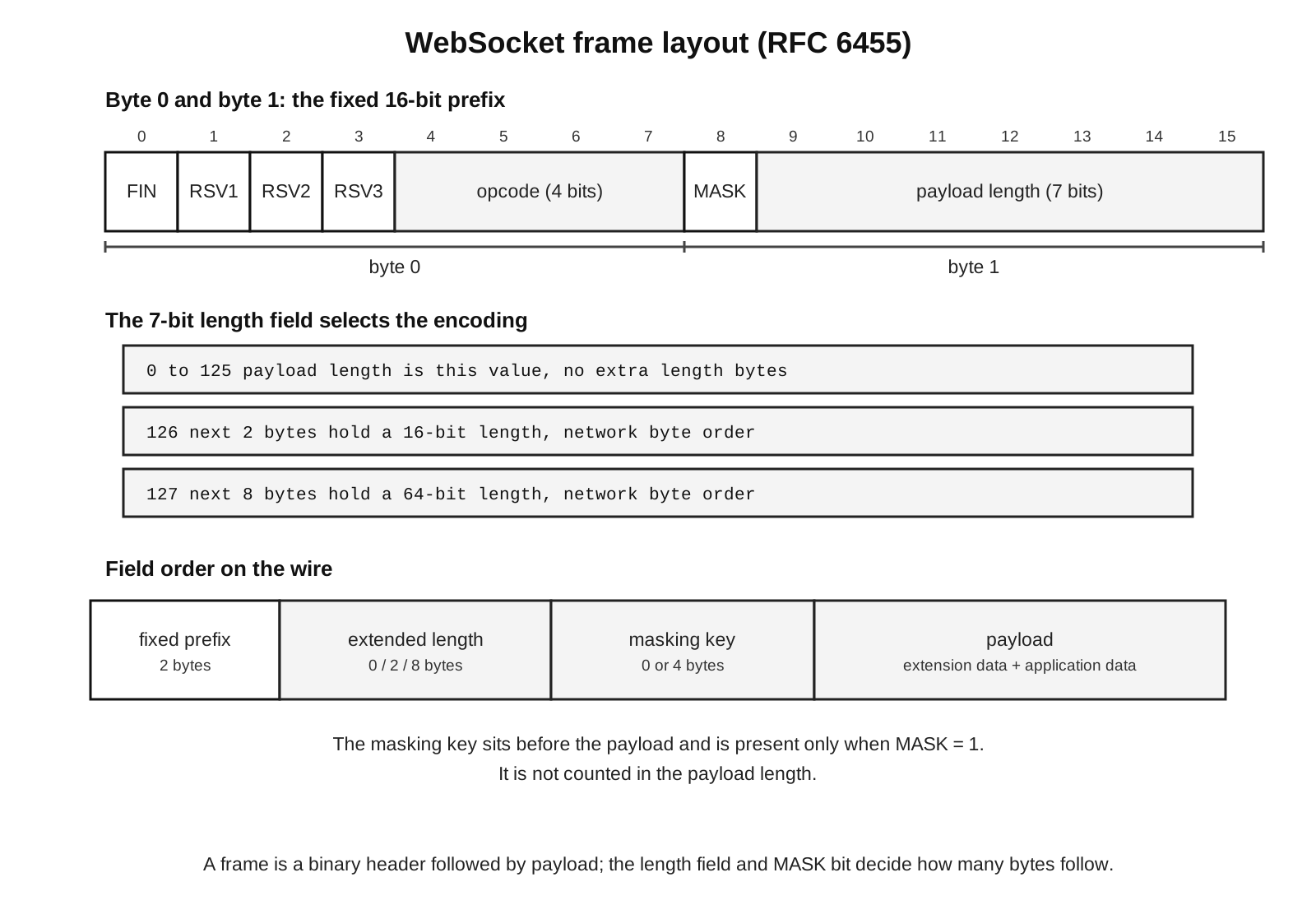
The first byte splits into bits. FIN says whether this frame is the final fragment of a message, RSV1, RSV2, and RSV3 are reserved for extensions, and opcode is the 4-bit field that says how to interpret the frame.
The second byte splits the same way. MASK says whether a 4-byte masking key is present, and the low 7 bits carry either the payload length directly or a marker that an extended length follows.
The first thing the parser does is bit math:
const b0 = frame[0];
const b1 = frame[1];
const fin = (b0 & 0x80) !== 0;
const opcode = b0 & 0x0f;
const masked = (b1 & 0x80) !== 0;
let length = b1 & 0x7f;
That code only reads the fixed two-byte prefix. A real parser goes on from there to extended lengths, masking keys, and partial buffers. The thing to notice is the bit layout. WebSocket frames are binary, so the opcode is four bits packed into the first byte, not a text token.
The fixed prefix creates the first round of protocol checks, and all of them run before application code ever sees a message. Control opcodes need FIN set. Reserved bits need a negotiated extension behind them. The opcode has to be one the parser knows or one an extension owns. Direction has its own rule, where a client frame arriving at a server needs the mask bit set and a server frame arriving at a client needs it clear.
Payload length has three encodings:
0..125 -> length is in the low 7 bits
126    -> next 2 bytes are the length
127    -> next 8 bytes are the length
The 16-bit and 64-bit forms are in network byte order. The parser waits until it has enough bytes for the extended length, then waits again for the masking key and the payload. Where the socket chunk boundaries fall makes no difference here. Whether the next byte is a length byte, a mask byte, or payload is decided by the parser's current state, not by how the bytes happened to arrive.
The length fields also come with minimal-encoding rules. A 124-byte payload uses the small 7-bit form. A 126-byte payload uses the 16-bit extended form. If a frame uses the 16-bit form for a length that would have fit in the 7-bit form, a strict parser rejects it. It is a small rule, but enforcing it keeps the framing canonical, and lenient parsers hand more edge cases to intermediaries, test suites, and any peer that expects canonical frames.
A real frame reader ends up with a state sequence closer to this:
need fixed header
  -> need extended length, maybe
  -> need masking key, maybe
  -> need payload bytes
  -> validate and deliver frame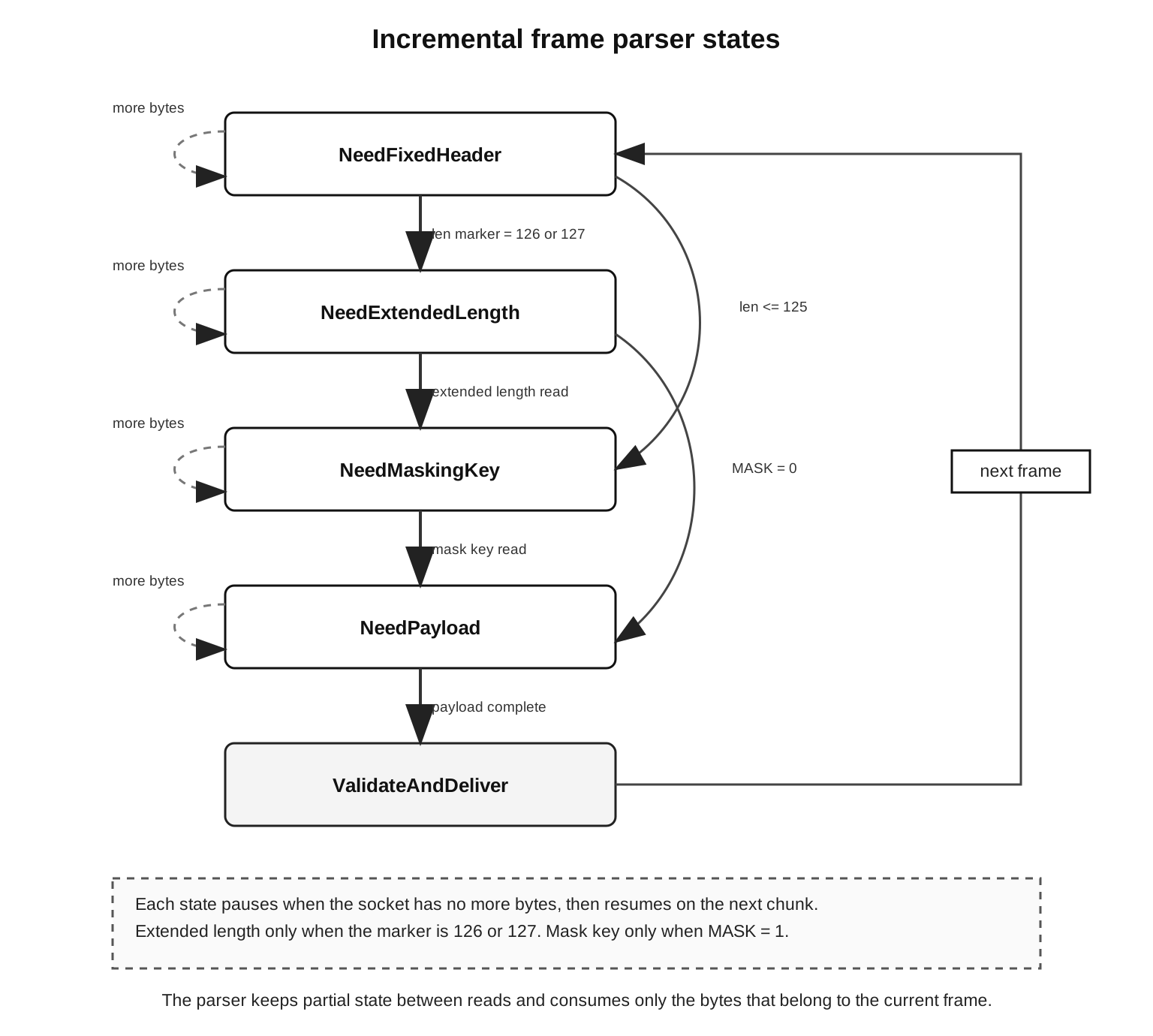
Any of those states can stop partway through, because the socket has not delivered more bytes yet. It is the same incremental style the HTTP parser used back in Chapter 10, with WebSocket frame grammar in place of HTTP grammar. The parser holds enough partial state to resume where it stopped when the next data event or read shows up.
The opcode values used most often are:
0x0 continuation
0x1 text
0x2 binary
0x8 close
0x9 ping
0xA pong
The opcode is the frame's type tag. Text frames carry UTF-8 text, binary frames carry raw application bytes, and continuation frames carry the rest of a message that was split up. Close, ping, and pong are the control frames.
A message is what you actually get once those frames are put back together. The simple case is one text frame with FIN set, which is a whole message on its own. A fragmented message starts with a text frame that has FIN clear, runs through zero or more continuation frames, and finishes with a continuation frame that sets FIN again.
The compact state machine is:
text frame, FIN=1
  -> deliver one text message

text frame, FIN=0
  -> collect continuation frames
  -> deliver one text message when FIN=1 arrives
Binary messages follow the same pattern. The first frame decides the message type, and the continuation frames after it carry more payload for that same message.
You see this difference in application code. A message event from a library is normally one fully reassembled message, whether the library read one frame or twenty to build it. Your handler gets the finished message, and all the frame work already happened underneath.
The same difference affects backpressure. The frame parser can pull partial frame data off the socket, but a message-oriented API might hold off emitting until the whole message is assembled. If a client sends a 20 MiB fragmented message, the parser stays busy for a while before the application ever gets a single message event. A server that needs streaming has to pick an API or library mode that hands you payload pieces safely. Most realtime protocols avoid the problem by keeping messages small and setting a maximum size.
UTF-8 validation also happens at the message level, not the frame level. In a fragmented message, one text frame can end in the middle of a UTF-8 sequence, and that is allowed. The thing that has to be valid UTF-8 is the whole reassembled message. If a server ends up with invalid text, it should close with a protocol-level code like 1007.
JSON is one layer up from that. A text message can be valid UTF-8 and still be broken JSON, and it can even be valid JSON that breaks your application schema. Match the close behavior to whichever layer actually failed. Bad UTF-8 is a protocol failure and closes the WebSocket. Bad JSON is an application parse failure. A schema violation is an application contract failure, which you would normally surface as an application error message or a policy close rather than a protocol close.
Control frames work differently. Their opcode has the high bit set, and there are three of them, close, ping, and pong. A control frame carries at most 125 bytes, never fragments, and can show up right in the middle of a fragmented data message.
That last point catches people. A peer can send part of a large text message, slip a ping in between, then carry on with more continuation frames. The receiver has to answer that ping quickly while it still holds the half-finished message. A parser that waits to assemble the entire large message before it even looks at control frames behaves worst right when messages are biggest.
A control frame, that is a ping, pong, or close, can land between the continuation frames of a fragmented data message. The parser has to handle it immediately, while it still holds the half-finished message, and then return to reassembly. If it buffers the whole fragmented message before checking opcodes, pings and close frames both get handled late, and a liveness monitor on the other side concludes the connection is dead.
Extensions can change how frames are read. permessage-deflate sets RSV1 on compressed messages, and other extensions, present or future, can claim the other reserved bits, extension data, or reserved opcodes. If a server gets a reserved bit it never negotiated, or an opcode it does not recognize, it should fail the connection, usually with 1002 for protocol error.
Close state also affects frame processing. Once an endpoint has sent a close frame, it should stop sending data frames, though it may still receive frames that were already in flight. A library usually drains or ignores those based on its own close state, then closes the socket when the peer answers or a local deadline runs out. If you write the parser yourself, you need a close-state flag in it, because a data frame that is fine during OPEN is a mistake once the close has begun.
Underneath all of this is one idea, the parser holds a lot of state. HTTP's parser stopped at the switch. The WebSocket parser now has to track:
current frame header state
current payload length
current masking key
current fragmented-message state
current negotiated extensions
current close state
Your application handlers should only see messages and control notifications after all of that parser work is finished. You write raw frame parsing when you are building a WebSocket implementation, not when you are using one someone else wrote.
Masking and Payload Handling
Masking only runs in one direction. The client masks every frame it sends to the server, and the server sends its frames back unmasked. The masking itself is a transformation applied to the frame payload. A masked frame puts a 4-byte masking key right after the length fields, and the receiver XORs each payload byte against one byte of that key, cycling through the four key bytes in order.
The loop itself is tiny:
for (let i = 0; i < payload.length; i++) {
  payload[i] ^= mask[i & 3];
}
The same loop masks and unmasks, because XOR against the same key undoes itself. The key is per frame and touches only payload data. The length field counts payload bytes alone, and the 4-byte masking key is not included in it.
A server parser should enforce that direction. A browser client always masks, so if a Node server gets an unmasked frame from a client, that is a protocol error. The reverse holds for a client that gets a masked frame from a server. Libraries run this check for you. A hand-written parser has to run it before it delivers any payload.
Because masking changes the bytes, people sometimes read it as a form of encryption. It is not, and it gives you very little. It is a required transformation on client frames and nothing else. Transport security on wss:// is TLS's job, authentication and authorization are the application's job, and masking only rewrites the payload bytes on the wire to follow the framing rule.
The parser can unmask in place when it has a mutable buffer for the payload to itself, which is common in Node libraries because a Buffer can be changed byte by byte. Whether that is safe depends on who else is holding those bytes. If the same bytes are shared with another view, or queued somewhere for diagnostics, mutating in place changes that other view as well. A library normally controls this memory itself, so application code can treat the delivered message as already decoded, per the library's API.
Partial payload reads create a small offset problem. The mask key cycles across the entire payload, and the mask index is tied to the payload offset, regardless of where the socket chunk boundaries fall. If the parser receives the first 10 bytes of a masked payload now and the next 10 bytes later, that second read has to resume at mask index 10 % 4. So a custom parser has to keep track of the payload offset as it unmasks across separate buffers.
The mask key is part of the frame header state. The parser consumes it before any payload is delivered, and the application payload starts right after it. If you accidentally count those four key bytes as message bytes, every size limit and parser offset after that point is off.
What happens to the payload next depends on the opcode and on any negotiated extensions.
For a binary message, the payload is raw application bytes, and a Node server usually hands it to you as a Buffer, or something you can turn into one. Leave it as bytes while the application protocol treats it as bytes, and do not convert to a string until the protocol actually says the bytes are text.
For a text message, the whole message has to decode as UTF-8, and the parser or library may check that as it reassembles. Invalid UTF-8 is a protocol failure and closes the connection. Invalid JSON is a different thing, an application parse failure, and a message can be invalid JSON while still being perfectly valid UTF-8, which keeps it inside the application contract rather than the protocol.
Large payloads are why you need a size limit. The frame format can encode very large lengths, so without a configured maximum message size the server has no real memory ceiling. A peer can push memory up either by sending one enormous payload or by spreading an enormous message across many frames. Stream backpressure helps at the transport level, but the size policy itself has to come from your configuration.
Be clear about which unit the limit applies to, because a per-frame limit and a per-message limit are not the same. A sender can build one message out of many frames. If a server caps individual frames but leaves the reassembled message unbounded, it can still buffer far too much. Cap the message instead and the server can reject an oversized payload even when every single frame inside it is small.
Set a maximum message size, or one peer can run your process out of memory. The 64-bit length field can claim a payload larger than your entire heap, and even with small frames a peer can stretch one message across thousands of continuation frames that you buffer until FIN finally arrives. Put the cap on the reassembled message, not only on each frame, and close anything over the limit with 1009. Backpressure protects the transport, but the size cap is policy you have to set.
The close code should match the failure. A message past the size limit usually maps to 1009. A binary message on a text-only endpoint is 1003, invalid UTF-8 is 1007, a frame with bad masking or bad reserved bits is 1002, and an application policy failure is 1008. When the codes line up with the actual failures, your client logs and server logs tell the same story about what went wrong.
Fragmentation forces another memory decision. A library may buffer fragments until it can emit one complete message. A streaming parser can give you the pieces sooner. Most application-level WebSocket APIs are message-oriented, so they keep enough state to deliver whole messages, which is fine as long as your size limits are explicit. It stops being fine the moment "message" silently means "whatever the peer sends before FIN".
Compression adds one more wrinkle to payload handling. With permessage-deflate active, the frame payload usually has to be decompressed before any UTF-8 validation or message delivery, and the compressed bytes on the wire can be far smaller than the message they expand into. So your size limits have to apply to the decompressed message, not the compressed input.
A few hundred kilobytes of compressed input can expand into hundreds of megabytes. A size limit that only counts the bytes on the wire stops protecting you the instant permessage-deflate is on. Cap the decompressed output, and stop decompressing once it crosses that cap, rather than trusting the advertised frame length. Context takeover makes it worse, because it keeps per-connection compression state across messages, so thousands of idle connections each pin some zlib memory.
Payload type also has to stay explicit in your own application protocol. A WebSocket connection only gives you text and binary messages. Everything past that, request IDs, retries, permissions, schemas, ordering, lives in the application protocol you build on top of the frame stream. Whether that protocol uses JSON envelopes, GraphQL subscription messages, protobuf, or custom binary records, it needs its own message-level validation above what WebSocket delivers.
Control Frames and Liveness
Liveness here comes from three separate signals that do not measure the same thing, TCP keep-alive, WebSocket ping/pong, and application heartbeats.
TCP keep-alive lives at the socket layer. It probes idle connections through the operating system, it is slow by default on a lot of systems, and it tells you very little about whether the application itself is responsive.
Ping and pong are WebSocket control frames, ping with opcode 0x9 and pong with opcode 0xA. Either side can send a ping once the connection is open and before it closes, and whichever side receives a ping answers with a pong that carries the same payload, as soon as it reasonably can, unless the connection is already closing.
Application heartbeats are messages your own application defines. They might carry user IDs, sequence numbers, subscription state, or presence data, and Subchapter 4 gets into that policy. The one protocol-level fact to separate out here is that ping and pong are part of WebSocket itself, not something you invent.
The three signals answer different questions:
TCP keep-alive: did the transport answer a low-level probe
WebSocket pong: did the peer's WebSocket stack process a ping
app heartbeat: did the application protocol make progress
Those three checks can disagree. The TCP connection can be fully established while the application's event loop is wedged. A pong can come back even though the user is no longer subscribed to the channel they should be on. And an application heartbeat can fold in sequence or presence state that ping and pong never look at. The protocol ping is a cheap check that the WebSocket stack is alive. Anything about application state still needs application messages.
ws exposes ping and pong directly:
wss.on('connection', ws => {
  ws.isAlive = true;
  ws.on('pong', () => { ws.isAlive = true; });
});
That snippet keeps application state on the connection object. A real server would pair it with an interval that sends pings, drops sockets that stopped answering, and stands down during shutdown. The point of the snippet is the event itself. A pong arrives as a WebSocket control frame, while chat messages and JSON payloads come through as data messages.
A server can drop a connection that stops answering pings, but that is a policy you decide locally. The protocol only gives you the ping and pong frames. Your service is what chooses the interval, the timeout, and what cleanup does.
Choose the interval carefully. A short interval adds writes across every open connection. A long one lets dead peers linger before cleanup notices them. Real behavior also gets bent by mobile clients, background browser tabs, proxies, NAT timeouts, and platform idle policies. Chapter 35 covers load balancers and platform routing. At this layer, treat ping policy as part of managing the connection, kept separate from your business logic.
Ping payloads are optional and small, and the pong echoes the same payload back, which some servers use to measure round-trip time. That number stays local to the connection. Full application latency still needs measurements from route handling, storage, and message processing.
The close frame is the third kind of control frame. It has opcode 0x8, and its payload can be empty. When it is not, the first two bytes are a close code in network byte order, and after that comes an optional UTF-8 reason. Control-frame payloads top out at 125 bytes, so the reason gets at most 123 of them.
The close code is a number that says why an endpoint is closing. The common ones:
1000 normal closure
1001 going away
1002 protocol error
1003 unsupported data
1007 invalid payload data
1008 policy violation
1009 message too big
1011 internal error
Application and library codes live in the 3000 to 4999 ranges, with a few values set aside for APIs and diagnostics. Some codes never travel on the wire. 1005, 1006, and 1015 are not allowed in a close frame, and APIs reuse them to mean "no code present", "abnormal closure", and TLS handshake failure.
The close handshake goes both ways. One endpoint sends a close frame, the peer sends its own close frame back if it has not already, and then the underlying socket can close. After an endpoint has sent its close frame, it stops sending data frames.
Closing is asynchronous. Calling ws.close() starts the process, but you do not know the peer received it until the connection actually makes progress. The close frame goes into the write queue, the peer may answer with its own, the socket may drain, and the connection closes after that. If the peer never answers, a hard deadline can still call terminate() or destroy the socket directly.
In ws, a policy close can be one line:
ws.close(1008, 'policy');That sends a close frame with code 1008 and a short reason. The peer receives that code and reason, as long as the close frame actually gets there. If you destroy the socket instead, the peer only gets a transport closure, which it may log as an abnormal close.
socket.destroy() is a level below that. It tears down the connected socket from Node's side, which is what you want for a malformed handshake, a parser failure that makes the socket unsafe to keep reading, a hard shutdown deadline, or a peer that has stopped answering liveness checks. Called directly, it skips the graceful WebSocket close completely.
An ECONNRESET is lower again. It means the TCP connection was reset, and it carries no WebSocket close code. If you need to know whether the application closed cleanly with 1000 or the network dropped midstream, log both surfaces, the WebSocket close events and the socket errors.
A good shutdown uses both levels. Send a close frame with a suitable code, wait a bounded interval, then destroy whatever is still open. Clients that cooperate get a clean protocol close, and the process still has a way to exit hard if some do not. The exact interval comes from your service's shutdown budget.
Extensions and Compression
Extensions are negotiated during the opening handshake, and from then on they change how later frames are processed. The server lists the ones it accepted in Sec-WebSocket-Extensions, and after that the frame parser applies those rules for the rest of the connection.
permessage-deflate is the compression extension you run into most on Node. It compresses WebSocket data messages with DEFLATE, and the negotiation can include parameters for context takeover and window size. Context takeover lets compression state carry over from one message to the next, which can improve the compression ratio, but it also keeps memory tied to each connection and lets repeated payload patterns interact with that retained state.
The name itself tells you the unit, per message. A compressed message can span more than one frame. The extension transforms the message payload, and the frame layer carries those transformed bytes. The receiver reassembles the message, applies the extension rules, decompresses, and then either validates the text or delivers the binary data. The ordering is the library's concern, but the memory it uses is your process's.
The negotiation here is not symmetric. A client offers permessage-deflate with some parameters. The server can decline it by leaving the extension out of its response, or accept it with parameters that fit both the client's offer and the server's own limits. Once that response is sent, both peers are bound to the negotiated behavior for the life of the connection.
In ws, compression is an option:
const wss = new WebSocketServer({
  port: 8080,
  perMessageDeflate: false
});
That turns permessage-deflate off, and a lot of services start there on purpose. Turn compression on after you have measured your message sizes, CPU headroom, memory per connection, and latency under load, not before.
There are concrete reasons for that. Compression adds CPU work before every write and after every read, it can allocate zlib state for each active compression operation, and it can change backpressure timing, because a small compressed payload can expand into a much larger message once decompressed. Run thousands of long-lived connections through repeated compressed messages, and a large share of your memory and CPU shifts from handling sockets to handling compression.
ws exposes tuning options for context takeover, window bits, thresholds, and zlib internals. These are really resource controls. They decide how much state the server keeps, when a message gets compressed, and how many compression operations run at once.
Context takeover is the setting to look at hardest. Turned on, the compressor keeps its history across messages on a connection, which can cut bytes for repetitive messages, at the cost of holding compression context on every connection between messages. Turned off, each message starts from fresh compression state, which usually spends more network bytes and less long-lived memory. The right call depends on your message sizes, how repetitive they are, how many connections you hold, and your CPU budget.
Thresholds belong in the same group. Compressing a 20-byte JSON message can cost more CPU than it ever saves on the wire, so a threshold tells the library to skip compression under a given size. For realtime systems that send a lot of tiny state updates, skipping is usually the right call.
Under bursts, a concurrency limit becomes important. When many connections receive the same compressed broadcast at once, the server can kick off just as many compression jobs, and a limit keeps that zlib work from growing without bound inside the process. The cost is latency, because messages may have to wait for a free compression slot. Measure it with the same kind of messages your service actually sends.
One frame-level detail ties back to all of this. permessage-deflate uses the RSV1 bit to mark a compressed message. So if a parser sees RSV1 set without having negotiated the extension, it is looking at invalid protocol data, and if it did negotiate compression, it has to apply the extension before delivering the message.
Compression also affects debugging. A packet capture taken after the handshake shows payload bytes that bear no resemblance to the original text, which is exactly what compression does. Record the negotiated extensions in your server log per connection class, or at least surface them in diagnostics, because without that context a real protocol bug can be mistaken for corrupted application data.
Bad data fails in a different order once compression is on. A malformed compressed payload fails during extension processing, before it is ever a text or JSON question. If it decompresses to text with invalid UTF-8, that is a WebSocket data failure. If it decompresses to valid JSON that breaks your schema, that is an application failure. Keeping those layers distinct is what gives you the right close code and clean metrics out of one incident.
A lot of realtime APIs gain more from message design than they ever would from compression. Smaller field names, binary payloads where they fit, coalesced updates, and a sensible send-queue policy all cut work before zlib is involved at all. Subchapter 3 gets into realtime backpressure and send queues. What to take from here is narrow. Turning on a negotiated compression extension changes both the WebSocket parser and the resource profile of your process.
Closing and Error Surfaces
The ready state is the connection state a WebSocket API reports to you. The usual values are connecting, open, closing, and closed. Browser APIs expose them as numeric constants, and Node libraries expose the same idea through their own constants or fields.
Those states live on the WebSocket object, not the socket underneath it. The TCP socket can still be around while the WebSocket object is in the closing state. And the WebSocket object can reach closed for two different reasons, either a close frame completed cleanly or the underlying socket failed.
State transitions explain many odd logs:
connecting -> open -> closing -> closed
connecting -> closed
open       -> closed
open       -> closing -> closed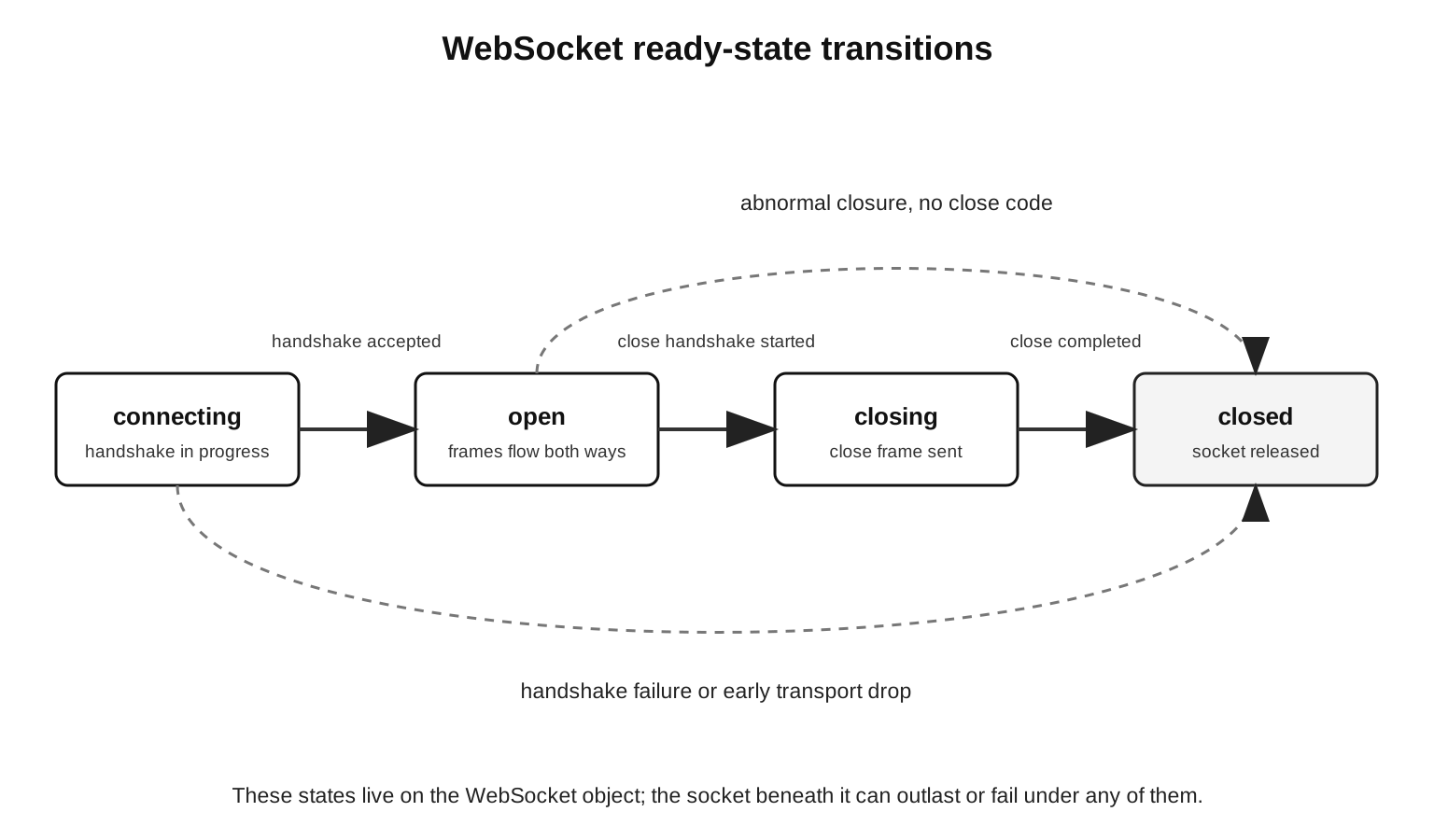
The first of those is a normal accepted connection that ends with a close handshake. The second is a failed handshake or an early transport failure. An abrupt transport drop while the application still believes the connection is open gives you the third. The fourth is the orderly case, a close frame followed by a clean completion.
That gives you two surfaces:
WebSocket surface: open, message, ping, pong, close code
socket surface: data, drain, timeout, error, close
Most application code should sit on the WebSocket surface, sending and receiving messages, watching close codes, and setting liveness behavior through the library. The socket surface is still useful for diagnostics, remote address, connection tracking, hard termination, and tying back into HTTP upgrade handling.
Failures during the upgrade are HTTP failures. A missing Sec-WebSocket-Key, the wrong version, a bad route, or a failed auth check can each produce an HTTP response before the switch ever happens. The client's WebSocket constructor surfaces it as a connection failure, but on the server you should log it as a rejected upgrade.
After the 101, protocol failures are WebSocket failures. An unknown opcode, an unexpected reserved bit, an unmasked client frame, an oversized control frame, an invalid close payload, or invalid UTF-8 in a text message should each close the connection with a fitting close code, as long as the parser can still send one.
Transport failures show up as socket failures. A peer reset, a process crash, a network interruption, a load balancer dropping the connection, a local socket.destroy(), any of those can end the connection without a close frame ever going out. The WebSocket API may report an abnormal closure, the socket may report ECONNRESET, and there is no close code at all, because no close frame was sent.
Metrics should keep those buckets separate:
upgrade_rejected_total
websocket_protocol_close_total{code="1002"}
websocket_app_close_total{code="1008"}
websocket_transport_error_total{code="ECONNRESET"}
Use whatever metric names fit your system. Keeping the buckets apart is worth it because each one has a different cause behind it. An upgrade rejection comes from HTTP routing, handshake validation, or auth. A protocol close comes from frame parsing or peer behavior. Application closes come from your own message contract, and transport errors come from the socket layer or the infrastructure beneath it.
Go easy on the close reason string. It is visible to the peer and limited in length, so keep it to short diagnostic text. Internal stack traces and anything user-private stay in your server logs, keyed by connection ID, request ID, user ID, or close code.
Shutdown is the part you have to track yourself. server.close() stops accepting new HTTP connections and lets ordinary HTTP exchanges finish, but the upgraded sockets are no longer in the HTTP connection set at all. HTTP cleanup calls like closeAllConnections() only act on HTTP connections and skip upgraded sockets completely. So any server that accepts WebSockets has to keep its own set of live WebSocket connections and close or terminate them during shutdown.
server.close() and server.closeAllConnections() only reach connections the HTTP layer still tracks. An upgraded WebSocket dropped out of that set back at the 101, so neither call drains it or shuts it down. Rely on them alone and server.close() can hang waiting on sockets it cannot see, and the deploy stalls until the platform kills the process. Keep your own registry of live WebSockets, and close or terminate them yourself during shutdown.
A small registry is enough to make that concrete:
const sockets = new Set();

wss.on('connection', ws => {
  sockets.add(ws);
  ws.on('close', () => sockets.delete(ws));
});
That set is WebSocket-level state. During a graceful shutdown the server can stop accepting upgrades, send close frames to the connections it has, wait a bounded interval, and then terminate whatever is left. The policy is yours to choose, but the responsibility sits here, not in HTTP cleanup. HTTP cleanup handles HTTP connections, and upgraded sockets live in this registry.
A shutdown sequence usually has four steps:
stop accepting new upgrades
  -> send close frames to active WebSockets
  -> wait for close or deadline
  -> terminate remaining sockets
For a planned server shutdown, the close code is usually 1001, going away. Some applications send a private code instead, when clients need to follow a specific reconnect strategy, and Subchapter 4 gets into that. The server-side mechanics are already clear, though. Upgraded sockets need their own registry and their own deadline.
Backpressure comes back during shutdown. Sending close frames to thousands of connections is still socket writes, all of them at once. A server under memory pressure might choose a shorter graceful window, or cut slow peers off sooner, and that decision should be deliberate, because otherwise the graceful close becomes one more source of queued writes in the middle of a deploy.
A clean trace through the whole thing catches most bugs:
HTTP parser accepted upgrade request
  -> server validated handshake and route
  -> Node emitted upgrade with req, socket, head
  -> WebSocket library consumed head and installed parser
  -> frames produced messages and control events
  -> close frame or socket failure ended the connection
When a WebSocket server misbehaves, put the failure somewhere on that trace. No upgrade event at all means the problem is in the HTTP parser or in upgrade acceptance. An upgrade event where the first frame never arrives is dropped head bytes. A message event with the wrong payload is somewhere in frame assembly, masking, UTF-8, compression, or application message parsing. A close event with no code is a transport closure, while a real code on an otherwise clean socket is ordinary WebSocket close behavior.
The split stays exact the whole way. HTTP carries the connection up to the 101, Node hands your code the raw socket, and from there WebSocket framing carries every message, ping, pong, extension bit, and close code.