The layer we live at
Where node:net sits in the stack, what actually happens when a connection comes in, and your first task - a Server class that hands you raw bytes.
- Draw the stack from the wire up to your handler and see which two rows this course lives in.
- Trace a connection from socket(2) through the event loop till the data event.
- Build a raw TCP server that binds, tells you its address, and closes cleanly.
Express and Fastify are Node.js web frameworks. What they do is, they call your handler function with req and res objects after converting the network bytes into an HTTP request. Node's built-in node:http module does most of that conversion work for them. In this course, I'm starting one level lower - with the built-in node:net module and a plain TCP connection. By the end of this lesson you'll have a small Server that accepts connections and hands their bytes to your code.
What I assume you already know
I am assuming you can create files and folders, run commands in terminal, and read basic JavaScript i.e variables, functions, classes, arrays, objects and loops. Also, I am assuming you've used import and export before. If you know this, you're good to go in this series.
[!INFO] A terminal is a program where you type commands like
node app.js. A repository is basically a project folder whose changes Git keeps track of.git initstarts an empty Git repository in the current folder.
I'm not assuming any networking or framework knowledge. Every networking term will get its definition before we actually use it anywhere.
The stack, top to bottom
Here is the whole stack you're working in. Everything in this course happens somewhere in this diagram, so it's worth staring at it for a minute.
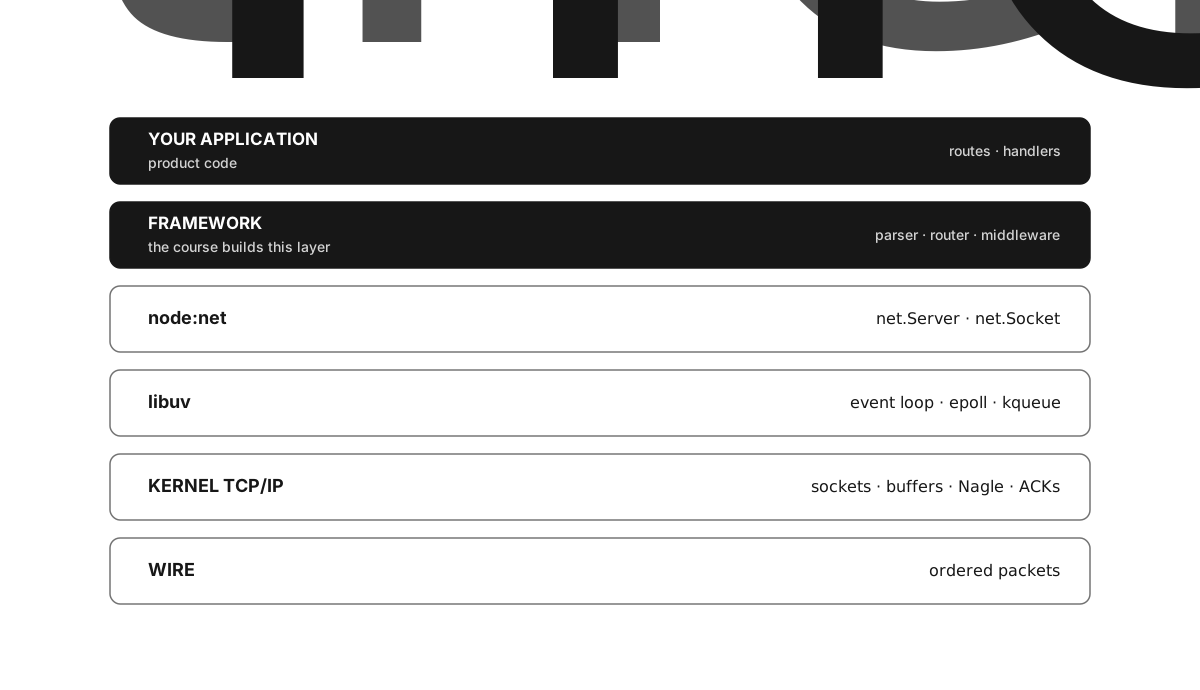
Figure 1.1 - NodeBook builds the application and framework layers, while Node, libuv and the OS sit below.
An application is the routes and handler functions written for one product. A framework gives reusable request parsing, routing and response code to many applications. Normally node:http provides the connection and HTTP parsing code below the framework - it uses a parser called llhttp, manages reusable connections, and also enforces time limits. In this course we're replacing all of that with code you'll write yourself.
node:net gives your program an ordered stream of bytes for every TCP connection. A byte is just a number from 0 to 255. TCP is the network protocol that delivers those bytes in order. A socket is the programming interface for one end of a network connection. And when I say raw here, I mean node:net hands you the received bytes as it is, without interpreting them as HTTP or anything.
Your application eventually wants routes and JSON values. A route connects an HTTP method and path to a handler function. JSON is a text format for values made of objects, arrays, strings, numbers, booleans and null. You'll be writing the framework that sits between these application concepts and the socket bytes.
[!INFO] The
node:prefix means the module ships with Node.js itself.node:netis available without installing anything. But you'll need to install a third party package like Express yourself.
What actually happens when a connection arrives
Let me define the operating system terms first, then we'll trace the connection. A process is one running instance of a program. The operating system manages processes, memory, files and network devices. The kernel is the part of it that can directly talk to those devices. User programs ask the kernel to do restricted work through system calls, or syscalls in short. That (2) in a name like socket(2) is just a Unix manual section number, it's not part of the function name.
Node uses a native library called libuv to turn operating system events into JavaScript callbacks. A callback is a function that some other code runs later. Node's event loop keeps asking libuv which work is ready and then runs those callbacks.
When a node:net server calls listen(3000, "127.0.0.1"), this is the sequence that runs.
- Node, through libuv, asks the kernel for a TCP socket. The
socket(2)syscall returns a small integer called a file descriptor. The process uses this number whenever it asks the kernel to do something with the socket. bind(2)attaches that descriptor to127.0.0.1:3000.127.0.0.1is the IPv4 loopback address - it always means your own computer.3000is a port, a number that picks one network service at an address. Together they make a local network endpoint.listen(2)marks the socket as a listener and creates a backlog queue. A queue stores items in the order they arrive. Completed connections wait there till the process accepts them.- libuv registers the descriptor with
kqueueon macOS orepollon Linux. These kernel interfaces tell you which descriptors can be read or written without waiting, so one event loop thread can watch many descriptors at once. A thread is one sequence of instructions that the OS schedules. A blocking call pauses that thread till the kernel has some event to report.
Then a client connects.
- The kernel does the TCP three-way handshake. The client sends a packet with the SYN flag, the server replies with SYN and ACK, and the client returns an ACK. SYN asks to start a connection, ACK confirms received data. A packet is a unit the network layer sends. TCP puts its own header plus some application bytes inside network packets. The completed connection waits in the accept queue.
- Now the listening descriptor becomes readable. libuv calls
accept(2)and gets a new descriptor for that connection. Node wraps it in anet.Socketobject and emits a'connection'event. - The kernel keeps the arriving bytes in the socket's receive buffer. A buffer is a region of memory that holds bytes temporarily. libuv calls
read(2)when bytes are available. Node emits a'data'event and passes a JavaScriptBufferto your callback. ABufferstores a fixed sequence of bytes.
An event is a named notification that an object emits. A listener is a callback registered for an event. socket.on("data", callback) registers a listener that runs every time the socket emits 'data'.
From this whole sequence, two things matter for the rest of the course.
- A
'data'event is whateverread(2)returned - which is whatever the kernel happened to have in its buffer at that moment. TCP is a byte stream. It guarantees order and completeness, but it guarantees nothing about boundaries. One data event might be half a request, or two requests together. socket.write(buf)offers bytes to Node. Node passes them to the kernel's send buffer when there's room, and holds the pending bytes when there isn't. The kernel later puts the bytes into TCP segments. A segment is TCP's unit of data, and the network layer carries it inside a packet. In Lesson 4 we'll see a kernel policy that can delay small segments.
The node:net surface you will use
You need only four parts of node:net for this lesson.
net.createServer(onConnection)returns a server. Your callback gets onenet.Socketper accepted connection.- On a socket you attach listeners.
socket.on("data", cb)gives the callback aBufferper read. The'error'event reports a failed socket operation. The'close'event tells you the socket has finished closing. This whole sequence from creation to closing is the socket's lifecycle. socket.setNoDelay(true)disables a kernel latency optimization called Nagle's algorithm on that socket. Rawnetsockets have it on by default. The last lesson of this chapter shows exactly why you have to turn it off. For now, just treat it as the first thing you do to every socket, no questions.server.listen(port, host, callback)starts accepting.server.close(cb)stops accepting new connections and runs its callback once the server has closed.listenemits'error'if some other process is already using that address and port.
The public methods you write will return Promise objects. A Promise represents an operation that finishes later. Resolving a Promise records success and makes await return its value. Rejecting it records failure and makes await throw the error. The listen callback resolves the Promise, and a server 'error' event rejects it when the server can't bind.
process.env holds environment variables - name and string value pairs given to a process when it starts. process.env.PORT ?? 3000 uses PORT when it's present, otherwise 3000. The ?? operator picks the right side only when the left side is null or undefined.
And that's it, that's the entire toolkit. Notice one thing - nothing in it knows what HTTP is. Turning these raw bytes into requests is your job, starting from next chapter.
One data event is not one request
The Server you build today takes an onData(socket, chunk) callback - one call per 'data' event. Let me tell you upfront, this interface is wrong. It only works today because you're sending the same fixed response to everything, so it doesn't matter where a request starts or ends.
So treat it as a deliberately naive seam, and give it a name right now. One data event is not one request. In Chapter 3 this callback gets replaced by a proper per-connection object, and because you named the seam now, that replacement will be a planned refactor and not a panic.
Create the project and write its first module. Everything you build across this course lives in one repository, and this is its beginning.
First, create the repository. Make a directory, run git init, and write a package.json. This JSON file stores project metadata and the commands npm uses. Set "type": "module" - this makes every .js file an ECMAScript module and allows import and export. Set the engines.node range to >=26 <27, which records that this course targets Node 26. A runtime dependency is an installed package needed while the application runs. Our framework has none.
Second, write src/server.js, exporting a Server class that meets this contract.
new Server(onData, options = {})is the constructor. A constructor initializes each new instance of a class. Store the callback and options in underscore-prefixed properties, declared in this fixed order -_onData,_options,_server- and initialize_servertonull. The underscore tells readers that framework code treats the property as internal. Also, keeping the same properties in the same order keeps the object's property layout stable, and later optimization chapters depend on this.listen(port, host)returns aPromise. Defaultportfromprocess.env.PORT ?? 3000andhostfromprocess.env.HOST ?? "127.0.0.1". It resolves tothisonce the port is actually accepting, and rejects if binding fails (e.g. port already in use). For every accepted socket it must do these things, in this order - callsocket.setNoDelay(true)first, then forward each'data'chunk toonData(socket, chunk), destroy the socket on'error', and handle'close'.close()returns aPromisethat resolves when the server has stopped (resolve immediately if it never started in the first place).address()returns the server's address object, ornullbefore it's listening.
Reveal these one at a time, and only when you are genuinely stuck. Each one tells you a little more than the last - none of them is the answer.
You don't have any client-facing behaviour yet, so the check is simple. Just prove the server binds, reports where it's listening, and closes without hanging. Port 0 asks the kernel for any free port, which is handy for a smoke test. Run this against your own module.
node -e '
  import("./src/server.js").then(async ({ Server }) => {
    const s = await new Server(() => {}).listen(0, "127.0.0.1");
    console.log("listening on", s.address());
    await s.close();
    console.log("closed clean");
  })'
You should see an address object with an IPv4 family and some port number, then closed clean.
listening on { address: '127.0.0.1', family: 'IPv4', port: 54xxx }
closed clean
If you get the address and then closed clean with no hang, the socket lifecycle works - bind, report, close. That's the whole contract for this lesson.
Error: listen EADDRINUSEmeans the port is already taken by something. Use port0for smoke tests. If yourlistenthrows here instead of rejecting, your error handling is wired wrong. Bind failure arrives as a server'error'event, and you have to translate it into a rejected Promise.- The process hangs instead of printing
closed clean. Means you didn'tawaittheclose(), or you resolvedlistenbefore the port was ready. With no client connected, there's nothing else holding the process open. SyntaxError: Cannot use import statement outside a modulemeanspackage.jsonis missing"type": "module".- Building parsing logic on top of
onDataright now. Don't. It's one call per data event, and a request can span several data events or share one. Chapter 3 proves it.
Your Server now accepts TCP connections and hands raw bytes to your callback. It disables Nagle and destroys a socket after a socket error. Its temporary onData interface still receives arbitrary byte chunks. Chapter 3 replaces this interface once the parser exists.