One HTTP response, byte by byte
The anatomy of an HTTP/1.1 response, CRLF discipline, the three ways to frame a body, and why Content-Length must be exact - then you'll serve the 52 bytes yourself.
- Break an HTTP/1.1 response into its four RFC-named parts.
- List the three legal ways to frame a response body and when to use each one.
- Explain why Content-Length counts octets and not characters, and compute it correctly.
- Serve a valid response over a raw socket and count its bytes with od.
On the wire, a response is a specific sequence of bytes and nothing else. If you get the sequence wrong, the client hangs, truncates, or simply rejects you. In this lesson we'll take one minimal response apart, name every piece exactly how the RFCs name it, and then you'll rebuild it and serve it yourself. By the end of it, you'll have counted the exact bytes leaving your socket.
The four parts of a response
HTTP is the protocol that web clients and servers use for requests and responses. The client starts a request, the server reads it and sends back a response. HTTP/1.1 writes the control part of each message as plain text and carries the message over TCP.
The Internet Engineering Task Force publishes HTTP standards as Request for Comments documents, RFCs in short. RFC 9110 defines HTTP semantics i.e the meanings of methods, status codes and fields. RFC 9112 defines the HTTP/1.1 wire syntax i.e the required order and encoding of bytes. The response you're about to serve is exactly 52 bytes.
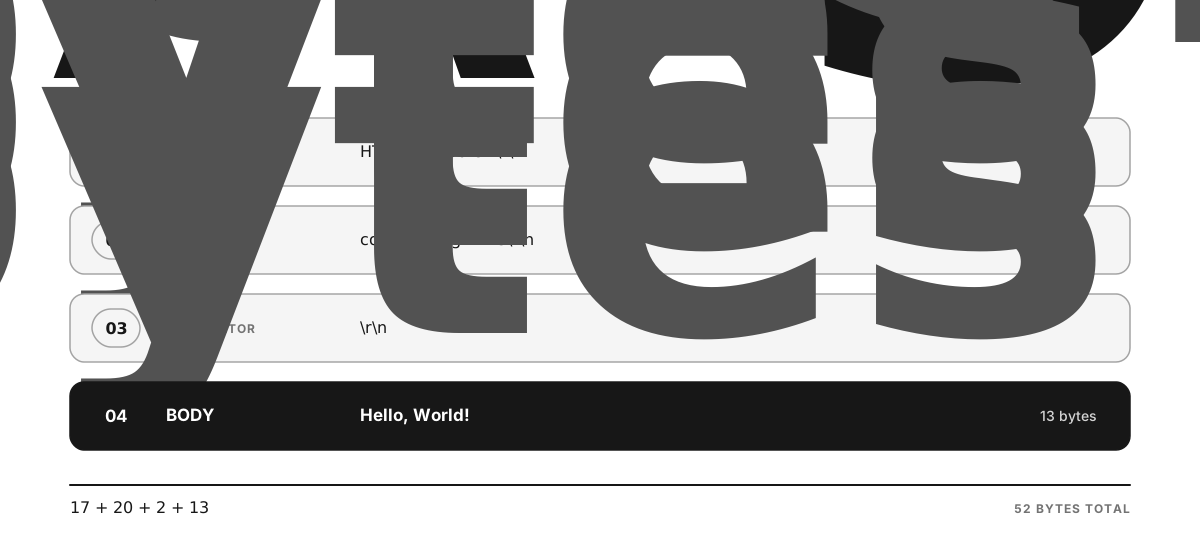
Figure 1.2 - A status line, one field line, the blank-line terminator, and the body together make the complete 52-byte response.
There are four pieces, and I'm using RFC 9112's own vocabulary for them. Please stick to these terms - they are precise, and the rest of the course assumes you know them.
- The status line -
HTTP-version SP status-code SP reason-phrase, for exampleHTTP/1.1 200 OK.SPmeans one space byte. The three-digit status code tells the client the result category.200means the request succeeded. The reason phrase is the text after the code, and RFC 9112 says a client SHOULD ignore that phrase.SHOULDis a standards keyword for a requirement you can skip only when you have a valid reason. - Field lines, also called headers. Each line has a field name and a value. You'll send
content-length: 13. Field names are case-insensitive, soContent-Lengthandcontent-lengthmean the same thing. This course stores and emits lowercase names. Converting different spellings into one stored spelling is called normalization. - The header block terminator - a bare CRLF on a line by itself, so the wire shows
\r\n\r\n. This is the only signal that headers have ended and the body is starting. "Blank line" is too loose a description here. It is exactly CR LF CR LF. - The body - raw bytes. HTTP doesn't assume a body contains text. It can be text, an image, or any other byte sequence.
[!INFO] The response head contains the status line, field lines and the blank-line terminator. The response body starts immediately after that terminator.
CRLF discipline
Every line in the head ends with \r\n - a carriage return (byte 0x0d) followed by a line feed (byte 0x0a). A bare \n won't cut it.
RFC 9112 allows a recipient (the program reading a message) to accept a lone LF as a line terminator. curl accepts such a response, but other clients reject it. A sender still has to generate the proper CRLF sequence. Lesson 3 compares curl with Node's fetch client.
Framing - how does the client know the body ended?
See, TCP hands the receiver a stream with no message markers in it, so HTTP itself has to say where a body stops. This is called message framing. An HTTP/1.1 response can use one of these three framing methods.
1. content-length: N            read exactly N more bytes, then you are done
  2. transfer-encoding: chunked   chunks carry their own lengths (built in Chapter 10)
  3. close-delimited              no length is sent; the body ends when the server
                                  closes the connection (HTTP/1.0's old default)
Chunked transfer coding divides a body into pieces. Each piece starts with its own byte length, so the recipient can find the end without any content-length field. Chapter 10 teaches this and builds its decoder. A close-delimited body ends when the TCP connection closes, which means that connection can't carry another response after it.
If you send none of these and keep the connection open, the client has to keep on reading, because no received byte marks the end. curl -v prints no chunk, no close, no size. Assume close to signal end. Means it selected close-delimited framing and kept waiting for a close that never came.
The numeric content-length value must match the body exactly.
- If it's too large, the client waits for bytes that never arrive. Same hang as before.
- If it's too small, the client stops reading early. And on a reused connection, the tail of your body gets read as the start of the next response. Silent corruption.
Content-Length counts octets
RFC 9110 defines the content-length value as the number of octets in the body. An octet is an eight-bit byte. But JavaScript's str.length counts UTF-16 code units instead. A code unit is one numeric part of JavaScript's internal string encoding. The string "Hëllo" has str.length === 5 but it takes 6 bytes after UTF-8 encoding, because ë uses two UTF-8 bytes. UTF-8 is the byte encoding normally used for web text. Buffer.byteLength(str) gives you the number of encoded UTF-8 bytes.
Buffer.byteLength("Hello, World!"); // 13 - this is the number that goes on the wireASCII is an older character encoding whose letters, digits and basic punctuation each take one byte in UTF-8. For those strings, str.length and Buffer.byteLength agree. Still, use Buffer.byteLength, because the values differ the moment a string contains a character that encodes to more than one byte.
Today's response skips content-type. That field identifies the media type of a body, like plain text or JSON. The exercise doesn't need it, and a later chapter adds media-type selection.
Write examples/hello.js. Using the Server you built in the previous lesson, serve one valid HTTP/1.1 response to every connection. The contract is like this.
- The response is the four parts above - status line
HTTP/1.1 200 OK, a single field linecontent-length: <N>whereNis the body's octet count, the header block terminator, then the bodyHello, World!. - Every line in the head ends with CRLF, and the terminator is a bare CRLF (so
\r\n\r\non the wire). - Compute the length with
Buffer.byteLength, and assemble the response once at module load, not per connection. Module-load code runs when Node first imports the file. - The header name is lowercase.
- Listen on
process.env.PORT ?? 3000/process.env.HOST ?? "127.0.0.1"and log the URL once it's listening.
Reveal these one at a time, and only when you are genuinely stuck. Each one tells you a little more than the last - none of them is the answer.
Start your server on a chosen port.
PORT=3123 node examples/hello.jsIn another terminal, hit it with curl. It should return instantly.
curl -s -i http://127.0.0.1:3123/HTTP/1.1 200 OK
content-length: 13
Hello, World!Now count the raw bytes. printf writes the quoted request bytes. nc, also called netcat, opens a TCP connection and forwards those bytes to the server. The pipe character sends one command's output into the next command's input. od -c prints the returned bytes as characters. Its left column uses octal, a base-8 number system whose digits go from 0 to 7.
printf 'GET / HTTP/1.1\r\nhost: x\r\n\r\n' | nc -w1 127.0.0.1 3123 | od -c0000000 H T T P / 1 . 1 2 0 0 O K \r
0000020 \n c o n t e n t - l e n g t h :
0000040 1 3 \r \n \r \n H e l l o , W o
0000060 r l d !
0000064The final offset 0000064 is octal for 52 - the exact count from the diagram. You can see the two \r \n pairs that end the field line, and immediately after them, the \r \n which is the header block terminator, then the body with nothing trailing it. If your byte count matches, your framing is correct.
- curl prints the body but never returns. You dropped or mis-sized
content-length. The body is fine, the framing is missing or wrong. The next lesson is entirely about this. - The last character of a multibyte body is missing. Means you used
body.lengthinstead ofBuffer.byteLength(body). - A strict client rejects the response but curl accepts it. You emitted a bare
\nsomewhere in the head instead of\r\n. - You're rebuilding the response inside the connection callback. It's harmless today, but the response never changes, so build it once at module load. This habit pays off later in the hot path chapters.
Your raw socket now sends a valid HTTP/1.1 response. The byte count confirms the status line, field line, terminator and body. The next lesson changes one framing rule at a time and records how each client fails.